CNC Upgrade Case Study
Available Languages
Contents
Introduction
This document describes a case study of a complex, large-scale migration of a Fixed Wireless network from Cisco CNC 4.1 to 7.1 via lift-and-shift.
Abstract
This paper presents a detailed case study of the migration of a large‑scale Fixed Wireless network from Cisco Crosswork Network Controller (CNC) version 4.1 to version 7.1. Due to the absence of an in-place upgrade mechanism, the transition required a full lift-and-shift deployment, introducing significant architectural, operational, and integration complexity across more than 2,000 network devices and multiple interdependent systems. The study examines challenges encountered‑ in multiple areas.
A key outcome highlights the essential role of automation in ensuring scalability, accuracy, and operational determinism, particularly for high volume workflows. The results further demonstrate that production environments diverge considerably from controlled laboratory conditions, necessitating adaptive troubleshooting, iterative validation, and sustained engagement with TAC and Business Unit engineering teams. This work contributes practical insights, validated methodologies, and recommended best practices that serve as a reference blueprint for future CNC upgrades and largescale orchestration platform transitions.
Background
The proliferation of 5G networks, the rapid adoption of connected devices, and the digitisation of enterprise and consumer environments have led to a significant increase in traffic volume and the diversity of services that must be delivered securely and reliably at scale. Communications Service Providers (CSPs) now operate highly dynamic networks where traditional, siloed operational tools often create complexity, degrade user experience, and drive higher operational expenses (OpEx).
To remain competitive, operators are increasingly adopting modernised operational models built on automation, virtualisation, SDN principles, and analytics-driven, self-optimising networks.
Cisco Crosswork Network Controller (CNC) is designed to support this transformation by simplifying operational workflows, reducing Total Cost of Ownership (TCO), and enabling intent-based automation across multivendor transport networks. CNC provides a unified platform for service provisioning, network health monitoring, and real-time optimisation, offering operators a single pane of glass to manage largescale IP networks more proactively and efficiently.
The underlying Crosswork Infrastructure delivers a resilient, scalable cluster framework on which all CNC applications run. For CNC 7.1, this includes modules such as Optimization Engine, Active Topology, Change Automation, Health Insights, Element Management Functions (EMF), Service Health, and Crosswork Workflow Manager (CWM), each of which contributes to end-to-end orchestration and assurance.
Upgrading CNC, however, presents unique challenges. CNC does not support inplace upgrades, requiring a full lift-and-shift deployment where the new environment is built in parallel with the existing one, and all data and services are migrated to the new version. This case study examines a largescale upgrade from CNC 4.1 to CNC 7.1 for a major Australian service aggregator supporting providing backbone service for all other service providers.
The migration was especially complex due to multiple customised Change Automation playbooks, custom Health Insight KPIs, L2/L3 VPN service reconciliation requirements, and the need for secure ZTP.
The large version jump introduced additional uncertainty, given internal architectural and behavioural changes that made it difficult to predict how existing use cases would behave in the new release. This necessitated comprehensive validation and alignment across all use cases.
Significant planning was invested into determining the optimal resource allocation, including hybrid/worker node counts, CDG distribution, and PCE sizing, and whether your existing resource footprint could be retained.
Initial CNC 7.1 deployment and validation were performed in an internal CALO lab, providing a safe environment to experiment, refine configurations, and build confidence. This was followed by deployment in the internal test environment, which closely mirrors production. The final phase involved deploying CNC 7.1 in production, applying device level configuration changes, and executing a phased migration of all devices and associated services to the new controller.
Production Network
The air-gapped production network is spread out across wide parts of Australia. With the presence of 2K+ devices, ranging from NCS to ASR9Ks, CNC managed all these devices by providing a live topological view. Approximately 2K devices were NCS540s locally known as SWR(Small Wireless Router) running IOS-XR 24.3.2 and 30 were ASR-9Ks(Version 7.5.2) locally known as LWRs(Large Wireless Router).
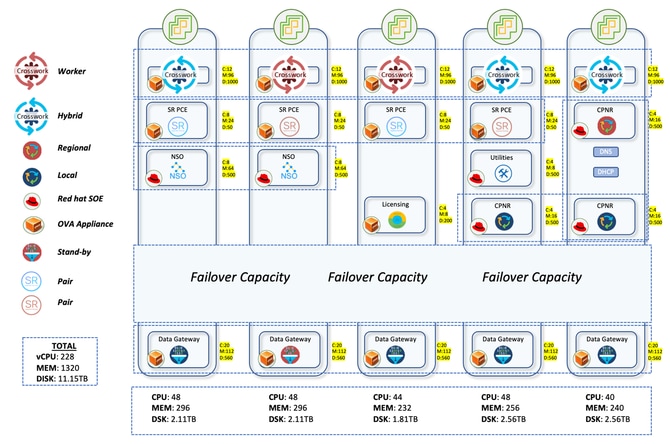
The Crosswork setup consisted of 3 Hybrid nodes and 2 worker nodes. There were a total of 5 CDGs for the devices with 4 being active and 1 being the standby node. This afforded limited protection since the pool had just 1 standby CDG. But considering your requirements, this was given the go ahead. The fact that all of the VMs would be on single Data Centre also made the decision easier to proceed with only 1 standby.
The CDG is the component that handles the data collection from devices through various protocols like SNMP, CLI and GNMI. The data collected by CDG is exposed to Crosswork through the internal kafka. A device onboarded to Crosswork must be attached to a CDG, which enables the data gateway to connect to the device and get the device data.
The device distribution for the CDGs was also given a lot of thought. The earlier deployment had randomly distributed the devices among the CDGs. This gave rise to a very skewed distribution with some CDGs carrying more devices while there were 1-2 CDGs with very less devices. This led to overconsumption and over burdening of some CDGs while others were under-provisioned.
The thought process here in the upgrade was to distribute 700 SWRs each to the 4 active CDGs. This accounted for 2100 SWRs getting accommodated in the first three CDGs. LWRs being very heavy on the interface front were all reserved for the fourth CDG. Though they were a very small number with a count of 30, this allocation ensured that even if more collections were done from these devices, there would be no heavy load on the CDG. Any subsequent onboarding of SWRs too would go to the 4th CDG. This ensured a uniform distribution in the first three CDGs with more space available in the 4th one to take in new devices.
SR-PCE was deployed in 2 pairs, meaning 4 VMs distributed on different host machines. One pair manages 7 POI sites and the other manages the remaining 8 POI sites. The topology updates on CNC GUI are done through the use of SR-PCE. It learns the topology of the network through BGP-LS peering with other LWR routers. This component is also used for all the traffic engineering use cases where it plays the role of the controller to steer the traffic to different paths.
To handle all the service provisioning and device config use cases, NSO needs to be used in conjunction with the CNC. For the production network, two NSOs with version 6.4.1.1 were deployed to work in tandem in high availability mode. SR-PCE(Segment Routing Path Computation Element) is the component required for providing the topology updates to CNC and also for handling the real time traffic engineering use cases. Four SR-PCEs with version 25.2.1 were deployed here with each PCE being peered to two different LWRs.
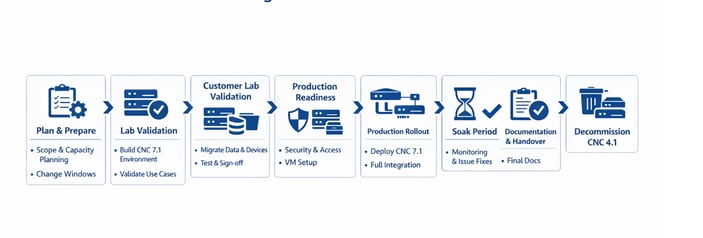
Migration Workflow from CNC 4.1 to CNC 7.1
For the CNC deployment, the preferred choice was to go ahead with the docker based one. But since the client did not approve the setup of docker on their premises, there was no other option but to go ahead with manual deployment using vCenter. This takes a longer time to deploy compared to the script based one as it requires us to provide inputs multiple times in the vCenter GUI.
Once the CNC deployment was done, all the required applications were deployed with the BU provided auto action install file which uploads and activates the applications all at once, thus reducing the time it takes to do it manually. The premier tier was deployed that includes Crosswork Optimisation Engine, Active Topology, Service Health, Element Management Functions, Crosswork Workflow Manager. Along with this, the add-on packages were also setup that includes Change Automation and Health Insight.
CWM and SH did not have any use cases. But they were deployed nevertheless since they were interested in some of the use cases offered by these applications in the next version.
Once the applications were setup, the next step was to migrate the data from the old version of CNC. This primarily comprises of the credential profiles, providers, tags, custom playbooks, custom KPIs, roles, sZTP vouchers and any other data. CNC provides the export option for all of these which can be leveraged and then imported to the new CNC.
Once these are setup, then it is prudent to start the device migration. In case of upgrades, if the new CNC is deployed in a new subnet compared to the older one, there is a requirement to do ACL changes on devices to provide reachability with the new CNC. This is a time consuming process as it requires one to manually login to each device and change the config.
Once these ACL changes are done, the next step is to import the devices to new CNC and attach them to the CDGs. If reachability is proper, and the SSH and SNMP credentials are correct, then the devices show as reachable on CNC and also get onboarded to the NSO(Network Services Orchestrator).
On the NSO front, all the required packages need to be in place and operationally up to ensure that CNC can talk to NSO and vice versa. For example, to automatically onboard the devices to NSO from CNC, the DLM function pack is mandatory. Similarly, if there is any requirement for NSO to configure MDT sensor paths on device, then the TM-TC package has to be deployed on NSO. The gist is that depending on the use case, the relevant package must be deployed on NSO.
Instead of taking the manual approach to deploy these required packages especially the Transport-SDN ones, an automated script was developed for provisioning. With the CNC 7.1 upgrade, updates have been introduced to the TSDN packages. These updated packages are intended for deployment on the NSO server to ensure continued support for L2/L3 provisioning in the upgraded environment. The script automates the installation of the updated TSDN packages and loads the necessary metadata into NSO, enabling it to provision services as required.
One instance of Cisco Smart Software Manager (SSM) licensing server & 3 instances of Cisco Prime Network Registrar (CPNR) are also be deployed on different hosts.
CNC Architecture and Integration with Other Components
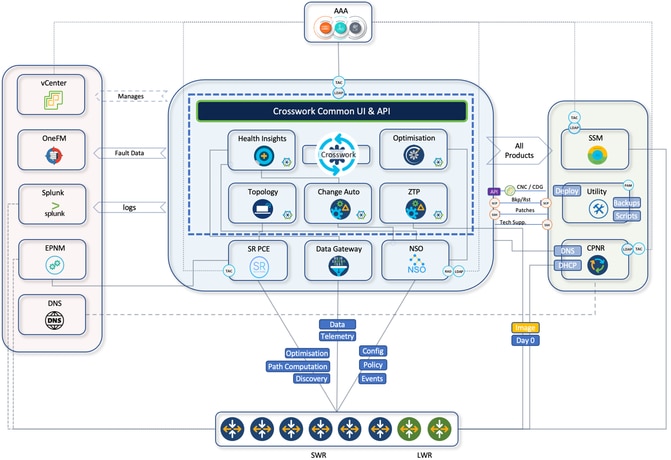
CNC provides a single platform for provisioning, optimising and visualising deployed services through a unified UI. Here is brief summary of CNC internal components that reside in CNC platform suite and the use cases.
- Crosswork active topology (CAT):
- Internal component application distributed across CNC VM nodes
- Provides real-time end to end visibility of reconciled inventory
- Integrates inventory information from multiple data sources into a single display
- Transport network path computation
- Topology discovery
- Crosswork optimisation engine (COE):
- Internal component application distributed across CNC VM nodes
- Real-time network optimisation
- Real-time topology visualisation
- SR-TE visualisations and provisioning
- RSVP-TE visualisation and provisioning
- Bandwidth-on-demand
- Crosswork health insight (CHI):
- Internal component application distributed across CNC VM nodes
- KPI monitoring
- Alert dashboard
- Crosswork change automation (CCA):
- Internal component application distributed across CNC VM nodes
- Dev-ops tool with out-of-box play books
- Scheduling capability to run plays at desired time
- HI KPIs alert stitching to suggested plays as remediation
Architecture Diagram
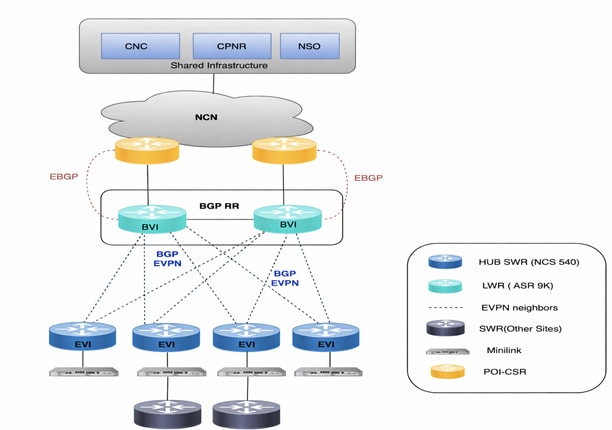
Network Diagram
CNC 4.1 → 7.1 Detailed Migration Workflow
End-to-end phased migration from legacy CNC 4.1 to CNC 7.1 (The same flow can be followed for any CNC Upgrade irrespective of versions)
| Plan |
› |
Lab |
› |
Customer Lab |
› |
Prod Ready |
› |
Production rollout |
› |
Soak Period |
› |
Handover |
› |
Decommission |
| PHASE 1 1 Plan & Prepare
|
|||||
| ▼ |
|||||
| PHASE 2 2 Internal Lab Validation
|
|||||
| ▼ |
|||||
| PHASE 3 3 Customer Lab Validation
|
|||||
| ✓ Perform ATP in Lab & Get Sign-off |
|||||
| ▼ |
|||||
| PHASE 4 4 Production Readiness
|
|||||
| ▼ |
|||||
| PHASE 5 5 Production Cutover ↻ Repeats all steps from Phase 3 — in the production environment
|
|||||
| ✓ Production rollout |
|||||
| ▼ |
|||||
| PHASE 6 6 Soak Period
|
|||||
| ▼ |
|||||
| PHASE 7 7 Documentation & Handover
|
|||||
| ▼ |
|||||
| PHASE 8 8 Decommission Legacy CNC 4.1
|
|||||
Use Cases
L2VPN (EVPN-Based) Service Provisioning
The L2VPN service provides Layer2 Ethernet connectivity across multiple SWRs, with some services anchored on LWRs. CNC Active Topology is used for service provisioning, while all environment‑specific logic is implemented through NSO custom templates.
L2VPN provisioning is treated as a Day2 configuration activity and requires operator‑provided service attributes.
Custom NSO Templates
Several custom templates were created to align with environment-specific naming conventions and interface behaviours:
- CT-l2vpn‑swr-hub‑and‑lwr
Handles hub side naming differences f‑or bridge ‑group and bridge ‑domain on SWR hubs and LWRs. - CT‑l2vpn‑swr‑nonhub‑100 / 101 / 102 / 105
Removes the ZTP uplink interface from the default EVPN bridge group and bridge domain for each VLAN-specific EVI.
These templates ensure consistent EVPN configuration across the network and abstract away hardware level‑ differences.
L3VPN (VRF-Based) Service Provisioning
The L3VPN use case enables Layer‑3 service delivery across multiple SWRs as endpoint. Provisioning is performed through CNC Active Topology, with environment-specific requirements implemented using a custom NSO template.
As with L2VPN, this is a Day‑2 configuration action, requiring operator inputs.
Custom NSO Template
- CT‑l3vpn‑swr
Collects VRF‑specific parameters (AS number, VRF name, prefix set, route‑policy name, route distinguisher) and builds the necessary BGP import/export policy, including redistribution of connected routes with a user‑defined route‑policy.
Traffic Engineering
Crosswork Optimisation Engine (COE) application of CNC suite helps to control traffic flows in network based on the desired intent.
There are two types of traffic which requires different intents (SLA metrics):
- TC1 Traffic – Latency Sensitive SLA to ensure traffic is on lowest latency path.
- TC4 Traffic – Minimum Bandwidth SLA to ensure that dedicated bandwidth is always available for TC4 traffic
TC1 Traffic (Lowest Latency)
To ensure that TC1 traffic is always taken on lowest latency path, one must have a Segment Routing (SR) policy created on headend SWR with path computation criteria as latency.
This is achieved by defining On Demand Next Hop (ODN) configuration on each headend SWR for specific colour 1001 by using CNC to facilitate with SR policy creation.
TC4 Traffic (Committed Bandwidth)
To ensure that TC4 traffic is always taken on the path with dedicated bandwidth, one must have a SR policy created on headend SWR with path computation criteria as bandwidth.
This is achieved by:
- Bandwidth on Demand (BoD) function pack on CNC
- Defining On Demand Next Hop (ODN) configuration on each headend SWR for specific colour 1004 using CNC SR policy creation with these configs
BoD function pack is used to compute path for SR policies that have bandwidth as criteria for path computation. It keeps track of bandwidth committed to a policy and keeps monitoring current path of the policy during its lifecycle.
At any point of time, if current patch of BWOD policy is not having enough capacity available to meet committed bandwidth, it re-computes the BWOD policy path and re-route the policy to new path. This BWOD policy re-routing is a continuous process and needs no manual intervention.
In a way, BWOD does optimisation on the fly for bandwidth in the same way as SR-PCE does for latency.
Device Turn-up using sZTP
In the past traditional installation and support model, the process of bringing up a new device required a certain level of expertise by the installer in order to install, configure, and troubleshoot the implementation of a new component. There may also be a long process of pre-staging the equipment at an offsite location, supported by many people working on different parts of the solution.
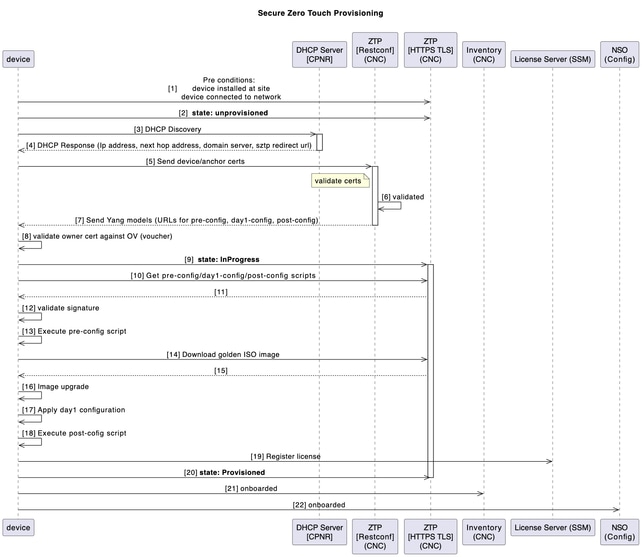
For new SWR devices planned to be deployed in your environment, this process of device turn-up is automated with the secured ZTP (Zero Touch Provisioning) application of CNC.
ZTP workflow is triggered on the first-time device boot up and it would download the planned platform image and initial configuration that needs to be applied without any manual intervention.
The device is also auto onboarded on CNC for further orchestration.
This diagram shows the workflow of the secure ZTP process upon device turn-up:
Post‑ZTP Orchestration (Automation‑Driven)
A Python automation on the Utility Host orchestrates and audits the end‑to‑end process using a structured Excel input (per chain):
- Generates & uploads Day‑1 and post‑config artefacts to CNC.
- Creates CPNR reservations (DHCP entries bound to SWR serial).
- Adds device in EPNM (for visibility/assurance).
- Post‑ZTP housekeeping in CNC:
- Assigns SWRs to CDGs (telemetry destination)
- Attaches to device groups and tags
- Updates latitude/longitude for topology visualisation
- Attaches BNM KPI profile to enable telemetry streaming
Bandwidth Notification Message (BNM) Processing in CNC
The SWR can receive BNM from the co-located MiniLink switch which corresponds to the bandwidth of the WAN ports. These notification messages are standard based CFM messages which would include current running recorded bandwidth (RBW) and maximum configured bandwidth, also known as nominal bandwidth (NBW).
The current bandwidth is the actual running bandwidth of the microwave WAN link, based on the aggregated bandwidths of the individual microwave links and their running QAM levels. The nominal bandwidth is the configured maximum possible WAN bandwidth, based on the aggregated bandwidths of the maximum configured QAM on each of the individual microwave links.
Bandwidth optimization is undertaken based on this scenario:
Temporary (Fleeting Events) Change
- When there is a fleeting degradation or outage in network/link which is localized to SWR (for example, due to an adverse weather event which causes microwave radio path fading and reduction in available bandwidth due to changes in modulation schemes), then traffic shaping correction occurs at the local SWR on the impacted network interface.
- This ensures that minimal packet loss occur over the impacted transmission path.
When an SWR is enabled with BNM KPI in CNC as part of post-sZTP activities, CNC pushes telemetry configs into SWR.
BNM MDT
telemetry model-driven
destination-group <DGName>
vrf VRF-OMSWR-<AreaCode>1
address-family ipv4 <CDG IPv4Address> port 9010
encoding self-describing-gpb
protocol tcp
!
!
sensor-group <GroupName>
sensor-path Cisco-IOS-XR-ethernet-cfm-oper:cfm/nodes/node/bandwidth-notifications/bandwidth-notification
!
CNC processes these BNM messages received over telemetry and take remediation action if required. Here are the 2 components involved in CNC:
- Health insight (HI): CNC application is used to ingest BNM notification by custom KPI that monitors specific sensor path for BNM messages. Health Insight is capable to raise alerts in case bandwidth changes are significant to be acted upon.
- Change automation (CA): CNC application is used to act on streaming BNM messages that caused HI alerts. 2 custom playbooks is deployed to make these changes on impacted interface:
- Setting QoS shaper to new RBW
- Setting Interface capacity to new RBW value.
A custom Python script is developed to to perform custom logic and execute the CA playbooks automatically when HI KPIs are breached.
The playbook triggering script operates based on this algorithm:
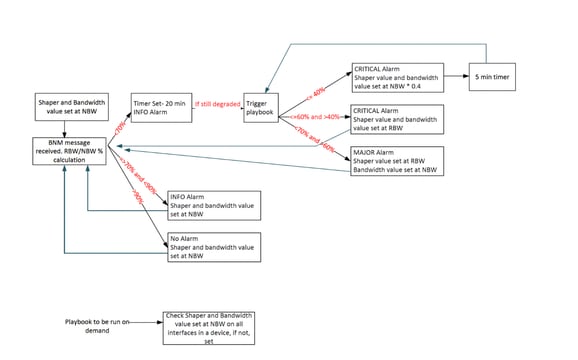
This table explains the custom alert levels that have been set on degrees of bandwidth degradation:
Reported Bandwidth = RBW
Nominal Bandwidth = NBW
| Alert Intervals Value |
Notification Level |
| (RBW/NBW)*100 >=70 |
Info |
| (RBW/NBW)*100 <70 and >60 |
Warning |
| (RBW/NBW)*100 <=60 |
Critical |
This sensor path is monitored by CNC:
Cisco-IOS-XR-ethernet-cfm-oper:cfm/nodes/node/bandwidth-notifications/bandwidth-notification
A custom KPI is created in CNC to monitor the BNM sensor path. This KPI is added to a KPI profile configured with a 120‑second cadence and alert thresholds. Attaching SWRs to this profile automatically pushes the required telemetry configuration to the devices through NSO.
Once enabled, devices stream RBW/NBW data to the assigned CDGs at the configured interval. Health Insight (HI) computes the RBW÷NBW ratio and raises alerts when thresholds are crossed; operators can monitor these events in HI and via Grafana dashboards.
An alert provider in CNC forwards these alerts to the hybrid node hosting the Python automation. The script parses device/interface/RBW/NBW details and triggers the appropriate Change Automation playbooks: shaper adjustment, bandwidth update, or both based on the defined decision logic.
These are the 2 playbooks used in the workflow:
1. Playbook to change the shaper value
2. Playbook to change the interface bandwidth
As already mentioned, the script spins up a web server to act as provider to communicate with CNC using REST API. Any response that we get for a POST request is captured here. The alerts are captured in the form on JSON and then converted to dictionary to pull out the necessary parameters.
Standardize Day-2 Network Operations through Custom Automation Playbooks
Custom change automation (CA) playbooks were developed to streamline and standardize critical Day-2 operations across the network lifecycle. These include Bundle-Ether provisioning, management interface description updates, CFM daisy-chain orchestration, seamless link capacity expansion, eNodeB decommissioning, and efficient Mini-Link onboarding. By embedding operational best practices into reusable workflows, these playbooks significantly enhance execution consistency, minimize the risk of human error, and reduce dependency on manual interventions. In the context of a Cisco CNC upgrade, this automation framework plays a pivotal role in accelerating operational turnaround, ensuring service continuity, and enabling scalable, repeatable processes aligned with modern network transformation objectives.
TACACS+ Integration Continuity in Cisco CNC 7.1 Upgrade
As part of the Cisco CNC 4.1 to 7.1 upgrade, existing TACACS+ integration was carefully preserved to ensure continuity of centralized Authentication, Authorization. The upgrade process validated and replicated the TACACS+ configuration in Cisco CNC 7.1, maintaining alignment with established enterprise security policies and role-based access control (RBAC) mechanisms.
CNC and CDG Syslog forwarding to Splunk
A syslog forwarding is set up to forward the alarms/events/syslogs to a Splunk server. The out of the box capability of CNC to setup the syslog server was used to achieve this.
Alarms Forwarding to OneFM
CNC alarms are also forwarded to a northbound system like OneFM making use of the CNC restconf connection-oriented API:
curl -L --request GET \

--url https://{server_ip}:30603/crosswork/notification/restconf/streams/v2/alarm.json \

--header 'Accept: application/txt'). This API must be used over a websocket connection config.
Automation of Daily CNC Backups
An automated script makes use of CNC backup API to take the full backup of CNC and stores the backup file in the utility host. This operation is done daily.
Challenges
Big Jump in Crosswork Version
The upgrade from Cross work 4.4 to 7.1 represented a significant version leap rather than a routine incremental update. Such a large jump introduced numerous new features across multiple applications, along with substantial refinements and architectural changes. Because of this, the CNC upgrade was not just a straightforward version replacement, it required thorough validation to ensure compatibility, stability, and proper functionality across all integrated components. The expanded feature set and underlying improvements meant that existing workflows, configurations, and integrations needed careful verification, making comprehensive testing and validation critical to the success of the upgrade.
No in Place Upgrade
CNC does not support an in-place upgrade model. Instead, upgrades must follow a lift-and-shift approach, where the existing deployment is preserved while a completely new environment is built from scratch with the target version. Once the new system is installed, configurations, data, and integrations must be carefully migrated and validated before the older environment can be decommissioned.
This approach introduces several operational challenges:
- Parallel environments: Both the old and new CNC environments must run simultaneously until the migration and validation are fully completed.
- Hardware resource pressure: Running two full environments in parallel significantly increases the demand for compute, storage, and network resources, which can strain available infrastructure.
- Extended validation effort: All migrated data, configurations, policies, and integrations must be verified in the new version to ensure they function exactly as expected.
- Data migration complexity: The transfer of historical data, application configurations, and operational settings requires careful planning to avoid inconsistencies or data loss.
- Delayed decommissioning: The older system and its VMs cannot be deleted until the new deployment are proven stable, prolonging resource usage and operational overhead.
- Operational coordination: Teams must manage synchronization between both environments during the transition period to prevent configuration drift or operational disruptions.
- Closed-loop automation conflicts: CNC supports closed-loop automation use cases that dynamically trigger actions based on real-time network conditions. When both the old and new controllers are active during the transition, there is a risk that the same automation logic could execute from both controllers, potentially resulting in duplicate configuration changes or conflicting actions in the network. This requires careful control of automation policies during the migration window.
- Legacy operational data, including historical alarms, events, fault records, and audit information, is not migrated to the new environment due to the absence of native export capabilities. As a result, this historical data is not available in the upgraded system and must be treated as non‑recoverable after the migration.
Because of these factors, the lift-and-shift model makes CNC upgrades more resource-intensive and operationally complex compared to a standard in-place upgrade.
Deployment Pitfalls with No Rollback Options
Certain deployment and post‑deployment configuration errors in CNC have no remediation path and require a complete cluster teardown and redeployment. For example, an incorrect FQDN configured for the Crosswork data VIP , mandatory for the sZTP use case, rendered sZTP non‑functional. Since this value cannot be corrected post‑deployment, full redeployment was required.
Similarly, incorrect configuration of device override credentials in Change Automation could not be rectified after deployment, leading to another cluster rebuild. Other errors, such as misconfigured gateway IPs or subnet definitions, are also identified as non‑recoverable.
These scenarios highlight the critical importance of validating all immutable parameters during initial deployment. Meticulous planning and input verification are essential to avoid costly rework and schedule impact.
Constraints of Post‑Deployment Diagnostic Validation
CNC provides a diagnostic utility to assess VM‑level health parameters such as disk read/write latency, IOPS, synchronization latency, network interface speed, and CPU clock frequency. The utility reports the measured values against expected thresholds and marks each check as pass or fail. However, these diagnostics can be executed only after the cluster has been deployed, leaving no mechanism to validate infrastructure readiness prior to deployment.
During installation, the “Ignore Diagnostic Checks” flag is set to false by default. In practice, if any single check fails, the installer halts, preventing deployment from proceeding. As a result, field engineers are often compelled to enable this flag and bypass diagnostics entirely, as even production‑grade environments frequently fail one or more checks. This creates an operational dilemma: teams must choose between enforcing strict validation that blocks deployment or proceeding without assurance that the underlying infrastructure meets recommended performance benchmarks.
HI Custom KPI Creation Procedure Change
In Health Insight 4.1, custom KPI creation relied on Tick script logic, where KPI definitions and processing logic were implemented using scripts within the Tick framework. However, in version 7.1, this approach was replaced with a tracker file–based framework for defining and managing KPIs.
Because of this architectural change, the existing custom KPIs could not be reused directly and required reworking to align with the new tracker file format. This required a substantial amount of time and effort to:
- Understand the new framework: The team had to study the structure, syntax, and operational behaviour of the tracker file–based KPI definition model introduced in 7.1.
- Redesign existing logic: The logic previously implemented in Tick scripts had to be translated and adapted into the tracker file format.
- Recreate BNM KPIs: The custom BNM KPI had to be recreated using the new framework to ensure they produced the same results and insights as before.
- Validate KPI accuracy: Extensive validation was required to confirm that the new implementations generated consistent and correct metrics compared to the previous version.
- Testing and tuning: The new model also required testing for performance and behaviour under real network conditions, followed by adjustments where necessary.
- Lack of support: Some features that worked earlier with tick script were no longer supported with the new tracker file implementation. So, some compromises had to be made.
This change in the KPI creation mechanism significantly increased the effort required during the upgrade, as it involved both learning a new system and reimplementing existing custom monitoring logic to ensure continuity of operational insights.
API Timeout in BNM Playbooks Trigger Script
The BNM playbooks are triggered through a custom script that interacts with CNC APIs. During the upgrade and validation process, several issues related to API authentication and response handling were identified and addressed.
The CNC API token has a validity of 8 hours, but the original script did not include proper logic to refresh the token once it expired. As a result, although the KPI alerts in CNC 4.4 were functioning correctly, the playbook-triggering script stopped executing after the token expired. This issue went unnoticed for a long period, meaning the automation script had effectively not been running reliably for more than a year. The problem became visible only during the migration and validation activities in CNC 7.1.
Several improvements and refinements were therefore required:
- Token refresh logic: Proper logic was implemented to detect token expiry and automatically refresh the API token, ensuring uninterrupted execution of the script.
- API response changes: Differences between CNC versions caused additional issues. In CNC 4.1, an expired token response typically contained the message “expired”, whereas in CNC 7.1, the response returns “Key not authorized.” The script logic had to be updated to correctly interpret the new response patterns in 7.1.
- Global token handling: Previously, tokens were stored and used locally within functions. This created scenarios where the token was valid when entering a function but expired before subsequent API calls. The implementation was modified to use global token handling, ensuring consistency and proper refresh across all functions.
- Improved error handling: In some cases, the NSO “check sync” API returned responses that were incomplete or different from the expected structure. This caused KeyError exceptions, which suspended the script execution. Additional exception handling and validation logic were introduced so that the script can continue running even when unexpected API responses are received.
- Script stability enhancements: Additional safeguards and checks were added to ensure that API failures, temporary response issues, or token refresh events do not cause the script to terminate unexpectedly.
These improvements not only resolved the issues uncovered during the upgrade but also significantly enhanced the reliability, resilience, and maintainability of the BNM playbook automation framework.
BNM Processing and Playbook Trigger Design Change
The BNM automation logic is event-driven and relies on alerts generated by KPIs in the Health Insight application within CNC. The overall workflow operates as follows:
- CNC reads the NB (Nominal Bandwidth) and RBW (Real Bandwidth) values from the device.
- It calculates the bandwidth ratio (BW%) using these values.
- The Health Insight KPI evaluates this ratio against predefined alert thresholds.
- When an alert is generated, the BNM playbook-triggering script detects the alert and executes the corresponding corrective playbooks
Limitation in the Original Alert Design
The configured alert thresholds were:
- BW% < 60 → Critical
- 60 ≤ BW% ≤ 70 → Warning
- BW% > 90 → Info
This design worked well for identifying bandwidth degradation, but it created a functional gap during bandwidth recovery scenarios. Specifically, the 70–90% range had no alert level defined.
This led to this behaviour:
- When BW% dropped below 70%, a Critical or Warning alert would be generated, triggering playbooks that adjusted the shaper and bandwidth values.
- However, when bandwidth recovered and BW% increased above 70%, the KPI generated no alert because the value fell into the 70–90% band with no associated alert level.
- Since the BNM automation script depends entirely on alert generation to trigger actions, it had no opportunity to read updated NBW/RBW values or initiate restoration actions.
- As a result, bandwidth restoration did not occur automatically, even though sufficient bandwidth had become available. There was no restoration logic as well in the original design.
This limitation became visible in the production network, where links that had previously undergone bandwidth reduction remained in a restricted state even after conditions improved.
Impact of the KPI Framework Change
The problem was further compounded by the framework change introduced in CNC 7.1. In Health Insight 4.1, the Tick-based KPI implementation supported up to five alert levels, allowing finer control of threshold bands and making restoration logic easier to implement.
However, in CNC 7.1, the tracker file based KPI framework supports only three alert levels, which reduced the flexibility in defining multiple recovery thresholds and required redesigning the alert logic to fit within these constraints.
Excessive Playbook Triggering
Another issue identified in the original implementation was the extremely high frequency of playbook executions. The automation logic did not include any hold time or stabilization window. As soon as CNC read a value from the device that met the alert condition:
- The alert was immediately raised.
- The automation script immediately triggered the corrective playbooks.
Because telemetry values fluctuate frequently in live networks, this caused hundreds of playbooks to be triggered every hour, which was not ideal from both a network stability and application performance perspective.
Redesigned Automation Logic
To address these limitations, the BNM automation design was reworked with several improvements:
- Revised alert threshold logic: To ensure the recovery band was captured within the three alert levels, the logic was modified so that any BW% greater than 70% is now treated as an INFO-level alert, replacing the earlier approach where only values above 90% were classified as INFO. This ensured that the 70–90% recovery band is actively monitored, allowing restoration playbooks to trigger when bandwidth conditions improve.
- Introduction of hold time: A hold time mechanism of 20 minutes was introduced to ensure that bandwidth conditions remain stable for a defined duration before triggering playbooks. This prevents automation from reacting to short-term fluctuations.
- Controlled playbook execution: With the revised logic and hold time, the frequency of playbook executions reduced drastically, preventing unnecessary automation actions.
- Booster mechanism for severe degradation: For cases of severe bandwidth degradation, a booster approach was introduced. In such scenarios, the automation proactively adjusts the traffic shaper and bandwidth allocation to 40% of the NBW, allowing faster recovery from congestion.
- Improved automation stability: The redesigned workflow ensures that both bandwidth reduction and bandwidth restoration scenarios are handled effectively, even within the limitations of the tracker-based KPI framework.
Outcome
With these design changes, combined with the earlier improvements in API handling, token management, and script robustness, the BNM automation framework now operates in a much more stable, efficient, and predictable manner. The system can correctly respond to both congestion and recovery conditions, while avoiding excessive playbook executions and ensuring reliable network bandwidth optimization.
Device Alarms Suppression
In CNC 4.1, alarms were forwarded to a northbound system called OneFM through a RESTCONF API. Since the CNC 4.1 stack did not include the EMF functionality, the platform generated only system-level alarms. These alarms were forwarded upstream without any complexity related to alarm categorization.
With the deployment of CNC 7.1, the EMF application was introduced, significantly expanding the alarm model. Alarms were now categorized into three types:
- System Alarms – related to CNC platform and application health
- Network Alarms – related to network service conditions
- Device Alarms – generated directly from network devices and forwarded through CNC
However, there was already an EPNM responsible for collecting and managing device-level alarms. If CNC also forwarded these alarms to OneFM, it resulted in duplicate alarms being received from both systems. Therefore, the requirement was to exclude device alarms from CNC while still forwarding system and network alarms.
The primary challenge was a limitation of the RESTCONF northbound API used to forward alarms to OneFM. The API did not support filtering alarms based on alarm category. If such filtering had been available, the solution would have been straightforward: simply exclude device alarms at the API level before forwarding them to the northbound system.
Several potential solutions were evaluated and discussed:
- Stopping device traps at the source: Prevent devices from sending traps to CNC.
- Filtering alarms at the northbound system (OneFM): Allow CNC to send all alarms but filter device alarms within OneFM.
- Filtering within CNC before forwarding alarms.
Stopping traps at the device level was not considered viable because CNC relies on those traps to detect device events and maintain operational awareness of network conditions. Disabling traps would significantly reduce CNC’s ability to respond to network issues.
The solution ultimately implemented leveraged a built-in CNC feature called Device Alarm Suppression. This feature allows administrators to suppress specific types of device alarms based on device groups, preventing them from being processed or forwarded further upstream.
By configuring device alarm suppression policies, the system was able to:
- Suppress device-generated alarms within CNC.
- Continue processing and forwarding system and network alarms.
- Prevent duplicate device alarms from reaching the OneFM system.
This approach provided a clean and scalable solution without disrupting CNC’s ability to receive traps from devices. As a result, the alarm flow to OneFM was streamlined, ensuring that only relevant system and network alarms were forwarded while avoiding duplication with EPNM’s device alarm management.
Out-of-band Changes
In the existing setup, the operations team frequently relied on direct CLI-based scripts to push configuration updates to network devices, particularly for tasks such as ACL modifications and debugging activities. While effective in the short term, this approach led to configuration drift, as changes made outside of NSO were not tracked within the system. As a result, NSO’s provisioning workflows were impacted due to inconsistencies between the intended (modeled) state and the actual device configurations, leading to failures and operational inefficiencies.
L2/L3 VPN Reconciliation
Due to out-of-band configuration changes: the networking team had updated VPN-related configuration on devices outside of CNC/NSO and the TSDN workflow. As a result, the state stored in NSO (from the CNC 4.1 era) did not always match the state on the devices.
These discrepancies caused multiple reconciliation failures and inconsistencies. In several cases, NSO contained VPN service data that no longer existed on the devices (or had been modified in a way NSO did not reflect). To align NSO with the network, it was necessary to remove VPN service entries that existed only in NSO and not on the devices, and to correct other mismatches caused by out-of-band changes.
Schedule Impact
Resolving these issues required approximately two additional weeks beyond the original reconciliation plan. The extra time was spent identifying mismatches, validating device state, and safely cleaning or correcting NSO CDB data.
Observations
- Configuration authority: Out-of-band changes to VPN (or any TSDN-managed) configuration create drift between NSO and the network and complicate reconciliation.
- Pre-migration baseline: A clear baseline of NC/NSO-managed vs device-only state before migration would have made discrepancies easier to detect and resolve.
- Automation and conversion: Payload conversion scripts and user-specific customizations were essential to handle format and model differences between 4.1 and 7.1 in a consistent way.
Recommendations for Similar Upgrades
- Enforce a change freeze for VPN (and other TSDN-managed) services during the reconciliation window, with exceptions only via a controlled process.
- Run a pre-reconciliation audit comparing NSO CDB to device configuration to quantify and list discrepancies before starting reconciliation.
- Document and socialize that VPN changes must go through CNC/NSO TSDN post-upgrade to avoid recurrence of out-of-band drift.
- Retain conversion and reconciliation scripts for reuse in future upgrades or for troubleshooting.
CNC Backup Failure due to Maintenance Mode Dependencies
The CNC backup mechanism mandates that the platform be placed into maintenance mode before a backup operation can be initiated. By design, the backup API enforces this prerequisite; if CNC fails to transition into maintenance mode, the backup process is automatically aborted.
In practice, entering maintenance mode frequently failed due to ongoing system activities, including:
- Active Change Automation playbook (MOP) executions
- Ongoing sZTP workflows
- DLM service operations
- KPI profile attachment or detachment activities
- On‑demand showtech collections
- Background orchestration tasks
The presence of any such activity prevents CNC from entering maintenance mode, causing the backup operation to fail before execution.
Operational Impact
The required daily CNC backups for compliance and operational assurance. However, frequent automation activity, particularly BNM‑triggered playbooks, meant that the system was often unable to enter maintenance mode. As a result, backup failures occurred repeatedly, creating a significant operational risk and necessitating manual intervention.
Mitigation Strategy
1. Backup scheduling optimisation: A maintenance window with minimal system activity was identified. Based on traffic and automation analysis, the backup job was scheduled for 5:00 AM (AEST), when orchestration and playbook execution were least likely to be active.
2. Pre‑backup activity validation: An automated pre‑check was introduced before invoking the backup API:
- The script queries CNC APIs to detect running Change Automation MOP jobs.
- If any job is reported asRunning, the script waits for 5 seconds and retries.
- This loop continues until the system reports no active jobs.
- Only after the environment is confirmed idle does the script attempt to enable maintenance mode and trigger the backup.
This prevented unnecessary backup attempts while the system was in a busy operational state.
3. Retry and resilience mechanisms: To accommodate transient system states, additional safeguards were added:
- Up tothree retry attempts if the backup API returns a failure
- Short delay intervals between retries
- Graceful error handling to avoid script termination
Results and Outcome
The combined mitigation significantly improved backup reliability:
- Backup failures were drastically reduced
- Post‑implementation, only two failures were observed, both caused by a stuck sZTP process, which is outside the script’s control.
- The introduction of execution delays in the BNM playbook automation further reduced contention with maintenance mode.
Forwarding syslogs to Splunk
The syslog destination was configured in CNC to forward logs to Splunk over TLS. However, once received, the logs were unreadable on the Splunk side. Due to this issue originating from the Splunk environment, the option was elected to revert to UDP transport, after which the logs were successfully processed.
Device Grouping Migration Issue
The user previously created 18 device groups in CNC 4.1; however, that release did not provide any UI‑based or API‑driven mechanism to export or import device groups. As a result, migrating these groups to CNC 7.1 required a non‑standard approach. Two internal CNC APIs were identified: one exposing the device‑group hierarchy and another listing the devices mapped to each hierarchy node. Using these APIs, all device groups and their associated devices were extracted and stored as JSON outputs. A custom script was then developed to parse the responses and extract only the device hostnames from each group.
CNC 7.1 introduced native import/export capabilities for device groups, including a CSV‑based import template. After extracting hostnames from the legacy system, a second automation script was created to populate the CSV templates in the required format, ensuring each device group could be imported accurately and independently. This automation was essential; without it, migrating the device groups to CNC 7.1 would have been significantly more time‑consuming and operationally complex.
Isolate Severely Bandwidth Degraded Devices
Despite the implementation of the BNM use case to automatically remediate low RBW/NBW ratios, a subset of devices continued to remain in severely degraded states for extended periods. Although the shaper and bandwidth‑adjustment playbooks typically restored devices shortly after degradation events, several devices persisted in a Critical state for more than a week and required manual intervention. Identifying these devices, however, presented a challenge. While the CNC UI provides clear visualizations of alerts and bandwidth metrics, it does not easily reveal devices that have remained exclusively in a Critical state over a prolonged interval.
To address this operational gap, an API‑driven solution was developed. CNC offers an API that retrieves a list of top alert‑generating devices over configurable time windows (for example, 7 days, one month). By getting this data and filtering for devices that generated only Critical alerts throughout the selected period, the team was able to rapidly isolate devices requiring manual remediation. This automated approach significantly improved troubleshooting efficiency and reduced the time required to identify persistent degradation cases.
Device Telemetry Config Removal
In CNC 4.1, telemetry configurations pushed from NSO via thetm‑tcfunction pack were applied automatically when a device was associated with a Health Insight (HI) KPI profile. However, these configurations—including CDG VIP references—were not removed when the KPI profile was later detached. As a result, devices accumulated stale and redundant telemetry entries over time.
This issue became more pronounced during the upgrade to CNC 7.1. Devices often retained legacy CDG VIP telemetry configurations from CNC 4.1 alongside the new entries generated by CNC 7.1, leading to multiple conflicting telemetry configurations on more than 2,000 devices. Concerns were raised about the operational impact and configuration hygiene, as only the CNC 7.1 CDG VIP configuration must have remained active.
To address this, an automated script was developed to identify and remove obsolete CDG VIP references from each device’s telemetry configuration. This solution eliminated configuration inconsistencies, restored alignment with the expected 7.1 telemetry model, and prevented what would have been several days of manual cleanup effort across the large device fleet.
Troubleshoot MDT Collection
In CNC 7.1, most Health Insight (HI) KPI collections rely on Model‑Driven Telemetry (MDT). When a KPI profile is enabled on a device, NSO automatically programs the required sensor paths and configures the CDG VIP as the telemetry destination. Once this configuration is applied, a corresponding CDG collection job is created to track the device’s telemetry status.
During validation, it was reported that more than 100 devices were missing telemetry configurations. Identifying these devices through the CNC user interface proved impractical, as the UI supports only per‑device filtering and does not scale efficiently for a fleet exceeding 2,000 devices. This necessitated an automated method to determine which devices lacked telemetry configuration and required KPI re‑enablement.
To address this, we leveraged the BNM tag assigned to devices whenever a KPI profile is activated. First, an export of all devices with the BNM tag was generated. A Python script was then developed to interact with the CNC Collection API, incorporating pagination logic to retrieve the full set of collection jobs (each API call returns a maximum of 100 entries). The script extracted hostnames from the collection job data and compared them against the exported BNM‑tagged device list.
This comparison yielded the list of devices that were tagged but did not appear in the BNM collection job indicating that the MDT telemetry configuration had not been applied. The KPI profile was then re‑enabled on these devices, and validation confirmed that all corresponding collection jobs were created correctly.
This automation significantly streamlined the troubleshooting process, enabling the team to identify and remediate all affected devices within a single day, an effort that would not have been feasible through manual inspection.
HA Behavior Changes and Consensus Algorithm Adjustment in NSO 6.4.1.1
During the upgrade from Cisco NSO 5.7.5.1 to 6.4.1.1 as part of the Cisco CNC 7.1 transition, a notable change was observed in High Availability (HA) behavior due to the implicit enablement of the consensus algorithm in the newer NSO version. This was not the default behavior in NSO 5.7.5.1, leading to a shift in failover characteristics post-upgrade. Specifically, when the primary node was taken down, the secondary node transitioned to a read-only state, preventing it from handling provisioning activities. Similarly, when the secondary node went down, the primary node moved from an active primary state to a “none” state, impacting service continuity.
To restore the expected HA behavior aligned with the previous deployment, the consensus algorithm was explicitly disabled in NSO 6.4.1.1. This adjustment ensured that the primary and secondary nodes resumed their intended roles during failover scenarios, allowing uninterrupted provisioning and maintaining operational stability consistent with the earlier NSO version.
NSO Version Upgrade and Package Compatibility Enhancements
As part of the transition from Cisco CNC 4.1 to 7.1, the underlying Cisco NSO version was upgraded from 5.7.5.1 to 6.4.1.1. This version upgrade introduced changes in XML template structures within existing NSO packages, leading to failures in certain regression test cases that were dependent on legacy template behavior.
To address these compatibility gaps, the impacted NSO package templates were analyzed and updated to align with the revised schema and processing requirements of NSO 6.4.1.1. These enhancements ensured that all automation workflows and service models continued to function as expected, restoring regression stability and maintaining consistency across the upgraded CNC environment.
Issues with KPI Enablement at Scale
CNC provides an out‑of‑the‑box UI mechanism for enabling KPI profiles on devices. While this approach works well for small fleets, it becomes inefficient and unreliable at large scale. In this deployment, more than 2,000 SWR devices required KPI enablement, and the UI did not offer an effective way to select or process devices in bulk.
Initially, a tagging‑based approach was attempted: all SWR devices were assigned an SWR tag, and KPI enablement was executed using tag selection rather than manual device selection. However, processing over 2,000 devices in a single workflow led to significant operational challenges. The job ran for more than three hours and completed with hundreds of failures. Although all devices were included in the intent, only ~750 successfully received KPI enablement, and repeated attempts produced only incremental progress. This approach proved neither scalable nor repeatable. It showed significant issues with the load.
A second challenge emerged from NSO device sync issues. Many failures indicated that NSO was not synchronized with the corresponding devices. Attempting manual sync-from operations followed by KPI re‑enablement was impractical and would have required extensive operator effort.
To address these limitations, an automated, batch‑driven workflow was developed:
- Export the full CNC inventory.
- Process devices in batches of 50 (identified as the optimal size through tuning).
- For each batch, trigger an automated sync-from using device UUIDs.
- Execute KPI enablement through the CNC API.
- Monitor KPI job history and log failures programmatically.
- Reprocess failed devices by repeating the sync and KPI enablement steps.
- Once a batch completes successfully, move on to the next set of 50 devices.
The automation also included the ability to disable KPI profiles, enabling full lifecycle management.
This solution delivered a streamlined, deterministic, and highly scalable process for KPI provisioning. It eliminated manual intervention, ensured consistent outcomes, and saved multiple days of operational effort. The same automation proved invaluable when KPI profiles had to be disabled and re‑enabled after the BNM design change, enabling rapid and error‑free reconfiguration across the entire 2,000‑device fleet.
RESTCONF Northbound API Restricted to Admin Access
The RESTCONF‑based northbound API used to forward alarms and events from CNC has a limitation whereby it can be invoked only using the admin account. Attempts to access the API through service accounts were unsuccessful, despite those accounts having the required operational roles. As a workaround, the user was required to use the admin credentials for alarm forwarding to the northbound system, introducing an operational constraint and limiting adherence to least‑privilege access principles.
Automation as a Strategic Enabler
Given the scale and complexity of the CNC upgrade and migration program, manual execution of operational tasks quickly proved unsustainable. Activities such as device onboarding, KPI provisioning, configuration alignment, reconciliation, and telemetry validation involve thousands of network elements and repeated workflows that are highly prone to human error when performed manually. Automation was therefore essential not only to accelerate execution but also to ensure consistency, reduce operational risk, and free delivery teams from time‑intensive, repetitive tasks.
By systematizing these processes through scripted workflows and API‑driven operations, the upgrade program achieved significant efficiency gains. Automation enabled faster task completion, improved accuracy, and predictable outcomes across all sections. The resulting savings not only reduced the overall deployment timeline but also allowed engineers to focus on higher‑value validation and design efforts rather than routine operational tasks.
Some of the automation activities were identified before the upgrade project started while some evolved when challenges arose. There were also some which were necessitated by the issues that developed during the course of the project.
This table illustrates the areas where automation delivered substantial impact across the program.
| Task Description |
Manual Effort (Days) |
Automation Effort (Days) |
Estimated Savings (Days) |
| ACL Updates (SWR/LWR)(2K+) |
30.0 |
2.0 |
28.0 |
| Device migration and attachment to CDG(2K+) |
5 |
1.0 |
4.0 |
| BNM KPI attachment to devices(2K+) |
4.0 |
1.5 (avg) |
2.5 |
| Service Reconciliation |
7 |
2.5 |
4.5 |
| Device Groups migration |
4 |
0.5 |
3.5 |
| Isolate severely bandwidth degraded devices |
3 |
0.5 |
2.5 |
| MDT collection troubleshooting |
3 |
0.5 |
2.5 |
| Totals |
56 Days |
8.5 days |
47.5 Days |
Lessons Learned
Upgrade is not Straightforward
CNC does not support in-place upgrades, and the lift‑and‑shift model introduces significant operational complexity. The process must never be assumed to be‑ simple, especially when the version jump is large. Unexpected issues surface across applications, integrations, and workflows, and each requires time, analysis, and careful mitigation. A major version leap amplifies this challenge, making thorough planning, validation, and phased execution essential. We had to spend lot of extra time in TAC cases and troubleshooting efforts. Since we didn’t keep buffer time for this, it became challenging.
CX has to do the Heavy Lifting
Expect substantial CX effort across deployment, integrations, migration, and end to‑ ‑end use case validation. Do not assume that workflows proven on the old release behaves identically on the new one.‑ Lot of troubleshooting and analysis would be required to make things work.
Automation Toolkit is a Necessity
The upgrade journey demonstrated that automation is not an optional convenience but a foundational requirement for large‑scale CNC deployments. We planned automation for the necessary candidates early on, but one can never assume that’s going to be enough. In the middle of the project, issues could be identified in use cases where automation would definitely add value as has been demonstrated in the earlier sections.
Avoid Dual Controller Conflicts during Migration
During the upgrade, it is critical to ensure that both the legacy and new CNC environments are not active simultaneously. Although a short soak period is necessary for validation, extending it significantly, as happened in this project for more than 2 months, creates operational risks. With both CNCs active for over 15-20 days, closed‑loop automation features such as Bandwidth On Demand generated inconsistent and conflicting actions across the network, since automation logic was running from two controllers at once.
A key lesson is to implement clear guardrails during migration. Measures such as administratively disabling devices in the old CNC, pausing automation workflows, or restricting telemetry subscriptions would have prevented these conflicts. Future upgrades must explicitly plan for strict controller isolation to avoid dual‑controller interference and ensure predictable network behaviour.
MOPs are not Sacrosanct
While Method of Procedure (MOP) documents are created for every deployment, integration, and use case, it is unrealistic to assume that a MOP validated in lab conditions behave identically in production. The production environment consistently revealed deviations, some minor, some significant, thus highlighting gaps that were not visible during controlled testing. Real‑world networks, legacy behaviours, external dependencies, and live traffic conditions introduce variables that laboratory simulations cannot always replicate.
The key learning is that teams must approach production rollout with the expectation of encountering unexpected behaviours, edge cases, and new discoveries. Flexibility, rapid troubleshooting capability, and readiness to adapt procedures on the fly are essential for successful execution at scale.
Efficacy of TAC Cases
Postproduction issues are inevitable, and while initial troubleshooting by the‑ delivery team is valuable, relying solely on internal effort can lead to unnecessary delays. It is prudent to open a TAC case in parallel as a safety net, especially for product ‑related issues or complex behaviours that are not immediately diagnosable. TAC investigations often require time, and delaying case creation by several days can result in significant loss of project momentum. Engaging TAC early ensures expert assistance is available when needed, accelerates root‑cause identification, and prevents avoidable schedule slippage.
Engage CNC BU for Effective Knowledge Support
Strong support from the CNC Business Unit is highly valuable during any CNC project. Users often require detailed product insights and clarifications that are not readily available with the delivery team alone. Having a BU contact accessible throughout the engagement accelerates issue resolution, strengthens technical accuracy, and helps build greater confidence and user rapport.
Best Practices for CNC Upgrade
Plan an Optimized Upgrade Strategy
CNC does not support in-place upgrades, making parallel deployment unavoidable. Treat the new environment as a fresh installation, and allocate sufficient compute, storage, and administrative capacity to run two environments simultaneously. Plan validation stages, migration sequencing, and cutover activities well in advance.
Rigorous Pre‑Deployment Validation Is Essential especially for Immutable Parameters
Many experiences underscore the critical importance of diligence during initial deployment. Validating all key inputs upfront, particularly immutable configuration parameters is essential to prevent costly redeployments and schedule impact. The use of structured pre‑deployment checklists, peer reviews, and dry‑run validations is therefore strongly recommended to minimise the risk of irreversible configuration errors.
Use a Dedicated Validation Environment Before Touching Production
Establishing an internal CALO/test environment early in the project allows teams to experiment, validate workflows, uncover version specific‑ changes, and build confidence before touching production. This significantly reduces unknowns during the final rollout.
Evidence-based Sizing for Distributed Crosswork Components
When designing clusters, CDG distributions, and PCE allocations, base decisions on device types, interface scale, topology complexity and collection intensity rather than simple device counts. Balanced distributions prevent overloading and ensure predictable performance across the cluster.
Automation for Repetitive, High-volume Work
Establish an automation backlog at kickoff tasks that are repetitive, high-volume, or operationally critical and invest where automation is mandatory. Validate and refine your automation in SIT environment first, ensuring production doesn’t rely on last-minute fixes. Scale amplifies the cost of manual work; standardized automation improves quality, speed, and control. Package outcomes as reusable assets (documented interfaces, parameterized jobs, shared libraries) so teams can leverage the same automation for future Crosswork upgrades and adjacent projects, reducing rework and onboarding time.
Avoid Dual Closed-loop Control during Parallel Run
During coexistence, treat closed-loop automation as a single-writer capability: only one orchestration path can actively drive remediation or policy-driven configuration. Concurrent CLA on old and new stacks risks duplicate triggers and divergent intent, which can destabilize device state. Plan CLA go-live as a late-phase milestone, after functional validation and definitive cutover to the new controller.
Perform Structured Upgrade Impact Assessment
Major version jumps introduce new capabilities while deprecating or changing older ones. It is extremely important to factor in these changes. Many times, the change won’t be documented in the upgraded version’s release notes and would pop up when we get to the field. Conduct structured assessments of:
- Deprecated APIs
- KPI framework changes
- Application‑level behaviour differences
- Configuration model deviations
- Alerts, topology processing, and playbook execution changes
Test Compatibility and Behavior across the Integration Surface
CNC interacts with multiple external systems such as NSO, SSM, CPNR, EPNM, OneFM, Splunk, and orchestration frameworks.
Before migration:
- Validate version compatibility
- Test all northbound/southbound integrations
- Confirm data models, traps, telemetry flows
- Check SSL/RESTCONF authentication behavior
Integration failures discovered post‑migration create operational blind spots.
Establish a Robust Pre‑Migration Data Export Strategy
Export everything before beginning migration:
- Credential profiles
- Providers
- Tags
- Custom playbooks
- Custom KPIs
- Roles and RBAC
- sZTP vouchers
- Device groups
- Historical service metadata
Batch Device Migration With Built‑In Validation Gates
When migrating thousands of devices, perform migration in controlled batches:
- Move devices in fixed cohorts (for example, by region, CDG load, or device type)
- Validate telemetry, NSO sync state, and reachability before moving to the next batch
- Roll back the batch if persistent anomalies appear
This prevents high load on CDG and CNC in a short interval of time.
Handle Out-of-Band Configuration Changes through NSO Integration
To address out of band challenge as part of the CNC 4.1 to 7.1 upgrade, a structured shift toward NSO-driven operations was implemented. The operations team was provided controlled, user-based access to the NSO CLI, while direct administrative acss to device CLI was restricted to prevent out-of-band changes. Additionally, legacy CLI scripts were systematically converted into RESTCONF-based automation integrated with NSO, enabling capabilities such as dry-run validation and transactional rollback. This approach ensured all configuration changes were centrally managed, auditable, and consistent with NSO’s service models, effectively eliminating configuration drift and restoring provisioning reliability.
Place Strong Emphasis on Change Freeze
During critical migration windows:
- Freeze user‑initiated network changes
- Restrict config pushes
- Synchronize with field and NOC teams
- Plan some window to accommodate emergency activities like device replacement using CNC/ZTP and so on.
This reduces noise and ensures the network state remains stable throughout the upgrade
Conclusion
The migration from CNC 4.1 to CNC 7.1 constitutes a significant case study in the complexities inherent to largescale network orchestration platform upgrades. This project demonstrates that such transitions are not merely version advancements but comprehensive transformations across architectural layers, operational workflows, and automation ecosystems. The absence of an in-place upgrade path necessitated a full lift-and-shift deployment, introducing parallel environment challenges and requiring meticulous coordination across CNC, NSO, SR-PCE, CDG, and external system integrations. The resulting operational landscape underscored the importance of robust migration methodologies, exhaustive validation cycles, and tightly controlled cutover processes to mitigate risk in production environments.
The upgrade further revealed the criticality of automation as an indispensable pillar for scalability and accuracy. With more than 2,000 devices, extensive telemetry configurations, multiple dependent components, and dynamic closed loop automation workflows, the project highlighted the limitations of manual procedures in environments of this magnitude. Purpose built automation spanning ACL updates, device onboarding, KPI provisioning, telemetry cleanup, and fault isolation proved essential for ensuring determinism, reducing human error, and achieving significant efficiency gains. The automation framework not only enabled operational continuity during the migration but also established a sustainable foundation for ongoing network optimisation.
Equally important was the recognition that production behaviour deviates markedly from controlled laboratory conditions. Framework changes, such as the transition from Tick based KPI logic to tracker based definitions, introduced unanticipated behaviour shifts that required reengineering, retesting, and iterative refinement. Similarly, operational challenges around closed loop automation, telemetry reliability, and API behaviour highlighted the need for adaptive troubleshooting, proactive risk assessment, and continuous engagement with TAC and Business Unit subject matter experts. These factors collectively illustrate that major version transitions demand both technical depth and organisational readiness. Few open issues too remain which are expected to be resolved in the next crosswork version 7.2.
Overall, this upgrade demonstrates that successful largescale CNC migrations rely on four foundational pillars: rigorous predeployment validation, systematic and resilient automation, strong crossfunctional coordination, and an adaptive operational posture that anticipates divergence between lab and production environments. The insights gained from this engagement not only contributed to a stable CNC 7.1 deployment but also offer a blueprint for future transitions, informing best practices, reinforcing architectural guardrails, and strengthening institutional knowledge for subsequent evolution of your network automation ecosystem.
Glossary of Terms
| Term |
Definition |
| BNM |
Bandwidth Notification Message. |
| CAT |
Crosswork Active Topology |
| CCA |
Crosswork Change Automation |
| CDG |
Crosswork Data Gateway |
| CHI |
Crosswork Health Insight |
| CNC |
Cisco Crosswork Network Controller |
| COE |
Crosswork Optimisation Engine |
| CPNR |
Cisco Prime Network Registrar |
| CWM |
Crosswork Workflow Manager |
| EMF |
Element Management Functions |
| KPI |
Key Performance Indicator |
| LWR |
Large Wireless Router |
| MDT |
Model-Driven Telemetry |
| MOP |
Method of Procedure |
| NBW |
Nominal Bandwidth |
| NSO |
Network Services Orchestrator |
| RBW |
Recorded Bandwidth |
| SR-PCE |
Segment Routing Path Computation Element |
| SSM |
Cisco Smart Software Manager |
| SWR |
Small Wireless Router |
| TAC |
Technical Assistance Center |
| TSDN |
Transport Software-Defined Networking |
| ZTP |
Zero Touch Provisioning |
| RR |
Route Reflector |
| RP |
Route Profile |
| POI |
Point Of Interconnect |
| EVPN |
Ethernet Virtual Private Network. |
References
- Cisco Systems, Cisco Crosswork Network Controller Release Notes, Release 7.1.0
- Cisco Systems, Cisco Crosswork Infrastructure 7.1 Installation Guide
- Cisco Systems, Cisco Crosswork Infrastructure 7.1 Administration Guide — Concepts Overview:
- Cisco Systems, Crosswork Network Controller Traffic Engineering and Optimization Guide, Release 7.1
- Cisco Systems, Cisco Crosswork Health Insights User Guide, Release 7.1
- Cisco Systems, Crosswork Zero Touch Provisioning (ZTP) Deployment Guide
- Cisco Systems, Cisco NSO Transport SDN Function Pack Bundle Installation Guide, Release 7.1.0
- Cisco Systems,Cisco SR-PCE Configuration Guide
Revision History
| Revision | Publish Date | Comments |
|---|---|---|
2.0 |
04-May-2026
|
Initial Release, formatting, headers, links, grammar, spelling. |
1.0 |
30-Apr-2026
|
Initial Release |
 Feedback
Contact Cisco
- Open a Support Case

- (Requires a Cisco Service Contract)