Configure and Troubleshoot Syslog in ACI
Available Languages
Introduction
This document describes how to configure, verify, and troubleshoot system logging (syslog) in Cisco Application Centric Infrastructure (ACI). It covers the complete configuration workflow, programmatic verification using the Application Policy Infrastructure Controller (APIC) managed-object (MO) model, and a structured troubleshooting workflow for both APIC controllers and leaf and spine switches.
Overview
ACI syslog is entirely policy-driven. Unlike standalone Cisco NX-OS® Software, there are no logging server CLI commands on ACI leaf or spine switches. All syslog configuration is done through APIC policies that the APIC pushes to every fabric node automatically.
Key Components
The syslog subsystem in ACI is built from the following managed objects:
- Syslog Destination Group (
syslogGroup) — The top-level container for all syslog destinations. It controls the message format (ACI or NX-OS style) and timestamp options. It can contain one or more remote destinations, a local file destination, and a console destination. - Syslog Profile (
syslogProf) — A child of the destination group that controls the group-level administrative state and the transport protocol (UDP, TCP, or SSL). - Syslog Remote Destination (
syslogRemoteDest) — A child of the destination group representing one remote syslog server. Controls the server IP or hostname, port, severity filter, syslog facility, and the management endpoint group (EPG) used to reach the server. - Syslog Local File (
syslogFile) — A child of the destination group that controls writing syslog messages to the local file/var/log/external/messageson each fabric node. - Syslog Source (
syslogSrc) — Attached to a monitoring policy. Controls what message types (audit, events, faults, session) and minimum severity are sent, and links to the destination group via asyslogRsDestGrouprelationship.
Syslog Source Attachment Points
ACI uses four monitoring policy scopes that control which nodes and objects generate syslog messages:
- Common Monitoring Policy (
monCommonPol,uni/fabric/moncommon) — Fabric-wide scope. A basic monitoring policy that applies to all faults and events and is automatically deployed to all nodes (leaf and spine switches) and all controllers (APICs) in the fabric. Covers all fabric, access, and tenant hierarchies. Found at Fabric > Fabric Policies > Policies > Monitoring > Common Policy. - Fabric Monitoring Policy (
monInfraPol,uni/infra/moninfra-default) — Fabric scope. Generates syslog for fabric-level objects: fabric ports, cards, chassis components, and fan trays. Found at Fabric > Fabric Policies > Policies > Monitoring > default. - Access Monitoring Policy (
monFabricPol,uni/fabric/monfab-default) — Access (infrastructure) scope. Generates syslog for access-facing components: access ports, Fabric Extender (FEX) devices, and virtual machine (VM) controller events. Found at Fabric > Access Policies > Policies > Monitoring Policies > default. - Tenant Monitoring Policy (
monEPGPol,uni/tn-common/monepg-default) — Tenant scope. Generates syslog for tenant-scoped objects: endpoint groups (EPGs), application profiles, and services. Found under each tenant at [Tenant] > Monitoring Policies > default.
Syslog Message Format
ACI syslog messages follow RFC 3164 format when the group format is set to aci (the default):
TIMESTAMP SOURCE %FACILITY-SEVERITY-MNEMONIC: Message-text
For example:
Apr 10 08:25:33 apic1 %LOG_LOCAL0-3-SYSTEM_MSG [F0022][soaking][inoperable][major][topology/pod-1/node-1/.../fault-F0022] LDAP Provider unreachable
The message body includes the ACI fault code, lifecycle state (for example, soaking, retaining, cleared), severity, and the distinguished name (DN) of the affected object, making messages self-describing.
Three message format options are available:
- aci (default) — RFC 3164 compliant format. Recommended for most deployments.
- nxos — NX-OS style format. Use this if the syslog platform expects NX-OS formatted messages.
- Enhanced Log (APIC 5.2(8) and later) — RFC 5424 compliant format with enhanced timestamps that include the year.
Severity Mapping
The syslog severity field is a single digit from 0 (most severe) to 7 (least severe). The following table shows the mapping between syslog severity levels and ACI / International Telecommunication Union (ITU) severity terminology:
| Syslog Severity | ACI / ITU Level | Description |
|---|---|---|
| 0 — emergency | — | System is unusable |
| 1 — alert | Critical | Immediate action required |
| 2 — critical | Major | Critical condition |
| 3 — error | Minor | Error condition |
| 4 — warning | Warning | Warning condition |
| 5 — notification | Indeterminate / Cleared | Normal but significant condition |
| 6 — informational | — | Informational message only |
| 7 — debugging | — | Debug output only |
Transport Options
ACI supports three transport protocols for remote syslog:
- UDP (default) — Available in all APIC releases. Standard fire-and-forget delivery.
- TCP — Available from APIC release 5.2(3) and later. Provides reliable delivery with connection-oriented transport.
- SSL — Available from APIC release 5.2(4) and later. Provides encrypted transport using TLS. Each ACI node (APIC or switch) acts as the TLS client and initiates an outbound connection to the syslog server. The server certificate must be uploaded to the APIC at Admin > AAA > Security > Public Key Management > Certificate Authorities.
Configuration
The following steps configure ACI syslog from end to end. Complete all steps in order to enable syslog forwarding from both the APIC controllers and the leaf and spine switches.
Step 1: Create the Syslog Destination Group
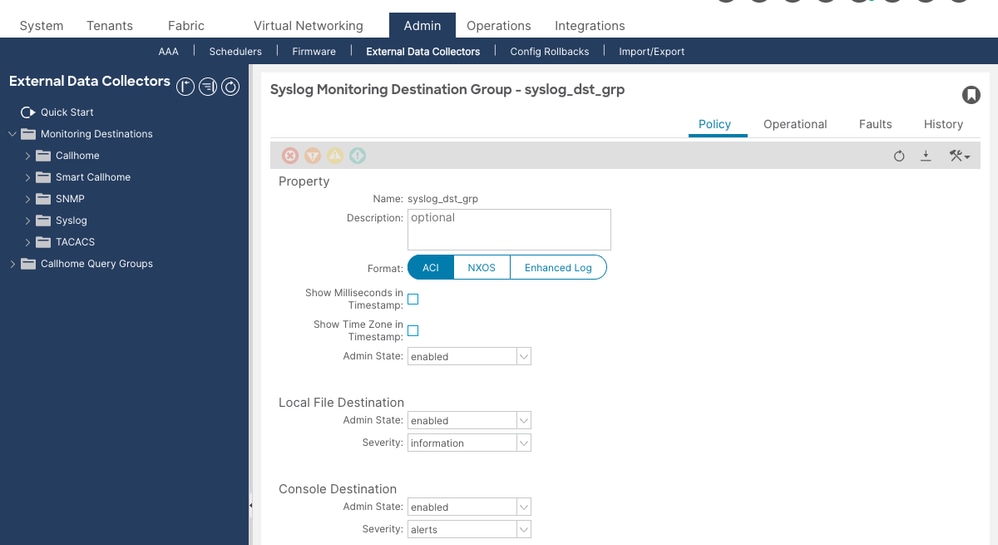
The destination group defines where syslog messages are sent and in what format. Create this first, because the syslog sources configured in later steps reference this group by name.
Navigate to Admin > External Data Collectors > Monitoring Destinations > Syslog. Right-click Syslog and select Create Syslog Monitoring Destination Group.

In the wizard, configure the following on the first page (group profile):
- Name — A descriptive name such as
Syslog-Dest-Group. - Format —
aci(default, RFC 3164 compatible) ornxos. - Admin State —
enabled. - Local File Destination Admin State —
enabled(recommended). This writes messages to/var/log/external/messageson every fabric node and is essential for local troubleshooting even when a remote server is unreachable. - Local File Destination Severity —
information. - Console Destination Admin State —
disabled(recommended for production environments).
Click Next. On the second page, click + in the Create Remote Destinations area to add a remote syslog server.
Step 2: Add a Remote Destination
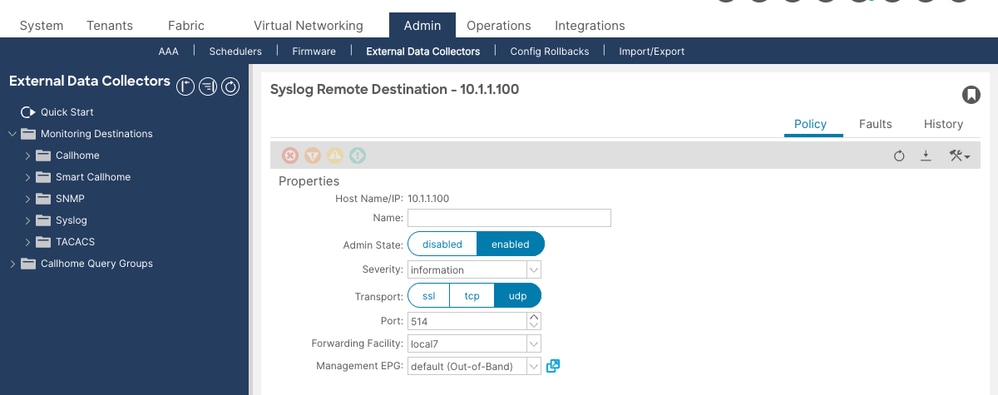
Configure the remote syslog server in the Create Syslog Remote Destination dialog:

- Host — IP address of the syslog server. Use an IP address rather than a hostname. If you use a hostname, you must ensure the Domain Name System (DNS) server is reachable over the out-of-band (OOB) management interface. DNS servers reachable only via in-band connectivity can fail to resolve when syslog messages are generated during a network disruption.
- Admin State —
enabled. - Severity —
information(recommended). This is the minimum severity sent to this specific remote server. - Port —
514(default). - Facility —
local7(default). Set this to match the facility value your syslog server is configured to accept and route. - Transport —
udp(default). Usetcpfor reliable delivery (requires APIC 5.2(3) or later), orsslfor encrypted transport (requires APIC 5.2(4) or later and a certificate uploaded to the APIC). - Management EPG — Select the management EPG that has reachability to the syslog server. For OOB management:
uni/tn-mgmt/mgmtp-default/oob-default. For in-band management, select the appropriate in-band EPG. This field must not be empty.
Click OK, then Finish.
Step 3: Create a Syslog Source under the Fabric Monitoring Policy
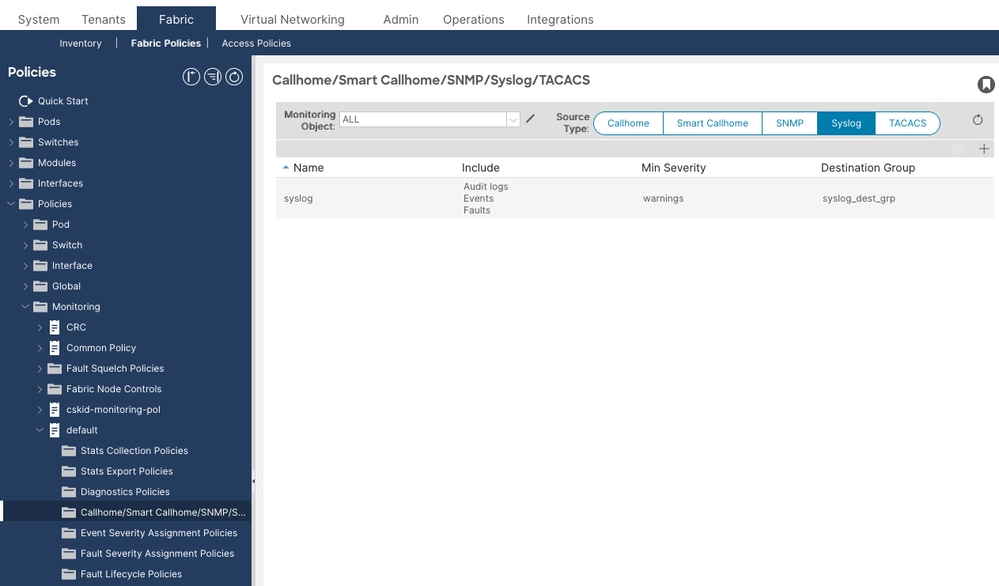
This step configures syslog for the fabric object hierarchy — fabric ports, cards, chassis components, and fan trays. This supplements the Common Monitoring Policy (Step 4) with hierarchy-specific control.
Navigate to Fabric > Fabric Policies > Policies > Monitoring > default > Callhome/Smart Callhome/SNMP/Syslog/TACACS.

In the right pane, set Source Type to Syslog. Click + to create a syslog source:
- Name — A descriptive name such as
Syslog-Source-Fabric. - Min Severity —
information(recommended for full coverage). - Include — Check audit, events, and faults. Optionally add session for login and logout events.
- Dest Group — Select the destination group created in Step 1.
Click Submit.
Step 4: Configure the Common Monitoring Policy (System-Wide Syslog)
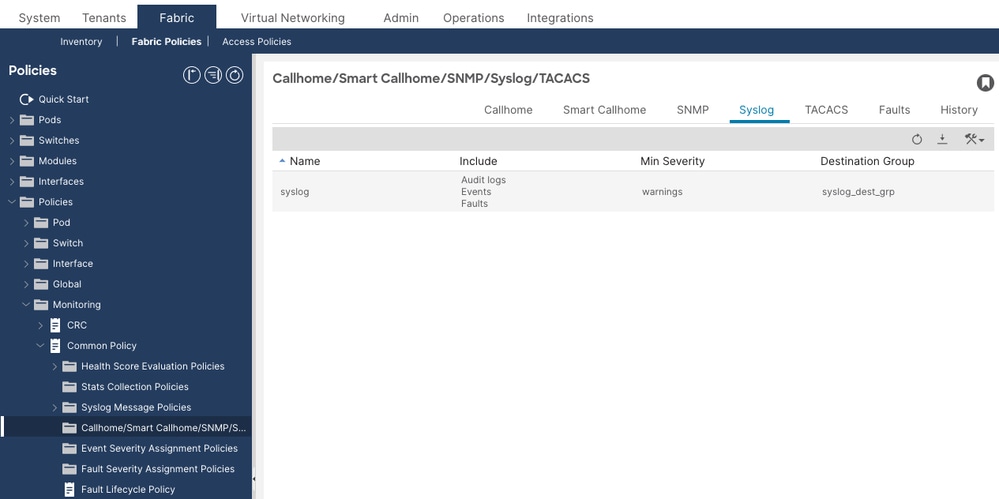
The Common Monitoring Policy provides system-wide syslog coverage that is automatically deployed to all nodes and controllers in the fabric. This step links the system syslog source to the destination group.
Navigate to Fabric > Fabric Policies > Policies > Monitoring > Common Policy. Under the Syslog section, link the system syslog source to the destination group created in Step 1.

The Common Policy system syslog source uses the MO syslogRsSystemDestGroup at DN uni/fabric/moncommon/systemslsrc/rssystemDestGroup.
Step 5: Create a Syslog Source under the Access Monitoring Policy
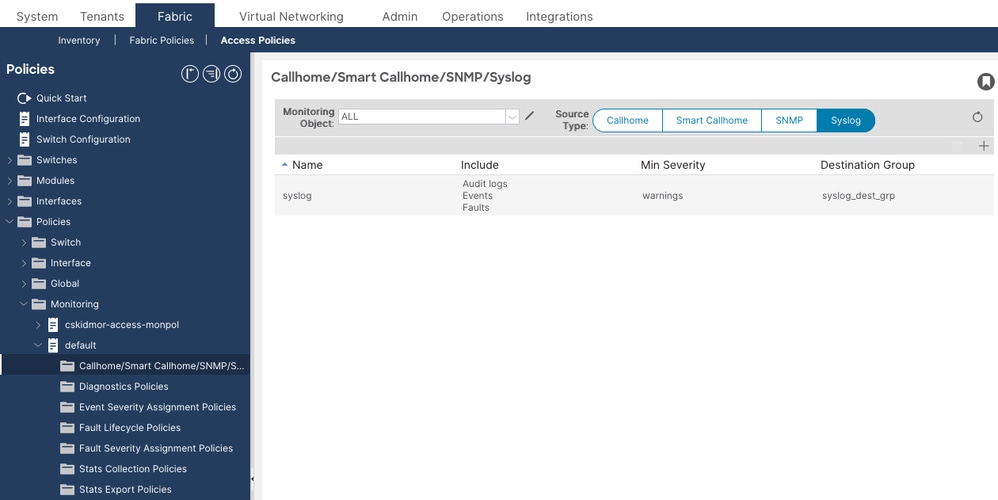
This step configures syslog for the access object hierarchy — access ports, Fabric Extender (FEX) devices, and virtual machine (VM) controller events. This supplements the Common Monitoring Policy (Step 4) with hierarchy-specific control.
Navigate to Fabric > Access Policies > Policies > Monitoring Policies > default > Callhome/SNMP/Syslog.

Set Source Type to Syslog. Click + and configure the same settings as Step 3:
- Name — For example,
Syslog-Source-Access. - Min Severity —
information. - Include — Check audit, events, and faults.
- Dest Group — Select the same destination group.
Click Submit.
Step 6 (Optional): Adjust the Syslog Message Policy for Contract ACL Logging
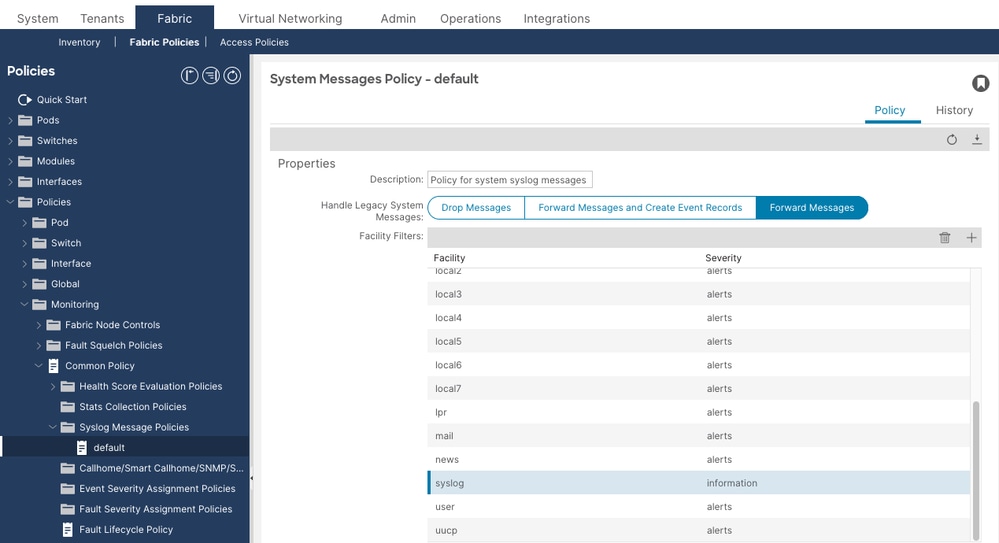
If you need contract ACL permit or deny packet logs (ACLLOG_PKTLOG_PERMIT / ACLLOG_PKTLOG_DENY) to appear in the remote syslog server, the syslog message facility filter must be set to informational severity.
Navigate to Fabric > Fabric Policies > Policies > Monitoring > Common Policy > Syslog Message Policies > default. In the facility filter list, select the syslog facility and set its Min Severity to information. This is the syslogFacilityFilter MO at DN uni/fabric/moncommon/sysmsgp/ff-syslog.
Verify the Configuration
Verify the configuration before troubleshooting any operational issues. The most common root cause of missing syslog messages is misconfiguration, not a network or software fault.
Verify the Destination Group and Profile
Run moquery -c syslogGroup on the APIC in order to confirm destination groups exist and check their attributes:
apic1# moquery -c syslogGroup
Total Objects shown: 1

# syslog.Group
name                 : Syslog-Dest-Group
dn                   : uni/fabric/slgroup-Syslog-Dest-Group
format               : aci                   <--- aci or nxos
includeMilliSeconds  : yes
includeTimeZone      : yes
remoteDestCount      : 1                     <--- must be ≥1; 0 means no remote dest added
Then verify the profile (group-level admin state) with moquery -c syslogProf:
apic1# moquery -c syslogProf
Total Objects shown: 1

# syslog.Prof
dn           : uni/fabric/slgroup-Syslog-Dest-Group/prof
adminState   : enabled    <--- must be enabled; disabled stops ALL forwarding for this group
transport    : udp
port         : 514
In order to find any destination group whose profile is disabled, run:
apic1# moquery -c syslogProf -x 'query-target-filter=eq(syslogProf.adminState,"disabled")'
A result here means that destination group is not forwarding any syslog traffic regardless of the remote destination admin state.
Verify the Remote Destination
Run moquery -c syslogRemoteDest to verify each remote server configuration:
apic1# moquery -c syslogRemoteDest
Total Objects shown: 1

# syslog.RemoteDest
host               : 10.1.1.100
dn                 : uni/fabric/slgroup-Syslog-Dest-Group/rdst-10.1.1.100
adminState         : enabled              <--- must be enabled
epgDn              : uni/tn-mgmt/mgmtp-default/oob-default   <--- must not be empty
forwardingFacility : local7
operState          : unknown              <--- normal; ACI does not probe syslog servers
port               : 514
protocol           : udp
severity           : information          <--- lower values = less restrictive
Three attributes require special attention:
- adminState: must be
enabled. If disabled, this specific remote server receives nothing. - epgDn: must not be empty. An empty
epgDnmeans the fabric does not know which interface to send syslog traffic from, so no messages leave the fabric. - operState: unknown: this value is expected and does not indicate a problem. ACI does not actively probe syslog servers for reachability.
Verify the Syslog Sources
Run moquery -c syslogSrc to confirm sources exist under the correct monitoring policies:
apic1# moquery -c syslogSrc
Total Objects shown: 2

# syslog.Src
dn           : uni/infra/moninfra-default/slsrc-Syslog-Source-Fabric  <--- fabric monitoring policy (fabric ports, cards, chassis)
minSev       : information    <--- must match or be lower than remote dest severity
incl         : audit,events,faults

# syslog.Src
dn           : uni/fabric/monfab-default/slsrc-Syslog-Source-Access   <--- access monitoring policy (access ports, FEX, VMs)
minSev       : information
incl         : audit,events,faults
Confirm sources exist under the appropriate monitoring policies:
- A source under
uni/fabric/moncommon— the Common Monitoring Policy, for fabric-wide coverage of all nodes and all object hierarchies. - A source under
uni/infra/moninfra-default— the Fabric Monitoring Policy, for fabric-level objects (fabric ports, cards, chassis). - A source under
uni/fabric/monfab-default— the Access Monitoring Policy, for access-level objects (access ports, FEX, VM controllers).
Also verify the Common Monitoring Policy system syslog source is linked:
apic1# moquery -d uni/fabric/moncommon/systemslsrc/rssystemDestGroup
Total Objects shown: 1

# syslog.RsSystemDestGroup
dn           : uni/fabric/moncommon/systemslsrc/rssystemDestGroup
tDn          : uni/fabric/slgroup-Syslog-Dest-Group    <--- must point to your dest group
If contract ACL logging is required, verify the Syslog Message Policy facility filter severity with moquery -d uni/fabric/moncommon/sysmsgp/ff-syslog:
apic1# moquery -d uni/fabric/moncommon/sysmsgp/ff-syslog
Total Objects shown: 1

# syslog.FacilityFilter
facility     : syslog
dn           : uni/fabric/moncommon/sysmsgp/ff-syslog
minSev       : information    <--- must be information for ACL logs; default is warnings
Verify the Local Log File
The local file at /var/log/external/messages is the most direct way to confirm that syslog messages are being generated on any fabric node, even when a remote server is not reachable. Check it on both the APIC and a leaf switch:
apic1# cat /var/log/external/messages | tail -20
Apr 10 08:25:33 apic1 %LOG_LOCAL0-3-SYSTEM_MSG [F0022][soaking][inoperable][major][topology/pod-1/node-1/.../fault-F0022] LDAP Provider 10.1.2.5 unreachable
Apr 10 08:30:02 apic1 %LOG_LOCAL0-6-SYSTEM_MSG [F0022][retaining][inoperable][cleared][topology/pod-1/node-1/.../fault-F0022] LDAP Provider 10.1.2.5 unreachable
leaf1# cat /var/log/external/messages | tail -20
Apr 10 09:47:14 leaf1 %LOG_LOCAL0-6-SYSTEM_MSG [E4208077][oper-state-change][info][sys/ipv4/inst/dom-Prod:VRF1/if-[lo1]/addr-[10.0.0.1/32]] IPv4 address is changed to Up, reason Up
Apr 10 09:51:15 leaf1 %LOG_LOCAL0-6-SYSTEM_MSG [login,session][info][subj-[uni/userext/remoteuser-admin]/sess-433791698575] [user admin] From-10.0.0.50-client-type-ssh-Success
If this file is empty or not updating on a node, messages are not being generated at the source. If the file has content but the remote syslog server is not receiving messages, the problem is in forwarding (destination group, network, or firewall), not in message generation.
Verify Reachability to the Syslog Server
Run a ping from the APIC to the syslog server in order to verify IP reachability over the management network:
apic1# ping -c 3 10.1.1.100
PING 10.1.1.100 (10.1.1.100) 56(84) bytes of data.
64 bytes from 10.1.1.100: icmp_seq=1 ttl=251 time=0.8 ms
64 bytes from 10.1.1.100: icmp_seq=2 ttl=251 time=0.8 ms
64 bytes from 10.1.1.100: icmp_seq=3 ttl=251 time=0.8 ms
From a leaf or spine switch, use iping with the -V flag to specify the VRF. Use management for out-of-band or mgmt:inb for in-band, depending on which Management EPG is assigned to the syslog destination:
leaf1# iping -V management 10.1.1.100
PING 10.1.1.100 (10.1.1.100): 56 data bytes
64 bytes from 10.1.1.100: icmp_seq=0 ttl=59 time=1.324 ms
64 bytes from 10.1.1.100: icmp_seq=1 ttl=59 time=0.622 ms

--- 10.1.1.100 ping statistics ---
2 packets transmitted, 2 packets received, 0.00% packet loss
round-trip min/avg/max = 0.622/0.973/1.324 ms
leaf1# iping -V mgmt:inb 10.1.1.100
PING 10.1.1.100 (10.1.1.100): 56 data bytes
64 bytes from 10.1.1.100: icmp_seq=0 ttl=58 time=0.833 ms
64 bytes from 10.1.1.100: icmp_seq=1 ttl=58 time=0.608 ms

--- 10.1.1.100 ping statistics ---
2 packets transmitted, 2 packets received, 0.00% packet loss
round-trip min/avg/max = 0.608/0.72/0.833 ms
A successful ping confirms IP reachability but does not confirm that UDP or TCP port 514 is permitted. Internet Control Message Protocol (ICMP) and syslog use different protocols.
Troubleshooting
Triage Workflow
Use the following decision tree when syslog messages are not arriving at the remote server:
No messages at remote syslog server
│
├─ Step 1: Check /var/log/external/messages on APIC and a leaf
│   ├─ File is EMPTY or not updating
│   │   → No messages are being generated at the source. Proceed to configuration checks:
│   │     - Is a syslogSrc configured and linked to the destination group?
│   │     - Is minSev set to information?
│   │     - Does incl include audit, events, and faults?
│   │
│   └─ File HAS CONTENT (messages are generating locally)
│       → Problem is in forwarding to the remote server. Continue to Step 2.
│
├─ Step 2: Check syslogProf adminState
│   └─ adminState = disabled → Enable it. This stops ALL forwarding from this group.
│
├─ Step 3: Check syslogRemoteDest adminState
│   └─ adminState = disabled → Enable it. This stops messages to this specific server.
│
├─ Step 4: Check syslogRemoteDest epgDn
│   └─ epgDn is empty → Set the correct Management EPG (OOB or in-band).
│
├─ Step 5: Verify network reachability
│   Run on the APIC: ping -c 3 10.1.1.100
│   ├─ ping FAILS → routing/firewall issue; verify OOB routing table and firewall rules
│   └─ ping SUCCEEDS → IP reachable; check firewall for UDP/TCP port 514 specifically

Messages from some nodes or object hierarchies are missing
└─ Check Common Policy — is it linked to the destination group?
    └─ Verify: moquery -d uni/fabric/moncommon/systemslsrc/rssystemDestGroup
    └─ Not linked → Configure Common Policy (Step 4) for fabric-wide coverage
    └─ Also check Fabric and Access policy sources for hierarchy-specific coverage

Messages arrive but important events are missing
└─ Check syslogSrc minSev AND syslogRemoteDest severity
    └─ Both must be information for full coverage; the more restrictive of the two applies
Common Scenarios
Scenario 1: No Syslog Messages Received at Remote Server
Problem: The syslog destination group and remote destination are configured, but no messages arrive at the remote server. The local file /var/log/external/messages on the APIC and switches contains recent entries.
Configuration Check:
apic1# moquery -c syslogRemoteDest
# syslog.RemoteDest
host       : 10.1.1.100
adminState : disabled    <--- PROBLEM: remote destination is disabled
epgDn      : uni/tn-mgmt/mgmtp-default/oob-default
Root Cause: The remote destination admin state is disabled. This can happen if the destination was created but inadvertently left disabled, or if it was disabled during maintenance and never re-enabled.
Solution: Navigate to Admin > External Data Collectors > Monitoring Destinations > Syslog > [group name] > Remote Destinations > [server]. Edit the remote destination and set Admin State to enabled.
Scenario 2: Syslog Destination Group Profile Is Disabled
Problem: No messages are forwarded from any node even though the remote destination admin state is enabled.
Configuration Check:
apic1# moquery -c syslogProf -x 'query-target-filter=eq(syslogProf.adminState,"disabled")'
Total Objects shown: 1

# syslog.Prof
dn           : uni/fabric/slgroup-Syslog-Dest-Group/prof
adminState   : disabled    <--- PROBLEM: group profile is disabled
transport    : udp
Root Cause: The syslogProf admin state controls the entire destination group. When it is disabled, no messages are forwarded from any node regardless of the individual remote destination states.
Solution: Navigate to Admin > External Data Collectors > Monitoring Destinations > Syslog > [group name]. Edit the profile and set Admin State to enabled.
Scenario 3: Events Missing — Common Monitoring Policy Not Linked
Problem: Syslog messages from some nodes or object hierarchies are not reaching the remote server, even though a syslog source is configured under the Fabric or Access Monitoring Policy.
Configuration Check:
apic1# moquery -d uni/fabric/moncommon/systemslsrc/rssystemDestGroup
Total Objects shown: 0
The Common Monitoring Policy system syslog source is not linked to the destination group.
Root Cause: The Common Monitoring Policy (uni/fabric/moncommon) provides fabric-wide syslog coverage across all hierarchies and is automatically deployed to all nodes and controllers. Without it, only events matching the specific Fabric or Access Monitoring Policy hierarchies are forwarded. The Fabric Monitoring Policy (uni/infra/moninfra-default) covers fabric-level objects, and the Access Monitoring Policy (uni/fabric/monfab-default) covers access-level objects, but neither provides the fabric-wide coverage the Common Policy offers.
Solution: Navigate to Fabric > Fabric Policies > Policies > Monitoring > Common Policy. Under the Syslog section, link the system syslog source to the destination group. Verify with moquery -d uni/fabric/moncommon/systemslsrc/rssystemDestGroup that the tDn points to your destination group.
Scenario 4: Severity Too Restrictive — Expected Messages Missing
Problem: Some messages arrive at the syslog server, but informational events, audit log entries, or session login events are missing. Only critical and major faults are seen.
Configuration Check:
apic1# moquery -c syslogSrc
# syslog.Src
dn       : uni/fabric/monfab-default/slsrc-Syslog-Source-Fabric
minSev   : warnings    <--- PROBLEM: only warnings and above are sent; info events filtered out
incl     : faults      <--- PROBLEM: audit and events are not included
apic1# moquery -c syslogRemoteDest
# syslog.RemoteDest
host     : 10.1.1.100
severity : warnings    <--- PROBLEM: remote dest severity also too restrictive
Root Cause: Syslog filtering occurs at two points: the source (minSev) and the remote destination (severity). Only messages that pass both filters are forwarded. If either is set above information, informational messages are dropped.
Solution: Edit the syslog source and set Min Severity to information, and check audit, events, faults in the Include field. Edit the remote destination and set Severity to information.
Scenario 5: No Management EPG Assigned to Remote Destination
Problem: No syslog messages are received at the remote server. The destination group is enabled, the remote destination is enabled, and the local log file has content.
Configuration Check:
apic1# moquery -c syslogRemoteDest
# syslog.RemoteDest
host       : 10.1.1.100
adminState : enabled
epgDn      :             <--- PROBLEM: Management EPG is empty
Root Cause: Without a Management EPG, the APIC and switches do not know which physical interface to use in order to send syslog messages. Messages are generated but cannot be forwarded.
Solution: Edit the remote destination, select the appropriate Management EPG. For OOB management, select uni/tn-mgmt/mgmtp-default/oob-default. For in-band management, select the appropriate in-band EPG.
Scenario 6: Wrong Management EPG (In-Band vs Out-of-Band)
Problem: Syslog messages arrive intermittently or only from some nodes. The syslog server is only reachable via OOB management, but the remote destination references the in-band EPG.
Configuration Check:
apic1# moquery -c syslogRemoteDest
# syslog.RemoteDest
host       : 10.1.1.100
epgDn      : uni/tn-mgmt/mgmtp-default/inb-In-Band    <--- in-band EPG selected
If the syslog server is only reachable via the OOB network, the in-band EPG results in messages being sourced from the in-band interface, which cannot reach the server.
Solution: Edit the remote destination and change the Management EPG to uni/tn-mgmt/mgmtp-default/oob-default. Verify with ping -c 3 10.1.1.100 from the APIC bash to confirm OOB reachability.
Scenario 7: Firewall Blocking Syslog Traffic
Problem: The local log file has content on both APIC and leaf nodes, the configuration is correct, ICMP ping to the syslog server succeeds, but no messages arrive at the server.
Operational Check: Run a ping from the APIC to the syslog server in order to verify IP reachability:
apic1# ping -c 3 10.1.1.100
PING 10.1.1.100 (10.1.1.100) 56(84) bytes of data.
64 bytes from 10.1.1.100: icmp_seq=1 ttl=251 time=0.8 ms
64 bytes from 10.1.1.100: icmp_seq=2 ttl=251 time=0.8 ms
64 bytes from 10.1.1.100: icmp_seq=3 ttl=251 time=0.8 ms
Ping succeeds, but syslog messages do not arrive. ICMP (ping) passes while UDP port 514 is blocked.
Root Cause: A firewall or ACL between the management network and the syslog server is blocking UDP port 514 (or TCP 514 if TCP transport is configured). ICMP and UDP are independent — ICMP passing does not confirm that UDP 514 is permitted. Additionally, each leaf and spine sends syslog directly from its own OOB IP address. A firewall that permits only the APIC OOB IPs drops syslog packets originating from switch nodes.
Solution: Verify that the firewall permits UDP/TCP port 514 from the OOB IP address range of all fabric nodes — including all APICs, all leaf switches, and all spine switches. A packet capture on the syslog server confirms whether UDP 514 packets are arriving.
Scenario 8: Contract ACL Permit/Deny Logs Not Arriving
Problem: Contract permit or deny packet logs (ACLLOG_PKTLOG_PERMIT / ACLLOG_PKTLOG_DENY) are not arriving at the syslog server.
Configuration Check:
- Verify the syslog source severity is
information:apic1# moquery -c syslogSrc # syslog.Src minSev : information <--- must be information; any higher value drops ACL logs
- Verify the remote destination severity is
information:apic1# moquery -c syslogRemoteDest # syslog.RemoteDest severity : information <--- must be information
- Verify the Syslog Message Policy facility filter severity is
information:apic1# moquery -d uni/fabric/moncommon/sysmsgp/ff-syslog # syslog.FacilityFilter facility : syslog minSev : information <--- must be information; default is warnings which drops ACL logs
- Verify the log directive is enabled on the contract filter. Navigate to Tenants > [tenant] > Contracts > [contract] > Subjects > [subject] > Filters and confirm the Directives column shows log for the relevant filter entry.
- Verify that ACL logs are being generated on the leaf switch (ACL logs originate from the leaf, not from the APIC):
leaf1# show logging ip access-list internal packet-log deny
leaf1# cat /var/log/external/messages | grep ACLLOG | tail -20
If noACLLOGentries appear, the log directive is not triggering log generation on the leaf. This can indicate a misconfigured contract directive, that no matching traffic is hitting the contract, or that CoPP rate-limiting is dropping packets before they are logged.
Root Cause: Contract ACL log severity level is informational (syslog level 6). If any filter in the syslog chain — source minSev, remote destination severity, or the Syslog Message Policy facility filter (syslogFacilityFilter at uni/fabric/moncommon/sysmsgp/ff-syslog) — is set above information, the ACL log messages are silently dropped before leaving the fabric node.
Solution: Set minSev to information on the syslog source, set severity to information on the remote destination, set the syslog facility filter minSev to information under Common Policy > Syslog Message Policies > default, confirm the Log directive is enabled on the contract filter, and verify that the firewall permits the syslog traffic from the leaf switch OOB IP addresses, not just the APIC IPs, because ACL logs are sent from the switch.
Scenario 9: Syslog Stops After Renaming the Destination Group
Problem: Syslog messages stop arriving at the remote server after the name of the syslog destination group is changed. Changing the port or facility does not cause this issue. Disabling and re-enabling the policy does not resume message delivery.
Root Cause: This is a known software defect. See Cisco bug ID CSCwj23752. Renaming the destination group breaks the internal syslog forwarding association. It is fixed in APIC release 6.0(6) and later.
Solution: Upgrade to APIC release 6.0(6c) or later. As a workaround on affected versions, delete the renamed destination group and recreate it with the desired name, then re-associate the syslog sources.
Scenario 10: Excessive Syslog Causing APIC GUI Slowness
Problem: The APIC GUI becomes slow and APIC CPU utilization is high. This can occur when contract ACL logging is left enabled during normal operations, generating a high volume of informational syslog messages that are converted to eventRecord objects in the APIC database.
Root Cause: When the Common Policy Syslog Message Policy severity is set to information, every informational syslog message — including high-volume ACL logs — generates an eventRecord in the APIC. This can overwhelm the APIC database and cause GUI slowness.
Solution:
- Disable contract ACL logging during normal operations. Enable it only during troubleshooting or maintenance windows.
- If ACL logging must remain enabled, set the Syslog Message Policy severity to
alertsat Fabric > Fabric Policies > Policies > Monitoring > Common Policy > Syslog Message Policies > default. This prevents informational syslog messages from being converted to events, while still allowing them to be forwarded to the remote syslog server. - Squelch noisy event codes that are not operationally useful. An event code can be squelched to prevent it from generating event records without affecting syslog forwarding.
Known Bugs
The following known software defects affect ACI syslog functionality:
- Cisco bug ID CSCwj23752 — Renaming the syslog destination group stops syslog delivery. Fixed in APIC release 6.0(6c) and later.
Escalation Criteria
Collect a tech support and engage Cisco TAC when:
- Syslog messages appear in
/var/log/external/messageslocally on fabric nodes, destination group and remote destination admin states are bothenabled, the Management EPG is correct, network reachability is confirmed (ping and firewall check pass), but messages still do not arrive at the remote server. - Syslog messages arrive from some fabric nodes but not others, with no difference in configuration between them, suggesting a policy deployment inconsistency.
- The destination group profile or remote destination was re-enabled but messages do not resume within a few minutes of the configuration change.
- Syslog messages stopped arriving after an APIC upgrade, suggesting a potential software defect.
Data to collect before opening a TAC case:
- On-demand techsupport from the affected APIC and one affected leaf node.
- Output of
moquery -c syslogGroup,moquery -c syslogProf,moquery -c syslogRemoteDest, andmoquery -c syslogSrcfrom the APIC. - Output of
moquery -d uni/fabric/moncommon/systemslsrc/rssystemDestGroupto verify the Common Policy link. - Tail of
/var/log/external/messagesfrom both an APIC and an affected leaf. - Packet capture from the syslog server confirming whether UDP/TCP 514 packets are arriving from fabric OOB addresses.
References
- Cisco APIC Basic Configuration Guide, Release 6.1(x) — Management
- Cisco ACI System Messages Reference Guide
- Cisco ACI Faults, Events, and System Messages Management Guide
- Cisco ACI Contract Guide White Paper
- Troubleshoot a Slow APIC GUI
Revision History
| Revision | Publish Date | Comments |
|---|---|---|
1.0 |
21-Apr-2026
|
Initial Release |

 Feedback
Contact Cisco
- Open a Support Case

- (Requires a Cisco Service Contract)