Scaling AI Workloads with Cisco UCS M8 Platform and DDN Infinia White Paper
Available Languages
Bias-Free Language
The documentation set for this product strives to use bias-free language. For the purposes of this documentation set, bias-free is defined as language that does not imply discrimination based on age, disability, gender, racial identity, ethnic identity, sexual orientation, socioeconomic status, and intersectionality. Exceptions may be present in the documentation due to language that is hardcoded in the user interfaces of the product software, language used based on RFP documentation, or language that is used by a referenced third-party product. Learn more about how Cisco is using Inclusive Language.
Powering the AI factory with data intelligence
As enterprises evolve toward “AI factories,” infrastructure leaders face a persistent source of uncertainty: whether storage and data access can keep pace with the extreme concurrency and metadata intensity of modern AI pipelines. This white paper explores the architectural shift required to support retrieval-augmented generation (RAG), LLM inference, and agentic AI. We examine why traditional public cloud and legacy NAS approaches often fail under the weight of extreme concurrency and metadata intensity.
This paper provides a validated technical blueprint, including step-by-step configuration guidelines for Cisco Nexus® networking, Cisco Intersight® management, and Ubuntu Server optimization. By following this approach, you can eliminate storage-induced latency and maximize your GPU utilization by using Cisco UCS® M8 servers and DDN Infinia.
Fueling the AI factory: moving beyond experimental AI
The era of "AI as a project" is over. Today, you are likely tasked with building an "AI factory — a continuous pipeline where data is ingested, processed, and served in real time. In this environment, your infrastructure's success is measured by how quickly you can turn raw data into actionable insights.
However, many organizations are finding that their expensive GPU clusters are sitting idle. This "I/O wait" is not just a technical metric; it is a business cost. If your data layer cannot deliver predictable, low-latency access at scale, your AI initiatives will stall. This document helps you navigate the decision-making process between traditional storage architectures and modern, software-defined approaches optimized for the high-concurrency world of generative AI.
By reading this analysis, you will be able to:
● Identify the hidden bottlenecks in your current RAG and LLM pipelines
● Evaluate the pros and cons of public cloud versus on-premises AI data clouds
● Understand how a "wire-once" architecture with Cisco UCS and DDN Infinia provides linear scaling
● Determine if your current networking fabric is prepared for the demands of RoCEv2 and 200G line rates
This paper is designed for:
● Infrastructure architects designing the next generation of data centers
● AI/ML engineering leads frustrated by GPU underutilization
● Data center operations managers tasked with building scalable, high-performance environments for generative AI and large-scale analytics
The problem: the hidden crisis of “I/O wait”
You have invested in the latest GPUs, yet your training and inference times are not hitting their targets. Why? The answer lies in the unique access patterns of modern AI. Unlike traditional enterprise applications, AI workloads demand:
● Extreme metadata intensity: When your model needs to “list” or “stat” millions of small objects (common in RAG), traditional NAS systems often choke, leading to massive latency.
● Massive concurrency: Thousands of parallel requests hitting the storage layer simultaneously can saturate standard networking protocols.
● Throughput caps: Even if your storage is fast, if your fabric isn’t “lossless”, packet drops will cause retransmissions that kill your performance.
The limitations of traditional approaches
To solve these issues, you might consider two common paths, but both have significant drawbacks:
● Public cloud object storage: While convenient, the "time to first byte" (TTFB) is often unpredictable. In high-performance AI, cloud latency can be up to 25x slower than a localized, optimized solution.
● Legacy NAS/SAN: These were built for a different era. As you add more nodes, these systems often hit a "performance ceiling" where adding hardware no longer results in faster data delivery.
The advocated solution: a software-defined AI data cloud
Cisco advocates for a modern, software-defined storage (SDS) approach that decouples your data intelligence from the underlying hardware. By combining Cisco UCS M8 rack servers with DDN Infinia, you create a high-performance foundation that behaves like the cloud but performs like a local NVMe drive.
1. The compute foundation: Cisco UCS C225 M8 Rack Server
To handle the intensive erasure coding and metadata indexing required by AI, you need more than just storage; you need massive processing power. The Cisco UCS C225 M8 Rack Server is a high-density, single-socket rack server that delivers industry-leading performance and efficiency for your AI workloads.
● Unprecedented processing power: By utilizing 5th Gen AMD EPYC processors with up to 192 cores, these servers ensure that your storage software never starves for CPU cycles.
● Next-gen I/O and memory: With the introduction of PCIe Gen 5 for high-speed I/O and a DDR5 memory bus, data moves between the CPU and the network without internal contention.
● Storage density: Each storage node contains 10x 15.3 TB NVMe U.3 high-performance drives, providing a massive, low-latency pool of ~840 TB raw capacity in a single global namespace.
● High-speed connectivity: Each node in your storage cluster features dual-port NVIDIA ConnectX-7 network adapters. These support speeds up to 200 Gb/s and provide the ultra-low latency and extreme throughput needed for AI model training and inference.

Cisco UCS C225 M8 Rack Server
Unified management: Cisco Intersight
Managing a high-performance AI cluster should not require a dozen different tools. Cisco Intersight is a lifecycle management platform that unifies your experience across the entire Cisco Unified Computing System™.
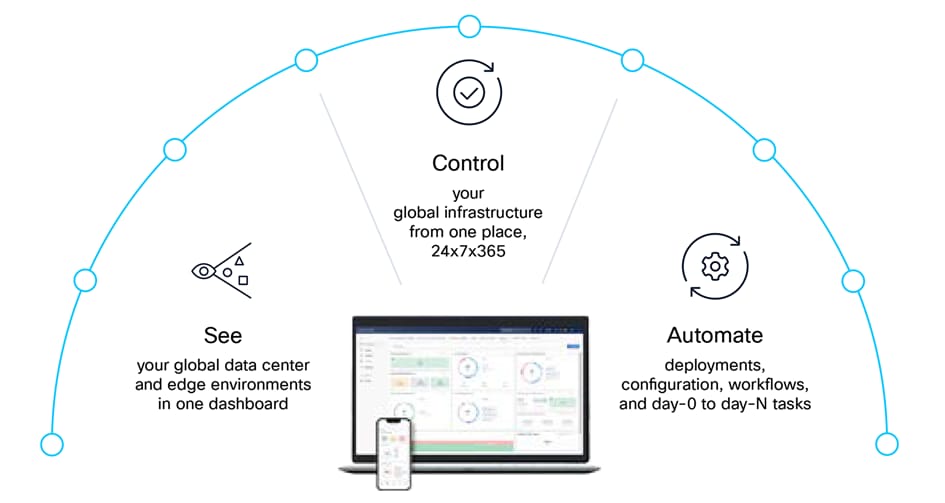
● One consolidated dashboard: Whether your infrastructure resides in the enterprise data center, at the edge, or in a remote site, Intersight gives you a single view of your real-time status and interdependencies.
● Intersight Management Mode (IMM): Your Cisco UCS servers are managed in standalone mode, providing centralized, cloud-powered management and strict policy enforcement.
● Automation at scale: You can manage your entire system as a single logical entity through an intuitive GUI or automate complex deployments and configurations using a robust API. This allows you to deploy a secure, multitenant AI data cloud in minutes rather than weeks.
Cisco Intersight: IT operations, simplified
2. The networking fabric: Cisco Nexus 9300 Series Switches
Your storage is only as fast as the network connecting it. To eliminate packet loss, you need a lossless Ethernet fabric.
● 400G line rates: The Cisco Nexus 9332D-GX2B switch provides the high-bandwidth backbone your AI factory requires.
● RoCEv2 (RDMA over Converged Ethernet): By using RDMA, tuned with priority flow control (PDC) and explicit congestion notification (ECN), you allow your storage traffic to bypass the OS kernel, drastically reducing CPU overhead and latency.
● Intelligent breakouts: You can configure 400G ports into 2x200G lanes, providing dedicated, high-speed paths for every server node in your cluster.
The next-generation fixed Cisco Nexus 9300-GX Series switches can support 400 Gigabit Ethernet (GE). The platform addresses the need for high-performance, power-efficient, and compact switches in the network infrastructure required by artificial intelligence (AI) and machine learning (ML) applications.

Cisco Nexus 9332D-GX2B switch
The Cisco Nexus 9332D-GX2B switch introduces a backward-compatible 400G optical quad small form-factor pluggable – double density (QSFP-DD) interface. Each of the 32 ports offers various lower port speeds and densities, including 10-, 25-, 50-, 100-, and 200-Gbps using breakouts. The last 8 ports, marked in green, are capable of wire-rate MACsec encryption.
3. The intelligence layer: DDN Infinia
DDN Infinia is a next-generation data intelligence platform designed to meet the unprecedented performance, scalability, and efficiency demands of AI. With native metadata intelligence and extreme low-latency data access, Infinia unifies structured and unstructured AI datasets across multi-cloud, on-premises, and edge environments — simplifying AI workflows, securing critical data, and unlocking the full potential of AI-driven insights.
With sub-millisecond latency and high-throughput metadata-driven AI pipelines, it replaces outdated storage models with a streamlined, software-defined platform that can handle massive data volumes and high computational requirements of modern AI. Infinia supports real-time data analytics, instant AI inference, and seamless integration with NVIDIA-powered AI stacks — delivering 10x higher efficiencies than traditional file systems. It supports capacities starting at a few hundred terabytes and seamlessly scaling all the way to multiple exabytes.
Built on a scalable and reliable key-value (KV) store, Infinia simplifies data integration and serves as an ideal source for all structured and unstructured data, including existing data lakes. The KV cache stores transformer model attention data, enabling faster token generation and inference. Infinia serves the KV cache with sub-millisecond latency, avoiding costly recompute cycles. DDN Infinia is engineered to serve the KV cache at sub-millisecond latency, ensuring fast, efficient reuse of attention data. This reduces GPU idle time, improves real-time response accuracy, and lowers inference costs — outperforming traditional file systems that are not optimized for dynamic, high-speed KV access.
Evidence of success: validated performance
In joint proof-of-concept (POC) testing, this architecture demonstrated that it does not just work – it leads the industry. Across just six Cisco UCS C225 M8 Rack Servers, the solution achieved the following:
● 149.9 GiB/s sustained S3 GET throughput
● One million operations per second for S3 metadata LIST rates
● Sub-millisecond latency (~0.6 ms for GET and ~0.76 ms PUT), which is an order of magnitude better than leading public cloud "express" storage tiers
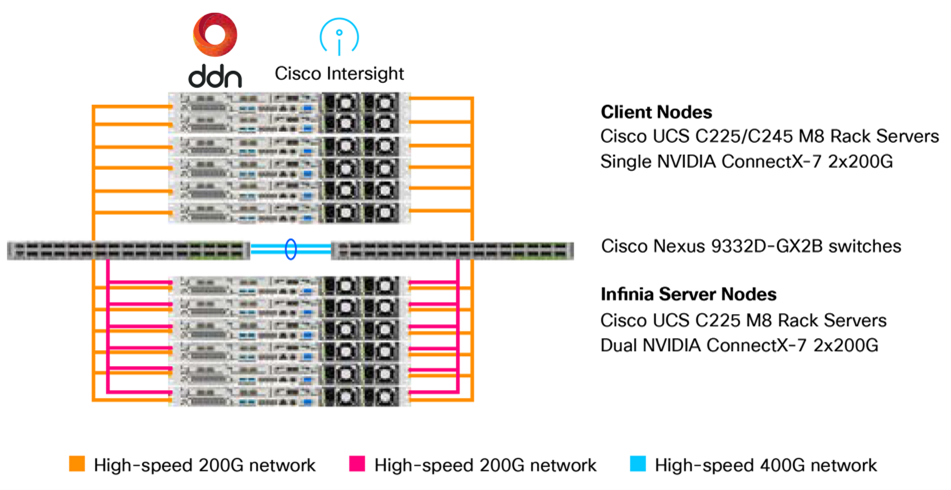
The POC featured a true enterprise scale-out setup using the following:
● Six Cisco UCS C225 M8 Rack Server–based client nodes generating realistic HPC and AI workloads
● Six Cisco UCS C225 M8 Rack Server-based high-throughput storage nodes with 10x NVMe drives each
● High-speed 200 GbE fabrics to interconnect storage and client nodes using Cisco Nexus 9332D-GX2B switches
High-level architecture overview
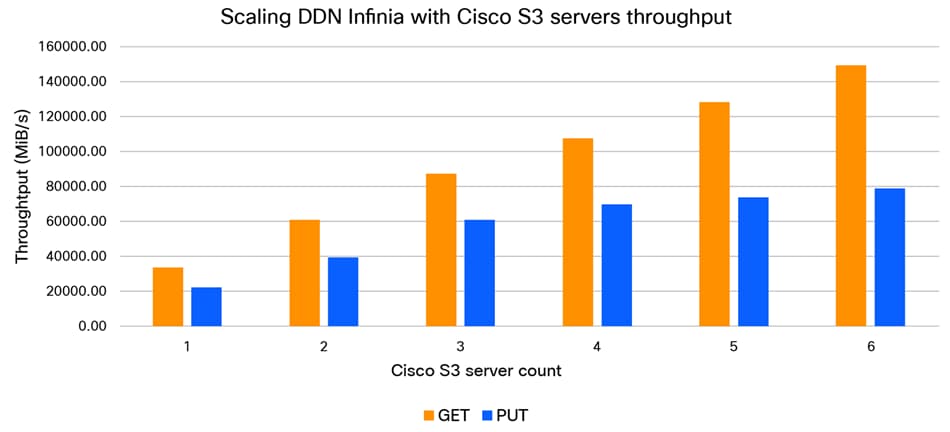
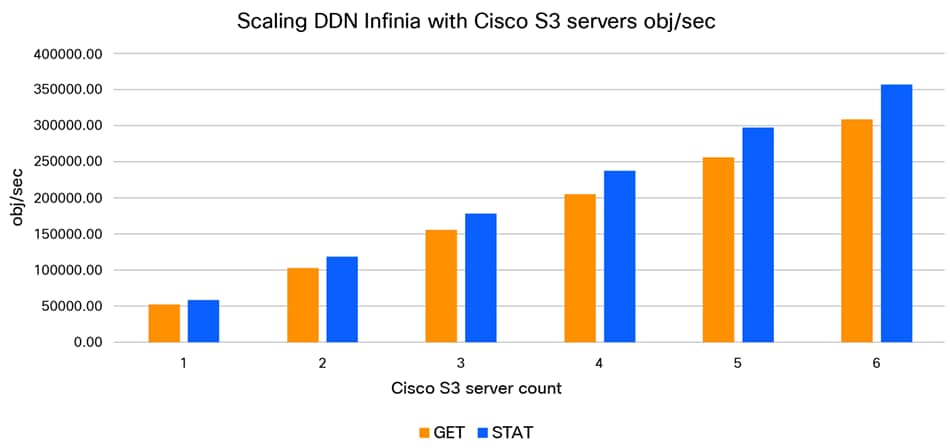
The DDN Infinia S3 performance as well as scalability was assessed using the popular warp benchmark. The S3 performance testing evaluated small-object rates per second (obj/sec), metadata operations, large object throughput, and S3 object access latency, including time-to-first-byte (TTFB).
The performance test shows that S3 throughput (Figure 5) as well as object rates (Figure 6) scale proportionally. Each of the Cisco UCS C225 M8 Rack Servers with Infinia S3 delivers sustained ~13 GiB7s PUT and ~25 GiB/s GET throughput, and metadata operations scale across the server nodes without diminishing returns.
DDN Infinia S3 throughput performance scaling
DDN Infinia S3 objects rate/second performance scaling
This means that, as your AI needs grow, your performance scales linearly. You can start with a small pilot and grow to exascale without ever having to rearchitect your storage because of the “wire-once” architecture.
Conclusion: Making your AI infrastructure future-ready
The transition to production AI requires a departure from the storage status quo. By moving away from high-latency cloud buckets and rigid legacy NAS and adopting a software-defined approach on Cisco UCS M8 Rack Servers and DDN Infinia, you eliminate the "I/O wait" bottleneck. This architecture ensures that your GPUs stay fed, your metadata stays fast, and your AI factory remains "always on." Choosing this foundation validated by Cisco maximizes your GPU ROI and accelerates your journey from data to insight.
To explore how the combination of Cisco UCS and DDN Infinia can transform your AI data strategy, visit the following resources or contact your Cisco account representative:
● Cisco AI Networking in Data Centers: Accelerate enterprise AI with a solution that grows with you. For an overview and additional resources, visit: AI Networking in Data Centers.
● Cisco UCS C225 M8 rack server: Find further details on the server which delivers record-breaking performance for space-constrained environments at https://www.cisco.com/c/en/us/products/collateral/servers-unified-computing/ucs-c-series-rack-servers/ucs-c225-m8-rack-server-ds.html.
● Cisco Intersight: Learn how to manage your global AI infrastructure from a single cloud-delivered platform at Cisco Intersight: IT Operations Management.
● DDN Infinia product page: For deep dives into software-defined data intelligence, visit ddn.com/products/infinia.
Appendix A: The blueprint for success (configuration guide)
To achieve the sub-milliseconds latencies and linear scaling mentioned in this paper, Cisco recommends the baseline configuration given below. This blueprint is divided into four phases: network fabric, compute management, host operating system, and the final phase DDN Infinia installation.
Phase 1: Cisco network optimization
A “lossless” fabric is non-negotiable for AI storage. Use the following steps to configure your Cisco Nexus 9300 Series Switches.
1.1 Core feature enablement
Enable the necessary protocols for programmability, link aggregation, and virtual port channels:
feature nxapi, cfs eth distribute, udld, interface-blan, lacp, vpc, lldp
1.2 Port breakouts and slice mapping
To maximize throughput, map 400G ports to 2x200G.
Performance tip: To optimize internal switch bandwidth, connect the NVIDIA ConnectX-7 adapters of the DDN Infinia storage cluster and the server cluster to different port subsets (for example, eth1/1-8 and eth1/17-24).
interface breakout module 1 port 1-6 map 200g-2x // Breakout ports 1-6 to 2x200G
interface breakout module 1 port 17-19 map 200g-2x // Breakout port 17-19 to 2x200G
1.3 Lossless RoCEv2 and quality of service (QoS)
This ensures that storage traffic is prioritized and never dropped.
● Classification: Match DSCP 24 for RoCEv2 and DSCP 48 for congestion notification packets (CNPs)
● PFC: Enable priority flow control on CoS 3
● ECN: Use WRED on the egress queue to signal congestion before drops occur
RoCEv2 QoS classification
// Define RoCEv2 class by DSCP 24
class-map type qos match-any ROCEv2
match dscp 24
// QoS policy: assign QoS group 3 to RoCEv2, 0 to default
policy-map type qos QOS_CLASSIFICATION
class ROCEv2
set qos-group 3
class class-default
set qos-group 0
// Apply QoS policy to all RoCEv2 interfaces
interface interface e1/1/1,...,e1/6/2,e1/17/1,...,e1/19/2
service-policy type qos input QOS_CLASSIFICATION no-stats
Enable PFC (priority flow control) for RoCEv2
// Network QoS: PFC on CoS 3 for RoCEv2, MTU adjustments
policy-map type network-qos QOS_NETWORK
class type network-qos c-8q-nq3
mtu 4200
pause pfc-cos 3
class type network-qos c-8q-nq-default
mtu 9216
system qos
service-policy type network-qos QOS_NETWORK
// Enable PFC on all RoCEv2 interfaces
interface interface e1/1/1,...,e1/6/2,e1/17/1,...,e1/19/2
priority-flow-control mode on
priority-flow-control watch-dog-interval // Enable PFC watchdog
CNP (congestion notification packet) prioritization
// Define CNP class by DSCP 48
class-map type qos match-any CNP
match dscp 48
// QoS: Assign CNP to QoS group 7
policy-map type qos QOS_CLASSIFICATION
class CNP
set qos-group 7
// Egress queue: prioritize CNP (level 1)
policy-map type queuing QOS_EGRESS_PORT
class type queuing c-out-8q-q7
priority level 1
// ECN (Explicit Congestion Notification) using WRED
policy-map type queuing QQOS_EGRESS_PORT
class type queuing c-out-8q-q3
bandwidth remaining percent 99
random-detect minimum-threshold 150 kbytes maximum-threshold 3000 kbytes drop-probability 7 weight 0 ecn
system qos
service-policy type queuing output QOS_EGRESS_PORT
VRF and management configuration
// Management VRF: DNS and default route
vrf context management
ip name-server <primary DNS server IP> <secondary DNS server IP>
ip route 0.0.0.0/0 192.116.0.254
// Management interface configuration
interface mgmt0
vrf member management
ip address 192.116.0.2/24
no shutdown
VLAN configuration
vlan 2 // Native VLAN
name VLAN-NATIVE
vlan 1160 // Out-of-band management
name VLAN-OOB-MGMT
vlan 1161-1164
name VLAN-<ID>
Port-channel (vPC peer link)
interface port-channel 11
description vPC peer link
switchport mode trunk
switchport trunk native vlan 2
switchport trunk allowed vlan 1160-1164
spanning-tree port type network
service-policy type qos input QoS_marking_in
vpc peer-link
RoCEv2 port configuration
// Enable trunking, edge, jumbo MTU, and bring up all RoCEv2 interfaces
interface interface e1/1/1,...,e1/6/2,e1/17/1,...,e1/19/2
switchport mode trunk
spanning-tree port type edge trunk
mtu 9216
no shutdown
VLAN pinning (N9K-A and N9K-B)
// N9K-A: Pin odd ports to VLAN 1161 and even ports to VLAN 1163
interface interface e1/1/1,...,e1/6/1,e1/17/1,...,e1/19/1
switchport trunk native vlan 1161
switchport trunk allowed vlan 1161
interface interface e1/1/2,...,e1/6/2,e1/17/2,...,e1/19/2
switchport trunk native vlan 1163
switchport trunk allowed vlan 1163
// N9K-B: Pin odd ports to VLAN 1162 and even ports to VLAN 1164
interface interface e1/1/1,...,e1/6/1,e1/17/1,...,e1/19/1
switchport trunk native vlan 1162
switchport trunk allowed vlan 1162
interface interface e1/1/2,...,e1/6/2,e1/17/2,...,e1/19/2
switchport trunk native vlan 1164
switchport trunk allowed vlan 1164
Port descriptions (N9K-A and N9K-B)
// Example: N9K-A port mapping to UCS servers
interface e1/1/1
description UCS-C225M8-1:e1/0 (ens1f0np0)
...
interface e1/1/2
description UCS-C225M8-1:e2/0 (ens2f0np0)
// Example: N9K-B port mapping to UCS servers
interface e1/1/1
description UCS-C225M8-1:e1/1 (ens1f1np1)
...
interface e1/1/2
description UCS-C225M8-1:e2/1 (ens2f1np1)
Phase 2: Cisco Intersight management and Cisco UCS policy
Use Cisco Intersight to enforce a consistent configuration baseline across your cluster.
2.1 Cisco UCS server policies
Policies in Cisco Intersight provide different configurations for UCS servers including BIOS settings, Simple Mail Transfer Protocol (SMTP), Intelligent Platform Management Interface (IPMI) settings, and more. A policy that is once configured can be assigned to any number of servers to provide a configuration baseline.
For this blueprint, the following server policies have been configured and used in the server profile template.
BIOS policy
This policy automates the configuration of BIOS settings on the servers. When you create the policy, select the CPUIntensive-M8-AMD configuration and change the following BIOS tokens:
● Enable SR-IOV support
● Change the Power Profile Selection F19h to Maximum IO Performance Mode
● Select X2APIC as local APIC mode
● Disable “ACPI SRAT L3 Cache As NUMA Domain” for memory consistency
● Select com-0 from the Console Redirection drop-down list
Boot order policy
Configures the linear ordering of devices and enables you to change the boot order and boot mode. Keep UEFI enabled and secure boot disabled. As boot devices, we select slot MSTOR-RAID as the local boot disk drive and KVM Mapped DVD as virtual boot media.
IPMI over LAN policy
Defines the protocols for remote interfacing with a service processor that is embedded in the server platform. Keep the defaults when creating the policy.
Local user policy
The local user policy defines and manages local user accounts (username, password, role) on Cisco UCS servers, crucial for the direct KVM access, IPMI over LAN authentication, and overriding default admin passwords like for the CIMC access.
NTP policy
Enables the NTP service to synchronize the time with an NTP server.
Power policy
The optional power policy enables the configuration of power redundancy, power profiling, and power restauration for servers. Configure Last State for Power Restore.
Serial over LAN policy
Enables the input and output of the serial port of a managed system to be redirected over IP. Select 115200 from the Baud Rate drop-down list.
Storage policy
Allows you to create drive groups and virtual drives. Enable the M.2 RAID configuration and keep the virtual drive name MstorBootVd and MSTOR-RAID slot.
Thermal policy
The optional thermal policy sets the fan-speed modes. For the POC, the fan control mode has been set to balanced.
Virtual KVM policy
The KVM console is an interface that emulates a direct keyboard, video, and mouse (KVM) connection to the server. Enable the Allow Tunneled vKVM selection.
2.2 Cisco UCS server profile deployment
Server profile templates enable the user to define a template from which multiple server profiles can be derived and deployed. Any property modification made in the template syncs with all the derived profiles.
Create the UCS server profile template in Intersight and attach the policies described in section 2.1. Derive individual UCS server profiles for each UCS C225 M8 Rack Server from template. This ensures “wire-once” simplicity.
Phase 3: Host OS optimization (Ubuntu 24.04.3 LTS)
Once the hardware is provisioned through Intersight, install and optimize the OS layer for the NVIDIA ConnectX-7 adapters.
3.1 Additional software packages
Install additional software packages that do not come with the default installation.
apt install chrony ipmitool net-tools openssh-server pdsh
3.2 Networking (netplan)
Configure your interface with a 9000 MTU to support jumbo frames. Ensure that your VLAN IDs correlate with your interface addressing for easier troubleshooting.
ens1f0np0:
dhcp4: false
addresses:
- [10.10.1.x/24]/24
mtu: 9000
3.3 Performance tools
Install the Mellanox (NVIDIA) Linux tools (https://linux.mellanox.com/public/repo/mlnx_ofed/latest-24.04/ubuntu24.04/amd64/mlnx-tools_24.04.0.2404066-1_amd64.deb) to manage the RDMA engines.
Ensure that chrony is configured to a local NTP source for precise log synchronization across the AI factory and map the IP addresses to hostnames within the /etc/hosts file of each host.
Phase 4: DDN Infinia software deployment
With the compute and network foundations established, the final stage is the deployment of the DDN Infinia software. To ensure optimal performance and alignment with the Cisco UCS M8 hardware, the installation and additional health checks are performed remotely by DDN Professional Services. Please coordinate with your Cisco or DDN account team to schedule the deployment and finalize your AI data cloud.