Cisco ISE Licensing Guide
Available Languages
Bias-Free Language
The documentation set for this product strives to use bias-free language. For the purposes of this documentation set, bias-free is defined as language that does not imply discrimination based on age, disability, gender, racial identity, ethnic identity, sexual orientation, socioeconomic status, and intersectionality. Exceptions may be present in the documentation due to language that is hardcoded in the user interfaces of the product software, language used based on RFP documentation, or language that is used by a referenced third-party product. Learn more about how Cisco is using Inclusive Language.
Cisco Identity Services Engine (ISE) is the industry’s leading end-to-end Network Access Control (NAC) platform that unifies visibility, authentication, authorization, and policy enforcement across every access domain—wired, wireless, VPN, and 5G. Cisco ISE sits at the heart of a Zero Trust architecture, connecting users, devices, and things to any part of the enterprise network—whether in the branch, data center, or cloud—with consistent identity-based controls. It goes beyond basic access management by providing context-aware visibility, profiling, and policy-driven segmentation, ensuring that every connection is verified, trusted, and continuously monitored.
Cisco Identity Services Engine (ISE) empowers you to solve a wide range of use cases. To understand the types and quantities of Cisco ISE licenses, you must first understand the capabilities of Cisco ISE. See the build resilience with Cisco ISE to understand the features of Cisco ISE and how it can address multiple use cases of network visibility, segmentation, and security.
2. Smart licensing deployment methods
The Cisco Smart Software Manager (CSSM) portal is a cloud-based platform provided by Cisco that enables you to easily manage and track your Cisco Smart Software licenses. Cisco ISE integrates with Cisco Smart Accounts to simplify license management.
Smart Accounts provide a centralized, organized, and simple-to-use solution for managing Cisco software licenses across an entire organization. They act as a container that holds all Cisco software assets, allowing customers to view, store, manage, and move these assets as needed. Smart Accounts enable full visibility into license entitlements and usage, helping optimize software management. Smart Accounts support license pooling, portability, and provide compliance reporting.
Virtual Accounts are customizable subaccounts within a Smart Account used to organize and optimize Cisco licenses. They can be structured to reflect business units, product types, or geographic locations, allowing better planning and utilization of assets.
You can configure Cisco ISE Smart Licensing through the following methods, depending on the needs of your organization.
Choose a Smart Licensing method:
● Smart Licensing for CSSM connected networks
● Smart Licensing for air-gapped networks with on-premises SSM
● Specific License Reservation (SLR) for air-gapped networks
2.1. Smart Licensing for CSSM connected networks
This Smart Licensing method is recommended for Cisco ISE deployments with internet connectivity. This approach supports both direct internet connections and proxy servers.
2.2. Smart Licensing with Cisco Smart Software Manager On-Premises
This Smart Licensing method is recommended for air-gapped Cisco ISE deployments that can connect to a local Cisco Smart Software Manager On-Premises (SSM On-Prem) server for all licensing operations, eliminating the need for direct internet connectivity to Cisco’s Cloud.
The SSM On-Prem server can operate in either online mode (with automatic synchronization to Cisco) or offline mode (requiring manual license synchronization). Importantly, this is configured on the SSM On-Prem server, not within Cisco ISE.
We recommend you use the offline mode in air-gapped deployments.
2.3. Specific License Reservation for air-gapped networks
Specific License Reservation (SLR) enables you to activate a software license on a Cisco ISE deployment without sending usage information to Cisco. This method is particularly useful for highly secured air-gapped networks.
For more details on SLR license reservation, please refer to Additional Information
3. Prerequisites for Cisco ISE deployment
A Cisco ISE deployment consists of three primary components:
● Appliance – Physical Hardware,Virtual Machine or Infrastructure-as-a-Service (IaaS)
● Software license
● Support
3.1. Appliance
Cisco ISE can be deployed on a combination of physical hardware, virtual appliances, and Infrastructure-as-a-Service (IaaS) instances in AWS, Azure, and Oracle Cloud.
● Hardware appliances
◦ The Cisco SNS 3800 series appliances are available in the following models
Table 1. Cisco ISE Hardware SKUs
| Hardware SKUs |
Description |
| SNS-3815-K9 |
Small Secure Network Server for Cisco ISE Applications |
| SNS-3855-K9 |
Medium Secure Network Server for Cisco ISE Applications |
| SNS-3895-K9 |
Large Secure Network Server for Cisco ISE Applications |
◦ For more information on Cisco ISE hardware appliances, refer to the Cisco Secure Network Server Data Sheet.
● Virtual appliances
◦ Cisco ISE is supported on virtual platforms including VMware, Linux KVM, Hyper-V, Nutanix AHV, and Red Hat OpenShift platforms
◦ For more information on virtual appliances, refer to the Cisco Identity Services Engine Installation Guide.
● Infrastructure-as-a-Service (IaaS)
◦ Cisco ISE is supported on Amazon Web Services (AWS), Microsoft Azure, and Oracle Cloud Infrastructure (OCI) platforms.
◦ For more information about Cisco ISE on cloud platforms, refer to Deploying Cisco ISE Natively on Cloud Platforms.
● For detailed information about performance and scalability, please refer to the Performance and Scalability Guide.
4. Cisco ISE Licensing: Evaluation and Purchase Cisco ISE licenses
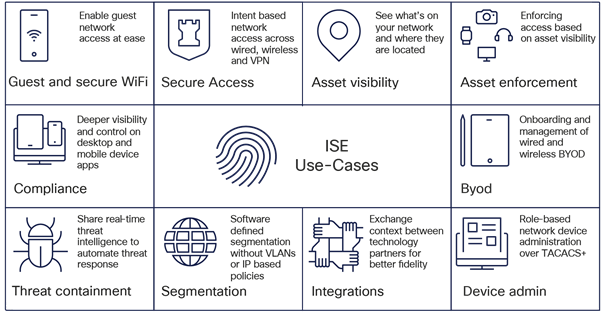
Evaluation and Purchase of Cisco ISE licenses overview
Cisco ISE, upon installation, grants a 90-day Evaluation license that supports 100 endpoints and enables all Cisco ISE features. You can set up a limited deployment in evaluation mode and explore all the capabilities and features within Cisco ISE.
A valid Cisco account is required to download the software. An existing Cisco ISE support contract may be required to download additional patches or packages.
For more information on your Cisco ISE release, refer to the collection page of your release.
When Evaluation licenses expire at the 90-day mark, administrators can view only the Licensing window in the Cisco ISE administrator portal. No alarms are sent to administrators to notify them of Evaluation license expiration.
To extend your Evaluation license by an additional 90 days or to request support for more than 100 endpoints, open a case through the SCM tool. You must include your Unique Device Identifiers (UDIs), details of your license request, and a justification message.
Note: The UDI information for your Cisco ISE primary and secondary Policy Administration Nodes (PANs) is mandatory to modify your Evaluation license.
A UDI consists of:
● Product Identifier (PID)
● Version Identifier (VID)
● Serial Number (SN)
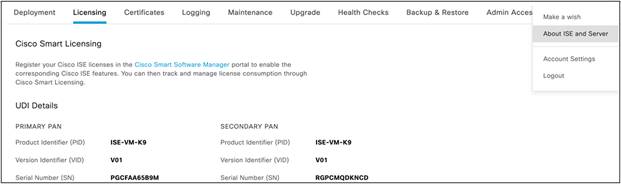
To view your Cisco ISE UDI, log in to your Cisco ISE administrator portal. From the main menu, choose Administration > System > Licensing. The UDI Details area contains the required information such as PID, VID, and so on.

Alternatively, you can see the About Identity Services Engine option in the Cisco ISE administrator portal.

To view the UDI details through the Cisco ISE command-line interface, use the show udi command:
Admin CLI
Positron-vm-3/admin#show udi
SPID: ISE-VM-K9
VPID: V01
Serial: TNEG8ID3JQ5
4.1. Software licenses
There are three types of licenses for Cisco ISE:
● Subscription Licenses – Essentials, Advantage, and Premier tier licenses for Cisco ISE software
● Device Admin Licenses -TACACS+ service license for Policy Service Nodes (PSN)
● Virtual Appliance Licenses – Appliance license for Virtual or IaaS form factors
4.1.1. Cisco ISE Subscription licenses
Cisco ISE subscription licenses are based on the number of active endpoints and are available in three tiers: Essentials, Advantage, and Premier. The quantity of licenses required is determined by the maximum number of active endpoints expected to connect concurrently on any given day.
Subscription licenses are structured in a nested model, where each higher tier includes all the features of the lower tiers. For example, the Cisco ISE Premier license provides all the capabilities of both the Advantage and Essentials licenses.
The Advantage license includes all the features of the Essentials license.
Table 2. Cisco ISE subscription licenses
| Cisco ISE Subscription SKU |
Product SKUs |
Support SKUs |
| ISE-SEC-SUB: Cisco Identity Services Engine Subscription |
ISE-E-LIC: Cisco Identity Services Engine Essentials Subscription ISE-A-LIC: Cisco Identity Services Engine Advantage Subscription ISE-P-LIC: Cisco Identity Services Engine Premier Subscription |
SVS-ISE-SUP-B: Cisco ISE Basic Support SVS-ISE-SUP-S: Cisco ISE Solution Support SVS-ISE-SUP-E: Cisco ISE Enhanced Support SVS-ISE-SUP-P: Cisco ISE Premium Support |
Features supported in different license tiers
The following table shows the Features available with each Cisco ISE Subscription license tier.
Table 3. Features supported in different license tiers
| Key Benefits |
Features |
Essentials |
Advantage |
Premier |
| Identity verification and Enforcement |
AAA and 802.1X |
✓ |
✓ |
✓ |
| Guest (Hotspot, Self-Reg, Sponsored) |
✓ |
✓ |
✓ |
|
| Easy Connect (Passive ID) |
✓ |
✓ |
✓ |
|
| Context sharing, Segmentation and Adaptive Network Control |
Profiling |
X |
✓ |
✓ |
| BYOD |
X |
✓ |
✓ |
|
| Context in or out using pxGrid, pxGrid Cloud and pxGrid Direct |
X |
✓ |
✓ |
|
| User Defined Network |
X |
✓ |
✓ |
|
| TrustSec® |
X |
✓ |
✓ |
|
| Endpoint Analytics Visibility and Enforcement |
X |
✓ |
✓ |
|
| Rapid Threat Containment (Adaptive Network Control) |
X |
✓ |
✓ |
|
| Compliance |
Posture |
X |
X |
✓ |
| Mobile Device Management (MDM) Compliance |
X |
X |
✓ |
|
| Threat-Centric Network Access Control (TC-NAC) |
X |
X |
✓ |
4.1.2. Subscription license consumption
Cisco ISE license consumption is based on active endpoint counts measured through RADIUS sessions. In situations where RADIUS sessions are not present or cannot be correctly counted, then unique endpoint attributes may be used (example: PassiveID etc). If you enable privacy/private MAC/MAC randomization/rotating and changing MAC in endpoints, the license consumption may be higher, as different sessions will be created for the same endpoint getting authenticated a second time with different MAC IDs.
The following table shows Cisco ISE licensing consumption.
Table 4. Cisco ISE licensing consumption
| Feature |
License tier |
Trigger of license consumption |
License release |
| AAA and 802.1X |
Essentials |
An endpoint establishes a RADIUS session. |
End of RADIUS session |
| Guest |
Essentials |
An endpoint with a RADIUS session uses a Guest feature. |
End of RADIUS session |
| Easy Connect (PassiveID) |
Essentials |
When an endpoint with a RADIUS session uses any Easy Connect feature. |
End of RADIUS session |
| Profiling |
Advantage |
When an endpoint with a RADIUS session uses dynamically assigned profiling attributes in an authorization policy. |
End of RADIUS session |
| TrustSec® (Group Based Policy) |
Advantage |
An endpoint is assigned a Security Group Tag (SGT) as part of the authorization. |
End of RADIUS session |
| BYOD (+CA, MDP) |
Advantage |
An endpoint with a RADIUS session uses its registration status in an authorization policy |
End of RADIUS session |
| pxGrid Cloud |
Advantage |
Per active session when session data is shared with pxGrid Cloud consumers. |
End of RADIUS session |
| pxGrid |
Advantage |
When session data is shared with pxGrid clients per active session via the session topic (e.g. WebSocket updates, bulk retrieval via REST API). |
End of RADIUS session |
| pxGrid Direct |
Advantage |
When an endpoint connects to Cisco ISE network and has pxGrid Direct dictionary attribute in authorization policy and that endpoint is found in pxGrid Direct record. |
End of RADIUS session |
| Endpoint Analytics |
Advantage |
When an endpoint with an active session is authorized onto the network using Endpoint Analytics dictionary attributes, an Advantage license is consumed. |
End of RADIUS session |
| RTC (ANC) |
Advantage |
When a dynamic response action is triggered on an active RADIUS session using Adaptive Network Control (ANC) policy. |
End of RADIUS session |
| User Defined Network |
Advantage |
When an endpoint with RADIUS matches a UDN attribute in an authorization policy. |
End of RADIUS session |
| Workload Connector |
Advantage |
When a workload IP is learned by Cisco ISE |
When Workload IP session is deleted from on-prem/cloud account, or connection is suspended/deleted on Cisco ISE |
| Posture (Cisco AnyConnect® with Agent) |
Premier |
When an endpoint with a RADIUS session uses posture attributes in an authorization policy. |
End of RADIUS session |
| Mobile Device Management (MDM) |
Premier |
When an endpoint uses an MDM attribute in an authorization policy. |
End of RADIUS session |
| Threat- Centric Network Admission Control (TC-NAC) |
Premier |
When an endpoint uses or triggers threat-based information or action as part of the authorization policy |
End of RADIUS session |
Here are some examples of license consumption.
| Sr. No. |
Scenario |
ISE Licenses consumed |
Remarks |
| 1. |
Number of authenticated endpoints:
● Guest (Active):200
● Non-Guest (Active):800
|
ISE Essential = 1000 |
An Essential license will be consumed per active endpoints getting authenticated |
| 2. |
Number of authenticated endpoints:
● Guest (Active):200
● Non-Guest (Active):800
● Integrate with DNAC & FMC through pxGrid
|
ISE Advantage = 1000 |
An Advantage license will be consumed for each endpoint sharing data over pxGrid |
| 3. |
Number of authenticated endpoints:
● Guest (Active):200
● Non-Guest (Active):800
● Endpoints authorized based on dynamic profiling attributes: 400
|
ISE Essential = 600 ISE Advantage = 400 |
An Advantage license will be consumed only when dynamically profiled attributes are used in the matched authorization policy rule. |
| 4. |
Number of authenticated endpoints:
● Guest (Active):200
● Non-Guest (Active):800
● Integrate with DNAC & FMC
● Dynamic Profiling attributes
● SGT assignment through TrustSec®
● Data sharing through pxGrid
|
ISE Advantage = 1000 |
Each endpoint uses only one Advantage license, irrespective of number of Advantage tier features used. |
| 5. |
Number of authenticated endpoints: Guest (Active):200 Non-Guest (Active):800 Endpoints authorized based on dynamic profiling attributes: 400 Compliance Threat Score for 100 endpoints |
ISE Essential = 700 ISE Advantage = 300 ISE Premier = 100 |
If you use a Premier feature, Advantage and Essentials are included by default. |
4.1.3 License SKUs for Virtual Machines and Device Administration
All Cisco ISE licenses are managed in Smart Licensing format through Cisco Smart Software Manager (SSM). The Cisco Smart Software Manager is an intuitive portal where you can activate and manage all your Cisco licenses.
Smart Licensing is a flexible software licensing model that simplifies the way you can activate and manage licenses across your organization. Instead of using Product Activation Keys (PAKs), Smart Licenses establish a pool of software licenses in a customer-defined Smart Account that can be used across an enterprise. Smart Accounts are mandatory for any subscription. They help identify and connect the right customer accounts into which the license subscriptions purchased by a customer must be deposited. The combination of Smart Licensing and Smart Accounts delivers visibility into your license ownership and consumption (through a cloud portal) to help you reduce operational costs.
Table 5. License SKUs for Virtual Machines and Device Administration
| License Name |
License Type |
License SKU |
Description |
| Cisco ISE Device Admin License |
Perpetual |
L-ISE-TACACS-ND= |
Purchase one license for each Policy Service Node (PSN) on which you wish to enable TACACS+ services. |
| Cisco ISE Virtual Machine License |
Perpetual |
R-ISE-VMC-K9= |
Purchase a license for each virtual machine or cloud-deployed Cisco ISE node in your deployment. |
| Cisco ISE Virtual Machine License (Free VM License) |
Perpetual |
R-ISE-VMF-K9= |
Special free VM license of 1 quantity available for eligible first-time Cisco ISE customers who receive Cisco ISE Subscription Tier licenses through Catalyst Advantage Subscription for Switching. Customers should contact Channel Partners or Cisco Account teams to check eligibility. |
| Cisco ISE Virtual Machine Support PID |
Term |
CON-L1SW-RISE9KVM |
Purchase this license for enhanced software support for virtual machines. |
4.1.4. Cisco ISE subscription license entitlement and enforcement
When you purchase a Cisco ISE license, you agree upon a quantity and duration for that license. License entitlement refers to the monitoring and enforcement of license usage according to these terms.
License out of compliance conditions
A license is out of compliance when:
● The deployment uses more than 100 percent of active endpoints compared to the quantity purchased.
● The licenses have expired without renewal.
When a tier license is out of compliance or is nearing renewal:
● Alerts are displayed in your Cisco ISE GUI every day that the license is out of compliance.
● For term licenses that are nearing expiration, alerts are displayed at the 90-, 60-, and 30-day marks before expiration, and every day for the last 30 consecutive days before expiration.
● If a Cisco ISE VM or Device Admin license is out of compliance, alerts are displayed daily in the Cisco ISE GUI,. But you can continue to manage your network through the GUI during this period.
While alerts are displayed, Cisco ISE continues to function as usual and your existing configurations continue to operate without disruption.
If your Cisco ISE deployment is out of compliance for 30 days in a 60-day period, you will lose all administrative control of Cisco ISE until you purchase and activate the required licenses. During this period, you will only have read-only access to relevant features, and visibility and management of those features will be limited.
Authentication and previously configured features will continue to operate as they did before license expiration. If you restore compliance by reducing license usage, full access is restored at the next synchronization with the Smart License Portal. Any overconsumption in a 24-hour period counts as one day toward the 30-day limit.
All Cisco ISE licenses can be ordered from Cisco Commerce (CCW).
For the Subscription licenses, these are the three ordering methods:
1. A-la-carte purchase
2. Cisco Enterprise Agreements
3. Cisco ISE-Advantage licenses come embedded within Catalyst Software Subscription for Switching
Note: Catalyst Advantage also includes Cisco ISE Advantage licenses. The quantity of licenses vary depending on Switch model.
5.1. Order Cisco ISE subscription licenses a-la-carte
Cisco ISE Subscription licenses can be ordered through Cisco Commerce (CCW) in any quantity, starting from 50. These subscription-based licenses are available in 1-, 3-, and 5-year terms, and can be co-termed for convenience. The default start date is 3 days from the date of purchase. You can choose a different start date, up to 90 days from the date of purchase. However, you must specify the request to change the start date at the time of placing the order. The start date should be set based on the lead time of the hardware appliance. For example, if the appliance on which you will be installing Cisco ISE will not be available for 45 days, set the ISE subscription start date beyond 45 days. For longer lead times, consider buying Cisco ISE subscription licenses in a separate order once the hardware has been procured.
You can order three types of Stock Keeping Units (SKUs) for Cisco ISE when buying the license subscription a-la-carte:
● Subscription SKU: Defines the subscription term and start date.
● Product SKU: Defines the products and quantities that make up the subscription.
● Support SKU: Defines the level of support for the subscription.
Follow these steps to choose your SKUs.
Step 1: Selecting the subscription SKU.
There is one Cisco ISE subscription SKU (ISE-SEC-SUB), which is not priced on its own. Pricing is determined when product SKUs are added and configured. A quantity of 1 should be selected because each end customer may have one, and only one, subscription. Product quantities will be entered when the product SKUs are added to the subscription.
After selecting the subscription SKU, choose Select Options to edit the subscription term (default is 36 months) and the requested start date. The service is provisioned, and the subscription starts on the service start date. The provisioning of the service may take up to 72 hours, assuming the order information is complete and correct.
Step 2: Selecting the product SKU.
When the subscription terms have been set, the next step is to add products to the subscription. The term for the product is defined by the subscription term. Start by selecting the appropriate product in the subscription configuration summary. Having chosen to configure the subscription for the product, you then enter the quantity based on the number of sessions.
Pricing is determined dynamically according to the quantity ordered and the term, and is based on a tiered pricing model. Per-month prices are displayed for the selected SKU. However, billing is prepaid for the term of the subscription, and the term amount is shown in the subtotal.
Step 3: Selecting the support SKU.
After the products have been added, the next step is to define the support level desired for the subscription. There are three Cisco ISE support SKUs, corresponding to the three levels of support. To configure support for the subscription, start by selecting Cisco ISE Support Options in the subscription configuration summary:
Cisco Software Support Basic is included for the duration of Cisco ISE subscription licenses. Higher-value service levels, Solution Support, or Software Support Enhanced or Premium Support may be purchased by selecting the appropriate level of support from the support options.
Prices for these higher-value services levels are calculated dynamically based on a percentage of the product cost and must meet annual minimum requirements where needed. The support level must be consistent across all endpoints. Customers cannot purchase one support level for some endpoints and a different support level for others.
Quoting and ordering help
For quoting or ordering questions, contact cs-support@cisco.com.
5.2 Order Cisco ISE subscription licenses in AWS and Microsoft Azure Marketplace
Cisco ISE licenses are now available in Amazon Web Services (AWS) and Microsoft Azure Marketplace.
If you are an AWS customer with an Enterprise Discount Program (EDP), you can request a Private Offer in the AWS Marketplace to order Cisco ISE subscription licenses. Once your request is submitted, a custom private offer will be provided for you to review and accept. After you accept the offer, your order will be processed as requested. You can then download the Cisco ISE BYOL AMI/software and deploy it on your EC2 instances.
To order Cisco ISE licenses in Microsoft Azure, you should work with your Cisco partner, who can extend a private offer through Azure. For more information of Cisco ISE on Azure, please refer to Microsoft Azure Marketplace.
5.3. Changing existing orders or subscriptions
Cisco Commerce (CCW) provides allows you to modify, renew, and replace subscriptions for your active orders including changes to quantities or upgrading tiers.
For more information, refer to the Change Subscription Job Aid.
6. Subscription Renewals, Cancellations or Modifications
6.1. Subscription renewals
By default, Cisco ISE license subscriptions automatically renew for another 12 months unless you opted out of auto-renewal when you first ordered. No new quote or order is needed for auto-renewal.
Starting 120 days before your subscription ends, Cisco will send renewal reminders to you or your partner. At the beginning of the new term, you will receive an invoice.
You can cancel the auto-renewal up to 60 days before the next term starts. If you do not cancel at least 60 days in advance, your subscription will automatically renew. You cannot cancel a subscription in the middle of a term for credit.
If you prefer, you can manually renew your subscription for 12, 36, or 60 months. Manual renewals require a quote, which is created using the same process as changing a subscription<hyperlink to that section>. Once the quote is approved, you can place an order.
6.2. Subscription cancellations
You can cancel your renewal up to 60 days before the new term begins. If you do not cancel at least 60 days in advance, your subscription will automatically renew. Midterm cancellations of subscriptions for credit are not allowed.
6.3. Subscription modifications
Changes to the products, quantities, or terms of a subscription may be made at any time during the term of the subscription. To change the subscription, refer to Cisco Commerce Change Subscription Job Aid.
7. Understand Cisco ISE licensing tiers and their benefits
Table 6. Cisco ISE licensing tiers overview
| License type |
Description |
Features |
Benefits |
Why upgrade? |
| Essentials |
With Cisco ISE Essentials, you gain a reliable, scalable, and cost-effective way to implement foundational Network Access Control (NAC) and enforce baseline security policies. Essentials is ideal if you are starting your Zero Trust journey or want consistent policy enforcement and visibility across all network endpoints. |
● Authenticate and authorize users and devices using RADIUS, 802.1X, MAC Authentication Bypass (MAB), and Web Authentication.
● Manage secure guest access with customizable portals.
● Integrate with REST APIs for basic monitoring.
|
● Gain essential visibility into connected devices.
● Simplify secure onboarding for users and devices.
● Meet basic security and compliance requirements for your deployment.
|
While Cisco ISE Essentials gives you core NAC capabilities, it does not offer advanced device profiling, contextual policy controls, or rich integrations. You can see who is connecting, but not the device type, ownership, or compliance status. You can upgrade to Advantage to control both the devices and how they connect. |
| Advantage |
With Cisco ISE Advantage, you extend the Essentials tier by adding advanced visibility, contextual awareness, segmentation, and dynamic response capabilities. Advantage allows you to make smarter, risk-based access decisions and supports context-aware access control, seamless BYOD onboarding, and policy-based segmentation. |
● Access all Essentials features.
● Profile and classify devices and endpoints.
● Register and provision BYOD with a built-in certificate authority.
● Integrate and share context through pxGrid.
● Apply TrustSec
® (Group-Based Policy) for micro-segmentation
● Add contextual attributes to access policies.
● Enable Adaptive Network Control for dynamic response.
|
● Achieve deep visibility and profiling for all endpoints, including IoT, BYOD, and corporate assets.
● Automate BYOD onboarding with certificate-based authentication.
● Enforce micro-segmentation and least-privilege access.
● Integrate with SIEM, firewall, and EDR platforms.
● Reduce attack surface and lateral movement.
● Improve operational efficiency through automation.
|
While Cisco ISE Advantage gives you enhanced visibility and segmentation, it does not assess or enforce endpoint health or compliance posture. You can control who and what accesses your network but cannot verify device security status at the time of access. You can upgrade to Premier to assess device health and automate threat response. |
| Premier |
With Cisco ISE Premier, you unlock comprehensive Zero Trust Network Access (ZTNA) features, including device posture assessment, health checks, automated threat response, and Mobile Device Management (MDM) integration. Premier ensures every device connecting to your network is both known and secure. |
● Access all Advantage features.
● Assess, remediate, and enforce device posture and health.
● Enable threat-centric NAC and advanced threat response.
● Integrate with MDM and EMM platforms.
● Utilize Adaptive Network Control (ANC) and advanced remediation workflows.
|
● Perform device posture assessment and remediation before and after access.
● Ensure mobile device compliance with MDM and EMM integration.
● Isolate compromised or non-compliant endpoints.
● Maintain continuous compliance with security policies.
● Enforce Zero Trust by validating identity, device health, and contextual risk.
● Enhance incident response with automated enforcement and policy updates.
|
Premier represents the most advanced security posture for your network, combining full device compliance checks with adaptive threat response. If you need to continuously validate device health and automate containment of threats, Premier is the ideal choice. |
8. Cisco ISE 3.5 licensing alignment
With Cisco ISE release 3.5, license tracking is improved to provide enhanced visibility, transparency, and accuracy. The Cisco ISE license tiers (Essentials, Advantage, Premier) and the features available in each tier remain unchanged, and you will continue to use the same licensing model and feature sets for each tier.
With Cisco ISE release 3.5, this enhancement ensures your license usage aligns with the features you use, delivering a more consistent and predictable experience.
You no longer need to track individual feature usage. Instead, simply monitor your peak active endpoints and choose the appropriate tier for your needs, making license management simpler and more straightforward.
Note: For Cisco ISE release 3.5, these changes are for visibility only. You are not subject to license enforcement at this stage. If your usage exceeds your licensed limits, you will receive non-disruptive ‘Consumption Alerts’ (which replace the previous ‘Out of Compliance’ messages). These alerts will remain visible until your usage returns within the licensed limits. Note that future Cisco ISE releases will enforce license compliance based on these updated metrics.
8.1 Historical Peak License Consumption
With Cisco ISE release 3.5, you gain access to the new Historical Peak License Consumption report as part of Smart Licensing. This report gives you detailed insights into your license usage over time, helping you monitor compliance and make informed decisions about license allocation.
You can view the Historical Peak License Consumption report by going to Reports > Audit > License Usage in your reporting interface.
You can also track your current active license consumption using the Active Sessions report at Reports > Endpoints and Users > Current Active Sessions.
8.2 License alignments in Cisco ISE release 3.5
● Profiling: License consumption logic of the profiling feature in ISE 3.5 (Patch 4 onwards) will continue to be consistent with Cisco ISE release 3.4 behaviour.
An Advantage license is consumed only when dynamically profiled attributes are used in the matched authorization policy rule. If the matched rule uses only statically assigned attributes, no Advantage license is consumed. For guest endpoints, the guest workflow internally assigns a static identity group upon portal flow completion; if the post-authentication policy references this static group, no Advantage license is consumed.
● pxGrid: pxGrid consumes a license when an active session data is shared with pxGrid clients via the session topic such as WebSocket updates or bulk retrieval via REST API.
● pxGrid Direct: pxGrid consumes a license when pxGrid Direct attributes are referenced in an authorization rule and the endpoint is present in the JSON payload, irrespective of the policy match result.
● TrustSec®: TrustSec® consumes a license based on the actual assignment of a Security Group Tag (SGT) to an active endpoint or session. This is tracked and reported independently of how the SGT is used within your authorization policies.
We recommend that you use the latest licensing reports in Cisco ISE release 3.5 to assess your current license consumption for pxGrid, pxGrid Direct, Profiling, and TrustSec®. By monitoring consumption alerts and comparing your usage against your purchased entitlements, you can identify potential gaps and plan any necessary license adjustments before future license enforcement begins.
9. Cisco ISE license migration
9.1. Migration for Enterprise Agreement customers
Cisco is offering 1.5 Years Free of Cisco ISE 3.x to migrate in EA available through July 25, 2026.
Enterprise Agreement (EA) customers can work with their Cisco ISE partners or Sales representatives to initiate this offer.
Alternatively, 2.x Enterprise Agreement (EA) customers can work with their Channel Partner or Account team to use the ‘EA Change Subscription’ process to replace 2.x with 3.x licenses. This ensures customers can continue to receive the benefits (example- Additional license generation, True Forwards etc) from the EA agreement for their 3.x licenses.
Note: As per Cisco EOL policy, the Base, Plus, and Apex licenses have reached end of life and Customer needs to upgrade to Cisco ISE 3.x version and will be required to go through the migration process.
9.2. Migrate to VM Common licenses
Each VM license—Small, Medium, or Large—is converted to a VM Common license. If you currently own 50 VM Small licenses, 30 VM Medium licenses, and 20 VM Large licenses, you will own 100 VM Common licenses after the migration process is complete.
Table 7. Migration to VM Common licenses
| Upgrade from |
Upgrade to |
Ratio |
| R-ISE-VML-K9= |
R-ISE-VMC-K9= |
1:1 |
| R-ISE-VMM-K9= |
R-ISE-VMC-K9= |
1:1 |
| R-ISE-VMS-K9= |
R-ISE-VMC-K9= |
1:1 |
Customers can continue to use classic VM Small, Medium, and Large licenses as well as the VM Common license for Cisco ISE 2.4, 2.6, 2.7, and 3.0. However, note that the classic PAK VM licenses need to be converted to Smart Licenses in Cisco ISE 3.0. For a seamless customer experience, we have replaced all classic VM licenses (Small, Medium, and Large) in your Smart Account with new VM Common licenses, which cover the use of any Large, Medium, or Small VM Licenses. If you already had VM Small, Medium, and Large licenses in your Smart Account, no further action will be required for upgrade. However, if you do not have a Smart Account, please create a Smart Account by navigating to Cisco Software Central, and then open a case with the Cisco Global License Operations Team to have your old or classic VM licenses converted to the new VM Common licenses in Smart Account.
9.2.1. Support associated with the classic VM licenses
When you migrate your PAK classic VM licenses to the VM Common license, you continue to receive support based on the support contract purchased with the classic VM license Product ID (PID). The support can be renewed until the classic VM license PID is EOL and reaches the last date of service renewal per the End-of-life notices. There is no support migration required. Therefore, for seamless support in such cases, customers should open a case with Cisco Customer Service and request the End-of-Life PID to be replaced with the desired PID in order to renew and receive support.
If you need to renew support, please follow the steps in the next section.
9.2.2. How to migrate or swap the old VM PID with the new VM common PID to renew support
Customers who previously purchased old or classic VM licenses and -now used as VM Common licenses should follow the steps below to request a PID swap in order to renew support.
● Log in to https://customerservice.cloudapps.cisco.com/
● Search for keyword “RMA Issues” and click Open a case.
● Fill in the Case title field with a relevant title (Example: PID Swap for Customer XXX).
● Select Product ID Upgrade or Change as the Type of Request.
● Select the appropriate Business Justification.
● Update the attributes in the UI itself or Ddownload the Excel template and, fill in all the required sections.
| Old product ID |
Old instance number |
New product ID |
Contract number |
| Ex: R-ISE-VM-K9 |
Ex: 1310418043 |
R-ISE-VMC-K9= |
204831740 |
● Click Next and create the case.
This PID swap request is processed by the Customer Service team, which shares the newly created instance number with the customer. Subsequently, the customer can continue to renew support on the new VM Common PID.
Update on old ISE VM licenses that reached their End of support.
The Service Contract Management (SCM) Team replaced all covered LDoS products (ISE VM Small, VM Medium and VM Large PIDs) with the new VM common license PID R-ISE-VMC-K9= in July 2025. This allows customers to seamlessly renew their services with the updated VM common license.
Note: Customers who are using PAK classic VM licenses must migrate to VM common license PID in order to renew or purchase new support. The classic VM license PIDs reached their End of support on Mar 31, 2025 and renewals cannot be processed using the old VM PIDs.
Additionally, if the support for a VM PID has expired, renewal must be completed within a 180-day renewal window. Failure to renew within this period will require the support to be purchased.
Table 8. Operational procedures for VM license management
| Sr. No. |
Scenario |
Customer's Action |
| 1 |
Customers with old VM licenses with an active support contract |
Verify that new VMC license has been updated in your contract. If not, please initiate a case with the Cisco Customer service Team, adhering to the procedure detailed in section 9.2.2 |
| 2 |
Customers with old VM license where support has expired less than 180 days ago |
Purchase a new VMC license and new support service |
| 3 |
Customers with old VM license where support has expired more than 180 days ago |
Purchase a new VMC license and new support service |
| 4 |
Customers with new VMC license with an active support contract |
No Action is required |
| 5 |
Customers with new VMC license where support has expired less than 180 days ago |
Renew the support for VM common PID instances within 180-day renewal window. |
| 6 |
Customers with new VMC license where support has expired more than 180 days ago |
Purchase a new support service |
9.3. Migration of Device Admin licenses
The classic Device Admin license was a cluster license that allowed TACACS+ services on all the PSNs in a deployment. Releases 2.6 and later require the Node license. If you are migrating from a 2.x release to a 3.x release, your Device Admin license must be migrated to a Smart Account.
Customers with the classic Device Admin license who are upgrading to Release 2.4 or later are entitled to upgrade and receive the number of new Device Admin licenses equivalent to the number of PSNs in their deployment.
Table 9. Device Admin license use cases
| License on release |
Pre-2.4 release |
Release 2.4 and later |
|
| Device Admin license |
New |
Not applicable |
Is identified and enables consumption of 1 Cisco ISE TACACS+ Policy Service Node |
| Classic |
Is identified and consumed as uncounted (unlimited number of ISE TACACS+ appliances within the deployment) |
Is identified and enables consumption of up to 50 Cisco ISE TACACS+ Policy Service Nodes |
|
Note: Classic Device Admin and Node licenses are perpetual.
10.1. Technical services
Support for appliances and perpetual licenses
Customers can purchase Cisco Smart Net Total Care® for Cisco ISE physical appliances and Software Support (SWSS) contracts for Cisco ISE virtual machines, along with the option to upgrade support to Solution Support. The support for Cisco ISE physical or virtual appliances also covers Base license (for customers still on 2.x) and Device Admin deployment.
For more details on the scope of Hardware support, refer to Cisco Support/Success Track service description document.
Note: If customers do not renew their hardware support contracts, their Cisco ISE appliances will no longer be covered under support agreements. Consequently, they will lose access to TAC support for those devices. Furthermore, Cisco ISE hardware does not include basic complimentary support; customers must purchase support services to receive hardware assistance.
Support for subscription licenses
Cisco Software Support Basic (SWSS) is included for the duration of all Cisco ISE subscription licenses. Higher-value service levels, Solution Support and Software Support Enhanced and Premium, are available for all Cisco ISE subscription licenses.
Software Support Enhanced and Premium services provide everything included in Software Support Basic, but with a richer feature set, such as prioritized case handling, direct access to highly skilled engineers with solution-level expertise, and onboarding and technical adoption assistance. For additional information on Software Support for Cisco ISE, please see the Cisco Support Services for Security Software At-a-Glance. Please note that Software Support Enhanced is the recommended support level for Cisco ISE subscription licenses.
10.2. Advisory services
Cisco offers Expert Services to address your business objectives with the technologies we offer. For example, the Cisco Security Segmentation Service provides a strategic infrastructure segmentation approach to help ensure the success of your segmentation initiative.
10.3 Cisco Talos Incident Response
The Cisco Talos Incident Response retainer provides a full suite of proactive and emergency services to help you prepare, respond, and recover from a cybersecurity breach. Cisco Talos Incident Response enables 24-hour emergency response capabilities and direct access to Cisco Talos®, the world's largest threat intelligence and research group.
You can order and transact Cisco Talos Incident Response when ordering Cisco ISE subscriptions. This will provide you with yet another option to create a stronger security posture and stay protected in case of a security breach. Cisco Talos Incident Response will automatically attach with right size based on product order size. The auto-attached SKU can be removed and is not mandatory. Also, you can manually select from the available Cisco Talos Incident Response options in case of no auto-attach.
This table explains the Cisco Talos Incident Response options available for Cisco ISE configurations.
Table 10. Cisco Talos Incident Response SKUs
| SKU |
Description |
| SVS-CTIR-ISE-S |
Cisco Talos Incident Response Retainer-Small, attach with Cisco ISE |
| SVS-CTIR-ISE-M |
Cisco Talos Incident Response Retainer-Medium, attach with Cisco ISE |
| SVS-CTIR-ISE-L |
Cisco Talos Incident Response Retainer-Large, attach with Cisco ISE |
To learn more about Cisco Talos Incident Response, refer to the Incident Responses Services.
Note: If you have additional questions about services, reach out to your account manager.
10.4. Raise a TAC support case for licensing requests
Follow these steps to raise a TAC case for Cisco ISE software licensing support.
1. Log in to the Support Case Manager.
2. Click Open New Case.
3. Selct Software Licensing as the case type.
4. Under License Management, choose the appropriate category.
5. Select the relevant sub-category and click Open Case.
6. Under the Security tab, select the product ISE.
7. Fill in the required details, including the title, problem description, telephone number, and email address.
8. Click Submit Case to send your request.
Your TAC case will be managed by the Global Licensing Operations Team and fulfilled with Cisco ISE Business Unit approval.
For assistance with Cisco ISE licensing, join the Webex for Customers space or email ise-license-escalation@external.cisco.com.
Specific License Reservation
Specific License Reservation (SLR) enables you to manually allocate and activate Cisco ISE licenses for each tier in your deployment without needing continuous network connectivity to Cisco Smart Software Manager. With SLR, you are responsible for reserving the correct license types and quantities on both your primary and secondary nodes to maintain compliance and uninterrupted service.
This table explains SLR requirements for your primary and secondary nodes.
Table 11. SLR requirements for primary and secondary nodes
| Category |
Primary PAN |
Secondary PAN |
| Purpose |
Reserve and activate the correct tiers and quantities of licenses for all endpoints managed by your Primary PAN. |
Reserve licenses to ensure continued service in case the Primary PAN fails. |
| License tiers |
Reserve each tier (Essentials, Advantage, Premier) separately, based on the peak active endpoints using each feature tier. Higher-tier licenses do not automatically cover lower tiers in SLR mode. |
Register the same license tiers and quantities as the Primary PAN to maintain uninterrupted service during failover. |
| Reservation process |
● Purchase the required number and tier(s) of licenses.
● Confirm licenses appear in your Smart Account.
● Generate the SLR Reservation Code in ISE.
● Enter the code in Smart Software Manager (SSM).
● Allocate the purchased quantity across the tiers as needed (must not exceed purchased quantity).
|
● Enable Specific License Reservation for Secondary PAN.
● Register the same license tiers and quantities as on the Primary PAN.
● Ensure licenses are active on the Secondary PAN before failover occurs.
|
| License allocation examples |
If you purchase 1,000 Premier licenses, you can reserve:
● 1,000 Premier
● 500 Premier, 500 Advantage
● 500 Premier, 300 Advantage, 200 Essentials
● Any other combination, but the total reserved count must not exceed purchased amount.
|
● If you have registered 1,000 licenses on the Primary PAN, register the same number and tiers on the Secondary PAN.
● This ensures that all licensed capabilities remain available if the Primary PAN fails.
|
| Flexibility in license reservation |
You can update reserved license quantities and tiers at any time to match your deployment needs. |
You can update reserved license quantities and tiers on the Secondary PAN to match changes on the Primary PAN. |
| Guidelines and recommendations |
● If reservation is incomplete or only high-tier licenses are reserved, endpoints using lower-tier features may generate errors or non-authorized notifications.
● Regularly review your license usage and adjust reservations after network changes, expansions, or upgrades
|
● If licenses are not registered on the Secondary PAN, Cisco ISE access and services will be impacted during failover until licenses are registered and activated.
● Always keep Secondary PAN license registration in sync with the Primary PAN to avoid service disruption during failover.
|
Note:
● Reserve each tier separately for SLR. By default, higher-tier licenses do not include lower-tier features in SLR.
● The sum of reserved licenses for all tiers on each PAN must not exceed your total purchased licenses.
● You can change reserved license tiers and quantities at any time.
● For high availability, register licenses on both Primary and Secondary PANs.
License distribution options for Cisco ISE availability
This table explains two approaches for maintaining uninterrupted access to Cisco ISE when you require 100 tier licenses. For uninterrupted access and compliance, you should register sufficient licenses on both the primary and secondary PANs.
Table 12. License distribution for Cisco ISE licenses
| Example |
Primary PAN |
Secondary PAN |
What to expect during primary PAN failover |
Recommended actions |
| Minimum license distribution |
100 |
1 |
If you fail over to the secondary PAN, your Cisco ISE does not have enough licenses and goes out of compliance. Cisco ISE enters a 30-day grace period. |
Before the grace period ends, either rejoin the original primary PAN with the higher license count, or release licenses from the original PAN and reserve them on the newly promoted PAN to restore compliance. |
| Maximum license distribution |
100 |
100 |
If you fail over to the secondary PAN, your Cisco ISE continues to operate without service impact or compliance alarms. |
No remediation is required. Simply rejoin the original primary PAN to Cisco ISE when it is available. |
● If no licenses are reserved on the secondary PAN, it enters Evaluation Mode based on the number of evaluation days remaining for your entire deployment since Cisco ISE was first installed. For example, if you have already used 50 out of 90 evaluation days before registering purchased licenses, the secondary PAN will remain in Evaluation Mode for the remaining 40 days if it is promoted to primary during failover with SLR.
● If there are no evaluation days left, your deployment is out of compliance until you reserve the appropriate licenses on the newly promoted PAN.
● You cannot use any license entitlements that are not included in your SLR.
● Cisco ISE displays out-of-compliance alerts in the administration portal if your license usage does not match the SLR.
Table 13. Specific license reservation examples
| Example |
Available licenses in your virtual account (Cisco SSM) |
Reserved licenses in your Cisco ISE deployment |
Remaining licenses in your virtual account (Cisco SSM) |
Explanation |
| Rule 1: Reserve only up to your entitlement |
100 Essentials |
100 Essentials |
0 Essentials |
You can reserve up to the total number of licenses available in your virtual account. |
| Over-reservation attempt |
100 Essentials |
300 Essentials |
0 Essentials |
You cannot reserve more licenses than you have in your virtual account. |
| Rule 2: Reserve only the right license type |
100 Advantage |
40 Advantage 40 Essentials |
20 Advantage |
You should reserve only the license types you are entitled to. Essentials licenses can be reserved if higher-tier licenses are available. |
Note:
● License counts in Cisco SSM do not include licenses previously reserved and not returned.
● You can reserve up to the number of licenses you are entitled to for each tier.
● You can reserve Essentials licenses if you have higher-tier licenses available.
Cisco ISE License requirements for displaying Entra ID device attributes
The ability to display Entra ID device attributes in the Cisco ISE GUI depends on the type of license in use. Detailed breakdown of the attributes available with each license tier is as follows.
1. Essentials License
With Essentials license, the device attributes listed in Essentials column of Table 14 are displayed in the Authorization Policy and Rest ID Store Configuration pages.
2. Advantage License
With the Advantage license, you get all attributes available in the Essential license, plus the additional attributes listed in Advantage column of Table 14 displayed in the Authorization Policy and Rest ID Store Configuration pages.
3. Premier License
With the Premier license, you get all attributes available in the Essential and Advantage licenses, along with these additional attributes listed in Premier column of Table 14 displayed in the Authorization Policy and Rest ID Store Configuration pages.
Table 14. Summary Table of Attributes by License Tier
| Attribute |
Essentials |
Advantage |
Premier |
| Display Name |
✓ |
✓ |
✓ |
| Device Id |
✓ |
✓ |
✓ |
| Account Enabled |
✓ |
✓ |
✓ |
| Device Ownership |
✓ |
✓ |
✓ |
| On Premises Security Identifier |
X |
✓ |
✓ |
| Operating System |
X |
✓ |
✓ |
| Manufacturer |
X |
✓ |
✓ |
| Operating System Version |
X |
✓ |
✓ |
| Device Category |
X |
✓ |
✓ |
| On Premises Sync Enabled |
X |
✓ |
✓ |
| Profile Type |
X |
✓ |
✓ |
| Model |
X |
✓ |
✓ |
| Trust Type |
X |
✓ |
✓ |
| Is Management Restricted |
X |
✓ |
✓ |
| Device Version |
X |
✓ |
✓ |
| Device Metadata |
X |
✓ |
✓ |
| Is Compliant |
X |
X |
✓ |
| Is Managed |
X |
X |
✓ |
| Is Rooted |
X |
X |
✓ |
| Management Type |
X |
X |
✓ |
| Enrollment Type |
X |
X |
✓ |
| Enrollment Profile Name |
X |
X |
✓ |
| Mdm App Id |
X |
X |
✓ |
Note: This Feature is available in Cisco ISE version 3.4 Patch 3 and later.
Entra ID premium license requirements
To utilize Entra ID attributes in the GUI, an Entra ID Premium License (P1, P2, or Suite level) is required. Entra ID attributes are classified into two categories:
User Attributes
Device Attributes
This table summarizes the attributes available in each category.
Table 15. Summary table of Entra ID or Azure premium license User and Device Attributes
| User Attributes |
Device Attributes |
| Birthday |
Device Category |
| Skills |
On Premises Sync Enabled |
| Hire Date |
Profile Type |
| My Site |
Device Ownership |
| Responsibilities |
Is Compliant |
| Schools |
Is Managed |
| Preferred Name |
|
| Interests |
|
| About Me |
|
| Past Projects |
|
| Device Enrollment Limit |
|