Ultra High Speed HDMI™ Cables by Cisco Data Sheet
Available Languages
Bias-Free Language
The documentation set for this product strives to use bias-free language. For the purposes of this documentation set, bias-free is defined as language that does not imply discrimination based on age, disability, gender, racial identity, ethnic identity, sexual orientation, socioeconomic status, and intersectionality. Exceptions may be present in the documentation due to language that is hardcoded in the user interfaces of the product software, language used based on RFP documentation, or language that is used by a referenced third-party product. Learn more about how Cisco is using Inclusive Language.
Ultra High Speed HDMI™ Cables by Cisco® enable your team to explore uncompromising bandwidth, pristine 8K audiovisual signal clarity, long reach, and enterprise-grade cloud management with a new generation of High-Definition Multimedia Interface (HDMI)*-enabled conferencing cables. These high-performing room accessories excel by streamlining AV installation, simplifying the integration of displays, cameras, and other peripherals, and allow for reliable content sharing for your teams.
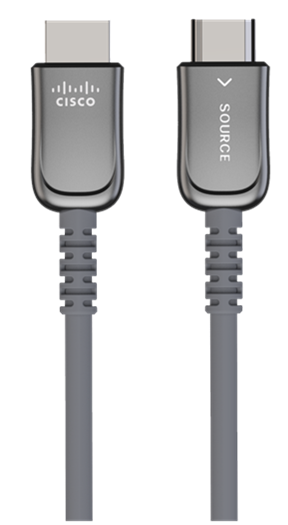
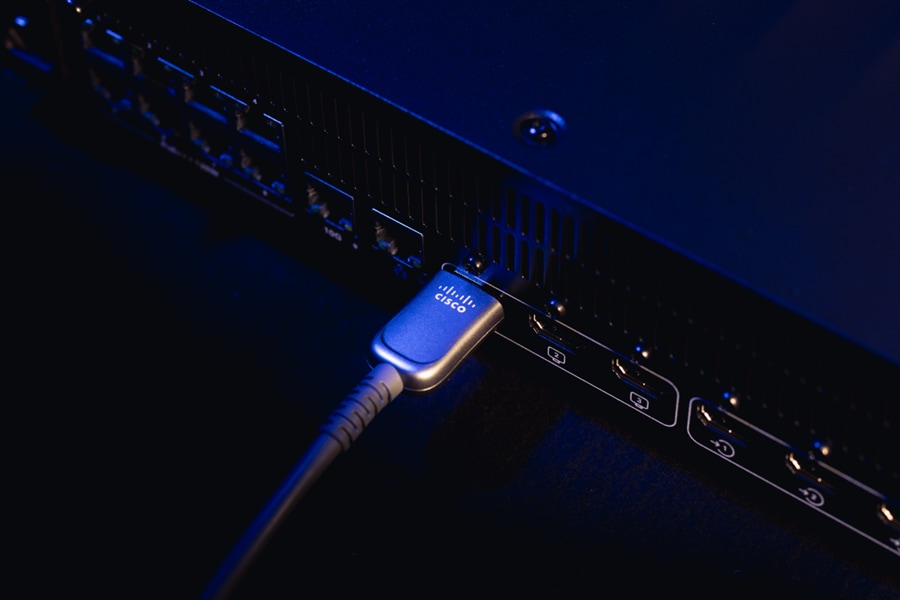
Build powerful, video-enabled meeting spaces without hardware complexity or sacrificing reliability—all through carefully engineered HDMI connections. These new conferencing cables deliver the promise of HDMI 2.1 standard while maintaining consistent signal transmission.
Enable end users to share high-resolution content with no extra steps, signal loss, or moments of uncertainty. Use them to connect a laptop for engaging presentations in huddle rooms, at conference tables, or across larger, more dynamic collaboration spaces.
Featuring up to 20-meter (65.6-foot) reach and active optical design in longer models, these cables help you connect displays, cameras, and content sources at larger distances without extender-clutter and extra power sources—reducing failure points and support overhead. Their slim, durable design makes it easy to route HDMI behind displays, through ceilings, or under tables. By replacing multiple hardware components with a single run, you can ease systems integration and enable a remarkably clean setup while ensuring a stable AV environment for large-scale deployments.
Table 1. Product specifications
| Feature |
Ultra High Speed HDMI Cable by Cisco |
Ultra High Speed HDMI Cables by Cisco – Active Optical Cables |
| Description |
2m Ultra High Speed HDMI Cable |
4m, 9m, and 20m Ultra High Speed HDMI Cable (Active Optical) |
| Product compatibility |
● Cisco Desk Series
● Cisco Board Series
● Cisco Room Series
● Compatible with non-Cisco devices
|
● Cisco Desk Series
● Cisco Board Series
● Cisco Room Series
● Compatible with non-Cisco devices
|
| Color |
Gray |
Gray |
| HDMI standard |
As specified by HDMI 2.1b |
As specified by HDMI 2.1b |
| Bandwidth |
Up to 48 Gbps |
Up to 48 Gbps |
| Orientation |
Bi-directional |
Monodirectional (source - sink) |
| Interface |
HDMI to HDMI |
HDMI to HDMI |
| Resolution |
Maximum resolution 8K UHD (7680 × 4320) @60fps |
Maximum resolution 8K UHD (7680 × 4320) @60fps |
| Cable dimensions |
2m (6.6 ft) |
4m (13 ft), 9m (29.5 ft), and 20m (65.6 ft) |
| Diameter |
5.8mm |
6mm |
| Cable ID |
Supported to detect cable type and daisy chaining |
Supported to detect cable type, wrong cable orientation, and daisy chaining |
| Management |
Visibility and monitoring of the cable in Control Hub when connecting the video system with a display |
Visibility and monitoring of the cable in Control Hub when connecting the video system with a display |
| Shielding |
Electromagnetic Interference (EMI) / Radio Frequency Interference (RFI) immune |
Electromagnetic Interference (EMI) / Radio Frequency Interference (RFI) immune |
| Bend radius |
60mm near the connectors, 30mm elsewhere |
60mm near the connectors, 30mm elsewhere |
Table 2 provides ordering information to help customers understand all the components and parts you need to purchase to install and use the products.
To place an order, visit the Cisco Ordering Home Page. To download software, visit the Cisco Software Center.
Table 2. Ordering information
| Product name |
Part number |
| Ultra High Speed HDMI Cable by Cisco, 2M |
CAB-UHS-8K-2M |
| Ultra High Speed HDMI Cable by Cisco, 4M |
CAB-UHS-8K-4M |
| Ultra High Speed HDMI Cable by Cisco, 9M |
CAB-UHS-8K-9M |
| Ultra High Speed HDMI Cable by Cisco, 20M |
CAB-UHS-8K-20M |
| Ultra High Speed HDMI Cable by Cisco, 2M - Spare |
CAB-UHS-8K-2M= |
| Ultra High Speed HDMI Cable by Cisco, 4M - Spare |
CAB-UHS-8K-4M= |
| Ultra High Speed HDMI Cable by Cisco, 9M - Spare |
CAB-UHS-8K-9M= |
| Ultra High Speed HDMI Cable by Cisco, 20M - Spare |
CAB-UHS-8K-20M= |
Cisco UHS HDMI cables has a 1-year limited liability warranty, learn more on Product Warranties page.
Information about Cisco’s environmental sustainability policies and initiatives for our products, solutions, operations, and extended operations or supply chain is provided in the “Environmental Sustainability” section of Cisco’s Corporate Social Responsibility (CSR) report.
Reference links to information about key environmental sustainability topics (mentioned in the “Environment Sustainability” section of the CSR Report) are provided in the following table:
Table 3. Product sustainability information
| Sustainability topic |
Reference |
|
| General |
Information on product-material-content laws and regulations |
|
| Information on electronic waste laws and regulations, including our products, batteries, and packaging |
||
| Information on product takeback and reuse program |
||
| Sustainability inquiries |
Contact: csr_inquiries@cisco.com |
|
| Material |
Product packaging weight and materials |
Contact: environment@cisco.com |
Cisco makes the packaging data available for informational purposes only. It may not reflect the most current legal developments, and Cisco does not represent, warrant, or guarantee that it is complete, accurate, or up to date. This information is subject to change without notice.
Cisco Services make networks, applications, and the people who use them work better together.
Today, the network is a strategic platform in a world that demands better integration among people, information, and ideas. The network works better when services, together with products, create solutions aligned with business needs and opportunities.
The unique Cisco lifecycle approach to services defines the requisite activities at each phase of the network lifecycle to help ensure service excellence. With a collaborative delivery methodology that joins the forces of Cisco, our skilled network of partners, and our customers, we can achieve the best results.
Flexible payment options make it easier than ever to get the Cisco technology you need
Cisco Capital® delivers leading-edge payment solutions, allowing you to stay focused on what’s most important—your business. We can help you drive business outcomes, accelerate innovation and digital transformation, and adapt to market dynamics faster with flexible payment options tailored to your specific business needs. Reduce the total cost of ownership, conserve capital, and accelerate growth. We help you realize the full benefits of Cisco technology today, and in the future, and pay for it in the way that best suits your business requirements. Whether you are looking for a pay-as-you consume model, or need to bundle Cisco hardware, software, services, subscriptions and third-party solutions, learn more about how Cisco Capital can help.
Visit Cisco collaboration devices, or contact your local Cisco account representative for more information.
Simplify workspace planning with Cisco Workspace Designer