Cisco Desk Pro G2 Data Sheet
Available Languages
Bias-Free Language
The documentation set for this product strives to use bias-free language. For the purposes of this documentation set, bias-free is defined as language that does not imply discrimination based on age, disability, gender, racial identity, ethnic identity, sexual orientation, socioeconomic status, and intersectionality. Exceptions may be present in the documentation due to language that is hardcoded in the user interfaces of the product software, language used based on RFP documentation, or language that is used by a referenced third-party product. Learn more about how Cisco is using Inclusive Language.
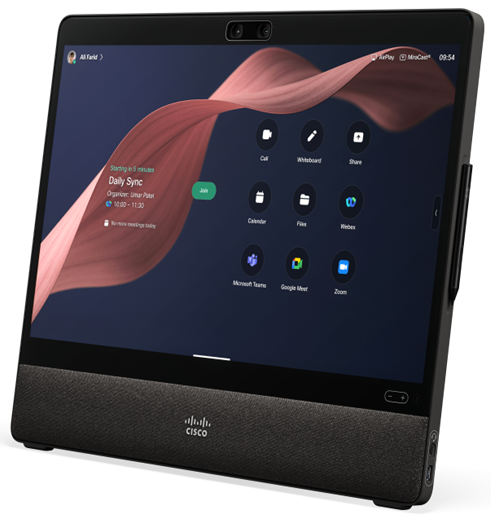
The Desk Pro G2 is the stage for the moments that matter. For your biggest meetings and most important presentations, its AI-powered audio and video help you build trust and deliver impactful, fatigue-free conversations—making it the perfect choice for executives, leaders, and anyone who leads with influence. Now featuring a dual-lens camera, the Desk Pro G2 expands to support huddle spaces and 3D video with Spatial Meetings. The advanced camera system includes a 4K telelens with 48MP and a wide-angle lens with a 105 degree field of view, ideal for groups of up to five people. IT teams can quickly deploy this compact device in minutes, streamlining setup and getting teams connected faster than ever.
Designed for sustainability and equipped with future-ready AI capabilities, the Desk Pro G2 empowers modern workspaces to connect and collaborate, today and into the future.
The Desk Pro G2 expands Cisco’s portfolio, delivering a seamless user experience as you move from large meeting rooms to huddle spaces and individual desks. Teams can enjoy consistent, high-quality collaboration in every workspace.
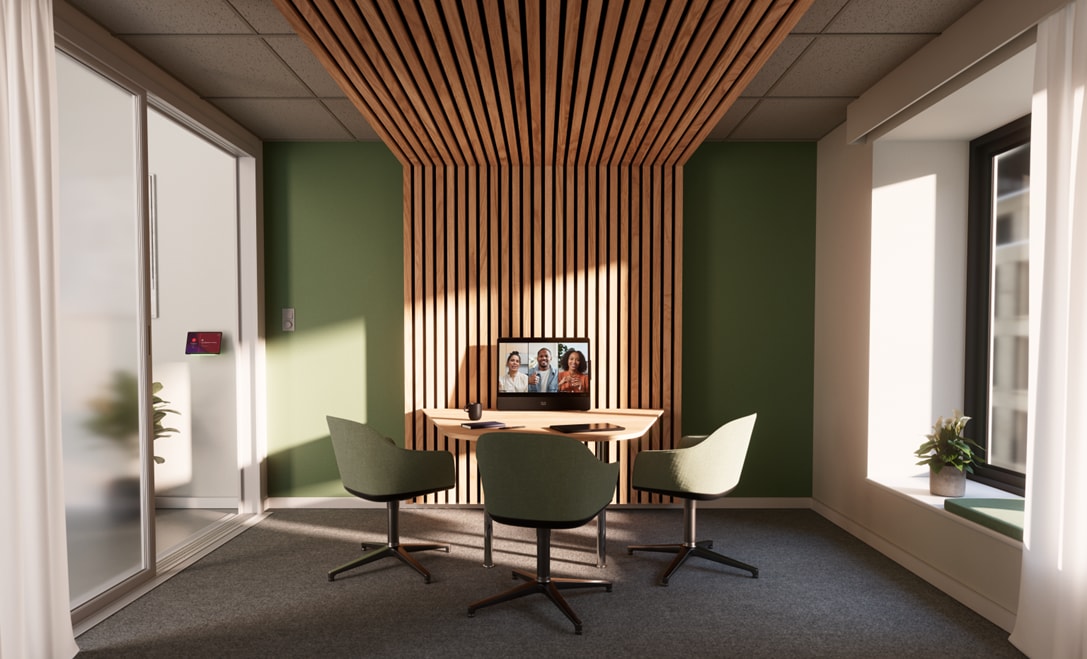
Table 1. Features and benefits
| Benefit |
|
| Premium workstation |
● Powerful device for dedicated video that enables focused conversations and quick decisions
● High-resolution 27-inch screen with a 4K-touch experience and anti-glare
● Dual-camera system with 48MP for sharp images, Bokeh effect, and excellent low light performance
● Active stylus enables simple and engaging whiteboarding experience
● Easy content sharing, including presentations, documents, or your desktop
● Advanced immersive presentations sharing capabilities
● Join a meeting or make a call using the touch display controls
● Customize your in-meeting video with blur and virtual background options
● Multiple ports for expanded docking station setups
|
| Compact huddle room |
● All-in-one workstation that is easy to deploy in any focus or huddle room
● Flexible mounting options for desk, wall mount, or a flexible arm
● Capture wide-angle view with the second camera suitable for up to five people
● Pair with a table navigator for extended screen reach
|
| USB-C connection |
● Functions as your docking station and primary display with a USB-C connection
● USB passthrough to use any meeting software on your laptop and while taking advantage of high-quality conferencing hardware
● Extend the functionality of your laptop with touch redirect that allows for touch-based PC control
● Power delivery to your laptop (USB PD 3.0)
|
| AI-powered collaboration |
● Includes AI-powered features that provide a frictionless meeting experience and contextual insights
● Webex
® Assistant is a voice-controlled assistant that enables you to start or join your meeting, book a room, or make a call
● Facial recognition identifies meeting participants and provides name labels
● Noise detection and suppression ensure the meeting is free of distracting background noise
|
| Co-creation |
● Easily whiteboard in person or remotely with the dedicated stylus or your finger
● Save whiteboard content to a Webex user with a few taps
● Get everyone on the same page with annotation on any content
● Ideate with the Microsoft Whiteboard (available in Microsoft Teams Room mode)
|
| Digital signage |
● Display on-demand content when the device isn’t being actively used
● Deliver digital signage, channel browsing, alerts, live TV, VoD capabilities, and scheduling
|
| Flexible deployments |
● Flexible deployment models enable you to decide what deployment option is best for your business
● Registers as a cloud, hybrid, or on-premises device
|
| Spatial meetings |
● Stereoscopic video using two camera lenses, which enables users to see participants in 3D video in a Webex meeting on Apple Vision Pro
● Enabled by multi-stream capabilities in Webex (based on building blocks developed for Webex Hologram)
● Non-headset participants receive 2D video of the same view
● Use cases: Product design review, Teaching technical process skills, Product and object demonstration, High-impact briefings and meetings
● Industries expressing interest: Education, Retail, Healthcare, Manufacturing
● Advantages over traditional 2D meetings:
◦ Better retention by participants ◦ Up-leveled audience engagement and trust ◦ Improved confidence in learning new skills ◦ Reduced cost and time to market for design reviews ◦ Brand differentiation for Sales teams |
Table 2. Product specifications
| Specifications |
Description |
| Software compatibility |
● RoomOS 26 or later
|
| Platform compatibility |
● Webex
● Microsoft Teams Rooms
● Zoom for Cisco
® Rooms ()
● H.323
● Session Initiation Protocol (SIP)
● Web Real-Time Communication (WebRTC)
● Bring Your Own Meeting (BYOM) using USB-C Passthrough
● Native registration on Cisco Unified Communications Manager (CUCM)
◦ Requires CUCM version 14 or later with device pack for Desk Pro G2 ◦ Native registration with Cisco Expressway |
| Default components shipped with Cisco Desk Pro G2 |
● Desk Stand
● USB-C cable (see USB-C BYOD section for details), 1.5 m/59 in
● Power supply for Cisco Desk Pro and Desk Pro G2
|
| Optional hardware components |
● Active stylus
● Video Electronics Standards Association (VESA) adapter and wall mount kit
● Replaceable metal speaker grille
● Network cable
● HDMI presentation cable
|
| Display |
● 27-inch LCD monitor
● 4K resolution (3840 x 2160) (16:9)
● High contrast ratio: 2000:1 (typical)
● Viewing angle: +/–89° (typical)
● Brightness 350 cd/m2
● 10-bit (8-bit + FRC) color depth, display 1.07B colors
● Color gamut DCI-P3 98%
● Low blue light for eye care
|
| User interface |
● Projected capacitive touch
● Optically bonded cover glass
● Multi-touch
● Palm rejection support
|
| Supported PC resolutions |
● 1080p60, 1440p60, 2160p30 (4K), and 2160p60 (4K)
|
| Cameras |
● Dual integrated camera system featuring a 105° wide-angle lens and a 70° telelens
● Privacy shutter with LED light in front (incoming calls and camera activation)
● Automatic framing of meeting participants
● Opt-in face recognition for name labels in Webex meetings
● Auto brightness, auto white balance, and auto focus
● Group view and Frames camera mode for individual participant framing, alongside manual camera adjustments
● Support for Meeting Zone to set up virtual meeting perimeters for automatic framing
● 2x optical zoom (tele/wide-angle equivalent focal lengths)
● 5x digital zoom
Main camera:
● 4K Ultra HD camera
● 70° horizontal field of view, 55° vertical field of view
● 1/1.3” Quad Bayer, 48MP, Phase Detection Autofocus (PDAF) technology
● f/1.85 fixed aperture
● 60 fps
Wide-angle camera:
● 4K Ultra HD camera
● 105° horizontal field of view, 86° vertical field of view
● 1/2.8”, 14.5MP, PDAF technology
● f/2.2 fixed aperture
|
| Video standards |
● H.263, H.264 AVC, H.265 HEVC, AV1
|
| Video inputs |
● USB-C DisplayPort Alternate Mode up to 3840 x 2160p60 (4Kp60), 4Kp60 requires Gen 2 speed cable
● HDMI 2.0 type A input supports formats up to 3840 x 2160p60 (4Kp60)
|
| Video outputs |
● HDMI 2.0 type A output supports formats up to 3840 x 2160p60 (4Kp60) for screen mirroring or extension on external displays (available on RoomOS, not on MTR)
|
| Encode and decode |
● Video stream: up to 1920x1080 at 60fps
● Content stream: up to 4K (3840x2160) at 30fps
|
| Audio standards |
● G.711, G.722, G.722.1, G.729, AAC-LD, and Opus
|
| Audio features |
● Acoustic Echo Cancellation (AEC)
● Active Lip Synchronization
● AI-Powered Noise Removal
● Automatic Gain Control (AGC)
● Beamforming Microphone Array
● De-Reverberation
● Full Duplex
● Full-Band Audio
● Noise Reduction
● Directional Audio
● Ultrasound Technology
|
| Audio inputs |
● Internal 8-element microphone array for crystal clear speech pickup
● Bluetooth
®
● High-Definition Multimedia Interface (HDMI) input
● USB-C
● USB-A
|
| Audio outputs (external) |
● USB-C
● USB-A
● Bluetooth headset
|
| Loudspeakers (integrated) |
● High-quality speakers with left, center, and right channels enabling Directional Audio, plus dual woofers in a mechanically balanced configuration
● Frequency response 45 Hz to 20 kHz
|
| USB-C BYOD |
Ability to provide the following over one USB-C cable to a connected computer:
● Extension of display (3840x2160 @60fps) (Computer must support Alt-mode Display Port)
● Touch forwarding capabilities on supported operating systems
● Use Desk Pro G2 camera, microphone, and speakers with any software client
● Laptop charging (80 W maximum)
● Use Desk Pro G2 as your laptop docking station to keep peripherals connected (keyboard, mouse, USB memory stick, etc.)
● A cable supporting USB 3.2 gen2x2 and 100 W charging or better is required for best performance
|
| Other USB ports |
Side connections:
● Application ports for headset, handset, or content camera for example
● 1 x USB-C: USB 2.0, USB 3.2 Gen 1x1, 15 W charging (5 V 3A)
● 1 x USB-A USB 2.0, 7.5 W charging
Rear connections:
● Application port for headset, handset, or content camera for example
● 1 x USB-A: USB 2.0, USB 3.2 Gen 2x1, 7.5 W charging
● PC Docking ports for mouse, keyboard, USB memory stick for example
● 1 x USB-C: USB 2.0, USB 3.2 Gen 2x1, 7.5 W charging
● 2 x USB-A: USB 2.0, USB 3.2 Gen 2x1, 7.5 W charging
● One Micro-B USB port intended for service only
|
|
● Networked Standby power consumption: 15 W typical
● Deep sleep power consumption: 1 W typical
● Electrical rating: 100 to 240 VAC [external power supply], 20 VDC input [Desk Pro G2]
● In call power: 62 W typical
|
|
| Sensors |
● Temperature for Control Hub analytics reporting. Resolution 0.1°C. Accuracy ±2°C
● Humidity for Control Hub analytics reporting. Resolution 1%; Accuracy ±5%
|
| Operating temperature and humidity |
● 32°F to 104°F (0°C to 35°C ) ambient temperature
● 20% to 90% Relative Humidity (RH)
|
| Storage and transport temperature |
● –4°F to 140°F (–20°C to 60°C) at RH 10% to 90% (noncondensing)
|
| Locking mechanism |
● Kensington security lock
|
|
● Width 24.8 in. (63 cm)
● Height 19.7 in (50 cm)
● Depth 3.2 in (8.2 cm) without desk stand; 7.3 in (18.6 cm) with desk stand attached
● Weight 26.2 lb (11.9 kg)
When packaged:
● Width 30.5 in. (77.6 cm)
● Height 30.5 in. (77.6 cm)
● Depth 7.7 in. (19.6 cm)
● Weight 38.5 lb (17.5 kg)
|
|
| Ergonomic design |
● Tiltable screen
● Stand attached
● Easy to snap on cable cover
|
| Physical buttons |
● Power button
|
| Touch buttons |
● Volume up and down LED indicator
● Microphone mute LED indicator
|
| Visual indicator |
● Camera On LED indicator (camera activation)
|
| Bluetooth wireless technology (excluding no-radio variants) |
● Bluetooth Dual-Mode
● Bluetooth Class 1.5
● Features: Classic Audio, LE Beacon
● Bluetooth Profiles: Hands-Free Profile (HFP), Advanced Audio Distribution Profile (A2DP)
● Qualified against Bluetooth core 5.1
|
| Network |
● Internal 2-port Cisco Ethernet switch allows for a direct connection to a 10/100/1000BASE-T Ethernet network (IEEE802.3i/802.3u/802.3ab) through an RJ-45 interface with single LAN connectivity for both the Desk Pro G2 and a co-located PC
● Wi-Fi 802.11a/b/g/n/ac/ax 2.4 GHz, 5 GHz and Wi-Fi 6E (UNII-5)
|
| Bandwidth requirements |
● Up to 20 Mbps bandwidth rate for video content
|
| System management and call control |
For cloud deployments, the device is managed in the Control Hub, providing a single pane of glass of system status, activation, configuration, metrics, workspace insights, and troubleshooting For on-premises deployments, the following management and call control options apply:
● Native registration with Cisco Unified Communications Manager (CUCM)—requires version 14 or later with device pack for Desk Pro G2
● Native registration with Expressway
● Webex Service
● Third-party H.323 gatekeepers and standards-based SIP proxies
● In case of a hybrid deployment, Webex Edge for Devices enables linking your on-premises Cisco devices to the Webex Platform and benefits from specific cloud features such as device management, monitoring, and analytics via Control Hub.
Learn more about the features and benefits of Webex Edge for Devices. |
| Peripherals supported |
● USB headset
● Bluetooth headset (wide band)
|
| Embedded encryption |
● Support Webex Encryption, end to end
● H.323
** and SIP point-to-point
● Standards-based: H.235 v3 and Advanced Encryption Standard (AES)
● Automatic key generation and exchange
|
| Wireless sharing |
● Webex app (up to 3840 x 2160 at 7.5 fps, including up to 1920 x 1080 at 30 fps)
● Miracast (1920 x 1080 at 60 fps) — not available on non-radio version
Apple AirPlay wireless sharing: coming soon
● Bluetooth discovery (not on non-radio version) and Bonjour service discovery
● AirPlay Screen mirroring up to 1920 x 1080 at 60 fps
● AirPlay Extended desktop (Mac only) — up to 1920 x 1080 at 60 fps
● AirPlay Video streaming up to 3840 x 2160 at 30 fps
|
|
● Directive 2014/53/EU (Radio Equipment Directive) for the radio versions
● Directive 2014/30/EU (EMC Directive) — Class A for non-radio
● Directive 2014/35/EU (Low-Voltage Directive) for the non-radio versions
● Directive 2011/65/EU (RoHS)
● Directive 2012/19/EU (WEEE)
● NRTL approved (product safety)
● FCC CFR 47 Part 15B (EMC) – Class A
● FCC CFR 47 Part 15C (RF)
● FCC CFR 47 Part 15E (RF)
● FCC Listed (radio equipment)
|
|
| Multipoint support |
● 5-way embedded SIP/H.323 conferencing capability with MultiSite option
|
| Multisite features (Embedded multipoint) (optional upgrade) |
● Up to 15 Mbps total MultiSite bandwidth
◦ 3-way, resolution up to 1080 at 30 fps plus content up to 4K at 15 fps ◦ 4-way, resolution up to 720 at 30 fps plus content up to 4K at 15 fps ◦ 5-way, resolution up to 720 at 30 fps plus content up to 4K at 10 fps
● Full individual audio and video transcoding
● H.323
**, SIP, and Audio only in the same conference
● Best impression (automatic continuous presence layouts)
● Encryption and dual stream from any site
|
Table 3. Product registration
| License |
Term |
| Cisco Device Subscription |
Monthly or 1-, 2-, 3-, 4-, or 5-year options |
Table 4. Ordering information
| Product name |
Part number |
Compliance model number |
| Cisco Desk Pro G2 – Carbon Black, Upfront GPL |
CS-DESKP-C-K9 |
TTC7-29 |
| Cisco Desk Pro G2 – No radio, Carbon Black |
CS-DESKP-NR-C-K9 |
TTC7-29 |
| Cisco Desk Pro G2 – TAA (for U.S Government) Carbon Black |
CS-DESKP-C-K9++ |
TTC7-29 |
| Cisco Desk Pro G2 - No radio TAA (for U.S Government) Carbon Black |
CS-DESKP-NR-C-K9++ |
TTC7-29 |
| Cisco Desk Pro G2, Customized Model, Carbon Black |
CS-DESKP-C-K9-- |
TTC7-29 |
| Cisco Desk Pro G2, No-Radio, Customized Model, Carbon Black |
CS-DESKP-NR-C-K9-- |
TTC7-29 |
| Cisco Desk Pro G2 – Standalone unit, Carbon Black |
CS-DESKP-C-UK9 |
TTC7-29 |
| Cisco Desk Pro G2 – No-Radio, Standalone unit, Carbon Black |
CS-DESKP-NR-C-UK9 |
TTC7-29 |
| Hardware Options |
||
| Cisco Active Stylus Pen (1 Stylus) for Desk Pro G2 only |
CS-ACTSTYL |
TTC5-21 |
| Software Options (Ordered Separately) |
||
| Remote Monitoring |
L-DESK-SERIES-RM |
- |
| Multisite (embedded multipoint) |
LIC-DESKPRO-MS |
- |
| Spares |
||
| Cisco Desk Pro G2 – Upfront GPL, Carbon Black, SPARE1 |
CS-DESKP-C-K9= |
TTC7-29 |
| Cisco Desk Pro G2 – No Radio, Carbon Black – SPARE1 |
CS-DESKP-NR-C-K9= |
TTC7-29 |
| Cisco Desk Pro G2, Customizedp Model, Carbon Black- SPARE |
CS-DESKP-C-K9--= |
TTC7-29 |
| Cisco Desk Pro G2, No-Radio, Customized Model, Black- SPARE |
CS-DESKP-NR-CK9--= |
TTC7-29 |
| Table Desk Stand for Cisco Desk Pro G2 – SPARE (Carbon Black) |
CS-DESKP-C-STAND= |
- |
| Desk Pro G2 Tablestand, Carbon w/Safety Kit for AUS/NZ-SPARE |
CS-MNT-DS-CTSKAU= |
- |
| Replacement SafetyKit for DeskSeries Tablestand AUS/NZ-SPARE |
CS-MNT-DS-SK-AU= |
- |
| VESA Adapter and Wall Mount Kit (Black) for Desk Pro and Desk Pro G2 |
CS-DESKP-VESA-C= |
- |
| Replacement Front Speaker Grille for DeskPro G2 (Carbon Black) |
CS-DESKP-C-FG= |
- |
| Metal speaker grille for Desk Pro G2 (Black) |
CS-DESKPRO-MG-C= |
- |
| Power adapter for Cisco Desk Pro and Desk Pro G2 |
CS-PWR-CUBE-7= |
FSP230-A20C14 |
| Cisco Active Stylus Pen (1 Stylus) for Desk Pro G2 |
CS-ACTSTYL= |
TTC5-21 |
| HDMI-HDMI 2.1b cable + w/Cable ID - 2M, Gray, Spare |
CAB-UHS-8K-2M= |
|
| HDMI-HDMI 2.1b directional (AOC) Active Optical Cable, 4M, Spare |
CAB-UHS-8K-4M= |
|
| USB-C 3.2 Gen 2X2 Passive Cable, 1.5M length |
CAB-USBC-1.5M |
|
| USB-C 3.2 Gen 2X2 Active Cable, 4M length - SPARE |
CAB-USBC-AC-4M= |
|
| Cisco Room Navigator Table Stand, First Light (White) -SPARE |
CS-T10-TS-L-K9= |
TTC5-15 |
| Cisco Room Navigator Table Stand, Carbon Black - SPARE |
CS-T10-TS-C-K9= |
|
| Cisco Room Navigator Wall Mount, First Light (White) -SPARE |
CS-T10-WM-L-K9= |
|
| Cisco Room Navigator Wall Mount, Carbon Black - SPARE |
CS-T10-WM-C-K9= |
|
| Ethernet CAT5E Round Cable, 4M length - SPARE |
CAB-CAT5E-4M= |
|
| Ethernet CAT5E Round Cable , 8M length - SPARE |
CAB-CAT5E-8M= |
|
| Ethernet CAT5E Round Cable, 12M length - SPARE |
CAB-CAT5E-12M= |
|
| Power Injector 802.3at PoE+ 30W |
CS-PWR-INJ-30W |
|
Table 5. Packaging chart
| Packaging |
Unit Package Dimensions |
Units Per Pallet |
Pallet Dimensions |
| DeskPro G2 |
30.55 x 8.06 x 29.33 in77.60 x 20.47 × 74.50 cm |
7 |
48.00 X 40.00 x 36.42 in121.92 x 101.6 x 92.51 cm |
Cisco Desk Pro G2 has a 1-year limited liability warranty, learn more on Product Warranties page.
Refer to the CSR/Social Responsibility section for more information on Cisco’s environmental sustainability policies and initiatives.
| Sustainability topic |
Reference |
|
| General |
Information on product-material-content laws and regulations |
|
| Information on electronic waste laws and regulations, including our products, batteries and packaging |
||
| Sustainability Inquiries |
Contact: csr_inquiries@cisco.com |
|
| Information on product takeback and reuse program |
||
| Hardware as a Service (Circular Economy) |
||
| Approvals and compliance |
||
| Power |
Power |
|
| Material |
Product packaging weight and materials |
Contact: environment@cisco.com |
| Dimensions |
||
Information about Cisco’s environmental, social and governance (ESG) policies and initiatives can be found in Cisco’s Corporate Social Responsibility (CSR) report.
Cisco and our partners provide a broad portfolio of smart, personalized services and support that can help you realize the full business value of your Cisco collaboration investment by increasing business agility and network availability. This portfolio of services can accelerate business innovation by harnessing the network as a powerful business platform.
For more information about these services, visit: cisco.com/go/collaborationservices.
Flexible payment solutions to help you achieve your objectives.
Cisco Capital® makes it easier to get the right technology to achieve your objectives, enable business transformation, and help you stay competitive. We can help you reduce the total cost of ownership, conserve capital, and accelerate growth. In more than 100 countries, our flexible payment solutions can help you acquire hardware, software, services, and complementary third-party equipment in easy, predictable payments. Learn more.
Learn more about the Cisco Desk Pro G2.