Fixed domains and country codes for Catalyst APs (ROW)
Fixed domains and country codes for Catalyst APs (ROW) is a regulatory management system that simplifies the management of country codes for regions that do not have a specific domain mapped, with fixed domain and country code support for the Catalyst IW9167E, IW9165E, and IW9165D APs.
Regulatory approval verification
You are responsible for ensuring APs approval for use in your country. To verify approval and identify the regulatory domain associated with a particular country, refer to the Cisco Product Approval Status.
Supported fixed domains for Catalyst IW9167E
This table provides a summary of supported fixed domains for the Catalyst IW9167E, detailing indoor deployment capabilities for each domain.
|
Domain |
Indoor deployment support |
|---|---|
|
A |
No |
|
B 1 |
N/A |
|
E |
Yes |
|
F |
No |
|
Q |
No |
|
Z |
No |
Supported country codes for Catalyst IW9167E
This table provides the complete list of supported country codes for the Catalyst IW9167E access point, including indoor deployment support status and initial software release information.
|
Country code |
Indoor deployment support |
Initial support |
|---|---|---|
|
Algeria (DZ) |
No |
17.16.1 |
|
Argentina (AR) |
No |
17.13.1 |
|
Bahamas (BS) |
No |
17.16.1 |
|
Brazil (BR) |
No |
17.13.1 |
|
Brunei (BN) |
No |
17.16.1 |
|
Cameroon (CM) |
No |
17.16.1 |
|
Chile (CL) |
No |
17.13.1 |
|
China (CN) |
No |
17.13.1 |
|
Colombia (CO) |
No |
17.13.1 |
|
Costa Rica (CR) |
No |
17.16.1 |
|
Ecuador (EC) |
No |
17.13.1 |
|
Egypt (EG) |
No |
17.15.1 |
|
El Salvador (SV) |
No |
17.16.1 |
|
Ghana (GH) |
No |
17.16.1 |
|
Great Britain (GB) |
Yes |
17.11.1 |
|
Hong Kong (HK) |
No |
17.13.1 |
|
Iceland (IS)2 |
Yes |
— |
|
India (IN) |
No |
17.12.1 |
|
Iraq (IQ) |
No |
17.13.1 |
|
Kenya (KE) |
No |
17.16.1 |
|
Korea (KR) |
No |
17.12.1 |
|
Kuwait (KW) |
No |
17.16.1 |
|
Macau (MO) |
No |
17.16.1 |
|
Malaysia (MY) |
No |
17.15.1 |
|
Mexico (MX) |
No |
17.13.1 |
|
Monaco (MC)3 |
Yes |
— |
|
Mongolia (MN) |
No |
17.15.1 |
|
Nigeria (NG) |
No |
17.16.1 |
|
Pakistan (PK) |
No |
17.13.1 |
|
Panama (PA) |
No |
17.16.1 |
|
Paraguay (PY) |
No |
17.16.1 |
|
Peru (PE) |
No |
17.12.1 |
|
Philippines (PH) |
No |
17.12.1 |
|
Puerto Rico (PR)4 |
No |
17.15.1 |
|
Qatar (QA) |
No |
17.13.1 |
|
Saudi Arabia (SA) |
No |
17.13.1 |
|
Singapore (SG) |
No |
17.13.1 |
|
South Africa (ZA) |
No |
17.13.1 |
|
Taiwan, Republic of China (TW) |
No |
17.13.1 |
|
Thailand (TH) |
No |
17.13.1 |
|
Trinidad (TI) |
No |
17.18.1 |
|
United Arab Emirates (AE) |
No |
17.13.1 |
|
Uruguay (UY) |
No |
17.13.1 |
|
Vietnam (VN) |
N/A |
17.11.1 |
 Note |
You can select the listed country codes using CLI or GUI. For ROW domain, select the country code for the device to work. This task IS common to all the three Catalyst APs: IW9167E, IW9165E, and IW9165DH. |
Supported fixed domains for Catalyst IW9165E
This table provides a list of supported fixed domains for the Catalyst IW9165E access point and indicates their support status for indoor deployment.
|
Domain |
Indoor deployment support |
|---|---|
|
A |
Yes |
|
B 5 |
N/A |
|
E |
Yes |
|
F |
Yes |
|
Q |
Yes |
|
Z |
Yes |
Supported country codes for Catalyst IW9165E
This table provides a comprehensive list of country codes supported by the Catalyst IW9165E access point, including indoor deployment capabilities and the initial software version that introduced support for each country.
|
Country code |
Indoor deployment support |
Initial support |
|---|---|---|
|
Algeria (DZ) |
Yes |
17.16.1 |
|
Argentina (AR) |
Yes |
17.15.1 |
|
Bahrain (BH) |
Yes |
17.16.1 |
|
Bolivia (BO) |
Yes |
17.16.1 |
|
Brazil (BR) |
Yes |
17.13.1 |
|
Cameroon (CM) |
Yes |
17.18.1 |
|
Chile (CL) |
Yes |
17.13.1 |
|
China (CN) |
Yes |
17.15.1 |
|
Colombia (CO) |
Yes |
17.15.1 |
|
Costa Rica (CR) |
Yes |
17.16.1 |
|
Dominican Republic (DO) |
Yes |
17.16.1 |
|
Ecuador (EC) |
Yes |
17.15.1 |
|
Egypt (EG) |
Yes |
17.15.1 |
|
Ghana (GH) |
Yes |
17.18.1 |
|
Great Britain (GB) |
Yes |
17.12.1 |
|
Hong Kong (HK) |
Yes |
17.15.1 |
|
India (IN) |
Yes |
17.13.1 |
|
Iraq (IQ) |
Yes |
17.15.1 |
|
Kazakhstan (KZ) |
Yes |
17.16.1 |
|
Kenya (KE) |
Yes |
17.16.1 |
|
Korea (KR) |
Yes |
17.13.1 |
|
Kuwait (KW) |
Yes |
17.18.1 |
|
Malaysia (MY) |
Yes |
17.15.1 |
|
Mexico (MX) |
Yes |
17.13.1 |
|
Mongolia (MN) |
Yes |
17.15.1 |
|
Pakistan (PK) |
Yes |
17.15.1 |
|
Panama (PA) |
Yes |
17.16.1 |
|
Paraguay (PY) |
Yes |
17.16.1 |
|
Peru (PE) |
Yes |
17.13.1 |
|
Philippines (PH) |
Yes |
17.13.1 |
|
Qatar (QA) |
Yes |
17.13.1 |
|
Saudi Arabia (SA) |
Yes |
17.13.1 |
|
Singapore (SG) |
Yes |
17.13.1 |
|
South Africa (ZA) |
Yes |
17.13.1 |
|
Sri Lanka (LK) |
Yes |
17.13.1 |
|
Taiwan, Republic of China (TW) |
Yes |
17.14.1 |
|
Thailand (TH) |
Yes |
17.13.1 |
|
UAE (AE) |
Yes |
17.13.1 |
|
Vietnam (VN) |
Yes |
17.13.1 |
Supported fixed domains for Catalyst IW9165DH
This table provides the indoor deployment support status for various regulatory domains applicable to the Catalyst IW9165DH access point.
|
Domain |
Indoor deployment support |
|---|---|
|
A |
No |
|
B 6 |
N/A |
|
E |
Yes |
|
F |
No |
|
Q |
No |
|
Z |
No |
Supported country codes for Catalyst IW9165DH
This table provides the supported country codes for the Catalyst IW9165DH access point, including indoor deployment availability and the initial software release that introduced support for each country.
|
Country code |
Indoor deployment support |
Initial support |
|---|---|---|
|
Algeria (DZ) |
No |
17.16.1 |
|
Argentina (AR) |
No |
17.15.1 |
|
Bolivia (BO) |
No |
17.16.1 |
|
Brazil (BR) |
No |
17.13.1 |
|
Cameroon (CM) |
No |
17.16.1 |
|
Chile (CL) |
No |
17.13.1 |
|
China (CN) |
No |
17.15.1 |
|
Colombia (CO) |
No |
17.15.1 |
|
Costa Rica (CR) |
No |
17.16.1 |
|
Costa Rica (CR) |
No |
17.16.1 |
|
Dominican Republic (DO) |
No |
17.16.1 |
|
Ecuador (EC) |
No |
17.15.1 |
|
Egypt (EG) |
No |
17.15.1 |
|
Ghana (GH) |
No |
17.16.1 |
|
Great Britain (GB) |
Yes |
17.12.1 |
|
Hong Kong (HK) |
No |
17.15.1 |
|
India (IN) |
No |
17.13.1 |
|
Iraq (IQ) |
No |
17.15.1 |
|
Kazakhstan (KZ) |
No |
17.16.1 |
|
Kenya (KE) |
No |
17.16.1 |
|
Korea (KR) |
No |
17.13.1 |
|
Kuwait (KW) |
No |
17.16.1 |
|
Malaysia (MY) |
No |
17.15.1 |
|
Mexico (MX) |
No |
17.13.1 |
|
Mongolia (MN) |
No |
17.15.1 |
|
Pakistan (PK) |
No |
17.15.1 |
|
Panama (PA) |
No |
17.16.1 |
|
Paraguay (PY) |
No |
17.16.1 |
|
Peru (PE) |
No |
17.13.1 |
|
Philippines (PH) |
No |
17.13.1 |
|
Qatar (QA) |
No |
17.13.1 |
|
Saudi Arabia (SA) |
No |
17.13.1 |
|
Singapore (SG) |
No |
17.13.1 |
|
South Africa (ZA) |
No |
17.13.1 |
|
Sri Lanka (LK) |
No |
17.13.1 |
|
Taiwan, Republic of China (TW) |
No |
17.14.1 |
|
Thailand (TH) |
No |
17.13.1 |
|
UAE (AE) |
No |
17.13.1 |
|
Vietnam (VN) |
No |
17.13.1 |
Configure and verify country code using CLI
This task configures the country code for Rest of the World (ROW) domain access points to ensure proper wireless interface operation and regulatory compliance.
Country code configuration is required for ROW domain access points to enable correct wireless operation. The country code must be included in the ROW domain for successful configuration.
Before you begin
Follow these steps to configure and verify country code using CLI:
Procedure
|
Step 1 |
Use the configure countrycode countrycode command to configure the country code for the ROW domain. Example:The CLI reports an error if the configured country code is not included in the ROW. The wireless interface does not work correctly if the country code is not configured.
|
||
|
Step 2 |
Use the show version | in Product command to verify the product model and ROW domain status. Example: |
||
|
Step 3 |
Use the show dot11Radio interface config command to verify the ROW country code configuration status. Example: |
Configure country code using GUI
Configure the country code to ensure wireless interfaces function properly and establish wireless connections between devices.
Wireless interfaces fail to work if country code is not configured. The country code setting ensures proper regulatory compliance and enables wireless functionality for your devices.
Before you begin
Follow these steps to configure the country code:
Procedure
|
Step 1 |
In the GENERAL SETTINGS, click wireless radio. |
||
|
Step 2 |
For ROW domain, if the country code is not selected, the following pop-up appears: 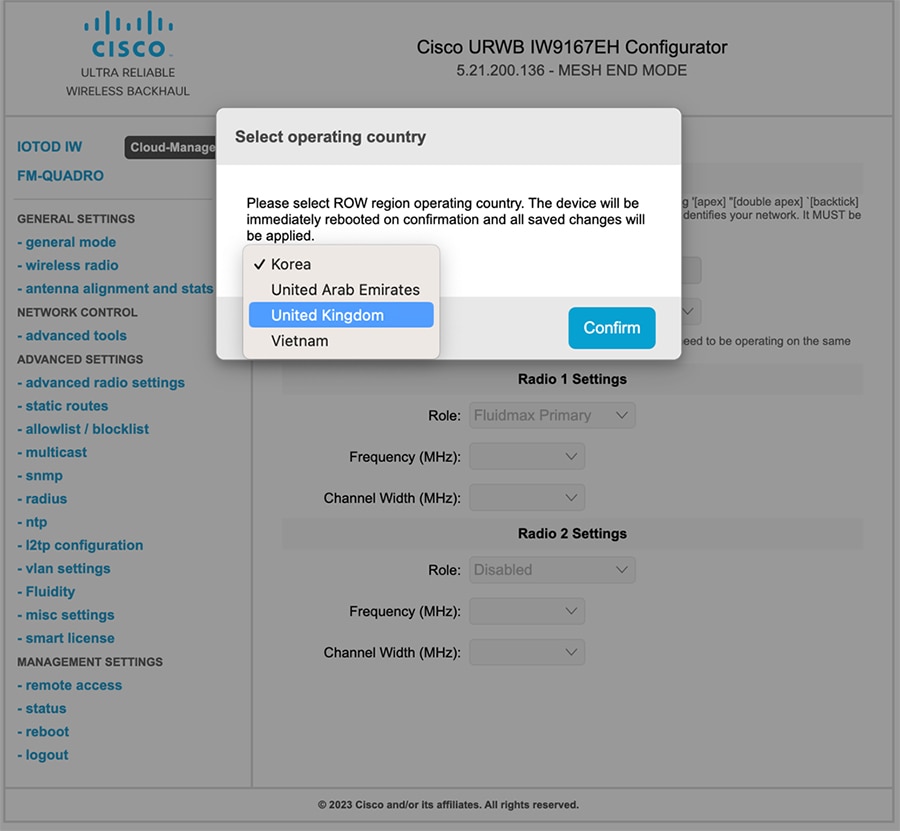
|
||
|
Step 3 |
To select a country code, click the pop-up in the above image then it redirects to the Wireless SETTINGS section. In the Wireless SETTINGS section, choose country from the drop-down list. A confirmation pop-up appears. |
||
|
Step 4 |
Click Confirm. A reboot confirmation screen appears. |
||
|
Step 5 |
Click Yes. |
||
|
Step 6 |
In the MANAGEMENT SETTINGS, click STATUS. In the STATUS page, check the details of operating region and country for confirmation. 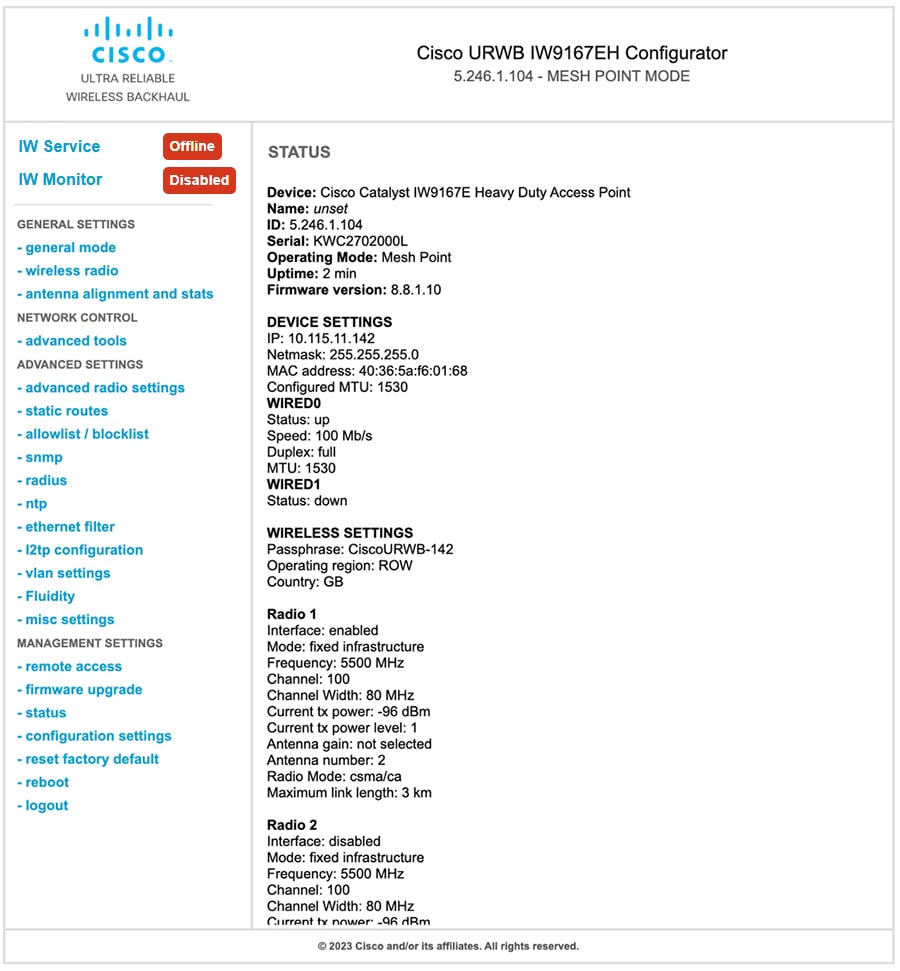
|
||
|
Step 7 |
To establish a wireless connection between devices, set the same operating frequency in radio devices.
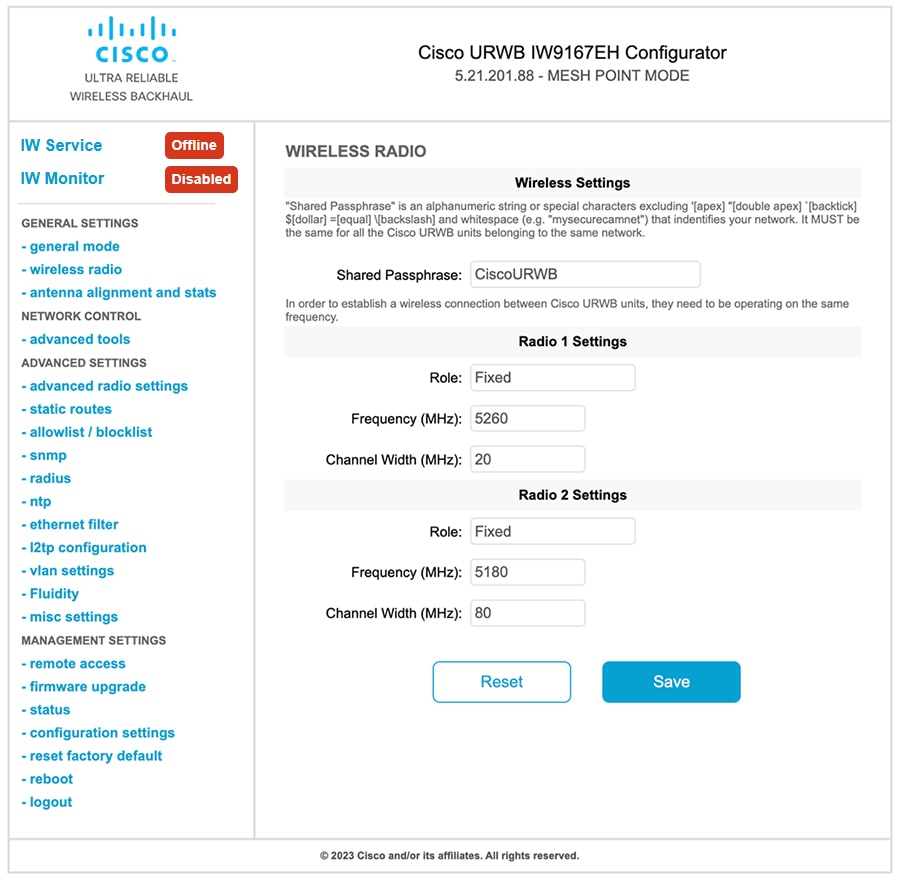
Following image shows the configuration of country code using GUI: 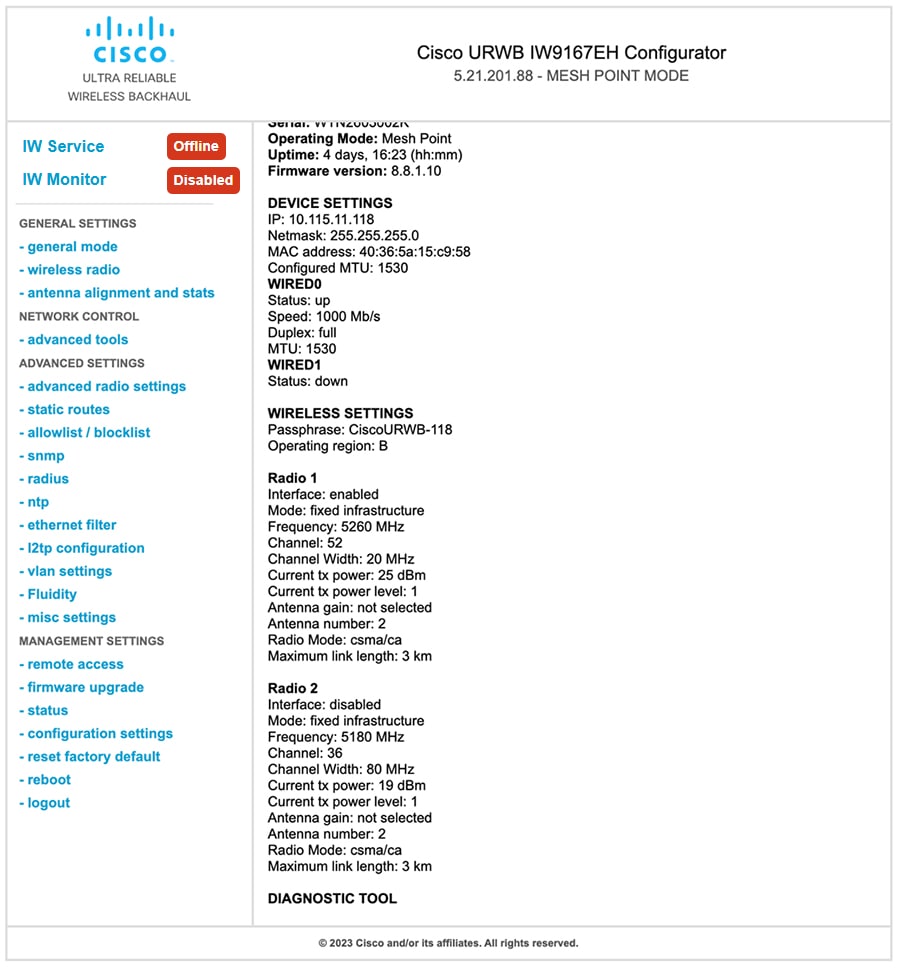
|
 Feedback