UCC 5G AMF Release Notes, Release 2026.03.0
Available Languages
Bias-Free Language
The documentation set for this product strives to use bias-free language. For the purposes of this documentation set, bias-free is defined as language that does not imply discrimination based on age, disability, gender, racial identity, ethnic identity, sexual orientation, socioeconomic status, and intersectionality. Exceptions may be present in the documentation due to language that is hardcoded in the user interfaces of the product software, language used based on RFP documentation, or language that is used by a referenced third-party product. Learn more about how Cisco is using Inclusive Language.
- US/Canada 800-553-2447
- Worldwide Support Phone Numbers
- All Tools
 Feedback
 Feedback
Ultra Cloud Core - Access and Mobility Management Function, Release 2026.03.0
Ultra Cloud Core - Access and Mobility Management Function, Release 2026.03.0
This Release Notes identifies changes and issues related to the Access and Mobility Management Function (AMF).
The key highlights of this release include:
● Enhanced Scalability and Resiliency: The AMF ULB integration with the Cilium plugin enables dynamic SCTP traffic distribution, supporting active-active operation and resilient connection handling during pod transitions.
● Dynamic Network Function Selection: Enables real-time sharing of priority, capacity, and load information with the NRF, allowing for accurate and dynamic network function selection.
● Real-time Policy Enforcement: Extends UE-AMBR throughput limit enforcement to active sessions, ensuring consistent policy application beyond just the initial registration phase.
● Simplified Deployment Models: Introduces All-in-One (AIO) cluster deployment options (Small/Large) that consolidate all AMF roles onto a single server to reduce infrastructure complexity.
● Configurable UDM Failure Handling: Extends the local NAS cause code mapping mechanism to allow operators to define specific 5GMM cause codes for UDM-side failures, ensuring predictable UE behavior.
● Jumbo Frame Support: Adds support for 9,000-byte MTU sizes on the N2 interface to accommodate larger data packets for high-performance networking requirements.
● Flexible Packet Service Control: Provides granular, policy-based, or local-override capability to block packet services for selected users while maintaining emergency access.
For more information on the AMF software, see the Related resources section.
Release Lifecycle Milestones
This table provides EoL milestones for Cisco Ultra Cloud Core - Access and Mobility Management Function software:
Table 1. EoL milestone information for UCC AMF, Release 2026.03.0
| Milestone |
Date |
| First Customer Ship (FCS) |
23-July-2026 |
| End of Life (EoL) |
23-July-2026 |
| End of Software Maintenance (EoSM) |
31-Jan-2028 |
| End of Vulnerability and Security Support (EoVSS) |
31-Jan-2028 |
| Last Date of Support (LDoS) |
31-Jan-2029 |
These milestones and the intervals between them are defined in the Cisco Ultra Cloud Core (UCC) Software Release Lifecycle Product Bulletin available on cisco.com.
This section provides a brief description of the new software features introduced in this release.
Table 2. New software features for UCC AMF, Release 2026.03.0
| Product impact |
Feature |
Description |
| Software Reliability |
5GMM cause code mapping for UDM failures |
In scenarios where AMF encounters UDM-side failures such as timeouts or transport issues, this feature allows you to handle these events in a controlled manner. By extending the local NAS cause code mapping mechanism, you can configure specific 5GMM cause codes to be sent to the UE, ensuring predictable behavior and supporting operator-specific requirements or redirection flows. |
| Ease of Setup |
AIO cluster architecture and deployment models |
You can deploy all AMF cluster functions on a single server with this feature, simplifying setup and reducing infrastructure complexity. You select either AIO-Small or AIO-Large, and resource allocation is optimized automatically so all AMF roles are consolidated on your chosen server. |
| Software Reliability |
Capability exchange with NRF during registration |
You benefit from more efficient network function selection because AMF shares its priority, capacity, and load information with NRF in real time during registration and on any changes. This enables dynamic load balancing and high availability by allowing NRF to maintain an accurate network function view. |
| Software Reliability |
Jumbo frame support on N2 interface |
You can now configure the N2 interface to support Jumbo Frames with an MTU size of 9,000 bytes. This feature allows for the adjustment of the MTU size within the SCTP stack parameters, ensuring the AMF can effectively handle larger data packets required for specific customer deployment environments and high-performance networking. |
| Software Reliability |
ULB integration with Cilium plugin |
This release introduces ULB integration with the Cilium plugin for dynamic SCTP pod traffic distribution, replacing static VIP-based routing. It supports advanced container networking and scalable pod placement through the Cilium plugin, enabling active-active SCTP operation and efficient connection distribution during pod failures. |
| Software Reliability |
UE-AMBR updates from UDM |
You benefit from real-time enforcement of subscriber throughput limits because AMF now applies UE-AMBR updates from UDM during active sessions, not just at registration. Any changes to bit rate limits are promptly conveyed to the gNB for connected UEs or at the next connection if idle, ensuring consistent policy enforcement. |
| Ease of Use |
Operator Determined Barring (ODB) for packet services |
You can block all packet services for selected users through AMF based on policy or regulatory requirements, either dynamically from UDM subscription changes or by local override, while emergency access remains unaffected. This feature gives you flexible network-level control over user packet service access. |
This section provides a brief description of the behavior changes introduced in this release.
Table 3. Behavior changes for Ultra Cloud Core - Access and Mobility Management Function, Release 2026.03.0
| Description |
Behavior changes |
| Configurable idle timeout for SCTP connections |
Previous behavior: There was no mechanism to identify and close idle SCTP connections. New behavior: AMF now supports configurable idle timeout for SCTP connections. When configured, AMF monitors SCTP connections for inactivity and automatically closes connections that remain idle beyond the specified timeout duration. Example configuration: sctp-parameter-profile sp1 parameters client-idle-timeout instance instance-id 1 endpoint sctp parameters client-idle-timeout Customer impact: Customers can now configure SCTP idle timeout handling to automatically close inactive connections. This capability improves connection management and helps prevent unused SCTP connections from remaining open unnecessarily. |
There are no resolved issues in this release.
This table lists the open issues in this specific software release.
Note: This software release may contain open bugs first identified in other releases. To see additional information, click the bug ID to access the Cisco Bug Search Tool. To search for a documented Cisco product issue, type in the browser: <bug_number> site:cisco.com
Table 4. Open issues for UCC AMF, Release 2026.03.0
| Bug ID |
Description |
| cache pod oom restart observed during amf ulb performance longevity |
|
| one of the service pod memory leak observed during 7K TPS longevity |
|
| T-AMF is not gracefully handling the collision of N2HO and registration procedure during SCTP Pod resiliency scenario |
This section lists compatibility information of the Cisco UCC software products that are verified to work with this version of the UCC AMF software.
Table 5. Compatibility information for UCC AMF, Release 2026.03.0
| Product |
Supported Release |
| Ultra Cloud Core SMI |
2026.03.1.08 |
| Ultra Cloud CDL |
2.3.0 |
This section provides information about the release packages associated with UCC AMF software.
Table 6. Software packages for UCC AMF, Release 2026.03.0
| Software Package |
Version |
| amf.2026.03.0.SPA.tgz |
2026.03.0 |
| cdl-2.3.0-amf-2026.03.0.SPA.tgz |
2.3.0 |
| NED package |
ncs-6.4.8.3-amf-nc-1.1. 2026.03.0 |
| NSO |
6.4.8.3 |
Cloud native product version numbering system
The show helm list command displays detailed information about the version of the cloud native product currently deployed.
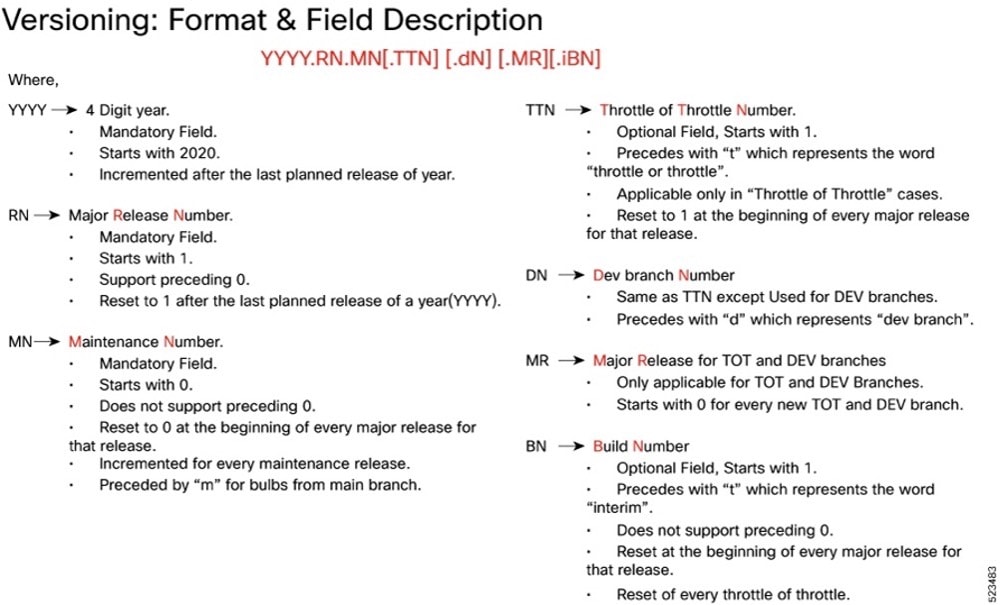 |
Image checksum information is available through Cisco.com Software Download Details. To find the checksum, hover the mouse pointer over the software image you have downloaded.
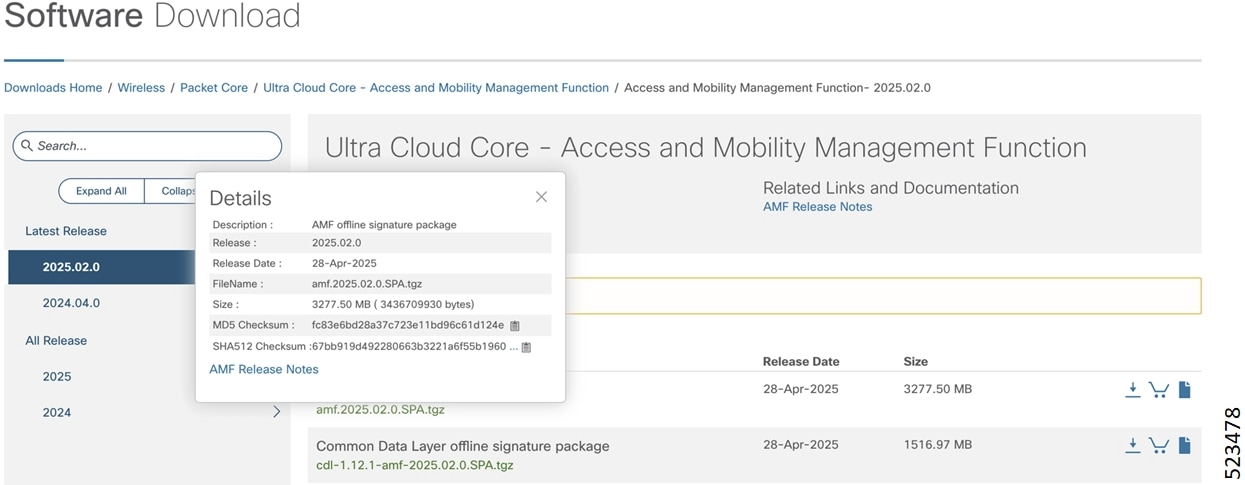
To validate the information, calculate a SHA512 checksum using the information in the following table and verify that it matches the one provided on the software download page.
To calculate a SHA512 checksum on your local desktop, see this table.
Table 7. SHA512 checksum calculation commands by operating system
| Operating System |
SHA512 checksum calculation command examples |
| Microsoft Windows |
Open a command line window and type the following command: > certutil.exe -hashfile <filename.extension> SHA512 |
| Apple MAC |
Open a terminal window and type the following command: $ shasum -a 512 <filename.extension> |
| Linux |
Open a terminal window and type the following command: $ sha512sum <filename.extension> OR $ shasum -a 512 <filename.extension> |
| <filename> is the name of the file. <extension> is the file type extension (for example, .zip or .tgz). |
|
If the SHA512 checksum does not match, we advise you not to attempt upgrading any systems with the corrupted software image. Download the software again and verify the SHA512 checksum again. If there is a constant mismatch, please open a case with the Cisco Technical Assistance Center.
The following table provides key resources and links to the essential documentation and support information for the Ultra Cloud Core AMF and Subscriber Microservices Infrastructure (SMI).
Table 8. Related resources and additional information
| Resource |
Link |
| AMF documentation |
|
| SMI documentation |
|
| Service Request and Additional information |
Cisco and the Cisco logo are trademarks or registered trademarks of Cisco and/or its affiliates in the U.S. and other countries. To view a list of Cisco trademarks, go to this URL: https://www.cisco.com/c/en/us/about/legal/trademarks.html. Third-party trademarks mentioned are the property of their respective owners. The use of the word partner does not imply a partnership relationship between Cisco and any other company. (1721R)
Any Internet Protocol (IP) addresses and phone numbers used in this document are not intended to be actual addresses and phone numbers. Any examples, command display output, network topology diagrams, and other figures in the document are shown for illustrative purposes only. Any use of actual IP addresses or phone numbers in illustrative content is unintentional and coincidental.
© 2026 Cisco Systems, Inc. All rights reserved.