UCC 5G AMF Release Notes, Release 2026.02.0
Available Languages
Bias-Free Language
The documentation set for this product strives to use bias-free language. For the purposes of this documentation set, bias-free is defined as language that does not imply discrimination based on age, disability, gender, racial identity, ethnic identity, sexual orientation, socioeconomic status, and intersectionality. Exceptions may be present in the documentation due to language that is hardcoded in the user interfaces of the product software, language used based on RFP documentation, or language that is used by a referenced third-party product. Learn more about how Cisco is using Inclusive Language.
- US/Canada 800-553-2447
- Worldwide Support Phone Numbers
- All Tools
 Feedback
 Feedback
Ultra Cloud Core - Access and Mobility Management Function, Release 2026.02.0
Ultra Cloud Core - Access and Mobility Management Function, Release 2026.02.0
This Release Notes identifies changes and issues related to the Access and Mobility Management Function (AMF).
The key highlights of this release include:
● DNS-based Discovery of MMEs: Enhances 5G Core (5GC) and Evolved Packet Core (EPC) interworking by automating MME selection via DNS NAPTR queries, replacing manual static configurations.
● DSCP Marking for SBI Interface: Enables DSCP marking for outgoing packets on the Service-Based Interface (SBI), allowing for improved traffic prioritization and handling.
● Enhanced Network Reliability and Session Continuity: Introduction of AMF Sets, allowing multiple AMF instances to share user context and provide seamless service, even during failures. This feature ensures uninterrupted service by enabling quick takeover by another AMF in the set and supports spanning across different Kubernetes clusters and regions.
● Local Cause Codes for 5G Attachment Restrictions: Provides operators with granular control to redirect subscribers from 5G to 4G by configuring specific 5GMM cause codes for RAT-type and registration restrictions.
For more information on the AMF software, see the Related resources section.
Release Lifecycle Milestones
This table provides EoL milestones for Cisco Ultra Cloud Core - Access and Mobility Management Function software:
Table 1. EoL milestone information for UCC AMF, Release 2026.02.0
| Milestone |
Date |
| First Customer Ship (FCS) |
23-Apr-2026 |
| End of Life (EoL) |
23-Apr-2026 |
| End of Software Maintenance (EoSM) |
22-Oct-2027 |
| End of Vulnerability and Security Support (EoVSS) |
22-Oct-2027 |
| Last Date of Support (LDoS) |
31-Oct-2028 |
These milestones and the intervals between them are defined in the Cisco Ultra Cloud Core (UCC) Software Release Lifecycle Product Bulletin available on cisco.com.
This section provides a brief description of the new software features introduced in this release.
Table 2. New software features for UCC AMF, Release 2026.02.0
| Product impact |
Feature |
Description |
| Ease of Setup |
DNS-based discovery of MMEs |
This feature enhances seamless interworking between 5G Core (5GC) and Evolved Packet Core (EPC) networks by automating the MME selection process. Instead of relying only on static peer MME configurations, the AMF can perform DNS queries (using NAPTR records) to dynamically discover suitable MMEs in supported scenarios. The feature is controlled by CLI configuration and supports both idle and connected mobility procedures. Command introduced: amf-services amf_service_name { peer-mme dns-discovery enabled }— Activates DNS-based dynamic discovery of peer MMEs for the specified AMF service. Default Setting: Disabled – Configuration Required |
| Ease of Setup |
DSCP marking for SBI interface |
AMF applies DSCP marking to outgoing packets on the SBI interfaces, ensuring that traffic is handled appropriately. Command introduced: config { instance instance-id instance_id { endpoint sbi { dscp dscp_value } } }— Used to configure the DSCP value for SBI interface. Default Setting: Disabled – Configuration Required |
| Ease of Setup |
Local cause codes update for 5G attachment restrictions |
Operators can now quickly redirect subscribers from 5G to 4G during network issues by rejecting 5G attachments with specific cause codes. AMF supports configurable local NAS cause codes for rat-type and registration restrictions. Operators can enable and select from predefined cause codes using CLI, such as "5GS-services-not-allowed," "N1 mode not allowed," and "redirection to EPC required." This mechanism allows the system to reject subscriber attempts to attach to 5G, triggering redirection to 4G without impacting performance or backup processes. Command introduced: · local-cause-code-map name cause_code_profile_name { rat-type-restriction cause-code5gmm { 5GS-services-not-allowed | N1-mode-not-allowed | redirection-to-epc-required } }— Used to configure the 5GMM cause codes for local cause-code mapping under the "amf-global call-control-policy" and "amf-service". The default value is "plmn-not-allowed". · local-cause-code-map name cause_code_profile_name { registration-restriction cause-code5gmm { N1-mode-not-allowed | redirection-to-epc-required } }— Used to configure the 5GMM cause codes for local cause-code mapping under the "amf-global call-control-policy" and "amf-service". The default value is "plmn-not-allowed". Default Setting: Disabled – Configuration Required |
| Upgrade |
AMF set deployment in different cluster |
AMF Sets improve network reliability and session continuity by allowing multiple AMF instances to share user context and provide seamless service, even during failures. Multiple AMFs in an AMF Set share UE context using a Common Data Layer (CDL) for synchronization. If one AMF fails, another in the set quickly takes over, ensuring uninterrupted service. AMF Sets can span different Kubernetes clusters and regions, with unique identifiers for each set and region. The system supports context sharing and subscriber migration across AMFs, with secure data stored and synchronized in the CDL. Command introduced: amf-services amf_services_name { guamis { mcc mcc_value | mnc mnc_value | region-id region_id | set-id set_id | pointer pointer_value { amf-name amf_name | backup-amf-name backup_amf_name | offline-mode } } } — Used to configure the amf-name and backup-amf-name for specific GUAMIs under AMF services. Default Setting: Disabled – Configuration Required |
This section provides a brief description of the behavior changes introduced in this release.
Table 3. Behavior changes for Ultra Cloud Core - Access and Mobility Management Function, Release 2026.02.0
| Description |
Behavior changes |
| Enhanced subscriber information visibility and clearing in AMF |
Previous Behavior: The AMF displayed subscriber information even after a subscriber was cleared, persisting until the tpurge timer expired. This made it difficult to distinguish between attached and terminated subscribers. · Subscriber Visibility: The show subscriber supi <supi-val> command now only displays information if the subscriber is currently registered. To view GUTI information for subscribers that are not currently registered, use the new show subscriber guti <guti-val> command. · Subscriber Clearing: The clear subscriber command now supports immediate purging and local-only purging: o clear subscriber supi <supi-val> tpurge 0: Purges the subscriber information immediately. o clear subscriber supi <supi-val> local-purge true: Purges the subscriber locally without informing peer nodes. · New Cause Code: A new default cause code, implicitly-de-registered, has been added to the local-cause-code-map for clear-subscriber operations. |
| Support for static NF instance ID (UUID) |
Previous Behavior: The AMF generated a dynamic UUID upon each redeployment, which was used for NRF registration. This resulted in the NF instance ID changing whenever the AMF was redeployed. New Behavior: The AMF now supports the optional configuration of a static NF instance ID (UUIDv4). You can configure a fixed UUID using the uuid command within the amf-services configuration mode. To ensure the new value is correctly applied, a shut-start of the ops center is required after configuring the UUID. Example: amf-services am1 uuid 12345678-1234-5678-1234-567812345678 exit |
| UE radio capability match request timing |
Previous Behavior: The AMF sent the UE Radio Capability Check Request to the gNB prior to the completion of the Initial Context Setup Response (ICSR). New Behavior: The AMF now defers the UE Radio Capability Check Request until after the ICSR has been completed, ensuring that AS security is fully activated before the gNB attempts to retrieve UE capabilities. |
This table lists the resolved issues in this specific software release.
Note: This software release may contain bug fixes first identified in other releases. To see additional information, click the bug ID to access the Cisco Bug Search Tool. To search for a documented Cisco product issue, type in the browser: <bug_number> site:cisco.com
Table 4. Resolved issues for UCC AMF, Release 2026.02.0
| Bug ID |
Description |
| Protocol pod crash after failover due to panic error for (*ASN1Writer).PutOctetString |
This table lists the open issues in this specific software release.
Note: This software release may contain open bugs first identified in other releases. To see additional information, click the bug ID to access the Cisco Bug Search Tool. To search for a documented Cisco product issue, type in the browser: <bug_number> site:cisco.com
Table 5. Open issues for UCC AMF, Release 2026.02.0
| Bug ID |
Description |
| AMF Pods Running as Root User Violates Least Privilege Principle |
|
| AMF is not marking NF status change notification response towards NRF with configured DSCP |
This section lists compatibility information of the Cisco UCC software products that are verified to work with this version of the UCC AMF software.
Table 6. Compatibility information for UCC AMF, Release 2026.02.0
| Product |
Supported Release |
| Ultra Cloud Core SMI |
2026.02.1.07 |
| Ultra Cloud CDL |
2.2.0 |
This section provides information about the release packages associated with UCC AMF software.
Table 7. Software packages for UCC AMF, Release 2026.02.0
| Software Package |
Version |
| amf.2026.02.0.SPA.tgz |
2026.02.0 |
| cdl-2.2.0-amf-2026.02.0.SPA.tgz |
2.2.0 |
| NED package |
ncs-6.4.8.2-amf-nc-1.1.2026.02.0 |
| NSO |
6.4.8.2 |
Cloud native product version numbering system
The show helm list command displays detailed information about the version of the cloud native product currently deployed.
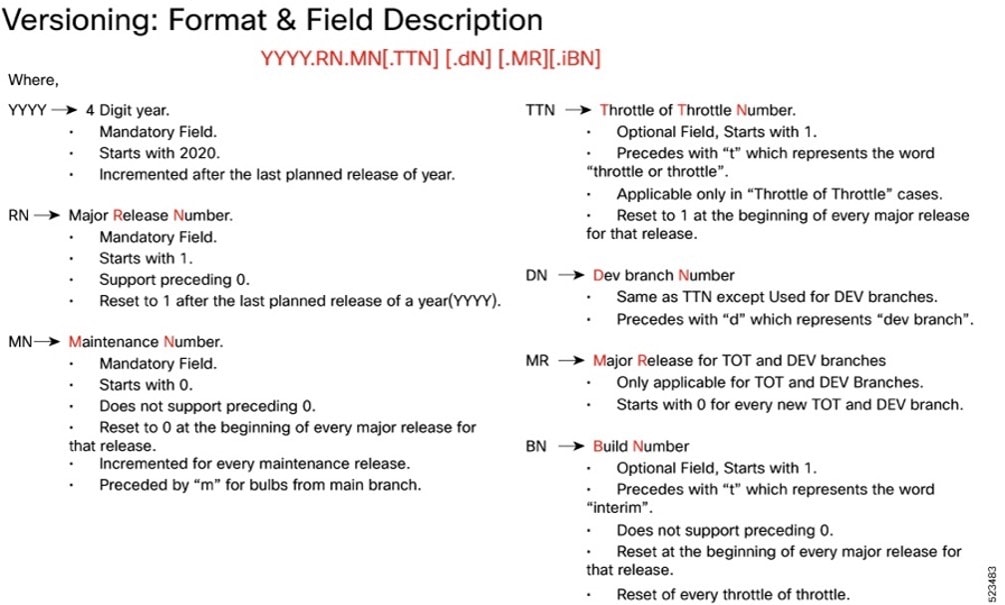 |
Image checksum information is available through Cisco.com Software Download Details. To find the checksum, hover the mouse pointer over the software image you have downloaded.
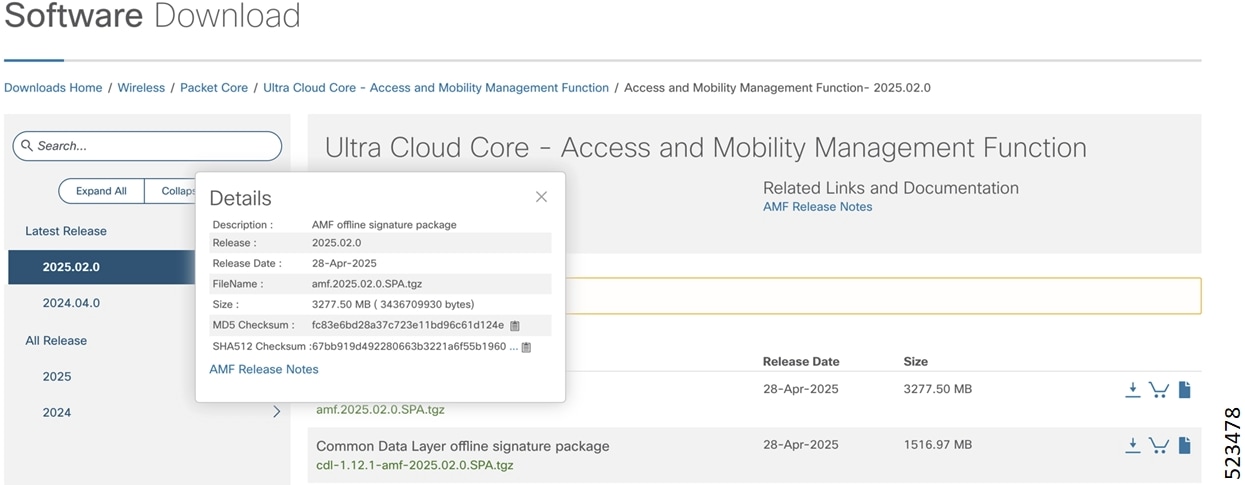
To validate the information, calculate a SHA512 checksum using the information in the following table and verify that it matches the one provided on the software download page.
To calculate a SHA512 checksum on your local desktop, see this table.
Table 8. SHA512 checksum calculation commands by operating system
| Operating System |
SHA512 checksum calculation command examples |
| Microsoft Windows |
Open a command line window and type the following command: > certutil.exe -hashfile <filename.extension> SHA512 |
| Apple MAC |
Open a terminal window and type the following command: $ shasum -a 512 <filename.extension> |
| Linux |
Open a terminal window and type the following command: $ sha512sum <filename.extension> OR $ shasum -a 512 <filename.extension> |
| <filename> is the name of the file. <extension> is the file type extension (for example, .zip or .tgz). |
|
If the SHA512 checksum does not match, we advise you not to attempt upgrading any systems with the corrupted software image. Download the software again and verify the SHA512 checksum again. If there is a constant mismatch, please open a case with the Cisco Technical Assistance Center.
The following table provides key resources and links to the essential documentation and support information for the Ultra Cloud Core AMF and Subscriber Microservices Infrastructure (SMI).
Table 9. Related resources and additional information
| Resource |
Link |
| AMF documentation |
|
| SMI documentation |
|
| Service Request and Additional information |
Cisco and the Cisco logo are trademarks or registered trademarks of Cisco and/or its affiliates in the U.S. and other countries. To view a list of Cisco trademarks, go to this URL: https://www.cisco.com/c/en/us/about/legal/trademarks.html. Third-party trademarks mentioned are the property of their respective owners. The use of the word partner does not imply a partnership relationship between Cisco and any other company. (1721R)
Any Internet Protocol (IP) addresses and phone numbers used in this document are not intended to be actual addresses and phone numbers. Any examples, command display output, network topology diagrams, and other figures in the document are shown for illustrative purposes only. Any use of actual IP addresses or phone numbers in illustrative content is unintentional and coincidental.
© 2026 Cisco Systems, Inc. All rights reserved.