UCC 5G AMF Release Notes, Release 2026.01.0
Available Languages
Bias-Free Language
The documentation set for this product strives to use bias-free language. For the purposes of this documentation set, bias-free is defined as language that does not imply discrimination based on age, disability, gender, racial identity, ethnic identity, sexual orientation, socioeconomic status, and intersectionality. Exceptions may be present in the documentation due to language that is hardcoded in the user interfaces of the product software, language used based on RFP documentation, or language that is used by a referenced third-party product. Learn more about how Cisco is using Inclusive Language.
- US/Canada 800-553-2447
- Worldwide Support Phone Numbers
- All Tools
 Feedback
 Feedback
Ultra Cloud Core - Access and Mobility Management Function, Release 2026.01.0
Ultra Cloud Core - Access and Mobility Management Function, Release 2026.01.0
The key highlights of this release include:
● AMF performance enhancements: Enhances performance for event processing.
● UE location reporting to SMF via AMF event subscription: Enables the SMF to directly subscribe to the AMF for UE location information.
● Public Warning System (PWS) Inter Working Functionality (IWF): Simplifies public warning system operations by consolidating functionality and offering flexible, protocol-based configuration options within the AMF.
For more information on the AMF software product, see the Related resources section.
Release Lifecycle Milestones
This table provides EoL milestones for Cisco Ultra Cloud Core - Access and Mobility Management Function software:
Table 1. EoL milestone information for UCC AMF, Release 2026.01.0
| Milestone |
Date |
| First Customer Ship (FCS) |
30-Jan-2026 |
| End of Life (EoL) |
30-Jan-2026 |
| End of Software Maintenance (EoSM) |
31-July-2027 |
| End of Vulnerability and Security Support (EoVSS) |
31-July-2027 |
| Last Date of Support (LDoS) |
31-July-2028 |
These milestones and the intervals between them are defined in the Cisco Ultra Cloud Core (UCC) Software Release Lifecycle Product Bulletin available on cisco.com.
This section provides a brief description of the new software features introduced in this release.
Table 2. New software features for UCC AMF, Release 2026.01.0
| Product impact |
Feature |
Description |
| Software Reliability |
Performance enhancements for AMF |
This feature enhances the event processing and offers new configuration options to optimize resource allocation. |
| Upgrade
|
UE location reporting to SMF through AMF event subscription |
AMF handles event subscriptions requests coming from SMF for location reporting. With this implementation, the SMF directly subscribes to the AMF for location information. |
| Upgrade
|
PWS-IWF functionality |
This feature enables the AMF to process the SBc interface messages using the SBc Application Protocol (SBc-AP), allowing direct communication with the CBC. The PWS-IWF functionality is now integrated within the AMF, removing the requirement for a separate PWS-IWF node. This streamlines the network architecture and reduces processing overhead. Command introduced: · amf-services amf_services_name pws-enabled interface [SBi][SBc]— The interface option SBc is used to enable the PWS-IWF functionality via CBC over SBc-AP protocol. The default value of the interface is SBi where PWS messages are handled via CBCF over N50 interface. Runtime change in the interface value is not supported and hence requires ops center shut and start. · amf-services amf_services_name pws-enabled interface SBc custom-enabled— The custom option is only applicable for SBc interface which allows AMF to process custom requirements — such as conversion of TAC and handling of warning area list IE. Default Setting: Disabled – Configuration Required |
There are no behavior changes in this release.
This table lists the resolved issues in this specific software release.
Note: This software release may contain bug fixes first identified in other releases. To see additional information, click the bug ID to access the Cisco Bug Search Tool. To search for a documented Cisco product issue, type in the browser: <bug_number> site:cisco.com
Table 3. Resolved issues for Ultra Cloud Core - Access and Mobility Management Function, Release 2026.01.0
| Bug ID |
Description |
| proto-ep pod failure for PWS restart and failure indication in bulk call |
|
| Few Cause codes(#7, #31, #27) to be added for context transfer failure and authentication failure errors for allowing UE to move to EPS |
|
| AMF is not using the ulnas cnt from the most recent security mode command when multiple smc happens during registration request |
This table lists the open issues in this specific software release.
Note: This software release may contain open bugs first identified in other releases. To see additional information, click the bug ID to access the Cisco Bug Search Tool.
Table 4. Open issues for Ultra Cloud Core - Access and Mobility Management Function, Release 2026.01.0
| Bug ID |
Description |
| minor service pod memory leak observed during longevity run |
This section lists compatibility information of the Cisco UCC software products that are verified to work with this version of the UCC AMF software.
Table 5. Compatibility information for UCC AMF, Release 2026.01.0
| Product |
Supported Release |
| Ultra Cloud Core SMI |
2026.01.1.08 |
| Ultra Cloud CDL |
2.1.0 |
This section provides information about the release packages associated with UCC AMF software.
Table 6. Software packages for UCC AMF, Release 2026.01.0
| Software Package |
Version |
| amf.2026.01.0.SPA.tgz |
2026.01.0 |
| cdl-2.1.0.i0-amf-2026.01.0.SPA.tgz |
2.1.0 |
| NED package |
ncs-6.4.8.2-amf-nc-1.1.2026.01.0 |
| NSO |
6.4.8.2 |
Cloud native product version numbering system
The show helm list command displays detailed information about the version of the cloud native product currently deployed.
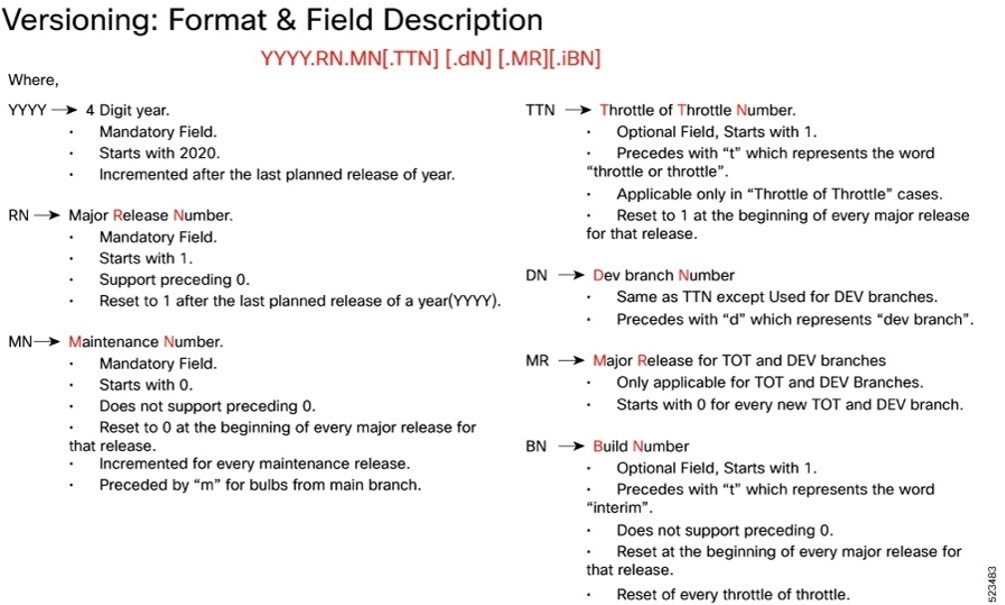
Image checksum information is available through Cisco.com Software Download Details. To find the checksum, hover the mouse pointer over the software image you have downloaded.
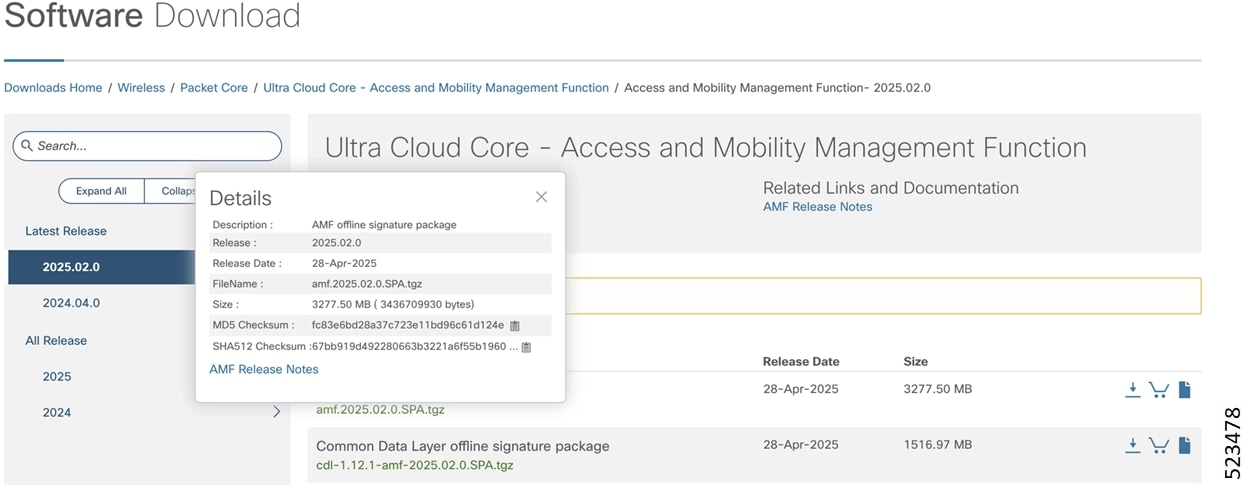
To validate the information, calculate a SHA512 checksum using the information in the following table and verify that it matches the one provided on the software download page.
To calculate a SHA512 checksum on your local desktop, see this table.
Table 7. SHA512 checksum calculation commands by operating system
| Operating System |
SHA512 checksum calculation command examples |
| Microsoft Windows |
Open a command line window and type the following command: > certutil.exe -hashfile <filename.extension> SHA512 |
| Apple MAC |
Open a terminal window and type the following command: $ shasum -a 512 <filename.extension> |
| Linux |
Open a terminal window and type the following command: $ sha512sum <filename.extension> OR $ shasum -a 512 <filename.extension> |
| <filename> is the name of the file. <extension> is the file type extension (for example, .zip or .tgz). |
|
If the SHA512 checksum does not match, we advise you not to attempt upgrading any systems with the corrupted software image. Download the software again and verify the SHA512 checksum again. If there is a constant mismatch, please open a case with the Cisco Technical Assistance Center.
The following table provides key resources and links to the essential documentation and support information for the Ultra Cloud Core AMF and Subscriber Microservices Infrastructure (SMI).
Table 8. Related resources and additional information
| Resource |
Link |
| AMF documentation |
|
| SMI documentation |
|
| Service Request and Additional information |
Cisco and the Cisco logo are trademarks or registered trademarks of Cisco and/or its affiliates in the U.S. and other countries. To view a list of Cisco trademarks, go to this URL: https://www.cisco.com/c/en/us/about/legal/trademarks.html. Third-party trademarks mentioned are the property of their respective owners. The use of the word partner does not imply a partnership relationship between Cisco and any other company. (1721R)
Any Internet Protocol (IP) addresses and phone numbers used in this document are not intended to be actual addresses and phone numbers. Any examples, command display output, network topology diagrams, and other figures in the document are shown for illustrative purposes only. Any use of actual IP addresses or phone numbers in illustrative content is unintentional and coincidental.
© 2026 Cisco Systems, Inc. All rights reserved.