Overview of Cisco Sensor Connect for IoT Services
Cisco Sensor Connect for IoT Services serves as the foundation for IoT capabilities across Cisco’s wireless portfolio. This guide covers on-premises deployments managed by Cisco Catalyst 9800 Series Wireless Controllers. For Sensor Connect deployments with cloud-managed Cisco Meraki, refer the Sensor Connect on Meraki Deployment Guide.
Sensor Connect runs as an application on a supported Cisco Catalyst 9800 Wireless Controller and provides centralized onboarding, control, monitoring, and telemetry services for BLE devices.
Sensor Connect supports these deployment models:
-
On-premises deployment: Sensor Connect is deployed and managed from the Cisco Catalyst 9800 Wireless Controller.
-
Cisco Spaces-managed deployment: Cisco Spaces installs and manages Sensor Connect through a Cisco Spaces Connector that provides the gateway service.
The supported deployment workflow and management location depend on the Cisco IOS XE release.
-
For Cisco IOS XE 17.15 and 17.18, use the manual deployment workflow on the controller.
-
For Cisco IOS XE 26.1 and later, the controller can generate the required NAT configuration. The generated configuration can be accepted or edited before Sensor Connect is installed.
-
For a Cisco Spaces-managed deployment starting with Cisco IOS XE 26.1.2 and later, Cisco Spaces installs and manages the Sensor Connect application through a Cisco Spaces Connector that provides the gateway service.
Feature history for Sensor Connect releases
-
This table provides release and related information for the feature explained in this module.
-
This feature is also available in all the releases subsequent to the one in which they are introduced in, unless noted otherwise.
|
Feature Name |
Release Information |
Feature Description |
|---|---|---|
|
Cisco Spaces onboarding through Gateway Service |
Sensor Connect Release 2.0 |
This feature enables Sensor Connect deployment through Connector Gateway Service and supports onboarding a Connector as the gateway. Gateway Service and Wireless IoT service are mutually exclusive. |
|
Cisco Spaces-Managed Lifecycle |
Sensor Connect Release 2.0 |
This feature enables Cisco Spaces to manage Sensor Connect installation, restart, upgrade, log upload, metrics, and uninstallation. |
|
Secure UI bootstrap for Cisco Spaces-managed deployment |
Sensor Connect Release 2.0 |
This feature prevents access to the Sensor Connect UI through default credentials during initial setup of a Cisco Spaces-managed deployment. An authorized operator must create the first administrator credentials from the Sensor Connect application shell before the UI is enabled. The credentials persist across application restarts, upgrades, and Cisco Catalyst 9800 Wireless Controller reloads. |
|
9800 WebUI support for automatic Sensor Connect App Network and NAT configuration |
Sensor Connect Release 2.0 |
Starting with Cisco IOS XE Release 26.1.x, this feature generates the required Network Address Translation (NAT) configuration. The configuration can be accepted or modified in the Cisco Catalyst 9800 WebUI. |
|
Updated Sensor Connect User Interface |
Sensor Connect Release 2.0 |
This feature introduces redesigned page layouts and table behavior, including updated Inventory and Configuration pages. |
|
AP and BLE Inventory Enhancements |
Sensor Connect Release 2.0 |
This feature adds redesigned tables, filtering, sorting, downloads, column settings, bulk selection, and detail views to the AP and BLE Inventory pages. |
|
Transmit, Scan, and Filter Profile Updates |
Sensor Connect Release 2.0 |
Sensor Connect updates the profile configuration workflows. Users can add, view, edit, clone, and apply profiles. Scan configuration includes new options for this release. |
|
Cisco Spaces-Managed AP Configuration |
Sensor Connect Release 2.0 |
This feature restricts local AP BLE radio and profile configuration when Cisco Spaces manages Sensor Connect. AP and BLE monitoring views remain available. |
|
Updated Application Registration |
Sensor Connect Release 2.0 |
This feature creates an onboarding application and provides credentials for third-party applications. Control and data applications are registered through the SCIM API. |
|
Application Deletion Impact |
Sensor Connect Release 2.0 |
Deleting an onboarding application also removes its associated applications, BLE devices, event subscriptions, and BLE device connections. |
|
SCIM and NIPC Draft Compliance |
Sensor Connect Release 2.0 |
Sensor Connect 2.0 aligns with the SCIM and NIPC draft specifications. The new APIs introduce standards-compliant data models and are not backward compatible with Sensor Connect 1.2.2. Existing integrations must be updated to use the Sensor Connect 2.0 data models and APIs. |
|
SDF Model Registration |
Sensor Connect Release 2.0 |
This feature enables vendor applications to register for BLE device models through the NIPC API. It represents devices, attributes, and events through standardized SDF constructs. |
|
MQTT Data Encoding with CBOR |
Sensor Connect Release 2.0 |
Sensor Connect 2.0 encodes MQTT payloads in Concise Binary Object Representation (CBOR). The Protocol Buffers payload format is no longer supported. |
|
Cisco Spaces Integration Status |
Sensor Connect Release 2.0 |
This feature provides a Cisco Spaces integration view that displays connection status, metrics, and logs. |
|
Serviceability Log Enhancements |
Sensor Connect Release 2.0 |
This feature enables password less controller configuration and the selection of multiple applications and Cisco Spaces cloud logs for troubleshooting. |
|
Name change to Sensor Connect |
Sensor Connect Release 1.2.2 |
IoT Orchestrator is now known as Sensor Connect App. |
|
Simplified IoT Services Configuration |
Sensor Connect Release 1.2.2 |
Starting with Cisco IOS XE Release 26.1.1, the IoT Service configuration page in the Cisco Catalyst 9800 WebUI provides a streamlined method for configuring network parameters for the Sensor Connect App. For more information, see the Cisco Catalyst 9800 release notes. |
|
Configurable high-baud-rate |
Sensor Connect Release 1.2.2 |
Sensor Connect App now provides an advanced option for enabling a high baud rate on the AP. This option will be supported in upcoming Cisco IOS XE releases. Enable a high baud rate only for specific deployments and under the guidance and supervision of Cisco Support. |
|
Get Connection Status API |
Sensor Connect Release 1.2.1 |
Get Connection Status API, introduced in IoT Orchestrator 1.2.1, retrieves the current BLE connection status of a device. If the device is connected, the API also returns its discovered GATT services, characteristics, and descriptors. This API is accessed via the GET /control/connectivity/status endpoint. |
|
Get All Onboarded Devices |
Sensor Connect Release 1.2.1 |
For the IoT Orchestrator 1.2.1 release, this feature enables the retrieval of all Bluetooth Low Energy (BLE) devices registered under a specific onboarding application. It requires the controlApp parameter to specify the application, supports pagination using startIndex and count parameters for efficient data handling, and requires an x-api-key for secure access. |
|
Get All Devices – With Pagination |
Sensor Connect Release 1.2.1 |
This new feature for IoT Orchestrator 1.2.1 provides the capability to retrieve a comprehensive list of all devices with built-in pagination support. Utilizing the GET /scim/v2/Devices endpoint, users can efficiently manage and browse device data. The API supports query parameters including the required onboardApp for specifying the onboarding application name, and optional parameters such as startIndex and limit. |
|
Support for all BLE frames |
Sensor Connect Release 1.2.0 |
All Cisco APs support scanning and reporting for all types of BLE frames (general discoverable and non-general discoverable advertisements). This feature is enabled by default. |
|
Allow-list filtering |
Sensor Connect Release 1.2.0 |
A configurable allow-list for BLE advertisement filtering is done at the access point level. Allow-list filter accepts any advertisement whose MAC address matches a filter. A filter entry can be of any length, up to a full MAC address length. A maximum of 64 filters per AP or AP profile is supported. Random private MAC addresses are still being filtered by default. This feature requires 17.15.3 APSP or a later image on the Access Point side. If this feature is enabled in an unsupported Access Point image (for example, 17.15.3 or earlier), the action sets the Access Point in an Out-of-Sync state as the allow-list filter feature is available only from the 17.15.3 APSP and later releases. |
|
Scanning mode disabled by default |
Sensor Connect Release 1.2.0 |
Scanning mode is disabled by default in this release. This feature permits the allow-list to be properly set and configured before enabling scanning, preventing possible BLE advertisement floods. When upgrading from a previous version with scanning enabled, configuration remains as is; however, we recommend that you keep scanning on any APs disabled where it is not needed and apply filters where relevant to reduce any noise coming from unwanted advertisements. A banner with this recommendation is displayed after the upgrade. |
|
Configurable default profiles |
Sensor Connect Release 1.2.0 |
With this release, you can configure and customize the default transmit and configuration profiles. |
|
Higher scale for CW9800M, CW9800H1 and CW9800H2 |
Sensor Connect Release 1.2.0 |
Support for higher advertisement rates for onboarded and non-onboarded BLE devices is available with this release. For more information, see Table 1 in System Configuration. |
Cisco Sensor Connect solution
This diagram depicts the elements of the Cisco Sensor Connect solution.
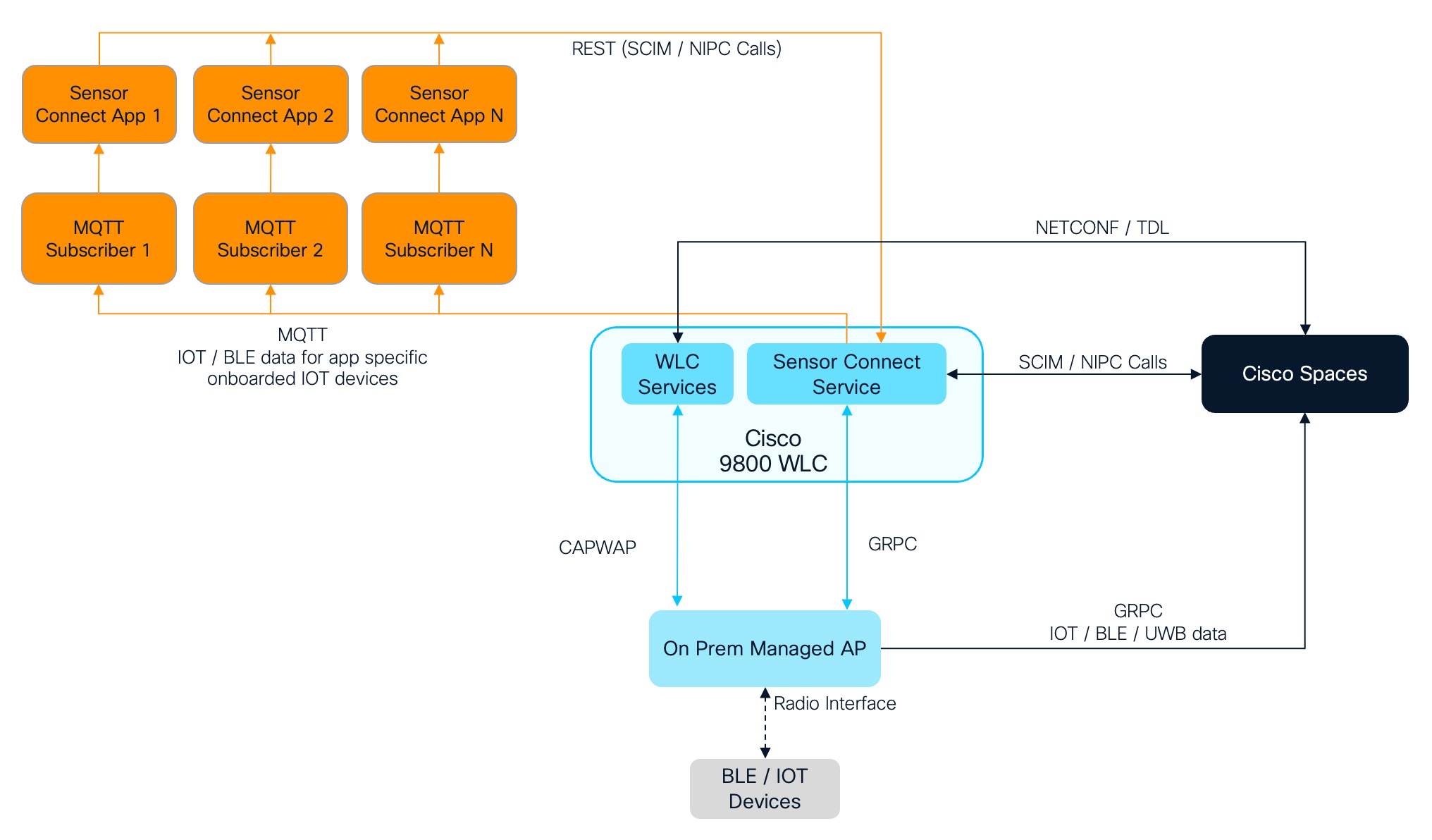
Sensor Connect is the new IOx application deployed on the Cisco Catalyst 9800 Wireless Controller as a Cisco IOx container that interacts with the AP using gRPC channels.
The AP uses its IoT radio to interact with the BLE device.
Sensor Connect provides APIs for these:
-
Onboarding applications: The onboarding applications leverage IETF SCIM for device models (https://datatracker.ietf.org/doc/draft-ietf-scim-device-model/). The SCIM allows an application to send a SCIM object to a SCIM server (gateway) to create, update, and delete devices in networks.
-
Device control applications: The device control applications allow an application to connect to a non-IP device to exchange data with the device and register topics for streaming telemetry. The IETF draft used for this protocol is called the Non-IP Control (NIPC).
-
Data receiver applications: The telemetry application receives the telemetry data from the Sensor Connect application.
-
Message Queuing Telemetry Transport (MQTT): Message Queuing Telemetry Transport (MQTT) is a lightweight messaging protocol commonly used for communication between devices in IoT applications. Subscriptions and notifications play crucial roles in enabling devices to receive and react to messages. In MQTT, the clients subscribe to topics for receiving messages published to those topics. A topic is a string that the MQTT broker uses to filter messages for each connected client. The notification for subscribed topic happens from the Sensor Connect application to the data receiver application.

Note
-
The Sensor Connect application does not currently meet Federal Information Processing Standards (FIPS) certification requirements.
-
The existing NIPC APIs were created when the standard was still evolving, leading to some aspects being implemented differently. Starting with Release 2.0, these APIs will be updated to align with the latest draft version of NIPC. Please note that backward compatibility with APIs from version 1.x will not be supported.
-
 Feedback
