Protected management frames with 802.11w
A protected management frame is a wireless security feature that
-
uses the 802.11w protocol to safeguard management frames
-
prevents spoofing and forgery of authentication, de-authentication, association, and disassociation frames, and
-
enhances the overall security of Wi-Fi networks by protecting key network management actions from attack.
While data frames can be encrypted, management frames were traditionally sent in the clear, making them vulnerable to interception and forgery. The 802.11w standard addresses this vulnerability by requiring cryptographic protection for certain management frames between client and access point.
Types of management frames protected by 802.11w
The 802.11w protocol protects certain management frames by using the Protected Management Frames (PMF) service. These frames are classified as robust management frames and include:-
Disassociation frames
-
De-authentication frames
-
Robust Action frames
-
Spectrum Management
-
Quality of Service (QoS)
-
Direct Link Setup (DLS)
-
Block acknowledgement
-
Radio Measurement
-
Fast Basic Service Set (BSS) Transition
-
Security Association (SA) Query
-
Protected Dual of Public Action
-
Vendor-specific Protected
Protections offered by 802.11w
When 802.11w is implemented, these protections are provided:
-
Client protection: The AP adds cryptographic protection to de-authentication and dissociation frames, preventing spoofing in DOS attacks.
-
Infrastructure protection: Security Association (SA) teardown protection is implemented using Association Comeback Time and SA-Query procedures to prevent spoofed association requests from disconnecting connected clients.
Integrity Group Temporal Key (IGTK)
An integrity group temporal key (IGTK) is a wireless security mechanism that
-
protects broadcast and multicast robust management frames.
-
uses random values assigned by the authenticator station (such as a wireless LAN controller), and
-
secures MAC management protocol data units (MMPDUs) in 802.11w networks.
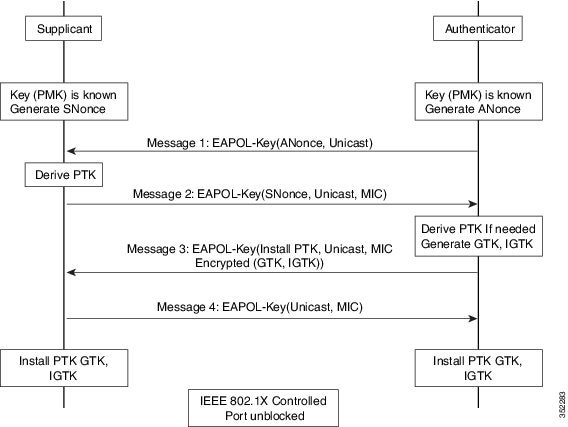
802.11w introduced IGTKs to enhance the security of management frames in wireless networks.
How IGTK is used in 802.11w management frame protection
When you enable management frame protection, the AP encrypts the group temporal key (GTK) and IGTK values in an Extensible Authentication Protocol over LAN-Key (EAPoL-Key) frame. The AP includes this frame in the third message of the four-way handshake.
-
IGTK is exchanged during the four-way handshake process.
-
If the AP changes the GTK later, it sends the new GTK and the new IGTK to your client device using the Group Key Handshake
Broadcast or multicast integrity protocol (BIP)
-
ensures data integrity of broadcast and multicast robust management frames
-
provides replay protection for these frames after you establish an Integrity Group Temporal Key Security Association (IGTKSA), and
-
adds a message integrity code (MIC) calculated using the shared IGTK key.
SA teardown protection
SA teardown protection is a wireless network security mechanism that
-
prevents spoofed or replay attacks from disconnecting already associated clients
-
uses Association Comeback Time and an SA-Query procedure to verify the authenticity of association requests, and
-
ensures the AP only accepts new associations after the original security association is proven invalid.
How association comeback time and SA query procedures work
This process describes how Association Comeback Time and SA Query procedures protect wireless client sessions from replay-based association teardown attacks.”
Summary
The key components involved in the process are:
-
AP: implements security association (SA) teardown protection and manages association requests.”
-
Client device: Maintains a security association and sends and receives association and SA Query frames.
-
SA Teardown Protection Mechanism: Provides the logic for handling replay and spoofed association attempts.
In this process, the AP and client device exchange association and SA Query frames. This exchange validates security associations and prevents unauthorized session teardown.
Workflow
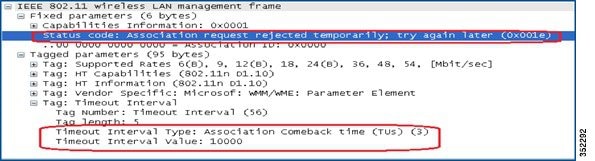
These stages describe how the Association Comeback Time and SA Query procedures operate to protect client sessions:
- When an AP receives an Association Request from a client with an existing valid security association (SA) negotiated with 802.11w, the AP rejects the request with status code 30 (“Association request rejected temporarily; try again later”) and sends an Association Comeback Time.
- The AP does not modify the existing association during the comeback interval.
- If no ongoing SA Query session with the client exists, the AP sends SA Query requests repeatedly until it receives a valid SA Query response or the comeback time expires.
- Receiving a matching SA Query response or a valid protected frame indicates a valid SA. The AP may then allow a new association attempt without more SA Query cycles.
Result
This process ensures that spoofed requests cannot disconnect valid clients, protecting against replay-based association teardown attacks.
Prerequisites for 802.11w
-
To configure 802.11w feature for optional and mandatory, you must have WPA and AKM configured.

Note
The RNS (Robust Secure Network) IE must be enabled with an AES Cipher.
Restrictions for 802.11w
-
You cannot use 802.11w with open WLANs, Wired Equivalent Privacy (WEP)-encrypted WLANs, or Temporal Key Integrity Protocol (TKIP)-encrypted WLANs.
-
You can use 802.11w with Protected Management Frames (PMF) for non-Apple clients. For Apple iOS version 11 and earlier, request a fix from Apple to resolve association issues
-
When clients do not use 802.11w PMF, the controller ignores disassociation frames or deauthentication frames they send. If a client uses PMF, its entry is deleted immediately when the controller receives such a frame. This process helps prevent denial-of-service attacks by malicious devices, since frames without PMF are not secure.
How to Configure 802.11w
Configure 802.11w (GUI)
To protect management traffic against spoofing and replay attacks, configure 802.11w settings after enabling WPA and AKM.
Before you begin
Ensure WPA and AKM are configured on the target WLAN.Procedure
|
Step 1 |
Choose . |
|
Step 2 |
Click Add to create WLANs. The Add WLAN page is displayed. |
|
Step 3 |
In the tab, navigate to the Protected Management Frame section. |
|
Step 4 |
Choose PMF as Disabled, Optional, or Required. By default, the PMF is disabled. If you choose PMF as Optional or Required, you can view these fields:
|
|
Step 5 |
Click Save & Apply to Device. |
802.11w PMF is enabled with the parameters you selected. This strengthens the security of management frames on the WLAN.
Configure 802.11w (CLI)
Before you begin
-
Configure WPA.
-
Configure AKM (Authentication and Key Management) on the WLAN.
Procedure
|
Step 1 |
Enter global configuration mode. Example: |
|
Step 2 |
Configure a WLAN and enters configuration mode. Example: |
|
Step 3 |
Configure 802.1x support using the security wpa akm pmf dot1x command. Example: |
|
Step 4 |
Configure the 802.11w association comeback time. Example:Example: |
|
Step 5 |
Require clients to negotiate 802.11w PMF protection on a WLAN. Example: |
|
Step 6 |
Configure time interval identified in milliseconds before which the SA query response is expected. Example:Example:If the device does not get a response, another SQ query is tried. |
802.11w Protected Management Frames are enabled and mandatory on the specified WLAN, providing improved protection of management frames.
Disable 802.11w
Procedure
|
Step 1 |
Enter global configuration mode. Example: |
|
Step 2 |
Configure a WLAN and enters configuration mode. Example: |
|
Step 3 |
Disable 802.1x support using the no security wpa akm pmf dot1x command. Example: |
|
Step 4 |
Configure the 802.11w association comeback time. Example: |
|
Step 5 |
Disable client negotiation of 802.11w PMF protection on a WLAN. Example: |
|
Step 6 |
Disable SQ query retry. Example: |
802.11w PMF protection is disabled for the specified WLAN.
Monitor 802.11w
Use these commands to monitor 802.11w.
Procedure
|
Step 1 |
Display the WLAN parameters on the WLAN. The PMF parameters are displayed. |
|
Step 2 |
Display the summary of the 802.11w authentication key management configuration on a client. |
 Feedback