Cisco Wireless MACsec On-Prem Deployment Guide
Available Languages
Bias-Free Language
The documentation set for this product strives to use bias-free language. For the purposes of this documentation set, bias-free is defined as language that does not imply discrimination based on age, disability, gender, racial identity, ethnic identity, sexual orientation, socioeconomic status, and intersectionality. Exceptions may be present in the documentation due to language that is hardcoded in the user interfaces of the product software, language used based on RFP documentation, or language that is used by a referenced third-party product. Learn more about how Cisco is using Inclusive Language.
- US/Canada 800-553-2447
- Worldwide Support Phone Numbers
- All Tools
 Feedback
 Feedback
PSK - Configuring the Controller
Sample 802.1X Switch Configuration
Sample 802.1X EAP-FAST WLC configuration
Sample 802.1X EAP-TLS WLC configuration
802.1X - Configuring the Switch
Switching considerations for FlexConnect local switching
Sample ISE Authorization Profile
MACsec (IEEE 802.1AE) allows to secure the link between AP and the access switch using hop-by-hop link encryption to mitigate attacks such as denial of service, intrusion, eavesdropping and man-in-the-middle attacks.
In this release support is added for MACsec with a Pre-Shared Key (PSK) and with 802.1X. The link is treated as a switch-to-switch link.
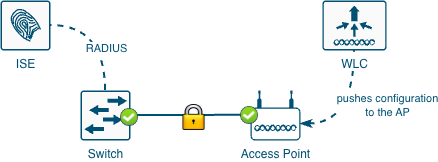
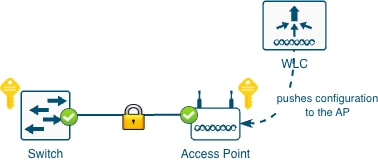
This document describes the configuration of MACsec between a Cisco Catalyst 9000 Series Switch and a Cisco Wireless Access Point. The guide is divided in two general sections: PSK and 802.1X.
● One or more compatible Cisco Wireless Access Points, to find the compatible models check the Feature Matrix for Cisco Wireless Access Points section Security Feature Matrix (IOS XE)
● Cisco Wireless 9800 Wireless LAN Controller running Cisco IOS® XE 26.1.1 or later
● One Cisco Wireless Essentials license per Access Point
● Cisco Catalyst 9000 Series Switch (or a MACsec compatible switch)
● ISE (or any RADIUS server): required only if MACsec using 802.1X is desired
The following concepts are provided for educational purposes.
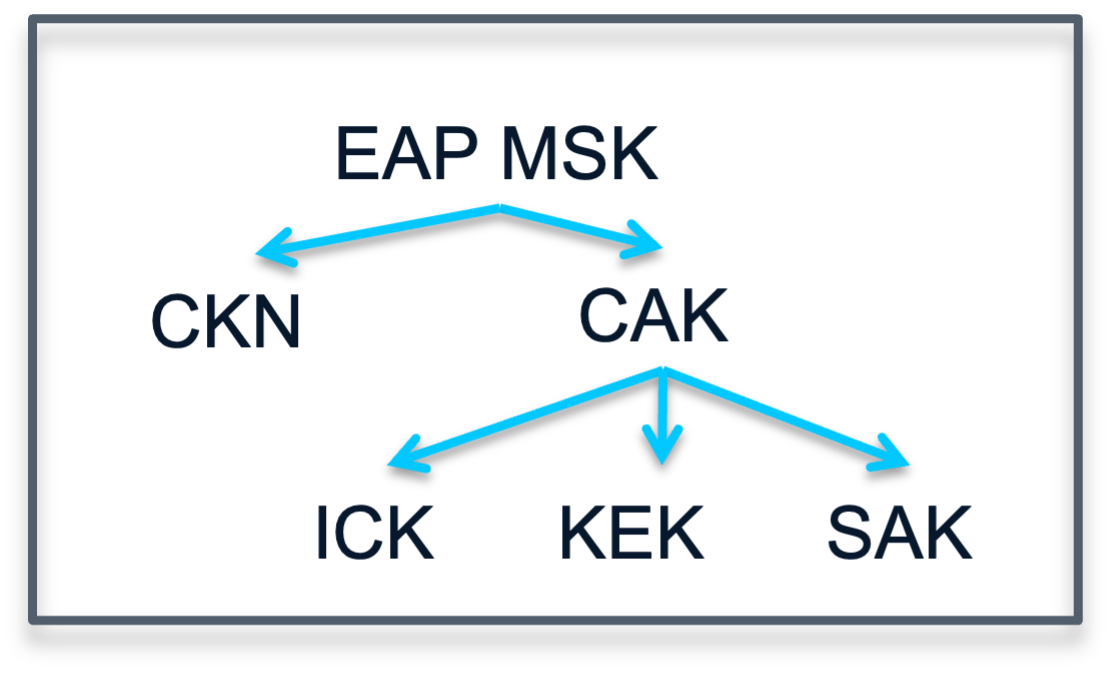
● MKA: MACsec Key Agreement, the protocol that creates, distributes, and manages the encryption keys used by MACsec. It is defined in IEEE 802.1X-2010 and works on top of EAPOL (Extensible Authentication Protocol over LAN).
● MSK: Master Session Key, generated during EAP exchange. Supplicant and authentication server use the MSK to generate the CAK.
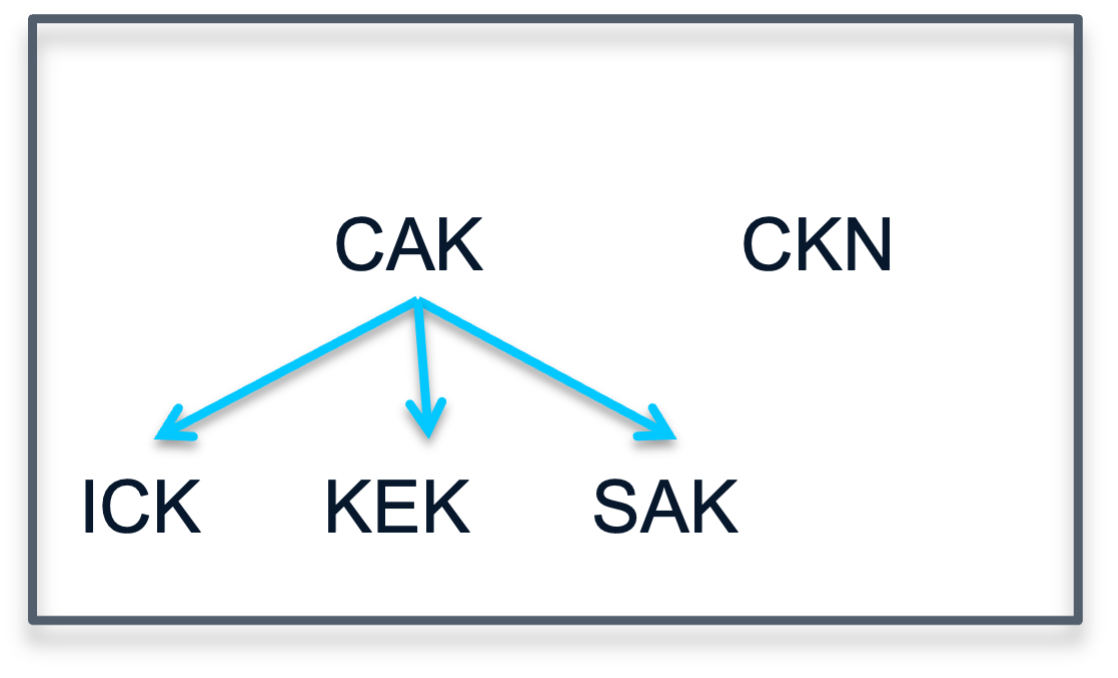
● CAK: Connectivity Association Key, it is derived from MSK. CAK is a long-lived master key used to generate all other keys used for MACsec.
● CKN: Connectivity Association Key Name, identifies the CAK.
● SAK: Secure Association Key, it is derived from the CAK and is the key used by supplicant and switch to encrypt traffic for a given session.
● KS: Key Server, it is:
◦ responsible for selecting and advertising a cipher suite
◦ responsible for generating the Secure Association Key (SAK) from the Connectivity Association Key (CAK).
● Key server priority: value used by MKA (MACsec Key Agreement) to determine which device becomes the Key Server in a MACsec session.
● Key chain: in the context of IOS-XE it is a configuration structure used to store and manage cryptographic keys, mainly for protocols that require authentication or key exchange. For MACsec, the key chain holds the CAK (Connectivity Association Key) and CKN (Connectivity Key Name) used by MKA (MACsec Key Agreement).
● Control-plane vs data-plane: the control-plane is MKA as described above, it has integrity verification to authenticate both sides. The data-plane (traffic) uses a different set of algorithms to encrypt the data.
● Replay Protection Window Size: it is a security parameter that defines how many sequence numbers (packets) can arrive out of order and still be accepted before the device starts treating them as replay attacks and drops them.
Note: Replay Protection Window Size won’t be supported at launch in 26.1.1, support wi[IFL(1] ll be added later.
Supported MACsec modes:
● PSK
● 802.1X:
◦ EAP-TLS
◦ EAP-FAST
Supported MKA (control-plane) authentication ciphers:
● AES-128-CMAC
● AES-256-CMAC
Supported data encryption ciphers:
● AES-128-GCM
● AES-256-GCM
Supported Access Point modes:
● Local
● FlexConnect
● Fabric
● For dual-port APs using the Link Aggregation Protocol (LAG) is not possible. However, for failover scenarios both ports can support MACsec independently.
● It is not possible to enable MACsec in the SFP ports of APs.
● The AP cannot act as a key server (KS), the switch is expected act as KS.
Configuration for PSK
As explained above, PSK stands for Pre-Shared Key. This mode requires to configure MACsec with the same password in both ends, the switch and the AP (which implies the WLC).
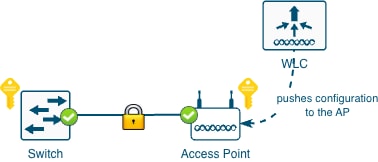
Once MACsec is enabled in the switch, the AP will lose connectivity. Therefore, it is important to configure things in the right order:
Step 1. Configure the WLC (and AP) enabling MACsec
Step 2. Configure the switch enabling MACsec (this will power cycle the switch port)
The configuration has the following elements:
● WLC
◦ Key chain
◦ AP Join Profile configuration
● Switch
◦ Key chain
◦ MKA policy
◦ Interface configuration
When using PSK to derive the encryption keys the following diagram depicts how the keys are derived. In this PSK scenario, the CAK=PSK and the CKN must be manually entered.
PSK - Configuring the Controller
First configure the key chain. To do that navigate to Configuration > Security > MACsec and add a new Key Chain:
● Give it a name
● Add a key:
◦ Enter a key identifier: should be a hex string with even number of digits. This is the Connectivity Association Key name (CKN) and must match in both sides.
◦ Select the crypto algorithm for the control-plane authentication
◦ Select the Key String Type
◦ Enter the Key String: should be a hex string with 32 digits. This is the Pre-Shared Key (PSK) which in this scenario is equivalent to the Connectivity Association Key (CAK). This must match in both sides.
Important: save the key before applying to device
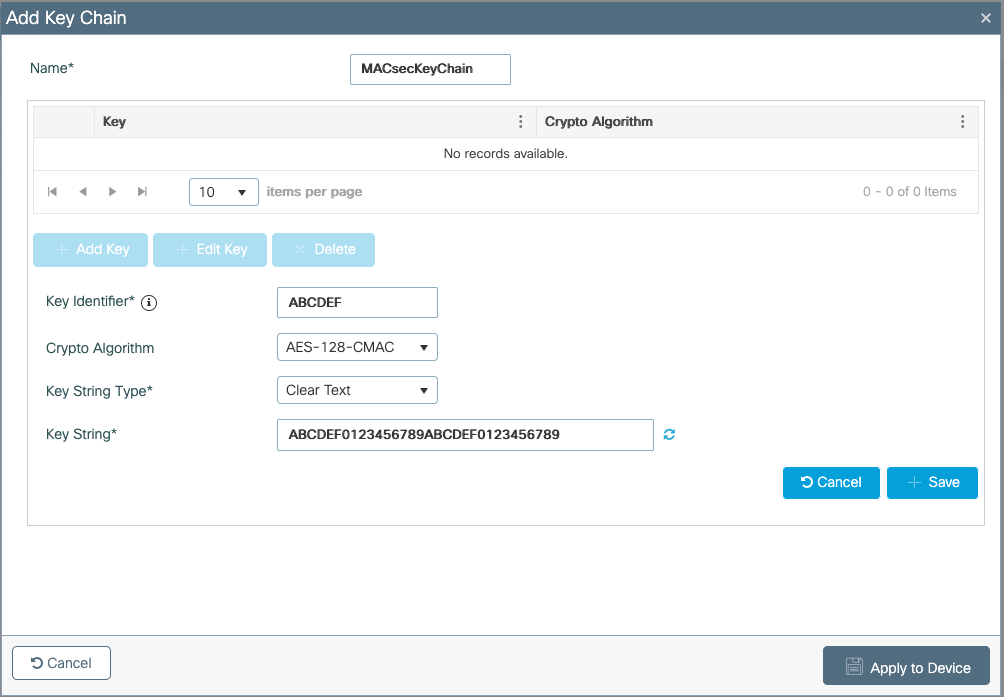
Using CLI in the WLC:
key chain MACsecKeyChain macsec
key ABCDEF
cryptographic-algorithm aes-128-cmac
key-string ABCDEF0123456789ABCDEF0123456789
Second, configure the AP Join Profile. Navigate to Configuration > Tags & Profiles > AP Join. Edit or create a new AP Join Profile, inside, go to AP > General > AP MACsec Configuration section.
● Enable MACsec
● Select the previously configured Key Chain
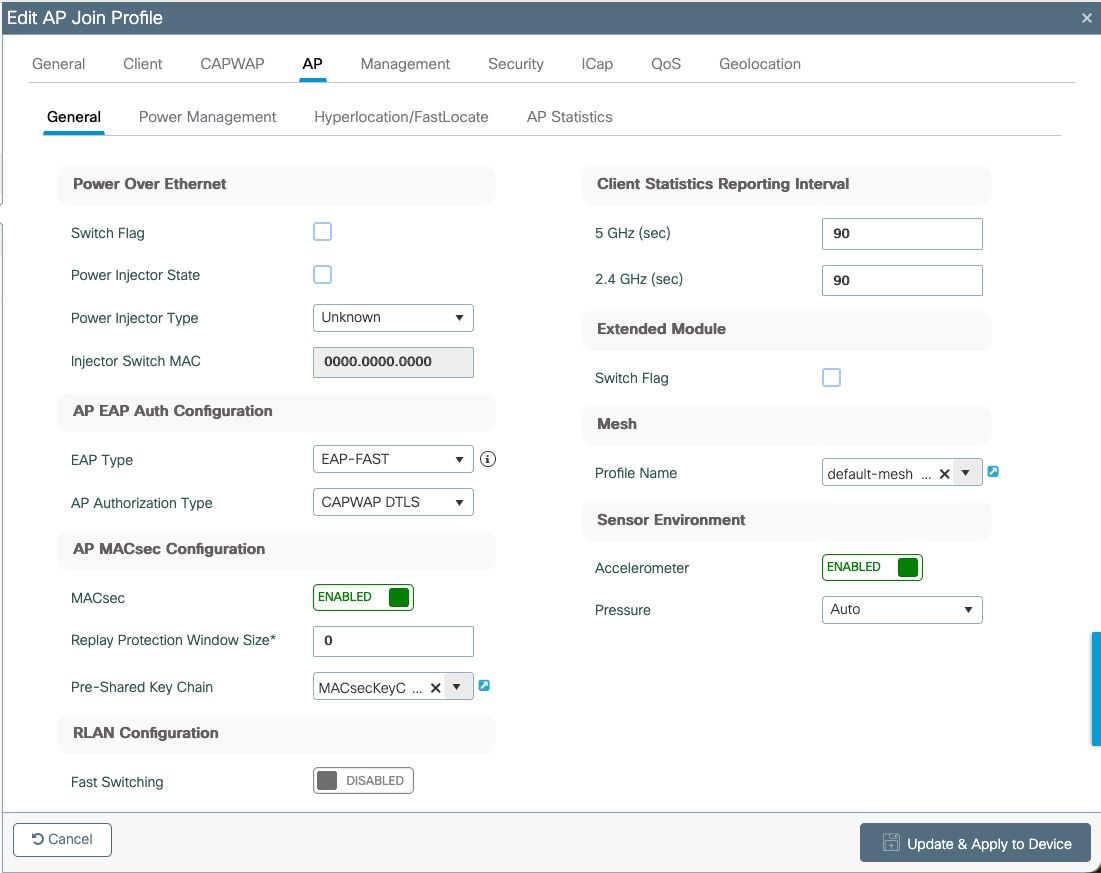
Using CLI in the WLC:
ap profile macsec-ap-profile
macsec
macsec psk-chain MACsecKeyChain
macsec replay-protection window-size 0
Since MACsec is a standard any switch that supports it should work. In this document a sample of Cisco Catalyst 9300 series will be covered.
You can find more details on MACsec configuration in the following guide: https://www.cisco.com/c/en/us/td/docs/switches/lan/catalyst9300/software/release/17-15/configuration_guide/sec/b_1715_sec_9300_cg/macsec_encryption.html
Currently it is not possible in switching to have MACsec PSK and MAC Authentication Bypass (MAB) with or without Dynamic VLAN assignment. Therefore, the port must be open and VLAN assignment done statically.
Like the WLC, first a key chain must be configured in the switch in config mode. Here’s the CLI:
key chain macsec macsec
key ABCDEF
cryptographic-algorithm aes-128-cmac
key-string ABCDEF0123456789ABCDEF0123456789
Now, the MKA policy. It is important to set the key-server priority to a value lower than 255.
CLI:
mka policy macsec-policy
key-server priority 200
mka policy macsec-policy
Optionally, if you want to use a stronger data encryption cipher (for traffic) add this command to the previous section:
macsec-cipher-suite gcm-aes-256
Finally, configure the interface to use MACsec PSK. Config mode CLI:
interface GigabitEthernetx/y/z
mka policy macsec-policy
mka pre-shared-key key-chain macsec
macsec network-link
Note: Applying the command “macsec network-link” will power cycle the port.
Verification for PSK
Legend:
● [WLC] indicates this command works on the WLC.
● [AP] indicates this command works on the AP.
● [SW] indicates this command works on the switch.
[WLC] AP Profile
show ap profile name <ap-profile-name> detailed
AP Profile Name :<ap-profile-name>
[…]
Macsec :
Enabled : True
Auth Method : PSK
PSK chain name : MACsecKeyChain
Replay protection window size: 0
[WLC] AP MACsec summary
show ap macsec summary
AP Name AP Mac Capable Port 0 Port 1
------------------------------------------------------------------------------------------------------
AP11AA.22BB.33CC 99ff.88ee.77dd Yes SUCCESS UNKNOWN
[AP] MACsec status (there are some changes depending on the AP model)
show macsec status
------------------------
wired0: Phy Address 0
------------------------
MACsec 100M: Enabled
1000M: Enabled
2500M: Enabled
5000M: Enabled
Capabilities:
Ciphers supported: GCM-AES-128
GCM-AES-256
Egress SC:
AN Roll Over: Disabled
Egress Protect Frames: True
Egress Cipher: GCM-AES-128
Ingress SC:
Replay Protect: False
Replay Window: 0
AN Roll Over: Disabled
Validate Frames: Strict
[AP] MACsec statistics (there are some changes depending on the AP model)
show macsec statistics
------------------------
wired0: Phy Address 0
------------------------
Egress SC:
Protected Not Encrypted Packets: 0
Protected and Encrypted Packets: 1185
Plain Text Octets Protected Not Encrypted: 0
Plain Text Octets Protected and Encrypted: 567830
Egress SA:
Dropped Packets: 0
Protected Not Encrypted Packets: 0
Protected and Encrypted Packets: 1185
Egress Common:
Control Packets: 445
Unknown Packets: 2
Untagged Packets: 0
Too Long Packets: 0
ECC Error Packets: 0
Dropped Packets: 0
------------------------
Ingress SA:
Untagged Packets: 0
Dropped Packets: 0
Not Using Packets: 0
UnUsed Packets: 0
Not Valid Packets: 0
Invalid Packets: 0
Validated Packets: 2149
Late Packets: 0
Delayed Packets: 0
Unchecked Packets: 0
Octets of Plaintext Not Encrypted: 0
Octets of Plaintext Encrypted: 359574
Ingress Common:
Control Packets: 445
Tagged but Miss Match Packets: 0
Untagged and Miss Match Packets: 1
Untagged and Match that Validate is Strict Packets: 1
Untagged and Match that Validate is Not Strict Packets: 0
Invalid Packets: 0
Unknown SCI and Match that Validate is Strict Packets: 0
Unknown SCI and Match that Validate is Not Strict Packets: 0
Controlled Port Pass the Check Packets: 2149
Uncontrolled Port Pass the Check Packets: 1
Controlled Port Failed the Check Packets: 0
UnControlled Port Failed the Check Packets: 0
Too Long Packets: 0
Control Packets by Post-MACSec Filter: 0
ECC Error Packets: 0
Uncontrolled Port Dropped Packets: 0
[AP] AP Authentication status, includes MACsec
show ap authentication status
Wired Link Status:
wired0 link: Up
Wired 0 Session:
key_mgmt=NONE
wpa_state=COMPLETED
address=99:ff:88:ee:77:dd
PAE KaY status=Active
Authenticated=No
Secured=Yes [Indicates that MACsec is in place]
Failed=No [Indicates if MACsec establishment failed]
Actor Priority=255
Key Server Priority=200
Is Key Server=No
Number of Keys Distributed=0
Number of Keys Received=1
MKA Hello Time=2000
actor_sci=8c:88:81:54:6e:70@1
key_server_sci=aa:11:22:bb:33:dd@27
participant_idx=0
ckn=abcdef
mi=a1d1eb46248ea1b53a883f3c
mn=525
active=Yes
participant=No
retain=No
live_peers=1
potential_peers=0
is_key_server=No
is_elected=Yes
[AP] Possible debugs
debug macsec phy
wpa_supplicant logs:
debug ap authentication {error | events | information | packet}
[SW] Sample syslogs when session is started and secured:
064427: Dec 12 11:51:34.116: %MKA-5-SESSION_START: (Gi1/0/20 : 27) MKA Session started for RxSCI aa11.22bb.33dd/0000, AuditSessionID , AuthMgr-Handle B0000163
064435: Dec 12 11:52:18.244: %MKA-5-SESSION_SECURED: (Gi1/0/20 : 27) MKA Session was secured for RxSCI 99ff.88ee.77dd/0001, AuditSessionID , CKN ABCDEF
[SW] Check MKA session
show mka sessions
Total MKA Sessions....... 1
Secured Sessions... 1
Pending Sessions... 0
====================================================================================================
Interface Local-TxSCI Policy-Name Inherited Key-Server
Port-ID Peer-RxSCI MACsec-Peers Status CKN
====================================================================================================
Gi1/0/20 aa11.22bb.33dd/001b macsec-policy NO YES
27 99ff.88ee.77dd/0001 1 Secured ABCDEF
[SW] MACsec summary (1 indicates success)
show macsec summary
Interface Transmit SC Receive SC
Gi1/0/20 1 1
MACsec can also be configured with 802.1X. The following diagrams explain this scenario.
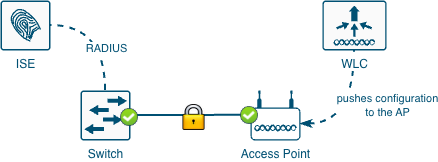
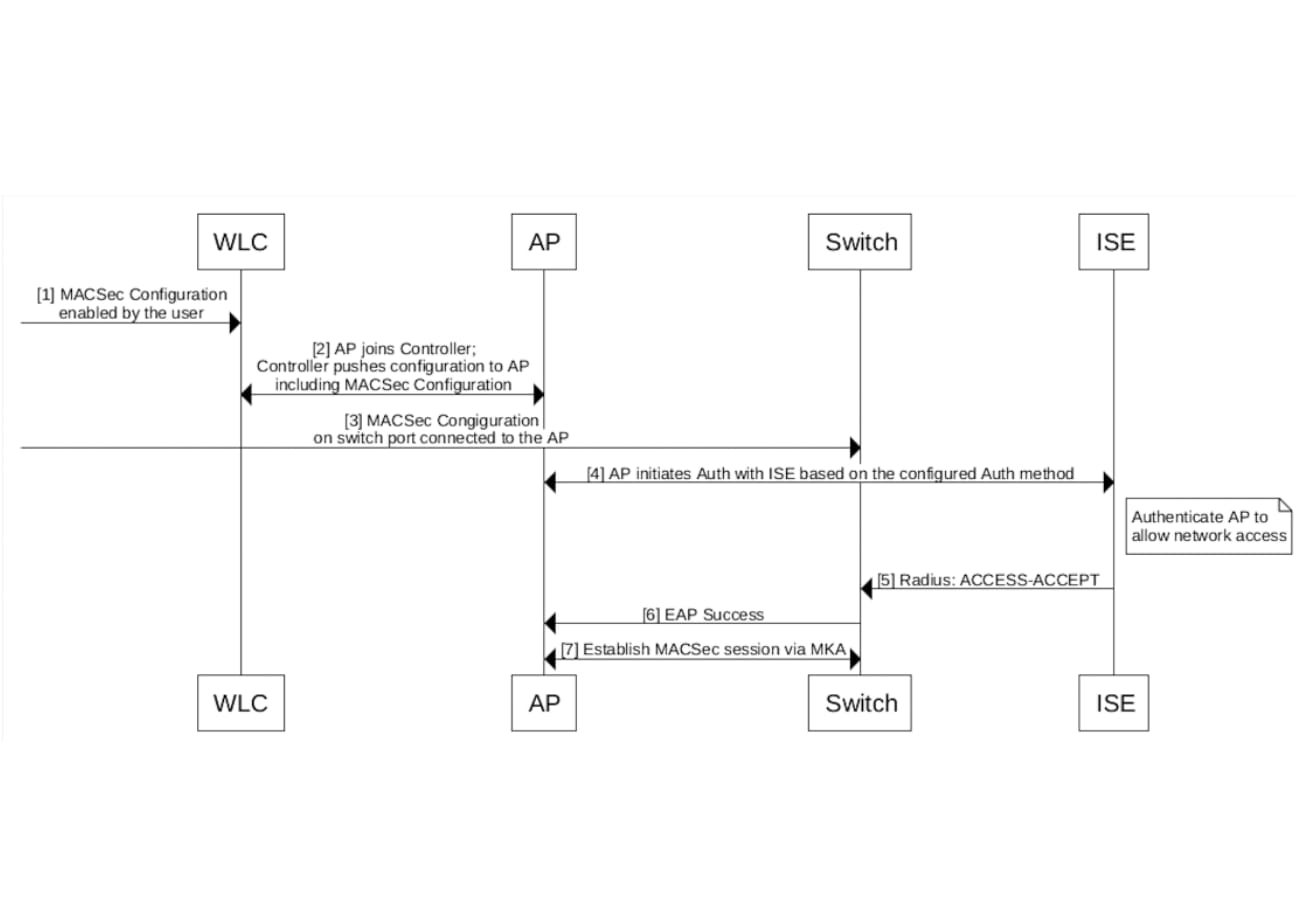
Like the PSK scenario, once MACsec is enabled in the switch, the AP will lose connectivity. However, since 802.1X is introduced, it is recommended to have a working 802.1X setup before attempting MACsec, some references for that are shown below. Recommended order:
1. Configure 802.1X in the switch, WLC (and AP) and RADIUS
2. Verify 802.1X is working
3. Configure the WLC (and APs) enabling MACsec
4. Configure the switch enabling MACsec
The configuration has the following elements:
● WLC
◦ [Not covered in detail] 802.1X
◦ Key chain
◦ AP Join Profile configuration
● Switch
◦ [Not covered in detail] 802.1X
◦ Key chain
◦ MKA policy
◦ Interface configuration
● RADIUS (like ISE)
◦ Not covered in detail
802.1X has several flavors, only the following two are supported, here are the basic differences:
Table 1. EAP types
| EAP Type |
Client Certificate |
Server Certificate |
Username |
| EAP-TLS |
Yes |
Yes |
No |
| EAP-FAST |
No |
No |
Yes |
Here are some documents that explains how to configure 802.1X:
Configure 802.1X Supplicant for Access Points with 9800 Controller
Configure 802.1X on APs for PEAP or EAP-TLS with LSC
EAP-FAST Authentication with Wireless LAN Controllers and Identity Services Engine
When using 802.1X to derive the encryption keys the following diagrams depicts how the keys are derived.
As part of the 802.1X negotiation, the switch port needs to receive an instruction telling it to how to secure the port.
There are two options:
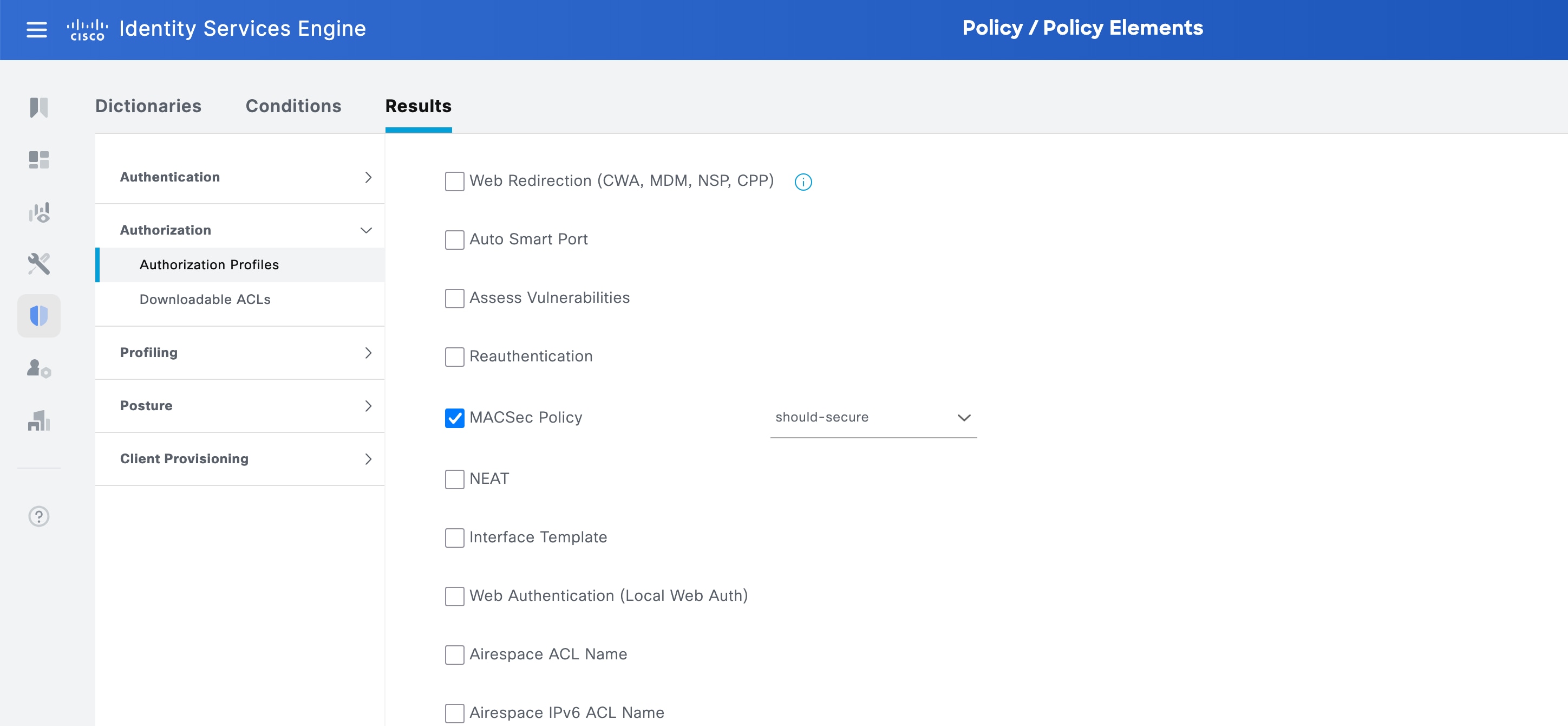
● Should Secure: the switch attempts to establish a MACsec session. If the peer supports it, the link is encrypted. If the peer doesn't support it, the link is not encrypted.
● Must Secure: the switch requires a successful MACsec session to pass traffic. This provides stricter security but in case of failure no communication is allowed.
This can be achieved in 2 different ways:
1. Directly on the switch using a policy map that includes the service template DEFAULT_LINKSEC_POLICY_SHOULD_SECURE. An example of this is shown later in the section Sample 802.1X switch configuration.
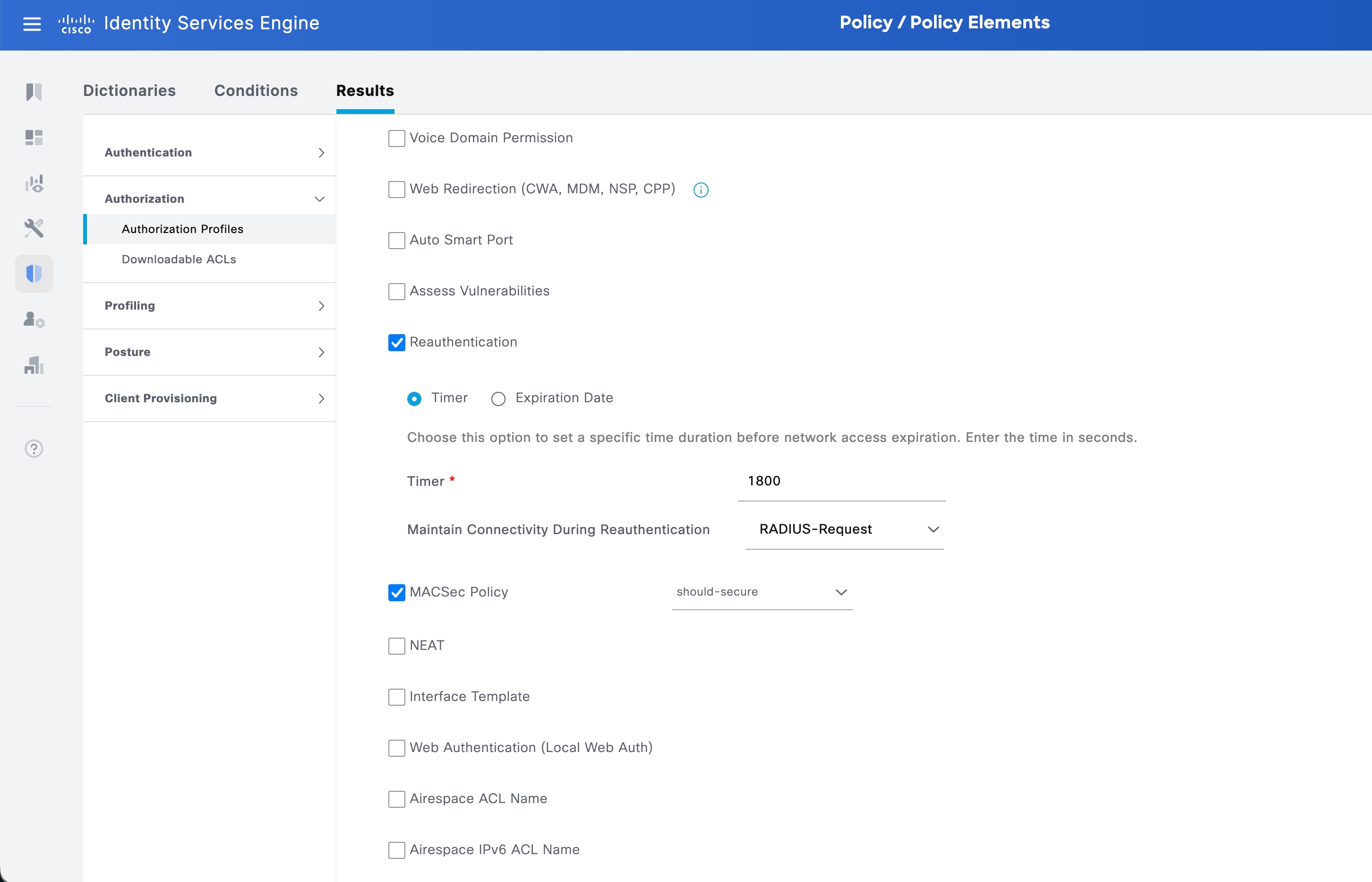
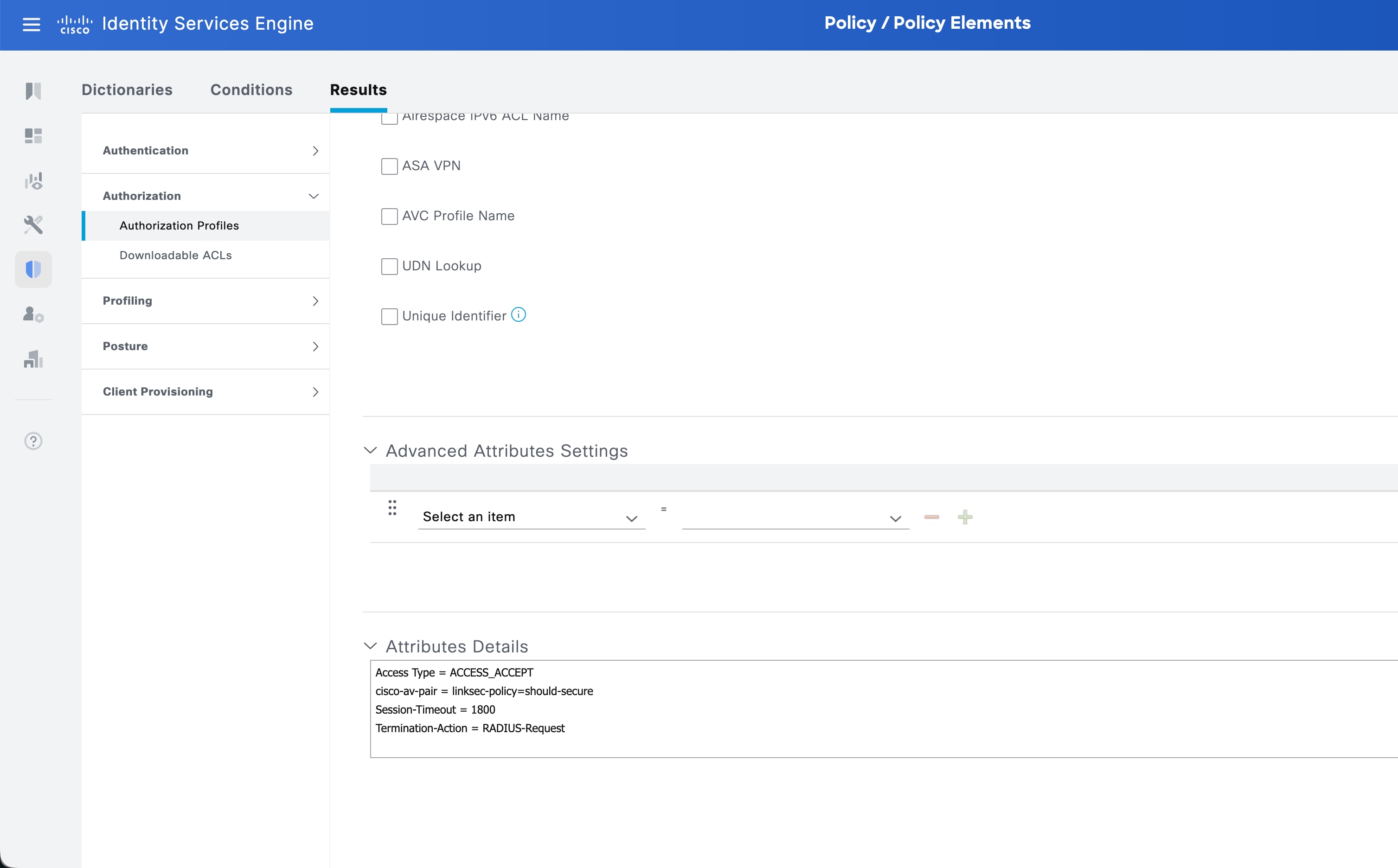
2. Sending from ISE the following attribute: cisco-av-pair = linksec-policy=should-secure. (or must-secure). See the following screenshot.
For simplicity, the samples in this section are with interfaces in access mode. However, for FlexConnect local switching a trunk is required. Details on how to configure 802.1X for that use case can be found later in section Switching considerations for FlexConnect with local switching.
Sample 802.1X Switch Configuration
The following section only covers 802.1X, without MACsec, later in the document MACsec is explained.
Policy Map:
policy-map type control subscriber PMAP_DefaultWiredDot1xClosedAuth_1X_MAB
event session-started match-all
10 class always do-until-failure
10 authenticate using dot1x retries 2 retry-time 0 priority 10
event authentication-failure match-first
5 class DOT1X_FAILED do-until-failure
10 terminate dot1x
20 authenticate using mab priority 20
10 class AAA_SVR_DOWN_UNAUTHD_HOST do-until-failure
30 authorize
40 pause reauthentication
20 class AAA_SVR_DOWN_AUTHD_HOST do-until-failure
10 pause reauthentication
20 authorize
30 class DOT1X_NO_RESP do-until-failure
10 terminate dot1x
20 authenticate using mab priority 20
40 class MAB_FAILED do-until-failure
10 terminate mab
20 authentication-restart 60
50 class DOT1X_TIMEOUT do-until-failure
10 terminate dot1x
20 authenticate using mab priority 20
60 class always do-until-failure
10 terminate dot1x
20 terminate mab
30 authentication-restart 60
event aaa-available match-all
10 class IN_CRITICAL_AUTH_CLOSED_MODE do-until-failure
10 clear-session
20 class NOT_IN_CRITICAL_AUTH_CLOSED_MODE do-until-failure
10 resume reauthentication
event agent-found match-all
10 class always do-until-failure
10 terminate mab
20 authenticate using dot1x retries 2 retry-time 0 priority 10
event inactivity-timeout match-all
10 class always do-until-failure
10 clear-session
event authentication-success match-all
! If the should-secure wants to be configured in the policy map, uncomment the following
! 10 class always do-until-failure
! 10 activate service-template DEFAULT_LINKSEC_POLICY_SHOULD_SECURE
event violation match-all
10 class always do-until-failure
10 restrict
event authorization-failure match-all
10 class AUTHC_SUCCESS-AUTHZ_FAIL do-until-failure
10 authentication-restart 60
Interface configuration
interface GigabitEthernet1/0/19
description BASE CONFIG
switchport mode access
switchport access vlan 72
switchport port-security maximum 3
switchport port-security
device-tracking attach-policy IPDT_POLICY
authentication periodic
authentication timer reauthenticate server
access-session host-mode multi-host
access-session closed
access-session port-control auto
mab
snmp trap mac-notification change added
snmp trap mac-notification change removed
dot1x pae authenticator
dot1x timeout tx-period 4
dot1x timeout supp-timeout 3
dot1x max-req 3
spanning-tree portfast
spanning-tree bpduguard enable
service-policy type control subscriber PMAP_DefaultWiredDot1xClosedAuth_1X_MAB
Sample 802.1X EAP-FAST WLC configuration
ap profile macsec-ap-profile
dot1x username ap password 8 [I]P^MXBVUeAJiO]EZPRJZR`VH]PUfERD
ntp ip 173.38.201.115
Note: The first EAP-FAST negotiation always fails; this is expected. This happens because the first time the AP establishes EAP-FAST, the AP needs to download/import the correct PAC (Protected Access Credentials) file generated by ISE.
Sample 802.1X EAP-TLS WLC configuration
EAP-TLS requires setting up the LSC so the APs can be primed with a certificate. Please see the following doc: Configure 802.1X on APs for PEAP or EAP-TLS with LSC.
This section includes a sample configuration but please follow the previous doc as a SCEP server is required and configurations must follow a certain order.
ap lsc-provision join-attempt 3
ap lsc-provision provision-list
ap lsc-provision subject-name-parameter country ES state Madrid city Madrid domain labwirelessmadrid.cisco.com org Cisco email-address madlab@cisco.com
ap lsc-provision trustpoint APs-MSCA
ap lsc-provision mac-address aabb.ccdd.eeff
ap profile macsec-ap-profile
dot1x eap-type eap-tls
dot1x lsc-ap-auth-state dot1x-port-auth
dot1x username ap password 8 [I]P^MXBVUeAJiO]EZPRJZR`VH]PUfERD
syslog host 0.0.0.0
macsec
macsec replay-protection window-size 0
Note: Even though EAP-TLS doesn’t require a username and password, it is needed for the configuration to work in the WLC.
Note: When using LSC, one must be careful with the certificates. Depending on how the WLC is configured the AP might try to join using the provisioned LSC and if the WLC trustpoint hasn’t been changed to also use the LSC this won’t work. There are several possible combinations to only use LSC everywhere or to have the AP join using the SUDI and keep the WLC trustpoint with the self-signed cert.
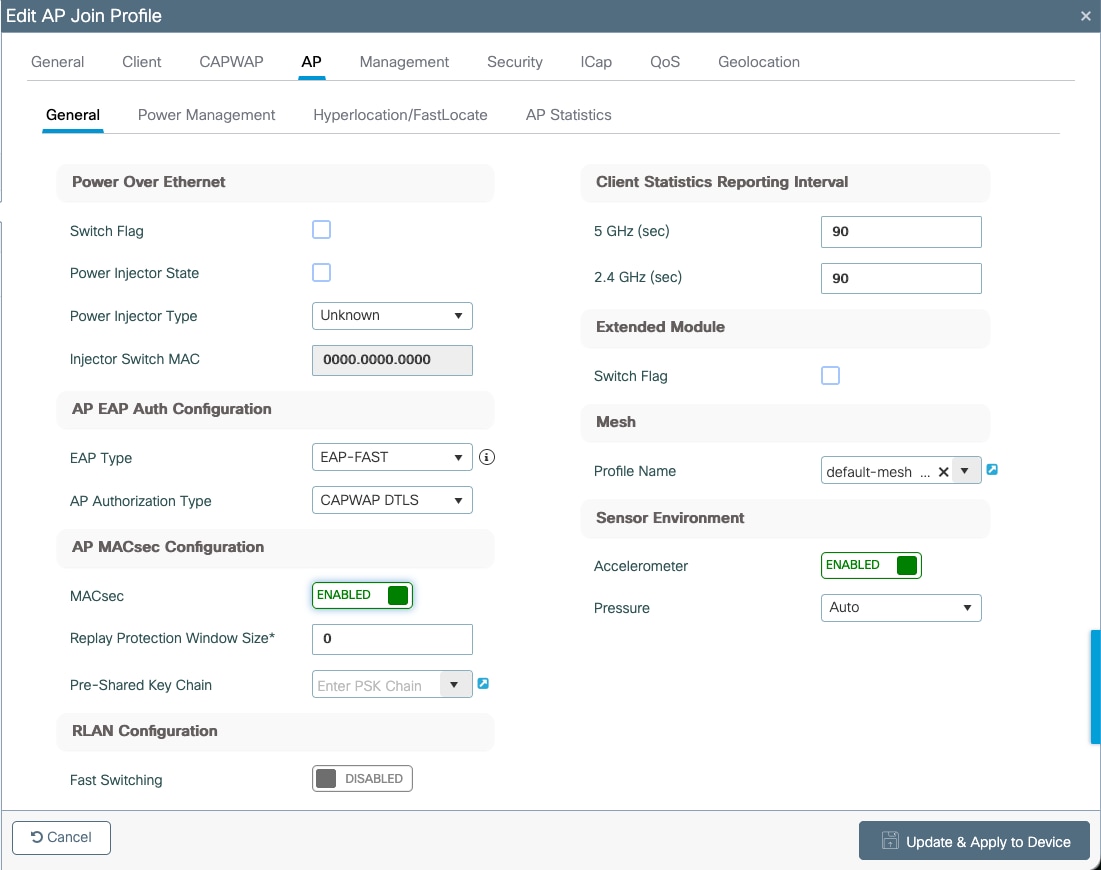
Let’s configure the AP Join Profile. Navigate to Configuration > Tags & Profiles > AP Join. Edit or create a new AP Join Profile, inside, go to AP > General > AP MACsec Configuration section.
● Enable MACsec
● Do not set any Pre-Shared Key Chain since it is not needed
Using CLI in the WLC:
ap profile macsec-ap-profile
macsec
802.1X - Configuring the Switch
Since MACsec is a standard, any switch that supports it should work. In this document a sample of Cisco Catalyst 9300 series will be covered.
You can find more details on MACsec configuration in the following guide: https://www.cisco.com/c/en/us/td/docs/switches/lan/catalyst9300/software/release/17-15/configuration_guide/sec/b_1715_sec_9300_cg/macsec_encryption.html
Create the MKA policy. It is important to set the key-server priority to a value lower than 255. CLI:
mka policy macsec-policy
key-server priority 200
mka policy macsec-policy
Optionally, if you want to use a stronger data encryption cipher (for traffic) add this command to the previous section:
macsec-cipher-suite gcm-aes-256
CLI:
interface GigabitEthernetx/y/z
mka policy macsec-policy
macsec network-link
Note: please be aware that applying the 'macsec network-link' command will result in a power cycle of the port. Additionally, dynamic VLAN assignment is currently not supported as well as switchport-to-trunk conversion using an interface template.
Tech tip: if for some reason you need to re-trigger the 802.1X negotiation you might do so by changing the interface speed, this will flap the port (without a power cycle) and the AP will retry 802.1X and MACsec.
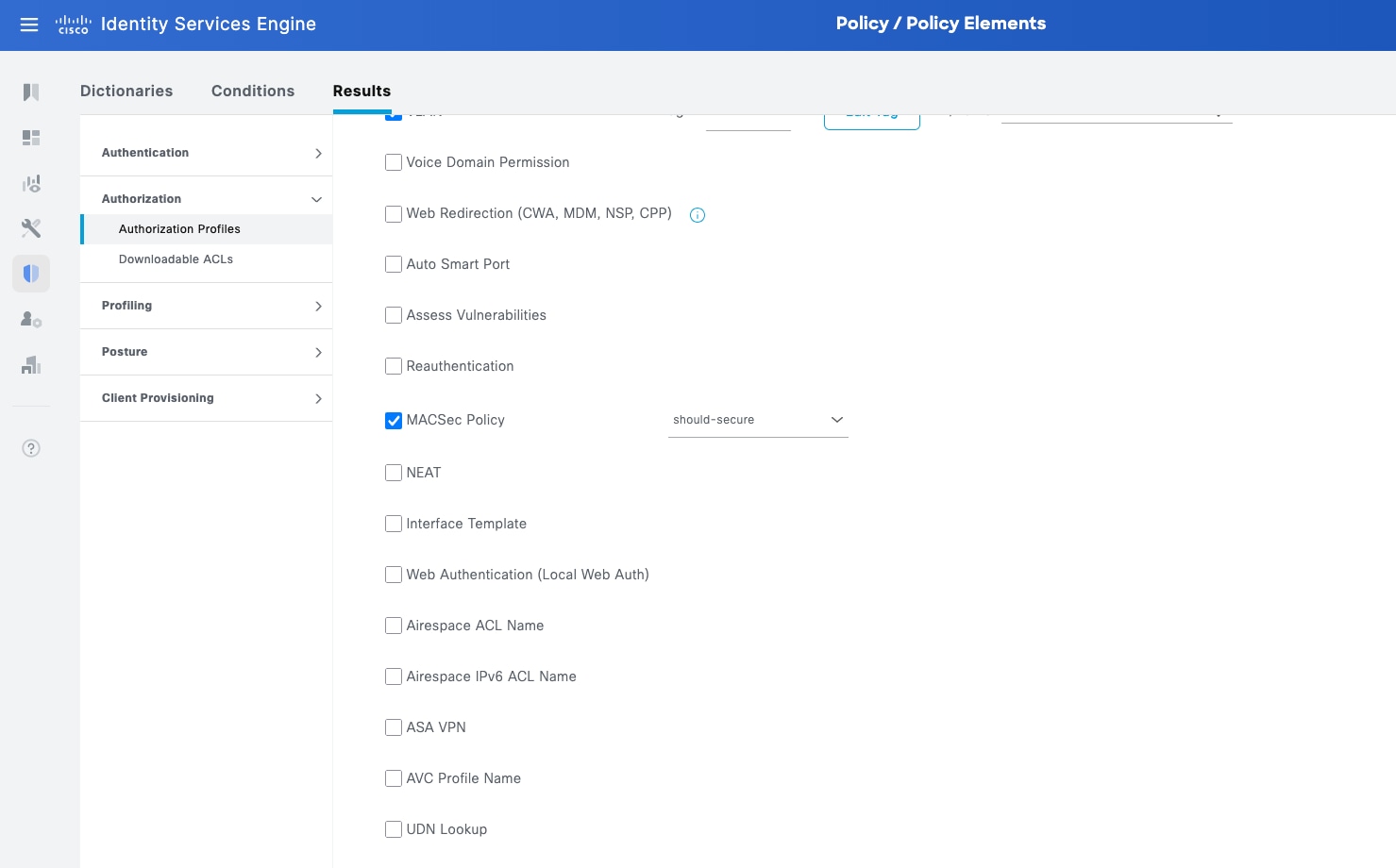
As discussed previously, Should Secure and Must Secure might be sent by ISE. This is configured in the Authorization Profiles.
Navigate to Policy > Policy Elements > Results then in the left navigation bar select Authorization > Authorization Profiles. Create a new one or edit an existing one that is used for APs.
Search for MACsec Policy and enable it, select should-secure or must-secure.
Note: to toggle from should-secure to must-secure or viceversa, first choose the right one in the dropdown, then disable MACsec Policy and reenable it. You can check the results at the bottom in the Attributes Details section
Legend:
● [WLC] indicates this command works on the WLC.
● [AP] indicates this command works on the AP.
● [SW] indicates this command works on the switch.
[WLC] AP Profile
show ap profile name <ap-profile-name> detailed
[…]
Macsec :
Enabled : True
Replay protection window size: 0
[WLC] AP MACsec summary
show ap macsec summary
AP Name AP Mac Capable Port 0 Port 1
------------------------------------------------------------------------------------------------------
AP11AA.22BB.33CC 99ff.88ee.77dd Yes SUCCESS UNKNOWN
[AP] MACsec status (there are some changes depending on the AP model)
show macsec status
------------------------
wired0: Phy Address 16
------------------------
MACsec: Enabled
Capabilities:
Max. Egress SecY: 32
Egress FlowIDTcam Table Size: 32
Egress SecyPolicy Table Size: 32
Egress SaPolicy Table Size: 64
Egress SecyToSaMap Table Size: 32
Ciphers supported: GCM-AES-128
GCM-AES-256
Max. Ingress SecY: 32
Ingress FlowIDTcam Table Size: 32
Ingress SecyPolicy Table Size: 32
Ingress ScCamLookupKey Table Size: 32
Ingress AnPerSc: 4
Ingress ScAnToSaMap Table Size: 128
Ingress SaPolicy Table Size: 64
Port Configuration:
MACsec Port Count: 1
MACsec Ingress pnThreshold: 0xffffffff
MACsec Egress pnThreshold: 0xffffffff
SecY Configuration:
Egress Controlled Port Enable: True
Egress Protect Frames: True
Egress Cipher: GCM-AES-256
Ingress Replay Protect: False
Ingress Replay Window: 3
Ingress Validate Frames: Strict
Ingress Cipher: GCM-AES-256
SC Configuration:
Ingress SecY: 0, SCI: 0xecce13c791130002, enable: 1
[AP] MACsec statistics (there are some changes depending on the AP model)
show macsec statistics
------------------------
wired0: Phy Address 16
------------------------
Egress SecY:
Ifoutcommonoctets: 247290
Ifoutunctloctets: 19856
Ifoutctloctets: 227434
Ifoutunctlucpkts: 0
Ifoutunctlmcpkts: 136
Ifoutunctlbcpkts: 0
Ifoutctlucpkts: 378
Ifoutctlmcpkts: 18
Ifoutctlbcpkts: 0
Outpktssecyuntagged: 0
Outpktssecytoolong: 0
Outpktssecynoactivesa: 0
Outpktsctrlportdisabled: 0
Egress SC:
Outoctetsscprotected: 0
Outoctetsscencrypted: 222682
Egress SA:
Outoctetssaprotected: 0
Outoctetssaencrypted: 396
Egress Port:
Outpktsflowidtcammiss: 0
Outpktsparseerr: 0
Outpktssectaginsertionerr: 0
Outpktsearlypreempterr: 0
Egress Flow:
Outpktsflowidtcamhit: 532
------------------------
Ingress SecY:
Ifinunctloctets: 176021
Ifinctloctets: 130341
Ifinunctlucpkts: 133
Ifinunctlmcpkts: 352
Ifinunctlbcpkts: 441
Ifinctlucpkts: 133
Ifinctlmcpkts: 216
Ifinctlbcpkts: 441
Inpktssecyuntaggedornotag: 136
Inpktssecybadtag: 0
Inpktssecyctl: 136
Inpktssecytaggedctl: 0
Inpktssecyunknownsci: 0
Inpktssecynosci: 0
Inpktsctrlportdisabled: 0
Ingress SC:
Inoctetsscvalidate: 0
Inoctetsscdecrypted: 120861
Inpktsscunchecked: 0
Inpktssclateordelayed: 0
Inpktssccamhit: 790
Ingress SA:
Inpktssaok: 790
Inpktssainvalid: 0
Inpktssanotvalid: 0
Inpktssaunusedsa: 0
Inpktssanotusingsaerror: 0
Ingress Port:
Inpktsflowidtcammiss: 0
Inpktsparseerr: 0
Inpktsearlypreempterr: 0
Ingress Flow:
Inpktsflowidtcamhit: 926
[AP] AP Authentication status, includes MACsec
show ap authentication status
Wired Link Status:
wired0 link: Up
Wired 0 Session:
key_mgmt=IEEE 802.1X (no WPA)
wpa_state=COMPLETED
address=99:ff:88:ee:77:dd
Supplicant PAE state=AUTHENTICATED
suppPortStatus=Authorized
EAP state=SUCCESS
selectedMethod=43 (EAP-FAST)
eap_tls_version=TLSv1.2
EAP TLS cipher=ECDHE-RSA-AES256-GCM-SHA384
tls_session_reused=1
EAP-FAST Phase2 method=MSCHAPV2
PAE KaY status=Active
Authenticated=No
Secured=Yes
Failed=No
Actor Priority=255
Key Server Priority=200
Is Key Server=No
Number of Keys Distributed=0
Number of Keys Received=1
MKA Hello Time=2000
actor_sci=8c:88:81:54:6e:70@1
key_server_sci=aa:11:22:bb:33:dd@2
participant_idx=0
ckn=ba1bdfa89c6457f4a5adfa16e83558b8
mi=3e2a531f2f77275ed068b430
mn=1003
active=Yes
participant=No
retain=No
live_peers=1
potential_peers=0
is_key_server=No
is_elected=Yes
eap_session_id=2b494af2bd8152a44d14966d26f4dc47be2f9ee6be68f4809912bd52f21543bf9
5000c202595dbb5045eea99283f30a2ec6be0583a237422daa87413a793eb8207
[AP] Possible debugs
debug macsec phy
wpa_supplicant logs:
debug ap authentication {error | events | information | packet}
[SW] Sample syslogs when session is started and secured:
000296: Dec 15 09:45:27.646: %MKA-5-SESSION_START: (Gi1/0/19 : 2) MKA Session started for RxSCI 99ff.88ee.77dd/0000, AuditSessionID 0801070A0000000B21668C31, AuthMgr-Handle 32000001
000312: Dec 15 09:45:31.672: %MKA-5-SESSION_SECURED: (Gi1/0/19 : 2) MKA Session was secured for RxSCI 99ff.88ee.77dd/0001, AuditSessionID 0801070A0000000B21668C31, CKN CE95AC2F38461CF085796E8924ADA77F
[SW] Check MKA session
show mka sessions
Total MKA Sessions....... 1
Secured Sessions... 1
Pending Sessions... 0
====================================================================================================
Interface Local-TxSCI Policy-Name Inherited Key-Server
Port-ID Peer-RxSCI MACsec-Peers Status CKN
====================================================================================================
Gi1/0/19 aa11.22bb.33dd/001b macsec-policy NO YES
2 99ff.88ee.77dd/0001 1 Secured BA1BDFA89C6457F4A5ADFA16E83558B8
[SW] MACsec summary (1 indicates success)
show macsec summary
Interface Transmit SC Receive SC
Gi1/0/19 1 1
Switching considerations for FlexConnect local switching
If you are thinking about deploying MACsec 802.1X with FlexConnect local switching which requires a trunk, this is possible.
The way to do this is configuring the switch port as a trunk port, with the right native VLAN assigned and enable 802.1X.
Note: It is not possible to convert an interface from access to trunk using an interface template along with MACsec.
interface GigabitEthernet1/0/19
switchport trunk native vlan 72
switchport mode trunk
device-tracking attach-policy IPDT_POLICY
macsec network-link
authentication periodic
authentication timer reauthenticate server
access-session host-mode multi-host
access-session closed
access-session port-control auto
mab
snmp trap mac-notification change added
snmp trap mac-notification change removed
dot1x pae authenticator
dot1x timeout tx-period 4
dot1x timeout supp-timeout 3
dot1x max-req 3
mka policy macsec-policy
spanning-tree portfast trunk
spanning-tree bpduguard enable
service-policy type control subscriber PMAP_DefaultWiredDot1xClosedAuth_1X_MAB
end
A key command in this configuration is access-session host-mode multi-host, which allows more than one MAC address in the port, which is necessary for FlexConnect local switching.
Sample ISE Authorization Profile
If MACsec is enabled on the AP but the connected switch port does not support it or it is not configured for MACsec, the AP may be unable to establish a secure wired session. To prevent the AP from remaining offline, the AP monitors MACsec peer availability and automatically falls back after a 5 minute timeout if no valid MACsec peer is detected.
For APs with more than one wired uplink, fallback is triggered only when all applicable uplinks fail to establish MACsec. If any uplink successfully establishes a MACsec session, the AP continues operating securely on that uplink. When fallback is triggered, the AP reports the MACsec failure to the controller. MACsec fallback is recovered after AP reboot, or after the AP rejoins the controller and then detects a wired port flap. The AP keeps blocking MACsec restart while the no-peer failure is pending, and clears the block only after controller rejoin plus link recovery.
Note: This behavior was introduced in IOS-XE 26.1.2 and 26.2.1.
Here’s a diagram if the described behavior:
[IFL(1]Fix