Cisco Auto MACsec On-Prem Deployment Guide
Available Languages
Bias-Free Language
The documentation set for this product strives to use bias-free language. For the purposes of this documentation set, bias-free is defined as language that does not imply discrimination based on age, disability, gender, racial identity, ethnic identity, sexual orientation, socioeconomic status, and intersectionality. Exceptions may be present in the documentation due to language that is hardcoded in the user interfaces of the product software, language used based on RFP documentation, or language that is used by a referenced third-party product. Learn more about how Cisco is using Inclusive Language.
- US/Canada 800-553-2447
- Worldwide Support Phone Numbers
- All Tools
 Feedback
 Feedback
Switching Configuration Options
Switching Configuration with Autoconf
Switching Configuration for Autoconf
RADIUS Configuration for Autoconf
Default Configurations by Autoconf
Switching Configuration with Existing 802.1X
Switching Configuration for Existing 802.1X
RADIUS Configuration for Existing 802.1X
Verification with Existing 802.1X
Disabling Auto MACsec in Wireless
This functionality allows the auto-establishment of MACsec between a Cisco 9350 Smart Switch and a compatible Cisco Wireless Wi-Fi 7 Access Point. This requires no explicit configuration on the wireless side and only minimal switch-side configuration. This builds on top of the MACsec functionality introduced for Wireless in IOS-XE 26.1.1. MACsec (IEEE 802.1AE) is used to secure the link between AP and the access switch using hop-by-hop link encryption to mitigate attacks such as denial of service, intrusion, eavesdropping and man-in-the-middle attacks.
● Cisco Smart 9350 Switch running IOS-XE 26.2.1 or higher
● Cisco Wireless Wi-Fi 7 Access Point compatible with Auto MACsec running 26.2.1 or higher, to find the compatible models check the Feature Matrix for Cisco Wireless Access Points section Security Feature Matrix (IOS XE)
● The minimum licensing level required is Essentials for both Switching and Wireless. Switching requires Advantage licensing when using 256-bit MACsec encryption
● RADIUS server (like ISE)
The following diagram shows a high-level explanation of how Auto MACsec works.
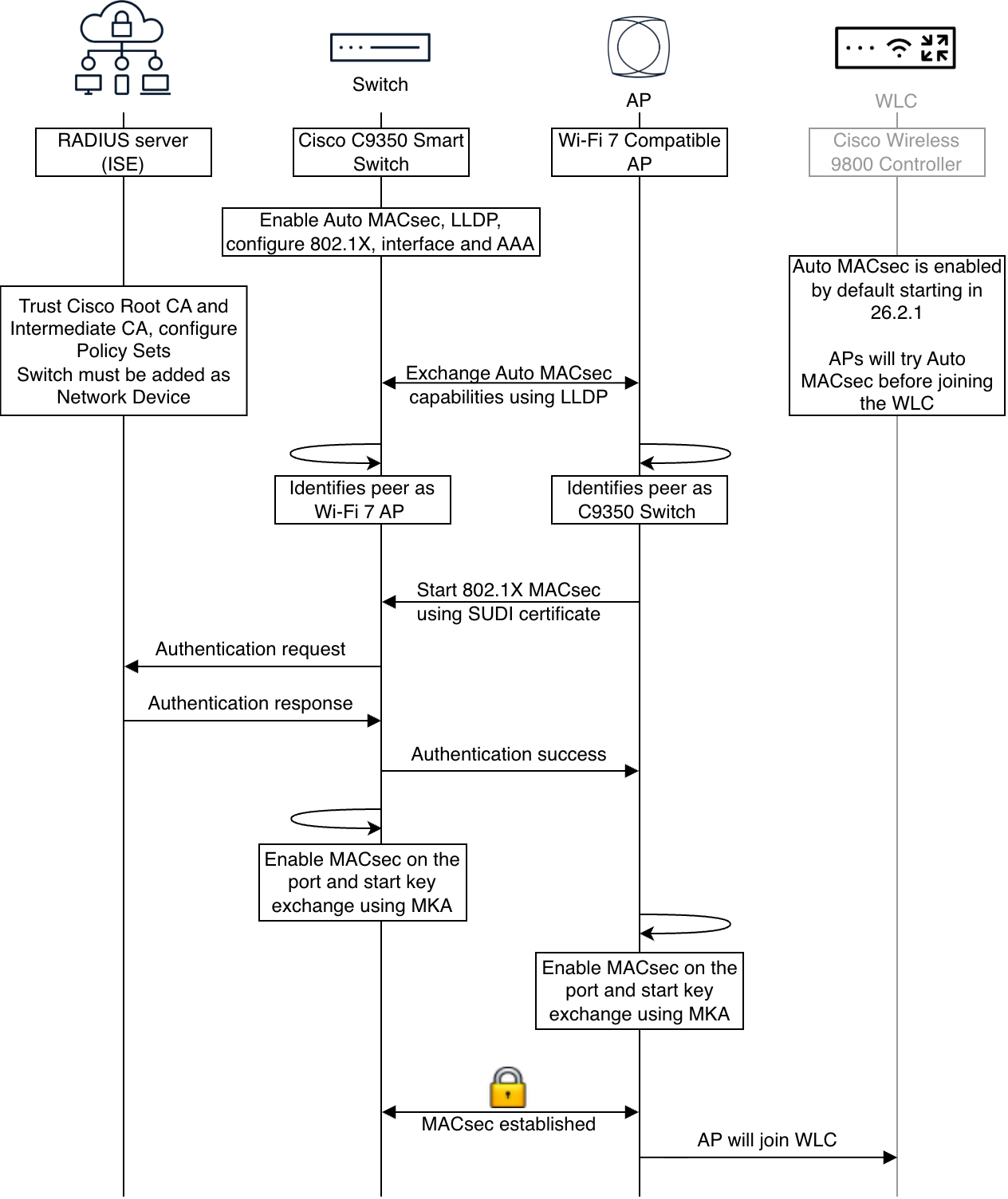
As shown in the diagram, when the AP and Switch are Auto MACsec capable, they exchange LLDP messages with custom flags (TLVs) indicating this capability. CDP is not currently supported. This exchange is in clear text. Once the exchange happens the AP will authenticate with 802.1X and establish MACsec. The switch needs to be configured appropriately to allow for MACsec 802.1X, this will be explained in the next sections.
When enabling Auto MACsec LLDP will always be sent in clear in the applicable ports, even after the link is encrypted with MACsec.
Note: The AP will not verify the RADIUS certificate, any RADIUS certificate will be accepted.
Cisco Wireless Access Points that support Auto MACsec don’t need any special configuration for Auto MACsec to work as long as they have the minimum software release. They don’t even have to join a WLC.
If you’re upgrading an existing deployment (brownfield) to a release that supports Auto MACsec, it will be enabled by default. If for any reason you want to disable Auto MACsec that can be done following the instructions in section Disabling Auto MACsec in Wireless.
Switching Configuration Options
There are 2 scenarios to consider when deploying Auto MACsec, depending on your current switching setup:
● No 802.1X configured in switching: Switching Configuration with Autoconf
● 802.1X already configured in switching with service policies: Switching Configuration with Existing 802.1X
Switching Configuration with Autoconf
This configuration assumes that 802.1X is not currently configured on your switches. Your current configuration most likely includes ports in access mode and a static VLAN assigned.
Autoconf is an automation feature that dynamically applies configurations to switch ports based on the type of endpoint device connected to them.
Autoconf is used in the context of Auto MACsec to automatically detect that the connected device is an Auto MACsec capable Wi-Fi 7 AP and configure the switchport accordingly for MACsec.
As shown below, you can modify the default template to incorporate your configurations to it. By doing this you don’t have to manually configure all AP interfaces.
Switching Configuration for Autoconf
First of all you need to enable the following at a global level:
Switch(config)#auto secure macsec
Switch(config)#lldp run
Switch(config)#autoconf enable
You also need to configure AAA and RADIUS servers, there are several approaches possible here’s a sample:
Switch(config)#radius server ISE
Switch(config-radius-server)#address ip 1.2.3.4 auth-port 1812 acct-port 1813
Switch(config-radius-server)#key <secret>
Switch(config)#aaa group server radius ISE_GRP
Switch(config-sg-radius)#server name ISE
Switch(config)#aaa authentication login default local
Switch(config)#aaa authentication enable default none
Switch(config)#aaa authentication dot1x default group ISE_GRP
Switch(config)#aaa authorization network default group ISE_GRP
Switch(config)#aaa accounting identity default start-stop group ISE_GRP
Switch(config)#aaa server radius dynamic-author
Switch(config-locsvr-da-radius)#client 1.2.3.4
Switch(config-locsvr-da-radius)#server-key <secret>
Finally, you need to configure the AP-connected interfaces. There are 2 possible ways of doing this. The first one is manually configuring all interfaces, then autoconf will just bring the MACsec configuration. See the following example:
Switch(config)#interface TenGigabitEthernet1/0/13
Switch(config-if)#switchport access vlan 92
Switch(config-if)#switchport mode access
Switch(config-if)#access-session interface-template sticky
Note: The command access-session interface-template sticky can also be applied at global level.
Alternatively, you can modify the default interface template that autoconf will apply and add your AP-connected configurations directly there:
Switch(config)#template AUTO_MACSEC_AP_INTERFACE_TEMPLATE
Switch(config-template)#dot1x pae authenticator
Switch(config-template)#switchport access vlan 92
Switch(config-template)#switchport mode access
Switch(config-template)#switchport nonegotiate dot1x pae authenticator
Switch(config-template)#access-session host-mode multi-host
Switch(config-template)#access-session port-control auto
Switch(config-template)#service-policy type control subscriber <YOUR-CUSTOM_AUTO_MACSEC_POLICY>
Switch(config-template)#macsec network-link
Here is a sample of a customer service policy:
Switch(config)#policy-map type control subscriber CUSTOM_AUTO_MACSEC_POLICY
Switch(config-event-control-policymap)#event session-started match-all
Switch(config-event-control-policymap)#10 class always do-until-failure
Switch(config-event-control-policymap)#10 authenticate using dot1x priority 10
Switch(config-event-control-policymap)#event authentication-failure match-first
Switch(config-event-control-policymap)#10 class always do-until-failure
Switch(config-event-control-policymap)#10 terminate dot1x
Switch(config-event-control-policymap)#20 authentication-restart 60
Switch(config-event-control-policymap)#event agent-found match-all
Switch(config-event-control-policymap)#10 class always do-until-failure
Switch(config-event-control-policymap)#10 authenticate using dot1x priority 10
Switch(config-event-control-policymap)#event authentication-success match-all
Switch(config-event-control-policymap)#10 class always do-until-failure
Switch(config-event-control-policymap)#10 activate service-template DEFAULT_LINKSEC_POLICY_SHOULD_SECURE
Once the AP boots and it is detected by the switch as an Auto MACsec capable AP, the switch will automatically apply the necessary configuration in the port using Autoconf. This will lead to 1 AP reboot, since the interface command applies macsec network-link that bounces the port.
To keep the interface template bound to the interface after the reboot, the following command is required: access-session interface-template sticky, otherwise the port bouncing would remove it.
RADIUS Configuration for Autoconf
You also need to configure the RADIUS server to allow the Access Points, see section ISE Configuration.
Default Configurations by Autoconf
If you’re curious on what exactly Autoconf is pushing here is how to check it.
To check which interface template has dynamically applied Autoconf:
LabW-Switch3#show template interface binding target t1/0/13
Interface Templates
===================
Interface: Te1/0/13
Method Source Template-Name
------ ------ -------------
dynamic Built-in AUTO_MACSEC_AP_INTERFACE_TEMPLATE
To see the details of the interface template that Autoconf uses:
LabW-Switch3#show template interface source built-in AUTO_MACSEC_AP_INTERFACE_TEMPLATE
Template Name : AUTO_MACSEC_AP_INTERFACE_TEMPLATE
Modified : No
Template Definition :
dot1x pae authenticator
switchport mode access
switchport nonegotiate
access-session host-mode multi-host
access-session port-control auto
service-policy type control subscriber BUILTIN_AUTO_MACSEC_POLICY
macsec network-link
To see the built-in service policy used by the previous interface template:
LabW-Switch3#show policy-map type control subscriber BUILTIN_AUTO_MACSEC_POLICY
BUILTIN_AUTO_MACSEC_POLICY
event session-started match-all
10 class always do-until-failure
10 authenticate using dot1x priority 10
event authentication-failure match-first
10 class always do-until-failure
10 terminate dot1x
20 authentication-restart 60
event agent-found match-all
10 class always do-until-failure
10 authenticate using dot1x priority 10
event authentication-success match-all
10 class always do-until-failure
10 activate service-template DEFAULT_LINKSEC_POLICY_SHOULD_SECURE
Note: Notice how the service-policy by default in the switch applies Should Secure, however, the policy sent by the RADIUS server takes precedence and could send Must Secure.
Switching Configuration with Existing 802.1X
If you already have your switch ports configured for 802.1X with a service policy and you want to keep your ports with the existing 802.1X configuration you must use the configuration described in this section.
As a high-level summary, if your 802.1X is already working in switching, you need to do the following:
- [SW] Enable LLDP
- [SW] Enable Auto MACsec globally
- [SW] Add macsec network-link per interface
- [ISE] Trust Root CA and Sub CA
- [ISE] Modify Policy Set to allow SUDI certs
Note: If you use this configuration strategy, autoconf will not apply any configurations automatically to interfaces. This is because when a port has already configured a service policy autoconf skips the interface.
Switching Configuration for Existing 802.1X
Let’s go step by step. First of all you need to enable the following:
Switch(config)#auto secure macsec
Switch(config)#lldp run
You also need to configure AAA and RADIUS servers, this is not shown as you should already have it. If you need a sample see the previous section Switching Configuration with Autoconf.
Add the following configurations to your existing interface 802.1X configurations where you have APs and you want MACsec:
Switch(config)#interface TenGigabitEthernet1/0/13
Switch(config-if)#macsec network-link
Note: please be aware that applying the macsec network-link command will result in a power cycle of the port. Additionally, dynamic VLAN assignment is currently not supported as well as switchport-to-trunk conversion using an interface template.
If you want, you might customize the MKA policy and apply it on interfaces using the following commands.
Switch(config)#mka policy macsec-policy
Switch(config-mka-policy)#key-server priority 200
Switch(config-mka-policy)#macsec-cipher-suite gcm-aes-256
Switch(config)#interface TenGigabitEthernet1/0/13
Switch(config-if)#mka policy macsec-policy
RADIUS Configuration for Existing 802.1X
You also need to configure the RADIUS server to allow the Access Points, see section ISE Configuration.
The last thing to configure is the RADIUS server itself, the following applies to any RADIUS server but the examples will be given for ISE. In ISE you first need to trust the Root CA and Intermediate CA that sign the SUDI certificate. Here are the 2 certificates:
● [Root CA] Cisco Root CA 2099: crca2099.cer
● [Sub CA] Cisco High Assurance SUDI CA or HA SUDI CA: hasudi.cer
The certificates can be downloaded from https://www.cisco.com/security/pki/.
The Cisco Root CA 2099 is already installed in ISE; but it is not trusted by default for client authentication (802.1X) so that needs to be configured. Navigate to Administration > System > Certificates > Trusted Certificates search for Cisco Root CA 2099 and edit it, enable trust for:
● Trust for authentication within ISE and Client-Server communication
● Trust for client authentication and Syslog
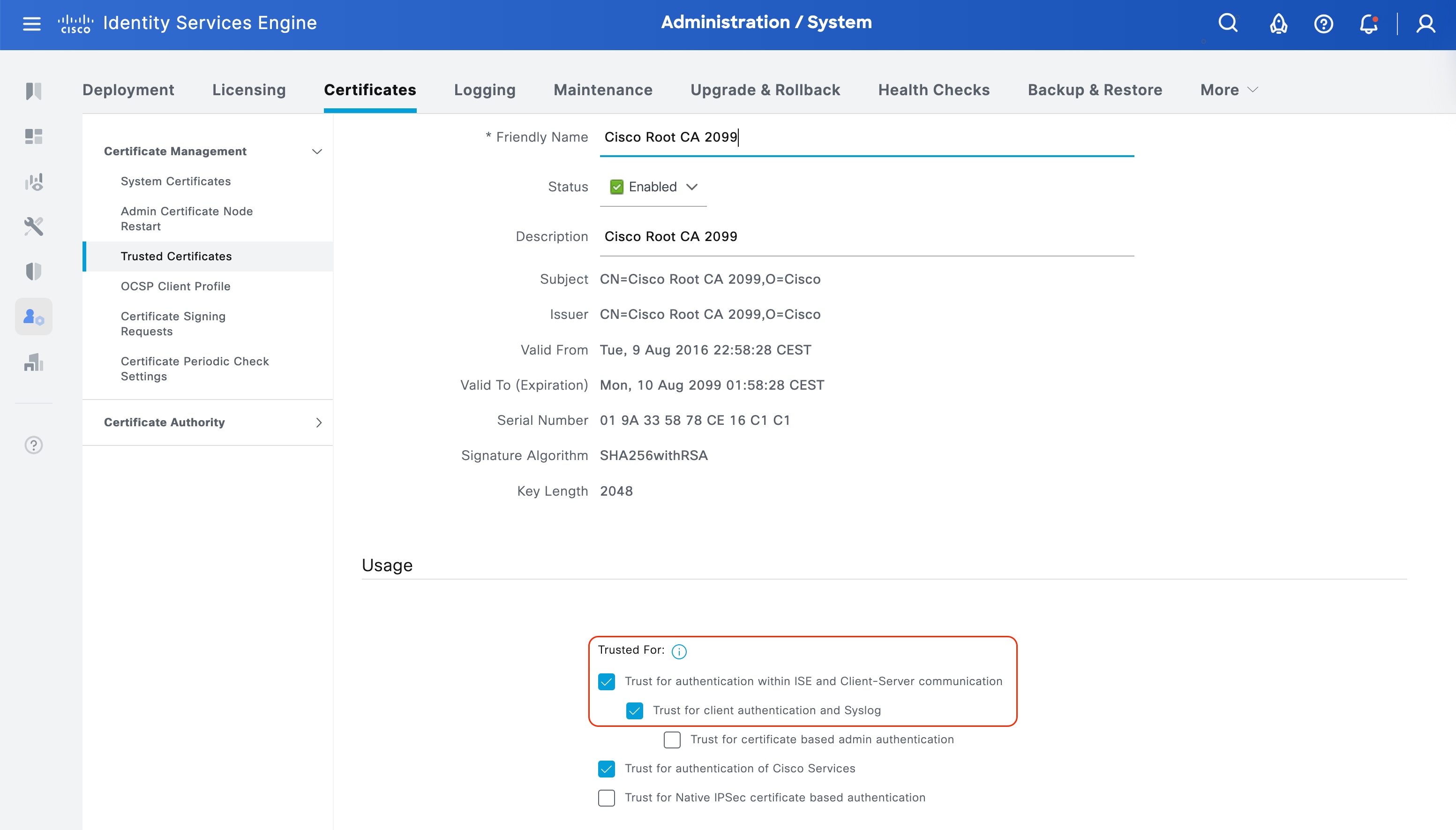
Now download the file for the Sub CA Cisco High Assurance SUDI CA and import it to Trusted Certificates. As for the previous certificate enable trust for:
● Trust for authentication within ISE and Client-Server communication
● Trust for client authentication and Syslog
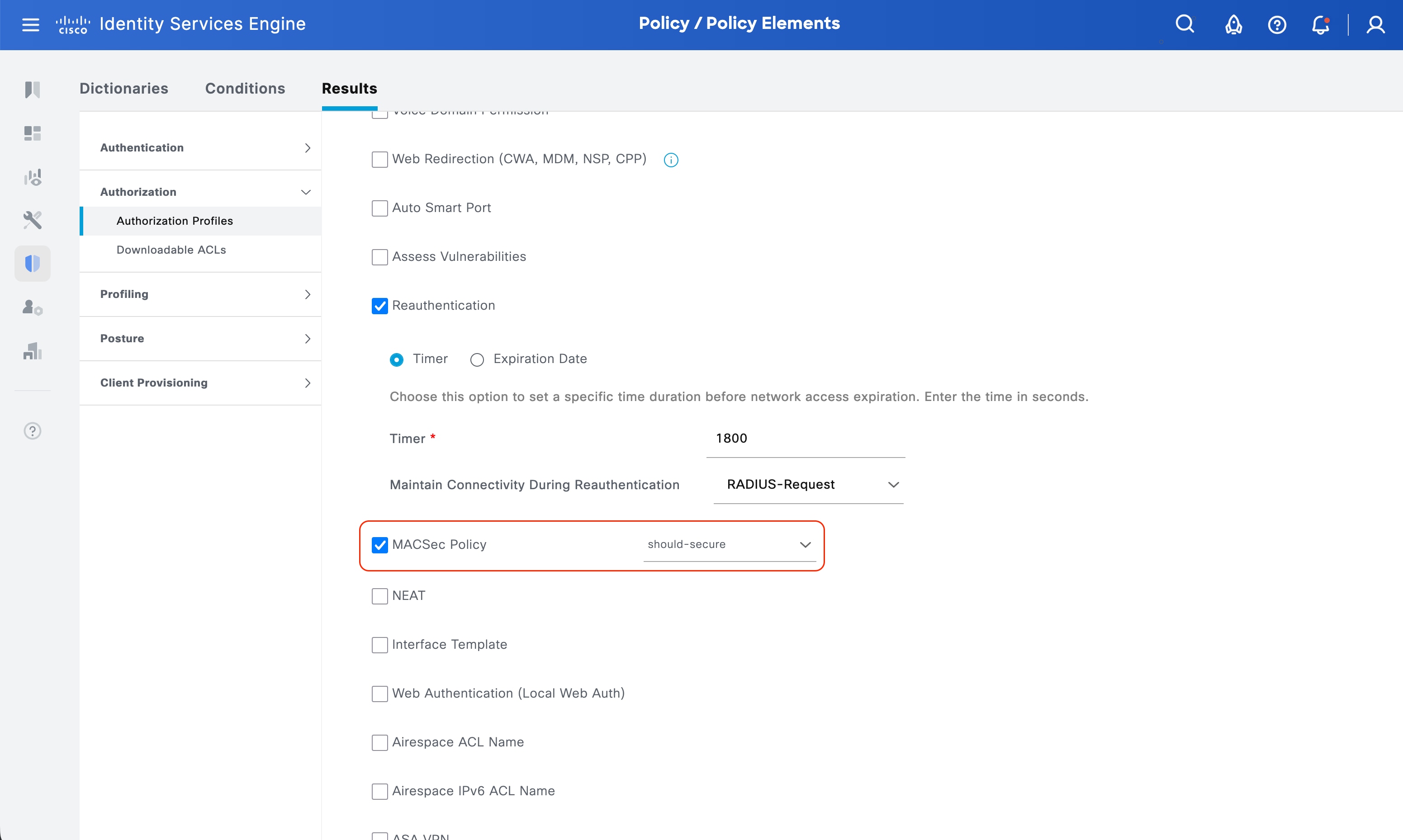
Now we have both certificates as trusted for 802.1X, let’s create the Authorization Profile. Navigate to Policy > Policy Elements > Authorization > Authorization Profiles. Create/edit a new one for Access Point with MACsec. You must configure it to:
● Access Type: Access Accept
● MACsec Policy: should-secure or must-secure depending on your security policies
Note: Should-secure will instruct the switch port to allow traffic even if MACsec is not established. Must-secure on the other hand will drop all traffic is MACsec is not established.
Note: If you don’t specify the MACsec policy (should-secure vs must-secure), the interface template AUTO_MACSEC_AP_INTERFACE_TEMPLATE pulls the service policy BUILTIN_AUTO_MACSEC_POLICY which has the service template DEFAULT_LINKSEC_POLICY_SHOULD_SECURE so the default will be should secure.
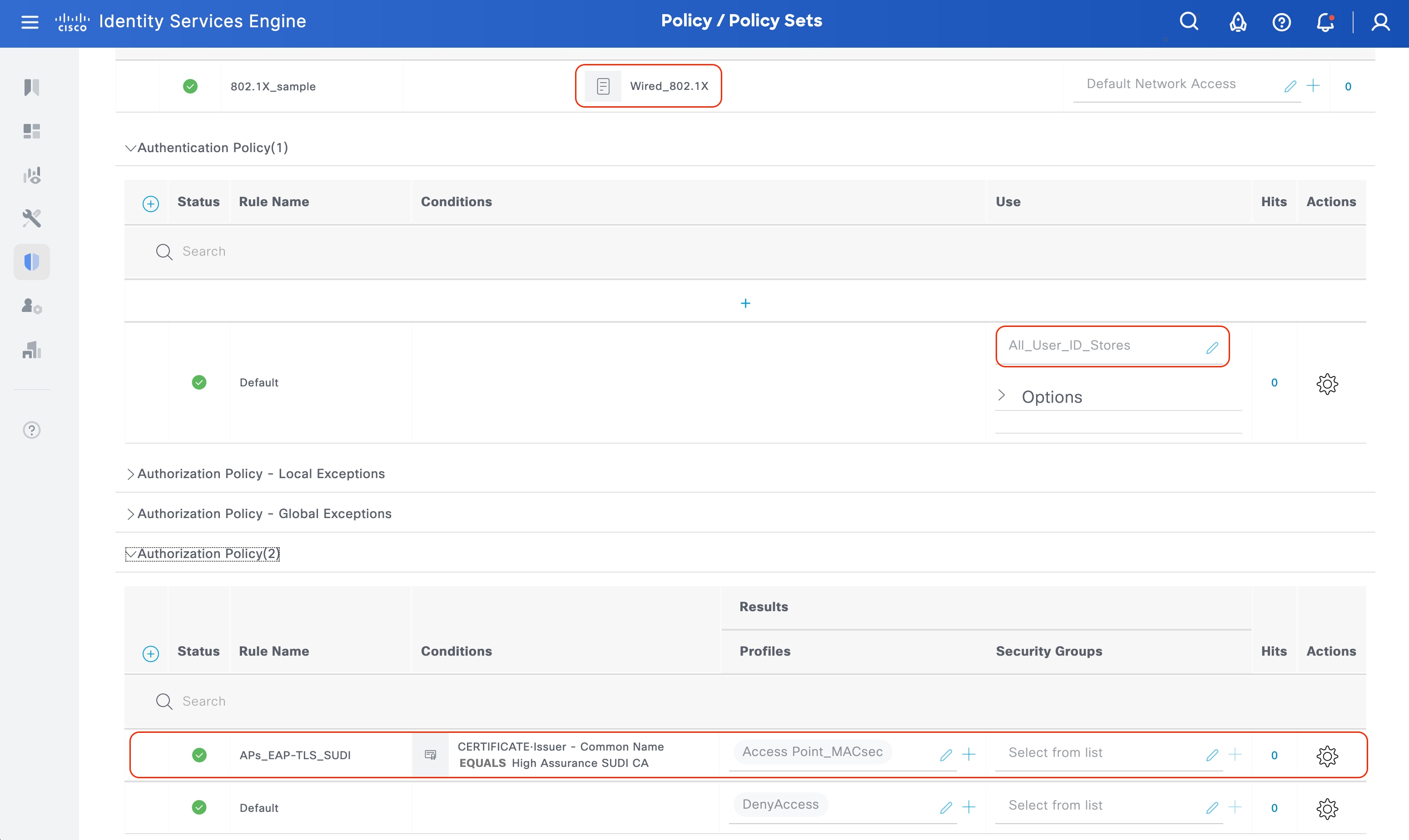
Now that the Authorization Profile is configured, it is time to work on the policy sets. Navigate to Policy > Policy Sets and create/edit a new Policy Set for Wired 802.1X. Configure it to:
● [Optional] Filter for just Wired 802.1X
● In Authentication Policy select All_Users_ID_Stores or a custom created Identity Source Sequence that includes the certificates trusted above.
● In Authorization Policy name your rule as desired, under conditions you might filter all the SUDI requests using the Sub CA name as shown below. Finally in Authorization Profiles select the previously created Authorization Profile.
You might want to combine this rule with an additional MAC-based endpoint group filtering to just allow a set of MAC addresses that belong to your organization. It is also possible to use a list of serial numbers, those must be stored in an external database and consulted, see the following article: www.cisco.com/c/en/us/support/docs/security/identity-services-engine/216841-simplified-access-policy-using-odbc-is.html.
Legend:
● [WLC] indicates this command is executed on the WLC.
● [AP] indicates this command executed on the AP.
● [SW] indicates this command executed on the switch.
Watch for bold sentenced to know what to look for.
[SW] Syslogs when Auto MACsec is established successfully.
May 28 09:50:57.546: %LINK-3-UPDOWN: Interface TenGigabitEthernet1/0/13, changed state to down
LabW-Switch3#
May 28 09:51:01.266: %LINK-3-UPDOWN: Interface TenGigabitEthernet1/0/13, changed state to up
LabW-Switch3#
May 28 09:51:06.466: %SESSION_MGR-5-START: Switch 1 R0/0: sessmgrd: Starting 'dot1x' for client (cc6e.2af6.afd0) on Interface TenGigabitEthernet1/0/13 AuditSessionID 1F01090A000000136DFEA8E1
LabW-Switch3#
May 28 09:51:08.020: %MKA-5-SESSION_START: (Te1/0/13 : 2) MKA Session started for RxSCI cc6e.2af6.afd0/0000, AuditSessionID 1F01090A000000136DFEA8E1, AuthMgr-Handle 63000004
May 28 09:51:08.019: %DOT1X-5-SUCCESS: Switch 1 R0/0: sessmgrd: Authentication successful for client (cc6e.2af6.afd0) on Interface Te1/0/13 AuditSessionID 1F01090A000000136DFEA8E1 Username anonymous
May 28 09:51:08.022: %SESSION_MGR-5-SUCCESS: Switch 1 R0/0: sessmgrd: Authorization succeeded for client (cc6e.2af6.afd0) on Interface TenGigabitEthernet1/0/13 AuditSessionID 1F01090A000000136DFEA8E1
LabW-Switch3#
May 28 09:51:09.022: %LINEPROTO-5-UPDOWN: Line protocol on Interface TenGigabitEthernet1/0/13, changed state to up
LabW-Switch3#
May 28 09:51:12.045: %MKA-5-SESSION_SECURED: (Te1/0/13 : 2) MKA Session was secured for RxSCI cc6e.2af6.afd0/0001, AuditSessionID 1F01090A000000136DFEA8E1, CKN 2A16953F3E04F045607A4D18AAE6E53D
[AP] Syslogs when Auto MACsec is established successfully.
[*05/28/2026 09:47:35.3768] !!!!! {/opt/cisco/bin/capwap_brain} LLDP Auto-Secure flag changed: 0 -> 1, triggering LLDP
[*05/28/2026 09:47:35.3768]
[*05/28/2026 09:47:35.3774]
[*05/28/2026 09:47:35.3774] !!!!! {/opt/cisco/bin/capwap_brain} Use HW SUDI to start auto secure process
[*05/28/2026 09:47:35.3774]
[*05/28/2026 09:47:38.0690] Waiting for wireless module load completion !!!
[*05/28/2026 09:47:38.6460] Interface wired0 is up
[*05/28/2026 09:47:38.6460] Starting wpa_supplicant for wired 0
[*05/28/2026 09:47:38.6461] Auto MACsec enabled, using TAM engine configuration
[*05/28/2026 09:47:38.6524] systemd[1]: Cannot find unit for notify message of PID 12833, ignoring.
[*05/28/2026 09:47:38.6959] hostapd:Successfully initialized wpa_supplicant
[*05/28/2026 09:47:38.9773] chatter: Device wired0 notify state change link DOWN
[*05/28/2026 09:47:38.9775]
[*05/28/2026 09:47:38.9775] Detect link-status changed !!
[*05/28/2026 09:47:38.9778] wired0 LINK DOWN
[*05/28/2026 09:47:44.1775] chatter: Device wired0 notify state change link UP
[*05/28/2026 09:47:44.1777]
[*05/28/2026 09:47:44.1777] Detect link-status changed !!
[*05/28/2026 09:47:44.1779] wired0 LINK UP
[*05/28/2026 09:47:44.7528] Check whether client_ip_table entry need to be cleared 0
[*05/28/2026 09:47:44.7532] In write handler 'run(0 1 0)' for 'set_gateway :: Script':
[*05/28/2026 09:47:44.7532] While calling 'route_table.conf1 dst 10.128.128.127 or dst ':
[*05/28/2026 09:47:44.7532] pattern 1: partial directive
[*05/28/2026 09:47:44.7532] Clearing client entry
[*05/28/2026 09:47:44.7893] Init TAM CTAMC - Start
[*05/28/2026 09:47:44.7893] Init TAM CTMAC - catalyst_engine
[*05/28/2026 09:47:44.9249] hostapd:dot1x: State: DISCONNECTED -> DISCONNECTED
[*05/28/2026 09:47:45.0270] hostapd:dot1x: Event ASSOC (0) received
[*05/28/2026 09:47:45.0270] hostapd:dot1x: State: DISCONNECTED -> ASSOCIATED
[*05/28/2026 09:47:45.0270] hostapd:dot1x: Associated to a new BSS: BSSID=01:80:c2:00:00:03
[*05/28/2026 09:47:45.1770] hostapd:dot1x: Associated with 01:80:c2:00:00:03
[*05/28/2026 09:47:45.1770] hostapd:dot1x: CTRL-EVENT-SUBNET-STATUS-UPDATE status=0
[*05/28/2026 09:47:46.0159] systemd[1]: Cannot find unit for notify message of PID 12947, ignoring.
[*05/28/2026 09:47:46.2432] Interface wired0 is up
[*05/28/2026 09:47:46.2433] Starting wpa_supplicant for wired 0
[*05/28/2026 09:47:46.2433] Auto MACsec enabled, using TAM engine configuration
[*05/28/2026 09:47:46.2481] systemd[1]: Cannot find unit for notify message of PID 12950, ignoring.
[*05/28/2026 09:47:46.2540] hostapd:Successfully initialized wpa_supplicant
[*05/28/2026 09:47:48.0705] Waiting for wireless module load completion !!!
[*05/28/2026 09:47:48.2988] Init TAM CTAMC - Start
[*05/28/2026 09:47:48.2988] Init TAM CTMAC - catalyst_engine
[*05/28/2026 09:47:48.4331] hostapd:dot1x: State: DISCONNECTED -> DISCONNECTED
[*05/28/2026 09:47:48.5170] hostapd:dot1x: Event ASSOC (0) received
[*05/28/2026 09:47:48.5171] hostapd:dot1x: State: DISCONNECTED -> ASSOCIATED
[*05/28/2026 09:47:48.5171] hostapd:dot1x: Associated to a new BSS: BSSID=01:80:c2:00:00:03
[*05/28/2026 09:47:48.6570] hostapd:dot1x: Associated with 01:80:c2:00:00:03
[*05/28/2026 09:47:48.6570] hostapd:dot1x: CTRL-EVENT-SUBNET-STATUS-UPDATE status=0
[*05/28/2026 09:47:50.4369] hostapd:EAP: Status notification: started (param=)
[*05/28/2026 09:47:50.4369] hostapd:EAP: EAP-Request Identity
[*05/28/2026 09:47:50.4427] hostapd:EAP: Status notification: accept proposed method (param=TLS)
[*05/28/2026 09:47:50.6777] hostapd:dot1x: CTRL-EVENT-EAP-METHOD EAP vendor 0 method 13 (TLS) selected
[*05/28/2026 09:47:50.7286] hostapd:dot1x: CTRL-EVENT-EAP-PEER-CERT depth=1 subject='/DC=com/DC=cisco/DC=labwirelessmadrid/CN=labwirelessmadrid-CA' hash=d9625a4a74d38416821ce794b5ec5e4234491a53d288a2992a2c1a10c316d627
[*05/28/2026 09:47:50.7288] hostapd:dot1x: CTRL-EVENT-EAP-PEER-CERT depth=1 subject='/DC=com/DC=cisco/DC=labwirelessmadrid/CN=labwirelessmadrid-CA' hash=d9625a4a74d38416821ce794b5ec5e4234491a53d288a2992a2c1a10c316d627
[*05/28/2026 09:47:50.7292] hostapd:dot1x: CTRL-EVENT-EAP-PEER-CERT depth=0 subject='/C=ES/ST=Madrid/L=Alcobendas/O=Cisco/OU=Madrid Wireless Lab/CN=madlab-ise2-1.cisco.com' hash=87c9000ef88f010114c8236a9a09dfb86b3cb054a23d7a623835a8feb265b151
[*05/28/2026 09:47:50.7295] hostapd:dot1x: CTRL-EVENT-EAP-PEER-ALT depth=0 DNS:madlab-ise2-1.cisco.com
[*05/28/2026 09:47:50.7295] hostapd:EAP: Status notification: remote certificate verification (param=success)
[*05/28/2026 09:47:51.9905] hostapd:KaY: No MKA participant instance - ignore EAPOL-MKA
[*05/28/2026 09:47:51.9932] hostapd:EAP: Status notification: completion (param=success)
[*05/28/2026 09:47:51.9932] hostapd:dot1x: CTRL-EVENT-EAP-SUCCESS EAP authentication completed successfully
[*05/28/2026 09:47:51.9933] hostapd:dot1x: State: ASSOCIATED -> COMPLETED
[*05/28/2026 09:47:51.9933] hostapd:dot1x: CTRL-EVENT-CONNECTED - Connection to 01:80:c2:00:00:03 completed [id=0 id_str=]
[*05/28/2026 09:47:55.9905] hostapd:KaY: We don't have a latest distributed key - ignore SAK use
[*05/28/2026 09:47:58.0720] Waiting for wireless module load completion !!!
[SW] Check MKA session
LabW-Switch3#show mka sessions
Total MKA Sessions....... 1
Secured Sessions... 1
Pending Sessions... 0
====================================================================================================
Interface Local-TxSCI Policy-Name Inherited Key-Server
Port-ID Peer-RxSCI MACsec-Peers Status CKN
====================================================================================================
Te1/0/13 fc72.8879.228d/0002 *DEFAULT POLICY* NO YES
2 cc6e.2af6.afd0/0001 1 Secured 2A16953F3E04F045607A4D18AAE6E53D
[SW] MACsec summary (1 indicates success)
LabW-Switch3#show macsec summary
Interface Transmit SC Receive SC
Te1/0/13 1 1
[WLC] AP MACsec summary
LabW-9800CL4#show ap macsec summary
Capability Codes:
(M) MACSec, (A) Auto-MACSec
AP Name AP Mac Capability Auto Port 0 Port 1
-----------------------------------------------------------------------------------------------------------------
APCC6E.2AF6.AFD0 1057.2508.7780 M,A Enabled SUCCESS UNKNOWN
[AP] Check AP LLDP neighbors to check the Auto MACsec status:
APCC6E.2AF6.AFD0#show lldp neighbors
Capability Codes:
(R) Router, (B) Bridge, (T) Telephone, (C) DOCSIS Cable Device
(W) WLAN Access Point, (P) Repeater, (S) Station, (O) Other
Device ID Local Intf Hold-time Capability Port ID Auto-Macsec
LabW-Switch3.cisco.com wired0 115 B Te1/0/13 Enabled
[AP] AP Authentication status, includes MACsec
APCC6E.2AF6.AFD0#show ap authentication status
Wired Link Status:
wired0 link: Up
Wired 0 Session:
key_mgmt=IEEE 802.1X (no WPA)
wpa_state=COMPLETED
address=cc:6e:2a:f6:af:d0
Supplicant PAE state=AUTHENTICATED
suppPortStatus=Authorized
EAP state=SUCCESS
selectedMethod=13 (EAP-TLS)
eap_tls_version=TLSv1.2
EAP TLS cipher=ECDHE-RSA-AES256-GCM-SHA384
tls_session_reused=0
PAE KaY status=Active
Authenticated=No
Secured=Yes
Failed=No
Actor Priority=255
Key Server Priority=0
Is Key Server=No
Number of Keys Distributed=0
Number of Keys Received=1
MKA Hello Time=2000
actor_sci=cc:6e:2a:f6:af:d0@1
key_server_sci=fc:72:88:79:22:8d@2
participant_idx=0
ckn=2a16953f3e04f045607a4d18aae6e53d
mi=df3b48524a83e5cc38c24923
mn=361
active=Yes
participant=No
retain=No
live_peers=1
potential_peers=0
is_key_server=No
is_elected=Yes
eap_session_id=0d2ff54cc1fc17f153833e3354708a804a5606482bf42939e0daed545c4d43a21
08533e7389e693944fee79aa17bc09977310afd40e776a74cc854eff11028346d
[AP] MACsec status (there are some changes depending on the AP model)
APCC6E.2AF6.AFD0#show macsec status
Auto-MACsec: Active
------------------------
wired0: Phy Address 16
------------------------
MACsec: Enabled
Capabilities:
Max. Egress SecY: 32
Egress FlowIDTcam Table Size: 32
Egress SecyPolicy Table Size: 32
Egress SaPolicy Table Size: 64
Egress SecyToSaMap Table Size: 32
Ciphers supported: GCM-AES-128
GCM-AES-256
Max. Ingress SecY: 32
Ingress FlowIDTcam Table Size: 32
Ingress SecyPolicy Table Size: 32
Ingress ScCamLookupKey Table Size: 32
Ingress AnPerSc: 4
Ingress ScAnToSaMap Table Size: 128
Ingress SaPolicy Table Size: 64
Port Configuration:
MACsec Port Count: 1
MACsec Ingress pnThreshold: 0xffffffff
MACsec Egress pnThreshold: 0xffffffff
SecY Configuration:
Egress Controlled Port Enable: True
Egress Protect Frames: True
Egress Cipher: GCM-AES-128
Ingress Replay Protect: False
Ingress Replay Window: 3
Ingress Validate Frames: Strict
Ingress Cipher: GCM-AES-128
SC Configuration:
Ingress SecY: 0, SCI: 0xfc728879228d0002, enable: 1
[SW] Additional verification commands:
show auto secure macsec
show auto secure macsec interface <interface>
show lldp neighbors <interface> detail
show derived-config interface <interface>
show access-session interface <interface> details
show mka sessions interface <interface> detail
show macsec interface <interface>
Verification with Existing 802.1X
Legend:
● [WLC] indicates this command is executed on the WLC.
● [AP] indicates this command executed on the AP.
● [SW] indicates this command executed on the switch.
Watch for bold sentenced to know what to look for.
[SW] Syslogs when Auto MACsec is established successfully.
LabW-Switch3#
May 28 21:24:34.161: %LINK-3-UPDOWN: Interface TenGigabitEthernet1/0/13, changed state to down
LabW-Switch3#
May 28 21:24:37.879: %LINK-3-UPDOWN: Interface TenGigabitEthernet1/0/13, changed state to up
LabW-Switch3#
May 28 21:24:43.097: %SESSION_MGR-5-START: Switch 1 R0/0: sessmgrd: Starting 'dot1x' for client (cc6e.2af6.afd0) on Interface TenGigabitEthernet1/0/13 AuditSessionID 1F01090A000000287079ADD8
LabW-Switch3#
May 28 21:24:44.649: %MKA-5-SESSION_START: (Te1/0/13 : 2) MKA Session started for RxSCI cc6e.2af6.afd0/0000, AuditSessionID 1F01090A000000287079ADD8, AuthMgr-Handle EB000011
May 28 21:24:44.648: %DOT1X-5-SUCCESS: Switch 1 R0/0: sessmgrd: Authentication successful for client (cc6e.2af6.afd0) on Interface Te1/0/13 AuditSessionID 1F01090A000000287079ADD8 Username anonymous
May 28 21:24:44.651: %SESSION_MGR-5-SUCCESS: Switch 1 R0/0: sessmgrd: Authorization succeeded for client (cc6e.2af6.afd0) on Interface TenGigabitEthernet1/0/13 AuditSessionID 1F01090A000000287079ADD8
LabW-Switch3#
May 28 21:24:45.651: %LINEPROTO-5-UPDOWN: Line protocol on Interface TenGigabitEthernet1/0/13, changed state to up
LabW-Switch3#
May 28 21:24:48.675: %MKA-5-SESSION_SECURED: (Te1/0/13 : 2) MKA Session was secured for RxSCI cc6e.2af6.afd0/0001, AuditSessionID 1F01090A000000287079ADD8, CKN 68F7C206BFC9132886D96855B41D26BC
[AP] Syslogs when Auto MACsec is established successfully.
[*05/28/2026 21:20:37.5398] !!!!! {/opt/cisco/bin/capwap_brain} LLDP Auto-Secure flag changed: 0 -> 1, triggering LLDP
[*05/28/2026 21:20:37.5398]
[*05/28/2026 21:20:37.5404]
[*05/28/2026 21:20:37.5404] !!!!! {/opt/cisco/bin/capwap_brain} Use HW SUDI to start auto secure process
[*05/28/2026 21:20:37.5404]
[*05/28/2026 21:20:40.3423] Waiting for wireless module load completion !!!
[*05/28/2026 21:20:40.8131] systemd[1]: Cannot find unit for notify message of PID 12834, ignoring.
[*05/28/2026 21:20:40.8147] Interface wired0 is up
[*05/28/2026 21:20:40.8147] Starting wpa_supplicant for wired 0
[*05/28/2026 21:20:40.8147] Auto MACsec enabled, using TAM engine configuration
[*05/28/2026 21:20:40.8643] hostapd:Successfully initialized wpa_supplicant
[*05/28/2026 21:20:40.9516] chatter: Device wired0 notify state change link DOWN
[*05/28/2026 21:20:40.9517]
[*05/28/2026 21:20:40.9517] Detect link-status changed !!
[*05/28/2026 21:20:40.9519] wired0 LINK DOWN
[*05/28/2026 21:20:46.1518] chatter: Device wired0 notify state change link UP
[*05/28/2026 21:20:46.1519]
[*05/28/2026 21:20:46.1519] Detect link-status changed !!
[*05/28/2026 21:20:46.1522] wired0 LINK UP
[*05/28/2026 21:20:46.9136] Check whether client_ip_table entry need to be cleared 0
[*05/28/2026 21:20:46.9140] In write handler 'run(0 1 0)' for 'set_gateway :: Script':
[*05/28/2026 21:20:46.9140] While calling 'route_table.conf1 dst 10.128.128.127 or dst ':
[*05/28/2026 21:20:46.9140] pattern 1: partial directive
[*05/28/2026 21:20:46.9140] Clearing client entry
[*05/28/2026 21:20:46.9534] Init TAM CTAMC - Start
[*05/28/2026 21:20:46.9535] Init TAM CTMAC - catalyst_engine
[*05/28/2026 21:20:47.0869] hostapd:dot1x: State: DISCONNECTED -> DISCONNECTED
[*05/28/2026 21:20:47.1912] hostapd:dot1x: Event ASSOC (0) received
[*05/28/2026 21:20:47.1913] hostapd:dot1x: State: DISCONNECTED -> ASSOCIATED
[*05/28/2026 21:20:47.1913] hostapd:dot1x: Associated to a new BSS: BSSID=01:80:c2:00:00:03
[*05/28/2026 21:20:47.3512] hostapd:dot1x: Associated with 01:80:c2:00:00:03
[*05/28/2026 21:20:47.3513] hostapd:dot1x: CTRL-EVENT-SUBNET-STATUS-UPDATE status=0
[*05/28/2026 21:20:48.1900] systemd[1]: Cannot find unit for notify message of PID 12949, ignoring.
[*05/28/2026 21:20:48.4176] Interface wired0 is up
[*05/28/2026 21:20:48.4177] Starting wpa_supplicant for wired 0
[*05/28/2026 21:20:48.4177] Auto MACsec enabled, using TAM engine configuration
[*05/28/2026 21:20:48.4221] systemd[1]: Cannot find unit for notify message of PID 12952, ignoring.
[*05/28/2026 21:20:48.4276] hostapd:Successfully initialized wpa_supplicant
[*05/28/2026 21:20:50.3437] Waiting for wireless module load completion !!!
[*05/28/2026 21:20:50.4830] Init TAM CTAMC - Start
[*05/28/2026 21:20:50.4831] Init TAM CTMAC - catalyst_engine
[*05/28/2026 21:20:50.6169] hostapd:dot1x: State: DISCONNECTED -> DISCONNECTED
[*05/28/2026 21:20:50.7213] hostapd:dot1x: Event ASSOC (0) received
[*05/28/2026 21:20:50.7213] hostapd:dot1x: State: DISCONNECTED -> ASSOCIATED
[*05/28/2026 21:20:50.7213] hostapd:dot1x: Associated to a new BSS: BSSID=01:80:c2:00:00:03
[*05/28/2026 21:20:50.9012] hostapd:dot1x: Associated with 01:80:c2:00:00:03
[*05/28/2026 21:20:50.9013] hostapd:dot1x: CTRL-EVENT-SUBNET-STATUS-UPDATE status=0
[*05/28/2026 21:20:52.6207] hostapd:EAP: Status notification: started (param=)
[*05/28/2026 21:20:52.6208] hostapd:EAP: EAP-Request Identity
[*05/28/2026 21:20:52.6261] hostapd:EAP: Status notification: accept proposed method (param=TLS)
[*05/28/2026 21:20:52.8609] hostapd:dot1x: CTRL-EVENT-EAP-METHOD EAP vendor 0 method 13 (TLS) selected
[*05/28/2026 21:20:52.9141] hostapd:dot1x: CTRL-EVENT-EAP-PEER-CERT depth=1 subject='/DC=com/DC=cisco/DC=labwirelessmadrid/CN=labwirelessmadrid-CA' hash=d9625a4a74d38416821ce794b5ec5e4234491a53d288a2992a2c1a10c316d627
[*05/28/2026 21:20:52.9143] hostapd:dot1x: CTRL-EVENT-EAP-PEER-CERT depth=1 subject='/DC=com/DC=cisco/DC=labwirelessmadrid/CN=labwirelessmadrid-CA' hash=d9625a4a74d38416821ce794b5ec5e4234491a53d288a2992a2c1a10c316d627
[*05/28/2026 21:20:52.9147] hostapd:dot1x: CTRL-EVENT-EAP-PEER-CERT depth=0 subject='/C=ES/ST=Madrid/L=Alcobendas/O=Cisco/OU=Madrid Wireless Lab/CN=madlab-ise2-1.cisco.com' hash=87c9000ef88f010114c8236a9a09dfb86b3cb054a23d7a623835a8feb265b151
[*05/28/2026 21:20:52.9150] hostapd:dot1x: CTRL-EVENT-EAP-PEER-ALT depth=0 DNS:madlab-ise2-1.cisco.com
[*05/28/2026 21:20:52.9150] hostapd:EAP: Status notification: remote certificate verification (param=success)
[*05/28/2026 21:20:54.1725] hostapd:KaY: No MKA participant instance - ignore EAPOL-MKA
[*05/28/2026 21:20:54.1750] hostapd:EAP: Status notification: completion (param=success)
[*05/28/2026 21:20:54.1751] hostapd:dot1x: CTRL-EVENT-EAP-SUCCESS EAP authentication completed successfully
[*05/28/2026 21:20:54.1751] hostapd:dot1x: State: ASSOCIATED -> COMPLETED
[*05/28/2026 21:20:54.1751] hostapd:dot1x: CTRL-EVENT-CONNECTED - Connection to 01:80:c2:00:00:03 completed [id=0 id_str=]
[*05/28/2026 21:20:58.1732] hostapd:KaY: We don't have a latest distributed key - ignore SAK use
[*05/28/2026 21:21:00.3453] Waiting for wireless module load completion !!!
[SW] Check MKA session
LabW-Switch3#show mka sessions
Total MKA Sessions....... 1
Secured Sessions... 1
Pending Sessions... 0
====================================================================================================
Interface Local-TxSCI Policy-Name Inherited Key-Server
Port-ID Peer-RxSCI MACsec-Peers Status CKN
====================================================================================================
Te1/0/13 fc72.8879.228d/0002 *DEFAULT POLICY* NO YES
2 cc6e.2af6.afd0/0001 1 Secured 68F7C206BFC9132886D96855B41D26BC
[SW] MACsec summary (1 indicates success)
LabW-Switch3#show macsec summary
Interface Transmit SC Receive SC
Te1/0/13 1 1
[WLC] AP MACsec summary
LabW-9800CL4#show ap macsec summary
Capability Codes:
(M) MACSec, (A) Auto-MACSec
AP Name AP Mac Capability Auto Port 0 Port 1
-----------------------------------------------------------------------------------------------------------------
APCC6E.2AF6.AFD0 1057.2508.7780 M,A Enabled SUCCESS UNKNOWN
[AP] Check AP LLDP neighbors to check the Auto MACsec status:
APCC6E.2AF6.AFD0#show lldp neighbors
Capability Codes:
(R) Router, (B) Bridge, (T) Telephone, (C) DOCSIS Cable Device
(W) WLAN Access Point, (P) Repeater, (S) Station, (O) Other
Device ID Local Intf Hold-time Capability Port ID Auto-Macsec
LabW-Switch3.cisco.com wired0 101 B Te1/0/13 Enabled
[AP] AP Authentication status, includes MACsec
APCC6E.2AF6.AFD0#show ap authentication status
Wired Link Status:
wired0 link: Up
Wired 0 Session:
key_mgmt=IEEE 802.1X (no WPA)
wpa_state=COMPLETED
address=cc:6e:2a:f6:af:d0
Supplicant PAE state=AUTHENTICATED
suppPortStatus=Authorized
EAP state=SUCCESS
selectedMethod=13 (EAP-TLS)
eap_tls_version=TLSv1.2
EAP TLS cipher=ECDHE-RSA-AES256-GCM-SHA384
tls_session_reused=0
PAE KaY status=Active
Authenticated=No
Secured=Yes
Failed=No
Actor Priority=255
Key Server Priority=0
Is Key Server=No
Number of Keys Distributed=0
Number of Keys Received=1
MKA Hello Time=2000
actor_sci=cc:6e:2a:f6:af:d0@1
key_server_sci=fc:72:88:79:22:8d@2
participant_idx=0
ckn=68f7c206bfc9132886d96855b41d26bc
mi=452fb3c6336eecc09423a609
mn=137
active=Yes
participant=No
retain=No
live_peers=1
potential_peers=0
is_key_server=No
is_elected=Yes
eap_session_id=0d220babca51939af63e1d557e057329b9a6405c635c81d459a950580e4dddc26
11dbb8e4c9f05ffd3cccb885b20e0ead1f56959b9fbf3282fdc685bac7496d35a
[AP] MACsec status (there are some changes depending on the AP model)
APCC6E.2AF6.AFD0#show macsec status
Auto-MACsec: Active
------------------------
wired0: Phy Address 16
------------------------
MACsec: Enabled
Capabilities:
Max. Egress SecY: 32
Egress FlowIDTcam Table Size: 32
Egress SecyPolicy Table Size: 32
Egress SaPolicy Table Size: 64
Egress SecyToSaMap Table Size: 32
Ciphers supported: GCM-AES-128
GCM-AES-256
Max. Ingress SecY: 32
Ingress FlowIDTcam Table Size: 32
Ingress SecyPolicy Table Size: 32
Ingress ScCamLookupKey Table Size: 32
Ingress AnPerSc: 4
Ingress ScAnToSaMap Table Size: 128
Ingress SaPolicy Table Size: 64
Port Configuration:
MACsec Port Count: 1
MACsec Ingress pnThreshold: 0xffffffff
MACsec Egress pnThreshold: 0xffffffff
SecY Configuration:
Egress Controlled Port Enable: True
Egress Protect Frames: True
Egress Cipher: GCM-AES-128
Ingress Replay Protect: False
Ingress Replay Window: 3
Ingress Validate Frames: Strict
Ingress Cipher: GCM-AES-128
SC Configuration:
Ingress SecY: 0, SCI: 0xfc728879228d0002, enable: 1
[SW] Additional verification commands:
show auto secure macsec
show auto secure macsec interface <interface>
show lldp neighbors <interface> detail
show derived-config interface <interface>
show access-session interface <interface> details
show mka sessions interface <interface> detail
show macsec interface <interface>
If for any reason MACsec fails and the AP is stranded and you want to stop MACsec you might do so with the following commands. When the command to disable Auto MACsec is used, the switch will send using an LLDP a flag (TLV) in the desired interface to tell the AP to stop MACsec.
[SW] At interface level you can send an LLDP message instructing the AP to disable Auto MACsec:
Switch(config)#interface TenGigabitEthernet1/0/13
Switch(config-if)#no auto detection macsec
Also if you are using Autoconf it might be hard to disable it because of the stickiness. You can use this commands to disable Auto MACsec:
Switch(config)#interface TenGigabitEthernet1/0/13
Switch(config-if)#no access-session interface-template sticky
Switch(config-if)#access-session inherit disable autoconf
Switch(config-if)#shutdown
Switch(config-if)#access-session interface-template sticky
Switch(config-if)#no shutdown
Disabling Auto MACsec in Wireless
Starting 26.2.1 Auto MACsec is enabled by default on the WLC, if for any reason you want to disable it you can do it in Configuration > Tags & Profiles > AP Join in section AP > General > AP MACsec Configuration:
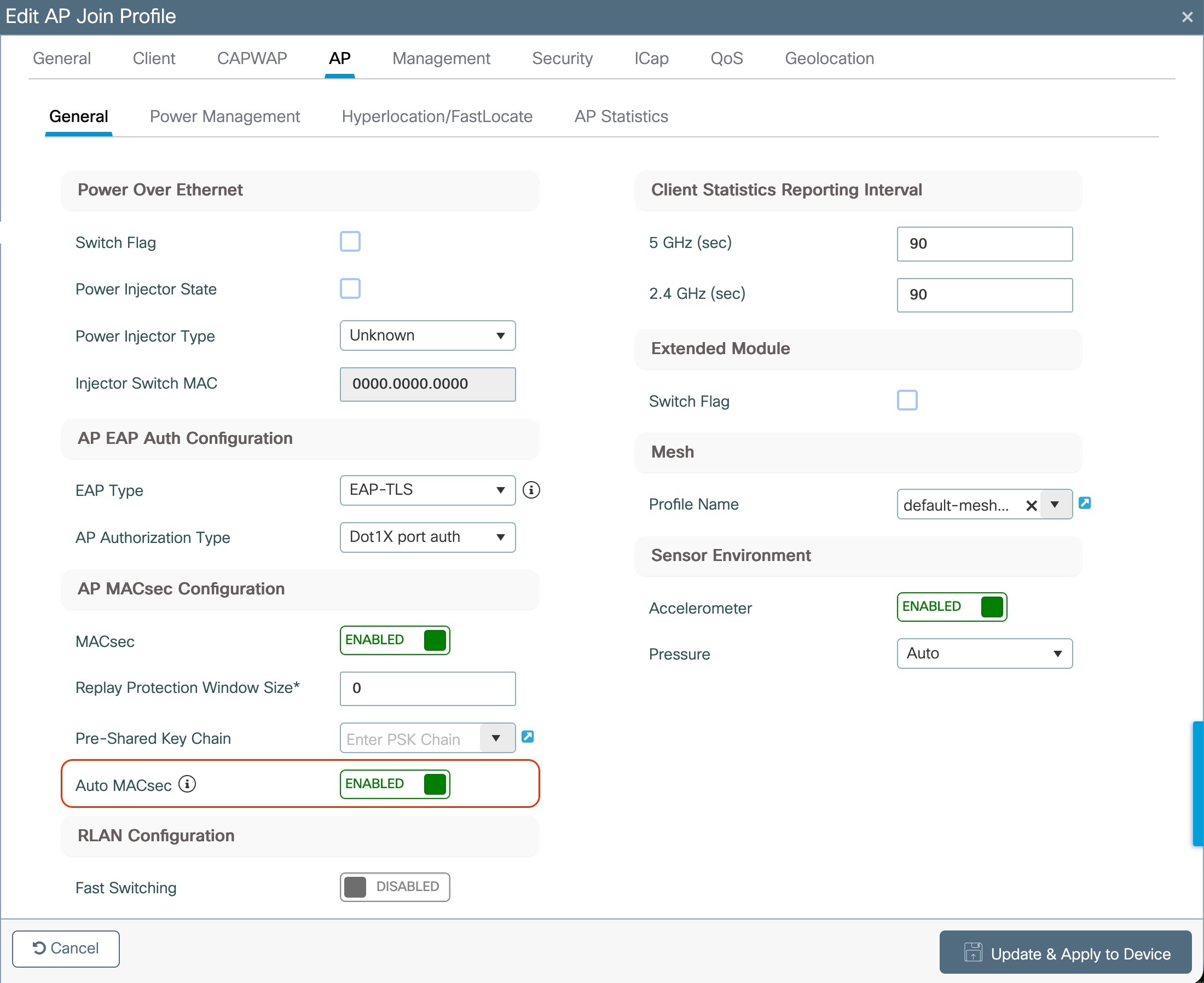
Or using CLI:
9800(config)#ap profile <ap profile name>
9800(config-ap-profile)#no auto secure macsec