Preparation


Note


This Cisco Unified Contact Center Enterprise Installation and Upgrade Guide provides the Install and Upgrade details and procedures for both 12.5(1) release and 12.5(2) maintenance release.


Installation Approach

Cisco HCS for Contact Center service, delivers Cisco Unified Contact Center Enterprise (Unified CCE) in a virtualized environment on Cisco Unified Computing System (UCS).

Cisco HCS for Contact Center offers the same shared management (service fulfillment and assurance) and aggregation (carrier trunks) that is common for all customer instances and used for other Cisco HCS services.

Cisco Core components include, Unified CVP, Unified CCE, Unified Communication Manager, Cisco Finesse, Unified Intelligence Center, CUBE-E. Install the core components using the golden template process as the standard approach.

Install the shared management and aggregation layer that consists of Unified Communication Domain Manager (UCDM), Cisco Unified Contact Center Domain Manager (Unified CCDM), Cisco Prime Collaboration - Assurance (PCA), and Cisco Adaptive Security Appliance (ASA). This combines the Cisco HCS components with multiple network connections and routes requests to a dedicated customer instance.

Install the network infrastructure layer that includes the implementation of UCS platform.

After you install the above, as part of post installation you can configure the customer instances for the supported deployment models. Depending upon your HCS for Contact Center deployment model, you can configure dedicated customer instances of 500, 2000, 4000, or 12000 agents and shared customer instances of 100 or 500 agents.

The following workflow describes the high-level installation sequence for Cisco HCS for Contact Center.
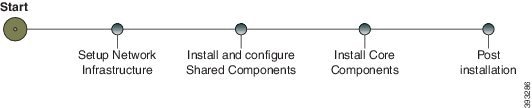
System Installation Dependencies

The components within each release set are compatible with each other and will interoperate correctly. The overall system may not be operational until you install all components or until you complete the initial configuration or setup.

For Nexus, ASA, and CUBE Enterprise supported release version, see https://www.cisco.com/c/en/us/support/unified-communications/hosted-collaboration-solution-hcs/tsd-products-support-series-home.html.

For information on all other component hardware and software versions and compatibility, see Contact Center Enterprise Compatibility Matrix at https://www.cisco.com/c/en/us/support/unified-communications/hosted-collaboration-solution-contact-center/products-device-support-tables-list.html.

Automation Software


Note


Automation software is required for golden templates only.

Software

Version

Download

Notes

GoldenTemplateTool zip file

12.6(1)

HCS-CC-12.6.1-GoldenTemplate.zip

Download and extract the GoldenTemplateTool.zip file to run the automation tool. For more information, see Automated Cloning and OS Customization section in Configuring Guide for Cisco HCS for Contact Center https://www.cisco.com/c/en/us/support/unified-communications/hosted-collaboration-solution-contact-center/products-installation-guides-list.html.

PowerCLI

6.0, 32-bit

Download and then install this VMWare tool on the client computer to run the automation scripts.

http://downloads.vmware.com/d/details/pcli50/dHRAYnQlKmpiZHAlJQ==

Use PowerCLI to run the automation script.

WinImage

8.5

Download and then install WinImage 8.5 on the client computer to run the automation scripts.

See http://winimage.com/download.htm.

To configure:

  • Cisco Unified Communications Manager publisher and subscribers

  • Cisco Unified Intelligence Center publisher and subscriber

  • Cisco Finesse primary and secondary nodes

WinImage creates a floppy image (.flp file) from the platformConfig.xml file. This file contains parameters for customizing publishers/primary and subscribers/ secondary nodes.

Hardware Requirements

HCS for Contact Center supports the following configurations:

For information on the TRC server support for this release, see the Virtualization for Cisco HCS for Contact Center guide at https://www.cisco.com/c/dam/en/us/td/docs/voice_ip_comm/uc_system/virtualization/hcs_cc_virt.html

HyperFlex M5 Support

Cisco HyperFlex HX-Series System provides a unified view of the storage across all nodes of the HyperFlex HX cluster via the HX Data Controller Platform. For optimal performance, it is recommended that all VMs are mapped to the single unified datastore. This mapping enables the HX Data Platform to optimize storage access based on the workload and other operating parameters.

For more information, see the documentation on Cisco HyperFlex HX Data Platform at https://www.cisco.com/c/en/us/support/hyperconverged-systems/hyperflex-hx-data-platform-software/products-installation-guides-list.html.

For information on installing collaboration software, see the Cisco Collaboration on Virtual Servers at https://www.cisco.com/c/en/us/support/unified-communications/unified-communications-manager-callmanager/products-installation-guides-list.html.

Specification Based Hardware Support

Cisco HCS for Contact Center supports specification based hardware, but limits this support only to the UCS B-Series blade hardware. This section provides supported server hardware, component version, and storage configurations.

For more information on specification based hardware such as CPU types, see theCollaboration Virtualization Hardware guide at https://www.cisco.com/c/dam/en/us/td/docs/voice_ip_comm/uc_system/virtualization/collaboration-virtualization-hardware.html

Java Requirements

A new 12.5(1a) base installer is available for customers, which has OpenJDK JRE as the supporting Java run time for all the CCE applications. Its predecessor the 12.5(1) installer employs Oracle JRE. Any installation done using the 12.5(1) installer can continue to use Oracle JRE, and can receive Java security updates and fixes from the Oracle website.

However, if there is a need to apply an ES on 12.5(1) that mandates the installation of ES55 (mandatory OpenJDK ES), then the Java updates would have to be downloaded and installed from the OpenLogic website.

CCE VMs installed using the 12.5(1a) installer would need the OpenJDK patches applied. You can verify the base installer version to be 12.5(1a) from Control Panel > Programs > Programs and Features > Cisco Unified ICM/CCE 12.5.1a.

Certificate Management Requirements

During installation of 12.5(2), Unified CCE installs the Java version 8 update 332. If your system has a Java version that is lower than version 8 update 332, perform the following steps:

Procedure


Step 1

Before you install 12.5(2):

  1. Run the command at the command prompt: cd %CCE_JAVA_HOME%\bin.

    Important

     
    Use %JAVA_HOME% if you are employing Oracle JRE.
  2. Export the certificates of all the components imported into the truststore.

  3. The command to export the certificates is keytool -export -keystore <JRE path>\lib\security\cacerts -alias <alias of the component> -file <filepath>.cer

  4. Enter the truststore password when prompted.

Step 2

After 12.5(2) installation is complete, perform the following steps:

  1. Run the command at the command prompt: cd %CCE_JAVA_HOME%\bin.

  2. Import the certificates for all the components that you previously exported from the truststore before you installed 12.5(2). The command to import certificates is keytool -import -keystore <JRE path>\lib\security\cacerts -file <filepath>.cer -alias <alias>.

  3. Enter the truststore password when prompted.

  4. Enter 'yes' when prompted to trust the certificate.


Network Infrastructure

This section provides information on how to setup the network infrastructure for Cisco HCS for Contact Center. This section does not provide detailed installation instructions for individual components installation. For details information on installation, see Cisco Hosted Collaboration Solution, Installation Guide.

  • Install and configure the Cisco UCS Server and Cisco UCS Manager.

  • Install and configure the SAN Storage.

  • Install and configure the MDS Series Switch.

    You can install the MDS Series Switch any time after the Nexus 7000 and 5500 switch.

  • Install and configure the vCenter.

  • Install and configure the Cisco Nexus 1000V Series Switch.