Release Notes for Cisco Catalyst IE3x00, IE3100 Rugged, IE3100 Heavy Duty, IE3400 Heavy Duty, and ESS3300 Series Switches, Release 17.18.x
Available Languages
Bias-Free Language
The documentation set for this product strives to use bias-free language. For the purposes of this documentation set, bias-free is defined as language that does not imply discrimination based on age, disability, gender, racial identity, ethnic identity, sexual orientation, socioeconomic status, and intersectionality. Exceptions may be present in the documentation due to language that is hardcoded in the user interfaces of the product software, language used based on RFP documentation, or language that is used by a referenced third-party product. Learn more about how Cisco is using Inclusive Language.
- US/Canada 800-553-2447
- Worldwide Support Phone Numbers
- All Tools
 Feedback
 Feedback
This document provides release information for the following Catalyst IE and Cisco ESS switches:
● Cisco Catalyst IE3100 Rugged Series
● Cisco Catalyst IE3x00 Rugged Series
● Cisco Catalyst IE3400 Heavy-Duty Series
● Cisco Catalyst IE3100 Heavy-Duty Series
● Cisco Embedded Services 3300 Series
Cisco Catalyst IE3x00 Rugged Series Switches feature advanced, full Gigabit Ethernet speed for rich real-time data—and a modular, optimized design. These Cisco rugged switches bring simplicity, flexibility and security to the network edge, and are optimized for size, power, and performance.
From their end-to-end security architecture to delivering centralized automation and scale with Cisco
intent-based networking, the Cisco Catalyst IE3x00 family is the perfect solution to your switching needs in almost any use case.
Cisco Embedded Services 3300 Series Switches (ESS3300) revolutionize Cisco’s embedded networking portfolio with 1G/10G capabilities. ESS3300 switches are optimized to meet specialized form-factor, ruggedization, port density, and power needs of many applications requiring customization. They complement Cisco’s off-the-shelf Industrial Ethernet switching portfolio.
On ESS3300, the small form factor, board configuration options, and optimized power consumption provide Cisco partners and integrators the flexibility to design custom solutions for defense, oil and gas, transportation, mining, and other verticals. The ESS3300 runs the trusted and feature-rich Cisco IOS XE Software, allowing Cisco partners and integrators to offer their customers the familiar Cisco IOS CLI and management experience on their ESS3300 solutions.
This section provides a brief description of the new software features introduced in this release.
IOS-XE 17.18.3
There are no new software features in this release.
IOS-XE 17.18.2
There are no new software features in this release.
IOS-XE 17.18.1
Table 1. New software features in release 17.18.1
|
Product Impact |
Feature |
Description |
| Ease of Use |
This feature achieves precise time synchronization with hardware timestamping, while MRP ensures fast network recovery—enabling reliable and consistent operations. |
|
| Cisco IOS XE Product Analytics collects device Systems Information for the purposes of understanding product usage, enabling product improvements and product development, and assisting in product adoption and sales support. Only summarized data of feature usage and statistical counters of configuration are collected. No personal identifiable information, such as MAC/IP addresses, usernames, custom configuration names, or user provided strings, are collected as part of Cisco IOS XE Product Analytics. Cisco processes this data following the General Terms, the Cisco Privacy Statement, and any other applicable agreement with Cisco. See Cisco Enterprise Networking Product Analytics Frequently Asked Questions. |
||
| This feature safeguards networks with unmanaged switches or disabled STP by detecting loops using periodic frames and applying corrective actions at the interface level. |
||
| This feature provides power to high-performance devices like advanced IoT sensors and wireless access points directly over Ethernet, simplifying your infrastructure. Starting from release 17.18.1, Cisco IE3100 Rugged Series Switches supports this feature. |
This section provides a brief description of the new hardware features introduced in this release.
IOS-XE 17.18.3
There are no new hardware features in this release.
IOS-XE 17.18.2
There are no new hardware features in this release.
IOS-XE 17.18.1
Table 2. New hardware features in release 17.18.1
|
Product Impact |
Feature |
Description |
| Upgrade |
The IE-3100-3P1U2S-E is a 6-port industrial switch featuring 1 GE (4PPOE) and 3 GE (PoE) downlink ports, and 2 GE SFP uplink ports. It provides a 120W PoE power budget, operates from -40C to +70C, and has an IP30-rated metal enclosure. |
|
| The IE-3100-6P2U2C-E is a 10-port industrial switch with 2 GE (4PPOE) and 6 GE (PoE) downlink ports, and 2 GE Combo uplink ports. It offers a 240W PoE power budget, operates from -40C to +70C, and features an IP30-rated metal enclosure. |
There are no behavior changes in this release.
Notice of upcoming changes in the Cisco IOS XE 17.18.2 release and beyond
Cisco is committed to safeguarding our products and customer networks against increasingly sophisticated threat actors. As computing power and the threat landscape have evolved, some features and protocols currently in use have become vulnerable to attack. While more secure alternatives are now available, legacy protocols may still be in use in some environments.
To improve network security, reduce the attack surface, and protect sensitive data, Cisco will begin phasing out legacy and insecure features and protocols, encouraging customers to transition to more secure alternatives. This process will be gradual and designed to minimize operational impact. The first phase begins with the Cisco IOS XE 17.18 release train. This is part of a broader initiative to make Cisco products more secure by default and secure by design.
Starting with the Cisco IOS XE 17.18.2 release and in future releases, Cisco software displays warning messages when configuring features or protocols that do not provide sufficient security such as those transmitting sensitive data without encryption or using outdated encryption mechanisms. Warnings also appear when security best practices are not followed, along with suggestions for secure alternatives.
This list is subject to change, but the following is a list of features and protocols that generates warnings in releases beyond the version Cisco IOS XE 17.18.1. Release notes for each release describes the exact changes for that release.
● Plain-text and weak credential storage: Type 0 (plain text), 5 (MD5), or 7 (Vigenère cipher) in configuration files.
Recommendation: Use Type 6 (AES) for reversible credentials, and Type 8 (PBKDF2-SHA-256) or Type 9 (Scrypt) for non-reversible credentials.
● SSHv1
Recommendation: Use SSHv2.
● SNMPv1 and SNMPv2, or SNMPv3 without authentication and encryption
Recommendation: Use SNMPv3 with authentication and encryption (authPriv).
● MD5 (authentication) and 3DES (encryption) in SNMPv3
Recommendation: Use SHA1 or, preferably, SHA2 for authentication, and AES for encryption.
● IP source routing based on IP header options
Recommendation: Do not use this legacy feature.
● TLS 1.0 and TLS 1.1
Recommendation: Use TLS 1.2 or later.
● TLS ciphers using SHA1 for digital signatures
Recommendation: Use ciphers with SHA256 or stronger digital signatures.
● HTTP
Recommendation: Use HTTPS.
● Telnet
Recommendation: Use SSH for remote access.
● FTP and TFTP
Recommendation: Use SFTP or HTTPS for file transfers.
● On-Demand Routing (ODR)
Recommendation: Use a standard routing protocol in place of CDP-based routing information exchange.
● BootP server
Recommendation: Use DHCP or secure boot features such as Secure ZTP.
● TCP and UDP small servers (echo, chargen, discard, daytime)
Recommendation: Do not use these services on network devices.
● IP finger
Recommendation: Do not use this protocol on network devices.
● NTP control messages
Recommendation: Do not use this feature.
● TACACS+ using pre-shared keys and MD5
Recommendation: Use TACACS+ over TLS 1.3, introduced in release Cisco IOS XE 17.18.1.
Cisco is committed to supporting customers through this transition. Subsequent releases in the Cisco IOS XE 17.18 train continues to support these features but displays warnings if they are used. Future release trains may impose additional restrictions on these features which will be communicated through release notes. For more information, see Resilient Infrastructure IOS XE Security Warnings Reference.
This section lists the resolved issues in this specific software release.
Note: This software release may contain bug fixes first introduced in other releases. To see additional information, click the bug ID to access the Cisco Bug Search Tool.
IOS-XE 17.18.3
Table 3. Resolved issues in release 17.18.3
| Bug ID |
Description |
| Broadcast traffic is leaking over a routed port |
|
| High PTP Path Delay and Offset on IE3100 with Mixed Fiber and Copper Connections |
|
| IE3300 - MKA session fails to come up after upgrade or power cycle |
|
| Rate limit is failing when there is L2 Loop. |
|
| IE3200 Memory Leak in Pool Manager and Possible Crashes |
|
| Switchport block multicast not working after switch reload or shut/no shut on interface |
|
| Hardening of IP Default Gateway removal |
IOS-XE 17.18.2
Table 4. Resolved issues in release 17.18.2
| Bug ID |
Description |
| Device with IPv6 ACL applied on 13 or more interfaces crashes on reload. |
|
| IE3400 SNMP Multicast Counters not working – ifOutMulticastPkts. |
|
| DHCP snooping dropping DHCP discover message for non CDP devices. |
|
| ICMPv6 packets are duplicated when device tracking is enabled on the interface. |
|
| IE3400H: FTP fails between port G1/1 and G1/2 with L2NAT. |
|
| Connectivity issue between ccv-sensor-app and default gateway. |
|
| IE3400 - 17.12.3 - Memory Leak observed in SNMP ENGINE. |
IOS-XE 17.18.1
Table 5. Resolved issues in release 17.18.1
| Bug ID |
Description |
| IE3100 - Major Alarm Relay Fault due to Over temperature Spike |
|
| IE3100-PN connect issues due to out of AR resources |
|
| Intermittent network connectivity with interfaces with speed/duplex of 100/half. |
|
| Device not able to ping on trunk port when "vlan dot1q tag native" is configured globally. |
|
| PTP stop working after ACL with permit ip any any |
|
| IE3xxx: Observed "rep bpduleak" CLI in Latest image |
|
| Disable REP NEG as REP ZTP functioning incoherent |
|
| DHCP Client on PVLAN does not receive IP address from DHCP server and unable to reach its gateway |
|
| DHCP Client on PVLAN does not receive IP address from DHCP server in MAC move case |
|
| MAT event not working on EEM for IE3400 switches |
|
| %IMSP_ACLMGR-3-INVALIDACL: Add access-list failed error on IE3400 switches |
This section lists the open issues in this specific software release.
Note: This software release may contain open bugs first identified in other releases. To see additional information, click the bug ID to access the Cisco Bug Search Tool.
IOS-XE 17.18.3
Table 6. Open issues in release 17.18.3
| Bug ID |
Description |
| SR 700264800--IE3400:RDP fails to PC when it is connected to SAN device |
|
| IE3100- 17.15.2 / 17.18.2 - duplicate or looping of packets - ICMPv6 RA and NA packet |
IOS-XE 17.18.2
Table 7. Open issues in release 17.18.2
| Bug ID |
Description |
| Broadcast traffic is leaking over a routed port. |
|
| Rate limit is failing when there is L2 Loop. |
|
| IPDT duplicating ICMPV6 RS,NA,NS packets while egressing. |
|
| Low bandwidth when IPerf traffic sent from PC with 1G speed on uplink ports with GLCT. |
|
| IE3300 - MKA session fails to come up after upgrade or power cycle. |
|
| L4 ACLs not summarised properly causing some entries to not take effect. |
|
| High PTP Path Delay and Offset on IE3100 with Mixed Fiber and Copper Connections. |
IOS-XE 17.18.1
Table 8. Open issues in release 17.18.1
| Bug ID |
Description |
| Device with IPv6 ACL on 13+ Interfaces crashes on reload. |
|
| IE3400 configured for HSR/PRP, when copper interface 1/3-4 set to 100mb HSR PTP tag missing. |
|
| DHCP snooping dropping DHCP discover message for non-CDP devices. |
PoE configuration on Cisco Catalyst IE3x00 Switch
Even when using power supplies that can provide up to a supported maximum (for example, 170W, 240W, or 480W) for the PoE budget, the PoE budget for the IE3x00 defaults to 125W regardless of the power supplies used. You can configure the power budget to use the maximum.
Note: Before changing the power budget, the minimum power requirements for the switch need to be considered as well. Please refer to the data sheet for your switch for more details.
The attached power supply powers the IE3x00 switch operation as well as PoE power. When increasing the maximum PoE budget, you must subtract the power draw of the IE3x00 switch from the capacity of the attached power supply. You do so to prevent the IE3x00 switch from overdrawing the capacity of the attached power supply. For example, the IE3400 switch with an expansion module supports a maximum PoE budget of 480W. The IE3400-8P2S with an attached IEM-3400-8P draws 67W. With a 480W capacity power supply, the maximum you should configure the PoE budget is (480W-67W) 413W.
To use the power supply's maximum supported wattage for the PoE budget, configure the power supply max wattage in global configuration mode as follows:
1. Verify the maximum amount that the power supplies support for the PoE budget.
2. Subtract the operating power of the IE3x00 switch according to its datasheet from the maximum capacity of the power supply. This is your max PoE budget.
3. Enter power inline max max-wattage to increase the PoE budget based on the power supplies used.
4. max-wattage is the maximum available PoE power.
IE3200 and IE 3300 with 10Mbps or 100Mbps speed in Half-Duplex Mode
CRC errors were observed on the IE3200 and IE3300 platforms when the switch is configured with 10Mbps or 100Mbps speed in half-duplex mode.
As a workaround, configure no ptp enable on the half-duplex interface. This improves ingress and egress latencies considerably and ensures that there are no late collisions (and therefore, no CRC errors).
The issue and workaround apply to Cisco IOS XE releases 17.3.5 and later.
L3 ACL limitation on usage of L4OP in ACLs
Layer 4 Operator (L4OP) in ACLs is limited by the hardware to a maximum of 8 L4OP (range and gt) for UDP and 8 L4OP for TCP, for a total of 16 global L4OP. Keep in mind that the range operator consumes 2 L4OP.
The L4OPs include: gt (greater than), lt (less than), neq (not equal), eq (equal), range (inclusive range).
Note: The eq does not consume L4OPs. For more information see QoS Configuration Guide.
Refer to Cisco IOS XE Migration Guide for IIoT Switches for software upgrade and downgrade information for Cisco Catalyst IE3x00 and IE3100 Rugged, IE3100 Heavy Duty, IE3400 Heavy Duty, and ESS3300 Series Switches, Release 17.18.x
This section lists the hardware support information.
SSH Algorithms for Common Criteria Certification Limitation
Starting from Cisco IOS XE Release 17.10, the following Key Exchange and MAC algorithms are removed from the default list:
● Key Exchange algorithm:
◦ diffie-hellman-group14-sha1
● MAC algorithms:
◦ hmac-sha1
◦ hmac-sha2-256
◦ hmac-sha2-512
Note: You can use the ip ssh server algorithm kex command to configure the Key Exchange algorithm and the ip ssh server algorithm mac command to configure the MAC algorithms.
IOx support for Cisco Catalyst IE3300 Switches
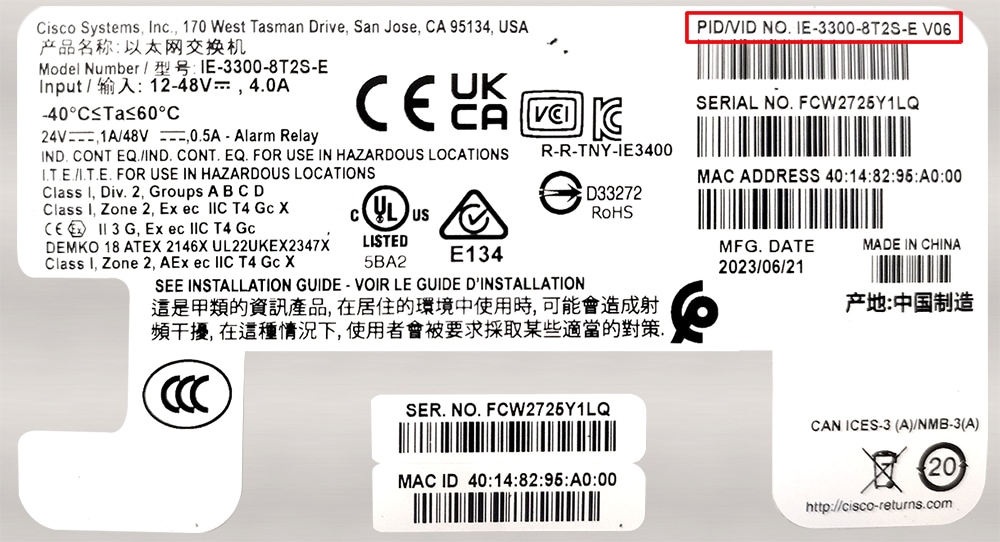
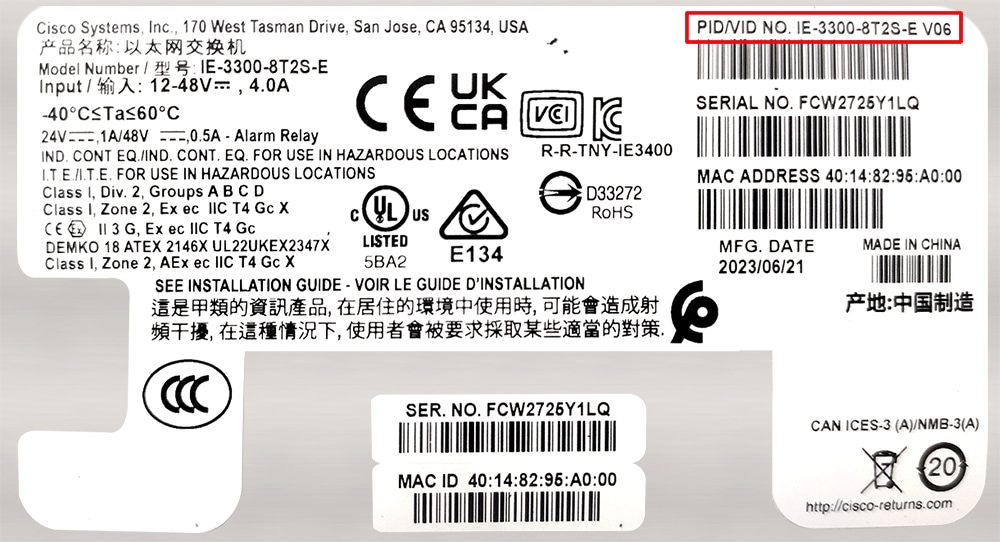
To see if the IE-3300-8P2S switch or IE-3300-8T2S switch supports IOx application environment, check the Hardware Version ID on the switch label. The Hardware Version ID is in the upper-right corner of the label, as shown in the following illustration. Support for the feature is available only with Hardware Version ID 06 or later. In the following illustration, the Version ID appears as "V06" at the end of the string inside the red rectangle in the upper-right corner of the label.
You also can see the Version ID by entering the show version command and examining the output, as shown in the following example:
IE-3300# show version
Base Ethernet MAC Address : b0:c5:3c:99:c8:a0
Motherboard Assembly Number : 73-101289-11
Motherboard Serial Number : FOC27151WEZ
Model Revision Number : V06
Motherboard Revision Number : B
Model Number : IE-3300-8T2S
System Serial Number : FCW2507P4CV
Top Assembly Part Number : 68-102662-01
Top Assembly Revision Number : B0
System FPGA version : 0.89.2
CIP Serial Number : 0x1999C8A0
SKU Brand Name : Cisco
IE-3300-8U2X and IE-3300-8T2X switches have supported IOx since the Cisco IOS-XE 17.4.1 release.
Startup config is always read from Flash
From Cisco IOS XE Release 17.10.1, the startup configuration is always read from flash. The latest configuration is available only in flash when you save the running config, irrespective of the booted media (for example, flash, sdflash, or usbflash) and the boot mode (install or bundle). If a switch cannot find a configuration in flash, it will try to find one in sdflash.
Note: Starting from the Cisco IOS XE Release 17.10.1, you can configure Cisco Catalyst embedded switches to use USB Flash as the primary boot device.
SMU installation: Boot in Install mode
Software Maintenance Upgrade (SMU) installation is no longer supported in bundle mode. Previously, SMU installation was supported in both bundle boot and install mode. Beginning in Cisco IOS XE 17.9.1, SMU supports patching using install mode only.
SMU installation stops if the device is booted up in bundle mode and syslog messages are displayed. You must boot the switch in install mode to support SMU installation.
If the device is booted up in install mode, SMU installation continues to work as before.
IE3100: Booting install image from SD card
Booting an install image (packages.conf) from SD card is not recommended. After factory reset, to perform a swap drive sync from SD card to internal flash memory, you must manually boot the image available in the emergency partition so that the swap drive auto restore will occur from the emergency image.
For more information about the SD swap drive, see Configuring SD Swap Drive.
For more details on the migration guide, see the Cisco IOS XE Migration Guide for IIoT Switches on cisco.com.
IE3400: Hardware changes may require action
Some hardware components on the Cisco Catalyst IE3400 Rugged Series and Cisco Catalyst IE3400 Heavy Duty Series switches have changed. The changes, which are automatically handled by the IOS XE software, do not affect switch functionality or the ordering process. New units shipped after May 31, 2022 have the hardware change.
However, you may need to upgrade the software, depending on which base switch and expansions module you have, as shown in the following table.
Note: For detailed information about affected hardware versions, supported software releases, and instructions for different scenarios, see Field Notices on Cisco.com.
| If you have… |
then… |
| Older versions (shipped before May 31, 2022) of the base switch and expansion module |
No action is required. |
| Newer versions (shipped after May 31, 2022) of the base switch and expansion module |
Deploy one of the supported releases of IOS-XE. Refer to Field Notices on Cisco.com for details that are appropriate to your deployment. |
| Newer version of the base switch with an older version of the expansion module |
Deploy one of the supported releases of IOS-XE. Refer to Field Notices on Cisco.com for details that are appropriate to your deployment. |
| Older version of the base switch with a newer version of the expansion module |
Deploy one of the supported releases of IOS-XE. Refer to Field Notices on Cisco.com for details that are appropriate to your deployment. |
FPGA profile
FPGA Profile is supported in Cisco IOS XE release 17.8 and later. In a Cisco IOS XE upgrade from an earlier release that does not support FPGA Profile, for example, an upgrade from Cisco IOS XE 17.7.1 to 17.8.1, the default FPGA Profile is installed. Any features controlled by FPGA Profile that are configured in the switch running the earlier release and that are not included in the default profile will be rejected.
Note: This feature is supported for Cisco Catalyst IE3400 Rugged Series Switches and Cisco Catalyst IE3400 Heavy-Duty Series Switches.
For example, CTS IPv6 is not supported in the default profile, so CTS IPv6 configurations are rejected during bootup after the upgrade. Similarly, after a Cisco IOS XE upgrade where the cts-ipv6 profile is loaded, existing PRP configurations are rejected upon bootup.
To keep the existing profile and feature configurations after an upgrade:
1. After booting the switch, selected the required FPGA Profile as described in "Changing the FPGA Profile", in System Management Configuration Guide, Cisco Catalyst IE3x00 Rugged, IE3400 Heavy Duty, and ESS3300 Series Switches, chapter "Configuring FPGA Profile".
Do not copy running-config to startup-config or write memory.
2. Reload the switch.
The required feature configurations will not be discarded because they are supported by the selected profile.
Cisco Catalyst IE and ESS Switches: Model numbers
This table lists the supported hardware models and the default license levels they are delivered with. For information about the available license levels, see section License Levels.
Table 9. Hardware models and their default license levels
| Model Number |
Default License Level |
Description |
| IE-3100-4P2S-E |
Network Essentials |
4 x Gigabit Ethernet 10/100/1000 PoE/PoE+ RJ45 ports, 2 x 100/1000 SFP ports |
| IE-3100-8P2C-E |
Network Essentials |
8 x Gigabit Ethernet 10/100/1000 PoE/PoE+ RJ45 ports, 2 x dual-purpose 1000Base-T RJ45 or 2 100/1000 SFP ports |
| IE-3100-18T2C-CC-E |
Network Essentials |
18 x Gigabit Ethernet 10/100/1000 RJ45 ports, 2 x dual-purpose 1000Base-T RJ45 or 2 100/1000 SFP ports, conformal coating |
| IE-3100-4T2S-E |
Network Essentials |
4 x Gigabit Ethernet 10/100/1000 RJ45 ports, 2x 100/1000 SFP ports |
| IE-3100-8T2C-E |
Network Essentials |
8 x Gigabit Ethernet 10/100/1000 RJ45 ports, 2x dual-purpose 1000Base-T RJ45 or 2 100/1000 SFP ports |
| IE-3100-8T4S-E |
Network Essentials |
8 x Gigabit Ethernet 10/100/1000 RJ45 ports, 4x 100/1000 SFP ports |
| IE-3100-18T2C-E |
Network Essentials |
18 x Gigabit Ethernet 10/100/1000 RJ45 ports, 2x dual-purpose 1000Base-T RJ45 or 2x 00/1000 SFP ports |
| IE-3105-8T2C-E |
Network Essentials |
8 x Gigabit Ethernet 10/100/1000 RJ45 ports, 2x dual-purpose 1000Base-T RJ45 or 2x 100/1000 SFP ports |
| IE-3105-18T2C-E |
Network Essentials |
18 x Gigabit Ethernet 10/100/1000 RJ45 ports, 2x dual-purpose 1000Base-T RJ45 or 2x 100/1000 SFP ports |
| IE-3100H-8T |
Network Essentials |
8 x Gigabit Ethernet 10/100/1000 M12 X-coded ports |
| IE-3100H-6FT2T |
Network Essentials |
2 x Gigabit Ethernet 10/100/1000 M12 X-coded ports, 6 x 10/100 Fast Ethernet M12 D-coded ports |
| ESS-3300-NCP-E |
Network Essentials |
Main Board without a cooling plate 2 ports of 10 GE fiber, 8 ports of GE copper. 4 of the 8 GE copper ports can also be combo ports. Terminal Power: 16W |
| ESS-3300-NCP-A |
Network Advantage |
Main Board without a cooling plate 2 ports of 10 GE fiber, 8 ports of GE copper. 4 of the 8 GE copper ports can also be combo ports. Terminal Power: 16W |
| ESS-3300-CON-E |
Network Essentials |
Main Board conduction cooled 2 ports of 10 GE fiber, 8 ports of GE copper. 4 of the 8 GE copper ports can also be combo ports Terminal Power: 16W |
| ESS-3300-CON-A |
Network Advantage |
Main Board conduction cooled 2 ports of 10 GE fiber, 8 ports of GE copper. 4 of the 8 GE copper ports can also be combo ports Terminal Power: 16W |
| ESS-3300-24T-NCP-E |
Network Essentials |
Main Board with a 16p Expansion Board without a cooling plate 2 ports of 10 GE fiber, 24 ports of GE copper 4 of 8 GE ports can be combo ports on mainboard 4 of 16 GE ports can be combo ports on expansion board Terminal Power: 24W
|
| ESS-3300-24T-NCP-A |
Network Advantage |
Main Board with a 16p Expansion Board without a cooling plate 2 ports of 10 GE fiber, 24 ports of GE copper 4 of 8 GE ports can be combo ports on mainboard 4 of 16 GE ports can be combo ports on expansion board Terminal Power: 24W |
| ESS-3300-24T-CON-E |
Network Essentials |
Main Board with a 16p Expansion Board conduction cooled 2 ports of 10 GE fiber, 24 ports of GE copper 4 of 8 GE ports can be combo ports on mainboard 4 of 16 GE ports can be combo ports on expansion board Terminal Power: 24W |
| ESS-3300-24T-CON-A |
Network Advantage |
Main Board with a 16p Expansion Board conduction cooled 2 ports of 10 GE fiber, 24 ports of GE copper 4 of 8 GE ports can be combo ports on mainboard 4 of 16 GE ports can be combo ports on expansion board Terminal Power: 24W |
| IE-3200-8T2S-E |
Network Essentials |
8 x Gigabit Ethernet 10/100/1000 RJ45 ports, 2 fiber 100/1000 SFP-based ports, non-PoE |
| IE-3200-8P2S-E |
Network Essentials |
8 x Gigabit Ethernet 10/100/1000 PoE/PoE+ ports, 2 fiber 100/1000 SFP-based ports; PoE power budget of 240W |
| IE-3300-8T2S-E |
Network Essentials |
8 x Gigabit Ethernet 10/100/1000 RJ45 ports, 2 fiber 100/1000 SFP-based ports, non-PoE |
| IE-3300-8P2S-E |
Network Essentials |
8 x Gigabit Ethernet 10/100/1000 PoE/PoE+ ports, 2 fiber 100/1000 SFP-based ports; PoE power budget of 360W (including expansion module) |
| IE-3300-8T2S-A |
Network Advantage |
8 x Gigabit Ethernet 10/100/1000 RJ45 ports, 2 fiber 100/1000 SFP-based ports, non-PoE |
| IE-3300-8P2S-A |
Network Advantage |
8 x Gigabit Ethernet 10/100/1000 PoE/PoE+ ports, 2 fiber 100/1000 SFP-based ports; PoE power budget of 360W (including expansion module) |
| IE-3300-8T2X-A |
Network Advantage |
8 x Gigabit Ethernet 10/100/1000 RJ45 ports, 2 fiber 1/10 Gigabit Ethernet SFP-based ports, non-PoE |
| IE-3300-8T2X-E |
Network Essentials |
|
| IE-3300-8U2X-E |
Network Essentials |
1/10 Gigabit Ethernet SFP-based ports; PoE power budget of 480W |
| IE-3300-8U2X-A |
Network Advantage |
8 x Gigabit Ethernet 10/100/1000 4PPoE (802.3bt type 3) ports, 2 fiber 1/10 Gigabit Ethernet SFP-based ports; PoE power budget of 480W (requires and expansion module to deliver 480W)
|
| IE-3400-8T2S-E |
Network Essentials |
8 x Gigabit Ethernet 10/100/1000 RJ45 ports, 2 fiber 100/1000 SFP-based ports, non-PoE |
| IE-3400-8T2S-A |
Network Advantage |
8 x Gigabit Ethernet 10/100/1000 RJ45 ports, 2 fiber 100/1000 SFP-based ports, non-PoE |
| IE-3400-8P2S-E |
Network Essentials |
8 x Gigabit Ethernet 10/100/1000 RJ45 ports, 2 fiber 100/1000 SFP-based ports with PoE |
| IE-3400-8P2S-A |
Network Advantage |
8 x Gigabit Ethernet 10/100/1000 RJ45 ports, 2 fiber 100/1000 SFP-based ports with PoE |
| IE-3400H-8T-E |
Network Essentials |
8 x 1-Gbps X-Coded ports, 1 Alarm input and 1 Alarm output, 1 Console port, mini-change input for Single power source |
| IE-3400H-8T-A |
Network Advantage |
8 x 1-Gbps X-Coded ports, 1 Alarm input and 1 Alarm output, 1 Console port, mini-change input for Single power source |
| IE-3400H-8FT-E |
Network Essentials |
8 x 100-Mbps D-coded ports, 1 Alarm input and 1 Alarm output, 1 Console port, Mini-change input for Single Power Source |
| IE-3400H-8FT-A |
Network Advantage |
8 x 100-Mbps D-coded ports, 1 Alarm input and 1 Alarm output, 1 Console port, Mini-change input for Single Power Source |
| IE-3400H-16T-E |
Network Essentials |
16 x 1-Gbps X-Coded ports, 1 Alarm input and 1 Alarm output, 1 Console port, mini-change input for Single power source |
| IE-3400H-16T-A |
Network Advantage |
16 x 1-Gbps X-Coded ports, 1 Alarm input and 1 Alarm output, 1 Console port, mini-change input for Single power source |
| IE-3400H-16FT-E |
Network Essentials |
16 x 100-Mbps D-coded ports, 1 Alarm input and 1 Alarm output, 1 Console port, Mini-change input for Single Power Source |
| IE-3400H-16FT-A |
Network Advantage |
16 x 100-Mbps D-coded ports, 1 Alarm input and 1 Alarm output, 1 Console port, Mini-change input for Single Power Source |
| IE-3400H-24T-E |
Network Essentials |
24 x 1-Gbps X-Coded ports, 1 Alarm input and 1 Alarm output, 1 Console port, mini-change input for Single power source |
| IE-3400H-24T-A |
Network Advantage |
|
| IE-3400H24FT-E |
Network Essentials |
24 x 100-Mbps D-coded ports, 1 Alarm input and 1 Alarm output, 1 Console port, Mini-change input for Single Power Source |
| IE-3400H-24FT-A |
Network Advantage |
24 x100-Mbps D-coded ports, 1 Alarm input and 1 Alarm output, 1 Console port, Mini-change input for Single Power Source |
WebUI system requirements
The WebUI is a web browser-based switch management tool that runs on the switch. These subsections list the hardware and software required to access the WebUI.
Minimum Hardware Requirements
| Processor speed |
DRAM |
Number of colors |
Resolution |
| 233 MHz |
512 MB (We Recommend 1GB DRAM) |
256 |
1280 x 800 or higher |
Software Requirements
Operating Systems
● Windows 10 or later
● Mac OS X 10.9.5 or later
Browsers
● Google Chrome: Version 59 or later (On Windows and Mac)
● Microsoft Edge
● Mozilla Firefox: Version 54 or later (On Windows and Mac)
● Safari: Version 10 or later (On Mac)
This section provides information about the release packages associated with Cisco Catalyst IE3x00 and IE3100 Rugged, IE3100 Heavy Duty, IE3400 Heavy Duty, and ESS3300 Series Switches.
Finding the software version
● The package files for Cisco IOS XE software can be found on the system board's internal flash memory device (flash:)
● You can use the show version privileged EXEC command to see the software version that is running on your switch.
You can also use the dir filesystem: privileged EXEC command to see the names and versions of other software images that you might have stored in flash memory.
Software images for Cisco IOS XE 17.18.x
Table 10. Software packages for Cisco Catalyst IE3x00 and IE3100 Rugged, IE3100 Heavy Duty, IE3400 Heavy Duty, and ESS3300 Series Switches, Release 17.18.x
| Release |
Image Type |
Platform |
File Name |
| Cisco IOS XE.17.18.1 |
Universal |
IE3x00 (IE3200, IE3300, IE3400, and IE3400H) |
ie3x00-universalk9.17.18.01.SPA.bin |
| ESS3300 |
ess3x00-universalk9.17.18.01.SPA.bin |
||
| IE3100 and IE3105 |
ie31xx-universalk9.17.18.01.SPA.bin |
||
| Cisco IOS XE.17.18.2 |
Universal |
IE3x00 (IE3200, IE3300, IE3400, and IE3400H) |
ie3x00-universalk9.17.18.02.SPA.bin |
| ESS3300 |
ess3x00-universalk9.17.18.02.SPA.bin |
||
| IE3100 and IE3105 |
ie31xx-universalk9.17.18.02.SPA.bin |
||
| Cisco IOS XE.17.18.3 |
Universal |
IE3x00 (IE3200, IE3300, IE3400, and IE3400H) |
ie3x00-universalk9.17.18.03.SPA.bin |
| ESS3300 |
ess3x00-universalk9.17.18.03.SPA.bin |
||
| IE3100 and IE3105 |
ie31xx-universalk9.17.18.03.SPA.bin |
Automatic boot loader upgrade
When you upgrade from the existing release on your switch to a later or newer release for the first time, the boot loader may be automatically upgraded, based on the hardware version of the switch. If the boot loader is automatically upgraded, it will take effect on the next reload.
For subsequent Cisco IOS XE releases, if there is a new bootloader in that release, it may be automatically upgraded based on the hardware version of the switch when you boot up your switch with the new image for the first time.
Caution: Do not power cycle your switch during the upgrade.
| Scenario |
Automatic Boot Loader Response |
| If you boot Cisco IOS XE the first time |
Boot loader may be upgraded to version "8.1.2" for IE3x00 and ESS-3300. Checking Bootloader upgrade... … Bootloader upgrade successful |
Software installation options
To install and activate the specified file, and to commit changes to be persistent across reloads, enter this command: install add file filename [ activate commit]
Note: For the install command to be successful, it is recommended to have a minimum of free space that is twice the size of the image in flash. If there is not enough space available in flash, you are advised to free up space in flash either by issuing the install remove inactive command or to manually clean up the flash by removing unwanted core files or any other files that occupy a large amount of space in flash.
This table lists the options for the install command for the Cisco Catalyst IE3x00 and IE3100 Rugged, IE3400 Heavy Duty, and ESS3300 Series Switches.
Table 11. Summary of software installation commands for install mode
| Command |
Description |
| activate[auto-abort-timer] |
Activates the file, and reloads the device. The auto-abort-timer keyword automatically rolls back image activation. |
| add file tftp: filename |
Copies the install file package from a remote location to the device and performs a compatibility check for the platform and image versions. |
| commit |
Commit the changes to the load path. |
| remove |
Remove installed packages. |
Table 12. Additional content for Cisco Catalyst IE3x00 and IE3100 Rugged, IE3100 Heavy Duty, IE3400 Heavy Duty, and ESS3300 Series Switches
| Document |
Description |
| Provides information about Cisco IOS XE. |
|
| Provides information about Cisco Catalyst IE3100 Rugged Series Switches. |
|
| Provides information about Cisco Catalyst IE3200 Rugged Series Switches. |
|
| Provides information about Cisco Catalyst IE3300 Rugged Series Switches. |
|
| Provides information about Cisco Catalyst IE3400 Rugged Series Switches. |
|
| Provides information about Cisco Catalyst IE3400H Heavy Duty Series Switches. |
|
| Provides information about Cisco Catalyst IE3100H Heavy Duty Series Switches. |
|
| Provides information about Cisco Catalyst ESS9300 Series Switches. |
|
| Provides Cisco validated designs |
|
| Provides locating and downloading MIBs. |
|
| To receive timely, relevant information from Cisco, sign up here. |
|
| Provides the business impact you’re looking for with the technologies |
|
| You can submit a service request here. |
|
| To discover and browse secure, validated enterprise-class apps, products, solutions, and services. |
|
| To obtain general networking, training, and certification titles visit here. |
|
| Provides warranty information for a specific product or product family. |
|
| You can ask and answer questions, share suggestions, and collaborate with your peers. |
|
| You can browse Cisco products and find relevant features. It also allows you to compare platforms, determine common features between products, and identify unique product features. The CFN also has a tab that provides a MIB Locator |
|
| Provides most up-to-date, detailed troubleshooting information. Go to Product Support and select your product from the list or enter the name of your product. Look under Troubleshoot and Alerts, to find information for the problem that you are experiencing. |
|
| Documentation Feedback |
To provide feedback about Cisco technical documentation, use the feedback form available in the right pane of every online document. |
| You can find information about the licensing packages for features here. |
Cisco and the Cisco logo are trademarks or registered trademarks of Cisco and/or its affiliates in the U.S. and other countries. To view a list of Cisco trademarks, go to this URL: www.cisco.com/go/trademarks. Third-party trademarks mentioned are the property of their respective owners. The use of the word partner does not imply a partnership relationship between Cisco and any other company. (1110R)
Any Internet Protocol (IP) addresses and phone numbers used in this document are not intended to be actual addresses and phone numbers. Any examples, command display output, network topology diagrams, and other figures included in the document are shown for illustrative purposes only. Any use of actual IP addresses or phone numbers in illustrative content is unintentional and coincidental.
© 2026 Cisco Systems, Inc. All rights reserved.