Preparing for Installation
- Safety Warnings
- Site Requirements
- Power Requirements
- Cabling Requirements
- Rack-Mounting Guidelines
- Site Preparation Checklist
Safety Warnings
Safety warnings appear throughout this publication in procedures that may harm you if you perform them incorrectly. A warning symbol precedes each warning statement. The warnings below are general warnings that are applicable to the entire publication.
 Warning | Class 1 laser product. Statement 1008 |
Warning | Read the installation instructions before connecting the system to the power source. Statement 1004 |
Warning | This product relies on the building's installation for short-circuit (overcurrent) protection. Ensure that the protective device is rated not greater than: 250 V, 20 A. Statement 1005 |
Warning | This unit is intended for installation in restricted access areas. A restricted access area can be accessed only through the use of a special tool, lock and key or other means of security. Statement 1017 |
Warning | Only trained and qualified personnel should be allowed to install, replace, or service this equipment. Statement 1030 |
Site Requirements
Planning a proper location for the switch and layout of the equipment rack or wiring closet is essential for successful system operation. These sections describe some of the basic site requirements that you should be aware of as you prepare to install your switch, including the following:
-
Environmental factors can adversely affect the performance and longevity of your system.
-
Install the switch in an enclosed, secure area, ensuring that only qualified personnel have access to the switch and control of the environment.
-
Equipment that is placed too closely together or that is inadequately ventilated may cause system over-temperature conditions, leading to premature component failure.
-
Poor equipment placement can make chassis panels inaccessible and difficult to maintain.
-
The switch requires a dry, clean, well-ventilated, and air-conditioned environment.
-
To ensure normal operation, maintain ambient airflow. If the airflow is blocked or restricted, or if the intake air is too warm, an over-temperature condition may occur. The switch environmental monitor may then shut down the system to protect the system components.
-
Multiple switches can be rack mounted with little or no clearance above and below the chassis. However, when mounting a switch in a rack with other equipment, or when placing it on the floor near other equipment, ensure that the exhaust from other equipment does not blow into the air intake vent of the switch chassis.
- Temperature
- Air Flow
- Humidity
- Altitude
- Dust and Particles
- Corrosion
- EMI and Radio Frequency Interference
- Power Source Interruptions
- System Grounding
- Maintaining Safety with Electricity
- Preventing Electrostatic Discharge Damage
Temperature
Temperature extremes may cause a system to operate at reduced efficiency and cause a variety of problems, including premature aging and failure of chips, and failure of mechanical devices. Extreme temperature fluctuations may also cause chips to become loose in their sockets. Observe the following guidelines:
-
Ensure that the system is operating in an environment no colder than 50°F (10°C) or hotter than 95°F (35°C).
-
Ensure that the chassis has adequate ventilation.
-
Do not place the chassis within a closed-in wall unit or on top of cloth, which can act as insulation.
-
Do not place the chassis where it will receive direct sunlight, particularly in the afternoon.
-
Do not place the chassis next to a heat source of any kind, including heating vents.
-
Adequate ventilation is particularly important at high altitudes. Make sure that all the slots and openings on the system remain unobstructed, especially the fan vent on the chassis.
-
Clean the installation site at regular intervals to avoid buildup of dust and debris, which may cause a system to overheat.
-
If the system has been exposed to abnormally cold temperatures, allow a 2-hour warm-up period to bring it to normal operating temperature before turning it on.
Failure to observe these guidelines may damage the chassis' internal components.
Air Flow
The switch is designed to be installed in an environment where there is a sufficient volume of air available to cool the supervisor engines, modules, and power supplies. If there are any constraints with regard to the free flow of air through the chassis, or if the ambient air temperature is elevated, the switch environmental monitor may then shut down the system to protect the system components.
To maintain proper air circulation through the switch chassis, we recommend that you maintain a minimum space of 6 inches (15 cm) between a wall and the chassis air intake or a wall and the chassis hot air exhaust. In situations where the switch chassis are installed in adjacent racks, you should allow a minimum space of 12 inches (30.5 cm) between the air intake of one chassis and the hot air exhaust of another chassis. Failure to maintain adequate spacing between chassis may cause the switch chassis that is drawing in the hot exhaust air to overheat and fail.
If you are installing your switch in an enclosed or partially enclosed rack, we strongly recommend that you verify that your site meets the following guidelines:
-
Verify that there is a minimum of 6 inches (15 cm) of clearance between the sides of the rack and both the chassis air intake grill and the chassis air exhaust grill.
-
Verify that the ambient air temperature within the enclosed or partially enclosed rack is within the chassis operating temperature limits. After installing the chassis in the rack, power up the chassis and allow the chassis temperature to stabilize (approximately 2 hours). Measure the ambient air temperature at the chassis air intake grill and at the chassis air exhaust grill by positioning an external temperature probe approximately 1 inch (2.5 cm) away from the grills, in line with the chassis slot occupied by a supervisor engine.
-
If the ambient intake air temperature is less than 104°F (40°C), the rack meets the intake air temperature criterion.
-
If the ambient intake air temperature exceeds 104°F (40°C), the system might experience minor temperature alarms and is in danger of overheating.
-
If the ambient intake air temperature equals or is greater than 131°F (55°C), the system will experience a major temperature alarm and shut down.
-
-
Verify that the enclosed or partially enclosed rack allows an adequate flow of air through the switch chassis as follows:
-
If the difference between the measured intake air temperature and the exhaust air temperature does not exceed 10°C, there is sufficient airflow in the rack.
-
If the difference in air temperature exceeds 10°C, there is insufficient airflow to cool the chassis.

Note
Determine the 10°C temperature difference between the intake and the exhaust by taking measurements using external digital temperature probes. Do not use the chassis internal temperature sensors to measure the temperature difference.
-
-
Plan ahead. A switch that is currently installed in an enclosed or partially enclosed rack might meet ambient air temperature and air flow requirements at present. However, if you add more chassis to the rack or more modules to a chassis in the rack, the additional heat generated might cause the ambient air temperature within the rack to exceed 104°F (40°C) and may cause minor alarms.
Selecting Rack Enclosure Cabinets
Cisco Systems has identified the following rack-enclosures that are determined to be Cisco-compatible:
Panduit Corporation
Chatsworth Products, Inc.
Chassis Fan Tray
|
Fan Tray Model Number |
Airflow Intake |
Airflow Exhaust |
Air Filter Available |
Air Volume |
|---|---|---|---|---|
|
C6807-XL-FAN |
Right side |
Left side |
No |
850 CFM |
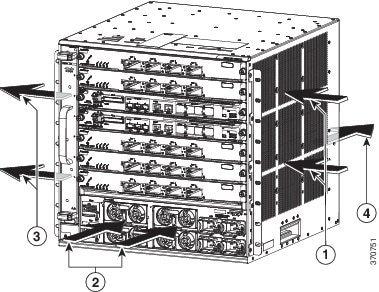
|
1 |
Module air inlet |
3 |
Module air exhaust |
|
2 |
Power supply air inlet |
4 |
Power supply air exhaust |
Humidity
High-humidity conditions may cause moisture to enter the system, and cause corrosion of internal components and degradation of properties such as electrical resistance, thermal conductivity, physical strength, and size. Extreme moisture buildup inside the system may result in electrical short circuit, which may cause serious damage to the system. Each system is rated to operate at 5 to 90 percent relative humidity, with a humidity gradation of 10 percent per hour. In storage, a system can withstand 5 to 95 percent relative humidity. Buildings in which climate is controlled by air-conditioning in the warmer months and by heat during the colder months usually maintain an acceptable level of humidity for system equipment. However, if a system is located in an unusually humid location, a dehumidifier should be used to maintain the humidity within an acceptable range.
Altitude
Operating a system at high altitude (low pressure) reduces the efficiency of forced and convection cooling and may result in electrical problems related to arcing and corona effects. This condition may also cause sealed components with internal pressure, such as electrolytic capacitors, to fail or perform at reduced efficiency. Each system is rated to operate at altitudes from -50 to 6500 feet (-16 to 1981 meters) and can be stored at altitudes of -50 to 35,000 feet (-16 to 10,668 meters).
Dust and Particles
Fans cool power supplies and system components by drawing in room-temperature air and exhausting heated air out through various openings in the chassis. However, fans also ingest dust and other particles, causing contaminant buildup in the system and increased internal chassis temperature. A clean operating environment can greatly reduce the negative effects of dust and other particles, which act as insulators and interfere with the mechanical components in the system. The standards listed below provide guidelines for acceptable working environments and acceptable levels of suspended particulate matter:
Corrosion
Corrosion of system connectors is a gradual process that may eventually lead to intermittent failures of electrical circuits. The oil from a person’s fingers or prolonged exposure to high temperature or humidity may corrode the gold-plated edge connectors and pin connectors on various components in the system. To prevent corrosion, avoid touching contacts on boards and cards, and protect the system from extreme temperatures and moist, salty environments.
EMI and Radio Frequency Interference
EMI and radio frequency interference (RFI) from a system can adversely affect devices such as radio and television (TV) receivers operating near the system. Radio frequencies emanating from a system can also interfere with cordless and low-power telephones. Conversely, RFI from high-power telephones can cause spurious characters to appear on the system monitor. RFI is defined as any EMI with a frequency above 10 kilohertz (kHz). This type of interference can travel from the system to other devices through the power cable and power source, or through the air in the form of transmitted radio waves. The Federal Communications Commission (FCC) publishes specific regulations to limit the amount of EMI and RFI emitted by computing equipment. Each system meets these FCC regulations. To reduce the possibility of EMI and RFI, follow these guidelines:
-
Always operate the system with the chassis covers installed.
-
Ensure that all chassis slots are covered by a metal filler bracket and that an unused power supply bay has a metal cover plate installed.
-
Ensure that the screws on all peripheral cable connectors are securely fastened to their corresponding connectors on the back of the chassis.
-
Always use shielded cables with metal connector shells for attaching peripherals to the system.
When wires are run for any significant distance in an electromagnetic field, interference can occur between the field and the signals on the wires. This fact has two implications for the construction of plant wiring:
-
Bad wiring practice can result in radio interference emanating from the plant wiring.
-
Strong EMI, especially when it is caused by lightning or radio transmitters, can destroy the signal drivers and receivers in the chassis, and even create an electrical hazard by conducting power surges through lines into equipment.
Note | To predict and provide a remedy for strong EMI, consult experts in RFI. |
If you use twisted-pair cable in your plant wiring with a good distribution of grounding conductors, the plant wiring is unlikely to emit radio interference. If you exceed the recommended distances, use a high-quality twisted-pair cable with one ground conductor for each data signal when applicable.
 Caution | Category 5e, Category 6, and Category 6a cables can store large levels of static electricity because of the dielectric properties of the materials used in their construction. Always ground the cables (especially in new cable runs) to a suitable and safe earth ground before connecting them to the module. |
If the wires exceed the recommended distances, or if wires pass between buildings, give special consideration to the effect of a lightning strike in your vicinity. The electromagnetic pulse caused by lightning or other high-energy phenomena can easily couple enough energy into unshielded conductors to destroy electronic devices. If you have had problems of this sort in the past, you may want to consult experts in electrical surge suppression and shielding.
Power Source Interruptions
Systems are especially sensitive to variations in voltage supplied by the AC power source. Overvoltage, undervoltage, and transients (or spikes) can erase data from memory or even cause components to fail. To protect against these types of problems, power cables should always be properly grounded. Also, place the system on a dedicated power circuit (rather than sharing a circuit with other heavy electrical equipment). In general, do not allow the system to share a circuit with any of the following:
-
Copy machines
-
Air conditioners
-
Vacuum cleaners
-
Space heaters
-
Power tools
-
Teletype machines
-
Laser printers
-
Facsimile machines
-
Any other motorized equipment
Besides these appliances, the greatest threats to a system's power supply are surges or blackouts that are caused by electrical storms. Whenever possible, turn off the system and peripherals, if any, and unplug them from their power sources during thunderstorms. If a blackout occurs—even a temporary one—while the system is turned on, turn off the system immediately and disconnect it from the electrical outlet. Leaving the system on may cause problems when the power is restored; all other appliances left on in the area may create large voltage spikes that may damage the system.
System Grounding
You must install a system ground as part of the chassis installation process. Chassis installations that rely only on the AC third-prong ground are insufficient to adequately ground the systems.
Proper grounding practices ensure that the buildings and the installed equipment within them have low-impedance connections and low-voltage differentials between chassis. When you install a system ground, you reduce or prevent shock hazards, chances of equipment damage due to transients, and the potential for data corruption.
Without proper and complete system grounding, you run the risk of increased component damage due to ESD. Additionally, you have a greatly increased chance of data corruption, system lockup, and frequent system reboot situations by not using a system ground.
Caution | Installations that rely solely on system grounding that uses only an AC third-prong ground run a substantially greater risk of equipment problems and data corruption than those installations that use both the AC third-prong ground and a properly installed system ground. |
The following table lists some general grounding practice guidelines.
|
Environment |
Electromagnetic Noise Severity Level |
Grounding Recommendations |
|---|---|---|
|
Commercial building is subjected to direct lightning strikes. For example, some places in the United States, such as Florida, are prone to more lightning strikes than other areas. |
High |
All lightning protection devices must be installed in strict accordance with manufacturer recommendations. Conductors carrying lightning current should be spaced away from power and data lines in accordance with applicable recommendations and codes. Best grounding practices must be closely followed. |
|
Commercial building is located in an area where lightning storms occur frequently, but is not prone to direct lightning strikes. |
High |
Best grounding practices must be closely followed. |
|
Commercial building contains a mix of information technology equipment and industrial equipment, such as welding. |
Medium to High |
Best grounding practices must be closely followed. |
|
Existing commercial building is not subject to natural environmental noise or man-made industrial noise. This building contains a standard office environment. This installation has a history of malfunction due to electromagnetic noise. |
Medium |
Best grounding practices must be closely followed. Determine source and cause of noise if possible, and mitigate as closely as possible at the noise source or reduce coupling from the noise source to the victim equipment. |
|
New commercial building is not subject to natural environmental noise or man-made industrial noise. This building contains a standard office environment. |
Low |
Best grounding practices should be followed as closely as possible. Electromagnetic noise problems are not anticipated, but installing a best-practice grounding system in a new building is often the least expensive route, and the best way to plan for the future. |
|
Existing commercial building is not subject to natural environmental noise or man-made industrial noise. This building contains a standard office environment. |
Low |
Best grounding practices should be followed as much as possible. Electromagnetic noise problems are not anticipated, but installing a best-practice grounding system is always recommended. |
Note | In all situations, grounding practices must comply with Section 250 of the National Electric Code (NEC) requirements or local laws and regulations. A 6 AWG grounding wire is preferred from the chassis to the rack ground or directly to the common bonding network (CBN). The equipment rack should also be connected to the CBN with a 6 AWG grounding wire. |
Note | Always ensure that all of the modules are completely installed and that the captive installation screws are fully tightened. In addition, ensure that all the I/O cables and power cords are properly seated. These practices are normal installation practices and must be followed in all installations. |
Caution | Category 5e, Category 6, and Category 6a cables can store large levels of static electricity because of the dielectric properties of the materials used in their construction. Always ground the cables (especially in new cable runs) to a suitable and safe earth ground before connecting them to the module. |
Maintaining Safety with Electricity
When working on electrical equipment, follow these guidelines:
-
Do not work alone if potentially hazardous conditions exist anywhere in your work space.
-
Never assume that power is disconnected from a circuit; always check the circuit before working on it.
-
Look carefully for possible hazards in your work area, such as damp floors, ungrounded power extension cables, frayed or damaged power cords, and missing safety grounds.
-
If an electrical accident occurs, proceed as follows:
-
Use extreme caution; do not become a victim yourself.
-
Disconnect power from the system.
-
If possible, send another person to get medical aid. Otherwise, assess the condition of the victim and then call for help.
-
Determine if the person needs rescue breathing or external cardiac compressions; then take appropriate action.
-
-
Use the product within its marked electrical ratings and product usage instructions.
-
Install the product in compliance with local and national electrical codes.
-
If any of the following conditions occur, contact the Cisco Technical Assistance Center:
-
Use the correct external power source. Operate the product only from the type of power source indicated on the electrical ratings label. If you are not sure of the type of power source required, consult the Cisco Technical Assistance Center or a local electrician.
-
Use approved power cables only. You have been provided with one or more power cables with your chassis power supply that are intended for use in your country, based on the shipping location. Should you need to purchase additional power cables, ensure that they are rated for the product and for the voltage and current marked on the product’s electrical ratings label. The voltage and current rating of the power cable should be greater than the ratings marked on the label.
-
To help prevent electrical shock, plug all the power cables into properly grounded electrical outlets. These power cables are equipped with three-prong plugs to ensure proper grounding. Do not use adapter plugs or remove the grounding prong from a power cable.
-
Observe power strip ratings. Make sure that the total current rating of all products that are plugged into the power strip does not exceed 80 percent of the power strip rating.
-
Do not modify power cables or plugs yourself. Consult with a licensed electrician or your power company for site modifications. Always follow your local and national wiring codes.
Preventing Electrostatic Discharge Damage
Electrostatic discharge (ESD) damage may occur when modules or other FRUs are improperly handled, and result in intermittent or complete failure of the modules or FRUs. Modules consist of printed circuit boards that are fixed in metal carriers. EMI shielding and connectors are integral components of a carrier. Although the metal carrier helps to protect the board from ESD, always use an ESD-grounding strap when handling modules. To prevent ESD damage, follow these guidelines:
-
Always use an ESD wrist strap and ensure that it has maximum contact with bare skin. ESD grounding straps are available with banana plugs, metal spring clips, or alligator clips. The chassis is equipped with a banana plug connector (identified by the ground symbol next to the connector) on the front panel.
-
If you choose to use the disposable ESD wrist strap supplied with most FRUs or an ESD wrist strap equipped with an alligator clip, you must attach the system ground lug to the chassis in order to provide a proper grounding point for the ESD wrist strap.
Power Requirements
Power supplies installed on the switch chassis must be AC input only. When preparing your site for switch installation, adhere to these requirements:
-
In systems configured with more than one power supply, connect each of the power supplies to a separate input power source. If you fail to do this, your system might be susceptible to total power failure due to a fault in the external wiring or a tripped circuit breaker.
-
To prevent loss of input power, be sure that the total maximum load on each source circuit is within the current ratings of the wiring and breakers.
-
In some systems, you may decide to use an uninterrupted power supply (UPS) to protect against power failures at your site. Be aware when selecting a UPS that some UPS models that use ferroresonant technology may become unstable when operating with the switch power supplies that use power factor correction. This may cause the output voltage waveform to the switch to become distorted, resulting in an undervoltage situation in the system.
-
The AC-input power supply has a detachable power cord.
-
Each chassis power supply should have a separate, dedicated branch circuit. -
If you are using a 200 or 240 VAC power source in North America, the circuit must be protected by a two-pole circuit breaker.
-
The source AC outlet must be within 6 feet (1.8 meters) of the system, and should be easily accessible.
-
The AC power receptacles used to plug in the chassis must be the grounding type. The grounding conductors that connect to the receptacles should connect to protective earth ground at the service equipment level.
Cabling Requirements
When running power and data cables together in overhead cable trays or subfloor cable trays, be aware of the following caution:
Caution | We strongly recommend that power cabling runs and other potential noise sources be located as far away as practical from LAN cabling that terminates on Cisco equipment. In situations where this type of long parallel cable runs exist and cannot be separated by at least 3.3 feet (1 meter), we recommend that you shield these potential noise sources. To avoid interference, the source should be shielded by housing it in a grounded metallic conduit. |
Also be aware of the following caution concerning the use of Category 5e and Category 6 Ethernet cables:
Caution | Category 5e, Category 6, and Category 6a cables can store large levels of static electricity because of the dielectric properties of the materials used in their construction. Always ground the cables (especially in new cable runs) to a suitable and safe earth ground before connecting them to the module. |
Rack-Mounting Guidelines
-
The width of the rack, measured between the two front-mounting rails, must be one of the following measurements: -
The depth of the rack, measured between the front-mounting and rear-mounting strips, must be at least 17.61 inches (44.72 cms).
-
The rack must have sufficient clearance in terms of height and depth, to insert the chassis. The chassis height is 17.5 inches (44.45 cms).
Note
Chassis height is sometimes measured in rack units (RU or just U) where 1 RU or 1 U equals 1.75 inches (44.45 mm). A typical server rack is 42 RU or 42 U in height. The Cisco Catalyst 6807-XL Switch chassis is 10 RU in height.
You can also use a center rack-mount kit for 23-inch, telco-style racks. The kit is not included in the accessory kit, but can be ordered separately (Part number C6800-XL-CNTR-MNT=). Installation instructions are included with the kit.
Caution | If the rack is on wheels, ensure that the brakes are engaged and that the rack is stabilized. |
Warning | Stability hazard. The rack stabilizing mechanism must be in place, or the rack must be bolted to the floor before you slide the unit out for servicing. Failure to stabilize the rack can cause the rack to tip over. Statement 1048 |
Note | The chassis are designed to be mounted in equipment racks that meet ANSI/EIA 310-D and ETS 300-119 standards. |
Note | To maintain proper air circulation through the Catalyst switch chassis, we recommend that you maintain a minimum 6-inch (15-cm) separation between a wall and the chassis air intake or a wall and the chassis air exhaust. You should also allow a minimum separation of 12 inches (30.5 cm) between the hot air exhaust on one chassis and the air intake on another chassis. Failure to maintain adequate air space can cause the chassis to overheat and the system to fail. On Catalyst switch chassis in which the airflow is from front to back, you can place the chassis side-by-side. |
Site Preparation Checklist
|
Task No. |
Activity |
Verified By |
Time |
Date |
|---|---|---|---|---|
|
1 |
|
|||
|
2 |
|
|||
|
3 |
|
|||
|
4 |
|
|||
|
5 |
|
|||
|
6 |
|
 Feedback