Configure IPsec

Feature history for IPsec

This table provides release and related information for features explained in this module. These features are available on all releases subsequent to the one they were introduced in, unless noted otherwise.

Release

Feature Name and Description

Supported Platform

Cisco IOS XE 26.2.1

IPsec and post-quantum key establishment for IKEv2: IPsec is a framework of standards developed by the IETF for protecting sensitive information over untrusted networks.

IPsec support includes IKEv2, ESP tunnel mode, IPv4 static virtual tunnel interfaces, and hybrid post-quantum key establishment using ML-KEM.

Cisco C9350 Series Smart Switches

Information about IPsec

This section provides information about IPsec topics.

IPsec

IPsec is a framework of open standards that

  • ensures confidentiality, integrity, and authenticity of data communications across a public network

  • provides a necessary component of a standards-based, flexible solution for deploying a network-wide security policy, and

  • is based on standards developed by the Internet Engineering Task Force (IETF).

IPsec protection methods


Note


To use this feature, you must have a Cisco Advantage license and HSEC (HSECK9 key) entitlement enabled. To enable the HSECK9 key refer to the Smart Licensing Using Policy chapter.


IPsec's method of protecting IP datagrams takes these forms:

  • Data origin authentication

  • Connectionless data integrity authentication

  • Data content confidentiality

  • Anti-replay protection

  • Limited traffic flow confidentiality

IPsec protects IP datagrams by defining a method of specifying the traffic to protect, how that traffic is to be protected, and to whom the traffic is sent.

By implementing security at the IP level, an organization can ensure secure networking not only for applications that have security mechanisms but also for the many security-ignorant applications. IPsec provides the capability to secure communications across a LAN, across private and public WANs, and across the Internet.

A secure network starts with a strong security policy that defines the freedom of access to information and dictates the deployment of security in the network. Cisco Systems offers many technology solutions for building a custom security solution for Internet, extranet, intranet, and remote access networks. These scalable solutions seamlessly interoperate to deploy enterprise-wide network security. Cisco System's IPsec delivers a key technology component for providing a total security solution. Cisco's IPsec offering provides privacy, integrity, and authenticity for transmitting sensitive information over the Internet.

Cisco's end-to-end offering allows customers to implement IPsec transparently into the network infrastructure without affecting individual workstations.

The principal feature of IPsec that enables it to support these varied applications is that it can encrypt or authenticate all traffic at the IP level. Thus, all distributed applications, including remote logon, client/server, e-mail, file transfer, Web access, and so on, can be secured.

Organizations usually maintain LANs at dispersed locations. In this typical business scenario, traffic on each LAN does not need any special protection, but the devices on the LAN can be protected from the untrusted network with firewalls.

Since we live in a distributed and mobile world, the people who need to access the services on each of the LANs may be at sites across the Internet. This company can use IPsec protocols to protect their access. These protocols can operate in networking devices, such as a router or firewall that connects each LAN to the outside world, or they can operate directly on the workstation or server.

IPsec use cases

Examples of IPsec use include:

  • Secure branch office connectivity over the Internet: A company can build a secure virtual private network over the Internet or over a public WAN. This enables a business to rely heavily on the Internet and reduce its need for private networks, saving costs and network management overhead.

  • Secure remote access over the Internet: An end user whose system is equipped with IP security protocols can make a local call to an Internet Service Provider (ISP) and gain secure access to a company network. This reduces the cost of toll charges for traveling employees and telecommuters.

  • Establishment of extranet and intranet connectivity with partners: IPsec can be used to secure communication with other organizations, ensuring authentication and confidentiality and providing a key exchange mechanism.

  • Enhancement of electronic commerce security: Most efforts to date to secure electronic commerce on the Internet have relied upon securing Web traffic with SSL since that is commonly found in Web browsers and is easy to set up and run. There are new proposals that may utilize IPsec for electronic commerce.

How IPsec works

IPsec embeds end-to-end encryption and authentication within your network, so you do not need to modify applications to provide strong security. All packets sent through your network are automatically secured.

Summary

The key components involved in IPsec operation are:

  • IPsec peers: Two devices, such as switches, establish secure communication tunnels with each other.

  • Security associations (SAs): Unidirectional sets that define protocols, algorithms, and keying material for protecting sensitive packets per security protocol.

  • Internet Key Exchange Version 2: IKEv2 negotiates the algorithms and keying material used to establish IKE and IPsec security associations. A post-quantum–enabled IKEv2 proposal combines a classical Diffie–Hellman key exchange with an ML-KEM additional key exchange.

  • Transform sets: Acceptable combinations of security protocols, algorithms, and settings that peers agree to use during security association negotiation.

  • Sensitive packets: Marked packets that are locally redirected to tunnel interfaces for protection based on defined criteria.

ML-KEM protects the process of establishing keys. It does not encrypt your traffic. IPsec continues to use the ESP transform you configure, such as AES-GCM, to protect your data packets.

Workflow

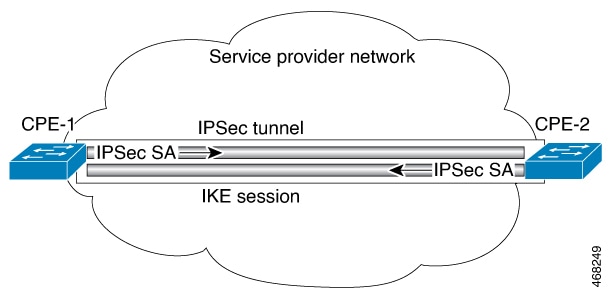
Figure 1. IPsec tunnel
The IPsec tunnel diagram illustrates the stages of establishing and maintaining secure communication, highlighting how sensitive packets are identified and the parameters for the tunnel are defined.

These stages describe how IPsec establishes and maintains secure communication:

  1. IPsec identifies sensitive packets that require protection and defines tunnel parameters. You define which packets that are considered sensitive and that should be sent through secure tunnels. You also specify the characteristics of these tunnels.
  2. IKEv2 negotiates security associations and keying material. When an IPsec security association does not exist, IKEv2 negotiates the algorithms and keying material required to protect the traffic. When ML-KEM is configured, IKEv2 combines the classical Diffie-Hellman shared secret with an ML-KEM shared secret during key derivation.
  3. IPsec establishes security associations between the peers. The negotiated security associations specify the protocols, data-plane transforms, lifetimes, and keying material for protecting traffic. The ML-KEM exchange protects key establishment, but it does not replace the ESP data-plane transform. Multiple IPsec tunnels can exist between two peers to secure different data streams, with each tunnel using a separate set of security associations. For example, some data streams might be authenticated only, while others require both encryption and authentication.
  4. IPsec applies established security associations to packets. Once established, the set of security associations (outbound, to the peer) is then applied to the triggering packet as well as to subsequent applicable packets as those packets exit the device. Applicable packets are packets that match the same criteria that the original packet matched. For example, all applicable packets could be encrypted before being forwarded to the remote peer. The device uses the corresponding inbound security associations to process incoming traffic from that peer.
  5. Security associations expire and require renegotiation for additional security. If IKE establishes the security associations, they are assigned lifetimes so they periodically expire and require renegotiation. This process adds another level of security.

Result

IPsec provides secure tunnels between two peers, such as two switches. The device locally redirects marked packets to the tunnel interface. A transform set contains security protocols, algorithms, and settings you can apply to IPsec-protected traffic. When the devices negotiate a security association, they agree to use one of these transform sets to protect your data flow.

Restrictions for IPsec

General restrictions for IPsec

Review these general restrictions before implementing IPsec:

  • NAT Traversal (NAT-T) is not supported. IPsec and NAT are not supported on the same Cisco IOS XE Smart Series switch.

  • Crypto maps are not supported. Use static virtual tunnel interfaces (SVTIs). Only IPv4-over-IPv4 SVTIs are supported.

  • SVTI scale is limited. A switch supports up to 128 IPsec IPv4 SVTIs and 16 unique tunnel-source IP addresses. The 128-SVTI limit applies when considered on its own; enabling other features that share the same resources reduces the supported scale.

  • Only ESP tunnel mode with GCM128 or GCM256 is supported for IPsec dataplane traffic.

  • Volume-based rekeying is not supported. At scale, short rekey timers can increase CPU usage because encapsulation cache entries are updated on each rekey.

  • OSPFv3 authentication with IPsec is not supported.

  • Only IKEv2 is supported. Post-quantum key establishment using ML-KEM requires IKEv2; IKEv1 does not support additional key exchange.

  • ML-KEM peer compatibility affects session establishment. A proposal that requires ML-KEM cannot establish a session with a peer that lacks a compatible ML-KEM parameter set. Configure the optional keyword only if fallback to classical Diffie-Hellman is acceptable; a session using that fallback does not provide post-quantum protection.

  • ML-KEM can increase IKEv2 message size and processing cost. Larger parameter sets may increase tunnel-establishment time and CPU utilization. To prevent oversized IKE messages from being fragmented by IP, configure IKEv2 fragmentation on both peers.

MTU considerations


Note


IKEv2 fragmentation and IPsec data-plane fragmentation are different functions. Configure IKEv2 fragmentation to split large IKE control messages before UDP encapsulation. Configure the tunnel MTU. For TCP traffic, set the maximum segment size (MSS) so that the protected data packet and IPsec overhead fit within the end-to-end underlay path MTU. This platform does not support fragmentation or reassembly of encrypted data packets.


Restrictions for IPsec virtual tunnel interfaces

Review these restrictions when configuring IPsec Virtual Tunnel Interfaces:

  • Dynamic changes to an IPsec SVTI are not supported. Before changing the tunnel mode, tunnel protection IPsec profile, tunnel-source IP address, or tunnel-destination IP address, remove the existing tunnel configuration and reconfigure the tunnel with the new values.

  • Client fragments and tunnel fragments are dropped. Fragmentation before or after encryption and reassembly of encrypted fragments are not supported.

  • The Internet Key Exchange (IKE) security association (SA) is bound to the VTI.

  • By default, Static VTIs (SVTIs) support only a single IPsec SA that is attached to the virtual tunnel interface. The traffic selector for the IPsec SA is IP any any.

  • Each SVTI supports one IPsec SA with an IP any any traffic selector. More-specific traffic selectors and multiple SAs per SVTI are not supported.

  • Do not configure the shared keyword when using the tunnel mode ipsec ipv4 command for IPsec IPv4 mode.

  • Tunnel source cannot be a subinterface.

Restrictions for IPsec dead peer detection periodic message option

Using periodic Dead Peer Detection (DPD) potentially allows the device to detect an unresponsive IKE peer with faster response time when compared to on-demand DPD. However, use of periodic DPD incurs extra overhead. When communicating to large numbers of IKE peers, with more than 10 crypto sessions, you should consider using on-demand DPD instead.

Information about internet key exchange version 2

This section provides information about Internet Key Exchange Version 2.

IKEv2 supported standards

Cisco implements the IP Security (IPsec) Protocol standard for use in Internet Key Exchange Version 2 (IKEv2).

The component technologies implemented in IKEv2 are:

  • AES-CBC and AES-GCM encryption algorithms

  • SHA-2 integrity and pseudorandom function algorithms

  • Diffie-Hellman and Elliptic Curve Diffie-Hellman key-agreement groups

  • ML-KEM post-quantum key encapsulation as defined by FIPS 203

  • IKEv2 includes an additional key exchange for hybrid classical and post-quantum key establishment


Note


Cisco no longer recommends using DES or MD5 (including HMAC variant); instead, you should use AES and SHA-256. For more information about cryptographic recommendations, see the Next Generation Encryption (NGE) white paper.

IKEv2 benefits

IKEv2 benefits are security and operational advantages that

  • provide enhanced security features including built-in Dead Peer Detection and DoS attack resilience

  • support modern authentication methods such as EAP and certificate URLs, and

  • deliver improved reliability through windowing and state management capabilities.

IKEv2 benefit categories

IKEv2 provides several categories of benefits that enhance VPN functionality:

  • Dead Peer Detection: Internet Key Exchange Version 2 (IKEv2) provides built-in support for Dead Peer Detection (DPD).

  • Certificate URLs: Certificates can be referenced through a URL and hash, instead of being sent within IKEv2 packets, to avoid fragmentation.

  • Denial of Service Attack Resilience: IKEv2 does not process a request until it determines the requester, which addresses to some extent the Denial of Service (DoS) problems in IKEv1, which can be spoofed into performing substantial cryptographic (expensive) processing from false locations.

  • Reliability and State Management (Windowing): IKEv2 uses sequence numbers and acknowledgments to provide reliability, and mandates some error-processing logistics and shared state management.

Internet key exchange version 2 CLI constructs

IKEv2 CLI constructs are command-line interface elements that

  • enable configuration and management of the Internet Key Exchange version 2 protocol,

  • provide options to define security parameters and operational settings, and

  • facilitate integration with other network services and authentication mechanisms.

IKEv2 proposals

An IKEv2 proposal is a set of security configurations that

  • uses encryption algorithms to protect the confidentiality of exchanged data

  • applies integrity and pseudorandom function algorithms to guarantee data authenticity and randomness, and

  • incorporates Diffie-Hellman groups, including ML-KEM parameter sets for post-quantum support, to negotiate secure key exchange during IKE SA initiation.

In a post-quantum-enabled proposal, you include one or more ML-KEM parameter sets with a classical Diffie-Hellman group. For hybrid key establishment, you must include at least one classical group.
IKEv2 policy

An IKEv2 policy is a configuration framework that

  • contains proposals used to negotiate encryption, integrity, pseudorandom function, classical Diffie-Hellman, and, when configured, ML-KEM additional key-exchange algorithms

  • can have match statements, which are used as selection criteria to select a policy during negotiation, and

  • provides default settings that can be overridden with custom configurations.

Additional information

See the "IKEv2 Smart Defaults" section for information about the default IKEv2 policy. See the "Configuring Advanced IKEv2 CLI Constructs" section for information about how to override the default IKEv2 policy and to define new policies.

IKEv2 profiles

An IKEv2 profile is a repository of nonnegotiable parameters of the IKE security association (SA) that

  • includes parameters such as local or remote identities and authentication methods and services

  • provides these parameters to authenticated peers that match the profile, and

  • attaches to either a crypto map or an IPsec profile on the initiator.

Configuration considerations

Note


Configure your IPsec peer to initiate tunnel establishment with a Static Virtual Tunnel Interface (SVTI) instead of waiting for data traffic. The switch can negotiate initiator and responder roles automatically. Configure the peer that receives the initial IKE request (usually the headend) as the responder. In dynamic Virtual Tunnel Interface (dVTI) deployments, the dVTI headend functions as the responder.


IKEv2 key rings

An IKEv2 key ring is a repository that

  • stores symmetric and asymmetric preshared keys independently of the IKEv1 key ring

  • associates with an IKEv2 profile to support a set of matching peers, and

  • gets its VPN routing and forwarding (VRF) context from the associated IKEv2 profile.

IKEv2 smart defaults

The IKEv2 Smart Defaults feature minimizes configuration steps by covering most of the use cases. IKEv2 smart defaults can be customized for specific use cases, though this is not recommended.

See the "Configuring Advanced IKEv2 CLI Constructs" section for information about how to modify the default IKEv2 constructs.

IKEv2 smart defaults rules

These rules apply to the IKEv2 Smart Defaults feature:

  1. A default configuration is displayed in the corresponding show command with default as a keyword and with no argument. For example, the show crypto ikev2 proposal default command displays the default IKEv2 proposal and the show crypto ikev2 proposal command displays the default IKEv2 proposal, along with any user-configured proposals.

  2. A default configuration is displayed in the show running-config all command; it is not displayed in the show running-config command.

  3. You can modify the default configuration, which is displayed in the show running-config all command.

  4. A default configuration can be disabled using the no form of the command; for example, no crypto ikev2 proposal default . A disabled default configuration is not used in negotiation but the configuration is displayed in the show running-config command. A disabled default configuration loses any user modification and restores system-configured values.

  5. A default configuration can be reenabled using the default form of the command, which restores system-configured values; for example, default crypto ikev2 proposal .

  6. The default mode for the default transform set is transport; the default mode for all other transform sets is tunnel.

IKEv2 command defaults

This table lists the commands that are enabled with the IKEv2 Smart Defaults feature, along with the default values.

Table 1. IKEv2 command defaults

Command Name

Default Values

crypto ikev2 authorization policy


Device# show crypto ikev2 authorization policy default

IKEv2 Authorization policy: default
route set interface
route accept any tag: 1 distance: 2

crypto ikev2 proposal


Device# show crypto ikev2 proposal
 
IKEv2 proposal: default 
Encryption: AES-CBC-256
Integrity: SHA512 SHA384
PRF: SHA512 SHA384
DH Group: DH_GROUP_256_ECP/Group 19 DH_GROUP_2048_MODP/Group 14 DH_GROUP_521_ECP/Group 21 DH_GROUP_1536_MODP/Group 5

crypto ikev2 policy


Device# show crypto ikev2 policy default

IKEv2 policy: default
Match fvrf: any
Match address local: any 
Proposal: default

crypto ipsec profile


Device# show crypto ipsec profile default

IPSEC profile default
Security association lifetime: 4608000 kilobytes/3600 seconds
Responder-Only (Y/N): N
PFS (Y/N): N
Transform sets={
default: { esp-aes esp-sha-hmac },
}

crypto ipsec transform-set


Device# show crypto ipsec transform-set default

Transform set default: { esp-aes esp-sha-hmac }
will negotiate = { Tunnel, },

Note


IKEv2 smart defaults do not enable ML-KEM. You must configure the pqc command explicitly in a user-defined IKEv2 proposal and attach your proposal to an IKEv2 policy.


Note


The table shows the default IPsec profile and transform set. Cisco C9350 Series Smart Switches support ESP tunnel mode with AES-GCM-128 or AES-GCM-256. You should configure and apply your own AES-GCM transform set rather than relying on the default IPsec transform set.


IKEv2 Suite-B support

Suite-B is a set of cryptographic algorithms promulgated by the National Security Agency as part of its Cryptographic Modernization Program that

  • defines cryptographic standards for Internet Key Exchange (IKE) and IPsec as specified in RFC 4869

  • comprises four user-interface suites of cryptographic algorithms for use with IKE and IPsec, and

  • consists of an encryption algorithm, a digital-signature algorithm, a key-agreement algorithm, and a hash- or message-digest algorithm.

Suite-B components

The Suite-B components are as follows:

  • Advanced Encryption Standard (AES) 128- and 256-bit keys configured in the IKEv2 proposal. For data traffic, AES should be used in Galois Counter Mode (GCM) that is configured in the IPsec transform set.

  • Elliptic Curve Digital Signature Algorithm (ECDSA) configured in the IKEv2 profile.

  • Secure Hashing Algorithm 2 (SHA-256 and SHA-384) configured in the IKEv2 proposal and IPsec transform set.

Suite B includes traditional cryptographic suites, which do not provide post-quantum key establishment. To enable post-quantum protection in IKEv2 key establishment, you must configure ML-KEM in the IKEv2 proposal.

See the "Configuring Security for VPNs with IPsec" feature module for detailed information about Cisco Suite-B support.

Post-quantum cryptographic techniques with ML-KEM for IKEv2

A post-quantum cryptographic technique is a cryptographic protection mechanism that

  • withstands attacks from cryptographically relevant quantum computers

  • replaces vulnerable algorithms such as RSA and classical Elliptic Curve Diffie-Hellman (ECDH), and

  • relies on module-lattice–based mathematics, which is considered resistant to classical and quantum attacks.

Post-quantum cryptography uses algorithms designed to keep your network secure from quantum computer attacks. These algorithms, such as Module-Lattice Key Encapsulation Mechanism (ML-KEM) standardized in FIPS 203, help you establish shared secrets between two peers. ML-KEM only provides key exchange; it does not authenticate peers or encrypt IPsec data packets.

Cisco implements ML-KEM in IKEv2 as an additional key exchange. When you configure IKEv2, both peers perform a classical Diffie-Hellman exchange and an ML-KEM exchange. The resulting shared secrets combine to create the IKE security association keys. This hybrid exchange protects your security association if either the classical or post-quantum component remains secure.

Choose from ML-KEM-512, ML-KEM-768, or ML-KEM-1024 parameter sets, depending on your security needs. Higher-numbered parameter sets provide stronger security but require larger keys, messages, and more processing. When you configure an IKEv2 proposal, enter the CLI keywords mlkem512, mlkem768, or mlkem1024.

ML-KEM protects your IKEv2 key establishment, while Encapsulating Security Payload (ESP) continues to use the data-plane transform you configure in the IPsec transform set. You can use AES-GCM-128 or AES-GCM-256 as ESP transforms.

IPsec virtual tunnel interfaces

An IPsec virtual tunnel interface is a tunneling technology that

  • simplifies the configuration process when you need to provide protection for remote access

  • provides an alternative to using generic routing encapsulation (GRE) or Layer 2 Tunneling Protocol (L2TP) tunnels for encapsulation, and

  • associates the IPsec tunnel endpoint with an actual virtual interface without requiring static mapping of IPsec sessions to a physical interface.

Key capabilities and traffic handling

Because there is a routable interface at the tunnel endpoint, many common interface capabilities can be applied to the IPsec tunnel.

An IPv4 SVTI carries IPv4 unicast traffic and supported dynamic-routing control traffic. Native multicast data forwarding over IPsec SVTI is not supported.

Benefits of using IPsec virtual tunnel interfaces

IPsec virtual tunnel interface benefits are configuration advantages that

  • allow you to configure a virtual interface to which you can apply features

  • enable features for clear-text packets to be configured on the VTI, and

  • apply features for encrypted packets on the physical interface.

VTI interface types

There are two types of VTI interfaces: static VTIs (SVTIs) and dynamic VTIs (DVTIs).


Note


Only static virtual tunnel interfaces are supported. Dynamic virtual tunnel interfaces are not supported.


Static virtual tunnel interfaces

A Static Virtual Tunnel Interface (SVTI) is an IPsec tunneling configuration that

  • provides always-on access between two sites for site-to-site connectivity

  • enables dynamic routing protocols on the tunnel interface without the extra 24 bytes required for GRE headers, reducing the bandwidth for sending encrypted data, and

  • supports native IPsec tunneling.

SVTI scale numbers

The number of IPsec IPv4 SVTIs supported is 128. This is a unidimensional scale number. If you enable other features which share the same resource, the scale number will be reduced.

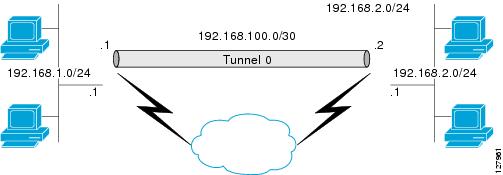
This figure illustrates how an SVTI is used.

Figure 2. IPsec SVTI
The figure illustrates the configuration and usage of IPsec Static Virtual Tunnel Interfaces (SVTIs), highlighting the increased support for both IPv4 and IPv6 tunnels.

Routing with IPsec virtual tunnel interfaces

Routing with IPsec virtual tunnel interfaces is a network configuration mechanism that

  • encrypts traffic only when it is forwarded out of the VTI

  • decrypts and routes traffic arriving on the VTI accordingly, and

  • establishes encryption tunnels using real interfaces as tunnel endpoints.

VTI interface benefits

VTIs provide several advantages because they are real interfaces:

  • You can monitor the interface status and performance

  • You can route traffic to the interface

  • The interface provides benefits similar to other Cisco IOS XE interfaces

How IPsec VTI traffic encryption works

When you configure an IPsec VTI, the interface encrypts packets using the IPsec profile. Route traffic to the VTI to simplify site-to-site VPN configuration. You cannot forward multicast data natively over the IPsec SVTI.

Summary

The key components involved in IPsec VTI traffic encryption are:

  • Forwarding engine: Routes traffic to the VTI and switches packets through interfaces

  • IPsec VTI: Performs encryption and decryption of traffic

  • IP routing table: Determines traffic forwarding to the SVTI

  • Inside interface: Receives incoming packets

  • Outside interface: Sends encrypted packets

Workflow

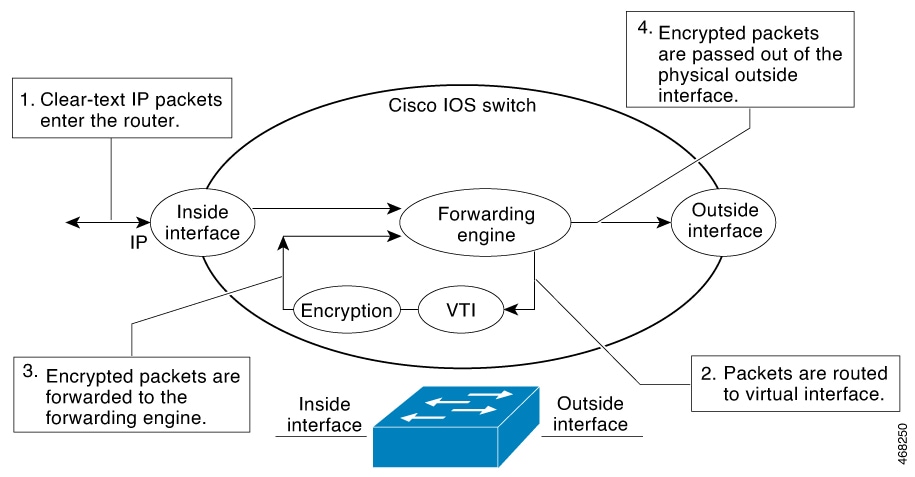
Figure 3. Packet flow into the IPsec tunnel
The diagram illustrates the packet flow into the IPsec tunnel, detailing the stages of traffic encryption through the VTI, including the roles of the forwarding engine, IP routing table, and inside and outside interfaces.

These stages describe how traffic is encrypted with IPsec VTI:

  1. Traffic arrives on the inside interface and is forwarded to the VTI for encryption. After packets arrive on the inside interface, the forwarding engine switches the packets to the VTI, where they are encrypted.
  2. Encrypted packets are returned to the forwarding engine and sent through the outside interface. The encrypted packets are handed back to the forwarding engine, where they are switched through the outside interface.
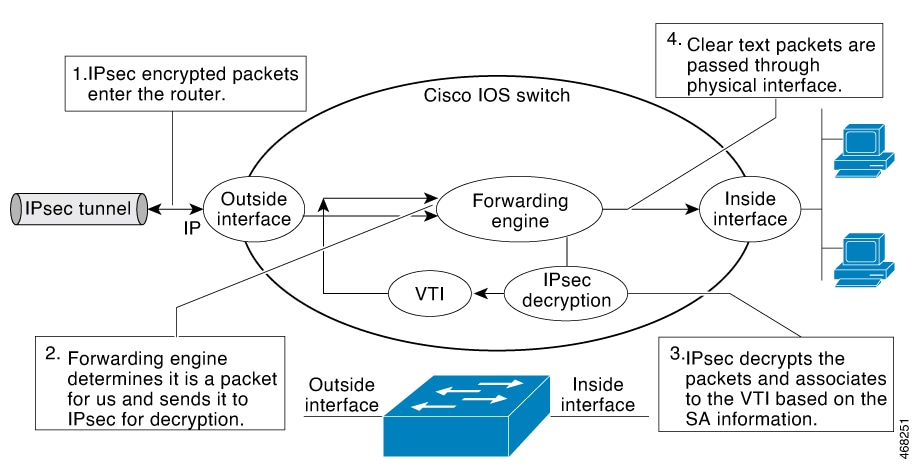
    Figure 4. Packet flow out of the IPsec tunnel
    The diagram illustrates the process of IPsec VTI traffic encryption, showing how packets are switched to the VTI for encryption before being sent through the outside interface.

IPsec anti-replay window

An IPsec anti-replay window is a security mechanism that

  • provides anti-replay protection against an attacker duplicating encrypted packets by assigning a unique sequence number to each encrypted packet

  • allows the receiver to reject old or duplicate packets to protect itself against replay attacks, and

  • tracks sequence numbers using a window size where the decryptor remembers the highest sequence number seen and whether it has seen packets within the window range.

Anti-replay window operation

The decryptor checks off the sequence numbers that it has seen before. The encryptor assigns sequence numbers in an increasing order. The decryptor remembers the value X of the highest sequence number that it has already seen. N is the window size, and the decryptor also remembers whether it has seen packets having sequence numbers from X-N+1 through X. Any packet with the sequence number X-N is discarded. Currently, N is set at 64, so only 64 packets can be tracked by the decryptor.

Configure IPsec

The sections provide information about the procedures you can perform to configure IPsec.

Configure internet key exchange version 2

This sections provide information about the procedures you can perform to configure the constructs of the Internet Key Exchange Version 2.

Basic internet key exchange version 2 CLI constructs

Basic Internet Key Exchange Version 2 CLI constructs are configuration elements that enable IKEv2 on crypto interfaces by attaching an IKEv2 profile to the crypto map or IPsec profile applied to the interface.

Configuration requirements

To enable IKEv2 on a crypto interface, attach an Internet Key Exchange Version 2 (IKEv2) profile to the crypto map or IPsec profile applied to the interface. This step is optional on the IKEv2 responder.

Perform these tasks to manually configure basic IKEv2 constructs:

Configure the IKEv2 keyring

This task enables you to configure the IKEv2 keyring for preshared key authentication methods, allowing secure peer identification and key management in IKEv2 VPN connections.

Configure the IKEv2 keyring keys in the peer configuration submode that defines a peer subblock. An IKEv2 keyring can have multiple peer subblocks. A peer subblock contains a single symmetric or asymmetric key pair for a peer or peer group. Any combination of the hostname, identity, and IP address identifies the peer or the peer group.

IKEv2 keyrings are independent of IKEv1 keyrings. The key differences are as follows:

  • IKEv2 keyrings support symmetric and asymmetric preshared keys.

  • IKEv2 keyrings don't support Rivest, Shamir, and Adleman (RSA) public keys.

  • IKEv2 keyrings are specified in the IKEv2 profile and aren't looked up, unlike IKEv1 keys. IKEv1 keys are looked up on receipt of MM1 to negotiate the preshared key authentication method. IKEv2 doesn't negotiate the authentication method.

  • IKEv2 keyrings aren't associated with VPN routing and forwarding (VRF) during configuration. The VRF of an IKEv2 keyring is the VRF of the IKEv2 profile that refers to the keyring.

  • You can specify a single keyring in an IKEv2 profile, unlike an IKEv1 profile, which can specify multiple keyrings.

  • If peers matching different profiles share the same keys, you can specify a single keyring in more than one IKEv2 profile.

  • An IKEv2 keyring is structured as one or more peer subblocks.

On an IKEv2 initiator, the IKEv2 keyring key lookup is performed using the hostname or the address of the peer, in that order. On an IKEv2 responder, the key lookup is performed using the IKEv2 identity or the address of the peer, in that order.


Note


You can't configure the same identity in more than one peer.


Procedure

Step 1

enable

Example:
Device> enable

Enables privileged EXEC mode. Enter your password, if prompted.

Step 2

configure terminal

Example:
Device# configure terminal

Enters global configuration mode.

Step 3

crypto ikev2 keyring keyring-name

Example:
Device(config)# crypto ikev2 keyring kyr1

Defines an IKEv2 keyring. Enters IKEv2 keyring configuration mode.

Step 4

peer name

Example:
Device(config-ikev2-keyring)# peer peer1

Defines the peer or peer group. Enters IKEv2 keyring peer configuration mode.

Step 5

description line-of-description

Example:
Device(config-ikev2-keyring-peer)# description this is the first peer

(Optional) Describes the peer or peer group.

Step 6

hostname name

Example:
Device(config-ikev2-keyring-peer)# hostname host1

Specifies the peer using a hostname.

Step 7

address {ipv4-address [mask] | ipv6-address prefix}

Example:
Device(config-ikev2-keyring-peer)# address 10.0.0.1 255.255.255.0

Specifies an IPv4 or IPv6 address or range for the peer.


Note


This IP address is the IKE endpoint address and is independent of the identity address.

Step 8

identity {address {ipv4-address | ipv6-address} | fqdn domain domain-name | email domain domain-name | key-id key-id}

Example:
Device(config-ikev2-keyring-peer)# identity address 10.0.0.5

Identifies the IKEv2 peer through the following identities:

  • E-mail

  • Fully qualified domain name (FQDN)


    Note


    When you use FQDN to identify the peer in the keyring configuration, use the IP address of the peer along with the FQDN


    crypto ikev2 keyring key1
     peer headend-1
      address 10.1.1.1 255.255.255.255
      identity fqdn NFVIS-headend-1.cisco.com
      pre-shared-key Cisco123
  • IPv4 or IPv6 address

  • Key ID


Note


The identity is available for key lookup on the IKEv2 responder only.

Step 9

pre-shared-key {local | remote} [0 | 6] line hex hexadecimal-string

Example:
Device(config-ikev2-keyring-peer)# pre-shared-key local key1

Specifies the preshared key for the peer.

Step 10

end

Example:
Device(config-ikev2-keyring-peer)# end

Exits IKEv2 keyring peer configuration mode. Returns to privileged EXEC mode.


The IKEv2 keyring is successfully configured with the specified peer settings and preshared key authentication. The keyring is ready for use in IKEv2 profiles to establish secure VPN connections.

Configure an IKEv2 profile (Basic)

Set up an IKEv2 profile, specifying the parameters and commands required for IKE security association to protect VPN connections.

An IKEv2 profile stores IKE security association (SA) parameters that cannot be negotiated. These parameters include local and remote identities, authentication methods, and peer services. You must associate the IKEv2 profile with the IPsec profile that is applied to the SVTI. You cannot use cryptographic maps with this system.

These rules apply to match statements:

  • An IKEv2 profile must contain a match identity or a match certificate statement; otherwise, the profile is considered incomplete and is not used. An IKEv2 profile can have more than one match identity or match certificate statements.

  • An IKEv2 profile must have a single match Front Door VPN routing and forwarding (FVRF) statement.

  • When a profile is selected, multiple match statements of the same type are logically ORed, and multiple match statements of different types are logically ANDed.

  • The match identity and match certificate statements are considered to be the same type of statements and are ORed.

  • Configuration of overlapping profiles is considered a misconfiguration. In the case of multiple profile matches, no profile is selected.

Use the show crypto ikev2 profile profile-name command to display the IKEv2 profile.

Before you begin

Perform this task to configure the mandatory commands for an IKEv2 profile.

Procedure

Step 1

enable

Example:
Device> enable

Enables the privileged EXEC mode. Enter your password, if prompted.

Step 2

configure terminal

Example:
Device# configure terminal

Enters the global configuration mode.

Step 3

crypto ikev2 profile profile-name

Example:
Device(config)# crypto ikev2 profile profile1

Defines an IKEv2 profile and enters the IKEv2 profile configuration mode.

Step 4

description line-of-description

Example:
Device(config-ikev2-profile)# description This is an IKEv2 profile

(Optional) Describes the profile.

Step 5

aaa accounting { psk | cert | eap } list-name

Example:
Device(config-ikev2-profile)# aaa accounting eap list1

(Optional) Enables authentication, authorization, and accounting (AAA) method lists for IPsec sessions.


Note


If the psk , cert , or eap keyword is not specified, the AAA accounting method list is used irrespective of the peer authentication method.

Step 6

authentication { local { rsa-sig | pre-share [ key { 0 | 6 } password }] | ecdsa-sig | eap [ gtc | md5 | ms-chapv2 ] [ username username ] [ password { 0 | 6 } password }]} | remote { eap [ query-identity | timeout seconds ] | rsa-sig | pre-share [ key { 0 | 6 } password }] | ecdsa-sig }}

Example:
Device(config-ikev2-profile)# authentication local ecdsa-sig

Specifies the local or remote authentication method.

  • rsa-sig —Specifies RSA-sig as the authentication method.

  • pre-share —Specifies the preshared key as the authentication method.

  • ecdsa-sig —Specifies ECDSA-sig as the authentication method.

  • eap —Specifies EAP as the remote authentication method.

  • query-identity —Queries the EAP identity from the peer.

  • timeout seconds —Specifies the duration, in seconds, to wait for the next IKE_AUTH request after sending the first IKE_AUTH response.


Note


You can specify only one local authentication method but multiple remote authentication methods.

Step 7

dpd interval retry-interval { on-demand | periodic }

Example:
Device(config-ikev2-profile)# dpd 30 6 on-demand

This step is optional. Configures Dead Peer Detection (DPD) globally for peers matching the profile. By default, the Dead Peer Detection (DPD) is disabled.

Step 8

identity local { address { ipv4-address | ipv6-address } | dn | email email-string | fqdn fqdn-string | key-id opaque-string }

Example:
Device(config-ikev2-profile)# identity local email abc@example.com

This is an optional step. Specifies the local IKEv2 identity type.


Note


If the local authentication method is a preshared key, the default local identity is the IP address. If the local authentication method is a Rivest, Shamir, and Adleman (RSA) signature, the default local identity is a Distinguished Name.

Step 9

initial-contact force

Example:
Device(config-ikev2-profile)# initial-contact force

Enforces initial contact processing if the initial contact notification is not received in the IKE_AUTH exchange.

Step 10

keyring { local keyring-name | aaa list-name [ name-mangler mangler-name | password password ] }

Example:
Device(config-ikev2-profile)# keyring aaa keyring1 name-mangler mangler1

Specifies the local or AAA-based key ring that must be used with the local and remote preshared key authentication method.


Note


You can specify only one key ring. Local AAA is not supported for AAA-based preshared keys.

Note


When using AAA, the default password for a Radius access request is "cisco". You can use the password keyword within the keyring command to change the password.

Step 11

lifetime seconds

Example:
Device(config-ikev2-profile)# lifetime 1000

Specifies the lifetime, in seconds, for the IKEv2 SA.

Step 12

match { address local { ipv4-address | ipv6-address | interface name } | certificate certificate-map | fvrf { fvrf-name | any } | identity remote address { ipv4-address [ mask ] | ipv6-address prefix } | { email [ domain string ] | fqdn [ domain string ]} string | key-id opaque-string }

Example:
Device(config-ikev2-profile)# match address local interface GigabitEthernet2/0

Uses match statements to select an IKEv2 profile for a peer.

Step 13

pki trustpoint trustpoint-label [ sign | verify ]

Example:
Device(config-ikev2-profile)# pki trustpoint tsp1 sign

Specifies Public Key Infrastructure (PKI) trustpoints for use with the RSA signature authentication method.


Note


If the sign or verify keyword is not specified, the trustpoint is used for signing and verification.

Note


In contrast to IKEv1, a trustpoint must be configured in an IKEv2 profile for certificate-based authentication to succeed. There is no fallback for globally configured trustpoints if this command is not present in the configuration. The trustpoint configuration applies to the IKEv2 initiator and responder.

Step 14

shutdown

Example:
Device(config-ikev2-profile)# shutdown
(Optional) Shuts down the IKEv2 profile.

Step 15

end

Example:
Device(config-ikev2-profile)# end
Exits the IKEv2 profile configuration mode and returns to the privileged EXEC mode.

The IKEv2 profile is configured and ready to be associated with a crypto map. Secure parameters and authentication methods are set, providing secure, authenticated VPN connections.

Advanced internet key exchange version 2 CLI constructs

Advanced Internet Key Exchange Version 2 CLI constructs are configuration settings that

  • provide global IKEv2 parameters for network security protocols,

  • enable override of IKEv2 default settings when required for specific use cases, and

  • support most use cases through smart defaults that minimize configuration requirements.

Configuration guidance

IKEv2 smart defaults support most use cases and hence, we recommend that you override the defaults only if they are required for specific use cases not covered by the defaults.

Perform tasks to configure advanced IKEv2 CLI constructs.

Configure global IKEv2 options

This task allows you to configure global IKEv2 options that apply system-wide and are not tied to specific peers.

Perform this task to configure global IKEv2 options that are independent of peers.

Procedure

Step 1

enable

Example:
Device> enable

Enables privileged EXEC mode. Enter your password, if prompted.

Step 2

configure terminal

Example:
Device# configure terminal

Enters global configuration mode.

Step 3

crypto ikev2 certificate-cache number-of-certificates

Example:
Device(config)# crypto ikev2 certificate-cache 750

Defines the cache size for storing certificates fetched from HTTP URLs.

Step 4

crypto ikev2 cookie-challenge number

Example:
Device(config)# crypto ikev2 cookie-challenge 450

Enables an IKEv2 cookie challenge only when the number of half-open security associations (SAs) exceeds the configured number.

  • Cookie challenge is disabled by default.

Step 5

crypto ikev2 DPD interval retry-interval {on-demand | periodic}

Example:
Device(config)# crypto ikev2 dpd 30 6 on-demand

Allows live checks for peers as follows:

  • Dead Peer Detection (DPD) is disabled by default.


Note


In the example in this step, the first DPD is sent after 30 seconds when there is no incoming ESP traffic. After waiting for 6 seconds (which is the specified retry interval), DPD retries are sent 5 times in intervals of 6 seconds each. So, a total of 66 seconds (30 + 6 + 6 * 5 = 66) elapses before a crypto session is torn down because of DPD.


Step 6

crypto ikev2 http-url cert

Example:
Device(config)# crypto ikev2 http-url cert

Enables the HTTP CERT support.

  • HTTP CERT is disabled by default.

Step 7

crypto ikev2 limit {max-in-negotiation-sa limit [incoming | outgoing] | max-sa limit}

Example:
Device(config)# crypto ikev2 limit max-in-negotiation-sa 5000 incoming
Device(config)# crypto ikev2 limit max-in-negotiation-sa 5000 outgoing

For scale deployments, configure the maximum in-negotiation SA limit for both incoming and outgoing IKEv2 negotiations.

Enables connection admission control (CAC).

  • Connection admission control is enabled by default.

Step 8

crypto ikev2 window size

Example:
Device(config)# crypto ikev2 window 15

Allows multiple IKEv2 request-response pairs in transit.

  • The default window size is 5.

Step 9

crypto logging ikev2

Example:
Device(config)# crypto logging ikev2

Enables IKEv2 syslog messages.

  • IKEv2 syslog messages are disabled by default.

Step 10

crypto ikev2 fragmentation mtu bytes

Example:
Device(config)# crypto ikev2 fragmentation mtu 1400

Enables IKEv2 fragmentation and specifies the maximum IKE fragment size. When using ML-KEM, configure the same value on both peers. IKEv2 fragmentation applies to IKE control messages. It does not enable fragmentation or reassembly of encrypted IPsec data packets.

Step 11

end

Example:
Device(config)# end

Exits global configuration mode and returns to privileged EXEC mode.


Global IKEv2 options are now configured with the specified parameters and settings that will apply to all IKEv2 connections.

Configure an IKEv2 proposal

This task allows you to override the default IKEv2 proposal or to manually configure the proposals when you do not want to use the default proposal.

Refer to the "IKEv2 Smart Defaults" section for information on the default IKEv2 proposal.

To negotiate an IKE SA during the IKE_SA_INIT exchange, create an IKEv2 proposal that includes an encryption algorithm, a pseudorandom function, and a classical Diffie-Hellman group. If your chosen encryption algorithm requires integrity, include an integrity algorithm. To enable post-quantum key establishment, configure one or more ML-KEM parameter sets. The hybrid construction uses both the classical Diffie-Hellman group and ML-KEM exchange.


Note


Security threats, as well as the cryptographic technologies to help protect against them, are constantly changing. For more information about the latest Cisco cryptographic recommendations, see the Next Generation Encryption (NGE) white paper.

Although the IKEv2 proposal is similar to the crypto isakmp policy command, the IKEv2 proposal differs as follows:

  • An IKEv2 proposal allows configuring one or more transforms for each transform type.

  • An IKEv2 proposal does not have any associated priority.

Procedure

Step 1

enable

Example:
Device> enable

Enables privileged EXEC mode.

  • Enter your password if prompted.

Step 2

configure terminal

Example:
Device# configure terminal

Enters global configuration mode.

Step 3

crypto ikev2 proposal name

Example:
Device(config)# crypto ikev2 proposal proposal1

Overrides the default IKEv2 proposal, defines an IKEv2 proposal name, and enters IKEv2 proposal configuration mode.

Step 4

encryption encryption-type...

Example:
Device(config-ikev2-proposal)# encryption aes-cbc-128 aes-cbc-192

Specifies one or more transforms of the encryption type, which are as follows:

  • AES-cbc-128

  • AES-cbc-192

  • AES-cbc-256

  • AES-GCM-128

  • AES-GCM-256

Step 5

integrity integrity-type...

Example:
Device(config-ikev2-proposal)# integrity sha512

Specifies one or more transforms of the integrity algorithm type, which are as follows:

  • The sha1 keyword specifies SHA-1 (HMAC variant) as the hash algorithm.

  • The sha256 keyword specifies SHA-2 family 256-bit (HMAC variant) as the hash algorithm.

  • The sha384 keyword specifies SHA-2 family 384-bit (HMAC variant) as the hash algorithm.

  • The sha512 keyword specifies SHA-2 family 512-bit (HMAC variant) as the hash algorithm.


Note


An integrity algorithm type cannot be specified if you specify Advanced Encryption Standard (AES) in Galois/Counter Mode (AES GCM) as the encryption type.

Step 6

group group-type...

Example:
Device(config-ikev2-proposal)# group 14

Specifies the Diffie-Hellman (DH) group identifier.

  • 14 —Specifies the 2048-bit DH group.

  • 15 —Specifies the 3072-bit DH group.

  • 16 —Specifies the 4096-bit DH group.

  • 19 —Specifies the 256-bit elliptic curve DH (ECDH) group.

  • 20 —Specifies the 384-bit ECDH group.

  • 21 —Specifies the 521-bit elliptic curve Diffie-Hellman group.

  • 24 —Specifies the 2048-bit DH group.

If you configure ML-KEM, the IKEv2 exchange uses a hybrid construction. Configure the classical group based on current Cisco cryptographic recommendations.

Step 7

pqc mlkem-algorithm [optional]

Example:
Device(config-ikev2-proposal)# pqc mlkem768

Configures one or more ML-KEM parameter sets for the IKEv2 additional key exchange. Valid keywords are mlkem512, mlkem768, and mlkem1024, when supported by the target image.

The optional keyword permits the peer to fall back to a classical-only exchange when it does not support a configured ML-KEM parameter set. Omit optional to require ML-KEM. A classical-only fallback session is not quantum safe.

Step 8

pqc { mlkem512 | mlkem768 | mlkem1024 } [optional]

  • mlkem512: ML-KEM with a 512-bit key size.

  • mlkem768: ML-KEM with a 768-bit key size.

  • mlkem1024: ML-KEM with a 1024-bit key size.

  • optional: Enables migration to PQC but permits classical-only fallback if needed.

Example:
crypto ikev2 proposal pqc-proposal
 encryption aes-cbc-256
 integrity sha512
 group 21
 pqc mlkem768 optional

Step 9

prf prf-algorithm

Example:
Device(config-ikev2-proposal)# prf sha256 sha512

Specifies one or more of the Pseudo-Random Function (PRF) algorithm, which are as follows:

  • md5

  • sha1

  • sha256

  • sha384

  • sha512


Note


This step is mandatory if the encryption type is AES-GCM—aes-gcm-128 or aes-gcm-256 . If the encryption algorithm is not AES-GCM, the PRF algorithm is the same as the specified integrity algorithm. However, you can specify a PRF algorithm, if required.

Step 10

end

Example:
Device(config-ikev2-proposal)# end

Exits IKEv2 proposal configuration mode and returns to privileged EXEC mode.

Step 11

show crypto ikev2 proposal [name | default]

Example:
Device# show crypto ikev2 proposal default

(Optional) Displays the IKEv2 proposal.


The IKEv2 proposal is configured with the specified encryption, integrity, DH group, and PRF algorithms, overriding the default proposal settings.

Configure IKEv2 policies

Configure IKEv2 policies to override the default IKEv2 policy or to manually configure the policies if you do not want to use the default policy.

See the "IKEv2 Smart Defaults" section for information about the default IKEv2 policy.

An IKEv2 policy must contain at least one proposal to be considered as complete and can have match statements, which are used as selection criteria to select a policy for negotiation. During the initial exchange, the local address (IPv4 or IPv6) and the Front Door VRF (FVRF) of the negotiating SA are matched with the policy and the proposal is selected.

The following rules apply to the match statements:

  • An IKEv2 policy without any match statements will match all peers in the global FVRF.

  • An IKEv2 policy can have only one match FVRF statement.

  • An IKEv2 policy can have one or more match address local statements.

  • When a policy is selected, multiple match statements of the same type are logically ORed and match statements of different types are logically ANDed.

  • There is no precedence between match statements of different types.

  • Configuration of overlapping policies is considered a misconfiguration. In the case of multiple, possible policy matches, the first policy is selected.

Procedure

Step 1

enable

Example:
Device> enable

Enables privileged EXEC mode.

  • Enter your password if prompted.

Step 2

configure terminal

Example:
Device# configure terminal

Enters global configuration mode.

Step 3

crypto ikev2 policy name

Example:
Device(config)# crypto ikev2 policy policy1

Overrides the default IKEv2 policy, defines an IKEv2 policy name, and enters IKEv2 policy configuration mode.

Step 4

proposal name

Example:
Device(config-ikev2-policy)# proposal proposal1 

Specifies the proposals that must be used with the policy.

  • The proposals are prioritized in the order of listing.


Note


You must specify at least one proposal. You can specify additional proposals with each proposal in a separate statement.


Step 5

match fvrf {fvrf-name | any }

Example:
Device(config-ikev2-policy)# match fvrf any

(Optional) Matches the policy based on a user-configured FVRF or any FVRF.

  • The default is global FVRF.


Note


The match fvrf any command must be explicitly configured in order to match any VRF. The FVRF specifies the VRF in which the IKEv2 packets are negotiated.


Step 6

match address local {ipv4-address |ipv6-address }

Example:
Device(config-ikev2-policy)# match address local 10.0.0.1

(Optional) Matches the policy based on the local IPv4 or IPv6 address.

  • The default matches all the addresses in the configured FVRF.

Step 7

end

Example:
Device(config-ikev2-policy)# end

Exits IKEv2 policy configuration mode and returns to privileged EXEC mode.

Step 8

show crypto ikev2 policy [policy-name | default ]

Example:
Device# show crypto ikev2 policy policy1

(Optional) Displays the IKEv2 policy.


The IKEv2 policy is configured and can be used for IKEv2 negotiations based on the specified match criteria and proposals.

Configure static IPsec virtual tunnel interfaces

Static IPsec virtual tunnel interfaces provide secure communication channels between network devices by creating encrypted tunnels that protect data in transit.

Use this procedure when you need to establish secure point-to-point connectivity between network devices using IPsec encryption in a static tunnel configuration.

Before you begin

Follow these steps to configure a static IPsec virtual tunnel interface:

Procedure


Step 1

enable

Example:


Device> enable

Enables privileged EXEC mode. Enter your password if prompted.

Step 2

configure terminal

Example:


Device# configure terminal

Enters global configuration mode.

Step 3

crypto ipsec transform-set transform-set-name

Example:

Device(config)# crypto ipsec transform-set tfs esp-gcm 

Defines a transform set and enters crypto transform configuration mode.

Step 4

mode tunnel

Example:

Device(cfg-crypto-tran)#mode tunnel

(Optional) Changes the mode associated with the transform set.

Step 5

crypto IPsec profile profile-name

Example:


Device(cfg-crypto-tran)# crypto IPsec profile PROF

Defines the IPsec parameters that are to be used for IPsec encryption between two IPsec devices, and enters IPsec profile configuration mode.

Step 6

set transform-set transform-set-name

Example:


Device(ipsec-profile)# set transform-set tfs esp-gcm

Specifies which transform sets can be used with the crypto map entry.

Step 7

set ikev2-profile profile-name

Example:

Device(ipsec-profile)#set ikev2-profile ikev2_prof 

Attaches an IKEv2 profile to an IPsec profile.

Step 8

exit

Example:

Device(ipsec-profile)# exit

Exits IPsec profile configuration mode, and enters global configuration mode.

Step 9

interface tunnel number

Example:


Device(config)# interface tunnel 0

Specifies the interface on which the tunnel will be configured and enters interface configuration mode.

Step 10

ip address address mask

Example:


Device(config-if)# ip address 10.1.1.1 255.255.255.0

Specifies the IP address and mask.

Step 11

tunnel mode ipsec ipv4

Example:

Device(config-if)# tunnel mode ipsec ipv4

Defines the mode for the tunnel.

Step 12

tunnel source interface-type interface-number

Example:


Device(config-if)# tunnel source loopback 0

Specifies the tunnel source as a loopback interface.

Step 13

tunnel destination IP-address

Example:


Device(config-if)# tunnel destination 172.16.1.1

Identifies the IP address of the tunnel destination.

Step 14

tunnel protection IPsec profile profile-name

Example:


Device(config-if)# tunnel protection IPsec profile PROF

Associates a tunnel interface with an IPsec profile.

Step 15

end

Example:

Device(config-if)# end

Exits interface configuration mode and returns to privileged EXEC mode.


The static IPsec virtual tunnel interface is configured and ready to establish secure communication with the specified destination device.

Configure IPsec anti-replay window expanding and disabling globally

This task allows you to configure IPsec Anti-Replay Window settings globally so that it affects all security associations that are created.

Use this procedure to configure IPsec Anti-Replay Window: Expanding and Disabling globally.

Procedure


Step 1

enable

Example:


Device> enable

Enables privileged EXEC mode. Enter your password if prompted.

Step 2

configure terminal

Example:


Device# configure terminal

Enters global configuration mode.

Step 3

crypto ipsec security-association replay window-size [ N]

Example:

Device (config)# crypto ipsec security-association replay window-size 64

Sets the size of the security association replay window globally. The default window size is 64 and only a window size of 64 packets is supported.


Note


Configure this command or the crypto ipsec security-association replay disable command. The two commands are not used at the same time.


Step 4

crypto ipsec security-association replay disable

Example:

Device (config)# crypto ipsec security-association replay disable

Disables checking globally. You can check the status of the crypto ipsec security association replay by using the show crypto ipsec sa command on the active security association.


Note


Configure this command or the crypto ipsec security-association replay window-size command. The two commands are not used at the same time.


IPsec anti-replay window settings are configured globally and will affect all security associations that are created.

Configuration examples for IPsec

The sections provide examples of IPsec configurations.

Configuration examples for internet key exchange version 2

This reference provides examples of configuring the constructs of the Internet Key Exchange Version 2.

Configuration examples for basic internet key exchange version 2 CLI constructs

This reference provides configuration examples for basic Internet Key Exchange Version 2 CLI constructs to help you implement IKEv2 configurations.

Example: Configure the IKEv2 key ring

This example demonstrates how to configure the IKEv2 key ring for secure network communications.

Example: IKEv2 key ring with multiple peer subblocks

This example shows how to configure an Internet Key Exchange Version 2 (IKEv2) key ring with multiple peer subblocks.


crypto ikev2 keyring keyring-1
 peer peer1
  description peer1 
  address 10.165.200.225 255.255.255.224
  pre-shared-key key-1
 peer peer2
  description peer2
  hostname peer1.example.com
  pre-shared-key key-2
 peer peer3
  description peer3
  hostname peer3.example.com
  identity key-id abc
  address 10.165.200.228 255.255.255.224
  pre-shared-key key-3
Example: IKEv2 key ring with symmetric preshared keys based on an IP address

This example shows how to configure an IKEv2 key ring with symmetric preshared keys based on an IP address.

This is the initiator's key ring:


crypto ikev2 keyring keyring-1
 peer peer1
  description peer1
  address 10.165.200.225 255.255.255.224
  pre-shared-key key1

This is the responder's key ring:


crypto ikev2 keyring keyring-1
 peer peer2
  description peer2 
  address 10.165.200.228 255.255.255.224
  pre-shared-key key1
Example: IKEv2 key ring with asymmetric preshared keys based on an IP address

This example shows how to configure an IKEv2 key ring with asymmetric preshared keys based on an IP address.

This is the initiator's key ring:


crypto ikev2 keyring keyring-1
 peer peer1
  description peer1 with asymmetric keys
  address 10.165.200.225 255.255.255.224
  pre-shared-key local key1
  pre-shared-key remote key2

This is the responder's key ring:


crypto ikev2 keyring keyring-1
 peer peer2
  description peer2 with asymmetric keys
  address 10.165.200.228 255.255.255.224
  pre-shared-key local key2
  pre-shared-key remote key1
Example: IKEv2 key ring with asymmetric preshared keys based on a hostname

This example shows how to configure an IKEv2 key ring with asymmetric preshared keys based on the hostname.

This is the initiator's key ring:


crypto ikev2 keyring keyring-1
 peer host1
  description host1 in example domain
  hostname host1.example.com
  pre-shared-key local key1
  pre-shared-key remote key2

This is the responder's keyring:


crypto ikev2 keyring keyring-1
 peer host2
  description host2 in abc domain
  hostname host2.example.com
  pre-shared-key local key2
  pre-shared-key remote key1
Example: IKEv2 key ring with symmetric preshared keys based on an identity

This example shows how to configure an IKEv2 key ring with symmetric preshared keys based on an identity.


crypto ikev2 keyring keyring-4
 peer abc
  description example domain
  identity fqdn example.com
  pre-shared-key abc-key-1
 peer user1
  description user1 in example domain
  identity email user1@example.com
  pre-shared-key abc-key-2
 peer user1-remote
  description user1 example remote users
  identity key-id example
  pre-shared-key example-key-3
Example: IKEv2 key ring with a wildcard key

This example shows how to configure an IKEv2 key ring with a wildcard key.


crypto ikev2 keyring keyring-1
 peer cisco
  description example domain
  address 10.0.0.0 10.0.0.0 
  pre-shared-key example-key
Example: Match a key ring

This example shows how a key ring is matched in crypto IKEv2 configurations, demonstrating the lookup process for different peer configurations and the selection of the best matching key.


crypto ikev2 keyring keyring-1
 peer cisco
  description example.com
  address 10.0.0.0 10.0.0.0 
  pre-shared-key xyz-key
 peer peer1
  description abc.example.com
  address 10.0.0.0 255.255.0.0 
  pre-shared-key abc-key
 peer host1
  description host1@abc.example.com
  address 10.0.0.1
  pre-shared-key host1-example-key

In this example, the key lookup for peer 10.0.0.1 first matches the wildcard key example-key, then the prefix key example-key, and finally the host key host1-example-key. The best match host1-example-key is used.


crypto ikev2 keyring keyring-2
 peer host1
 description host1 in abc.example.com sub-domain
 address 10.0.0.1
 pre-shared-key host1-example-key
 peer host2
  description example domain
  address 10.0.0.0 10.0.0.0 
  pre-shared-key example-key

In this example, the key lookup for peer 10.0.0.1 would first match the host key host1-abc-key. Because this is a specific match, no further lookup is performed.

Configuration examples for advanced internet key exchange version 2 CLI constructs

Demonstrates configuration examples for advanced Internet Key Exchange Version 2 CLI constructs.

Example: IKEv2 proposal with one transform for each transform type

This example shows how to configure an IKEv2 proposal with one transform for each transform type.


crypto ikev2 proposal proposal-1
 encryption aes-cbc-128
 integrity sha1
 group 14
Example: IKEv2 proposal with multiple transforms for each transform type

This example shows how to configure an IKEv2 proposal with multiple transforms for each transform type.


crypto ikev2 proposal proposal-2
 encryption aes-cbc-128 aes-cbc-192
 integrity sha1
 group 14

Note


Cisco no longer recommends using 3DES, MD5 (including HMAC variant), and Diffie-Hellman(DH) groups 1, 2 and 5; instead, you should use AES, SHA-256 and DH Groups 14 or higher. For more information about the latest Cisco cryptographic recommendations, see the Next Generation Encryption (NGE) white paper.


The IKEv2 proposal proposal-2 shown translates to this prioritized list of transform combinations:

  • AES-cbc-128, sha1, 14

  • AES-cbc-192, sha1, 14

Example: IKEv2 proposals on the initiator and responder

This example demonstrates how to configure IKEv2 proposals on the initiator and the responder, showing the configuration syntax and the resulting selected proposal when conflicting preferences exist.

The proposal on the initiator is as follows:


crypto ikev2 proposal proposal-1
 encryption aes-cbc-192 aes-cbc-128
 integrity sha256 sha1
 group 14 24

The proposal on the responder is as follows:


crypto ikev2 proposal proposal-2
 encryption aes-cbc-128 aes-cbc-192
 peer
 integrity sha1 sha256 
 group 24 14

The selected proposal will be as follows:


encryption aes-cbc-128
integrity sha1 
group 14

In the proposals shown for the initiator and responder, the initiator and responder have conflicting preferences. In this case, the initiator is preferred over the responder.

Example: Configure IPsec on the distributed gateway

This example describes how to configure an IPsec tunnel.

The image illustrates the configuration steps for setting up an IPSEC tunnel on a distributed gateway, detailing the creation of the IKEv2 proposal, keyring, and profile, as well as the IPSEC profile configuration.

Configure the parameters required to bring up an IKEv2 tunnel. Start by creating the IKEv2 proposal and keyring. Then, configure the IKEv2 profile where the crypto keyring is called. Conclude the crypto configuration by configuring the IPsec profile including the IPSEC transform-set and IKEv2 profile.

Example configuration at Site A

! —— IKEv2 Proposal

crypto ikev2 proposal prop-1 
 encryption aes-cbc-256
 integrity sha512
 group 5

! --- IKEv2 Policy

crypto ikev2 policy policy-1
 match fvrf any
 match address local 192.168.1.1
 proposal prop-1

! —— IKEv2 Keyring

crypto ikev2 keyring keyring-1
 peer ANY
  address 0.0.0.0 0.0.0.0
  pre-shared-key cisco123
 
! —— IKEv2 Profile

crypto ikev2 profile IKEv2-Profile-1
 match identity remote address 0.0.0.0 
 authentication remote pre-share
 authentication local pre-share
 keyring local keyring-1

! —— IPSEC Transform set

crypto ipsec transform-set transform-1 esp-gcm 256
mode tunnel

! —— IPSEC Profile

crypto ipsec profile IPSEC-Profile-1
 set transform-set transform-1 
 set ikev2-profile IKEv2-Profile-1

Example configuration at Site B

! —— IKEv2 Proposal

crypto ikev2 proposal prop-1 
 encryption aes-cbc-256
 integrity sha512
 group 5

! -- IKEv2 Policy

crypto ikev2 policy policy-1
 match fvrf any
 match address local 192.168.2.1
 proposal prop-1

! —— IKEv2 Keyring

crypto ikev2 keyring keyring-1
 peer ANY
  address 0.0.0.0 0.0.0.0
  pre-shared-key cisco123
 
! —— IKEv2 Profile

crypto ikev2 profile IKEv2-Profile-1
 match fvrf internet
 match identity remote address 0.0.0.0 
 authentication remote pre-share
 authentication local pre-share
 keyring local keyring-1

! —— IPSEC Transform set

crypto ipsec transform-set transform-1 esp-gcm 256
mode tunnel

! —— IPSEC Profile

crypto ipsec profile IPSEC-Profile-1
 set transform-set transform-1 
 set ikev2-profile IKEv2-Profile-1

Example: Static virtual tunnel interface with IPsec

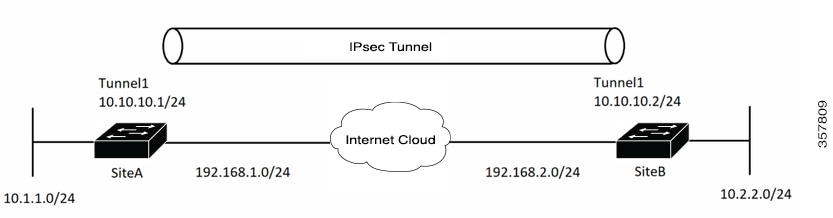
In this example VPN traffic is forwarded to the IPsec VTI for encryption and then sent out the physical interface. The tunnel on subnet 10 checks packets for the IPsec policy and passes them to the Crypto Engine (CE) for IPsec encapsulation. The figure below illustrates the IPsec VTI configuration.

The figure illustrates a static Virtual Tunnel Interface (VTI) configuration with IPsec, demonstrating how VPN traffic is forwarded for encryption and sent out through the physical interface. It shows the process of packet checking against the IPsec policy and the subsequent encapsulation by the Crypto Engine.

Site a device configuration


! —— Interface Configuration

interface Tunnel1
 ip address 10.10.10.1 255.255.255.0
 tunnel source 192.168.1.1
 tunnel destination 192.168.2.1
 tunnel mode IPsec ipv4
 tunnel protection ipsec profile IPSEC-Profile-1

 interface Loopback 1
 ip address 192.168.1.1 255.255.255.0

Site b device configuration

! —— Interface Configuration


interface Tunnel1
 ip address 10.10.10.2 255.255.255.0
 tunnel source 192.168.2.1
 tunnel destination 192.168.1.1
 tunnel mode IPsec ipv4
 tunnel protection ipsec profile IPSEC-Profile-1

interface Loopback 1
 ip address 192.168.2.1 255.255.255.0

Example: Verify the results for the IPsec static virtual tunnel interface

This section provides information that you can use to confirm that your configuration is working properly. In this display, Tunnel 0 is "up," and the line protocol is "up." If the line protocol is "down," the session is not active.

Verify the IPsec static virtual tunnel interface


Device# show interface tunnel 0

Tunnel0 is up, line protocol is up
Hardware is Tunnel
Internet address is 10.0.51.203/24
MTU 1514 bytes, BW 9 Kbit, DLY 500000 usec,
reliability 255/255, txload 103/255, rxload 110/255
Encapsulation TUNNEL, loopback not set
Keepalive not set
Tunnel source 10.0.149.203, destination 10.0.149.217
Tunnel protocol/transport ipsec/ip, key disabled, sequencing disabled
Tunnel TTL 255
Checksumming of packets disabled, fast tunneling enabled
Tunnel transmit bandwidth 8000 (kbps)
Tunnel receive bandwidth 8000 (kbps)
Tunnel protection via IPsec (profile "P1")
Last input never, output never, output hang never
Last clearing of "show interface" counters never
Input queue: 1/75/0/0 (size/max/drops/flushes); Total output drops: 0
Queueing strategy: fifo
Output queue: 0/0 (size/max)
30 second input rate 13000 bits/sec, 34 packets/sec
30 second output rate 36000 bits/sec, 34 packets/sec
191320 packets input, 30129126 bytes, 0 no buffer
Received 0 broadcasts, 0 runts, 0 giants, 0 throttles
0 input errors, 0 CRC, 0 frame, 0 overrun, 0 ignored, 0 abort
59968 packets output, 15369696 bytes, 0 underruns
0 output errors, 0 collisions, 0 interface resets
0 output buffer failures, 0 output buffers swapped out

Device# show crypto session

Crypto session current status
Interface: Tunnel0
Session status: UP-ACTIVE
Peer: 10.0.149.217 port 500
IKE SA: local 10.0.149.203/500 remote 10.0.149.217/500 Active
IPsec FLOW: permit ip 0.0.0.0/0.0.0.0 0.0.0.0/0.0.0.0
Active SAs: 4, origin: crypto map

Device# show ip route

Codes: C - connected, S - static, R - RIP, M - mobile, B - BGP
D - EIGRP, EX - EIGRP external, O - OSPF, IA - OSPF inter area
N1 - OSPF NSSA external type 1, N2 - OSPF NSSA external type 2
E1 - OSPF external type 1, E2 - OSPF external type 2
i - IS-IS, su - IS-IS summary, L1 - IS-IS level-1, L2 - IS-IS level-2
ia - IS-IS inter area, * - candidate default, U - per-user static route
o - ODR, P - periodic downloaded static route
Gateway of last resort is not set
10.0.0.0/8 is variably subnetted, 4 subnets, 2 masks
C 10.0.35.0/24 is directly connected, Ethernet3/3
S 10.0.36.0/24 is directly connected, Tunnel0
C 10.0.51.0/24 is directly connected, Tunnel0
C 10.0.149.0/24 is directly connected, Ethernet3/0

Example: Global expanding and disabling of an anti-replay window

This example demonstrates how to configure the anti-replay window size to 64 packets globally using the crypto ipsec security-association replay window-size command.

This example shows that the anti-replay window size has been set to 64 packets globally.

Device(config)#crypto ipsec security-association replay window-size 64