EIGRP

Enhanced Interior Gateway Routing Protocol (EIGRP) is an advanced Cisco-developed hybrid routing protocol that balances distance-vector and link-state features for fast, efficient, and scalable routing within an Autonomous System (AS).

Information about EIGRP

Enhanced Interior Gateway Routing Protocol (EIGRP) is a sophisticated routing protocol developed by Cisco Systems. Diffusing Update Algorithm (DUAL) is the core algorithm used by EIGRP to ensure loop-free paths and rapid convergence. It allows EIGRP to find the best path (successor) and pre-calculate backup paths (feasible successors) to destinations. If the primary path fails, EIGRP can immediately switch to a feasible successor without recomputing the entire route, minimizing downtime. DUAL also supports Variable Length Subnet Masks (VLSMs).

EIGRP is considered an advanced distance-vector routing protocol, often referred to as a hybrid protocol because it incorporates features typically found in both distance-vector and link-state routing protocols.

EIGRP key features

Here are the key features of EIGRP:

  • Hybrid nature and efficient updates: EIGRP combines the simplicity of distance-vector protocols (learning routes from neighbors) with the rapid convergence and loop-avoidance mechanisms typically associated with link-state protocols. Unlike traditional distance-vector protocols that send periodic full routing table updates, EIGRP sends partial and bounded updates. This means updates are sent only when a change occurs, and only the affected routes are sent to the routers that need the information, significantly reducing bandwidth consumption.

  • Reliable Transport Protocol (RTP): EIGRP uses its own RTP to ensure the reliable and ordered delivery of EIGRP packets. It includes sequence and acknowledgment numbers for reliable communication.

  • Multiple tables: EIGRP maintains three distinct tables to manage routing information:

    • Neighbor table: Stores information about directly connected EIGRP routers (neighbors) with whom adjacency has been formed. Neighbor relationships are established using Hello packets.

    • Topology table: Contains all learned routes to destinations within the autonomous system, including the best paths (successors) and backup paths (feasible successors).

    • Routing table: Contains the best path to each destination, selected from the topology table.

  • Composite metric and support for multiple network layer protocols: EIGRP calculates its metric using a combination of factors: bandwidth, delay, reliability, and load. By default, only bandwidth and delay are used in the metric calculation, as load and reliability can be dynamic and cause frequent route recalculations. The metric formula incorporates "K values" which determine which factors are used and their impact. EIGRP supports routing for various network layer protocols, including IPv4, IPv6, IPX, and AppleTalk, through the use of Protocol Dependent Modules (PDMs).

  • Load balancing and route summarization: EIGRP supports both equal-cost and unequal-cost load balancing. This allows traffic to be distributed across multiple paths to a destination, even if those paths have different costs, optimizing network resource utilization. EIGRP supports both manual and automatic route summarization, which helps reduce the size of routing tables and improves routing efficiency and scalability.

  • Authentication: EIGRP can use authentication (e.g., MD5 or SHA-2) to secure routing updates between neighbors, enhancing network security.

  • Stub routing: EIGRP supports stub routing, which is used to optimize routing in hub-and-spoke topologies. A stub router limits the amount of EIGRP traffic and queries it receives, improving network stability and reducing memory consumption.

  • Classless routing: EIGRP is a classless routing protocol, meaning it supports Variable Length Subnet Masks (VLSM) and Classless Inter-Domain Routing (CIDR).

  • Administrative Distance (AD) and Hop Count: EIGRP has a default administrative distance of 90 for internal routes and 170 for external routes, which influences route selection when multiple routing protocols are in use. While not directly used in metric calculation, EIGRP has a configurable maximum hop count (default 100, up to 255) that acts as a loop prevention mechanism.

EIGRP key advantages

EIGRP offers several advantages that make it suitable for large and complex networks:

  • Interface-Based Configuration: Unlike EIGRP for IPv4, which uses the network command to include networks in the EIGRP process, EIGRP for IPv6 is configured directly on the interfaces where it needs to run. This means there is no "network" command in EIGRPv6. Instead, you enable EIGRPv6 on specific interfaces.

  • No Global IPv6 Address Requirement: EIGRP for IPv6 can be configured on interfaces without requiring a global IPv6 address. It primarily uses IPv6 link-local addresses for neighbor discovery and communication.

  • Router ID: An EIGRP for IPv6 instance requires an explicit or implicit router ID to function properly. This router ID is a 32-bit number, still represented in IPv4 dotted-decimal format (e.g., 1.1.1.1). If a router doesn't have an IPv4 address from which to derive a router ID, it must be manually configured.

  • Multicast Address: EIGRP for IPv6 uses the IPv6 multicast address FF02::A for sending its messages (like Hello packets and updates), which is the IPv6 equivalent of the 224.0.0.10 multicast address used by EIGRP for IPv4.

  • Source Addresses: EIGRP for IPv6 messages are sourced using the IPv6 link-local address of the exit interface, whereas EIGRP for IPv4 messages use the IPv4 address of the outbound interface.

  • Differentiated Configuration: Although the underlying mechanisms like the Diffusing Update Algorithm (DUAL) and metric calculations are similar to EIGRP for IPv4, EIGRP for IPv6 is configured and managed separately.

EIGRP for IPv6 specific features

Enhanced Interior Gateway Routing Protocol (EIGRP) for IPv6 is an adaptation of the original EIGRP designed to support IPv6 networks. While it retains many core functionalities and benefits of EIGRP for IPv4, it incorporates specific enhancements and operational differences to accommodate the IPv6 addressing scheme and its unique characteristics.

  • Interface-Based Configuration: EIGRP for IPv6 is configured directly on the interfaces rather than using a global network command.

  • Router ID: Requires an explicit or implicit 32-bit router ID, often in IPv4 dotted-decimal format, even in IPv6-only environments.

  • Multicast Address: Uses the IPv6 multicast address FF02::A for sending messages, equivalent to 224.0.0.10 in IPv4.

  • Source Addresses: EIGRP for IPv6 messages are sourced from the IPv6 link-local address of the exit interface.

  • Similar DUAL and Metric Calculation: Both IPv4 and IPv6 versions use the same DUAL algorithm and composite metric calculation.

EIGRP Nonstop Forwarding

EIGRP Nonstop Forwarding (NSF) is a high-availability feature designed to minimize traffic disruption during planned or unplanned control plane outages on a router, such as a Route Processor (RP) switchover or restart. To achieve this, EIGRP NSF relies on two distinct roles or levels of support among the routers in the network: EIGRP NSF Capability and EIGRP NSF Awareness.

EIGRP NSF capability

A router configured with EIGRP NSF Capability is the device that is designed to perform a restart or switchover without interrupting packet forwarding. This router, often equipped with redundant control planes (like dual RPs in a Cisco Catalyst 6500 series switch), can maintain its data plane (Forwarding Information Base - FIB) and continue forwarding traffic even while its control plane is recovering or switching over.

When an NSF-capable router undergoes a restart, it signals its NSF capability to its EIGRP neighbors. During this period, it temporarily stops sending EIGRP Hello packets, which would normally cause its neighbors to declare the adjacency down. However, because of NSF, its neighbors react differently.

EIGRP NSF awareness

Routers that are EIGRP NSF Aware (also known as NSF-helpers) are the neighboring EIGRP routers that understand the NSF-specific signaling from an NSF-capable router. When an NSF-aware router detects that an NSF-capable neighbor is undergoing a restart, it does not immediately tear down the EIGRP adjacency, even though it stops receiving Hello packets.

Instead, the NSF-aware router continues to hold the routing information it received from the restarting (NSF-capable) router for a predefined "grace period." This prevents the routing

Cisco Confidential

adjacency from dropping and avoids a network-wide routing reconvergence, which would otherwise lead to traffic loss. During this grace period, the NSF-capable router rebuilds its routing tables and re-establishes full EIGRP adjacency with its NSF-aware neighbors. Once the restarting router has fully recovered and synchronized its routing information, normal EIGRP operations resume seamlessly.

In essence, EIGRP NSF Capability refers to the ability of a router to maintain forwarding during its own control plane disruption, while EIGRP NSF Awareness refers to the ability of its neighbors to assist in this process by maintaining the routing adjacency and not triggering a network-wide reconvergence. This cooperative mechanism ensures minimal downtime and continuous packet forwarding in the event of a control plane failure.

c-Benefits of EIGRP NSF

  • Minimized Downtime: The primary benefit is the significant reduction in network unavailability and packet loss during control plane failures or planned maintenance.

    Seamless Operation: Users experience uninterrupted service, as traffic continues to flow even when the routing intelligence is temporarily unavailable.

    Improved Network Stability: By preventing routing adjacencies from dropping, NSF avoids widespread route recalculations across the network, contributing to overall stability.

Prerequisites and considerations for EIGRP NSF

  • SSO and GR Integration: NSF is not a standalone feature; it is typically deployed in conjunction with SSO and GR (or Non-Stop Routing - NSR) to achieve full non-stop forwarding capabilities.

  • NSF-Capable and NSF-Aware Devices: All devices involved must support NSF, with the restarting router being NSF-capable and its neighbors being NSF-aware.

  • EIGRP Timers: EIGRP NSF has configurable timers, such as graceful-restart purge-time, nsf converge, nsf route-hold, and nsf signal, which control the duration of the grace period and other recovery aspects.

  • BFD Interaction: While BFD (Bidirectional Forwarding Detection) provides fast fault detection, it can conflict with NSF/SSO if not BFD-aware, as BFD adjacencies might not be maintained during a failover, potentially leading to reconvergence.

  • Cisco Express Forwarding (CEF): NSF relies on CEF, which maintains the FIB, to enable line cards to continue forwarding packets during control plane disruptions.

EIGRP stub routing

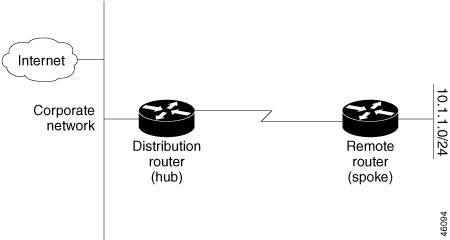
EIGRP stub routing is a feature designed to improve network stability, reduce resource utilization (CPU, memory, bandwidth), and simplify network design, particularly in hub-and-spoke or branch office topologies. It is used to control the flow of EIGRP routing updates and queries within a network.

What is EIGRP stub routing

When a router is configured as an EIGRP stub, it signals to its EIGRP neighbors that it is a stub router. A stub router is typically a router at the edge of an EIGRP domain that does not have other EIGRP neighbors beyond itself in a particular direction. It is usually a spoke router in a hub-and-spoke topology, or a router connected to a single upstream router.

Figure 1. Simple Hub-and-Spoke Network

Why use EIGRP stub routing

The primary reasons for implementing EIGRP stub routing are:

  • Improved Network Stability: By limiting the propagation of EIGRP queries, stub routing helps to confine the scope of route recalculations during topology changes. This prevents "stuck-in-active" (SIA) issues and reduces the impact of network instability.

  • Reduced Resource Utilization: Stub routers do not need to maintain a full EIGRP topology table of the entire network. This reduces their CPU and memory usage. Additionally, by controlling what updates are sent and received, it conserves bandwidth.

  • Simplified Configuration: It simplifies the routing configuration on stub routers, as they only advertise a limited set of routes.

  • Enhanced Security: By preventing transit traffic through a stub router, it can act as a security measure, ensuring that traffic only flows towards the hub.

How EIGRP stub routing works

When a router is configured as a stub:

  • It sends a special stub flag in its EIGRP Hello packets to its neighbors.

  • Neighbors recognize this flag and mark the router as a stub in their neighbor table.

  • Crucially, EIGRP neighbors will not send query packets to a stub router. This is the main mechanism for limiting the query domain. If a neighbor needs a route that it believes the stub router might have, it will not query the stub; instead, it will assume the stub does not have a path to that destination.

  • Stub routers, by default, only advertise their directly connected and summary routes. They do not advertise routes learned from other EIGRP neighbors.

EIGRPv6 stub routing

EIGRPv6 Stub Routing is the implementation of the EIGRP stub routing feature specifically for IPv6 networks. The core principles and benefits remain the same as with EIGRP for IPv4 stub routing, but adapted for the IPv6 addressing and operational context.

What is EIGRPv6 stub routing

EIGRPv6 Stub Routing is used to improve network stability, reduce resource utilization (CPU, memory, bandwidth), and simplify the configuration of stub routers in an IPv6 EIGRP domain. A stub router is typically an edge device in a hub-and-spoke or branch office topology. It's usually a router that has only one or a few paths out of its local network segment, and it's not intended to be a transit point for traffic between other EIGRP peers.

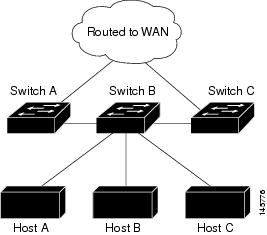
In the given figure Switch B is configured as an EIGRPv6 stub router. Switches A and C are connected to the wider WAN. In this setup:

  • Switch B advertises its connected, static, redistribution, and summary routes to Switches A and C.

  • Conversely, Switch B does not advertise any routes that it learns from Switch A (and vice-versa). This ensures that Switch B only injects its local routes into the EIGRP domain and does not act as a transit router for routes learned from other EIGRP neighbors.

Figure 2. EIGRP Stub Router Configuration

How EIGRPv6 stub routing works

The mechanism of EIGRPv6 stub routing is largely identical to its IPv4 counterpart:

  1. Stub Flag in Hello Packets: When an EIGRPv6 router is configured as a stub, it includes a special stub flag in its EIGRPv6 Hello packets. These Hellos are sent using the IPv6 link-local address of the interface and the EIGRPv6 multicast address (FF02::A).

  2. Neighbor Recognition: Neighboring EIGRPv6 routers (typically the hub routers) receive these Hellos, recognize the stub flag, and mark that specific neighbor as a stub.

  3. Query Suppression: The most critical aspect is that EIGRPv6 neighbors will not send query packets to a stub router. If a hub router loses a route and needs to query its neighbors for an alternative path, it will not query its stub peers. This prevents query floods from reaching the stub network, which is particularly beneficial over potentially unstable or low-bandwidth WAN links.

  4. Limited Route Advertisement: By default, an EIGRPv6 stub router advertises only its directly connected IPv6 networks and summary IPv6 routes into the EIGRPv6 domain. This limits the size of the routing table that the stub router needs to maintain and the amount of routing information it sends.

Benefits of an EIGRPv6 environment

  • Enhanced Stability: Prevents EIGRPv6 queries from propagating into the stub network, mitigating "Stuck In Active" (SIA) conditions and localizing the impact of topology changes. This is crucial for maintaining network uptime.

  • Reduced Resource Consumption: Less memory and CPU are required on the stub router because it doesn't need to process or store a full EIGRPv6 topology table. Less bandwidth is consumed on the links to the stub, as fewer updates and no queries are sent.

  • Simplified Design and Management: Streamlines the routing design for edge networks and simplifies the configuration on the stub devices.

  • Optimized for Hub-and-Spoke: Ideal for IPv6 hub-and-spoke deployments, where spoke routers typically only need a default route (or a few specific routes) to reach the rest of the network.

Key considerations for EIGRPv6 stub routing

  • Configuration Location: EIGRPv6 is configured directly on the interfaces using ipv6 eigrp [ASN], and the eigrp stub command is applied within the EIGRPv6 router configuration mode.

  • Router ID: An EIGRPv6 instance requires a 32-bit router ID (often in IPv4 dotted-decimal format), even in an IPv6-only network. This must be explicitly configured if no IPv4 address is present on the router.

  • No Transit Traffic: A router configured as a stub should never be a transit point for traffic between other EIGRPv6 neighbors. Doing so can lead to routing black holes.

  • Default Route and Summarization: To fully realize the benefits of stub routing, especially in terms of resource conservation, it's highly recommended to configure the hub router to send a default IPv6 route (::/0) to the stub router. Additionally, summarizing routes on the hub can further reduce the routing table size on the stub.

How to configure EIGRP

To initiate an EIGRP routing process on a device, you must:

Procedure


Step 1

Enable EIGRP: This involves starting the EIGRP process, typically by entering a command like router eigrp [AS_number] in global configuration mode, where [AS_number] is the autonomous system number that defines the EIGRP routing domain.

Step 2

Associate Networks: After enabling EIGRP, you need to specify the networks that EIGRP will advertise and on which interfaces EIGRP will send updates. This is done using the network command within the EIGRP router configuration mode. EIGRP will send updates to interfaces belonging to the specified networks. If an interface network is not explicitly specified, it will not be advertised in any EIGRP update.


What to do next


Note


If you have devices on your network that are configured for IGRP, and you want to change to EIGRP, you must designate transition devices that have both IGRP and EIGRP configured. In these cases, perform Steps 1 through 3 in the next section and also see the “Configuring Split Horizon” section. You must use the same AS number for routes to be automatically redistributed.


Default EIGRP configuration

Table 1. Default EIGRP Configuration

Feature

Default Setting
Auto summary Disabled.
Default information Exterior routes are accepted and default information is passed between EIGRP processes when doing redistribution.
Default metric

Only connected routes and interface static routes can be redistributed without a default metric. The metric includes:

  • Bandwidth: 0 or greater kb/s.

  • Delay (tens of microseconds): 0 or any positive number that is a multiple of 39.1 nanoseconds.

  • Reliability: any number between 0 and 255 (255 means 100 percent reliability).

  • Loading: effective bandwidth as a number between 0 and 255 (255 is 100 percent loading).

  • MTU: maximum transmission unit size of the route in bytes. 0 or any positive integer.

Distance

Internal distance: 90.

External distance: 170.

EIGRP log neighbor changes Disabled. No adjacency changes logged.
IP authentication key-chain No authentication provided.
IP authentication mode No authentication provided.
IP bandwidth percent 50 percent.
IP hello interval For low-speed nonbroadcast multiaccess (NBMA) networks: 60 seconds; all other networks: 5 seconds.
IP hold-time For low-speed NBMA networks: 180 seconds; all other networks: 15 seconds.
IP split-horizon Enabled.
IP summary address No summary aggregate addresses are predefined.
Metric weights tos: 0; k1 and k3: 1; k2, k4, and k5: 0
Network None specified.

Nonstop

Forwarding (NSF)

Awareness

Enabled for IPv4 on switches running the Network Advantage license. Allows Layer 3 switches to continue forwarding packets from a neighboring NSFcapable router during hardware or software changes.
NSF capability

Disabled.

Note


The device supports EIGRP NSF-capable routing for IPv4.

Offset-list Disabled.
Router EIGRP Disabled.
Set metric No metric set in the route map.
Traffic-share Distributed proportionately to the ratios of the metrics.
Variance 1 (equal-cost load-balancing).

Configuring basic EIGRP parameters

To configure basic EIGRP parameters, perform this procedure:

Procedure


Step 1

Enable and configure terminal

Enables privileged EXEC mode. Enter your password if prompted and enter global configuration mode.

Example:

Device enable
Device# configure terminal 

Step 2

router eigrp autonomoussystem

Enables an EIGRP routing process, and enter router configuration mode. The AS number identifies the routes to other EIGRP devices and is used to tag routing information.

Example:

Device(config)#router eigrp 10  

Step 3

nsf

(Optional) Enables EIGRP NSF. Enter this command on the active switch and on all of its peers.

Example:

Device(configrouter)#nsf  

Step 4

network network-number

Associate networks with an EIGRP routing process. EIGRP sends updates to the interfaces in the specified networks.

Example:

Device(configrouter)#network 192.168.0.0 
 

Step 5

eigrp log-neighbor-changes

(Optional) Enables logging of EIGRP neighbor changes to monitor routing system stability.

Example:

Device(configrouter)#eigrp logneighbor-changes 
 

Step 6

metric weights tos k1 k2 k3 k4 k5

(Optional) Adjust the EIGRP metric. Although the defaults have been carefully set to provide excellent operation in most networks, you can adjust them.

Note


Setting metrics is complex and is not recommended without guidance from an experienced network designer.

Example:

Device(configrouter)#metric weights 0 
2 0 2 0 0 


Step 7

offset-list [ access-list number name] { in out } offset [type number]

(Optional) Applies an offset list to routing metrics to increase incoming and outgoing metrics to routes learned through EIGRP. You can limit the offset list with an access list or an interface.

Example:

Device(configrouter)#offset-list 21 out 10 
 

Step 8

auto-summary

(Optional) Enables automatic summarization of subnet routes into network-level routes.

Example:

Device(configrouter)# auto-summary 
 

Step 9

interface interface-id

Enters interface configuration mode, and specifies the Layer 3 interface to configure and optionally, configure a summary aggregate. ip summary-address eigrp autonomous-systemnumber address mask

.

Example:

Device(configrouter)# interface gigabitethernet 1/0/1  
Device(config-if)# ip summary-address eigrp 1 192.168.0.0 255.255.0.0 
Device(config-if)# end 
 

What to do next

To verify your entries, use show ip protocols.

Device# show ip protocols 
For NSF awareness, the output shows:  *** IP Routing is NSF aware *** EIGRP NSF enabled. 

To save your entries in the configuration file, use copy running-config startup-config.

Device# copy runningconfig startup-config  

Configuring EIGRP interfaces

Other optional EIGRP parameters can be configured on an interface basis.To configure EIGRP interfaces, perform this procedure:

Procedure


Step 1

Enable and configure terminal

Enables privileged EXEC mode. Enter your password if prompted and enter global configuration mode.

Example:

Device enable
Device# configure terminal 

Step 2

interface interface-id

Enters interface configuration mode, and specifies the Layer 3 interface to configure.

Example:

Device(config)#interface gigabitethernet 1/0/1   

Step 3

ip bandwidth-percent autonomous-system-number eigrp

(Optional) Configures the percentage of bandwidth that can be used by EIGRP on an interface. The default is 50 percent.

Example:

Device(config-if)# ip bandwidth-percent autonomous-system-number eigrp 60  

Step 4

ip summary-address eigrp autonomous-systemnumber address mask

(Optional) Configures a summary aggregate address for a specified interface (not usually necessary if auto-summary is enabled).

Example:

Device(config-if)#ip summary-address eigrp 109 192.161.0.0 255.255.0.0 
 

Step 5

ip hello-interval eigrp autonomous-system-number seconds

(Optional) Change the hello time interval for an EIGRP routing process. The range is 1 to 65535 seconds. The default is 60 seconds for low-speed NBMA networks and 5 seconds for all other networks.

Example:

Device(config-if)#ip hellointerval eigrp 109 10 
 

Step 6

ip hold-time eigrpautonomous-system-number seconds

(Optional) Change the hold time interval for an EIGRP routing process. The range is 1 to 65535 seconds. The default is 180 seconds for low-speed NBMA networks and 15 seconds for all other networks.

Note


Do not adjust the hold time without consulting Cisco technical support.

Example:

Device(config-if)#ip holdtime eigrp 109 40


Step 7

no ip split-horizon eigrp [autonomous-system-number

(Optional) Disables split horizon to allow route information to be advertised by a router out any interface from which that information originated.

Example:

Device(config-if)#no ip split-horizon eigrp 109  
 

Step 8

end

Returns to privileged EXEC mode.

Example:

Device(config)# end 
 

What to do next

Use show ip eigrp interface to displays which interfaces EIGRP is active on and information about EIGRP relating to those interfaces.

Device#show ip eigrp interface  

To save your entries in the configuration file, use copy running-config startup-config.

Device# copy runningconfig startup-config  

Configuring EIGRP for IPv6

Prerequisites for EIGRPv6 Configuration

Before you can configure the switch to run EIGRP for IPv6, ensure the following global configurations are in place:

  1. Enable IP Routing: Enter the ip routing global configuration command. While EIGRPv6 is for IPv6, this command is generally a prerequisite for any routing functionality on Cisco devices.

  2. Enable IPv6 Unicast Routing: Use the global configuration command to enable the forwarding of IPv6 packets across the device.

    ipv6 unicast-routing
  3. Enable IPv6 on Layer 3 Interfaces: Ensure that IPv6 is enabled on all Layer 3 interfaces where you intend to run IPv6 EIGRP. This typically involves configuring an IPv6 address on the interface.

Setting an explicit router ID

EIGRP for IPv6 requires a router ID. If an implicit router ID derived from an IPv4 address is not available or desired, you can set an explicit one:

  • You can use the show ipv6 eigrp command to view the currently configured router IDs.

  • Use the router-id command within the EIGRP IPv6 router configuration mode to set a specific 32-bit router ID (often in dotted-decimal format, like an IPv4 address).

Configuring EIGRP IPv6 interfaces and passive interfaces

Similar to EIGRP for IPv4, you can specify which interfaces participate in the EIGRP IPv6 process and designate some as passive:

  • Active Interfaces: To include an interface in the EIGRP IPv6 process, you typically enable EIGRP IPv6 directly on that interface.

  • Passive Interfaces: Use the passive-interface command (within the EIGRP IPv6 router configuration mode) to make an interface passive. A passive interface participates in the EIGRP process by having its connected networks advertised, but it does not send or receive EIGRP Hello packets or form adjacencies on that interface.

  • Activating Passive Interfaces: If an interface was made passive, you can use the command on specific interfaces to make them active again, allowing them to form EIGRP adjacencies.

    no passive-interface
  • No Configuration on Passive Interfaces: EIGRP IPv6 does not need to be explicitly configured on a passive interface; the passive-interface command simply controls its EIGRP behavior.

Configuring EIGRP route authentication

EIGRP route authentication provides MD5 authentication of routing updates from the EIGRP routing protocol to prevent the introduction of unauthorized or false routing messages from unapproved sources.

Procedure


Step 1

Enable and configure terminal

Enables privileged EXEC mode. Enter your password if prompted and enter global configuration mode.

Example:

Device enable
Device# configure terminal 

Step 2

interface interface-id

Enters interface configuration mode, and specifies the Layer 3 interface to configure.

Example:

Device(config)#interface gigabitethernet 1/0/1   

Step 3

ip authentication mode eigrp autonomous-system md5

Enables MD5 authentication in IP EIGRP packets.

Example:

Device(config-if)# ip authentication mode eigrp 104 md5 
 

Step 4

ip authentication key-chain eigrp autonomous-system keychain

Enables authentication of IP EIGRP packets.

Example:

Device(config-if)#ip authentication key-chain eigrp 105 chain1 
 

Step 5

exit

Returns to global configuration mode.

Example:

Device(config-if)# exit
 

Step 6

key chainname-of-chain

Identify a key chain and enter key-chain configuration mode. Match the name configured in Step 4.

Example:

Device(config)#key chain chain1


Step 7

key [number

In key-chain configuration mode, identify the key number. In key-chain key configuration mode, identify the key string. Use key-string text

Example:

Device(config-keychain)#key 1 
Device(config-keychainkey)# key-string key1   
 

Step 8

accept-lifetime starttime {infinite | endtime | duration seconds}

(Optional) Specifies the time period during which the key can be received.

The start-time and end-time syntax can be either hh:mm:ss Month date year or hh:mm:ss date Month year . The default is forever with the default starttime and the earliest acceptable date as January 1, 1993. The default endtime and duration is infinite.

Example:

Device(config-keychainkey)# accept-lifetime 13:30:00 Jan 25 2011 duration 7200
 

Step 9

send-lifetime starttime {infinite | endtime | duration seconds}

(Optional) Specifies the time period during which the key can be sent.

The start-time and end-time syntax can be either hh:mm:ss Month date year or hh:mm:ss date Month year . The default is forever with the default starttime and the earliest acceptable date as January 1, 1993. The default endtime and duration is infinite.

Example:

Device(config-keychainkey)#send-lifetime 14:00:00 Jan 25 2011 duration 3600 
Device (config) # end

What to do next

Use show key chain to displays authentication key information.

Device# show key chain  

To save your entries in the configuration file, use copy running-config startup-config.

Device# copy runningconfig startup-config