Configuring 802.1X

This chapter describes how to configure IEEE 802.1X port-based authentication on Cisco NX-OS devices.

This chapter includes the following sections:

About 802.1X

802.1X is a client-server based access control and authentication protocol that restricts unauthorized clients from connecting to a LAN through publicly accessible ports.

  • Authenticates each client connected to a Cisco NX-OS device port using an authentication server.

  • Allows only Extensible Authentication Protocol over LAN (EAPOL) traffic until authentication is successful.

  • Permits normal traffic through the port after successful authentication.

Device Roles

Device roles in 802.1X define the responsibilities of network devices in port-based authentication, including the supplicant, authenticator, and authentication server.

  • Supplicant : The client device that requests access to the LAN and responds to requests from the Cisco NX-OS device, requiring 802.1X-compliant client software.

  • Authentication server : Performs the actual authentication of the supplicant, validates its identity, and notifies the Cisco NX-OS device about authorization. RADIUS with EAP extensions is the only supported authentication server.

  • Authenticator : Controls physical access to the network based on the supplicant's authentication status, acts as an intermediary between the supplicant and authentication server, and includes the RADIUS client for EAP frame handling.

Details of Device Roles in 802.1X Authentication

With 802.1X port-based authentication, devices in the network have specific roles that determine how access is granted and managed.

  • The supplicant is typically a workstation or client device running 802.1X-compliant software, such as Microsoft Windows XP.

  • The authentication server is usually a RADIUS server with EAP extensions, such as Cisco Secure Access Control Server, version 3.0.

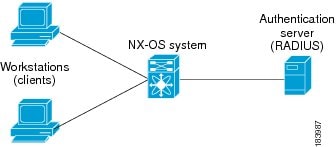
  • The authenticator is the Cisco NX-OS device, which acts as a proxy between the supplicant and the authentication server.

  1. When the authenticator receives EAPOL frames from the supplicant, it strips the Ethernet header and encapsulates the EAP frame in RADIUS format for the authentication server.

  2. The authentication server processes the EAP frame and sends a response back to the authenticator.

  3. The authenticator removes the server’s frame header, encapsulates the EAP frame for Ethernet, and sends it to the supplicant.


Note


The Cisco NX-OS device can only be an 802.1X authenticator.


Figure 1. 802.1X Device Roles

Example of Device Roles in 802.1X

For example, when a user connects a workstation (supplicant) to a network port, the Cisco NX-OS device (authenticator) requests identity information. The authentication server (RADIUS) validates the credentials and authorizes access if the supplicant is verified.

Authentication Initiation and Message Exchange

Authentication initiation and message exchange describe the process by which either the authenticator (Cisco NX-OS device) or the supplicant (client) starts the authentication process, and how EAP frames are exchanged to establish network access.

  • Authentication can be initiated by either the authenticator or the supplicant.

  • The authenticator sends EAP-request/identity frames when a port transitions from down to up.

  • The supplicant responds with EAP-response/identity frames or can initiate authentication with an EAPOL-start frame if no request is received.

Details of Authentication Initiation and Message Exchange

Authentication on Cisco NX-OS devices can be initiated by either the authenticator or the supplicant. When authentication is enabled on a port and the link state transitions from down to up, the authenticator sends an EAP-request/identity frame to the supplicant. The supplicant responds with an EAP-response/identity frame. If the supplicant does not receive a request, it can initiate authentication by sending an EAPOL-start frame. The authenticator then acts as an intermediary, passing EAP frames between the supplicant and the authentication server until authentication succeeds or fails. If authentication is successful, the port becomes authorized.


Note


If 802.1X is not enabled or supported on the network access device, the Cisco NX-OS device drops any EAPOL frames from the supplicant. If the supplicant does not receive an EAP-request/identity frame after three attempts to start authentication, the supplicant transmits data as if the port is in the authorized state. A port in the authorized state means that the supplicant has been successfully authenticated.


The specific exchange of EAP frames depends on the authentication method being used.
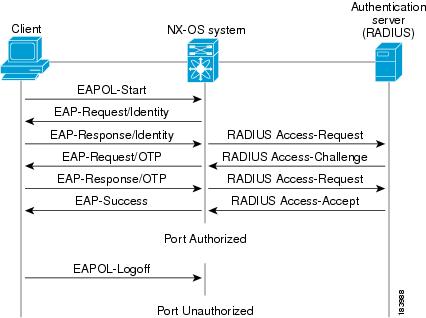
Figure 2. Message Exchange

The user’s secret pass-phrase never crosses the network at any time such as during authentication or during pass-phrase changes.

Example of Authentication Message Exchange

This example shows a message exchange initiated by the supplicant using the One-Time-Password (OTP) authentication method with a RADIUS server. The OTP authentication device uses a secret pass-phrase to generate a sequence of one-time (single use) passwords.

Authenticator PAE Status for Interfaces

An authenticator PAE (Port Access Entity) is a protocol entity that supports authentication on an interface when 802.1X is enabled.

  • Created automatically when 802.1X is enabled on an interface.

  • Not automatically cleared when 802.1X is disabled on the interface.

  • Can be explicitly removed and reapplied as needed.

Authenticator PAE Management on Interfaces

When 802.1X is enabled on an interface, the Cisco NX-OS software creates an authenticator PAE instance to support authentication. Disabling 802.1X does not automatically remove the PAE instance; manual removal and reapplication may be required.

Example: Managing Authenticator PAE Instances

For example, after disabling 802.1X on an interface, you may need to explicitly remove the authenticator PAE before re-enabling it to ensure proper authentication behavior.

Ports in Authorized and Unauthorized States

The port authorization state determines whether a supplicant is granted access to the network. Ports can be in authorized or unauthorized states, which control the flow of network traffic based on authentication status.

  • In the unauthorized state, the port blocks all ingress and egress traffic except for 802.1X protocol packets.

  • When a supplicant is successfully authenticated, the port transitions to the authorized state, allowing all traffic for the supplicant.

  • Ports support three authorization states: Force authorized, Force unauthorized, and Auto.

Authorization States and Port Behavior

Ports can operate in different authorization states, each affecting how authentication and network access are managed.

  • Force authorized : Disables 802.1X port-based authentication and transitions to the authorized state without requiring any authentication exchange. The port transmits and receives normal traffic without 802.1X-based authentication of the client. This authorization state is the default.

  • Force unauthorized : Causes the port to remain in the unauthorized state, ignoring all attempts by the client to authenticate. The authenticator cannot provide authentication services to the client through the interface.

  • Auto : Enables 802.1X port-based authentication and causes the port to begin in the unauthorized state, allowing only EAPOL frames to be sent and received through the port. The authentication process begins when the link state of the port transitions from down to up or when an EAPOL-start frame is received from the supplicant. The authenticator requests the identity of the client and begins relaying authentication messages between the client and the authentication server. Each supplicant that attempts to access the network is uniquely identified by the authenticator by using the supplicant’s MAC address.

When a client that does not support 802.1X is connected to an unauthorized 802.1X port, the authenticator requests the client’s identity. If the client does not respond, the port remains in the unauthorized state and the client is not granted access to the network.

When an 802.1X-enabled client connects to a port that is not running the 802.1X protocol, the client initiates the authentication process by sending the EAPOL-start frame. If no response is received, the client retries a fixed number of times and then begins sending frames as if the port is in the authorized state.

If the supplicant is successfully authenticated (receives an Accept frame from the authentication server), the port state changes to authorized, and all frames from the authenticated supplicant are allowed through the port. If authentication fails, the port remains in the unauthorized state, but authentication can be retried. If the authentication server cannot be reached, the authenticator can retransmit the request. If no response is received from the server after the specified number of attempts, authentication fails, and the supplicant is not granted network access.

When a supplicant logs off, it sends an EAPOL-logoff message, which causes the authenticator port to transition to the unauthorized state. If the link state of a port transitions from up to down, or if an EAPOL-logoff frame is received, the port returns to the unauthorized state.

Example: Port State Transitions

For example, if a supplicant is authenticated successfully, the port transitions to the authorized state and allows all traffic. If authentication fails or the supplicant logs off, the port returns to the unauthorized state, restricting network access.

Counter-Example: Non-802.1X Client on Unauthorized Port

If a non-802.1X client is connected to an unauthorized port, it does not respond to identity requests, and the port remains unauthorized, denying network access.

Analogy: Security Checkpoint

Port authorization states are like a security checkpoint: only authenticated individuals (supplicants) are allowed through (authorized state), while others are stopped at the gate (unauthorized state).

Single Host and Multiple Hosts Support

Single-host and multiple-host support in 802.1X define how many endpoint devices can access a port and how authentication and security violations are handled.

  • Single-host mode restricts port access to only one authenticated endpoint device.

  • Multiple-host mode allows multiple endpoint devices to access a port after the first device is authenticated.

  • Security violations are handled differently in each mode, with stricter enforcement in single-host mode.

Details of Single Host and Multiple Hosts Support in 802.1X

The 802.1X feature can restrict traffic on a port to only one endpoint device (single-host mode) or allow traffic from multiple endpoint devices on a port (multi-host mode).

  • Single-host mode: Only one endpoint device is allowed on the port. After authentication, the port is authorized. If the device leaves, the port becomes unauthorized. Any traffic from a different MAC address triggers a security violation, disabling the interface. This mode is used for host-to-switch topologies and applies to both Layer 2 and Layer 3 ports.

  • Multiple-host mode: Only the first host must be authenticated. Once authorized, additional hosts can access the network without separate authentication. If the port becomes unauthorized, all hosts lose access. Security violation shutdown is disabled in this mode. It is applicable to both switch-to-switch and host-to-switch topologies.

Example of Single Host and Multiple Hosts Support

For example, in single-host mode, a single computer connected to a switch port must authenticate before gaining network access. In multiple-host mode, once the first device authenticates, other devices connected to the same port can access the network without additional authentication.

Supported Topology

Supported topology for 802.1X port-based authentication refers to the network configuration in which the authentication protocol operates.

  • Supports point-to-point topology.

  • Only one supplicant (client) can connect to the 802.1X-enabled authenticator port at a time.

  • The authenticator detects the supplicant when the port link state changes to up, and returns to unauthorized state if the supplicant leaves or is replaced.

Reference Information for Supported Topology

The 802.1X port-based authentication is designed for point-to-point topologies, ensuring that only a single client is authenticated per port.

Example of Supported Topology

For example, when a client device connects to a Cisco NX-OS device port configured for 802.1X, the device authenticates the client. If the client disconnects and another device connects, the port transitions to the unauthorized state until the new device is authenticated.

Prerequisites for 802.1X

  • 802.1X requires Cisco Nexus Release 7.0(3)I7(1) software and access to one or more RADIUS servers in the network.

  • 802.1X supplicants must be attached to the ports unless MAC address authentication bypass is enabled.

  • System-message logging levels for 802.1X must meet or exceed Cisco DCNM requirements; exceptions apply for Cisco Nexus 7000 Series switches running Cisco NX-OS Release 4.0.

  • For EAP-TLS profile, PKI infrastructure is required for certificate management, including RSA key-pair generation, trustpoint creation, and CA authentication.

  • 802.1X with EAP-TLS requires a remote EAP server such as ISE; local authentication server is not supported.

  • All participating devices, CA server, and Cisco Identity Services Engine (ISE) must be synchronized using Network Time Protocol (NTP) to ensure certificate validation.

  • AAA server reachability is required for mutual authentication between switches, and both must have proper AAA configurations and connectivity.

Reference Information for 802.1X Prerequisites

Prerequisites for 802.1X include software, server, and configuration requirements for both general and EAP-TLS authentication scenarios.

  • Cisco Nexus Release 7.0(3)I7(1) software is required.

  • One or more RADIUS servers must be accessible in the network.

  • 802.1X supplicants must be attached to the ports unless MAC address authentication bypass is enabled.

  • System-message logging levels for 802.1X must meet or exceed Cisco DCNM requirements.

  • For EAP-TLS, PKI infrastructure is required for certificate management, including RSA key-pair generation, trustpoint creation, and CA authentication.

  • Remote EAP server such as ISE is required; local authentication server is not supported.

  • Devices, CA server, and ISE must be synchronized using NTP.

  • AAA server reachability and proper AAA configurations are required for mutual authentication.

Example: 802.1X Prerequisites in Practice

For example, to enable 802.1X with EAP-TLS, ensure that the switch is running Cisco Nexus Release 7.0(3)I7(1), a RADIUS server is reachable, PKI infrastructure is in place for certificate management, and all devices are synchronized using NTP.

802.1X Guidelines and Limitations

802.1X port-based authentication has the following guidelines and limitations:

  • Cisco Nexus 7.0(3)I7(1) series switches do not support 802.1X on the following:

    • Transit topology set UPS

    • FEX ports

    • vPC ports

    • PVLAN ports

    • L3 (routed) ports

    • Port security

    • Ports enabled with CTS and MACsec.

    • Dot1x with LACP port-channels.


      Note


      Dot1x supports static port-channels.


    Note


    You must disable 802.1X on FEX and vPC ports, and the unsupported features.


  • The Cisco NX-OS software supports 802.1X authentication only on physical ports.

  • The Cisco NX-OS software does not support 802.1X authentication on port channels or subinterfaces.

  • The Cisco NX-OS software supports 802.1X authentication on member ports of a port channel but not on the port channel itself.

  • When the members are configured for 802.1X, Cisco NX-OS software does not support configuring single-host mode on port channel members. Only multi-host mode is supported on the member ports.

  • Member ports with and without 802.1X configuration can coexist in a port channel. However, you must ensure the identical 802.1X configuration on all the member ports in order for channeling to operate with 802.1X.

  • When you enable 802.1X authentication, supplicants are authenticated before any other Layer 2 or Layer 3 features are enabled on an Ethernet interface.

  • The Cisco NX-OS software supports 802.1X authentication only on Ethernet interfaces that are in a port channel, a trunk, or an access port.

  • The Cisco NX-OS software supports 802.1X authentication only on Ethernet interfaces that are in a port channel or a trunk or an access port.

  • The Cisco NX-OS software does not support single host mode on trunk interfaces or member interfaces in a port channel.

  • The Cisco NX-OS software does not support MAC address authentication bypass on trunk interfaces.

  • The Cisco NX-OS software does not support MAC address authentication bypass on a port channel.

  • The Cisco NX-OS software does not support Dot1x on vPC ports and MCT.

  • During a switch reload, Dot1x does not generate RADIUS accounting stops.

  • The Cisco NX-OS software does not support the following 802.1X protocol enhancements:

    • One-to-many logical VLAN name to ID mapping

    • Web authorization

    • Dynamic domain bridge assignment

    • IP telephony

    • Guest VLANs

Default Settings for 802.1X

  • 802.1X is disabled by default on Cisco NX-OS devices.

  • The default authentication method for AAA 802.1X is not configured.

  • Per-interface 802.1X protocol is disabled ( force-authorized ), allowing normal traffic without authentication.

  • Periodic reauthentication is disabled by default.

  • The default number of seconds between reauthentication attempts is 3600 seconds.

  • The quiet timeout period is 60 seconds, which is the time the device remains in the quiet state after a failed authentication exchange.

  • The retransmission timeout period is 30 seconds, representing the wait time for a response to an EAP request/identity frame before retransmitting.

  • The maximum retransmission number is 2 times, indicating how many times the device will send an EAP-request/identity frame before restarting authentication.

  • The default host mode is single host.

  • The supplicant timeout period is 30 seconds, which is the wait time for a response from the supplicant before retransmitting the request.

  • The authentication server timeout period is 30 seconds, which is the wait time for a reply from the authentication server before retransmitting the response.

Default 802.1X Parameters Reference

This section provides a detailed reference table listing the default settings for 802.1X parameters in Cisco NX-OS.

Table 1. Default 802.1X Parameters

Parameters

Default

802.1X feature

Disabled

AAA 802.1X authentication method

Not configured

Per-interface 802.1X protocol enable state

Disabled ( force-authorized )

Note


The port transmits and receives normal traffic without 802.1X-based authentication of the supplicant.

Periodic reauthentication

Disabled

Number of seconds between reauthentication attempts

3600 seconds

Quiet timeout period

60 seconds (number of seconds that the Cisco NX-OS device remains in the quiet state following a failed authentication exchange with the supplicant)

Retransmission timeout period

30 seconds (number of seconds that the Cisco NX-OS device should wait for a response to an EAP request/identity frame from the supplicant before retransmitting the request)

Maximum retransmission number

2 times (number of times that the Cisco NX-OS device will send an EAP-request/identity frame before restarting the authentication process)

Host mode

Single host

Supplicant timeout period

30 seconds (when relaying a request from the authentication server to the supplicant, the amount of time that the Cisco NX-OS device waits for a response before retransmitting the request to the supplicant)

Authentication server timeout period

30 seconds (when relaying a response from the supplicant to the authentication server, the amount of time that the Cisco NX-OS device waits for a reply before retransmitting the response to the server)

Configuring 802.1X

802.1X configuration refers to the process of enabling and setting up the 802.1X authentication feature on Cisco NX-OS and DCNM devices.

  • 802.1X provides port-based network access control.

  • Configuration steps may differ between Cisco NX-OS and Cisco IOS platforms.

  • Familiarity with the specific CLI commands for NX-OS is important for successful configuration.

Key Information for Configuring 802.1X

This section describes how to configure the 802.1X feature.

Configure the 802.1X Feature

This section describes the process for configuring 802.1X.

Procedure


Step 1

Enable the 802.1X feature.

Step 2

Configure the connection to the remote RADIUS server.

Step 3

Enable 802.1X feature on the Ethernet interfaces.


Enable the 802.1X Feature

You must enable the 802.1X feature on the Cisco NX-OS device before authenticating any supplicant devices.

Procedure


Step 1

configure terminal

Example:

switch# configure terminalswitch(config)#
					

Enters global configuration mode.

Step 2

feature dot1x

Example:

switch(config)# feature dot1x

Enables the 802.1X feature. The default is disabled.

Step 3

exit

Example:

switch(config)# exit
switch#

Exits configuration mode.

Step 4

(Optional) show dot1x

Example:

switch# show dot1x

Displays the 802.1X feature status.

Step 5

(Optional) copy running-config startup-config

Example:

switch# copy running-config startup-config

Copies the running configuration to the startup configuration.


Configure AAA Authentication Methods for 802.1X

You can use remote RADIUS servers for 802.1X authentication. You must configure RADIUS servers and RADIUS server groups and specify the default AAA authentication method before the Cisco NX-OS device can perform 802.1X authentication.

Before you begin

Obtain the names or addresses for the remote RADIUS server groups.

Procedure


Step 1

configure terminal

Example:

switch# configure terminal
						switch(config)#

Enters global configuration mode.

Step 2

aaa authentication dot1x default group group-list

Example:

switch(config)# aaa authentication dot1x default group rad2

Specifies the RADIUS server groups to use for 802.1X authentication.

The group-list argument consists of a space-delimited list of group names. The group names are the following:

  • radius —Uses the global pool of RADIUS servers for authentication.

  • named-group —Uses the global pool of RADIUS servers for authentication.

Step 3

exit

Example:

switch(config)# exit
						switch#

Exits configuration mode.

Step 4

(Optional) show radius-server

Example:

switch# show radius-server

Displays the RADIUS server configuration.

Step 5

(Optional) show radius-server group [ group-name ]

Example:

switch# show radius-server group rad2

Displays the RADIUS server group configuration.

Step 6

(Optional) copy running-config startup-config

Example:

switch# copy running-config startup-config

Copies the running configuration to the startup configuration.


Control 802.1X Authentication on an Interface

You can control the 802.1X authentication performed on an interface. An interface can have the following 802.1X authentication states:

  • Auto : Enables 802.1X authentication on the interface.

  • Force-authorized : Disables 802.1X authentication on the interface and allows all traffic on the interface without authentication. This state is the default.

  • Force-unauthorized : Disallows all traffic on the interface.

Before you begin

Enable the 802.1X feature on the Cisco NX-OS device.

Procedure


Step 1

configure terminal

Example:

switch# configure terminal
switch(config)#

Enters global configuration mode.

Step 2

interface ethernet slot / port

Example:

switch(config)# interface ethernet 2/1
switch(config-if)#

Selects the interface to configure and enters interface configuration mode.

Step 3

dot1x port-control { auto | force-authorized | forced-unauthorized }

Example:

switch(config-if)# dot1x port-control auto

Changes the 802.1X authentication state on the interface. The default is force-authorized.

Step 4

exit

Example:

switch(config)# exit
						switch#

Exits configuration mode.

Step 5

(Optional) show dot1x all

Example:

switch# show dot1x all

Displays all 802.1X feature status and configuration information.

Step 6

(Optional) show dot1x interface ethernet slot / port

Example:

switch# show dot1x interface ethernet 2/1

Displays 802.1X feature status and configuration information for an interface.

Step 7

(Optional) copy running-config startup-config

Example:

switch# copy running-config startup-config

Copies the running configuration to the startup configuration.


Create or Remove an Authenticator PAE on an Interface

Use this procedure to create or remove an authenticator PAE instance on an interface.

You can create or remove the 802.1X authenticator port access entity (PAE) instance on an interface.


Note


By default, the Cisco NX-OS software creates the authenticator PAE instance on the interface when you enable 802.1X on an interface.


Before you begin

Enable the 802.1X feature.

Procedure


Step 1

configure terminal

Example:

switch# configure terminal
switch(config)#

Enters global configuration mode.

Step 2

(Optional) show dot1x interface ethernet slot / port

Example:

switch# show do1x interface ethernet 2/1

Displays the 802.1X configuration on the interface.

Step 3

interface ethernet slot / port

Example:

switch(config)# interface ethernet 2/1
switch(config-if)#

Selects the interface to configure and enters interface configuration mode.

Step 4

[ no ] dot1x pae authenticator

Example:

switch(config-if)# dot1x pae authenticator

Creates an authenticator PAE instance on the interface. Use the no form to remove the PAE instance from the interface.

Note


If an authenticator PAE already exists on the interface the dot1x pae authentication command does not change the configuration on the interface.

Step 5

(Optional) copy running-config startup-config

Example:

switch(config)# copy running-config startup-config

Copies the running configuration to the startup configuration.


Enable Periodic Reauthentication for an Interface

You can enable periodic 802.1X reauthentication on an interface and specify how often it occurs. If you do not specify a time period before enabling reauthentication, the number of seconds between reauthentication defaults to the global value.


Note


During the reauthentication process, the status of an already authenticated supplicant is not disrupted.


Before you begin

Enable the 802.1X feature on the Cisco NX-OS device.

Procedure


Step 1

configure terminal

Example:

switch# configure terminal
switch(config)#

Enters global configuration mode.

Step 2

interface ethernet slot / port

Example:

switch(config)# interface ethernet 2/1
switch(config-if)#

Selects the interface to configure and enters interface configuration mode.

Step 3

dot1x re-authentication

Example:

switch(config-if)# dot1x re-authentication

Enables periodic reauthentication of the supplicants connected to the interface. By default, periodic authentication is disabled.

Step 4

(Optional) dot1x timeout re-authperiod seconds

Example:

switch(config-if)# dot1x timeout re-authperiod 3300

Sets the number of seconds between reauthentication attempts. The default is 3600 seconds. The range is from 1 to 65535.

Note


This command affects the behavior of the Cisco NX-OS device only if you enable periodic reauthentication on the interface.

Step 5

exit

Example:

switch(config-if)# exit
switch(config)#

Exits configuration mode.

Step 6

(Optional) show dot1x all

Example:

switch(config)# show dot1x all

Displays all 802.1X feature status and configuration information.

Step 7

(Optional) copy running-config startup-config

Example:

switch(config)# copy running-config startup-config

Copies the running configuration to the startup configuration.


Manually Reauthenticate Supplicants

You can manually reauthenticate the supplicants for the entire Cisco NX-OS device or for an interface.


Note


During the reauthentication process, the status of an already authenticated supplicant is not disrupted.


Before you begin

Enable the 802.1X feature on the Cisco NX-OS device.

Procedure


dot1x re-authenticate [ interface slot / port ]

Example:

switch# dot1x re-authenticate interface 2/1

Reauthenticates the supplicants on the Cisco NX-OS device or on an interface.


Change 802.1X Authentication Timers for an Interface

Use this procedure to change the 802.1X authentication timers for an interface on a Cisco NX-OS device.

You can change the following 802.1X authentication timers on the Cisco NX-OS device interfaces:

  • Quiet-period timer : When the Cisco NX-OS device cannot authenticate the supplicant, the switch remains idle for a set period of time and then tries again. The quiet-period timer value determines the idle period. An authentication failure might occur because the supplicant provided an invalid password. You can provide a faster response time to the user by entering a smaller number than the default. The default is the value of the global quiet period timer. The range is from 1 to 65535 seconds.

  • Rate-limit timer : The rate-limit period throttles EAPOL-Start packets from supplicants that are sending too many EAPOL-Start packets. The authenticator ignores EAPOL-Start packets from supplicants that have successfully authenticated for the rate-limit period duration. The default value is 0 seconds and the authenticator processes all EAPOL-Start packets. The range is from 1 to 65535 seconds.

  • Switch-to-authentication-server retransmission timer for Layer 4 packets : The authentication server notifies the switch each time that it receives a Layer 4 packet. If the switch does not receive a notification after sending a packet, the Cisco NX-OS device waits a set period of time and then retransmits the packet. The default is 30 seconds. The range is from 1 to 65535 seconds.

  • Switch-to-supplicant retransmission timer for EAP response frames : The supplicant responds to the EAP-request/identity frame from the Cisco NX-OS device with an EAP-response/identity frame. If the Cisco NX-OS device does not receive this response, it waits a set period of time (known as the retransmission time) and then retransmits the frame. The default is 30 seconds. The range is from 1 to 65535 seconds.

  • Switch-to-supplicant retransmission timer for EAP request frames : The supplicant notifies the Cisco NX-OS device that it received the EAP request frame. If the authenticator does not receive this notification, it waits a set period of time and then retransmits the frame. The default is the value of the global retransmission period timer. The range is from 1 to 65535 seconds.


Note


You should change the default values only to adjust for unusual circumstances such as unreliable links or specific behavioral problems with certain supplicants and authentication servers.


Before you begin

Enable the 802.1X feature on the Cisco NX-OS device.

Procedure


Step 1

interface ethernet slot / port

Example:

switch# configure termina
switch(config)# interface ethernet 2/1
switch(config-if)

Selects the interface to configure and enters interface configuration mode.

Step 2

(Optional) dot1x timeout quiet-period seconds

Example:

switch(config-if)# dot1x timeout quiet-period 25

Sets the number of seconds that the authenticator waits for a response to an EAP-request/identity frame from the supplicant before retransmitting the request. The default is the global number of seconds set for all interfaces. The range is from 1 to 65535 seconds.

Step 3

(Optional) dot1x timeout ratelimit-period seconds

Example:

switch(config-if)# dot1x timeout ratelimit-period 10

Sets the number of seconds that the authenticator ignores EAPOL-Start packets from supplicants that have successfully authenticated. The default value is 0 seconds. The range is from 1 to 65535 seconds.

Step 4

(Optional) dot1x timeout server-timeout seconds

Example:

switch(config-if)# dot1x timeout server-timeout 60

Sets the number of seconds that the Cisco NX-OS device waits before retransmitting a packet to the authentication server. The default is 30 seconds. The range is from 1 to 65535 seconds.

Step 5

(Optional) dot1x timeout supp-timeout seconds

Example:

switch(config-if)# dot1x timeout supp-timeout 20

Sets the number of seconds that the Cisco NX-OS device waits for the supplicant to respond to an EAP request frame before the Cisco NX-OS device retransmits the frame. The default is 30 seconds. The range is from 1 to 65535 seconds.

Step 6

(Optional) dot1x timeout tx-period seconds

Example:

switch(config-if)# dot1x timeout tx-period 40

Sets the number of seconds between the retransmission of EAP request frames when the supplicant does not send notification that it received the request. The default is the global number of seconds set for all interfaces. The range is from 1 to 65535 seconds.

Step 7

(Optional) dot1x timeout inactivity-period seconds

Example:

switch(config-if)# dot1x timeout inactivity-period 1800
switch(config)# exit

Sets the number of seconds the switch can remain inactive. The recommended minimum value is1800 seconds.

Step 8

(Optional) show dot1x all

Example:

switch# show dot1x all

Displays the 802.1X configuration.

Step 9

(Optional) copy running-config startup-config

Example:

switch# copy running-config startup-config

Copies the running configuration to the startup configuration.


Enable Single Host or Multiple Hosts Mode

You can enable single host or multiple hosts mode on an interface.

Before you begin

Enable the 802.1X feature on the Cisco NX-OS device.

Procedure


Step 1

configure terminal

Example:


switch# configure terminal
switch(config)#
					

Enters global configuration mode.

Step 2

interface ethernet slot / port

Example:

switch(config)# interface ethernet 2/1
switch(config-if)

Selects the interface to configure and enters interface configuration mode.

Step 3

dot1x host-mode { multi-host | single-host }

Example:

switch(config-if)# dot1x host-mode multi-host
					

Configures the host mode. The default is single-host.

Note


Make sure that the dot1x port-control interface configuration command is set to auto for the specified interface.

Step 4

dot1x host-mode multi-auth

Example:

switch(config-if)# dot1x host-mode multi-auth
					

Configures the multiple authentication mode. The port is authorized only on a successful authentication of either EAP or MAB or a combination of both. Failure to authenticate will restrict network access.

authentication either EAP or MAB

Step 5

exit

Example:


switch(config-if)# exit
switch(config)#
					

Exits configuration mode.

Step 6

(Optional) show dot1x all

Example:


switch# show dot1x all
					

Displays all 802.1X feature status and configuration information.

Step 7

(Optional) copy running-config startup-config

Example:

switch(config)# copy running-config startup-config
					

Copies the running configuration to the startup configuration.


Disable 802.1X Authentication on the Cisco NX-OS Device

You can disable 802.1X authentication on the Cisco NX-OS device. By default, the Cisco NX-OS software enables 802.1X authentication after you enable the 802.1X feature. However, when you disable the 802.1X feature, the configuration is removed from the Cisco NX-OS device. The Cisco NX-OS software allows you to disable 802.1X authentication without losing the 802.1X configuration.


Note


When you disable 802.1X authentication, the port mode for all interfaces defaults to force-authorized regardless of the configured port mode. When you reenable 802.1X authentication, the Cisco NX-OS software restores the configured port mode on the interfaces.


Before you begin

Enable the 802.1X feature on the Cisco NX-OS device.

Procedure


Step 1

configure terminal

Example:

switch# configure terminal
switch(config)#

Enters global configuration mode.

Step 2

no dot1x system-auth-control

Example:

switch(config)# no dot1x system-auth-control

Disables 802.1X authentication on the Cisco NX-OS device. The default is enabled.

Note


Use the dot1x system-auth-control command to enable 802.1X authentication on the Cisco NX-OS device.

Step 3

exit

Example:

switch(config)# exit
switch#

Exits configuration mode.

Step 4

(Optional) show dot1x

Example:

switch# show dot1x

Displays the 802.1X feature status.

Step 5

(Optional) copy running-config startup-config

Example:

switch# copy running-config startup-config

Copies the running configuration to the startup configuration.


Disable the 802.1X Feature

Use this procedure to disable the 802.1X feature on a Cisco NX-OS device.

You can disable the 802.1X feature on the Cisco NX-OS device.

When you disable 802.1X, all related configurations are automatically discarded. The Cisco NX-OS software creates an automatic checkpoint that you can use if you reenable 802.1X and want to recover the configuration. For more information, see the Cisco NX-OS System Management Configuration Guide for your platform.

Before you begin

Enable the 802.1X feature on the Cisco NX-OS device.

Procedure


Step 1

configure terminal

Example:

switch# configure terminal
switch(config)#
					

Enters global configuration mode.

Step 2

no feature dot1x

Example:


switch(config)# no feature dot1x
					

Disables 802.1X.

Caution


Disabling the 802.1X feature removes all 802.1X configuration.

Step 3

exit

Example:


switch(config)# exit
switch#
					

Exits configuration mode.

Step 4

(Optional) copy running-config startup-config

Example:

switch# copy running-config startup-config

Copies the running configuration to the startup configuration.


Resetting the 802.1X Global Configuration to the Default Values

You can set the 802.1X global configuration to the default values.

Before you begin

Enable the 802.1X feature on the Cisco NX-OS device.

Procedure

  Command or Action Purpose

Step 1

configure terminal

Example:

switch# configure terminal
switch(config)#

Enters global configuration mode.

Step 2

dot1x default

Example:

switch(config)# dot1x default

Reverts to the 802.1X global configuration default values.

Step 3

exit

Example:

switch(config)# exit
switch#

Exits configuration mode.

Step 4

(Optional) show dot1x all

Example:

switch# show dot1x all
(Optional)

Displays all 802.1X feature status and configuration information.

Step 5

(Optional) copy running-config startup-config

Example:

switch# copy running-config startup-config
(Optional)

Copies the running configuration to the startup configuration.

Resetting the 802.1X Interface Configuration to the Default Values

You can reset the 802.1X configuration for an interface to the default values.

Before you begin

Enable the 802.1X feature on the Cisco NX-OS device.

Procedure

  Command or Action Purpose

Step 1

configure terminal

Example:

switch# configure terminal
switch(config)#

Enters global configuration mode.

Step 2

interface ethernet slot/port

Example:

switch(config)# interface ethernet 2/1
switch(config-if)

Selects the interface to configure and enters interface configuration mode.

Step 3

dot1x default

Example:

switch(config-if)# dot1x default

Reverts to the 802.1X configuration default values for the interface.

Step 4

exit

Example:

switch(config-if)# exit
switch(config)#

Exits configuration mode.

Step 5

(Optional) show dot1x all

Example:

switch(config)# show dot1x all
(Optional)

Displays all 802.1X feature status and configuration information.

Step 6

(Optional) copy running-config startup-config

Example:

switch(config)# copy running-config startup-config
(Optional)

Copies the running configuration to the startup configuration.

Setting the Global Maximum Authenticator-to-Supplicant Frame

In addition to changing the authenticator-to-supplicant retransmission time, you can set the number of times that the Cisco NX-OS device sends an EAP-request/identity frame (assuming no response is received) to the supplicant before restarting the authentication process.


Note


You should change the default value of this command only to adjust for unusual circumstances such as unreliable links or specific behavioral problems with certain supplicants and authentication servers.


Before you begin

Enable the 802.1X feature on the Cisco NX-OS device.

Procedure

  Command or Action Purpose

Step 1

configure terminal

Example:

switch# configure terminal
switch(config)#

Enters global configuration mode.

Step 2

dot1x max-req retry-count

Example:

switch(config)# dot1x max-req 3

Changes the maximum request retry count before restarting the 802.1X authentication process. The default is 2 and the range is from 1 to 10.

Step 3

exit

Example:

switch(config)# exit
switch#

Exits configuration mode.

Step 4

(Optional) show dot1x all

Example:

switch(config)# show dot1x all
(Optional)

Displays all 802.1X feature status and configuration information.

Step 5

(Optional) copy running-config startup-config

Example:

switch# copy running-config startup-config
(Optional)

Copies the running configuration to the startup configuration.

Set the Maximum Authenticator-to-Supplicant Frame for an Interface

You can set the maximum number of times that the Cisco NX-OS device retransmits authentication requests to the supplicant on an interface before the session times out. The default is 2 times and the range is from 1 to 10.

Before you begin

Enable the 802.1X feature on the Cisco NX-OS device.

Procedure


Step 1

configure terminal

Example:

switch# configure terminal
switch(config)#

Enters global configuration mode.

Step 2

interface ethernet slot / port

Example:

switch(config)# interface ethernet 2/1
switch(config-if)#

Selects the interface to configure and enters interface configuration mode.

Step 3

dot1x max-req count

Example:

switch(config-if)# dot1x max-req 3

Changes the maximum authorization request retry count. The default is 2 times and the range is from 1 to 10.

Note


Make sure that the dot1x port-control interface configuration command is set to auto for the specified interface.

Step 4

exit

Example:

switch(config)# exitswitch#

Exits interface configuration mode.

Step 5

(Optional) show dot1x all

Example:

switch# show dot1x all

Displays all 802.1X feature status and configuration information.

Step 6

(Optional) copy running-config startup-config

Example:

switch(config)# copy running-config startup-config

Copies the running configuration to the startup configuration.


Enable RADIUS Accounting for 802.1X Authentication

You can enable RADIUS accounting for the 802.1X authentication activity.

Before you begin

Enable the 802.1X feature on the Cisco NX-OS device.

Procedure


Step 1

configure terminal

Example:

switch# configure terminal
switch(config)#

Enters global configuration mode.

Step 2

dot1x radius-accounting

Example:

switch(config)# dot1x radius-accounting

Enables RADIUS accounting for 802.1X. The default is disabled.

Step 3

exit

Example:

switch(config)# exit
                  switch#

Exits configuration mode.

Step 4

(Optional) show dot1x

Example:

switch# show dot1x 

Displays the 802.1X configuration.

Step 5

(Optional) copy running-config startup-config

Example:

switch# copy running-config startup-config

Copies the running configuration to the startup configuration.


Configure AAA Accounting Methods for 802.1X

You can enable AAA accounting methods for the 802.1X feature.

Before you begin

Enable the 802.1X feature on the Cisco NX-OS device.

Procedure


Step 1

configure terminal

Enters global configuration mode.

Step 2

aaa accounting dot1x default group group-list

Configures AAA accounting for 802.1X. The default is disabled.

The group-list argument consists of a space-delimited list of group names. The group names are the following:

  • radius —For all configured RADIUS servers.

  • named-group —Any configured RADIUS server group name.

Step 3

exit

Exits configuration mode.

Step 4

(Optional) show aaa accounting

Displays the AAA accounting configuration.

Step 5

(Optional) copy running-config startup-config

Copies the running configuration to the startup configuration.


This example shows how to enable the 802.1x feature:

switch# configure terminal
switch(config)# aaa accounting dot1x default group radius
switch(config)# exit
switch# show aaa accounting
switch# copy running-config startup-config
			

Set the Maximum Reauthentication Retry Count on an Interface

You can set the maximum number of times that the Cisco NX-OS device retransmits reauthentication requests to the supplicant on an interface before the session times out. The default is 2 times and the range is from 1 to 10.

Before you begin

Enable the 802.1X feature on the Cisco NX-OS device.

Procedure


Step 1

configure terminal

Example:

switch# configure terminal
switch(config)#

Enters global configuration mode.

Step 2

interface ethernet slot / port

Example:

switch(config)# interface ethernet 2/1
switch(config-if)#

Selects the interface to configure and enters interface configuration mode.

Step 3

dot1x max-reauth-req retry-count

Example:

switch(config-if)# dot1x max-reauth-req 3

Changes the maximum reauthentication request retry count. The default is 2 times and the range is from 1 to 10.

Step 4

exit

Example:

switch(config)# exit
switch#

Exits interface configuration mode.

Step 5

(Optional) show dot1x all

Example:

switch# show dot1x all

Displays all 802.1X feature status and configuration information.

Step 6

(Optional) copy running-config startup-config

Example:

switch(config)# copy running-config startup-config

Copies the running configuration to the startup configuration.


Verifying the 802.1X Configuration

Verifying the 802.1X configuration involves using specific show commands to display feature status and configuration information for 802.1X on Cisco NX-OS devices.

  • Use show dot1x to display the overall 802.1X feature status.

  • Use show dot1x all [ details | statistics | summary ] to display all 802.1X feature status and configuration information.

  • Use show dot1x interface ethernet slot / port [ details | statistics | summary ] to display 802.1X status and configuration for a specific Ethernet interface.

  • Use show running-config dot1x [ all ] to display the 802.1X configuration in the running configuration.

  • Use show startup-config dot1x to display the 802.1X configuration in the startup configuration.

Reference Information for Verifying 802.1X Configuration

To display 802.1X information, perform one of the following tasks:

Table 2. 802.1X Show Commands and Purpose

Command

Purpose

show dot1x

Displays the 802.1X feature status.

show dot1x all [ details | statistics | summary ]

Displays all 802.1X feature status and configuration information.

show dot1x interface ethernet slot / port [ details | statistics | summary ]

Displays the 802.1X feature status and configuration information for an Ethernet interface.

show running-config dot1x [ all ]

Displays the 802.1X feature configuration in the running configuration.

show startup-config dot1x

Displays the 802.1X feature configuration in the startup configuration.

For detailed information about the fields in the output from these commands, see the Cisco NX-OS Security Command Reference for your platform.

Example: Displaying EAP-TLS Configuration on a Port

The following example displays information about the EAP-TLS configuration on the port as both authenticator and supplicant in authorized state:
switch(config)# show dot1x int eth 5/6 details
               Dot1x Info for Ethernet5/6
               -----------------------------------
               PAE = AUTHENTICATOR
               PortControl = AUTO
               HostMode = MULTI HOST
               ReAuthentication = Disabled
               QuietPeriod = 60
               ServerTimeout = 30
               SuppTimeout = 30
               ReAuthPeriod = 3600 (Locally configured)
               ReAuthMax = 2
               MaxReq = 2
               TxPeriod = 30
               RateLimitPeriod = 0
               InactivityPeriod = 0
               Mac-Auth-Bypass = Disabled
               Dot1x Info for Ethernet5/6
               -----------------------------------
               PAE = SUPPLICANT
               StartPeriod = 30
               AuthPeriod = 30
               HeldPeriod = 60
               MaxStart = 3
               Dot1x Authenticator Client List
               -------------------------------
               Supplicant = C4:B2:39:2C:EE:50
               Domain = DATA
               Auth SM State = AUTHENTICATED
               Auth BEND SM State = IDLE
               Port Status = AUTHORIZED
               Authentication Method = EAP
               Authenticated By = Remote Server
               Auth-Vlan = 0
               DACL-Applied = False
               Dot1x Supplicant Client List
               -------------------------------
               Authenticator = C4:B2:39:2C:EE:50
               Supp SM State = AUTHENTICATED
               Supp Bend SM State = IDLE
               Port Status = AUTHORIZED
            

Monitor 802.1X statistics

Monitor 802.1X statistics to review authentication activity and troubleshoot network access issues on Cisco NX-OS devices.

You can display the statistics that the Cisco NX-OS device maintains for the 802.1X activity.

Before you begin

Enable the 802.1X feature on the Cisco NX-OS device.

Procedure


show dot1x { all | interface ethernet slot / port } statistics

Example:

switch# show dot1x all statistics
					

Displays the 802.1X statistics.


Configure 802.1X on Access and Trunk Ports

This task provides configuration commands and operational examples for enabling 802.1X authentication on access and trunk ports, including sample outputs for open mode and violation restrict mode.

Procedure


Step 1

Configure 802.1X for an access port:

Example:


                  feature dot1x
                  aaa authentication dot1x default group rad2
                  interface Ethernet2/1
                  
                     dot1x pae authenticator
                     
                  
                  dot1x port-control auto
               

Step 2

Configure 802.1X for a trunk port:

Example:


                  feature dot1x
                  aaa authentication dot1x default group rad2
                  interface Ethernet2/1
                  dot1x pae authenticator
                  dot1x port-control auto
                  dot1x host-mode multi-host
               

Note


Repeat the dot1x pae authenticator and dot1x port-control auto commands for all interfaces that require 802.1X authentication.

Step 3

Review COA (Change of Authorization) examples:

  • COA - Reauthentication Statistics

    COA reauthentication triggered from ISE for data client:

Example:

switch# show aaa client radius statistics 192.0.2.10
                  Dynamic Author Client 192.0.2.10
                  COA Statistics
                  Requests: 1
                  Transactions: 1
                  Retransmissions: 0
                  Active Transactions: 0
                  Ack Responses: 1                    ! COA ACK sent to ISE
                  Nak Responses: 0
                  Invalid Requests: 0
                  Errors: 0
  • COA - Session termination:

    • Before COA disconnect:

Example:

switch# show dot1x all summary
                  Interface     PAE              Client          Status
                  ------------------------------------------------------------------
                  Ethernet1/26    AUTH   C4:14:3C:97:22:46      AUTHORIZED
                  00:30:30:30:30:30      AUTHORIZED
  • COA disconnect triggered from ISE for data client 00:30:30:30:30:30

    After COA disconnect:

Example:

switch# show dot1x all summary
                  Interface     PAE              Client          Status
                  ------------------------------------------------------------------
                  Ethernet1/26    AUTH   C4:14:3C:97:22:46      AUTHORIZED
                  switch# show aaa client radius statistics 192.0.2.10
                  COA Statistics
                  Requests: 3
                  Ack Responses: 3

Additional References for 802.1X

This section includes additional information related to implementing 802.1X.

Standards

Standards

Title

IEEE Std 802.1X- 2004 (Revision of IEEE Std 802.1X-2001)

802.1X IEEE Standard for Local and Metropolitan Area Networks Port-Based Network Access Control

RFC 2284

PPP Extensible Authentication Protocol (EAP)

RFC 3580

IEEE 802.1X Remote Authentication Dial In User Service (RADIUS) Usage Guidelines