Role-Based Access Control for Industrial Operations
Available Languages
Bias-Free Language
The documentation set for this product strives to use bias-free language. For the purposes of this documentation set, bias-free is defined as language that does not imply discrimination based on age, disability, gender, racial identity, ethnic identity, sexual orientation, socioeconomic status, and intersectionality. Exceptions may be present in the documentation due to language that is hardcoded in the user interfaces of the product software, language used based on RFP documentation, or language that is used by a referenced third-party product. Learn more about how Cisco is using Inclusive Language.
- US/Canada 800-553-2447
- Worldwide Support Phone Numbers
- All Tools
 Feedback
 Feedback
Characteristics of OT Environments
Limitations of Traditional Network Management Access Models
Compliance Alignment: ISA/IEC 62443
Auditing and Visibility: The "Trust but Verify" Model
Manufacturing Site Hierarchy Design
OT Personas and Access Requirements
Recommended Site-Based RBAC Role Profiles
Role Profiles in Operational Context
OT Operator or OT Line Engineer
Configuration Administrator or OT Maintenance
Platform Administrator (Typically IT)
Operations Administrator (Typically IT)
Functional Comparison of Profiles
Putting the Model into Practice
Fault Recovery Scenario – Switch Failure and Recovery
Traditional Operational Model (Common Today)
What Changes with Site-Based RBAC
Using Site-Based RBAC with UI-Based Device Configuration
Day 0, Day 1, and Day N – Where UI Configuration Fits
UI Capabilities for OT Operators
UI Capabilities for Configuration Administrators
Security Adjustments Through the UI
Industrial Protocol Configuration
Design and Implementation Guidance
Access Groups and Multi-Role Users
How Active Access Groups Affect UX
Recommendations when using multi-role users
Examples of Actions That Are Not Site-Scoped
Platform and Site Hierarchy Considerations
Hierarchy Constraints for Extended Nodes
Manufacturing networks increasingly rely on shared infrastructure operated by both IT and OT teams. While this convergence improves visibility and standardization, it also introduces operational friction. OT engineers require timely access to network functions and telemetry to maintain production continuity, while IT teams remain accountable for security, compliance, and management.
Traditional role-based access control (RBAC) models are insufficient in manufacturing environments because they are role-centric but not location-aware. Granting OT users broad administrative privileges increases risk, while restricting access limits capabilities that directly impact production, especially problem identification and resolution.
Site-Based Role-Based Access Control (Site-Based RBAC), as implemented in Cisco Catalyst Center, addresses this challenge by combining role, permission, and location/site scope. This model enables OT teams to perform necessary operational tasks within clearly defined physical or logical boundaries, without compromising overall network security.
This document describes how Site-Based RBAC benefits OT operations, outlines recommended design practices, and provides implementation guidance for industrial environments.
This document is intended for:
● Manufacturing IT architects
● OT engineering managers
● Network and security architects
● System integrators deploying and supporting industrial networks
● Operations leaders responsible for uptime and governance
This guide focuses on:
● Cisco Catalyst Center Site-Based RBAC
● Industrial Ethernet environments
● Shared IT/OT operational models
● Brownfield and greenfield manufacturing plants
This document provides a practical framework for implementing site-based RBAC that enables secure, controlled delegation of network operations to OT teams within Catalyst Center. It does not provide step-by-step UI procedures or CLI configuration details.
It is important to understand the role and capability of new “Operational” users of the network management systems. These characteristics will shape how RBAC is used to enable them to better perform their jobs without increasing risk to the overall network.
Characteristics of OT Environments
Operation or production environments differ fundamentally from enterprise IT in that:
● Availability takes precedence over flexibility.
● OT changes are typically restricted to planned maintenance windows and tightly controlled to avoid disrupting production.
● Troubleshooting must be immediate and localized.
● Responsibilities are typically aligned to physical sections of the plant (lines, cells).
Operations engineers are responsible for:
● Maintaining production uptime
● Rapid fault isolation
● Supporting maintenance and commissioning activities
They are not responsible for:
● Global network architecture
● Policy design
● Fabric-wide changes
Operations engineers are often not networking experts, requiring clear problem identification and simplified, automated routines to perform.
Limitations of Traditional Network Management Access Models
In many manufacturing environments, one of the following patterns exists:
● Centralized IT control
◦ All changes go through IT
◦ OT waits for action
◦ Downtime increases
● Separate OT administrative tools
◦ OT relies on local switch access or standalone tools
◦ Limited visibility into global network context
◦ Configuration drift and inconsistent practices
These models do not scale as plants grow, lines are added, or responsibility is distributed across teams.
Site-Based RBAC extends traditional RBAC by introducing location awareness into how the network management roles and responsibilities are allocated.
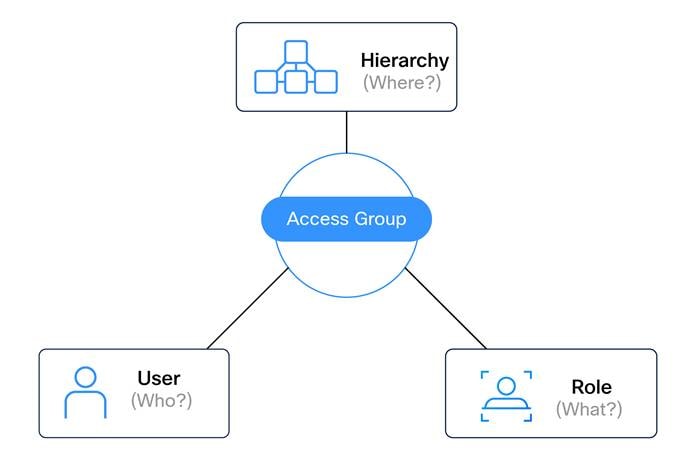 Access decisions are based on:
● Who the user is (role)
● What actions they are allowed to perform (permissions)
● Where those actions are permitted (site hierarchy)
This approach aligns naturally with manufacturing environments, where responsibility is inherently tied to physical areas of the plant, at least for the operations team.
The Access Group glues together who you are, what you can do, and where you are allowed to do it.
Table 1. Access Groups and Role Assignments
| Access Group |
Role |
Site Scope |
User |
| IT_Global_Admin |
Network Admin |
Global |
Alex_IT |
| OT_Paint_IE |
OT Network Operator |
Paint Shop |
Ana_OT |
| OT_Body_IE |
OT Network Operator |
Body Shop |
Ben_OT |
Site-Based RBAC enables multiple teams to safely operate within the same management platform without interfering with each other.
Delegating UI-based monitoring and configuration capabilities to OT teams through Site-Based RBAC delivers tangible operational and business advantages:
Improved Collaboration Between IT and OT: Site-Based RBAC enables a clear division of responsibilities. IT retains control of architecture, policy, and lifecycle governance, while OT teams gain the ability to perform daily operational tasks within their assigned sites. This alignment reduces friction, removes bottlenecks, and creates a shared operating model without compromising security.
Faster Operational Response: By delegating approved UI-based actions to OT users, common tasks such as shutting or enabling ports, assigning VLANs, or adjusting industrial protocol settings can be completed immediately.
Reduced Configuration Risk: UI-driven workflows replace ad hoc CLI changes with standardized, validated operations. Site-scoped permissions ensure that users can only modify devices within their area of responsibility, preventing accidental changes that could impact other parts of the network.
Lower Administrative Overhead for IT: Routine Day-N tasks can be safely handled by OT personnel, reducing the number of operational requests directed to central IT teams.
Better Lifecycle Alignment: Day-0 onboarding and Day-1 global configuration remain centrally controlled, while Day-N adjustments are delegated locally. This creates a practical balance between standardized design and the flexibility required for real-world plant operations.
Site-Based RBAC strengthens operational security by applying access to network management data and functions that are both precise and practical. It enforces least-privilege access, ensuring that users, especially operations, receive only the permissions required for their specific responsibilities. This approach improves accountability, limits the potential impact of mistakes or misuse, and supports consistent governance across the organization.
Compliance Alignment: ISA/IEC 62443
Site-Based RBAC is a critical component for organizations seeking to align with the ISA/IEC 62443 framework for industrial automation and control systems (IACS).
ISA/IEC 62443-3-3 (System Security Requirements) directly addresses requirements for Identification and Authentication Control (IAC) and Use Control (UC) by ensuring that only authorized personnel can access specific zones or conduits.
By scoping access to specific physical lines or cells, organizations satisfy the requirement to limit user privileges to the minimum necessary to perform their job functions, reducing the risk of accidental or malicious system-wide disruptions. Restricting configuration authority to localized OT experts ensures that critical production settings remain intact and are only modified by those with the relevant operational context.
Auditing and Visibility: The "Trust but Verify" Model
A primary barrier to IT/OT collaboration is the concern that delegating authority leads to a loss of control. Site-Based RBAC solves this by shifting the IT role from gatekeeping (executing every change) to oversight (defining the boundaries and auditing the results).
Because every action in Catalyst Center is tied to a unique user identity and site scope:
● Full Traceability: Every VLAN change, port toggle, and device replacement is logged with a timestamp and user ID.
● Centralized Oversight: IT administrators maintain global visibility through the Audit Logs and Assurance dashboards, allowing them to review OT-led changes in real-time.
● Accountability: If a configuration error occurs, logs clearly show who made the change and where, enabling faster remediation and targeted retraining rather than broad access revocation.
This "Trust but Verify" approach empowers OT to maintain production uptime, while providing IT with the evidence needed to satisfy security audits and corporate governance.
Table 2. Validated Hardware and Software
| Function |
Platform/Component |
Validated Version |
Notes |
| Distribution switches |
Catalyst 9300 Series and Catalyst 9500 Series |
IOS-XE 17.15 |
Layer 3 demarcation point |
| Core switches |
Catalyst 9500 Series |
IOS-XE 17.15 |
Provide Layer 3 core connectivity to the plant floor |
| Industrial access |
Cisco Catalyst IE3100, IE3200, IE3300, IE3400, IE3500, IE9300 |
IOS-XE 17.18.2 |
Policy extended node; supports PRP. |
| Network management |
Cisco Catalyst Center |
3.1.6 |
Central provisioning, assurance, and lifecycle management |
| Policy & segmentation |
Cisco Identity Services Engine (ISE) |
|
Central policy server for segmentation |
Manufacturing Site Hierarchy Design
In Catalyst Center, the site hierarchy is not merely an organizational construct. It becomes a security boundary that defines the scope of access and responsibility.
A well-designed hierarchy:
● mirrors the physical layout of the plant,
● aligns with operational ownership and responsibilities, and
● limits the impact of any inadvertent changes.
For manufacturing environments, Cisco recommends the following logical structure:
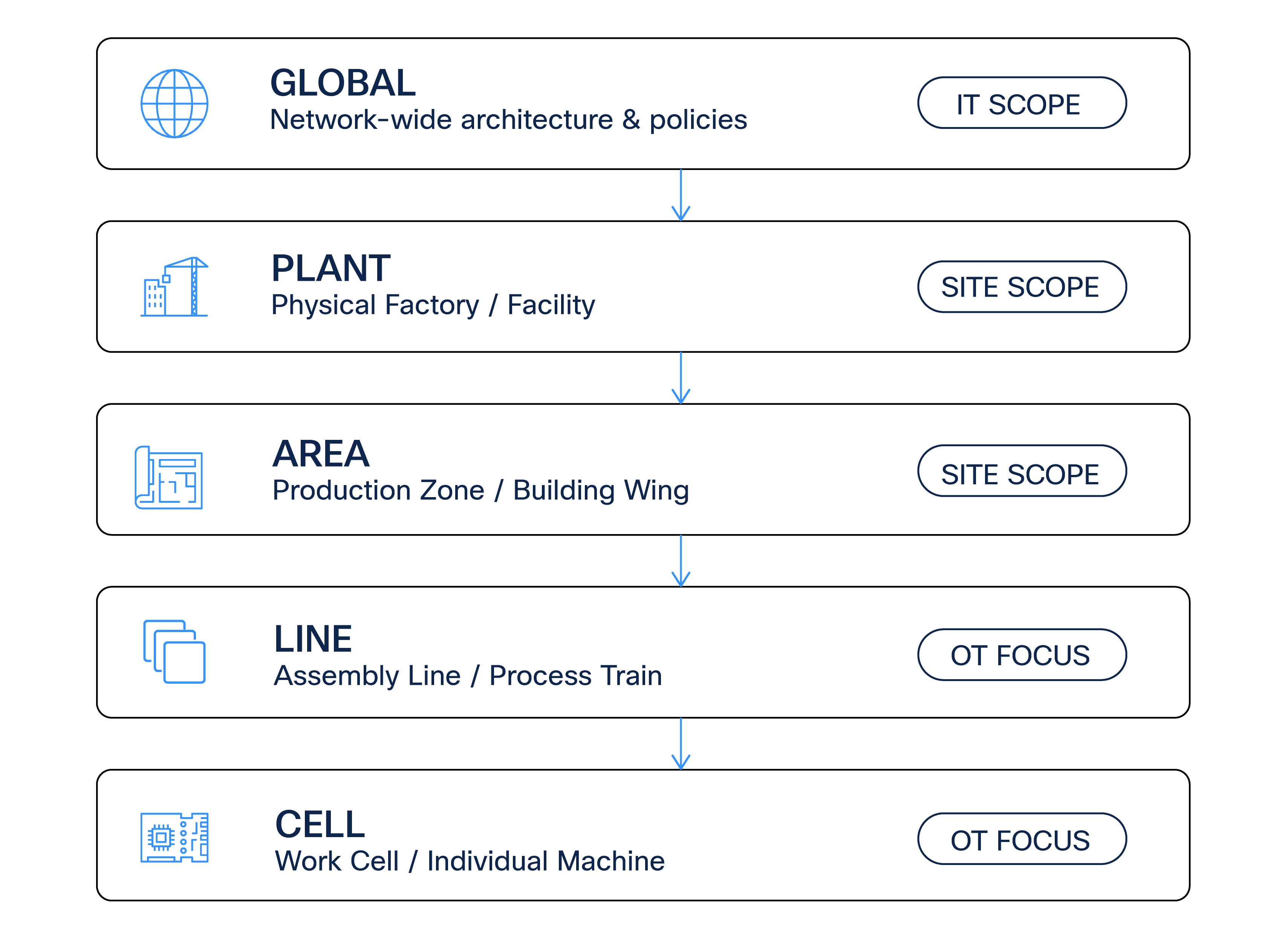 This structure supports:
● Granular access delegation
● Clear ownership boundaries
● Scalable expansion as production grows
Our key design considerations for hierarchy for Site-based RBAC for production deployments of Catalyst Center include:
● Avoiding flat hierarchies
● Avoiding excessive nesting beyond operational needs
● Using consistent naming conventions that mean something to the operational teams
● Aligning hierarchy boundaries with production responsibilities
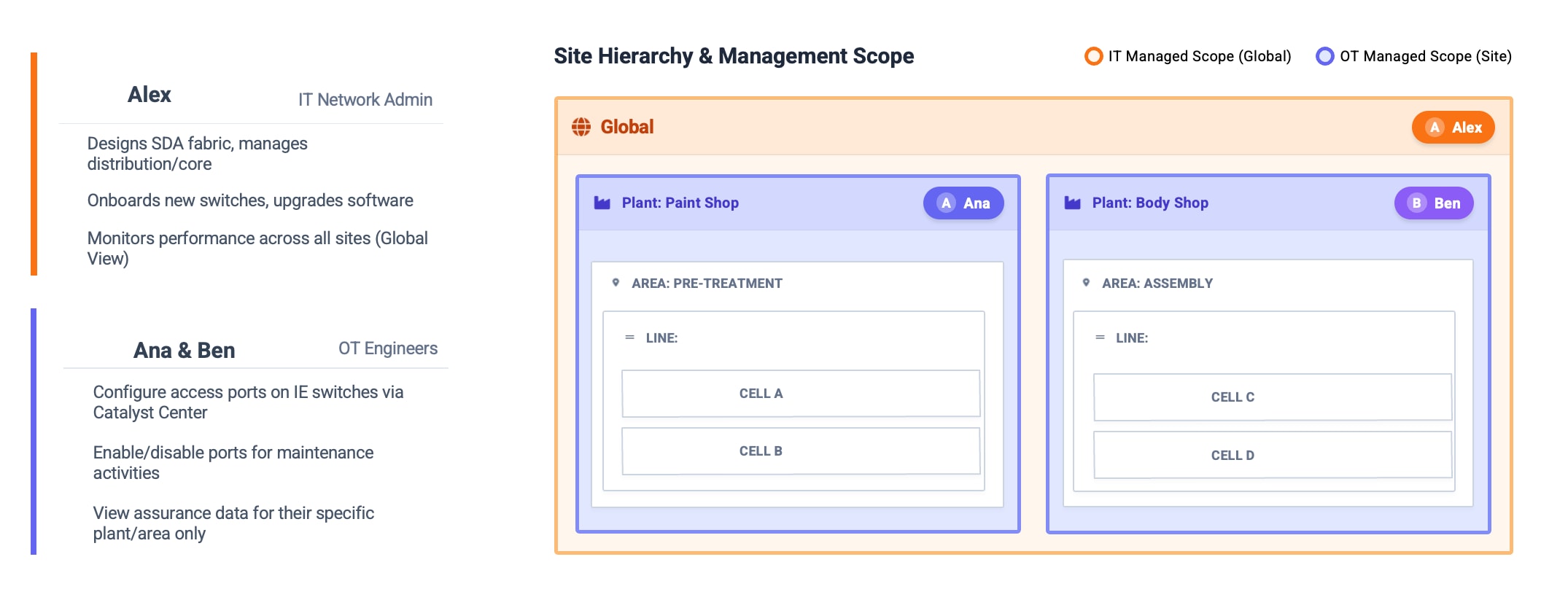
The following diagram illustrates how a well-defined site hierarchy provides the structural basis for Site-Based RBAC in an industrial environment. The hierarchy is modeled to reflect physical and operational boundaries—from the global network down to plants, areas, lines, and cells—and serves as the foundation for scoping management responsibilities. Global IT roles retain visibility and control across the entire network, while OT engineers are granted access only to the portions of the hierarchy they operate and maintain. By aligning the hierarchy with real production structures, Catalyst Center enables clear separation between IT-managed global functions and OT-managed site-level operations, ensuring that access, visibility, and configuration authority are consistently applied where they are needed.
OT Personas and Access Requirements
Manufacturing networks are operated by a variety of roles with different levels of technical responsibility. Access control must reflect these operational realities rather than traditional IT job titles.
Table 3. OT Personas
| Persona |
Primary Responsibilities |
| OT Line Engineer |
Maintain production line connectivity |
| OT Maintenance |
Commission and replace devices |
| OT Supervisor |
Visibility and escalation |
| IT Network Admin |
Architecture and policy |
These personas translate directly into the recommended Site-Based RBAC role profiles described in this guide. A typical mapping is shown below:
● OT Line Engineer → OT Operator
● OT Maintenance → Configuration Administrator
● OT Supervisor → Observer
● IT Network Admin → Platform Administrator or Operations Administrator
This mapping ensures that each user receives the level of access required to perform their duties—no more and no less—while keeping all actions properly scoped and governed.
Recommended Site-Based RBAC Role Profiles
This guide recommends defining a small number of practical, incremental role profiles that align with common OT workflows. Each profile expands capability only where there is a clear operational requirement, following a least-privilege design approach.
Rather than creating complex custom roles from scratch, this guide recommends a progressive model:
1. Begin with a read-only observer profile.
2. Add write permissions only for the specific functions required by each persona.
3. Scope each role to the appropriate site hierarchy using access groups.
4. Validate if users can complete their tasks without granting unnecessary global privileges.
The table below summarizes the recommended progression of permissions.
Table 4. Reference Permission Model
| Capability Area |
Observer |
OT Operator |
Configuration Admin |
Platform Admin |
Operations Admin |
| Utilities > Command Runner |
Read |
Write |
Write |
Write |
Write |
| Network Management > Inventory |
Read |
Write |
Write |
Write |
Write |
| Network Provision > Device Provision |
Read |
Read |
Write |
Write |
Write |
| Network Management > Hierarchy |
Read |
Read |
Write |
Write |
Write |
| Network Design > Profiles & Settings |
Read |
Read |
Write |
Write |
Write |
| Network Operation > Compliance Remediation |
Read |
Read |
Write |
Write |
Write |
| Network Operations > SWIM |
Read |
Read |
Read |
Write |
Write |
| Discovery / PnP / Replacement |
Read |
Read |
Read |
Read |
Write |
| Network Management > Discovery |
Read |
Read |
Read |
Read |
Write |
These profiles are provided as practical examples. Organizations can adjust them as needed, but this model reflects a balanced and field-tested approach.
Role Profiles in Operational Context
Purpose
Provide visibility into network status and health without allowing configuration changes.
Typical users
Plant supervisors, operations managers, and OT stakeholders who need insight but not control.
Operational value
Enables production teams to view inventory, topology, and events directly in Catalyst Center. Enables operations supervisors and managers to review status, issues, and faults to help determine what is causing an outage. This improves situational awareness and collaboration with IT, while eliminating any risk of unintended changes.
OT Operator or OT Line Engineer
Purpose
Support routine, day-to-day operational tasks that require simple, low-risk adjustments.
Typical users
OT technicians and line engineers responsible for immediate troubleshooting on the plant floor.
Operational value
Allows users to perform essential actions such as enabling or disabling ports and assigning VLANs and adding/replacing industrial endpoints on the production floor. These capabilities accelerate recovery during incidents, reduce escalation to IT, and keep a trail of all changes governed through Catalyst Center workflows.
Configuration Administrator or OT Maintenance
Purpose
Enable OT maintenance or network engineers to manage device-level configuration for their area of responsibility.
Typical users
Site or area OT engineers who maintain and adjust switch configurations.
Operational value
Provides access to UI-based configuration domains including Layer 2 settings, security parameters, and setup of industrial protocol options. This allows OT teams to commission equipment, adjust network behavior, and remediate compliance issues without requiring global administrative privileges.
Platform Administrator (Typically IT)
Purpose
Manage the software lifecycle of devices without granting onboarding or discovery authority.
Typical users
Central operations engineers responsible for network image management and upgrades.
Operational value
Enables controlled SWIM activities such as uploading images, distributing software, and activating updates. Separating this function from onboarding maintains governance while supporting planned maintenance and standardization.
Operations Administrator (Typically IT)
Purpose
Provide full operational control for trusted administrators who manage complete device lifecycle workflows.
Typical users
Senior IT or OT operations leads with broad responsibility across multiple sites.
Operational value
Combines onboarding, replacement, compliance remediation, and software lifecycle management in a single role. This profile supports end-to-end operational processes, while still enforcing site-based boundaries and auditability.
Functional Comparison of Profiles
The following table summarizes how these profiles translate into practical capabilities:
Table 5. Profile Comparison
| Operational Task |
Observer |
OT Operator |
Configuration Administrator |
Platform Administrator |
Operations Administrator |
| View dashboards and topology |
✔ |
✔ |
✔ |
✔ |
✔ |
| Assign VLANs to ports and shut / no-shut interfaces |
✘ |
✔ |
✔ |
✔ |
✔ |
| Modify Layer 2, industrial and security features via UI |
✘ |
✘ |
✔ |
✔ |
✔ |
| Create and deploy templates |
✘ |
✘ |
✔ |
✔ |
✔ |
| Fix configuration compliance issues |
✘ |
✘ |
✔ |
✔ |
✔ |
| Manage software images |
✘ |
✘ |
✘ |
✔ |
✔ |
| Discovery and PnP onboarding |
✘ |
✘ |
✘ |
✘ |
✔ |
| Device replacement workflows |
✘ |
✘ |
✘ |
✘ |
✔ |
Putting the Model into Practice
These profiles are intended to be combined with site scope using Catalyst Center access groups. A user may be assigned multiple access groups if they perform different roles across different areas of the plant.
For example:
● A maintenance engineer might have Operator rights in one line and Configuration Administrator rights in another.
● A supervisor might use only the Observer profile for visibility into all sites.
This flexible model allows organizations to distribute responsibility safely, while maintaining consistent governance and auditability.
The following example illustrates how the role profiles are used in practice:
Fault Recovery Scenario – Switch Failure and Recovery
During production hours, a switch on Line 3 fails due to a hardware fault. Local troubleshooting confirms that the failure is at the switch level. Because production is affected, immediate restoration is required.
Traditional Operational Model (Common Today)
In many plants, recovery follows this pattern:
1. OT maintenance replaces the failed switch on the plant floor.
2. The replacement switch is restored using a local backup or SD card.
3. The production line is returned to operation as quickly as possible.
4. After production is stable, OT opens a ticket with IT to:
a. Replace the device in Catalyst Center
b. Update inventory and management records
● Production is restored quickly
● Local configuration may be correct
● Central management becomes temporarily out of sync
● Compliance and lifecycle tracking lag behind reality
This model prioritizes uptime, but it introduces operational debt and ongoing reconciliation work.
With Site-Based RBAC, this same scenario can be handled end to end by an OT user assigned the Operations Administrator profile and scoped to:
After the physical replacement, the OT engineer can immediately:
1. use Catalyst Center RMA workflows to replace the failed switch
2. validate inventory accuracy
3. confirm configuration and compliance state
All actions remain:
● scoped to the assigned production line
● executed through approved Catalyst Center workflows
● fully auditable and aligned with IT governance
The benefits include:
● OT continues to prioritize uptime
● Central management remains accurate
● Configuration drift is eliminated
● Recovery workflows reflect real operational ownership
● IT governance is preserved without slowing operations
What Changes with Site-Based RBAC
| Without Site-Based RBAC |
With Site-Based RBAC |
| OT restores locally; IT reconciles later |
OT restores and reconciles |
| Manual ticketing required |
Immediate lifecycle closure |
| Temporary management drift |
Management state stays accurate |
| IT becomes a bottleneck |
IT retains oversight, not execution |
Site-Based RBAC enables authorized OT users to complete the full recovery lifecycle—from physical device replacement to centralized reconciliation—within their assigned site. This removes operational bottlenecks, maintains accurate network state, and supports production continuity without compromising security or governance.
Using Site-Based RBAC with UI-Based Device Configuration
One of the most practical benefits of Site-Based RBAC is the ability to delegate UI-based configuration capabilities to OT users. Catalyst Center exposes guided workflows that allow specific device settings to be viewed and edited through the web interface, without requiring CLI access. When these workflows are combined with site-based scoping, OT teams can perform meaningful operational changes, while IT maintains architectural control and auditability.
This section focuses on how those UI capabilities support real OT workflows. A complete list of supported options is available in the Catalyst Center User Guide – Device Configuration Workflows.
Day 0, Day 1, and Day N – Where UI Configuration Fits
Network management in industrial environments follows three natural phases:
● Day 0 – Onboarding: New devices are discovered and claimed using plug-and-play workflows.
● Day 1 – Standardization: Global configuration is applied using templates and design policies.
● Day N – Operations: Local adjustments are made over the lifetime of the production system.
Templates remain essential for consistency, most operational activity happens in Day N—small, targeted changes required to keep production running. Site-Based RBAC makes these Day N operations practical by allowing them to be performed safely through the Catalyst Center UI.
UI Capabilities for OT Operators
For OT technicians and line engineers, most daily tasks are simple but time-critical. The OT Operator profile enables exactly the kinds of changes that occur constantly on the plant floor: assigning a VLAN to a port, enabling or disabling an interface, or making a minor adjustment to restore connectivity.
These actions may seem small, but in manufacturing, they are often the difference between immediate recovery and extended downtime. Allowing OT staff to perform them directly through Catalyst Center eliminates unnecessary escalation to IT, reduces wait time, and ensures that every change is logged and governed. Most importantly, Site-Based RBAC guarantees that these actions can only be performed on devices within the user’s assigned site.
UI Capabilities for Configuration Administrators
Site engineers and OT network specialists require a broader set of tools. The Configuration Administrator profile extends UI access beyond basic port changes to include more complex device configuration tasks.
Through the Catalyst Center interface, this role can perform common Layer 2 operations such as creating new VLANs when equipment is added, adjusting port parameters, configuring port channels, or tuning features such as CDP, LLDP, STP, and multicast behavior. These are the kinds of changes that naturally occur as lines are expanded, machines are moved, or production layouts evolve.
Providing this level of control through a structured UI has important benefits. OT teams can respond quickly to local requirements, while IT avoids the risk of ad hoc CLI modifications that bypass standards. All changes remain consistent with approved workflows and are fully traceable.
Security Adjustments Through the UI
Segmentation and security often need to adapt as new devices are connected. Catalyst Center exposes Cisco TrustSec configuration through guided workflows so that necessary adjustments can be delegated safely.
A common example is assigning a security group tag to a specific port when new equipment is installed. Configuration Administrators can make these changes directly in the UI; for example, they can modify enforcement behavior or update port-level settings without altering global policy. This approach lets OT teams integrate new assets into existing security architecture without waiting for central intervention, while still operating within defined governance boundaries.
Industrial Protocol Configuration
Catalyst Center provides UI workflows for parameters related to CIP, PROFINET, Modbus, and industrial alarms.
These settings directly influence controller communication, redundancy behavior, and operational diagnostics—areas that OT engineers manage every day. Site-Based RBAC ensures that changes remain limited to the correct devices and locations.
UI-based configuration does not replace templates or centralized design. Instead, it complements them.
● Templates and policies establish a consistent Day 1 baseline.
● UI workflows enable the Day N adjustments required in real operations.
● Site-Based RBAC ensures that both happen within appropriate boundaries.
This combination allows OT teams to act with the speed production demands, while IT retains visibility, consistency, and control.
Design and Implementation Guidance
This section provides practical, documentation-aligned guidance for implementing Site-Based RBAC in Catalyst Center in a manufacturing context.
Cisco recommends the following sequence when implementing Site-Based RBAC.
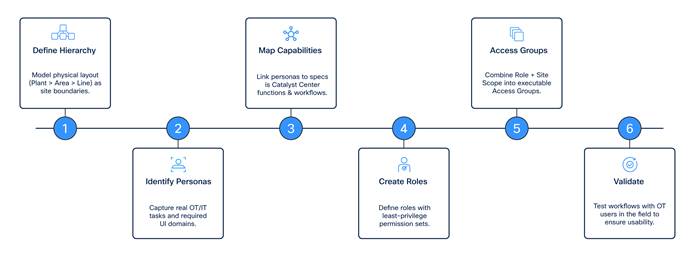
1. Define the manufacturing site hierarchy: Model the hierarchy to reflect physical locations and operational ownership (Plant > Area > Line > Cell). This hierarchy becomes the site scope in access groups.
2. Identify OT and IT personas and the tasks they must perform: Capture real operational requirements, including which UI configuration domains must be accessible (Layer 2, security, industrial). Mapping to supported UI actions reduces unnecessary permissions.
3. Map capabilities: Determine which Catalyst Center functions each role will need, and whether those functions are UI-based, provisioning workflows, or lifecycle actions.
4. Create roles with minimal required permission sets: Use the least-privilege principle when defining permission sets that support required UI actions or workflows.
5. Create access groups and assign site scopes: An access group in Catalyst Center is a combination of role + site scope. Site scope can be Global or a specific hierarchical branch. Users may be assigned multiple access groups.
6. Validate workflows with OT users: Ensure that OT engineers can complete necessary tasks using the correct access group, and confirm that no unnecessary UI panels or capabilities are exposed.
Access Groups and Multi-Role Users
Catalyst Center allows a user to be assigned to multiple access groups, each representing a distinct combination of role and site scope. The Admin Guide confirms this behavior and provides a sample use case showing a user with three access groups across different roles and scopes.
How Active Access Groups Affect UX
● Users must select the active access group at login or switch between them as needed.
● The effective permissions and visible UI features are determined by the active access group.
● This design allows separation between operational scopes and responsibilities without granting global privileges.
Recommendations when using multi-role users
● Use narrow, task-oriented access groups instead of broad, catch-all scopes.
● Name access groups clearly to indicate role and site (e.g., OT_Maint_Line3_Config).
● For users with responsibilities in more than one area (e.g., OT + IT), assign them multiple access groups rather than increasing permission breadth.
● Provide user guidance or training on selecting the correct access group during login.
Note: It is possible to assign more than one access group to a user.
Balancing Granularity and Usability: While Catalyst Center allows for highly granular access groups (e.g., scoping a user down to a single "Cell"), assigning a user to too many small, fragmented scopes can lead to "switch fatigue." Since a user must select an active access group at login, frequently switching between five different "Line" groups can cause operational friction.
Tech tip: For the best Day 2 experience, assign users to the broadest single site-scope that encompasses their entire area of responsibility.
While Site-Based RBAC enables fine-grained delegation of many operational workflows, not all Catalyst Center actions support site-based scoping. Some actions are inherently global in nature and apply across the entire managed network.
Site-Based RBAC operates through access groups, which combine a role and a site scope. However, the scope of enforcement depends on the feature being used.
● Site-scoped actions are restricted to devices within the assigned hierarchy.
● Global actions ignore site boundaries and require global-level permissions
This behavior is by design and documented in the Catalyst Center Admin Guide.
Examples of Actions That Are Not Site-Scoped
The following types of actions typically require global scope, regardless of user site assignment:
● Role and access group management
● Global settings and system-wide configurations
● Template creation and modification
● Policy and fabric-wide design changes
● System administration operations
These actions are intentionally restricted on site-scoped roles to prevent fragmentation of global design and policy.
● Do not grant global permission sets to OT roles, even if their site scope is limited.
● Use site-scoped access groups only for operational workflows that explicitly support site-based enforcement
● Reserve global roles for IT administrators responsible for architecture, policy, and lifecycle governance
● Validate whether a workflow is site-scoped or global before assigning permissions
If a function affects network-wide behavior, it should remain under global administrative control.
Platform and Site Hierarchy Considerations
Hierarchy Constraints for Extended Nodes
Be aware of platform constraints when designing the hierarchy.
Some devices and roles inherently depend on their parent site (for example, extended nodes under a parent Fabric Edge cannot be moved to a separate hierarchy that breaks that parent relationship).
This constraint can affect both visibility and access group scope.
The following design faults are frequently encountered when RBAC is first adopted:
● Over-privilege roles - granting broader permission than required increases risk.
● Designing hierarchy without OT participation - a hierarchy that does not match operational zones will misalign access.
● Ignoring the active access group concept - users who are unaware of the active group selected can experience confusion or lack of access.
● Not aligning actual workflows to roles - RBAC should be validated against real tasks.
● Not accounting for hierarchy constraints - assigning a site scope that conflicts with underlying device relationships can cause unpredictable behavior.
Successful deployments involve OT early and validate access against real production workflows.
Organizations new to Site-Based RBAC can follow this practical sequence to begin implementation:
1. Define the Site Hierarchy
● Model Catalyst Center sites to reflect real operational boundaries
● Align hierarchy with plants, areas, lines, and cells
● Confirm that hierarchy matches OT ownership and responsibility
2. Create Standard Role Profiles
● Use the recommended profiles as a starting point
● Assign only the permissions required for each role
● Avoid creating custom roles unless a clear gap exists
3. Build Access Groups
● Combine each role profile with the appropriate site scope
● Create separate access groups for different areas of responsibility
● Name access groups clearly and consistently
4. Assign Users
● Map users to the correct access groups based on their job function
● Assign multiple access groups when a user has multiple responsibilities
● Validate that each user selects the correct active access group
5. Validate Workflows
● Test common Day N tasks with OT users
● Confirm that users can perform required actions
● Verify that actions remain restricted to the intended sites
Following this checklist allows organizations to deploy Site-Based RBAC incrementally, aligning access control with real operational needs, while maintaining security and governance .
.