Learn how to use the Firewall Migration Manager to automate and streamline the migration of Palo Alto Networks Firewall configurations to Cisco Secure Firewall Threat Defense.
The Firewall Migration Manager is a network security application that automates the migration of supported Palo Alto Networks Firewall configurations to Cisco Secure Firewall Threat Defense. It parses source configurations, maps features, pushes policies to the Firewall Management Center, and streamlines the migration process for organizations seeking to upgrade their firewall solutions.
Why choose Firewall Migration Manager
Firewall migration may appear simple during planning, but execution is often complicated. Common challenges include configuration dependencies, parsing timeouts on large rule sets, and unexpectedly tight cutover windows. For many organizations these risks delay their security modernization efforts.
The Firewall Migration Manager an enterprise-ready product built for overcoming these challenges and to migrate seamlessly. The product helps customers and partners by offering predictable timelines, resilient workflows, and clear visibility at every stage of migration to Cisco Secure Firewall Threat Defense. As a result, migration becomes a strategic accelerator rather than a source of friction.
Key features
-
Migration efficiency: Firewall Migration Manager streamlines and accelerates the firewall migration process while maintaining accuracy and reliability.
-
Improvised GUI: Use Firewall Migration Manager to replace fragmented manual workflows with a guided, wizard-driven orchestration, visual task tracking, parallel execution, and proactive status monitoring.
-
Pre-deployment validation and testing: Allows teams to fully evaluate a migration plan before committing to deployment.
-
Enhanced reporting and traceability: Provides richer migration reports and clearer audit trails, so every stakeholder—from the engineer running the job to Cisco reviewers—has the necessary visibility.
-
Broader platform coverage: Cisco will continue to expand supported migration sources to include more platforms, helping more teams consolidate onto Cisco Secure Firewall Threat Defense.
Dashboard overview
The Firewall Migration Manager dashboard is a centralized management interface for tracking and troubleshooting network device migrations. It also provides visibility into the health and progress of migration projects.
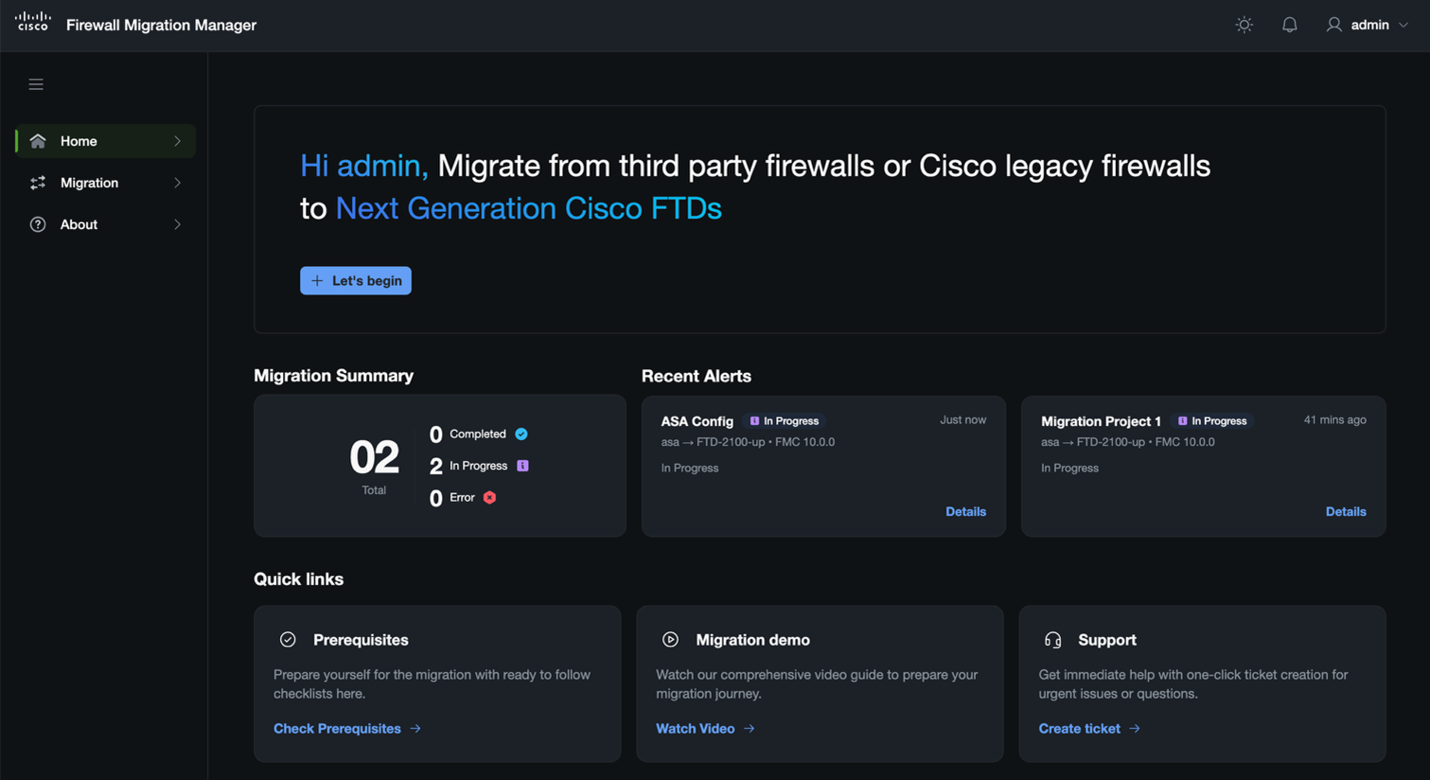
Key functional areas:
-
Migration monitoring: The Migration Summary tile provides a real-time status overview of all migration tasks and displays counts of completed, in progress, and blocked tasks.
-
Issue identification: The Recent Alerts section helps you diagnose issues. It flags failed migration tasks, identifies the exact stage and cause of failure, and provides a brief explanation of the cause, such as configuration syntax issues or connectivity timeouts.
-
Resource and support hub: The Quick links section provides immediate access to essential onboarding and troubleshooting resources, including:
-
Prerequisites: Review the checklist to confirm all prerequisites are met before starting a migration.
-
Migration demo: Watch the comprehensive video that guides you through your migration journey.
-
Support: Get immediate help with one-click ticket creation for urgent issues or questions.
-