Overview
How to power on the Secure Firewall 3100 and confirm it started successfully by checking the front-panel LEDs for power and system status.
System power is controlled by a rocker power switch located on the rear of the firewall. The rocker power switch provides a soft notification that supports graceful shutdown of the system to reduce the risk of system software and data corruption.
Procedure
| 1. | Attach the power cord to the firewall, and connect it to an electrical outlet. |
||||||||||||||||
| 2. | Turn the power on using the rocker power switch located on the rear of the chassis, adjacent to the power cord. 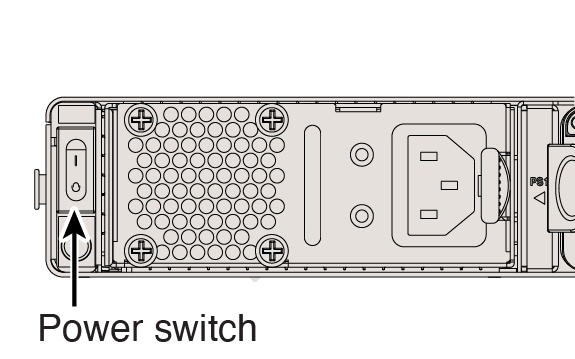
|
||||||||||||||||
| 3. | Check the LEDs for the current status. 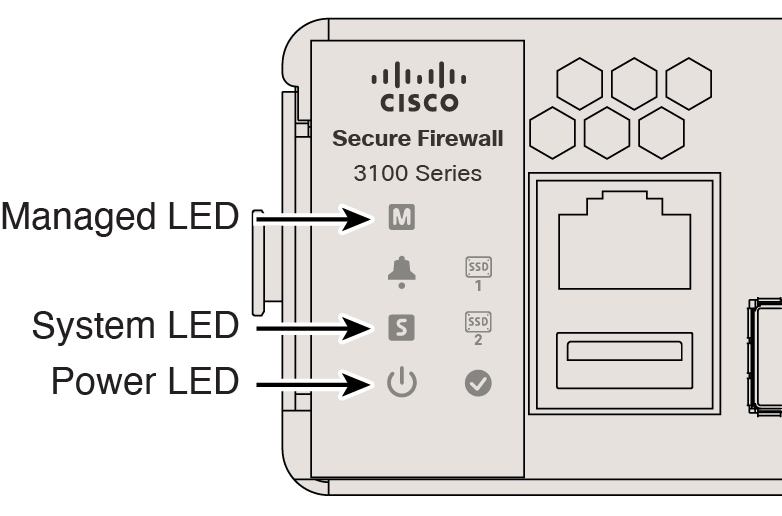
|