
Cisco Secure Access - Local Data Residency in Australia
About Cisco Secure Access - Local Data Residency in Australia
Cisco Secure Access - Local Data Residency (LDR) deployments keep most data in the control, management, and data plane within Australia rather than in the global cloud. The core security features, policy enforcement capabilities, and administrative workflows are identical to standard Cisco Secure Access. For data processing details, see the Cisco Secure Access with local data residency Offer Disclosure on the Cisco Trust Portal.
This capability provides regional data localization to keep customer-specific data stored at rest within Amazon Web Services (AWS) data centers located in Australia. This includes activity logs, security reports, and identity configurations. By maintaining a dedicated regional control plane, Cisco Secure Access helps government agencies, critical infrastructure organizations, and other regulated industries meet Australian data residency requirements.
For Australia, Cisco Secure Access - Local Data Residency is assessed under the Information Security Registered Assessors Program (IRAP).
Data Residency Scope: Storage, Processing, and Global Services
- Data Stored at Rest in Australia: Customer-specific data—including activity and event logs, security reports, tenant configuration policies, and identity directory metadata—remains stored at rest within AWS data centers located in Australia (Sydney and Melbourne).
- Data Processed in Australia: User traffic inspection, policy enforcement, Secure Web Gateway (SWG), Zero Trust Network Access (ZTNA), and Cloud-Delivered Firewall (CDFW) processing execute within Points of Presence (PoPs) in Australia.
- Global Services and Threat Intelligence: Real-time threat intelligence updates, Anycast DNS routing, and global reputation lookups query Cisco Talos® cloud infrastructure (no customer traffic logs or identity data are stored outside Australia).
Administrative Architecture and End-User Experience
- Subscription Claiming & Org Provisioning (Cisco Security Cloud Control): Initial order validation, organization region assignment, and LDR subscription claiming occur in Cisco Security Cloud Control, which validates that the organization is provisioned in the Australia region.
- Day-to-Day Security Administration (Security Cloud Control & Secure Access): Administrators configure access policies, deploy resource connectors, inspect logs, and manage user identities directly within Cisco Security Cloud Control (which surfaces the Australia-hosted Secure Access backend), or through the standalone Cisco Secure Access dashboard.
- End-User Connectivity: Users connect through Cisco Secure Client without requiring special regional endpoint configurations.
Supported LDR Specifications
- Product: Cisco Secure Access - Local Data Residency
- Region: Australia
- Buying Model: A-la-carte (ALC) only
- Compliance Status: IRAP assessed
 Note
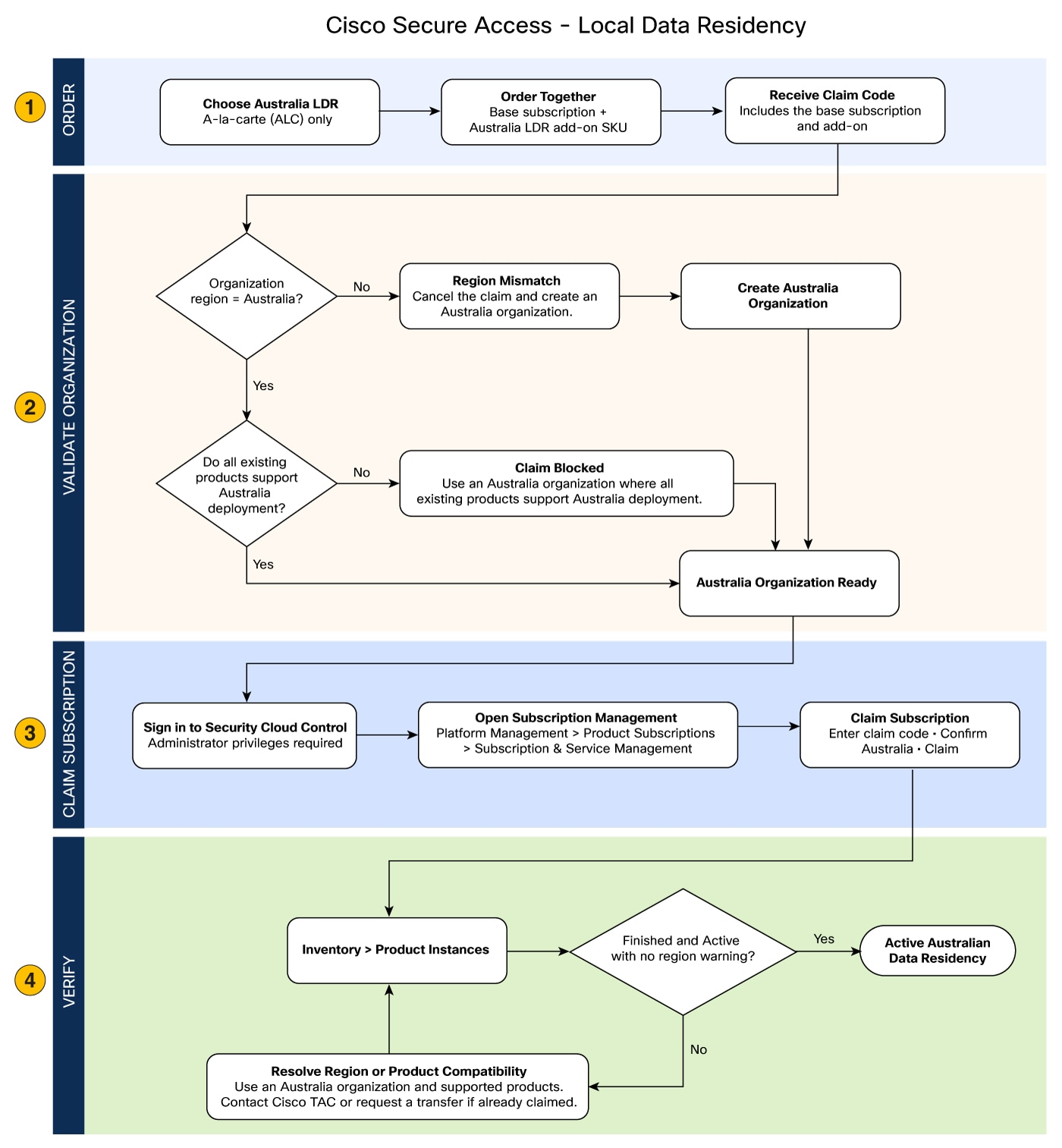
Australia Local Data Residency Workflow
The figure shows the workflow for ordering, validating, claiming, and verifying an Australia local data residency subscription in Security Cloud Control.
Best Practices and Limitations for Local Data Residency in Australia
Best Practices
- Confirm that the organization region is set to Australia before entering the claim code.
- Make sure your purchase order includes both the Cisco Secure Access Base Subscription and the Australia LDR add-on SKU before onboarding.
Limitations
- Claiming an Australia LDR SKU does not migrate historical data from global data centers.
- If an existing non-Australia subscription receives an amendment that adds the Australia add-on SKU, a region mismatch warning appears on that organization.
- If an LDR subscription expires or is canceled, regional data residency enforcement terminates.
- You cannot mix LDR and global Secure Access SKUs within the same organization. Converting an active LDR deployment to a global deployment, or a global deployment to an LDR deployment is not supported.
Subscription Types and Ordering Rules
When purchasing Cisco Secure Access, choose either a Global (non-LDR) subscription or a dedicated Local Data Residency (LDR) subscription based on your regional data storage and processing requirements.
An Australia LDR subscription consists of two line items purchased together on the same purchase order under the A-la-carte (ALC) model:
- Cisco Secure Access Base Package (Product Tier): The core software subscription tier (such as Essentials or Advantage).
- Australia Local Data Residency Add-on (Regional SKU): The mandatory regional add-on SKU that anchors data residency to Australia.
Key Ordering Rules
- Co-Termed Order: The base package SKU and regional add-on SKU must be ordered together on the same purchase order, generating a unified LDR entitlement claimed in Security Cloud Control.
- No Coexistence: You cannot mix Global Secure Access SKUs and LDR SKUs within the same organization.
- No Post-Purchase Conversion: You cannot attach an Australia LDR add-on to an existing Global subscription. To migrate to LDR, you must provision a new Australia-region organization in Security Cloud Control and claim a dedicated LDR order.
For detailed pricing, packaging, and ordering rules, see the Cisco Secure Access Data Residency Ordering Guide.
Considerations and Compatibility for LDR Subscriptions
Review the following operational restrictions and compatibility rules before claiming an LDR subscription:
Security Cloud Control Considerations
Review the following tenant and platform boundary rules in Cisco Security Cloud Control:
- Regional Alignment: For an existing Security Cloud Control organization, you can claim an Australia LDR subscription only if the organization is configured for the Australia region.
- Product Compatibility: Claim only products that support deployment in Australia. Security Cloud Control restricts the organization to Australian data residency and blocks products that do not support Australian regional deployment.
Secure Access Limitations
Review the following licensing and SKU compatibility rules:
- Coexistence Restrictions: You cannot use LDR SKUs and Global Secure Access SKUs in the same organization. To use Cisco Secure Access - LDR in Australia, the organization must be configured for the Australia region and must use the Australia LDR SKU.
- Regional Purchase and Provisioning Requirements: A customer does not need a physical presence in Australia to purchase this option. However, the organization must be created in the Australia region and provisioned with the Australia Local Data Residency SKU.
Subscription Conversions and Transfers
Review the following lifecycle and migration restrictions:
-
Unsupported Conversions: Conversion between LDR and non-LDR subscriptions is not supported across the following workflows:
- Subscription amendments
- Paid-to-trial or trial-to-paid conversions
- Paid-over-paid claims
- Subscription Transfers: Moving an Australia LDR subscription requires the destination organization to meet the exact same regional and product-compatibility criteria as a new claim.
Claim Australia Local Data Residency Subscription
Before you begin
Before claiming your subscription in Cisco Security Cloud Control, verify that the following prerequisites are met:
- An active Cisco Secure Access base subscription.
- A valid claim code containing the Cisco Secure Access base tier and the Australia LDR add-on SKU.
- A Cisco Security Cloud Control organization with its region set to Australia.
- Administrative privileges in Cisco Security Cloud Control.
Step 1 | Sign in to Cisco Security Cloud Control. |
Step 2 | Choose |
Step 3 | Click Claim Subscription. |
Step 4 | Enter the claim code containing your Cisco Secure Access subscription and the Australia LDR add-on SKU. |
Step 5 | Review the subscription items on the verification screen to ensure the organization region matches Australia. |
Step 6 | Click Claim Subscription to initiate regional tenant provisioning. Wait for the backend provisioning workflow to finish. |
Step 7 | Navigate to to inspect the provisioned instance. |
Step 8 | Verify that the product instance status updates to Finished and Active. NoteIf the subscription claim is blocked, verify that the organization is located in Australia and that all its existing products support deployment there. Self-service product migration between organizations is not supported. |
The Cisco Secure Access tenant is provisioned within the Australia regional deployment, and data residency policies are active.
Regional Deployment Options for Existing Organizations
How you apply an Australia LDR subscription to an existing organization depends on the initial region of that organization.
Determine the regional configuration of your existing organization and apply the appropriate action:
|
 Warning
Verify Local Data Residency Status
After claiming the subscription, confirm that regional data residency enforcement is active.
Step 1 | In Cisco Security Cloud Control, navigate to . |
Step 2 | Select your Cisco Secure Access instance card. |
Step 3 | Confirm that the operational status displays Finished and Active. |
Step 4 | Verify that no regional mismatch warning banners appear on the instance card. |
The instance card verifies that the organization and tenant are operating under active local data residency enforcement.
Frequently Asked Questions for Cisco Secure Access - Local Data Residency
Q. | What is Cisco Secure Access - Local Data Residency (LDR)? |
A. |
Cisco Secure Access - Local Data Residency is a regional deployment option for Cisco Secure Access that maintains data in the control, management, and data plane within a designated geographic region rather than in the global cloud. For data processing details, see the Cisco Secure Access with Local Data Residency Offer Disclosure document on the Cisco Trust Portal. |
Q. | Who is this offering intended for? |
A. |
This offering is intended for government agencies, critical infrastructure organizations, and other regulated industries that must meet regional data residency requirements. |
Q. | Is this a separate product from Cisco Secure Access? |
A. |
No. It is a regional deployment option for Cisco Secure Access. |
Q. | What regions are supported for Cisco Secure Access - LDR? |
A. |
Australia is currently the supported region for Cisco Secure Access - LDR. For the latest information about regional availability, refer to the current product documentation and ordering information. |
Q. | Is the Australia offering IRAP assessed? |
A. |
Yes. Cisco Secure Access - Local Data Residency in Australia is IRAP assessed. |
Q. | Does a customer need a physical presence in the target region to purchase this offering? |
A. |
No. A physical regional office is not required. However, the Cisco Security Cloud Control organization must be created in the designated region, and the subscription must be claimed with the matching regional Local Data Residency SKU. |
Q. | When does the customer choose between global and Local Data Residency? |
A. |
The customer makes this choice during purchasing and ordering. |
Q. | Can a customer mix global and Local Data Residency SKUs in the same organization? |
A. |
No. Global Secure Access SKUs and Local Data Residency SKUs cannot be mixed in the same organization. |
Q. | Can a customer convert a global deployment to a Local Data Residency deployment, or the reverse? |
A. |
No. Conversion between global and Local Data Residency deployments is not supported. |
Q. | Is the administrative or end-user experience different from standard Cisco Secure Access? |
A. |
No. Policy configuration, resource connector deployment, and user management operate the same as in standard Cisco Secure Access. End users connect through Cisco Secure Client without requiring custom regional configuration. |
Q. | What customer data remains in the designated region? |
A. |
Most data in the control, management, and data plane remains within dedicated regional data centers. For detailed data processing information, see the Cisco Secure Access with Local Data Residency Offer Disclosure on the Cisco Trust Portal. |
Related References
Changelog
|
Date |
Description of Change |
|---|---|
|
November 2026 |
Initial publication for Cisco Secure Access with Local Data Residency in Australia. |