Provides a workflow diagram for migrating Firewall Threat Defense to Cloud-Delivered Firewall Management Center.
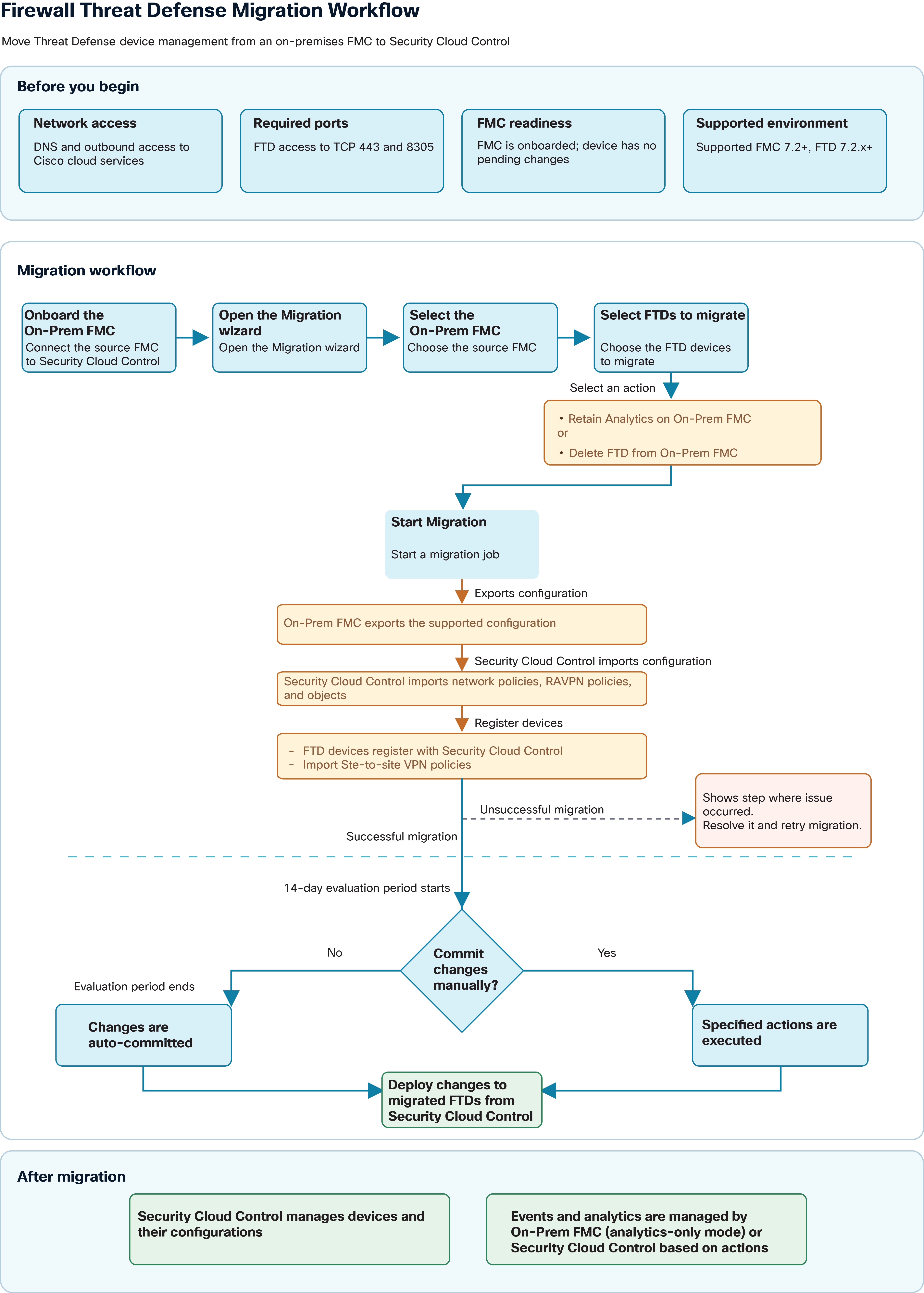
The following flowchart illustrates the high-level workflow for migrating Firewall Threat Defense to Security Cloud Control.
Cisco Security Cloud Control: On-Premises Managed Firewall Threat Defense Migration to Cloud Management
Cisco Security Cloud Control: On-Premises Managed Firewall Threat Defense Migration to Cloud Management
Provides a workflow diagram for migrating Firewall Threat Defense to Cloud-Delivered Firewall Management Center.
The following flowchart illustrates the high-level workflow for migrating Firewall Threat Defense to Security Cloud Control.
Security Cloud Control Firewall Management performs migration in the following sequence:
Check readiness Confirm that the On-Premises Firewall Management Center and Firewall Threat Defense versions are supported, the On-Premises Firewall Management Center is onboarded with no pending changes, and the required DNS and outbound access are available, including TCP ports 443 and 8305.
Connect the source FMC Onboard the On-Premises Firewall Management Center to Security Cloud Control, then open the migration wizard.
Choose devices and actions Select the source On-Premises Firewall Management Center and Firewall Threat Defense devices to migrate. Choose whether to retain analytics on the On-Premises Firewall Management Center or delete the Firewall Threat Defenses from that On-Premises Firewall Management Center.
Start migration. The On-Premises Firewall Management Center exports the supported configuration. Security Cloud Control imports the network and remote-access VPN policies and objects, registers the Firewall Threat Defenses, and imports site-to-site VPN policies.
Resolve migration failures. If migration fails, address the issue reported at the failed step and retry the migration.
Evaluate the migration. After a successful migration, review the configuration during the 14-day evaluation period.
Commit the changes. Commit manually to execute the selected actions, or allow the changes to be committed automatically when the evaluation period ends.
Deploy and manage devices. Deploy the intended changes to the migrated Firewall Threat Defenses from Security Cloud Control. After migration, Security Cloud Control manages device configuration; analytics are handled by the On-Premises Firewall Management Center in analytics-only mode or by Security Cloud Control, depending on the selected actions.
After migration:
Security Cloud Control manages devices and their configuration.
Events and analytics can be handled by either the On-Premises Firewall Management Center (analytics-only mode) or Security Cloud Control.
Migrated devices appear on the Security Cloud Control Security Devices page.