Resilient Infrastructure: Cisco Catalyst SD-WAN and Routing
Available Languages
Bias-Free Language
The documentation set for this product strives to use bias-free language. For the purposes of this documentation set, bias-free is defined as language that does not imply discrimination based on age, disability, gender, racial identity, ethnic identity, sexual orientation, socioeconomic status, and intersectionality. Exceptions may be present in the documentation due to language that is hardcoded in the user interfaces of the product software, language used based on RFP documentation, or language that is used by a referenced third-party product. Learn more about how Cisco is using Inclusive Language.
- US/Canada 800-553-2447
- Worldwide Support Phone Numbers
- All Tools
 Feedback
 Feedback
Resilient Infrastructure: Cisco Catalyst SD-WAN and Routing
Cisco Routing IOS-XE: Secure CLI Commands and UI Equivalents
Cisco Routing IOS-XE Release 26.1.x
Cisco Routing IOS-XE Release 26.2.x
Cisco Catalyst SD-WAN Control Components: Secure CLI Commands and UI Equivalents
Cisco Catalyst SD-WAN Release 26.1.x
Cisco Catalyst SD-WAN Release 26.2.x
Resilient Infrastructure: Cisco Catalyst SD-WAN and Routing
This document serves as a security hardening and resiliency playbook for Cisco Catalyst SD-WAN and Cisco Routing IOS-XE as part of the Resilient Infrastructure, providing prescriptive guidance to identify, remediate, and replace insecure configurations across CLI and UI-based management models.
This document first addresses the Cisco Routing IOS-XE infrastructure. We list insecure CLI commands and provide secure alternatives that maintain functionality while strengthening your security posture. Where applicable, we map these secure configurations to their equivalent SD-WAN Manager UI workflows and include screenshots to guide your implementation.
Next, we cover SD-WAN Manager UI enhancements. This section outlines secure configuration workflows and best practices, providing visual guidance to ensure consistent and secure deployments.
Finally, we focus on Cisco Catalyst SD-WAN Control components. We identify features and configurations that are insecure when implemented via the CLI and provide actionable steps to mitigate these risks, allowing teams to improve resiliency without disrupting existing operational workflows.
Overall, this playbook delivers step-by-step guidance to help you transition from insecure configurations to secure, resilient alternatives, ensuring consistency and alignment across your CLI and UI-driven operational models.
· Strengthen security: Ensures devices remain inherently secure against evolving threats.
· Reduce attack surface: Deprecates and removes obsolete capabilities to eliminate exploitation risks.
· Protect data: Deploys advanced security features to safeguard sensitive information.
Cisco Routing IOS-XE: Secure CLI Commands and UI Equivalents
Cisco Routing IOS-XE Release 26.1.x
This section covers the full list of commands that we identified as insecure and alternative secure commands that you can leverage to secure the network while having similar functionality. We organized the commands into the following sections.
◦ Line transport
◦ Device server configurations
◦ File transfer protocols
◦ SNMP
◦ AAA/RADIUS/TACACS - Default Passwords and Security Warnings
◦ Miscellaneous
Each section lists the insecure commands we have identified. These sections also provide secure alternatives and mitigation steps to follow when upgrading to later IOS-XE releases that no longer support these commands.
We will phase out these insecure commands starting in 2026. We strongly recommend migrating to the secure alternatives listed below to ensure a secure network and seamless upgrades between IOS-XE releases.
With IOS-XE 17.18.2 and later, we added support for the CLI to list all configured insecure commands. Execute the command below to get a list of all insecure commands configured on the router.
router#show system insecure configuration
=============================================================
ACTIVE INSECURE CONFIGURATION DATABASE
=============================================================
Generated: Active Configuration Analysis
Total Active Insecure Commands: 2
Database Type: Active (Current State)
Scan Status: Complete
=============================================================
SECURE_CONFIG_ACTIVE_INSECURE_CONFIG_DB_WALK: Processing 2 active insecure CLI entries
+-------------------------------------------------------------
| ACTIVE INSECURE CONFIGURATION ENTRY [1/2]
+-------------------------------------------------------------
| Module: HTTP
| Parent Command: NA
| CLI Command: ip http server
| Description: HTTP server enabled - unencrypted protocol vulnerable to eavesdropping and man-in-the-middle attacks
| Reason: Legacy protocol poses data confidentiality and integrity risks due to lack of encryption and authentication
| Remediation: Use http secure server to ensure secure web access
| Config Mode: configure
| Status: ACTIVE
| Severity: HIGH
+-------------------------------------------------------------
SECURE_CONFIG_ACTIVE_INSECURE_CONFIG_DB_WALK: Processed entry 1: ip http server
+-------------------------------------------------------------
| ACTIVE INSECURE CONFIGURATION ENTRY [2/2]
+-------------------------------------------------------------
| Module: AAA
| Parent Command: radius server 192.168.1.1_443_0
| CLI Command: key 7 00051105000A59555B
| Description: RADIUS server key configured with weak encryption (type 0, 7, or plaintext) instead of secure type 6 encryption
| Reason: Configuration employs an Insecure method for password storage
| Remediation: Please consider migrating to a secure alternative such as Type-6
| Config Mode: conf-rad-server
| Status: ACTIVE
| Severity: HIGH
+-------------------------------------------------------------
SECURE_CONFIG_ACTIVE_INSECURE_CONFIG_DB_WALK: Processed entry 2: key 7 00051105000A59555B
=============================================================
DATABASE SUMMARY
=============================================================
Total Active Entries Processed: 2
Queue Status: Preserved (read-only traversal)
Memory Status: Allocated and stable
Database Integrity: Verified
=============================================================
SECURITY RECOMMENDATIONS
=============================================================
1. IMMEDIATE ACTION REQUIRED:
- Review all 2 insecure configurations above
- Follow remediation steps for each entry
- Prioritize HIGH severity configurations
2. ONGOING MONITORING:
- Monitor active configuration changes
- Implement automated security scanning
- Regular security configuration audits
3. COMPLIANCE REQUIREMENTS:
- Document all remediation actions
- Maintain security configuration baseline
- Schedule periodic security reviews
=============================================================
Also starting with IOS-XE 17.18.2, we will display error messages on boot/upgrade for all detected insecure configurations. The generated log will have the format as below.
%SYS-4-INSECURE_CONFIG or %SYS-4-INSECURE_DYNAMIC_WARNING.
CLI and syslog warnings are typically followed by one or more of the following sections (note that not all messages include every section):
1. Module: The IOS-XE component that generated the log message (e.g., LOGGING, HTTP, or LINE).
2. Command: The specific configured command that triggered the warning message.
3. Reason: The reason this feature or protocol is considered insecure.
4. Description: Additional details explaining why the feature or protocol is insecure.
Example:
SECURITY WARNING - Module: SNMP, Command: snmp-server community * * , Reason: Legacy protocol poses data confidentiality and integrity risks due to lack of encryption and authentication, Description: SNMP community string configured - uses insecure SNMPv1/v2c protocol vulnerable to eavesdropping, Remediation: Configure snmp v3 user
We will now examine these sections in detail.
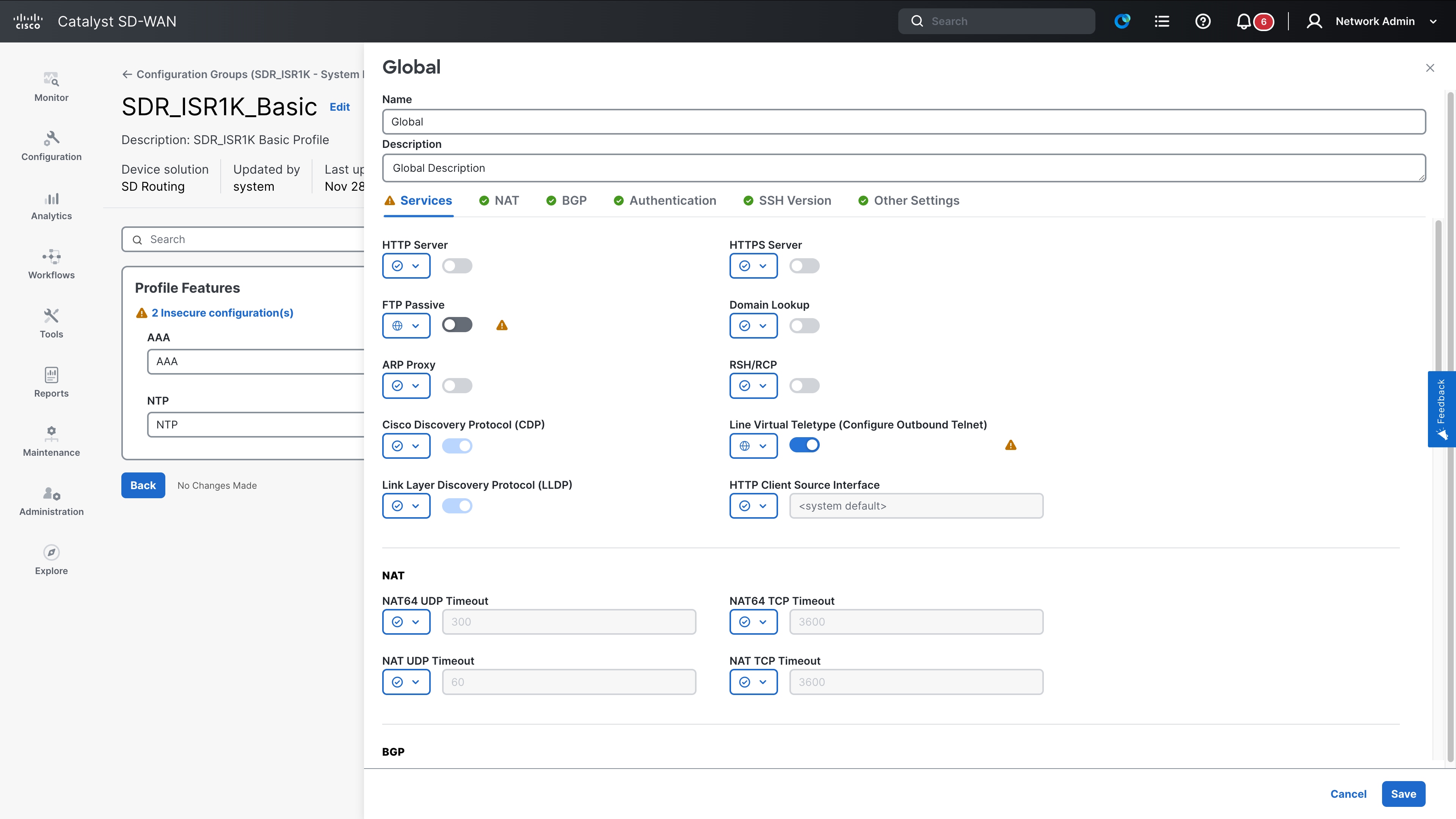
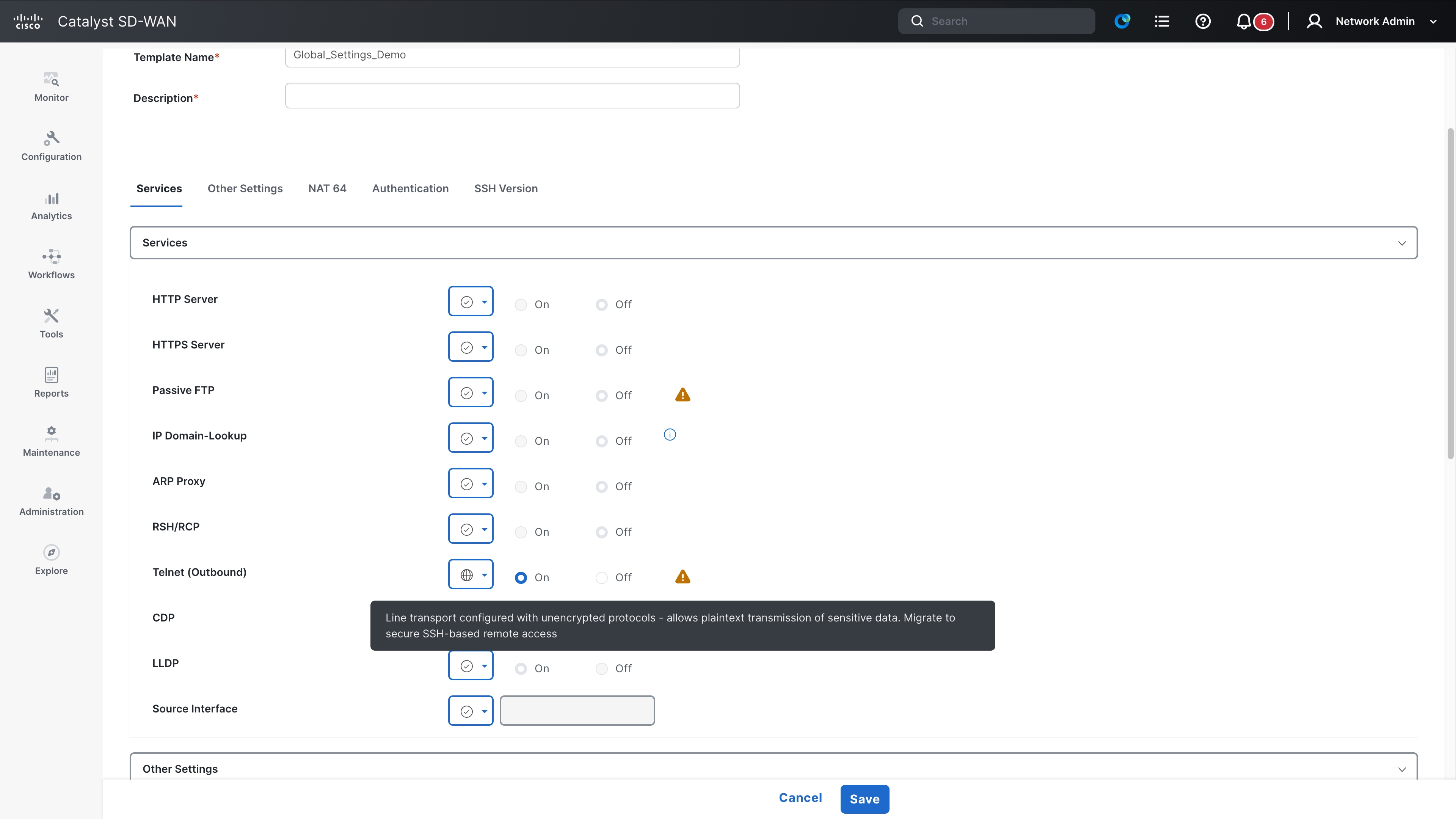
This section addresses insecure line transport configurations. Telnet is the primary insecure protocol; we recommend migrating to SSH as a secure alternative. Note that you must generate a crypto key on the device before using SSH. Enabling SSH transport without a crypto key will not allow connections to the device.
The following transport protocols are considered insecure as of IOS-XE 17.18.2:
· Telnet
· Rlog
What happens if you do not migrate?
We recommend migrating to the SSH protocol as soon as possible. If you upgrade to a later IOS-XE version that removes support for insecure commands without first migrating to SSH, the device will lock you out. This occurs because telnet (and rlogin) commands no longer function, leaving no transport protocol configured.
If you face the situation described above, physically console into the device to recover it and configure the SSH transport protocol. You must generate a crypto RSA key and enable a username and password to log in remotely to the device. The list of secure alternative commands is outlined below.
Secure alternative commands
1. Generate a crypto RSA key
crypto key generate rsa
2. Remove existing configurations (line transport configurations and enable ssh)
Line #/vty#/console
Transport input ssh
Transport output ssh
Once you configure a username and password, you enable SSH for remote access to the device.
This also applies when you use device consoles to connect to neighboring devices. After you enable SSH, you can use SSH to log in to the neighboring device. You must ensure the neighboring device is also configured to support SSH connections.
ssh -l <USERNAME> <IP_ADDRESS>
Command list
The table below provides the complete list of commands impacted by this announcement. If you are currently using any of these commands, it is strongly recommended that you transition to the secure alternative commands mentioned above.
| Command mode |
Affected command |
| Global Config |
line <x/y/z> transport output <rlogin| telnet> |
| Global Config |
line <x/y/z> transport output all |
| Global Config |
line <x/y/z> transport input <rlogin| telnet> |
| Global Config |
line <x/y/z> transport input all |
| Global Config |
line <x/y/z - x/y/z> transport output <rlogin| telnet> |
| Global Config |
line <x/y/z - x/y/z> transport output all |
| Global Config |
line <x/y/z - x/y/z> transport input <rlogin| telnet> |
| Global Config |
line <x/y/z - x/y/z> transport input all |
| Global Config |
line vty 0 n transport output <rlogin| telnet> |
| Global Config |
line vty 0 n transport output all |
| Global Config |
line vty 0 n transport input <rlogin| telnet> |
| Global Config |
line vty 0 n transport input all |
| Global Config |
telnet <IP_address> |
This section addresses insecure configurations related to HTTP. The HTTP protocol is identified as insecure, and HTTPS is recommended as the secure alternative.
The complete list of transport protocols marked insecure as of IOS-XE 17.18.2 are:
1. ip http server
2. ip bootp server
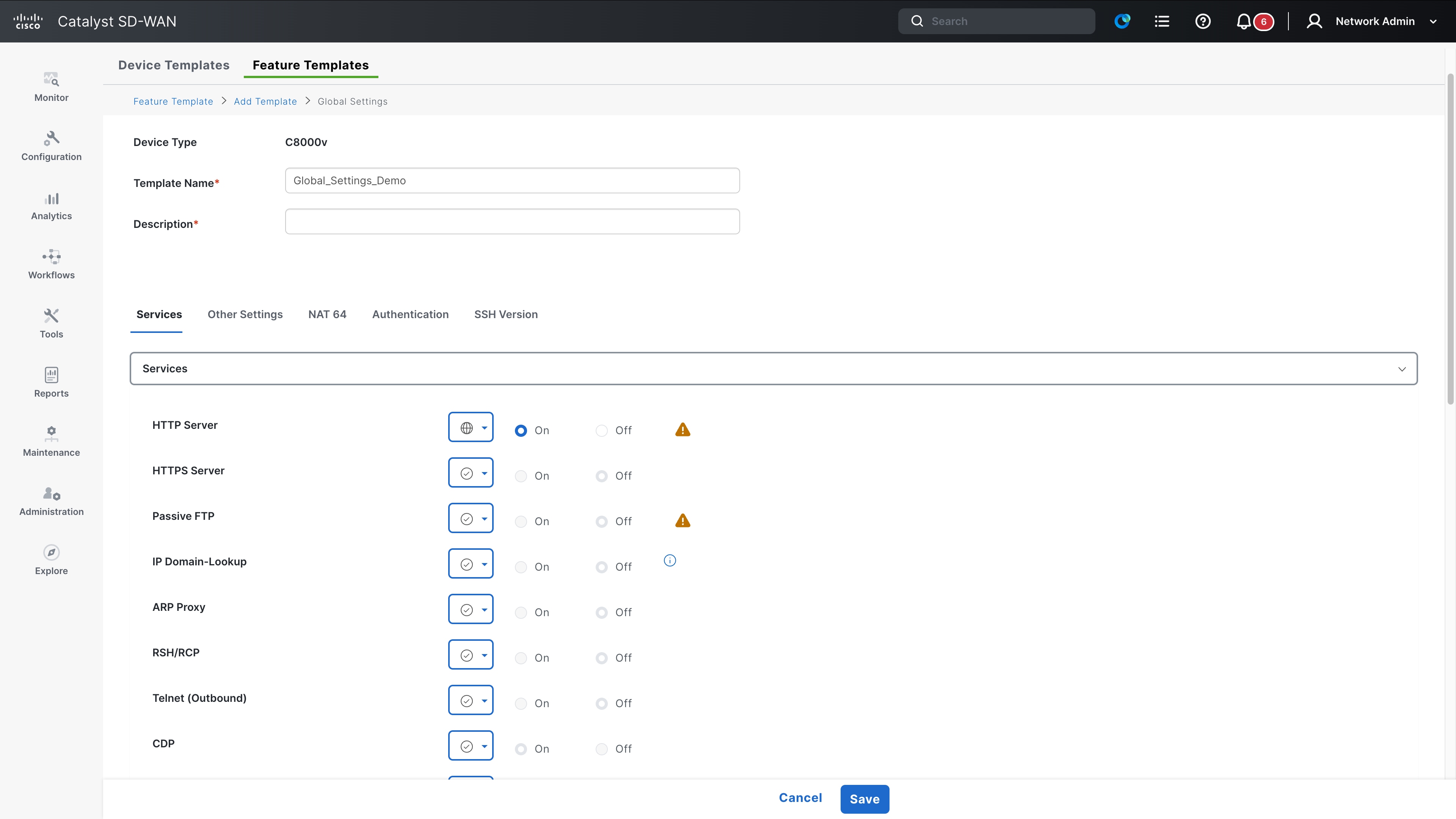
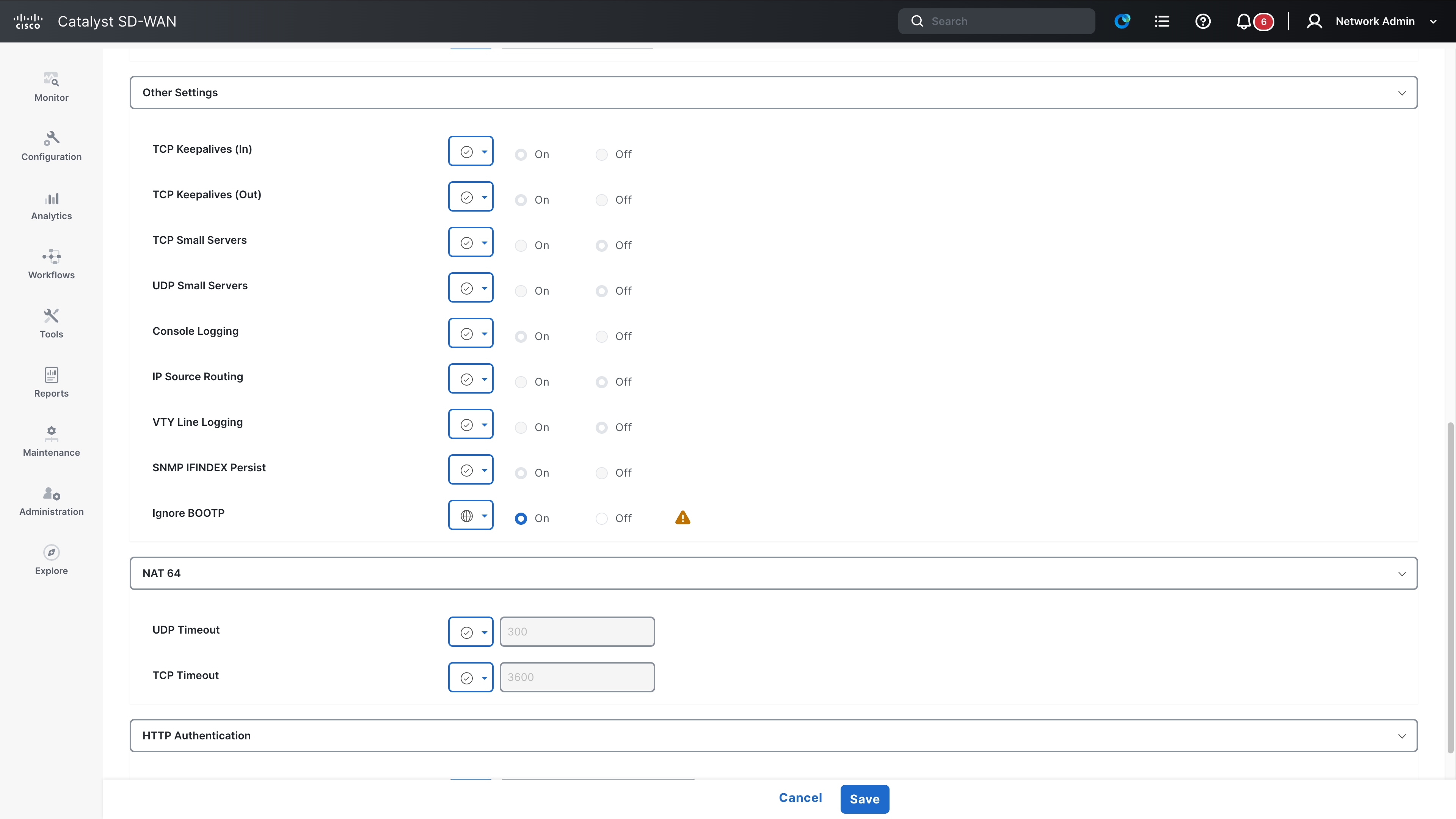
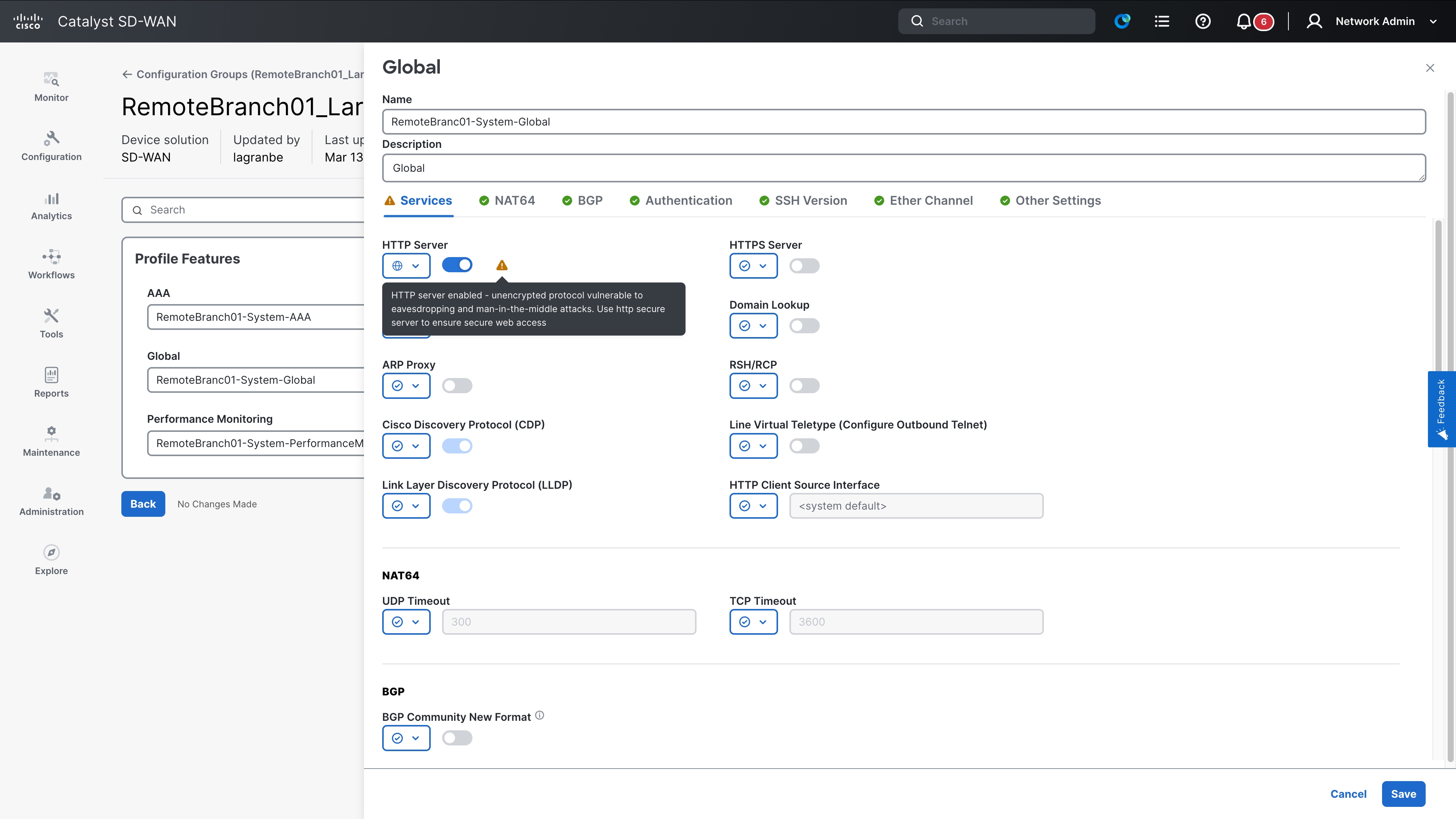
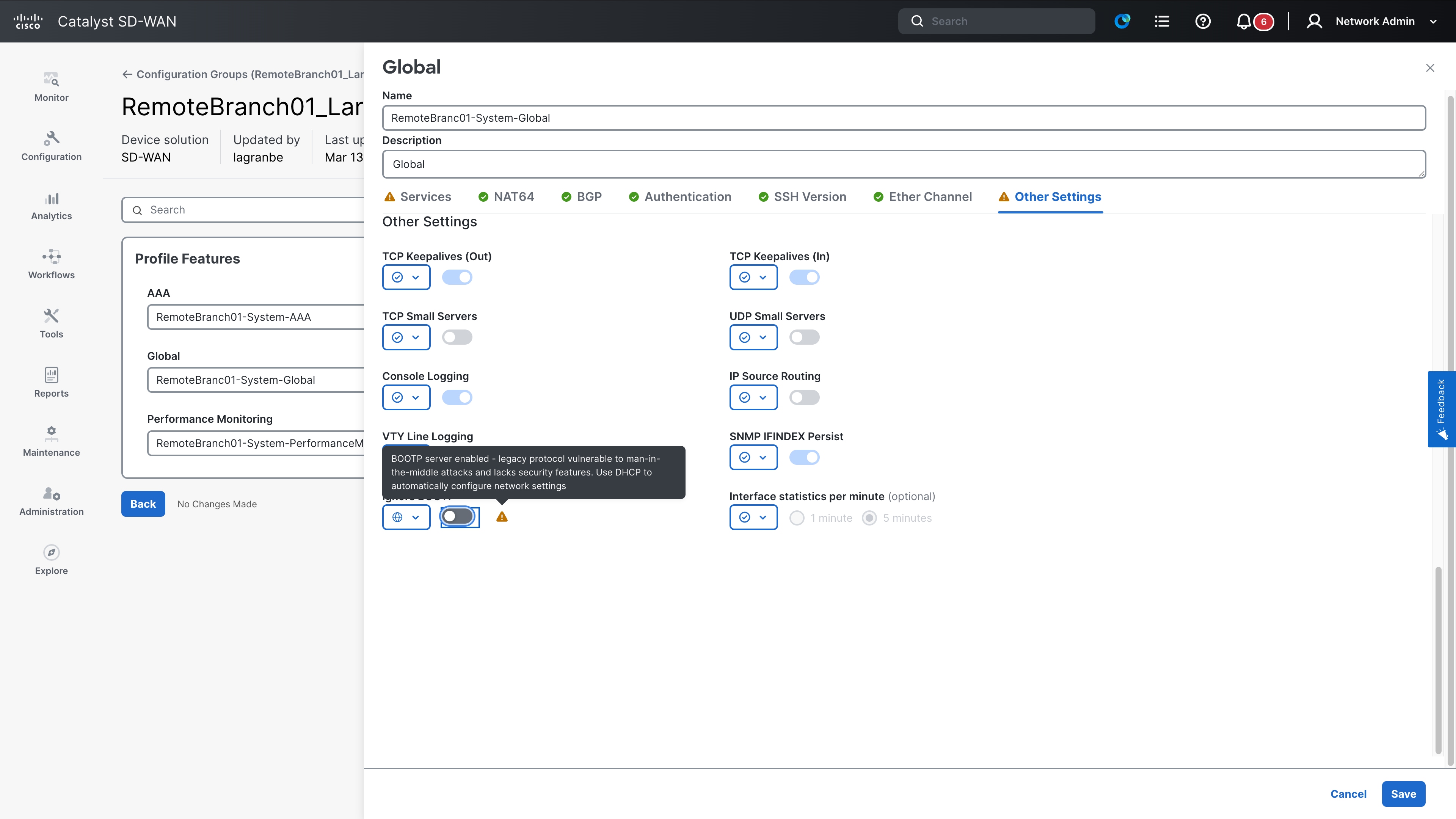
Both are found in the Global Feature template.
What happens if you do not migrate?
If you upgrade to a later IOS-XE that removes support for all insecure commands, communications over port 80 to the device will not work. This includes the web UI for the devices. If you use the web UI to configure the device, you will lock yourself out of the web UI.
Note that the upgrade will not affect communications over port 80 across the switch (pass-through traffic); this applies only to traffic over port 80 that the switch initiates or terminates. Additionally, some ciphers used over port 443 (https) are marked as insecure, and we recommend that you migrate to a secure cipher instead.
Secure alternative commands
It is recommended to migrate to an HTTPS server using port 443 instead of port 80. An example configuration is provided below.
(config) ip http secure-server
Some ciphers over 443 are also marked insecure. Migrate to a secure cipher listed below.
The complete list of affected commands is provided below.
Command list
| Command mode |
Affected command |
| Global Config |
ip http server |
| Global Config |
ip http tls-version <TLSv1.0/1.1/> |
| Global Config |
ip http client tls-version <TLSv1.0/1.1/> |
| Global Config |
ip http secure-ciphersuite ecdhe-rsa-aes-128-cbc-sha |
| Global Config |
ip http secure-ciphersuite aes-128-cbc-sha |
| Global Config |
ip http secure-ciphersuite aes-256-cbc-sha |
| Global Config |
ip http client secure-ciphersuite aes-256-cbc-sha |
| Global Config |
ip http client secure-ciphersuite aes-128-cbc-sha |
This section covers insecure configurations related to file transfer protocols. The main protocols discussed are FTP and TFTP. The recommended secure alternative is to use the SCP protocol. Note that SSH access must be enabled on the device as a prerequisite for using SCP. Refer to the section titled Line Transport for instructions on enabling SSH. Attempting an SCP transfer without SSH configured will result in transfer failure.
Full list of transport protocols marked insecure as of IOS-XE 17.18.2 are
1. FTP
2. TFTP
3. RCP
What happens if you do not migrate?
In this scenario, you must first enable SSH connections on the device (refer to the "Line transport" section for detailed steps). Once enabled, you can perform SCP transfers. The following list outlines the necessary commands.
Secure alternative commands
1. Enable ssh on the device (Refer to the Line transport section)
2. Initiate SCP transfers to and from the router.
copy scp source: destination:
Example: Copy a file from a switch to a server (IP address 10.1.1.1)
copy scp bootflash:test_file username@10.1.1.1
Copy a file from server (10.1.1.1) to switch
copy scp username_10.1.1.1:<path-to-file> bootflash:
There are several commands to specify connection details, such as the source interfaces or IP addresses for file transfers. You can include most of these directly in the SCP command itself, which eliminates the need for separate configuration commands. Additionally, you can include the username and password for the connection directly within the SCP command syntax.
Example:
ip rcmp source-interface <>
ip ftp source-interface <>
ip tftp source-interface <>
For the above commands, you can use scp with the vrf simply specified.
copy scp <source> <destination> vrf [vrf-name]
While an alternative is not needed in most use cases, you can use the following command to tweak the block size.
ip ssh bulk-mode <>
Full list of affected commands is below.
Command list
| Command mode |
Affected command |
| Exec mode |
copy ftp |
| Global Config mode |
ip ftp passive |
| Global Config mode |
ip ftp password <uint8 0..7> |
| Global Config mode |
ip ftp password < uint8 0..7> <string> |
| Global Config mode |
Switch(config) ip ftp source-interface <type> <string> |
| Global Config mode |
ip ftp username <string> |
| Exec mode |
copy <> ftp: |
| Global Config mode |
ip rcmd domain-lookup |
| Global Config mode |
ip rcmd rcp-enable |
| Global Config mode |
ip rcmd rsh-enable |
| Exec mode |
copy <> rcp: |
| Exec mode |
copy rcp: <> |
| Global Config mode |
ip rcmd remote-host |
| Global Config mode |
ip rcmd remote-username |
| Global Config mode |
ip rcmd rsh-disable-command |
| Global Config mode |
ip rcmd source-interface |
| Global Config mode |
ip tftp blocksize <> |
| Global Config mode |
ip tftp source-interface |
| Exec mode |
copy tftp: <> |
| Exec mode |
copy <> tftp: |
SNMP
This section covers insecure SNMP protocol configurations. Collecting router telemetry remains an important aspect of network maintenance and troubleshooting. The SNMP protocol is a mature solution that allows you to collect extensive information about various switch features and processes. Due to its age, many consider several SNMP commands insecure. We recommend migrating to newer technologies, such as NetConf or RestConf using YANG models, or streaming telemetry technologies like gNMI or gRPC, to collect data more securely over transport protocols like HTTPS.
If you cannot migrate away from SNMP, we recommend using SNMPv3, as it provides robust user-based authentication and message integrity, unlike SNMPv2, which relied on weak, unencrypted community strings. Additionally, we recommend using a secure cipher and password type with SNMPv3.
What happens if you do not migrate?
We recommend migrating to NetConf/RestConf, API calls, or SNMPv3 with secure ciphers and passwords. If you upgrade to an IOS-XE release that removes support for insecure commands, the system will disable your SNMP functionality. Consequently, you will no longer be able to collect information from the router using SNMP. To recover, you must reconfigure your SNMP using SNMPv3 with recommended ciphers, or migrate to RestConf/NetConf using API calls instead.
Secure alternative commands
Given the nature of SNMP, it is difficult to provide one to one mapping of commands. The amount of information collected depends on the OIDs that are polled from the router and scope of the commands make it impossible for it to be collated in this document. A good starting point would be the Netconf and restconf sections in the programmability guide below. https://www.cisco.com/c/en/us/td/docs/ios-xml/ios/prog/configuration/1718/b-1718-programmability-cg
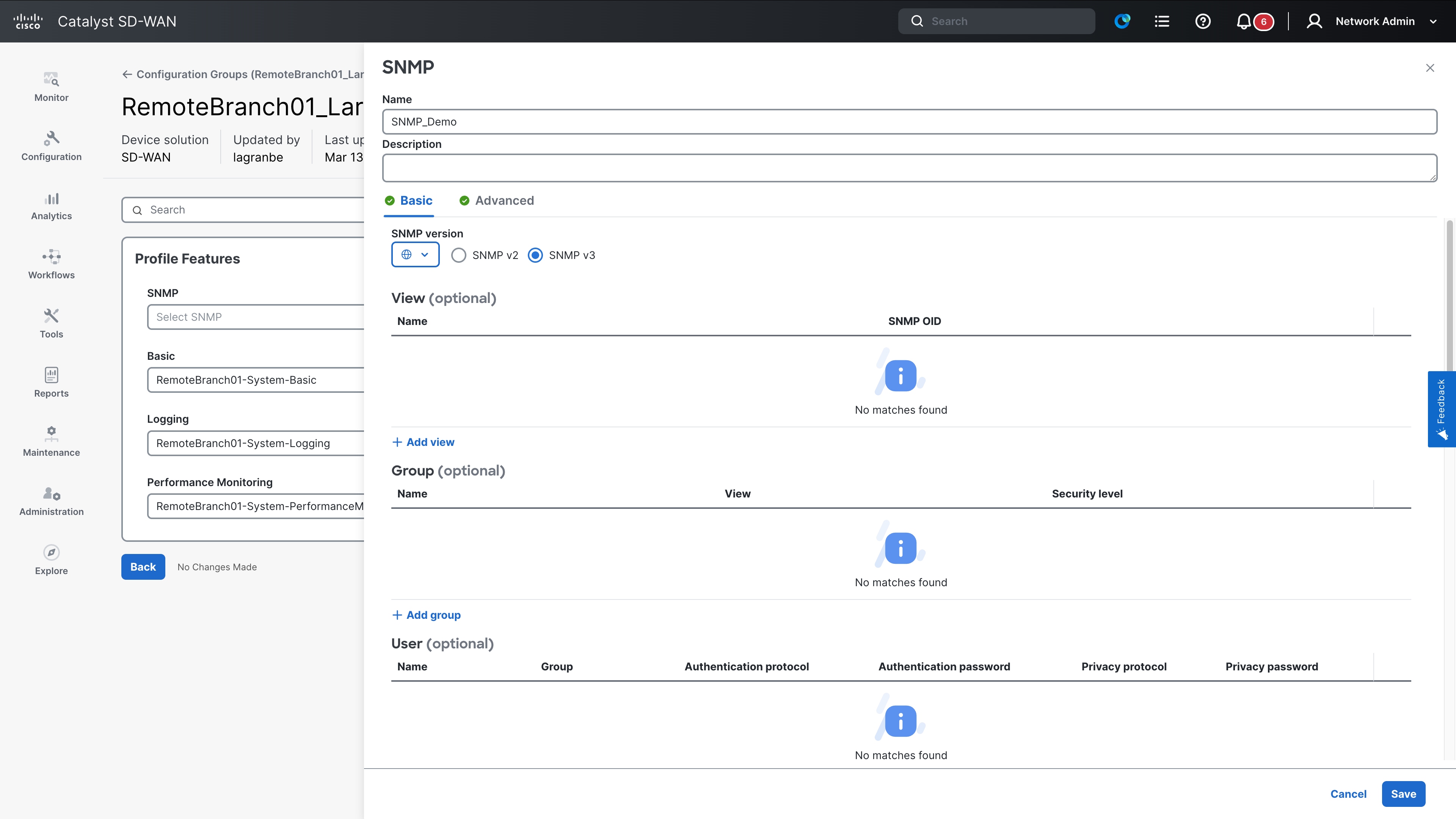
In Configuration Groups the SNMP Profile is part of the System Profile.
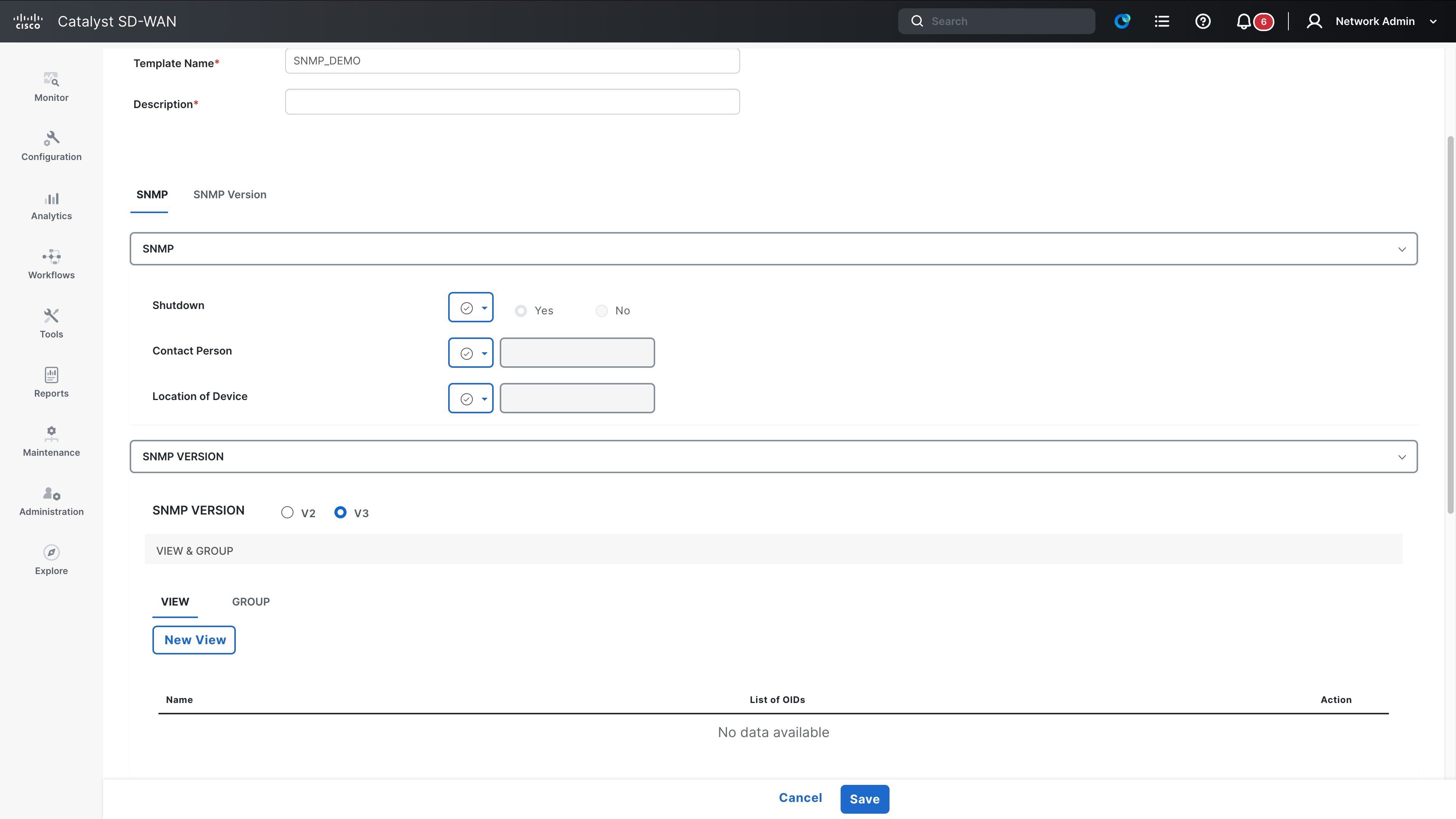
If you are using templates, locate the SNMP template and update it to V3
If you are migrating to SNMP v3 instead, one advantage is that the OIDs in use remain the same if it’s SNMP v2, SNMP v2c or SNMP v3. The only change will be to change the format in which the messages are sent. For this, enable SNMP v3 using the command below.
snmp-server group <group-name> v3 priv read <view-name> write <view-name>
snmp-server user <username> <group-name> v3 auth sha <auth-password> priv aes 256 <priv-password>
snmp-server host <NMS-IP-Address> traps version 3 priv <priv-password>
Command list
| Command mode |
Affected command |
| Global Config mode |
snmp-server user <> <> v3 auth (sha/sha2/md5) | (0, 6,7) <> priv <des> | (0,6,7) <> access <ipv6> |
| Global Config mode |
snmp-server user <> <> v3 auth (sha/sha2/md5) | (0, 6,7) <> priv <des> | (0,6,7) <> access <1-99> |
| Global Config mode |
snmp-server user <> <> v3 auth (sha/sha2/md5) | (0, 6,7) <> priv <des> | (0,6,7) <> access <std-acl> |
| Global Config mode |
snmp-server user <> <> v3 auth (sha/sha2/md5) | (0, 6,7) <> priv <3des> | (0,6,7) <> access <ipv6> |
| Global Config mode |
snmp-server user <> <> v3 auth (sha/sha2/md5) | (0, 6,7) <> priv <3des> | (0,6,7) <> access <1-99 > |
| Global Config mode |
snmp-server user <> <> v3 auth (sha/sha2/md5) | (0, 6,7) <> priv <3des> | (0,6,7) <> access <std-acl> |
| Global Config mode |
snmp-server user <> <> v3 encrypted auth (md5) access <ipv6 | (1-99) | std-acl> |
| Global Config mode |
snmp-server user <> <> v3 encrypted auth (sha/sha2/md5) | (0, 6,7) <> priv <des> | (0,6,7) <> access <ipv6> |
| Global Config mode |
snmp-server user <> <> v3 encrypted auth (sha/sha2/md5) | (0, 6,7) <> priv <des> | (0,6,7) <> access <(1-99)> |
| Global Config mode |
snmp-server user <> <> v3 encrypted auth (sha/sha2/md5) | (0, 6,7) <> priv <des> | (0,6,7) <> access <std-acl> |
| Global Config mode |
snmp-server user <> <> v3 encrypted auth (sha/sha2/md5) | (0, 6,7) <> priv <3des> | (0,6,7) <> access <ipv6> |
| Global Config mode |
snmp-server user <> <> v3 encrypted auth (sha/sha2/md5) | (0, 6,7) <> priv <3des> | (0,6,7) <> access <(1-99) > |
| Global Config mode |
snmp-server user <> <> v3 encrypted auth (sha/sha2/md5) | (0, 6,7) <> priv <3des> | (0,6,7) <> access <std-acl> |
| Global Config mode |
snmp context <> user <> auth sha <> priv aes (128|192|256) <> |
| Global Config mode |
snmp context <> user <> auth sha <> priv aes (128|192|256) <> access <ipv6> |
| Global Config mode |
snmp context <> user <> auth sha <> priv aes (128|192|256) <> access <std-acl> |
| Global Config mode |
snmp context <> user <> auth sha <> priv aes (128|192|256) <> access <1-99> |
| Global Config mode |
snmp context <> user <> auth sha <> priv aes (128|192|256) <> access <ipv6> |
| Global Config mode |
snmp context <> user <> auth sha <> priv aes (128|192|256) <> access <std-acl> |
| Global Config mode |
Snmp-server community <0|7> < > <ro|rw> access <ipv6 | (1-99) | std-acl> |
| Global Config mode |
snmp mib community-map <0|7> <> context <> (engineid | security-name|target-list) |
| Global Config mode |
snmp-server user <> <> v3 auth md5 | (0, 6,7) <> priv <des> | (0,6,7) <> |
| Global Config mode |
snmp-server user <> <> v3 auth md5 | (0, ,7) priv <3des> | (0,6,7) <> |
| Global Config mode |
snmp-server user <> <> v3 auth md5 | (0,7) <> priv <des/3des> | (0,7) <> |
| Global Config mode |
snmp-server user <> <> v3 auth md5 | (0, 6,7) <> priv <des/3des> | (0,6,7) <> |
| Global Config mode |
Snmp-server group <> v3 <auth|noauth> access (ipv6| (1-99) | std-acl) |
| Global Config mode |
Snmp-server group <> v3 priv context <>access (ipv6| (1-99) | std-acl) |
| Global Config mode |
snmp-server host <> version {1|2c} * {0|7} <community> |
| Global Config mode |
snmp-server host <> version {1|2c}* {0|7} <community> udp-port <0-65535> |
| Global Config mode |
snmp-server host <> vrf <1-65535> version {1|2c}* {0|7} <community> |
| Global Config mode |
snmp-server host <> vrf <1-65535> version {1|2c} * {0|7} udp-port <0-65535> |
| Global Config mode |
snmp-server host <> version {3} (auth|noauth) <username> |
| Global Config mode |
snmp-server host <> version (auth|noauth) <community> udp-port <0-65535> |
| Global Config mode |
snmp-server host <> vrf <1-65635> version {3} (auth|noauth) <username> |
| Global Config mode |
snmp-server host <> vrf <1-65635> version {3} (auth|noauth) <username> udp-port <0-65535> |
| Global Config mode |
snmp-server host <> version {1|2c} * {0|7} <community> |
| Global Config mode |
snmp-server host <> version {1|2c} * {0|7} <community> udp-port <0-65535> |
| Global Config mode |
snmp-server host <> vrf <1-65535> version {1|2c} * {0|7} <community> udp-port <0-65535> |
| Global Config mode |
snmp-server host <> vrf <1-65535> version {1|2c} * {0|7} <community> |
| Global Config mode |
snmp context abc user [^ ]+( (credential|access|encrypted))? auth md5 [^ ]+( access)? |
| Global Config mode |
snmp context abc user [^ ]+( (credential|access|encrypted))? auth sha [^ ]+ priv des ( access)? |
| Global Config mode |
snmp context abc user [^ ]+( (credential|access|encrypted))? auth sha [^ ]+ priv 3des ( access)? |
| Global Config mode |
snmp context abc user [^ ]+(encrypted))? auth md5 [^ ]+( access)? |
| Global Config mode |
snmp context abc user [^ ]+( (encrypted))? auth sha [^ ]+ priv des ( access)? |
| Global Config mode |
snmp context abc user [^ ]+( (encrypted))? auth sha [^ ]+ priv 3des ( access)? |
| Global Config mode |
snmp context abc user [^ ]+( (credential|access))? auth md5 [^ ]+( access)? |
| Global Config mode |
snmp context abc user [^ ]+ auth sha [^ ]+ priv des <> access <ipv6> |
| Global Config mode |
snmp context abc user [^ ]+ auth sha [^ ]+ priv 3des <> access <1-99> |
| Global Config mode |
snmp context abc user [^ ]+(encrypted))? auth md5 [^ ]+( access)? |
| Global Config mode |
snmp context abc user [^ ]+( encrypted))? auth md5 [^ ]+ priv des ( access)? |
| Global Config mode |
snmp context abc user [^ ]+( (encrypted))? auth md5 [^ ]+ priv 3des ( access)? |
| Global Config mode |
snmp-server community < > <ro|rw> |
| Global Config mode |
snmp mib community-map <> context <> (engineid | security-name|target-list) |
| Global Config mode |
snmp-server group <> (v1) |
| Global Config mode |
snmp-server group <> (v2c) |
AAA/RADIUS/ TACACS – Default Passwords and Security Warnings
This section covers these details:
Release 17.18.2 – Warnings and Behavior Changes
Starting with Cisco IOS XE Release 17.18.2, the system introduces dynamic security warnings when AAA servers are configured without TLS or secure transport options. These warnings are printed when you exit the server configuration submode and indicate that authentication traffic may be exposed to potential eavesdropping. The warnings recommend enabling secure options under the server configuration. This behavior is informational only and does not block configuration.
The warning is displayed for RADIUS, TACACS+, and LDAP servers, even if the server address has not yet been configured.
Example – RADIUS server without TLS:
Router(config)# radius server DServer
Router(config-radius-server)# exit
INSECURE DYNAMIC WARNING - Module: AAA, Command: radius server DServer,
Reason: TLS is not configured, exposing traffic to potential eavesdropping,
Remediation: Configure secure options under server to enhance security,
Submode: conf-rad-server, Parent CLI: Not Applicable
Warning: Address not yet configured.
Example – TACACS+ server without TLS:
Router(config)# tacacs server TServer
Router(config-server-tacacs)# exit
INSECURE DYNAMIC WARNING - Module: AAA, Command: tacacs server TServer,
Reason: TLS is not configured, exposing traffic to potential eavesdropping,
Remediation: Configure secure options under server to enhance security,
Submode: conf-tac-server, Parent CLI: Not Applicable
Warning: Address not yet configured.
Example – LDAP server without TLS:
Router(config)# ldap server Lserverr
Router(config-ldap-server)# exit
INSECURE DYNAMIC WARNING - Module: AAA, Command: ldap server Lserverr,
Reason: TLS is not configured, exposing traffic to potential eavesdropping,
Remediation: Configure secure options under server to enhance security,
Submode: conf-ldap-server, Parent CLI: Not Applicable
Release 26.1.1 – Warnings and Behavior Changes
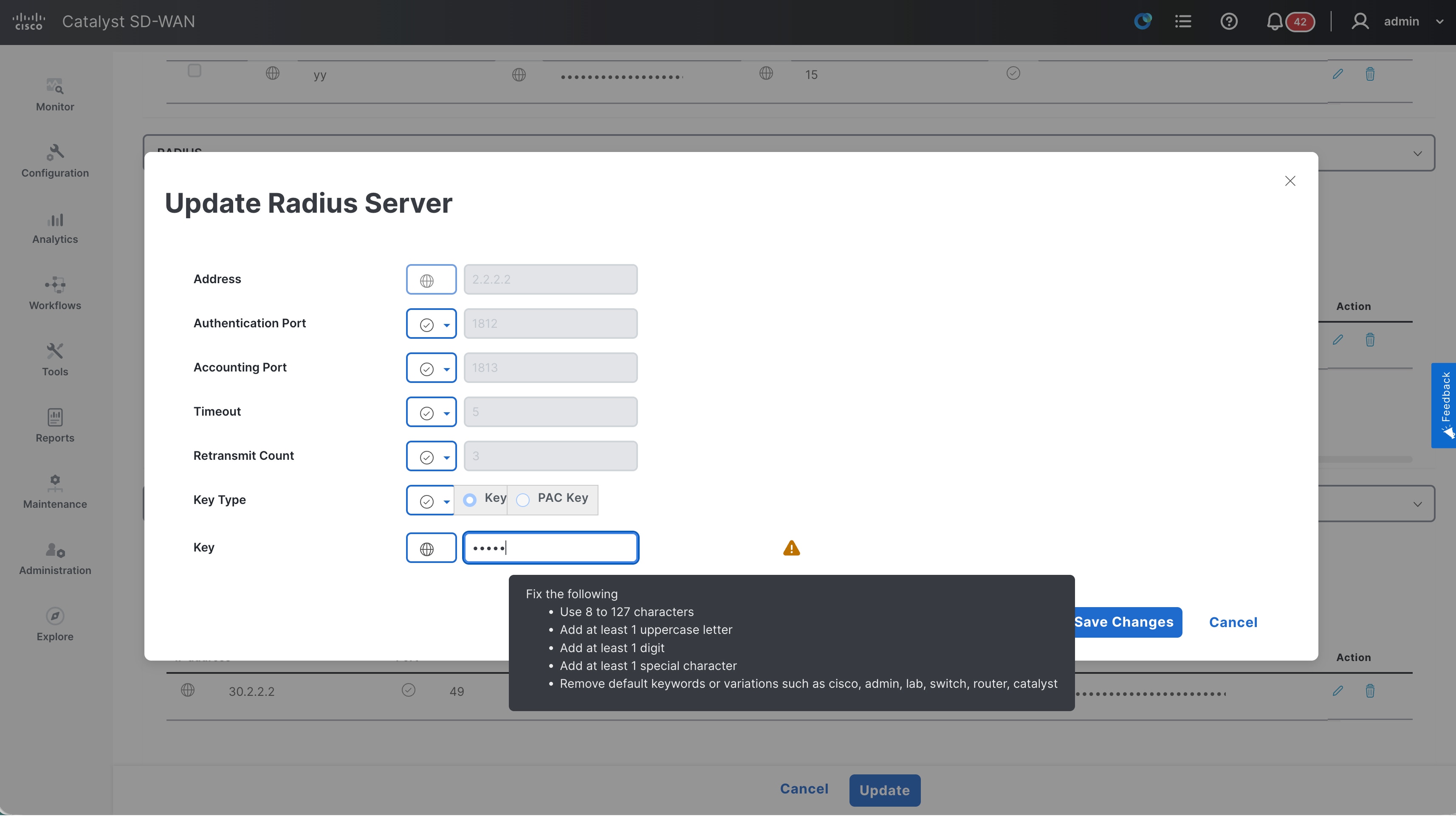
Starting with Cisco IOS XE Release 26.1.1, the AAA subsystem introduces configuration-time security warnings for default, weak, or non-compliant passwords and shared secrets.
Warnings are displayed during the configuration of the AAA CLI commands whenever the password criteria outlined below are not met.
Critical Password Requirements
Your password must meet all these criteria:
· Minimum length: 8 characters
· Character diversity: Must contain all 4 character classes:
o Uppercase letters (A-Z)
o Lowercase letters (a-z)
o Numbers (0-9)
o Special characters (!@#$%^&*())
· No username similarity: Cannot be same as username or username reversed
· No default keywords: Cannot be variants of cisco, admin, lab, switch,router, catalyst
· No character substitution: System detects common character replacements
Category 1: Password Length Violations
Rule: Password must be at least 8 characters long
Rejected Passwords:
------------------
"" ← Empty password
"1" ← 1 character
"12" ← 2 characters
"123" ← 3 characters
"1234" ← 4 characters
"12345" ← 5 characters
"123456" ← 6 characters
"1234567" ← 7 characters
"Pass1@a" ← 7 characters (even with complexity)
Error Message: "AAA password restriction failed: password too short"
Category 2: Username Similarity Violations
Rule: Password cannot be the same as username or username reversed
(case insensitive)
Rejected Password Examples:
--------------------------
Username: "testuser" → REJECTED passwords:
• "testuser" ← Exact match
• "TESTUSER" ← Case insensitive match
• "TestUser" ← Mixed case match
• "resutest" ← Username reversed
Username: "adminadm" → REJECTED passwords:
• "adminadm" ← Exact match
• "mdanimda" ← Username reversed
Error Message: "AAA password restriction failed: Password same as username
or username reversed"
Category 3: Character Class Violations
Rule: Password must contain ALL 4 character classes
Rejected Password Examples:
--------------------------
Missing Uppercase Letters:
"password123!" ← No uppercase
"mypass@123" ← No uppercase
Missing Lowercase Letters:
"PASSWORD123!" ← No lowercase
"MYPASS@123" ← No lowercase
Missing Numbers:
"Password!@#$" ← No numbers
"MyPass@#$%" ← No numbers
Missing Special Characters:
"Password123" ← No special chars
"MyPass123abc" ← No special chars
Single Character Class Only:
"ABCDEFGH" ← Only uppercase
"abcdefgh" ← Only lowercase
"12345678" ← Only numbers
"!@#$%^&*" ← Only special characters
Missing Multiple Classes:
"Password" ← Missing numbers and special chars
"password!" ← Missing uppercase and numbers
"PASSWORD1" ← Missing lowercase and special chars
Error Message: "AAA password restriction failed: Password configured should
have characters belonging to 4 classes"
Category 4: Default Keyword “Cisco” Violations
Rule: Password cannot be any variant of "cisco" (5 characters, with
substitutions)
Direct Cisco Variants:
---------------------
"cisco" ← Plain cisco
"CISCO" ← Uppercase cisco
"Cisco" ← Capitalised cisco
"CiScO" ← Mixed case cisco
"ocsic" ← Cisco reversed
"OCSIC" ← Cisco reversed uppercase
Character Substitution Variants:
-------------------------------
The system detects common character substitutions:
's' Substitutions ($ → s, 5 → s, z → s, % → s):
"ci$co" ← $ replaces s
"ci5co" ← 5 replaces s
"cizco" ← z replaces s
"ci%co" ← % replaces s
'i' Substitutions (| → i, ! → i, 1 → i):
"c|sco" ← | replaces i
"c!sco" ← ! replaces i
"c1sco" ← 1 replaces i
'o' Substitutions (0 → o):
"cisc0" ← 0 replaces o
Multiple Substitutions:
"c!$c0" ← Multiple substitutions
"C1$C0" ← Multiple substitutions uppercase
"c15c0" ← Multiple substitutions
"C!%C0" ← Multiple substitutions
Error Message: "AAA password restriction failed: Password should not be any
variant of cisco"
Category 5 – Default Keyword “Admin” Violations
Rule: Password cannot be any variant of "admin" (5 characters, with
substitutions)
Direct Admin Variants:
---------------------
"admin" ← Plain admin
"ADMIN" ← Uppercase admin
"Admin" ← Capitalized admin
"AdMiN" ← Mixed case admin
"nimda" ← Admin reversed
"NIMDA" ← Admin reversed uppercase
Character Substitution Variants:
-------------------------------
'a' Substitutions (@ → a, 4 → a, & → a):
"@dmin" ← @ replaces a
"4dmin" ← 4 replaces a
"&dmin" ← & replaces a
'i' Substitutions (| → i, ! → i, 1 → i):
"adm|n" ← | replaces i
"adm!n" ← ! replaces i
"adm1n" ← 1 replaces i
Multiple Substitutions:
"@dm1n" ← Multiple substitutions
"4DM!N" ← Multiple substitutions uppercase
"&dm|n" ← Multiple substitutions
"@DM1N" ← Multiple substitutions
Error Message: "AAA password restriction failed: Password should not be any
variant of admin"
Category 6: Default Keyword Lab Violations
Rule: Password cannot be any variant of "lab" (3 characters, with
substitutions)
Direct Lab Variants:
-------------------
"lab" ← Plain lab
"LAB" ← Uppercase lab
"Lab" ← Capitalized lab
"LaB" ← Mixed case lab
"bal" ← Lab reversed
"BAL" ← Lab reversed uppercase
Character Substitution Variants:
-------------------------------
'a' Substitutions (@ → a, 4 → a, & → a):
"l@b" ← @ replaces a
"l4b" ← 4 replaces a
"l&b" ← & replaces a
'b' Substitutions (8 → b):
"la8" ← 8 replaces b
Multiple Substitutions:
"L@8" ← Multiple substitutions uppercase
"l48" ← Multiple substitutions
"L&8" ← Multiple substitutions
Error Message: "AAA password restriction failed: Password should not be any
variant of lab"
Category 7: Default Keyword Switch Violations
Rule: Password cannot be any variant of "switch" (6 characters, with
substitutions)
Direct Switch Variants:
----------------------
"switch" ← Plain switch
"SWITCH" ← Uppercase switch
"Switch" ← Capitalized switch
"SwItCh" ← Mixed case switch
"hctiws" ← Switch reversed
"HCTIWS" ← Switch reversed uppercase
Character Substitution Variants:
-------------------------------
's' Substitutions ($ → s, 5 → s, z → s, % → s):
"$witch" ← $ replaces first s
"5witch" ← 5 replaces first s
"zwitch" ← z replaces first s
"%witch" ← % replaces first s
'i' Substitutions (| → i, ! → i, 1 → i):
"sw|tch" ← | replaces i
"sw!tch" ← ! replaces i
"sw1tch" ← 1 replaces i
't' Substitutions (7 → t, + → t):
"swi7ch" ← 7 replaces t
"swi+ch" ← + replaces t
'h' Substitutions (# → h):
"switc#" ← # replaces h
Multiple Substitutions:
"$w17c#" ← Multiple substitutions
"5W!+C#" ← Multiple substitutions
"zw1+c#" ← Multiple substitutions
"$WI7CH" ← Multiple substitutions
Error Message: "AAA password restriction failed: Password should not be any
variant of switch"
Category 8: Default Keyword Router Violations
Rule: Password cannot be any variant of "router" (6 characters, with
substitutions)
Direct Router Variants:
----------------------
"router" ← Plain router
"ROUTER" ← Uppercase router
"Router" ← Capitalised router
"RoUtEr" ← Mixed case router
"retuor" ← Router reversed
"RETUOR" ← Router reversed uppercase
Character Substitution Variants:
-------------------------------
'o' Substitutions (0 → o):
"r0uter" ← 0 replaces o
't' Substitutions (7 → t, + → t):
"rou7er" ← 7 replaces t
"rou+er" ← + replaces t
Multiple Substitutions:
"r0u7er" ← Multiple substitutions
"R0U+3R" ← Multiple substitutions uppercase
"R0U73R" ← Multiple substitutions
Error Message: "AAA password restriction failed: Password should not be any
variant of router"
Category 9: Default Keyword Catalyst Violations
Rule: Password cannot be any variant of "catalyst" (8 characters, with
substitutions)
Direct Catalyst Variants:
------------------------
"catalyst" ← Plain catalyst
"CATALYST" ← Uppercase catalyst
"Catalyst" ← Capitalized catalyst
"CaTaLySt" ← Mixed case catalyst
"tsylatac" ← Catalyst reversed
"TSYLATAC" ← Catalyst reversed uppercase
Character Substitution Variants:
-------------------------------
'a' Substitutions (@ → a, 4 → a, & → a):
"c@talyst" ← @ replaces first a
"c4talyst" ← 4 replaces first a
"c&talyst" ← & replaces first a
"cat@lyst" ← @ replaces second a
't' Substitutions (7 → t, + → t):
"ca7alyst" ← 7 replaces first t
"ca+alyst" ← + replaces first t
"catalys7" ← 7 replaces final t
"catalys+" ← + replaces final t
's' Substitutions ($ → s, 5 → s, z → s, % → s):
"cataly$t" ← $ replaces s
"cataly5t" ← 5 replaces s
"catalyzt" ← z replaces s
"cataly%t" ← % replaces s
Error Message: "AAA password restriction failed: Password should not be any
variant of catalyst"
WHAT PASSWORDS WILL BE ACCEPTED
Valid Password Examples:
-----------------------
"MyStr0ng!Pass" ← All requirements met
"C0mpl3x@Password123" ← All requirements met
"SecureNet#2024" ← All requirements met
"Admin123!Network" ← Contains DEFAULT word as substring (allowed)
"CiscoDevice@456" ← Contains DEFAULT word as substring (allowed)
"MyLabNet@789" ← Contains DEFAULT word as substring (allowed)
"SwitchConfig#123" ← Contains DEFAULT word as substring (allowed)
"RouterSetup$456" ← Contains DEFAULT word as substring (allowed)
"CatalystDevice@789" ← Contains DEFAULT word as substring (allowed)
NOTE: Passwords containing DEFAULT keywords as SUBSTRINGS are allowed.
Only exact-length matches (with character substitutions) of the DEFAULT
keywords are rejected:
• "CiscoDevice@456" is allowed (11 characters, cisco is substring)
• "ci$c0" is rejected (5 characters, exact cisco variant)
• "MyAdminPass!" is allowed (12 characters, admin is substring)
• "@dm1n" is rejected (5 characters, exact admin variant)
Character Substitution Detection Table
The system automatically detects these common character substitutions:
Original Character | Substitute Characters | Example
------------------|----------------------|--------------------------------
s | $, 5, z, % | cisco → ci$co, ci5co, cizco, ci%co
i | |, !, 1 | cisco → c|sco, c!sco, c1sco
o | 0 | cisco → cisc0
a | @, 4, & | admin → @dmin, 4dmin, &dmin
e | 3 | (used in detection)
t | 7, + | switch → swi7ch, swi+ch
b | 8 | lab → la8
g | 6, 9 | (used in detection)
h | # | switch → switc#
IMPORTANT: Character substitutions must result in exact matches of DEFAULT
keywords. Complex substitutions that create different patterns (like
"cataiyst" instead of "catalyst") are not detected as keyword variants but
may still be rejected for other reasons (missing character classes, etc.).
Best Practices for Strong Passwords
DO:
• Use at least 8 characters (12+ recommended)
• Include ALL 4 character classes
• Use unique passwords for each system
• Consider passphrases with special characters
• Use password managers for generation
DON'T:
• Reuse usernames as passwords
• Use common network equipment terms
• Use simple character substitutions (1337 speak)
• Repeat characters consecutively
• Use dictionary words without complexity
Strong Password Examples:
------------------------
"My$tr0ng!Network2024" ← Personal phrase with substitutions
"Secure#Cloud$Access99" ← Business context with complexity
"P@ssw0rd!Management#2024" ← Complex but memorable
"Network$Security!Team77" ← Team-based with complexity
Troubleshooting Common Issues
Issue: "Password too short"
Solution: Ensure password is at least 8 characters long
Issue: "Missing character classes"
Solution: Add uppercase, lowercase, numbers, AND special characters
Issue: "Consecutive characters"
Solution: Avoid typing the same character 3 times in a row
Issue: "Username similarity"
Solution: Choose a password completely different from your username
Issue: "DEFAULT keyword detected"
Solution: Avoid using cisco, admin, lab, switch, router, or catalyst
(even with number/symbol substitutions)
IMPORTANT:
When any of these criteria are violated, informational warnings are printed immediately during CLI configuration. These warnings do not block the configuration, do not affect existing deployments, and are intended to improve visibility into insecure credential usage.
This behavior applies to local user credentials, enable and line passwords, RADIUS and TACACS+ shared keys, PAC keys, dynamic authorization keys, LDAP bind passwords, AAA group server secrets, proxy and policy-device keys, and cache or filter server passwords.
AAA CLI Commands Affected
The following 33 AAA-related CLI commands print warnings in Cisco IOS XE Release 26.1.1 when the password or key does not meet the criteria documented above,
username test2 privilege 15 password sample
username test3 privilege 15 secret 0 sample
username test4 privilege 15 algorithm-type sha256 secret 0 sample
user-name test5
password 0 sample
user-name test6
secret 0 sample
user-name test6
algorithm-type sha256 secret 0 sample
radius server server1
key 0 sample
radius server server1
pac key 0 sample
radius server serve2
encryption-key 0 1234567890123456
message-auth-code-key 0 1234567890123456
auth-code-key 0 12345678901234567890
aaa server radius dynamic-author
client 1.2.3.4 server-key sample
aaa server radius dynamic-author
server-key 0 sample
tacacs server server1
key 0 cisco
aaa group server radius GRP
server-private 1.2.3.4 key 0 sample
aaa group server radius GRP
server-private 1.2.3.4 pac key 0 sample
aaa configuration pool username test2 password 0 sample
aaa configuration route username test3 password 0 sample
ldap server SVR1
bind authenticate root-dn sample password 0 sample
radius-server key 0 sample
aaa server radius sesm
key 0 sample
aaa server radius sesm
client 1.2.3.4 key 0 sample
aaa server radius proxy
key 0 sample
aaa server radius proxy
client 1.2.3.4
aaa server radius policy-device
key sample
aaa server radius policy-device
client 1.2.3.4 key 0 sample
tacacs-server key 0 sample
tacacs-server host 1.1.1.1 key 0 sample
aaa group server tacacs+ Tac--SG1
server-private 1.2.3.4 key 0 sample
aaa cache filterserver
password 0 sample
line vty 4
password 0 sample
enable password 0 sample
enable secret 0 sample
enable algorithm-type sha256 secret 0 sample
These warnings explicitly flag default passwords, weak shared secrets, predictable values, insufficient complexity, and cleartext credentials, guiding administrators toward more secure AAA configurations while preserving backward compatibility.
Miscellaneous
This section covers insecure configurations that cannot be classified into any of the other sections. Examples of the features covered in this section include the BOOTP server, NTP authentication, and the logging TLS profile.
Given the diverse nature of the features covered here, the commands and their secure alternatives are presented in the following tabular format.
What happens if you do not migrate?
It is difficult to define a general impact because the features themselves are diverse. If you upgrade to a later Cisco IOS XE release that removes support for these insecure commands, the functionality of those specific features will be impacted.
Command list
| Global config mode |
ntp authentication-key <num> md5 <string> |
Use cipher <> instead |
| Global config mode |
logging tls-profile <> |
Use tls 1.2 or later |
| Global config mode |
logging tls-profile <> |
Use cipher <> instead |
NTP Configuration in Configuration Group
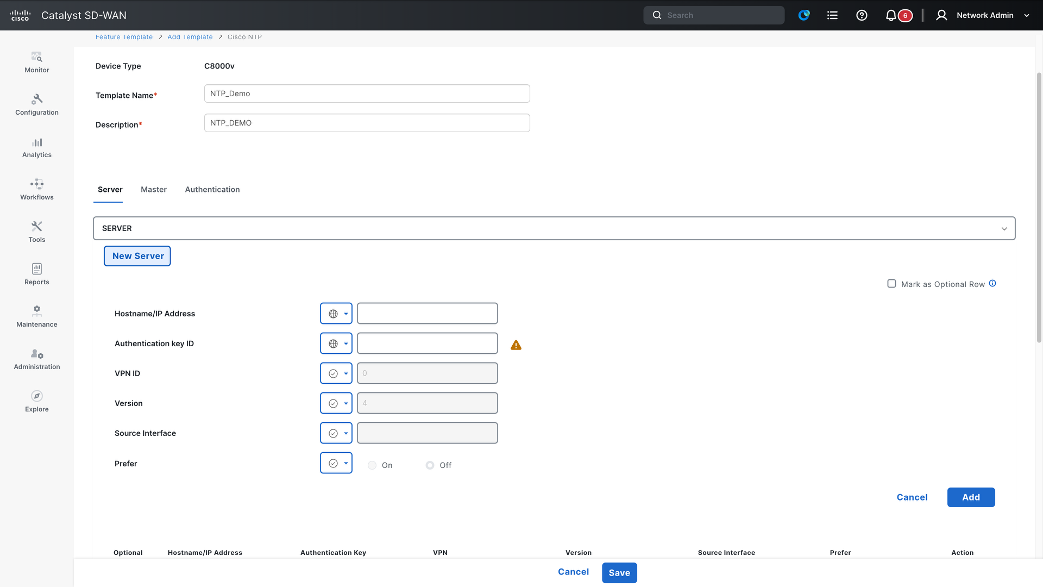
Passwords and credentials
This section covers insecure configurations pertaining to configured passwords and credentials. All type 0, 5 and 7 passwords are considered insecure, and the recommendation is to use type 6, 8 or type 9 passwords instead. This section covers passwords across different protocols, including sections covered previously.
This section covers insecure configurations related to configured passwords and credentials. Password types 0, 5, and 7 are considered insecure; therefore, it is recommended to use type 6, 8, or 9 passwords instead. This section covers passwords across various protocols, including those discussed in previous sections.
What happens if you do not migrate?
Passwords are vital for securing access to the system. Therefore, it is strongly recommended to migrate devices to newer, more secure alternatives as soon as possible. If you upgrade to a later Cisco IOS XE release that removes support for insecure commands, existing insecure passwords (type 0 or type 7) will be removed from the configuration. This will impact the functionality of the associated feature (example if SCP password is removed, SCP file transfer operations will fail).
Furthermore, if a device login password is removed, you may be locked out of the device. While you can typically recover the device by using a console connection to configure a secure password, extreme cases may result in a complete system lockout. The only way to recover would be to perform a password recovery on the device, which erases all configurations and requires the full configuration to be reapplied.
Wherever possible, an auto-conversion of type 0 and 7 passwords to type 6 will be performed starting with Cisco IOS XE 26.1.1.
Secure alternative commands
The best approach is to migrate to secure password types (for example, types 6, 8, and 9) where applicable. The following are some examples:
Enable secret 9 <password>
Command list
| Command mode |
Affected command |
| Global config mode |
enable password [1|7] <password> |
| Global config mode |
enable secret [1|7] <password> |
| Global config mode |
ip scp password <password> |
| Global config mode |
ip dhcp pool <pool_name> authorization shared-password <password> |
| Global config mode |
group-policy server username <username> password [0 7] <password> |
| Global config mode |
cts policy-server username <username> password [0 7] <password> |
| Global config mode |
cts sxp default password [0 6 7] <password> |
| Global config mode |
group-policy server username <username> password [0 7] <password> |
| Global config mode |
cts credential id <device-id> password <password> |
| Global config mode |
line vty [0 15] username <> password <> |
| Global config mode |
ip wccp web-cache password |
Closing
The first step in security is to clean up device configurations by removing known insecure commands and migrating to secure alternatives. This document covers most of the commands marked as insecure; however, it must not be treated as an exhaustive list. The primary source of truth is the logs generated on switches running Cisco IOS XE releases 17.18.2 and later.
This document will be updated as more CLIs are identified as insecure.
While efforts are underway to ensure a smooth migration to secure configurations, automatic migrations are unlikely for most of the use cases outlined above. It is strongly recommended to migrate to secure alternatives as soon as possible to ensure smooth upgrades to later Cisco IOS XE releases. Failure to migrate commands before upgrading to Cisco IOS XE 26.2.x, 27.1.x, or later will lead to operational issues and is strongly discouraged.
For additional information on resilient infrastructure, please visit the resources listed below.
This document focuses on resilient infrastructure for the Cisco Catalyst 8000 Series and Cisco 8000 Series routers. For migration recommendations, please refer to the Cisco IOS XE bulletin.
Cisco Routing IOS-XE Release 26.2.x
Disable NTP Mode Control by Default
The ntp allow mode control command enables NTP mode-control queries. Enabling these queries
without appropriate restrictions can increase the device’s exposure to denial-of-service (DoS) or distributed denial-of-service (DDoS) attacks.
What’s changing?
The ntp allow mode control is no longer enabled by default. To view and verify this change, use the show running-config all command to display default settings.
Sample output
no ntp allow mode control
Configuration and Commands
The table below provides the complete list of commands impacted by this announcement. If you are currently using any of these commands, it is strongly recommended that you transition to the secure alternative commands mentioned above.
| Command mode |
Affected command |
| Config mode |
ntp allow mode control |
SNMP
SNMP configurations that use insecure protocol versions, authentication methods, privacy algorithms, or community strings can increase the device’s exposure to security threats. These configurations are not supported in secure mode.
What’s changing?
When support for the affected CLI commands is removed, configurations that rely on insecure SNMP options will no longer be supported. As a result, users and network-management systems that depend on these configurations will no longer be able to perform the associated SNMP operations.
What to do next?
Migrate the affected SNMP configurations to SNMPv3 configurations that use the supported authentication and privacy options.
1. snmp-server user username groupname v3 [auth {sha | sha-2 {256 | 384 | 512 }} authpassword] [privacy {aes {128 | 192 | 256 } privacypassword ] [access accesslist ]
2. snmp-server group groupname {v3 {priv} [read readview ] [write writeview ] [notify notifyview ] [access accesslist ]
3. snmp-server host host [traps | informs ] [version {3 [priv ]}] username [notificationtype ]
4. snmp context contextname user username groupname v3 [auth {sha} authpassword] [privacy {aes {128 | 192 | 256 } privacypassword ] [access accesslist ]
Sample output: Configure an SNMPv3 user
snmp-server user test grp v3 auth sha cisco1234 priv aes 128 cisco1234
Sample output: Configure an SNMPv3 group
snmp-server group grp v3 priv
Sample output: Configure an SNMPv3 notification host
snmp-server host 1.1.1.1 version 3 priv test
Sample output: Configure an SNMP context
snmp mib community-map public context ctx
Configuration and Commands
The following commands contain the insecure SNMP options affected by this change. Migrate applicable configurations to the supported SNMPv3 alternatives.
| Command mode |
Affected command |
| Configuration mode |
snmp-server community string [view view-name] [ro | rw] [ipv6 nacl] [access-list-number] |
| Configuration mode |
snmp-server host host-id [traps | informs] [version {1 | 2c | 3 [auth | noauth]}] community-string [udp-port port-number] [notification-type] |
| Configuration mode |
snmp-server group [groupname {v1 | v2c | v3 [auth | noauth]}] [read readview] [write writeview] [notify notifyview] [access access-list] |
| Configuration mode |
snmp mib community-map communityname [context contextname] [engineid engineid] [security-name securityname] [target-list upnlistname] |
| Configuration mode |
snmp-server user username groupname [remote host [udp-port port] [vrf vrfname]] {v1 | v2c | v3 [encrypted] [auth md5 authpassword]} [privacy {des | 3des} privacypassword] {aclnumber | aclname} |
NTP, SCP, SFTP, and FTP Password Encryption
The NTP, SCP, SFTP, and FTP configuration commands can accept passwords stored in cleartext as type 0 or protected using the weak type 7 method. These credentials are automatically converted to type 6 when a master key is configured, and password encryption AES is enabled on the device.
What’s changing?
Upgrade Behavior
When a device is upgraded from an earlier release, such as Release 17.18.x, to Release 26.2.1, existing type 0 and type 7 passwords are converted to type 6 and stored in the configuration if both of the following conditions are met:
3. A master key is configured.
4. password encryption aes is enabled on the device.
NTP Authentication Keys
Type 0 and type 7 values configured with the following command are automatically converted to type 6 when the required master key and AES password-encryption configuration are present:
ntp authentication-key <key-number> <encryption-algorithm> <key-string> <0/6/7>
The resulting configuration no longer displays the password using encryption type 0 or type 7.
SCP Passwords
A plaintext password configured with the following command is automatically converted to type 6 when the required master key and AES password-encryption configuration are present:
ip scp password <0/6/7> <password>
Note: The plaintext password is not stored in the resulting configuration.
SFTP Passwords
Type 0 and type 7 values configured with the following command are automatically converted to type 6 when the required master key and AES password-encryption configuration are present:
ip sftp password <0/6/7> <password>
The resulting configuration no longer displays the password using encryption type 0 or type 7.
FTP Passwords
A plaintext password configured with the following command is automatically converted to type 6 when the required master key and AES password-encryption configuration are present:
ip ftp password <encryption-type> <password>
The plaintext password is not stored in the resulting configuration.
FTP Password Length Changes in Release 26.2.1
Change in the maximum supported FTP password lengths:
| Password type |
Before Release 26.2.1 |
Release 26.2.1 |
| Cleartext (type 0) |
Up to 25 characters |
Up to 20 characters |
| Type 7 |
Up to 52 characters |
Up to 42 characters |
In Release 26.2.1, a cleartext (type 0) FTP password longer than 20 characters is truncated when configured.
MPLS LDP Passwords
Type 0 and type 7 passwords configured with the following MPLS LDP commands are automatically converted to type 6 when the required master key and AES password-encryption configuration are present:
mpls ldp neighbor 1.1.1.1 password <0/6/7> <password>
mpls ldp password fallback <0/6/7> <password>
mpls ldp password option 1 for <acl-name> <0/6/7> <password>
The resulting configuration stores and displays the passwords as type 6 instead of type or type 7.
HTTP Client Passwords
Type 0 and type 7 passwords configured with the following HTTP client command are automatically converted to type 6 when the required master key and AES password-encryption configuration are present:
ip http client password <0/6/7> <password>
The resulting configuration stores and displays the password as type 6 instead of type 0 or type 7.
Configuration and Commands
The following commands are affected by the password-encryption changes:
| Command mode |
Affected command |
| Configuration mode |
ntp authentication-key <key-number> <encryption-algorithm> <key-string> <0/6/7> |
| Configuration mode |
ip scp password <0/6/7> <password> |
| Configuration mode |
ip sftp password <0/6/7> <password> |
| Configuration mode |
ip ftp password <encryption-type> <password> |
| Configuration mode |
mpls ldp neighbor 1.1.1.1 password <0/6/7> <password> |
| Configuration mode |
mpls ldp password fallback <0/6/7> <password> |
| Configuration mode |
mpls ldp password option 1 for <acl-name> <0/6/7> <password> |
| Configuration mode |
ip http client password <0/6/7> <password> |
FTP, TFTP, Telnet, and HTTP Security Warnings
FTP, TFTP, RCP, HTTP, and Telnet are insecure protocols that can expose transmitted information to security threats. When a user enters a command that uses an insecure protocol, the device either displays a security warning or rejects the operation, depending on the command mode and the device’s system security mode.
What’s changing?
Configuration Commands
In secure mode, configuration commands that reference an insecure protocol can be accepted, but the device displays a security warning. The warning identifies the affected command, explains why the protocol is considered insecure, and recommends a secure alternative.
For example, configuring TFTP for SNMP file transfers produces the following warning:
Router(config)# snmp-server file-transfer access-group 1 protocol tftp
SECURITY WARNING -
Module: SNMP
Command: snmp-server file-transfer access-group 1 protocol tftp
Reason: Usage of weak file transfer protocol like FTP/TFTP/RCP/HTTP
Description: SNMP file transfer using TFTP/FTP/RCP protocol
Remediation: Use secure File Transfer protocol like SFTP/HTTPS/SCP
The warning alerts the user to the security risk, but the configuration command is not rejected.
EXEC Commands
In secure mode, an EXEC command that attempts to perform an insecure operation is rejected. The device displays an error that identifies the affected command, explains why the operation is not permitted, and recommends a secure alternative.
For example, attempting a TFTP file transfer in secure mode produces the following result:
Router# copy tftp: bootflash:
%Error: Insecure configurations are not permitted in secure mode.
To proceed, set the system mode to insecure using the command
system mode insecure, and then try again.
Module: IFS
Command: copy tftp:/// bootflash:
Reason: Usage of weak file transfer protocol like FTP/TFTP/RCP/HTTP
Remediation: Use secure File Transfer protocol like SFTP/HTTPS/SCP
%ERROR: Security policy check failed, configuration can't be applied
The operation does not proceed while the device is in secure mode.
Recommended Action
Replace insecure file-transfer protocols with one of the secure alternatives identified in the security message:
SCP
SFTP
HTTPS
Using a secure alternative allows the file-transfer operation to remain compatible with secure mode.
Configuration and Commands
The following examples illustrate the commands affected by this behavior:
| Command mode |
Affected command |
Behavior in secure mode |
| Configuration mode |
snmp-server file-transfer access-group 1 protocol tftp |
The configuration is accepted, and a security warning is displayed. |
| EXEC mode |
Copy <source> <destination> |
The operation is rejected, and an error message is displayed. |
Enable SSH Host-Key Checking by Default
SSH host-key checking enables a device acting as an SSH client to verify an SSH server's identity before establishing a connection. This verification helps prevent the client from connecting to unexpected servers.
In earlier releases, strict host-key checking could only be enabled or disabled. When enabled, the SSH server’s host key had to be added manually to the IOS host-key database before the first connection. If the database did not contain a matching key, the connection was rejected.
Release 26.2.1 introduces accept-new mode, which uses Trust On First Use (TOFU). This mode becomes the default SSH host-key-checking behavior.
Behavior and Security Impact
Trust On First Use Mode
In accept-new mode, the device trusts an unknown SSH server during the first successful connection and automatically stores the server’s host key in the TOFU host-key database.
ip ssh stricthostkeycheck accept-new
During subsequent connections, the device compares the host key presented by the server with the stored key:
If the keys match, the connection can proceed.
If the keys do not match, the connection is rejected.
A server can have an entry in either the TOFU-learned host-key database or the manually configured host-key database, but not in both.
Strict Mode
Strict mode requires the server’s host key to be present in the host-key database before a connection can be established.
ip ssh stricthostkeycheck
In earlier releases, strict mode checks only manually configured host-key entries. In Release 26.2.1, strict mode checks both manually configured and TOFU-learned entries. If no matching entry is found, the connection is rejected.
Disabled Host-Key Checking
The following command disables SSH host-key checking:
no ip ssh stricthostkeycheck
When host-key checking is disabled, the device does not validate the SSH server’s host key. This behavior does not change in Release 26.2.1.
Default Behavior
| Behavior |
Earlier Releases |
Release 26.2.1 |
| Default mode |
no ip ssh stricthostkeycheck |
ip ssh stricthostkeycheck accept-new |
| Running-configuration visibility |
The default command is not NVGENed. |
The accept-new command is NVGENed and visible in the running configuration. |
| TOFU support |
Not supported. |
Supported and enabled by default. |
| First connection to an unknown server |
In strict mode, the connection is rejected unless the server key was added manually. |
In accept-new mode, the server is trusted during the first successful connection and its key is stored automatically. |
| Subsequent connections |
Strict mode checks manually configured entries. |
The connection is checked against the stored TOFU-learned or manually configured entry. A host-key mismatch causes the connection to be rejected. |
Recommended Action
The default accept-new mode automatically learns a server’s host key during the first successful connection and validates that key during subsequent connections.
Use strict mode when the server’s host key must be known and stored before the first connection:
ip ssh stricthostkeycheck
For strict mode, manually add the server’s host key to the host-key database:
ip ssh pubkey chain server <server-ip> <host-key>
Configuration and Commands
| Behavior |
Earlier Releases |
Release 26.2.1 |
| Configuration mode |
ip ssh stricthostkeycheck accept-new |
Enables TOFU host-key checking. This is the default in Release 26.2.1. |
| Configuration mode |
ip ssh stricthostkeycheck |
Enables strict host-key checking. |
| Configuration mode |
no ip ssh stricthostkeycheck |
Disables SSH host-key checking. |
| Configuration mode |
ip ssh pubkey chain server <server-ip> <host-key> |
Adds a server host key manually. |
| EXEC mode |
show ip ssh pubkey server <all | server-ip> |
Displays manually configured and TOFU-learned entries. |
| EXEC mode |
clear ip ssh pubkey server <all | server-ip> |
Removes TOFU-learned entries. |
Verify the Host-Key Database
Use the following command to display both manually configured and TOFU-learned entries:
show ip ssh pubkey server all
Sample output:
Configured Entries:
12.2.2.2 ssh-rsa c15a59308791dd44b39e58cedd7c8cd90e5b28bcaaef8c4bdd4e81193d40498d
13.3.3.3 ecdsa-sha2-nistp384 8b67d855fdeda0e927af13635f9e860c300d805f4655e02f2bb31535b7a78317
Learned TOFU Entries:
11.1.1.1 ssh-rsa 91ff8eba27586baf5b004244a356bb280b968f37a12525c210ec20eaa1e4bc8c
11.1.1.2 ssh-rsa 20529426ba1f6989d59ce770d98c986811983e3984c94e56d0bc211b7875fd92
Clear TOFU-Learned Entries
Use the following command to remove a TOFU-learned entry for a specific server or to clear all learned entries:
clear ip ssh pubkey server <server-ip | all>
Available options include:
A.B.C.D IPv4 address
X:X:X:X::X IPv6 address
all Clear all public keys
DHCP Password Encryption
DHCP-related configuration commands can store passwords in cleartext as type 0 or protect them using the weak type 7 method. These storage methods provide insufficient protection for device credentials.
Release 26.2.1 improves credential security by converting affected type 0 and type 7 passwords to type 6 when the device has a master key and password encryption aes enabled.
Behavior and Security Impact
IPv6 DHCP Framed Passwords
The following command no longer stores passwords as type 0 or type 7:
ipv6 dhcp framed password <0/6/7> <password>
When a user configures a type 0 or type 7 password, the device automatically converts it to type 6 if:
A master key is present.
Password encryption aes is enabled.
The resulting configuration stores and displays the password as type 6.
DHCP Authorization Shared Passwords
The following command no longer stores the shared password in cleartext:
authorization shared-password <0/6> <password>
When a user configures a type 0 password, the device automatically converts it to type 6 if a master key is present and password encryption aes is enabled.
Upgrade Behavior
When a device upgrades from an earlier release, such as Release 17.18 or 26.1.1, to Release 26.2.1, the device converts affected type 0 and type 7 DHCP passwords to type 6 if:
A master key is present.
password encryption aes is enabled.
The device then stores the converted passwords as type 6.
Recommended Action
Before upgrading to Release 26.2.1 or configuring an affected password, verify that the device has a master key and password encryption aes enabled. These settings allow the device to convert an insecure password to type 6.
Configuration and Commands
| Command mode |
Affected command |
| Interface configuration mode |
ipv6 dhcp framed password <0/6/7> <password> |
| DHCP pool configuration mode |
authorization shared-password <0/6> <password> |
Example configuration contexts:
Router(config)# interface <interface-name>
Router(config-if)# ipv6 dhcp framed password <0/6/7> <password>
Router(config)# ip dhcp pool <pool-name>
Router(dhcp-config)# authorization shared-password <0/6> <password>
Disable the HTTPS Server by Default on New Deployments
The HTTPS server provides secure web-based access to the device. On devices that start with a fresh configuration, the device disables the HTTPS server by default. Disabling an unused management service reduces the device’s exposed services.
Users who require HTTPS server functionality can enable it explicitly with the following configuration command:
ip http secure-server
Behavior and Security Impact
New Deployments
The device does not enable ip http secure-server by default when it starts with a fresh configuration or as a greenfield deployment.
Users must explicitly enable the HTTPS server when their deployment requires web-based device access.
Day 0 Exceptions
During Day 0 initialization, supported platforms can programmatically enable ip http secure-server as part of their initial platform configuration workflow.
This exception allows platforms that require HTTPS during initialization to enable the service without manual configuration.
Existing Deployments
This change does not affect brownfield deployments during an upgrade or downgrade. Existing devices retain their HTTPS server configuration.
Recommended Action
No action is required when the deployment does not use the device’s HTTPS server.
If the deployment requires HTTPS server functionality, enable it explicitly:
ip http secure-server
Configuration and Commands
| Command mode |
Affected command |
Purpose |
| Global configuration mode |
ip http secure-server |
Enables the HTTPS server |
Plain RADIUS deployments can expose systems to BlastRadius when devices do not send or validate the Message-Authenticator attribute. The send-ma and validate-ma options help mitigate this risk.
What’s changing?
Cisco IOS XE supported the send-ma and validate-ma options before Cisco IOS XE Release 26.2.1. From Cisco IOS XE Release 26.2.1, the device displays security warnings when users configure a RADIUS server, private RADIUS server, or dynamic-authorization client without the applicable send-ma or validate-ma options.
◦ send-ma directs the device to include the Message-Authenticator attribute in RADIUS requests.
◦ validate-ma directs the device to validate the Message-Authenticator attribute in RADIUS responses.
For dynamic-authorization clients:
◦ send-ma directs the device to include the Message-Authenticator attribute in every Change of Authorization (CoA) or Packet of Disconnect (PoD) response.
◦ validate-ma directs the device to validate the Message-Authenticator attribute in every CoA or PoD request.
The device accepts the configuration but displays a warning that recommends enabling the missing option. Release 26.2.1 does not enable these options by default because some external RADIUS implementations might not process the Message-Authenticator attribute in every packet.
Sample Output: Missing Message-Authenticator Options
The following example shows the warnings that the device displays when a user configures a RADIUS server without send-ma and validate-ma:
Router(config)# radius server RADSERVER
Router(config-radius-server)# exit
SECURITY WARNING -
Module: AAA
Command: radius server RADSERVER
Reason: send-ma is not enabled. The device might not send the
Message-Authenticator attribute, which can leave some use cases
vulnerable to BlastRadius.
Remediation: Enable send-ma for mitigation.
SECURITY WARNING -
Module: AAA
Command: radius server RADSERVER
Reason: validate-ma is not enabled. The device might not validate
the Message-Authenticator attribute, which can leave some use cases
vulnerable to BlastRadius.
Remediation: Enable validate-ma for mitigation.
Sample Output: Private RADIUS Server Without Message-Authenticator Options
The following example shows the warnings that the device displays when a user configures a private RADIUS server without send-ma and validate-ma:
Router(config)# aaa group server radius RADGROUP
Router(config-sg-radius)# server-private 1.1.1.1 key Cisco@12345
SECURITY WARNING -
Module: AAA
Command: server-private 1.1.1.1 key *
Reason: send-ma is not enabled. The device might not send the
Message-Authenticator attribute, which can leave some use cases
vulnerable to BlastRadius.
Remediation: Enable send-ma for mitigation. The option will be
enabled by default in a future release.
Submode: sg-radius
Parent CLI: aaa group server radius RADGROUP
SECURITY WARNING -
Module: AAA
Command: server-private 1.1.1.1 key *
Reason: validate-ma is not enabled. The device might not validate
the Message-Authenticator attribute, which can leave some use cases
vulnerable to BlastRadius.
Remediation: Enable validate-ma for mitigation. The option will be
enabled by default in a future release.
Submode: sg-radius
Parent CLI: aaa group server radius RADGROUP
Sample Output: Dynamic-Authorization Client Without Message-Authenticator Options
The following example shows the warnings that the device displays when a user configures a RADIUS dynamic-authorization client without send-ma and validate-ma:
Router(config)# aaa server radius dynamic-author
Router(config-locsvr-da-radius)# client 1.1.1.1 vrf RED server-key Cisco@12345
SECURITY WARNING -
Module: AAA
Command: client 1.1.1.1 vrf RED server-key *
Reason: send-ma is not enabled. The device might not send the
Message-Authenticator attribute, which can leave some use cases
vulnerable to BlastRadius.
Remediation: Enable send-ma for mitigation. The option will be
enabled by default in a future release.
Submode: radius-da-locsvr
Parent CLI: aaa server radius dynamic-author
SECURITY WARNING -
Module: AAA
Command: client 1.1.1.1 vrf RED server-key *
Reason: validate-ma is not enabled. The device might not validate
the Message-Authenticator attribute, which can leave some use cases
vulnerable to BlastRadius.
Remediation: Enable validate-ma for mitigation. The option will be
enabled by default in a future release.
Submode: radius-da-locsvr
Parent CLI: aaa server radius dynamic-author
Deprecated Commands
Release 26.2.1 deprecates the global and RADIUS server-group-level send-ma and validate-ma commands. Configure these options for each individual RADIUS server instead.
Sample output: Deprecated Global RADIUS Commands
Router(config)# radius-server send-ma
% Command accepted but obsolete, unreleased or unsupported;
see documentation.
<radius-server send-ma> will be deprecated.
Configure send-ma under <radius server> configuration mode.
Router(config)# radius-server validate-ma
% Command accepted but obsolete, unreleased or unsupported;
see documentation.
<radius-server validate-ma> will be deprecated.
Configure validate-ma under <radius server> configuration mode.
Sample output: Deprecated RADIUS Server-Group Commands
Router(config)# aaa group server radius RADGRP
Router(config-sg-radius)# send-ma
% Command accepted but obsolete, unreleased or unsupported;
see documentation.
<send-ma> under <aaa group server radius> will be deprecated.
Configure send-ma using the server-private command.
Router(config-sg-radius)# validate-ma
% Command accepted but obsolete, unreleased or unsupported;
see documentation.
<validate-ma> under <aaa group server radius> will be deprecated.
Configure validate-ma using the server-private command.
For private RADIUS servers, configure the options for each server-private entry instead of applying them at the server-group level.
Warning Visibility
Release 26.2.1 records the following AAA security warnings in the insecure-warning operational database:
◦ RADIUS, TACACS+, or LDAP server configurations that do not use TLS.
◦ AAA passwords or keys that do not meet the security requirements.
◦ RADIUS configurations that do not enable send-ma or validate-ma.
Use the following command to display active warnings:
show system insecure warning
Cisco SD-WAN Manager can also display these warning records for managed IOS XE devices.
Recommended Action
Verify that each external RADIUS server supports the Message-Authenticator attribute. Then configure send-ma and validate-ma for each individual RADIUS server, private-server entry, or dynamic-authorization client, as applicable.
Configuration and Commands
| Command mode |
Affected command |
| RADIUS server configuration mode |
send-ma |
| RADIUS server configuration mode |
validate-ma |
| RADIUS server-group configuration mode |
server-private <server-address> send-ma validate-ma |
| RADIUS dynamic-authorization configuration mode |
client <client-address> send-ma validate-ma |
Proxy ARP allows a router to answer ARP requests on behalf of hosts on other network segments. When Proxy ARP is enabled, the router responds with its own MAC address, allowing devices on different subnets to communicate.
Cisco changes the default Proxy ARP behavior in two phases to maintain compatibility while moving to a more secure default.
| Release |
Default behavior |
Configuration impact |
| Release 26.1.1 |
Proxy ARP remains enabled by default. |
The running configuration continues to display ip proxy-arp for backward compatibility. |
| Release 26.2.1 and later |
Proxy ARP is disabled by default. |
Users who require Proxy ARP must enable it explicitly. |
Configuration and Commands
Explicitly configure ip proxy-arp when your deployment requires Proxy ARP.
Closing
For additional information on resilient infrastructure, please visit the resources listed below.
https://www.cisco.com/c/en/us/about/trust-center/resilient-infrastructure.html
This document focuses on resilient infrastructure for the Cisco Catalyst 8000 Series and Cisco 8000 Series routers. For migration recommendations, please refer to the Cisco IOS XE bulletin.
Cisco Catalyst SD-WAN Control Components: Secure CLI Commands and UI Equivalents
Cisco Catalyst SD-WAN Release 26.1.x
Cisco Catalyst SD-WAN is already aligned with our security goals in 17.18.2 , requiring no specific changes for this release. These are the changes in Release 26.1.1:
· Weak Cipher
· AAA/Radius/TACACS
· SNMP
· SSH
· Logging Protocol
SDWAN Manager - Insecure configurations tab
Insecure configurations tab overview
Configurations that no longer meet current security requirements and increase the risk of exploitation are considered insecure. The Insecure Configurations tab in Cisco Catalyst SD-WAN enables administrators to identify and remediate these vulnerabilities. It offers centralized visibility and actionable insights into insecure settings across devices, configuration groups, and templates managed by Cisco SD-WAN Manager.
For more information, refer to Insecure Configuration Management section.
Benefits of visibility into insecure configurations
· Centralized visibility: Offers a consolidated dashboard to track insecure configurations present in the network.
· Actionable guidance: Provides remediation steps for each detected insecure configuration, helping maintain compliance and security.
· Operational assurance: Enables administrators to identify, prioritize, and resolve insecure settings before critical operations such as upgrades.
Enable insecure configuration management
1. From Cisco SD-WAN Manager, choose Admin > Settings > Insecure Configuration Mode.
2. Toggle the button to Enable.
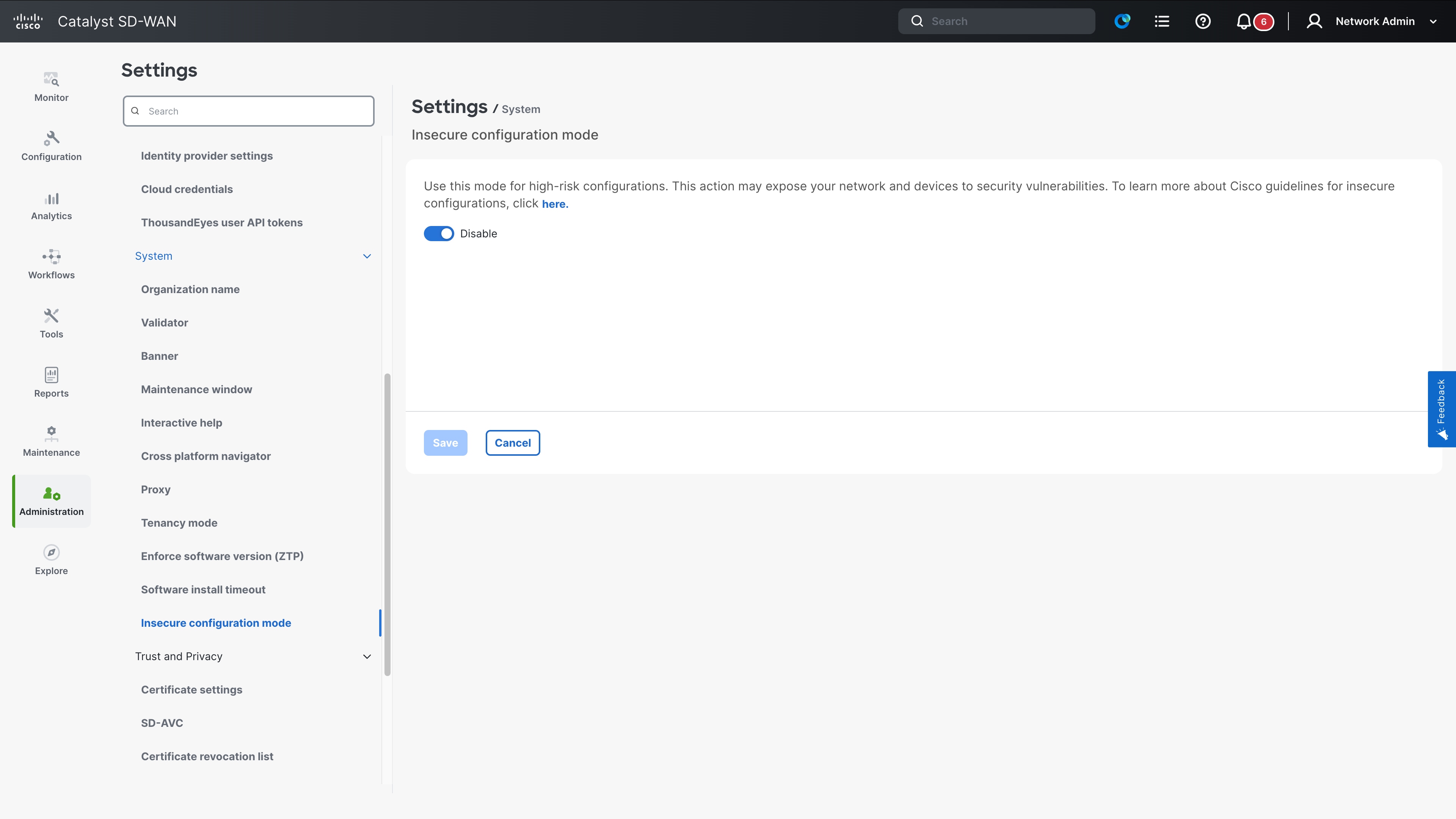
For new deployments on Release 26.1.1 and later, this feature ois disabled by default. For upgrades, it is enabled by default to allow continuity for existing configurations. To view additional tabs such as Field Notices and Security Advisories, Cloud Services must be enabled in Administration > Settings.
View and manage insecure configurations
Use these steps to view and manage insecure configurations in Cisco SD-WAN Manager.
1. From the Cisco SD-WAN Manager menu, choose Monitor > Advisories.
2. Select the Insecure Configurations tab.
3. Select Devices to view devices with insecure configurations.
4. Select Configuration Groups to view insecure configuration groups in your network.
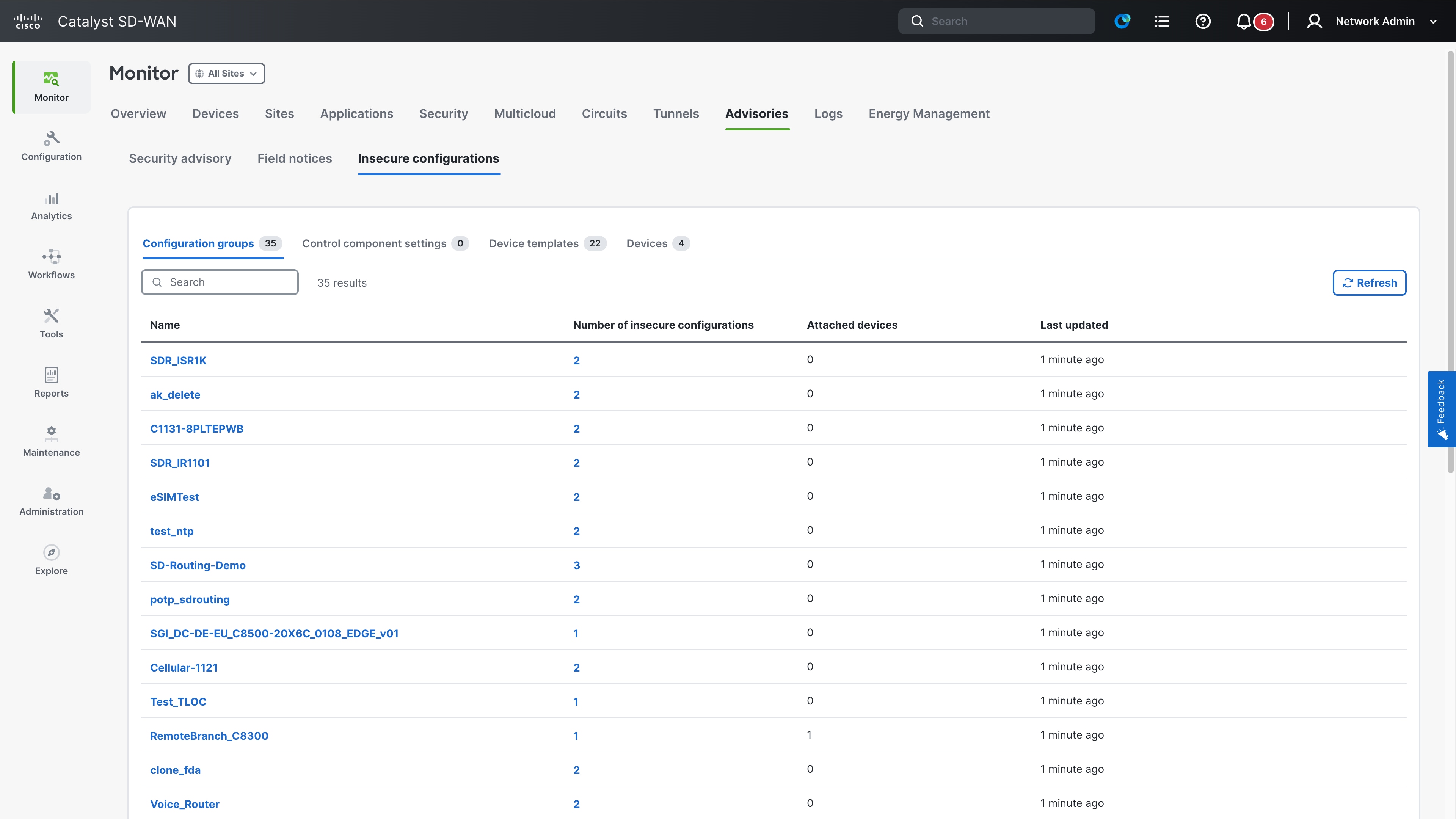
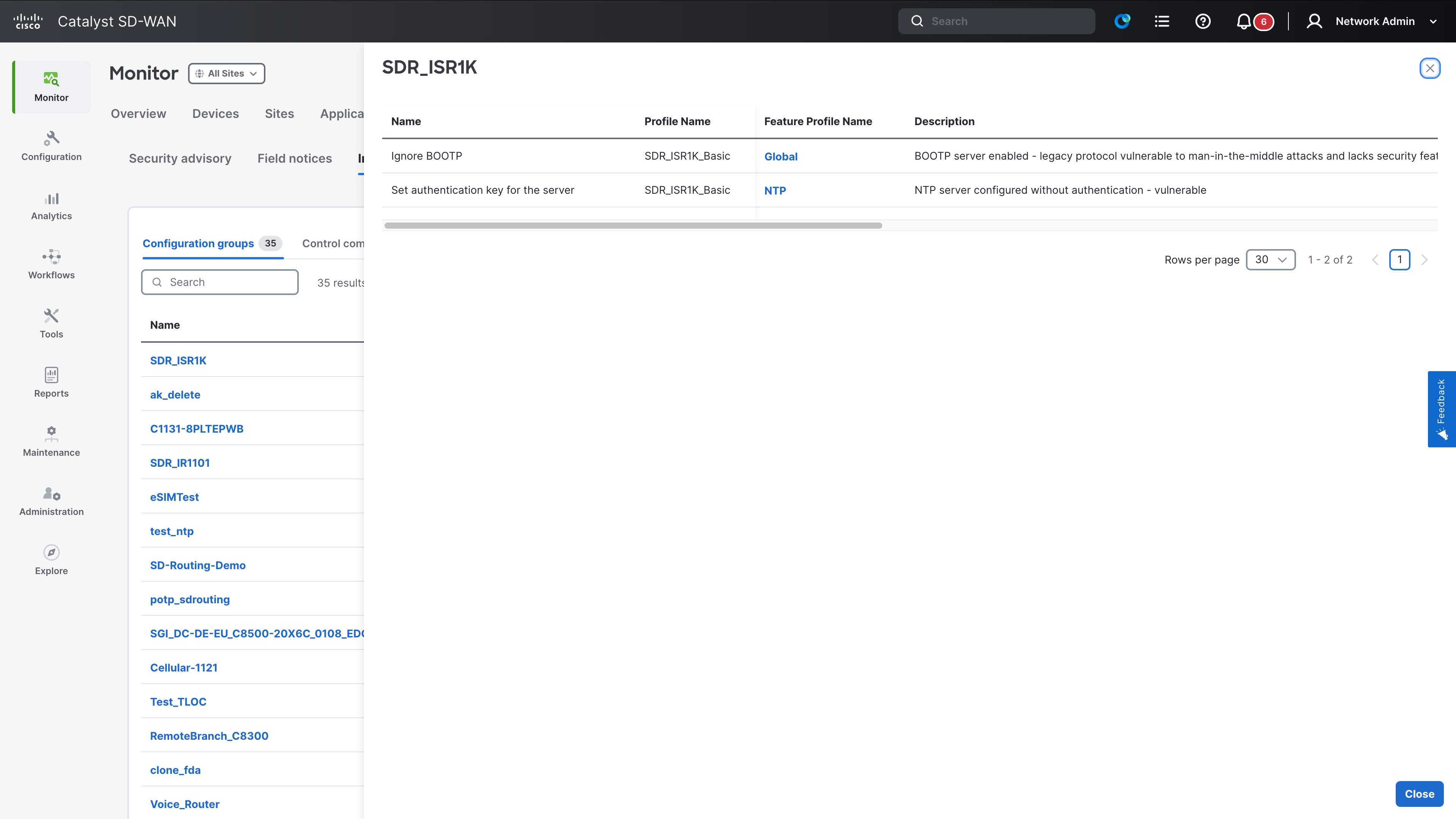
5. Select Device Templates to view templates running insecure configurations.
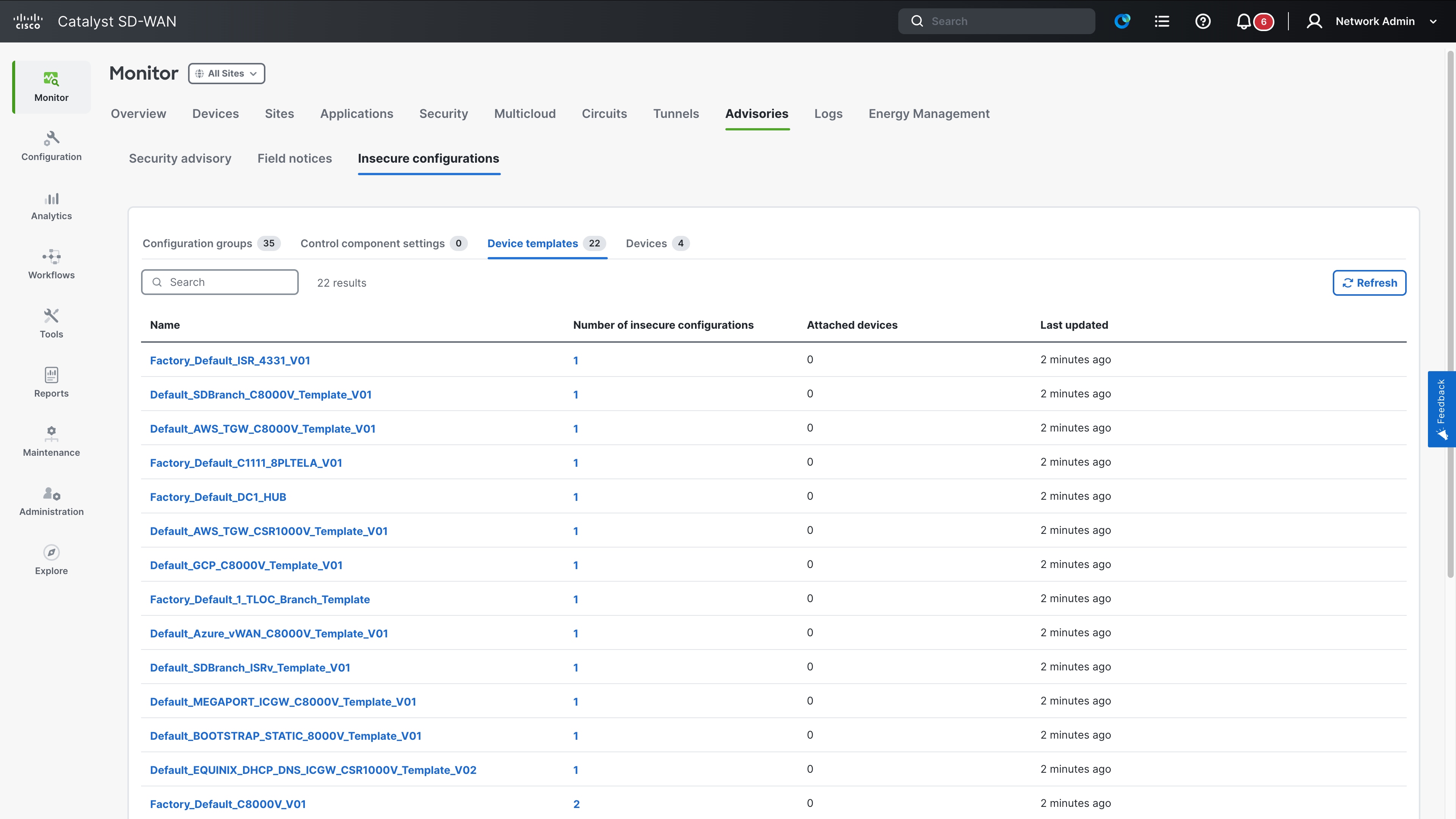
Review each insecure configuration by clicking its link to navigate directly to the relevant remediation section to apply the recommended fix. A periodic scan occurs every 30 minutes to ensure the latest insecure configuration details are displayed.
Weak Cipher
Weak ciphers are encryption algorithms used to secure data transmissions that are considered insecure or vulnerable for various reasons.
What’s Changing?
Cipher configurations within logging tls-profile and system ssh-server are now classified as insecure. Using weak ciphers triggers an entry in the show system insecure configuration report.
What to do next?
Update your TLS profiles and SSH server settings to use strong ciphers such as AES-GCM.
Syslog entry when using insecure ciphers
device# show system insecure configuration
insecure-configuration ssh-server
ACTIVE INSECURE CONFIGURATION ENTRY [1/1]
Module Name: ssh-server
Description: ssh-server
CLI Command: system ssh-server cipher aes-128-192
Security Risk: ssh-server-weak-cipher
Remediation: ssh-server-strong-cipher
Console Output for Insecure Ciphers
device# show system insecure ciphers
Insecure Ciphers:
AES128-SHA256 AES256-SHA256 DHE-RSA-AES128-SHA256
DHE-RSA-AES256-SHA256 ECDHE-ECDSA-AES128-SHA256 ECDHE-ECDSA-AES256-SHA384
ECDHE-RSA-AES128-SHA256 ECDHE-RSA-AES256-SHA384
Secure Ciphers available for configuration:
AES128-GCM-SHA256 AES256-GCM-SHA384 DHE-PSK-AES128-GCM-SHA256
DHE-PSK-AES256-GCM-SHA384 DHE-RSA-AES128-GCM-SHA256 DHE-RSA-AES256-GCM-SHA384
ECDHE-ECDSA-AES128-GCM-SHA256 ECDHE-ECDSA-AES256-GCM-SHA384 ECDHE-RSA-AES128-GCM-SHA256
ECDHE-RSA-AES256-GCM-SHA384 PSK-AES128-GCM-SHA256 PSK-AES256-GCM-SHA384
RSA-PSK-AES128-GCM-SHA256 RSA-PSK-AES256-GCM-SHA384
device#
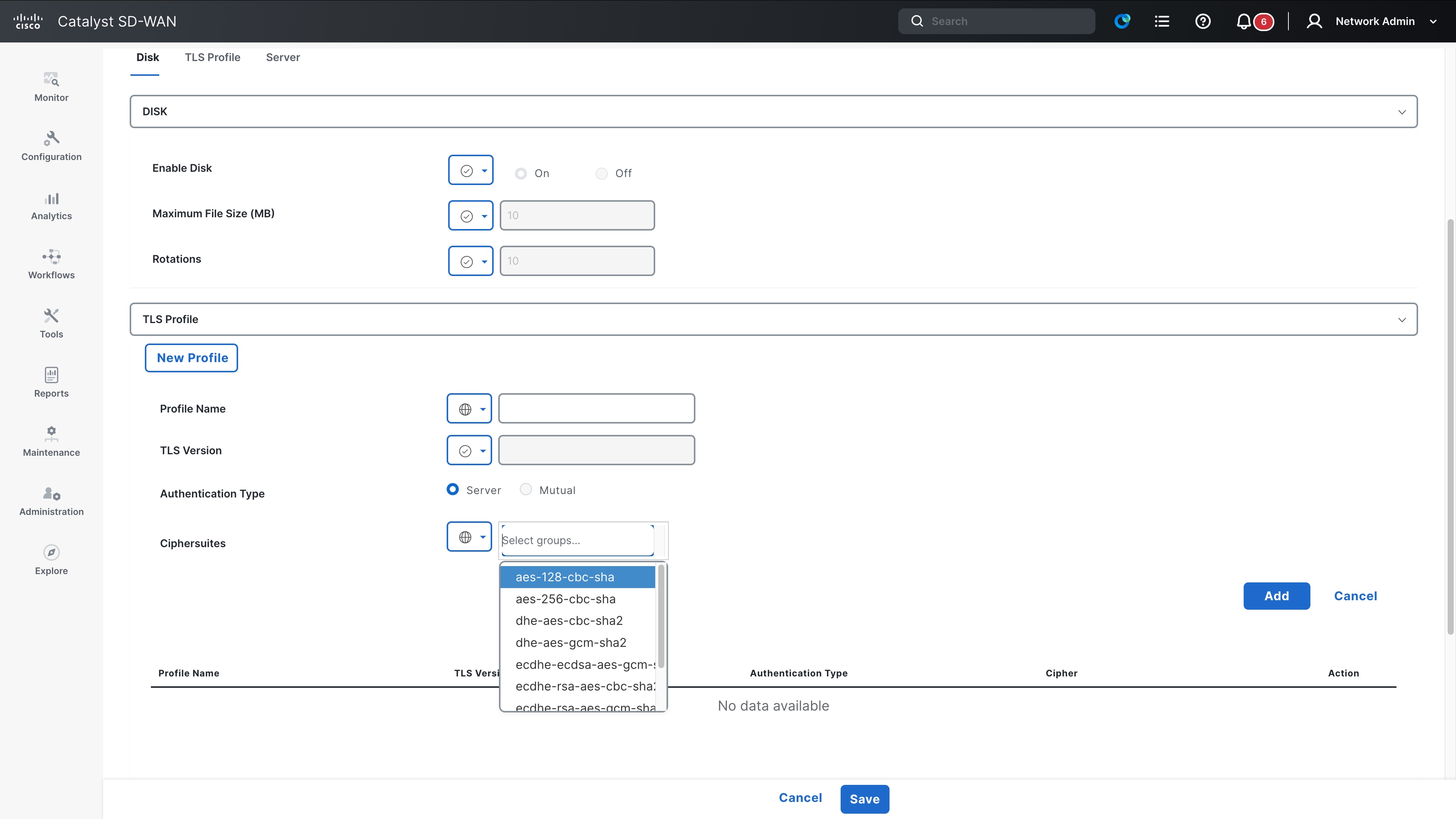
AAA/RADIUS/TACACS
AAA is a security framework for managing user access and tracking, with RADIUS as an open standard protocol combining authentication and authorization using UDP and limited encryption. TACACS+ is a Cisco proprietary protocol that uses TCP that separate authentication, authorization, and accounting providing full packet encryption and granular command control.
What’s Changing?
Cisco Control components [SD-WAN Manager, SD-WAN Validator, and SD-WAN Controller] now identify and report high-risk configuration changes. Cisco SD-WAN Manager generates a major syslog event whenever a change is detected in AAA, RADIUS, or TACACS+ server settings, lockout policies, or SNMP communities.
What to do next?
Monitor your centralized syslog server for major priority alerts. Ensure that any reported configuration changes are authorized and correspond to planned maintenance or administrative actions.
Syslog for high-risk configuration changes
11/13 18:05:17 config-change-radius-server major host-name:vb1 generated-at:2025-11-13T18:05:17
11/13 18:05:17 config-change-tacacs-server major host-name:vb1 generated-at:2025-11-13T18:05:17
11/13 18:05:17 config-change-radius major host-name:vb1 generated-at:2025-11-13T18:05:17
11/13 18:05:17 config-change-tacacs major host-name:vb1 generated-at:2025-11-13T18:05:17
11/13 18:05:17 config-change-lockout-policy major host-name:vb1 generated-at:2025-11-13T18:05:17
11/13 18:05:17 config-change-ciscotac major host-name:vb1 generated-at:2025-11-13T18:05:17
11/13 18:05:17 config-change-snmp-community major host-name:vb1 generated-at:2025-11-13T18:05:17
SNMP
Simple Network Management Protocol (SNMP) is a protocol used for communication between SNMP managers and agents to monitor and manage network devices.
What’s Changing?
SNMPv1, SNMPv2, SNMPv3 (noAuthNoPriv) are insecure SNMP configurations. Users are blocked from rom configuring these options while in secure mode. To enable them, you must use the system mode insecure command, which will trigger system warnings.
What to do next?
Migrate to SNMPv3 using the authPriv security level with strong authentication (e.g., SHA256) and privacy (e.g., AES). Enable insecure mode only as a temporary measure for legacy configurations.
Syslog entry when using insecure ciphers
device# show system insecure config
insecure-configuration snmpv1
----------------------------------------------------------------------
ACTIVE INSECURE CONFIGURATION ENTRY [1/1]
----------------------------------------------------------------------
Module Name snmpv1
Description snmp-community
CLI Command snmp community <community-name>
Security Risk snmp-community
Remediation use-snmpv3-with-auth-priv
vm(config)# snmp group Aj_grp_2 no-auth-no-priv view v1
vm(config-group-Aj_grp_2/no-auth-no-priv)# commit
vm(config-group-Aj_grp_2/no-auth-no-priv)# end
SSH
SSH is a cryptographic network protocol used for secure remote access and encrypted management of network devices. It ensures data confidentiality and integrity by using strong encryption keys.
What’s Changing?
The SSH RSA key size has been set to 4096, and the ECDSA key size to 384. These keys are generated during the SSH process bring-up. Additionally, ED25519 is now deprecated.
What to do next?
Ensure your SSH clients are compatible with RSA 4096 and ECDSA 384. Plan to migrate away from ED25519-based authentication to the newer, secure defaults.
Logging Protocol
Logging servers use UDP, TCP and TLS as transport protocols.
What’s Changing?
UDP and TCP are considered as insecure options.
vs1(config)# system logging server 1.1.1.1 transport udp
vs1(config-server-1.1.1.1)# commit
Commit complete.
vs1(config-server-1.1.1.1)# end
vs1# show system insecure config
insecure-configuration logging-transport
-----------------------------------------------------------------------
ACTIVE INSECURE CONFIGURATION ENTRY [1/1]
-----------------------------------------------------------------------
Module Name logging-transport
Description logging-transport-protocols
CLI Command system logging server <ip> transport
Security Risk weak-transport
Remediation use-tls-transport
What to do next?
Use TLS option for transport protocol for secure configuration.
Cisco Catalyst SD-WAN Release 26.2.x
Password Validation in AAA Configuration Groups
What’s changing?
Cisco SD-WAN Manager validates RADIUS and TACACS+ server keys in AAA configuration groups. When a key does not meet the password requirements, the interface displays a warning that identifies the requirements the user must satisfy.
RADIUS Server Password-Strength Warning in Cisco SD-WAN Manager
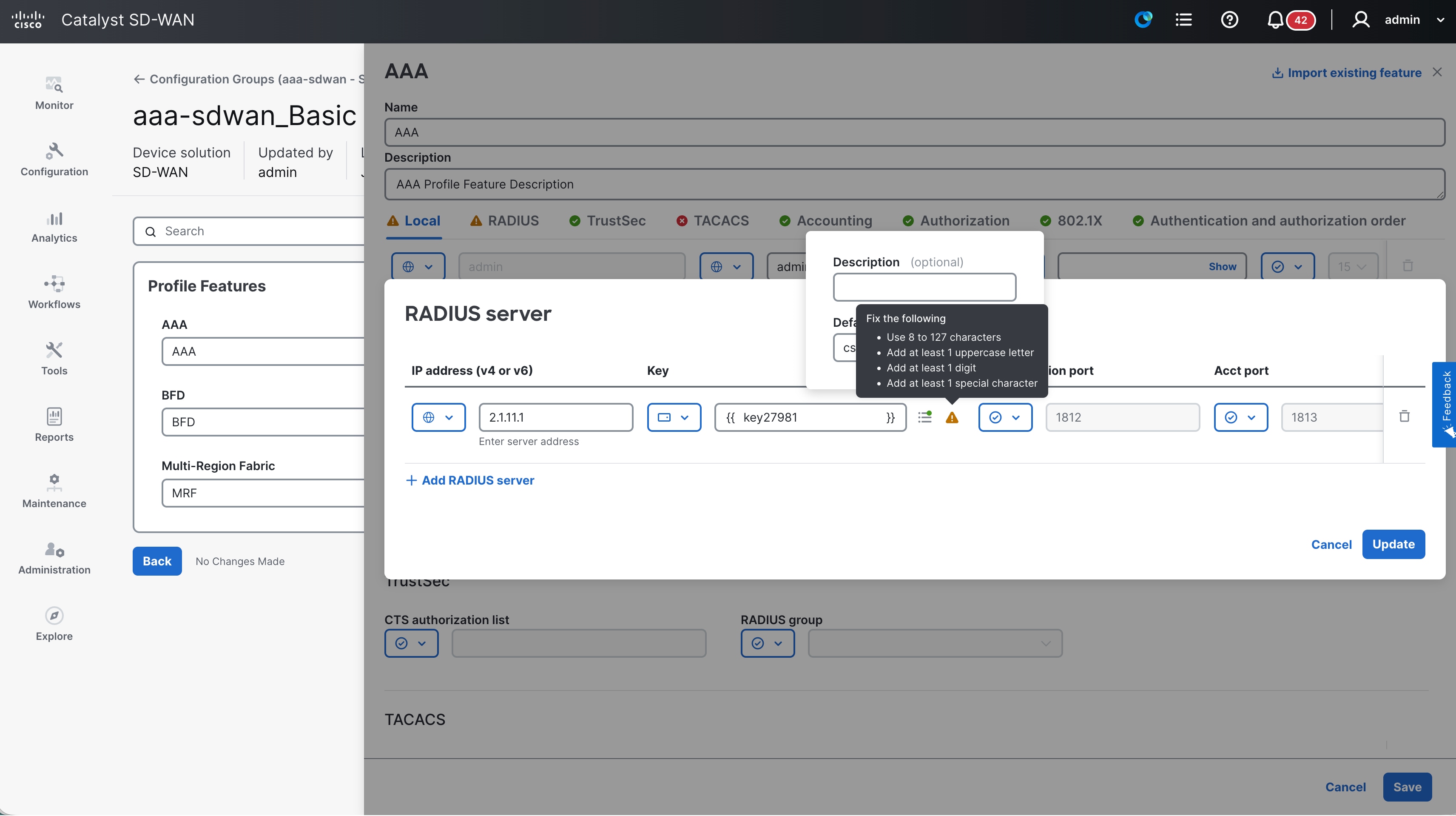
TACACS+ Server Password-Strength Warning in Cisco SD-WAN Manager
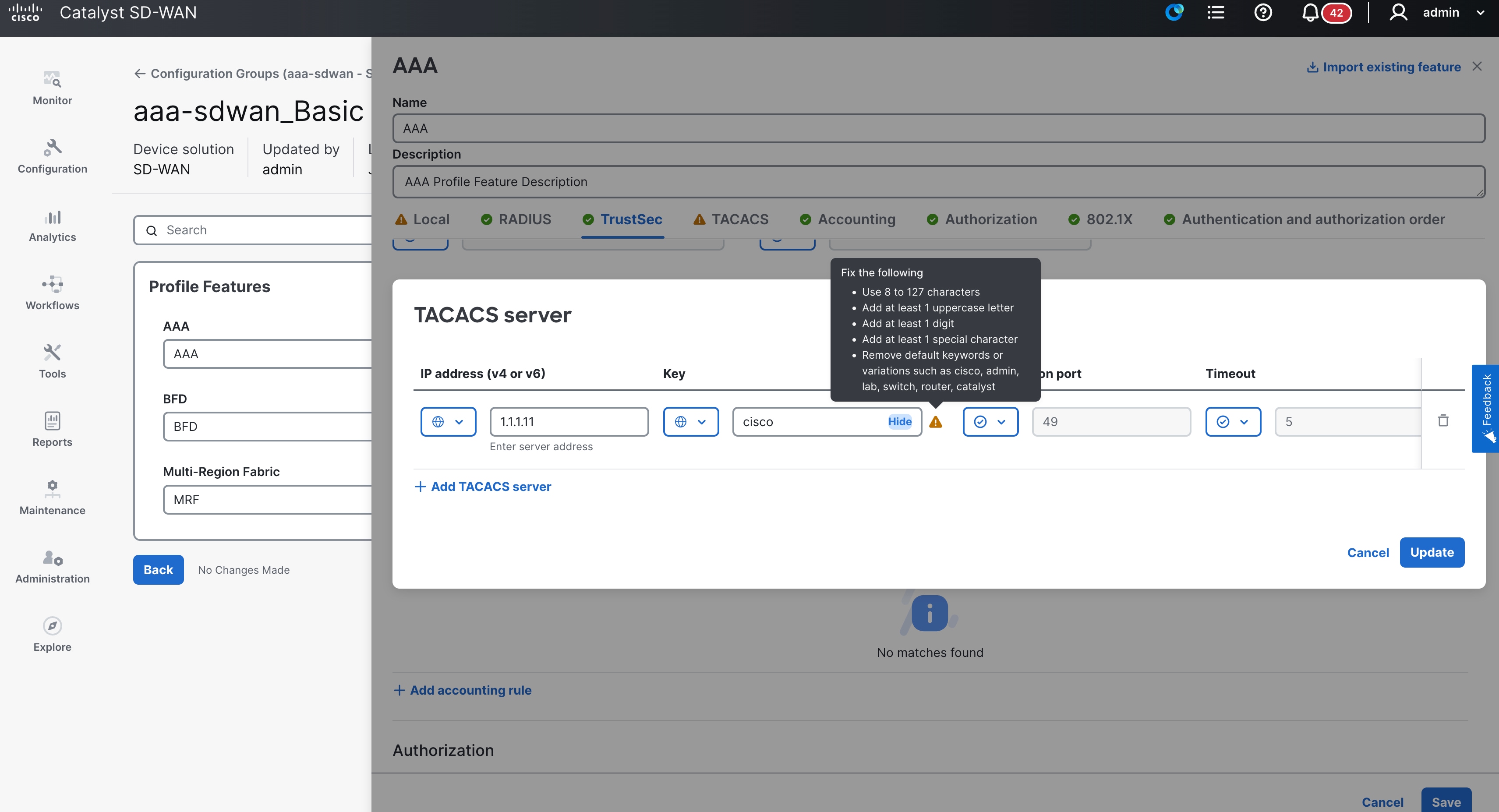
Password Validation in AAA cEdge Feature Templates
Cisco SD-WAN Manager validates local-user passwords and RADIUS server keys in AAA cEdge feature templates. When a password or key does not meet the password requirements, the interface displays a warning that identifies the requirements the user must satisfy.
Local User Password Validation in an AAA cEdge Feature Template
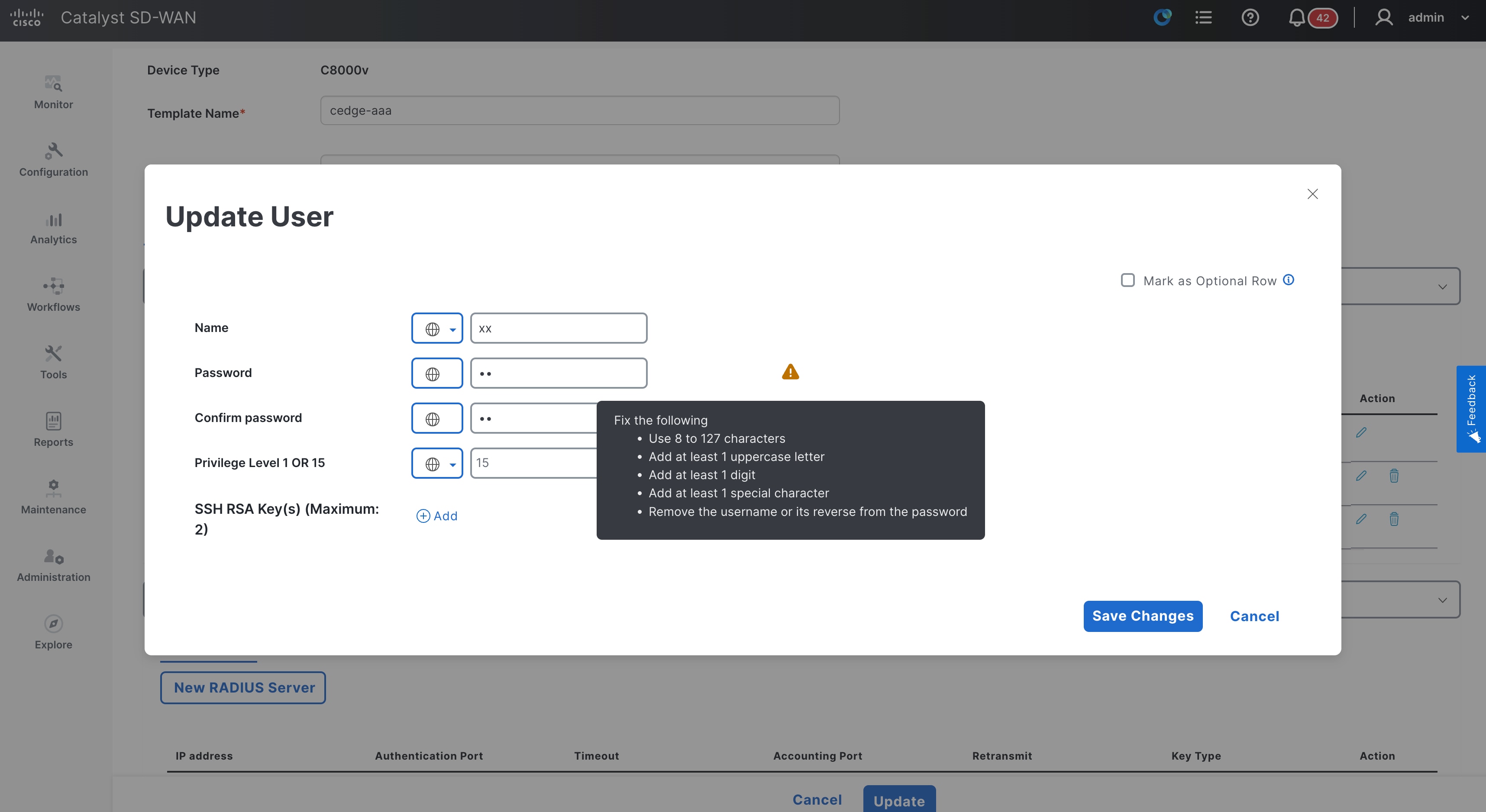
RADIUS Server Key Validation in an AAA cEdge Feature Template