Cisco Catalyst SD-WAN Licensing Playbook
Available Languages
Bias-Free Language
The documentation set for this product strives to use bias-free language. For the purposes of this documentation set, bias-free is defined as language that does not imply discrimination based on age, disability, gender, racial identity, ethnic identity, sexual orientation, socioeconomic status, and intersectionality. Exceptions may be present in the documentation due to language that is hardcoded in the user interfaces of the product software, language used based on RFP documentation, or language that is used by a referenced third-party product. Learn more about how Cisco is using Inclusive Language.
- US/Canada 800-553-2447
- Worldwide Support Phone Numbers
- All Tools
 Feedback
 Feedback
Scenario 1: License transfer between Smart Accounts
Scenario 2: License enforcement for Cisco Secure Routers
Scenario 3: License synchronization impact on devices in a production environment
Scenario 4: HSEC license behavior before reboot
Scenario 5: Out-of-compliance banner
Scenario 6: Configuration group deployment on Cisco Secure Routers
Scenario 7: Applicable licenses for SD-WAN Manager
Scenario 8: Demo licenses for a proof of concept
Scenario 9: Migration from offline to online mode
Scenario 10: Assigning the wrong tier license to a device
Scenario 11: License types for a combination of Cisco Catalyst and Cisco Secure Routers
Scenario 12: License release in online mode
Scenario 13: Best practices for procuring network hardware from a distributor
Scenario 14: Onboarding devices purchased from a distributor
Scenario 15: Consolidating subscriptions with Cisco ONE
Scenario 16: License enforcement of multiple licenses for a single device
Scenario 17: Managing enterprise agreement (EA) renewals and multiple Smart Accounts
Scenario 18: License strategy for high availability sites
Scenario 19: Enterprise agreement EA Workspace integration in SD-WAN Manager
Scenario 20: Out-of-compliance alerts when using Analytics
Scenario 21: Licensing cloud gateway routers
This playbook is a scenario-based guide to Cisco Catalyst SD-WAN licensing, focusing on common operational questions, troubleshooting workflows, and best practices for managing licenses across Cisco Smart Software Manager, SD-WAN Manager, Smart Accounts, Virtual Accounts, and Enterprise Agreement workspaces.
The document covers licensing behavior for Cisco Catalyst and Cisco Secure Routers, including DNA subscription licenses, HSEC licenses, demo licenses, high availability licensing, cloud gateway router exemptions, and license enforcement during onboarding and configuration. It also addresses common scenarios such as license transfers, offline-to-online migration, out-of-compliance alerts, distributor purchases, subscription consolidation, and Enterprise Agreement renewals.
By following the guidance in this playbook, customers, partners, and support teams can better understand how Cisco Catalyst SD-WAN licenses are assigned, synchronized, and enforced, helping to ensure smoother license operations.
Scenario 1: License transfer between Smart Accounts
Scenario
A company purchases licenses as a partner for their customer. They plan to buy licenses a la carte for the flexibility to spend the budget over time. Their customer intends to use features that are available in the Advantage package, such as Analytics or Advisories. Their customer has a mix of C8300 and C8200 devices. SD-WAN Manager has connectivity to the Cisco Smart Software Manager (Cisco SSM).
The licenses purchased in this transaction were deposited into Smart Account X. But Smart Account X is not linked to Plug-n-Play (PnP). They have a Smart Account Y that is linked to PnP. They want to know how they can transfer the licenses from Smart Account X to Y.
Issues
Question: How can you transfer licenses from one Smart Account to another?
Answer: Contact Cisco TAC to transfer licenses from one Smart Account X to Y.
Key takeaway
Transferring licenses from one Smart Account to another requires the assistance of Cisco TAC.
Scenario 2: License enforcement for Cisco Secure Routers
A company has a mix of C8300 and C8355-G2 platforms in their inventory. They need to know what they should be mindful of when dealing with Cisco Secure Router licensing.
Issues
Question: What do I need to know about license enforcement for Cisco Secure Routers?
Answer: Cisco Secure Routers require a license before they can be configured. Otherwise SD-WAN Manager does not allow associating the routers with a configuration group.
Note that Cisco Secure Routers do not accept configuration by device template. They can be configured using configuration groups.
Key takeaway
Cisco Secure Routers require a license before being configured.
It is necessary to have a license assigned to a Cisco Secure Router at the time of onboarding. You cannot deploy a config group to the router without a license.
Scenario 3: License synchronization impact on devices in a production environment
Scenario
A company operates hundreds of routers in a production environment without licenses assigned. The devices include C8500, C8300, C8200, ISR1100, and C8000V. The required licenses include DNA-T0,1,2,3,4, and HSEC, per branch type. They have already purchased the licenses and are in the process of installing them.
Given the critical nature of the infrastructure, they want to ensure that no service disruptions or unintended traffic limitations will occur during the license synchronization and installation process.
Issues
Question: Will synchronizing Cisco Smart Software Manager (Cisco SSM) and SD-WAN Manager (either online or offline) result in any impact to devices in a production environment?
Answer: Synchronization of licenses does not disrupt network operations.
Question: After Cisco SSM and Catalyst SD-WAN Manager are synchronized, can you safely install licenses such as:
● DNA-T0,1,2,3,4, and
● HSEC licenses
...on all device models without triggering any automatic reloads or enforcement on traffic limitations?
Answer: Yes. There will be no automatic reboots.
Question: Does HSEC license installation require a manual reload after the installation?
Answer: Yes, a manual reload required after:
Installation of HSEC licenses
No reload required after:
Installation of DNA-T0,1,2,3,4 licenses
Scenario 4: HSEC license behavior before reboot
A company assigned an HSEC license to a device using SD-WAN Manager. The license is downloaded to the device but is not yet activated with a reboot.
Issues
Question: After assigning an HSEC license to a device using SD-WAN Manager, what is the system behavior before reboot?
Answer: The system continues to run as-is, capping off at 250 Mbps until the next reboot. There will be no alerts, syslogs, or traps indicating that the HSEC license has not been activated. One can view the HSEC status for a device in SD-WAN Manager to view the current throughput limit.
Reboot a device after installing an HSEC license. Until then, the device continues to operate without the benefits of the HSEC license.
Key takeaway
Reboot a device after installing an HSEC license. Until then, the device continues to operate without the benefits of the HSEC license.
Scenario 5: Out-of-compliance banner
A company has just upgraded their fabric from Catalyst SD-WAN release 20.9 to 20.15. They immediately see an "out of compliance" banner in SD-WAN Manager.

Issues
Question: After upgrading a Catalyst SD-WAN fabric from release 20.9 to 20.15, you might see an out-of-compliance banner in SD-WAN Manager. What does the out-of-compliance banner message mean?
Answer: The banner indicates that the network is out of compliance due to licensing. Possible causes:
● Licenses have not been synced with Cisco Smart Software Manager (Cisco SSM).
● Cisco SSM sync has been done, but some number of devices have not been assigned appropriate licenses.
● There is a postpaid subscription that has expired.
Question: What could cause the out-of-compliance message after upgrading to 20.18?
Answer: In addition to the same causes relevant in earlier releases, if SD-WAN Analytics is enabled, and if not all licensed devices have Advantage licenses, SD-WAN Manager displays an out-of-compliance message. Non-Advantage license types may include Essential, and so on.
Scenario 6: Configuration group deployment on Cisco Secure Routers
A company purchases Cisco Secure Routers to run native post-quantum cryptography (PQC), to mitigate the quantum computing threat. When they onboard the devices, they are unable to deploy a configuration group.
Issues
Question: After purchasing and onboarding Cisco Secure Routers, why am I unable to deploy a configuration group to the routers?
Answer: Out of the box, Cisco Secure Routers come with license enforcement. Until an administrator assigns a license to the device, they cannot deploy a configuration group to the device.
Assign a license to the device to remedy the issue.
Note that Cisco Secure Routers do not accept configuration by device template. They can be configured using configuration groups.
Key takeaway
Cisco Secure Routers require a license to be installed before they can be configured.
Scenario 7: Applicable licenses for SD-WAN Manager
A company has provisioned a new fabric and ordered multiple types of licenses for their Smart Account in Cisco Smart Software Manager (Cisco SSM).

Issues
Question: After I've purchased multiple types of licenses for a Smart Account, which licenses can SD-WAN Manager use?
Answer: Only DNA licenses are applicable to SD-WAN Manager. These are subscription-based licenses, and they are the only ones that SD-WAN Manager shows after you sync with Cisco SSM.
For example, if you purchase 10 Routing DNA Advantage Tier 2 licenses, you receive:
● 10 Routing DNA Advantage Tier 2 licenses, and
● 10 Routing Network Advantage Tier 2 licenses
These are visible in Cisco Smart Software Manager (Cisco SSM), but SD-WAN Manager shows only the DNA Licenses.
Ensure you purchase and assign DNA subscription licenses for all devices managed by SD-WAN Manager. Other license types, such as those that are part of the same subscription, may be visible in Cisco SSM, but SD-WAN Manager will only recognize DNA licenses.
Key takeaway
Purchase and assign DNA subscription licenses for devices managed by SD-WAN Manager. Other license types may be visible in Cisco SSM, but SD-WAN Manager only shows DNA licenses.
Scenario 8: Demo licenses for a proof of concept
A company purchases Cisco Secure Routers as a part of a refresh. They want to put together a proof of concept showcasing all the latest features that came in the latest release.
Issues
Question: If I purchase Cisco Secure Routers and need to put together a proof of concept (POC), how can I procure demo licenses to deliver a proof of concept?
Answer: Cisco Secure Routers need a license assignment to deploy a configuration group, but:
● Cisco offers trial subscriptions for Cisco Secure Routers at no cost for up to 3 months. Subscription tiers include Routing Advantage, WAN Essentials, WAN Advantage including Security add-ons.
● Order L-C8000-DEMO licenses through the Cisco Commerce Workspace (CCW). Add these demo licenses during the bill of materials (BOM) request process.
● Demo licenses are valid only for early field trials (EFTs), POCs, testing, and validation by Cisco customers or partners with a Smart Account and Virtual Account (SA, VA) outside the cisco.com domain.
● Demo licenses help facilitate migrations and testing during route refresh projects.
Order L-C8000-DEMO licenses for Cisco Secure Routers through the CCW portal to enable temporary, full-featured POC environments at no cost.
Key takeaway
Order L-C8000-DEMO licenses for Cisco Secure Routers through the CCW portal to enable temporary, full-featured POC environments at no cost.
Scenario 9: Migration from offline to online mode
A company has been managing licenses in SD-WAN Manager using offline mode for several years, for an air-gapped environment. Recently, they have migrated to online mode, to accommodate features such Talos and SD-AVC.
Issues
Question: Will SD-WAN Manager reconcile the licenses already assigned to some of these devices in the network when I change to online mode? Will the license assignments made to specific devices when they used offline mode continue when they change to online mode? While changing the mode of assignment, can I proceed if I see a message saying "Changing the mode will remove all licensing data"?
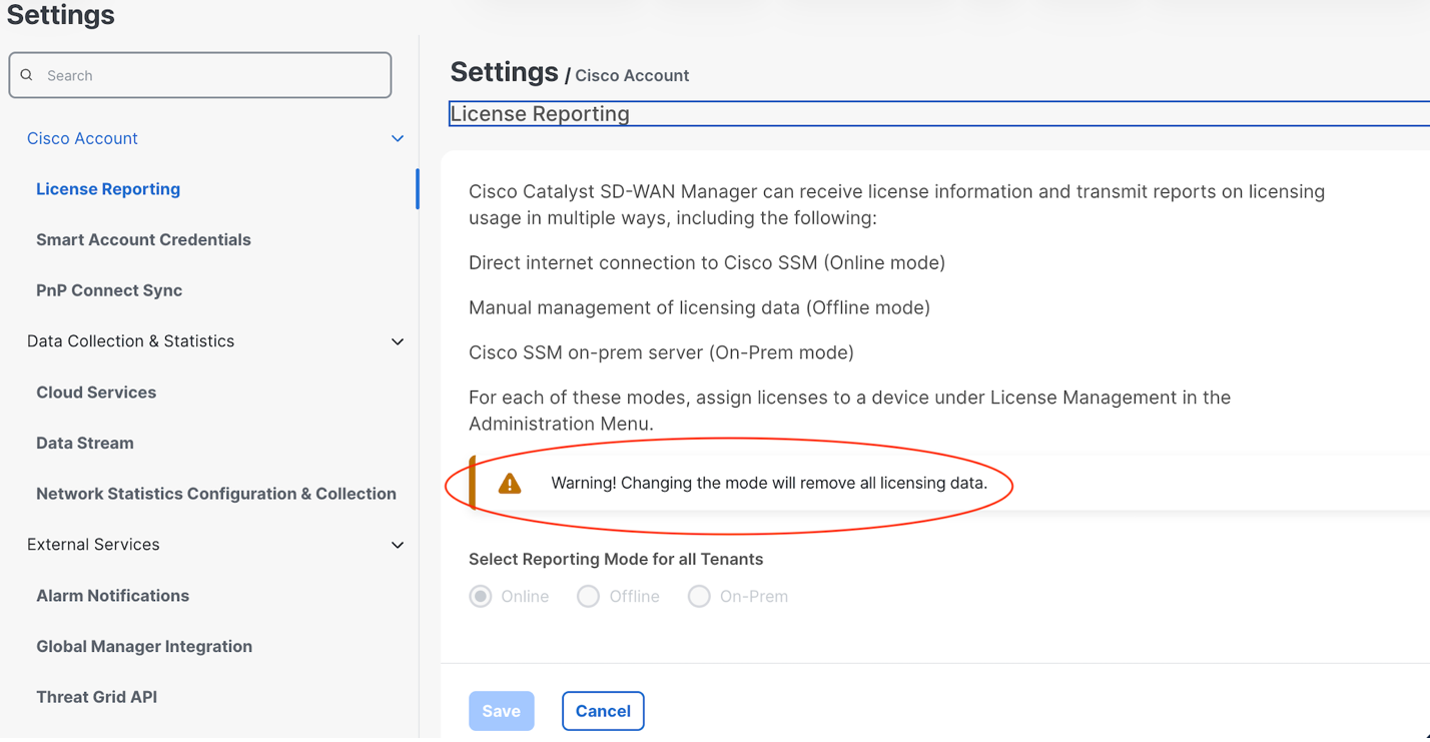
Answer: Changing the license method removes all of the existing license assignments. All devices will need to be licensed again.
Question: There were several HSEC licenses that were installed manually by CLI on some of the hub routers in their data center.
Answer: There is no impact on HSEC licenses. SD-WAN Manager only deals with DNA licenses. HSEC licenses are installed directly on the device and thus there is no reporting or further action required for them after they are installed, unless the device is reset to factory settings.
Plan for license reassignment when migrating from offline to online mode, but HSEC licenses remain unaffected unless the device is factory reset.
Key takeaway
Plan for license reassignment when migrating from offline to online mode, but HSEC licenses remain unaffected unless the device is factory reset.
Scenario 10: Assigning the wrong tier license to a device
A company's connected link exceeds the bandwidth tier, but the consumption is less than their licensed bandwidth.
Issues
Question: Is there regular auditing by Cisco to evaluate whether connected bandwidth exceeds the bandwidth tier of the license assigned to a device?
Answer: There are no restrictions. From release 20.14, SD-WAN Manager only allows assigning licenses that are applicable to a particular device. For example, it does not allow assigning a 5M Tier license to an ASR 1000 router.
Scenario 11: License types for a combination of Cisco Catalyst and Cisco Secure Routers
A company has a mix of Catalyst routers and Cisco Secure Routers. What licensing issues should they be aware of?
Issues
Question: What licensing issues should I be aware of?
Answer: The license types and nomenclature are different for Catalyst and Cisco Secure Routers. Keep these in mind:
● If there are license compliance issues in the network, SD-WAN Manager displays a banner to indicate the license compliance issue.

● Cisco Secure Routers offer these types of subscriptions:
◦ Cisco Networking Subscription: For switching, wireless, and Catalyst SD-WAN, with consistent embedded support.
◦ Cisco Routing Subscription: For routing use cases.
● You can get a pro-rata credit back on your existing a-la-carte DNA subscriptions and migrate to Cisco Networking Subscription or Cisco Routing Subscriptions.
● Cisco Secure Routers require either a WAN-ESS or WAN-ADV license after being onboarded. A license assignment is required before configuring the Cisco Secure Router.
● The workflow for existing Cisco IOS XE devices does not allow adding new licenses to the same subscription ID. So if you are doing phased migrations and purchase different sets of licenses at different times, the differing end dates for the subscriptions can create an operational burden. For Cisco Secure Routers, you can have a Cisco ONE subscription contract with a common end date for all the product licenses, even licenses added at different times. You can add the licenses to the same contract as a network expands, and the licenses are co-termed to the same end date. This reduces the burden of tracking different dates for renewals.
Scenario 12: License release in online mode
A company releases licenses to assign to new devices. How long will it take for the released licenses to become available?
Issues
Question: In online mode, after releasing a license, how long will it take for the release to be completed?
Answer: License release may take at least 24 hours to appear in SD-WAN Manager. Allow for this interval when scheduling device replacements.
Scenario 13: Best practices for procuring network hardware from a distributor
A company purchases hardware from a distributor.
Issues
Question: After purchasing network hardware from a distributor, what issues should I look out for?
Answer: Cisco has many different buying programs and procurement channels. Distributors often move assets to a partner holding Smart Account to temporarily hold Smart license-enabled orders until a customer Smart Account is identified.
A Smart Account (SA) represents an organization, and a Virtual Account (VA) is a subset of Smart Account that enables customers and partners to organize licenses.
When a Smart Account is created, a corresponding default Virtual Account is automatically created at the same time. Additional Virtual Accounts for Partner Holding Smart Accounts and Customer Smart Accounts are created in Cisco Software Central.
Coordinate with your distributor to associate licenses to the appropriate production SA/VA at the start of the transaction. This ensures assets and entitlements are aligned before deployment deadlines.
Scenario 14: Onboarding devices purchased from a distributor
A company purchased devices from distributer, and they don’t see the device serial number information in the Plug-and-Play (PnP) Connect portal, nor do they see license entitlements on the Cisco SSM portal.
Issues
Question: How can I onboard these devices and obtain the correct license entitlements?
Answer:
● You or an authorized partner with access to the appropriate Smart Account (SA) and Virtual Account (VA), should upload the list of device serial numbers to PnP Connect using an Excel spreadsheet. After these are uploaded, the devices become available for sync and onboarding to SD-WAN Manager.
● After shipment, the distributor should drop-ship the devices, and your organization, or a partner, should order the required licenses, specifying the correct SA/VA for license deposit.
● For enterprise agreement purchases, use the Enterprise Agreement (EA) workspace to provision licenses in Cisco SSM and sync with SD-WAN Manager. For SD-WAN Manager 20.18 and later, use the EA workspace integration within SD-WAN Manager for streamlined license provisioning.
Key takeaway
Ensure device serial numbers are uploaded to PnP Connect and licenses are ordered for the correct SA/VA. Use EA workspace integration for enterprise agreement licenses if using SD-WAN Manager 20.18 or later.
Scenario 15: Consolidating subscriptions with Cisco ONE
A regional partner serving different regions (APJC, Europe, and AMER) for a multi-national customer can wind up creating a different subscription for each region. This increases operational complexity.
Issues
Question: How can I avoid operational overhead and complexity when managing multiple regional subscriptions for Cisco Secure Routers?
Answer:
● Use a Cisco ONE subscription for Cisco Secure Routers to consolidate all new licenses under a single subscription ID on a pro rata basis.
● This approach allows all licenses to be co-termed to the same end date and managed under a single contract, simplifying renewals and reducing administrative effort.
Key takeaway
Cisco ONE subscriptions consolidate regional licenses into a single, co-termed contract for operational simplicity and easier renewals.
Scenario 16: License enforcement of multiple licenses for a single device
A regional partner purchases and deposits licenses in different Smart Accounts (SA) or Virtual Accounts (VA) for the same device.
Issues
Question: What are the implications of splitting licenses for the same device across multiple Smart Accounts (SA) or Virtual Accounts (VA)? For example, this can happen if a regional partner purchases and deposits licenses for the same device in different SAs or VAs.
Answer:
● Cisco enforces per-device license alignment: all licenses for a single device must reside in the same SA/VA.
● SD-WAN Manager’s License Management (LM) component enforces this requirement, and helps to migrate all licenses for a device into a single SA/VA for compliance.
● Licenses can be in different accounts when using online mode, but for offline or on-premises modes, all licenses must be within one SA or VA.
Key takeaway
Maintain all licenses for a given device in the same SA/VA to ensure compliance and simplify license management.
Scenario 17: Managing enterprise agreement (EA) renewals and multiple Smart Accounts
A company is in the process of renewing a Cisco Enterprise Agreement (EA) contract, creating two Smart Accounts (SA), one for their current network and a new one for their renewed iteration of EA.
Issues
Question: After renewing a Cisco Enterprise Agreement (EA) contract, creating two Smart Accounts (SA), one for the current network and a new one for the renewed iteration of EA, can I still access our existing licenses, in the original SA, in the same way?
Answer: SD-WAN Manager 20.18.1 introduced an integration between SD-WAN Manager and EA, enabling you to directly sync EA from SD-WAN Manager. SD-WAN Manager can transfer licenses from the Cisco Enterprise Agreement Workspace to Cisco Smart Software Manager (Cisco SSM). This enables the synchronization between SD-WAN Manager and Cisco SSM to include licenses acquired through the Cisco Enterprise Agreement system.
In SD-WAN Manager, administrators can sync with both old and new SAs to view and assign licenses to devices as needed. SD-WAN Manager can report license assignments back to Cisco SSM according to each license's respective SA and VA.
Question:
What changes to license management are in SD-WAN Manager 20.15?
Answer:
● Before SD-WAN 20.15: License assignment was template-based. Using the template, you can select the SA/VA in which to report license usage.
● After 20.15: There is an explicit workflow in SD-WAN Manager for DNA and HSEC licenses. You can follow the workflow to assign platform-specific licenses to your devices.
Scenario 18: License strategy for high availability sites
A company using Catalyst SD-WAN has four data center sites, with dual routers, for high availability (HA), serving a high volume of network traffic.
Issues
Question: What is the license strategy for HA sites like in this scenario?
Answer:
● Before SD-WAN Manager 20.18: Licenses for HA devices were treated similarly to licenses for primary devices.
● From SD-WAN Manager 20.18: There are HA license entitlement and compliance checks to ensure that the license for a device matches the intended network usage.
Question:
What are the prerequisites for applying HA licensing to a secondary router at a high availability site?
Answer:
● Both the primary and secondary routers must be at the same site.
● Both routers must be the same model.
● Both routers must be assigned the same license type.
Key takeaway
To deploy HA licenses, use identical router models at the same site and assign matching licenses to both devices.
Scenario 19: Enterprise agreement EA Workspace integration in SD-WAN Manager
A company has been generating licenses from the Cisco Enterprise Agreement (EA) Workspace and depositing them in Cisco SSM. This is a time-consuming manual task.
Issues
Question: If my company has been generating licenses from the Cisco Enterprise Agreement (EA) Workspace and depositing them in Cisco SSM. This is a time-consuming manual task. Is there any integration of the EA Workspace and SD-WAN Manager to improve the efficiency of this process?
Answer: Yes. From SD-WAN Manager 20.18, you can sync to EA Workspace directly from Catalyst SD-WAN Manager. The screenshot shows how to enable this. Specifically, the screenshot shows the License Management page in SD-WAN Manager, and the Sync Licenses functionality available there.
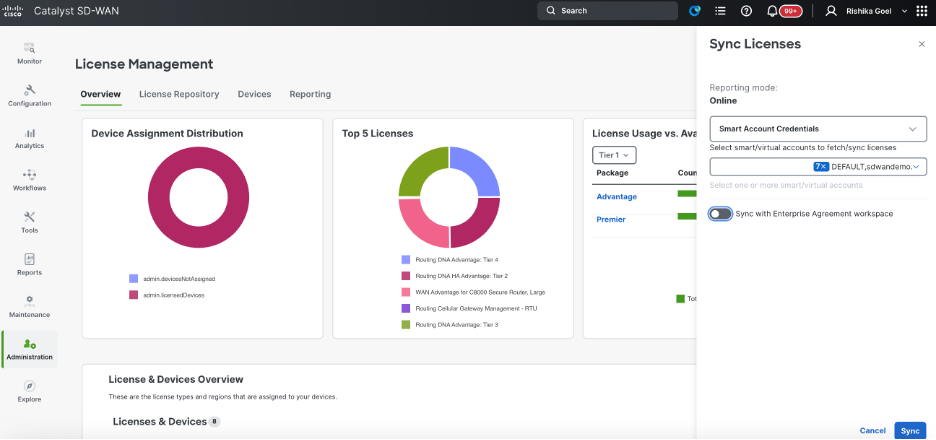
When you sync with the Enterprise Agreement workspace, a menu enables you to select the source Virtual Account (VA) from the EA Workspace. You can then generate the license of choice. The EA Suite must be located within all the listed VAs for them to show up in the menu.
After generating the licenses, the workflow presents a target VA in Cisco SSM, to choose where to deposit the licenses. Through the integration of EA Workspace and SD-WAN Manager, the licenses are transferred to the intended VA within the Cisco SSM.
Key takeaway
Use EA Workspace integration in SD-WAN Manager to automate license provisioning and eliminate manual steps.
Scenario 20: Out-of-compliance alerts when using Analytics
After upgrading to SD-WAN Manager 20.18, a compliance alert appears when using Analytics.

Issues
Question: After upgrading to SD-WAN Manager 20.18, why do I see a compliance alert when using Analytics? How do I address it?
Answer: From SD-WAN Manager 20.18, if you use Analytics and you haven't assigned a Cisco Advantage license to all devices, you will see a compliance alert. Assign Cisco Advantage licenses to the devices in the fabric to address the issue.
Ensure that every device in the SD-WAN fabric has a Cisco Advantage license assigned when using Analytics.
Key takeaway
This is a fabric-level alert. So ensure that every device in the SD-WAN fabric has a Cisco Advantage license assigned when using Analytics.
Scenario 21: Licensing cloud gateway routers
A company has decided to host their network using a Cisco cloud-hosted Catalyst SD-WAN solution. They have:
● An on-prem TACACS server, and
● A syslog server
These need to be connected to the cloud-hosted environment. To accomplish this, they've set up two Catalyst 8000V instances as cloud gateway routers. These gateways establish the connectivity to their on-prem data center, enabling them to use their TACACS and syslog server with SD-WAN Manager.
Issues
Question: The two cloud gateway routers show up as unlicensed devices, even though they’re part of the solution. How should these be licensed?
Answer: From SD-WAN Manager 20.15.5, you can tag up to two devices with the Connector tag to exempt them from the license requirement. After tagging, SD-WAN Manager does not show an out-of-compliance message for those devices.
Key takeaway
Tag up to two cloud gateway routers with the Connector tag in SD-WAN Manager to exempt them from licensing requirements.
Cisco and the Cisco logo are trademarks or registered trademarks of Cisco and/or its affiliates in the U.S. and other countries. To view a list of Cisco trademarks, go to this URL: www.cisco.com/go/trademarks. Third-party trademarks mentioned are the property of their respective owners. The use of the word partner does not imply a partnership relationship between Cisco and any other company. (1110R)
Any Internet Protocol (IP) addresses and phone numbers used in this document are not intended to be actual addresses and phone numbers. Any examples, command display output, network topology diagrams, and other figures included in the document are shown for illustrative purposes only. Any use of actual IP addresses or phone numbers in illustrative content is unintentional and coincidental.
© 2026 Cisco Systems, Inc. All rights reserved.