Secure Cisco Catalyst SD-WAN with Live Protect

Feature history for Live Protect

This table describes the developments of this feature, by release.

Feature name Release information Description
Live Protect for Cisco Catalyst SD-WAN

Cisco Catalyst SD-WAN Control Components Release 20.18.3

Live Protect validates security shields that protect Cisco products without requiring device reloads or service interruptions.

You can deploy security shields in two modes:

  • Monitoring mode: Provides visibility into potential exploit attempts without enforcement, allowing you to assess threats before taking action.

  • Protecting (Enforce) mode: Actively applies mitigation policies to reduce exposure to known vulnerabilities.

Live Protect allows you to monitor, enforce, disable, and retire the security shields enabling a smooth transition to remediation.

This capability helps businesses maintain continuous operations while managing risks until the software upgrades or patches are deployed.

Live Protect for Cisco Catalyst SD-WAN

Live Protect is a security capability that

  • enables compensating controls and zero-day attack mitigation without software upgrades or reboots,

  • allows you to manage security shields through Cisco SD-WAN Manager to protect infrastructure integrity.

Deployment modes

You can deploy security shields in two modes:

  • Monitoring mode: Provides visibility into potential exploit attempts without enforcement, allowing you to assess threats before taking action.

  • Protecting (Enforce) mode: Actively applies mitigation policies to reduce exposure to known vulnerabilities.

Benefits of Live Protect

  • Zero-downtime remediation: Provides temporary protection against vulnerabilities without requiring software upgrades or device reboots, ensuring continuous network availability until remediation.

  • Dynamic security: Allows for real-time enforcement of security policies using eBPF technology.

  • Flexible deployment: You can deploy security shields in two modes. Monitoring mode to rovides visibility into potential exploit attempts without enforcement and Protecting (Enforce) mode to actively apply mitigation policies to reduce exposure to known vulnerabilities.

  • Centralized management: You can manage security shields across the entire SD-WAN fabric through Cisco SD-WAN Manager.

  • Visibility: Provides hit statistics to help track the efficacy of deployed shields.

Configure Live Protect using Cisco SD-WAN Manager

Use these steps to deploy and configure Live Protect security shields in Cisco SD-WAN Manager.

Procedure


Step 1

From the Cisco SD-WAN Manager menu, go to Monitor > Advisories > Security Advisories.

Step 2

Select Control Components to display the relevant information for your infrastructure.

Step 3

Select a specific security advisory to view its details.

Step 4

Select Affected Control Components.

Step 5

Choose Deploy Shield.

This shield is deployed to all applicable control components associated with the selected advisory. Individual control component selection for deployment is not supported.

Step 6

Choose the desired mode:

  • Monitoring: Observes activity and logs events without blocking traffic.

  • Protecting (Enforce): Enforces security policies to actively block exploit attempts.

Note


Shields provide temporary mitigation for identified vulnerabilities until affected components are upgraded to a software version that includes remediation.

Cisco strongly recommends upgrading to a software release containing the fix as soon as possible.


Disable Live Protect using Cisco SD-WAN Manager

Use these steps to disable a Live Protect shield.

Procedure


Step 1

From the Cisco SD-WAN Manager menu, choose Monitor > Compliance > Advisories.

Step 2

Select the advisory for which you want to deactivate the shield.

Step 3

Select ... and choose Disable Shield.


Monitor Live Protect

You can monitor Live Protect through shield status and event statistics.

View shield status for Live Protect

Procedure


Step 1

From the Cisco SD-WAN Manager menu, go to Monitor > Devices.

Step 2

Select a device to open the Device360 page.

Step 3

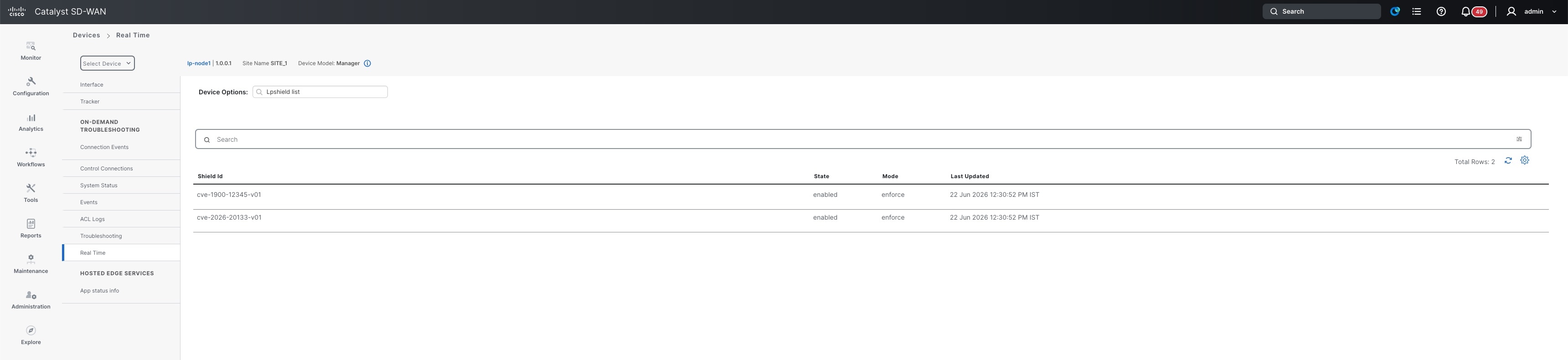
Select real-time monitoring from the drop-down list and choose Lpshield List.

The Lpshield List view displays the installed shield status on the selected device.

Figure 1. View shield status

View event statistics for Live Protect

Procedure


Step 1

From the Cisco SD-WAN Manager menu, go to Monitor > Advisory.

Step 2

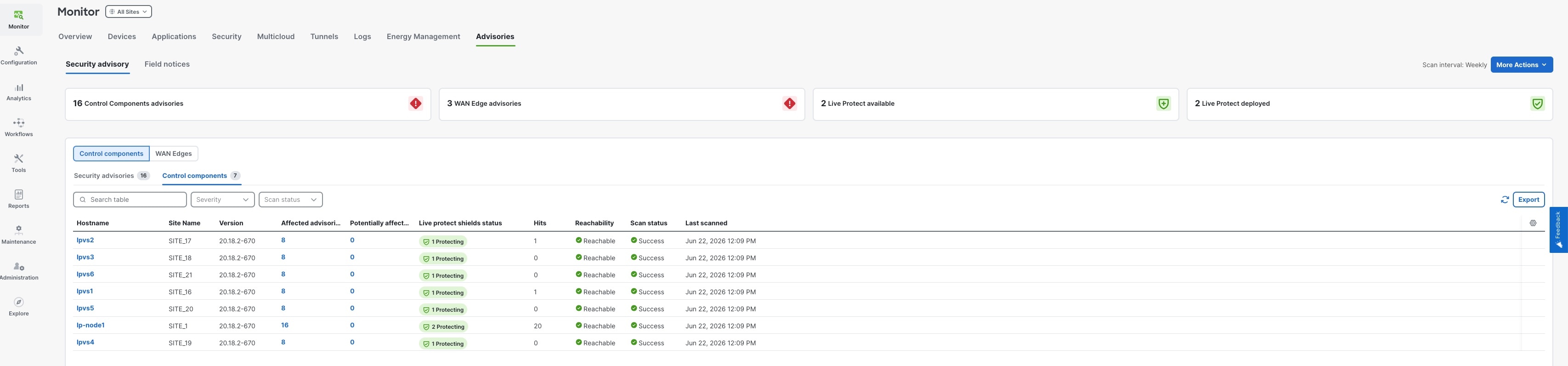
Select Control Components.

The Hits field displays the event statistics for the deployed shields.

Figure 2. View event statistics