Prerequisites for DHCP for IPv6
Ensure basic IPv6 connectivity for assigning IPv6 addresses to hosts connected to the devices.
The documentation set for this product strives to use bias-free language. For the purposes of this documentation set, bias-free is defined as language that does not imply discrimination based on age, disability, gender, racial identity, ethnic identity, sexual orientation, socioeconomic status, and intersectionality. Exceptions may be present in the documentation due to language that is hardcoded in the user interfaces of the product software, language used based on RFP documentation, or language that is used by a referenced third-party product. Learn more about how Cisco is using Inclusive Language.
This table describes the feature history of DHCP for IPv6.
|
Feature Name |
Release Information |
Description |
|---|---|---|
|
DHCP for IPv6 |
Cisco IOS XE Catalyst SD-WAN Release 17.7.1a Cisco vManage Release 20.7.1 |
This feature allows you to configure DHCP for IPv6 (DHCPv6) on Cisco IOS XE Catalyst SD-WAN devices to assign IPv6 addresses to hosts on an IPv6-enabled network. Assigning of IPv6 addresses is accomplished using SLAAC, DHCPv6, DHCPv6 Prefix Delegation, or DHCPv6 Relay. A Cisco IOS XE Catalyst SD-WAN device can be configured for DHCPv6 as a DHCP server, DHCP client, or as a DHCP relay agent. |
Ensure basic IPv6 connectivity for assigning IPv6 addresses to hosts connected to the devices.
These are restrictions that apply to DHCP for IPv6.
DHCP for IPv6 is supported only through CLI configuration.
A unique DHCPv6 pool name must be provided for each VRF.
DHCP for IPv6 (DHCPv6) is a protocol used by IPv6 devices to obtain IP addresses and configuration parameters from DHCPv6 servers. It operates similarly to DHCP for IPv4 but uses IPv6-specific mechanisms and messages.
You can configure Dynamic Host Configuration Protocol (DHCP) for IPv6 to assign addresses on an IPv6-enabled network. Alternatively, you can also configure Stateless Address Autoconfiguration (SLAAC) to assign addresses on an IPv6-enabled network.
The most common method for IPv6 client address assignment is SLAAC. SLAAC provides simple plug-and-play connectivity where hosts self-assign an address based on the IPv6 prefix.
SLAAC is configured like this:
Host sends a router solicitation message.
Hosts waits for a Router Advertisement (RA) message.
Hosts take the first 64 bits of the IPv6 prefix from the RAmessage and combines it with the 64 bit EUI-64 address (in the case of ethernet, this is created from the MAC Address) to create a global unicast message. The host also uses the source IP address, in the IP header, of the RA message, as its default gateway.
Duplicate Address Detection (DAD) is performed by IPv6 clients in order to ensure that random addresses that are picked do not collide with other clients.
The choice of algorithm is up to the client and is often configurable.
The last 64 bits of the IP v6 address can be learned based on these two algorithms:
EUI-64 which is based on the MAC address of the interface, or
Private addresses that are randomly generated.
|
DHCPv6 |
IPv6 devices use multicast to acquire IP addresses and to find DHCPv6 servers. The basic DHCPv6 client-server concept is similar to DHCP for IPv4. If a client wants to receive configuration parameters, it sends out a request on the attached local network to detect available DHCPv6 servers. The server responds with the requested information in a Reply message. The DHCPv6 client knows whether to use DHCPv6 based upon the instruction from a router on its link-local network. The default gateway has two configurable bits in its RA available for this purpose:
|
|
Stateless DHCP |
Stateless DHCPv6 is a combination of SLAAC and DHCPv6. With this option SLAAC is still used to retrieve an IP address while DHCP is used to obtain additional information such as TFTP server addressor, DNS server address. In this case, the device sends an RA with the O bit set but does not set the M bit. This is known as Stateless DHCPv6 because the DHCPv6 server does not have to track the client address bindings. |
|
Stateful DHCP |
Stateful DCHPv6 functions exactly the same as DHCP IPv4 in which hosts receive both their IPv6 address and additional parameters from the DHCP server. When a device sends an RA with the M bit set, this indicates that clients must use DHCP to obtain their IP addresses. When the M bit is set, the setting of the O bit is irrelevant because the DHCP server also returns other configuration information together with the addresses. This is known as Stateful DHCPv6 because the DHCPv6 server tracks the client address bindings. |
The DHCPv6 prefix delegation feature is a stateful mode of operation for simple delegation of prefixes from a delegating edge device (DHCP server) to requesting edge device (DHCP clients).
DHCPv6 prefix delegation feature is ideal for situations where:
A delegating edge device that does not have the information about the topology of the networks to which the requesting edge device is attached to.
A delegating edge device does not require other information apart from the identity of the requesting edge device to choose a prefix for delegation. This mechanism is appropriate for use by an ISP to delegate a prefix to a subscriber. After the ISP has delegated prefixes to a subscriber, the subscriber may further subnet and assign prefixes to the links within the subscriber's network.
A DHCPv6 relay agent is an edge device, residing on the client's network, is used to relay messages between the client and the server when a DHCPv6 server is not in the same network as the DHCPv6 clients.
Configuring DHCP for IPv6 allows you to have more IP address compared to IPv4. With IPv6, there can be no depletion of IP addresses.
These are use cases for DHCP for IPv6.
Cisco IOS XE Catalyst SD-WAN devices can be configured for DHCPv6 as a server, client, or a relay agent. As a server, a device can be configured for SLAAC, stateless DHCP, or for prefix delegation.
The figure below shows a typical broadband deployment.
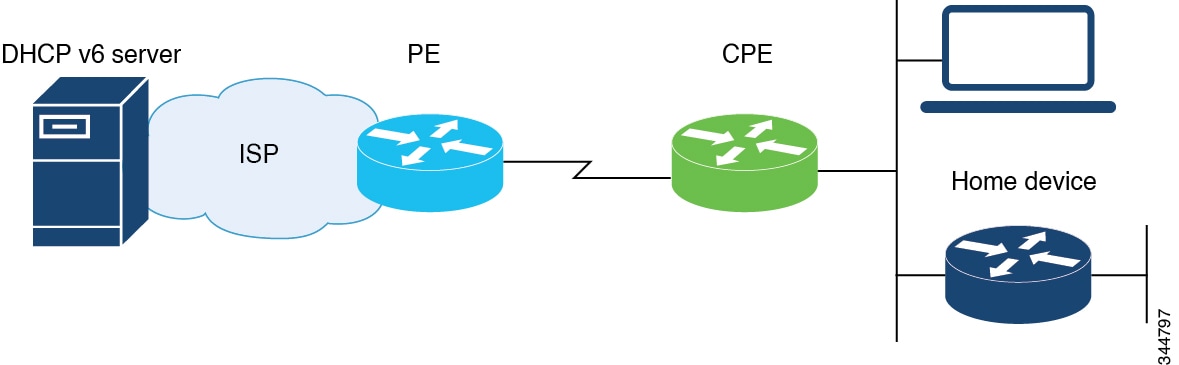
A Cisco IOS XE Catalyst SD-WAN device deployed on a customer premises (CPE) and connected to a ISP edge (PE) device can be a stateless or stateful DHCPv6 client. In either case, the ISP-side DHCPv6 server might provide configuration parameters such as Domain Name System (DNS) server addresses, domain names, and Simple Network Time Protocol (SNTP) servers to the DHCP client on the CPE. Such information can be specific to ISPs.
In addition to being a DHCPv6 client (toward the ISP), the CPE can act as a DHCPv6 server to the home network. For example, neighbor discovery followed by a stateless or stateful DHCPv6 client can occur on the link between the CPE and the home devices. In some cases, the information to be provided to the home network is the same as that obtained from the ISP-side DHCPv6 server. Therefore, the DHCPv6 component on the CPE allows automatic importing of configuration parameters from the DHCPv6 client to the DHCPv6 server pool.
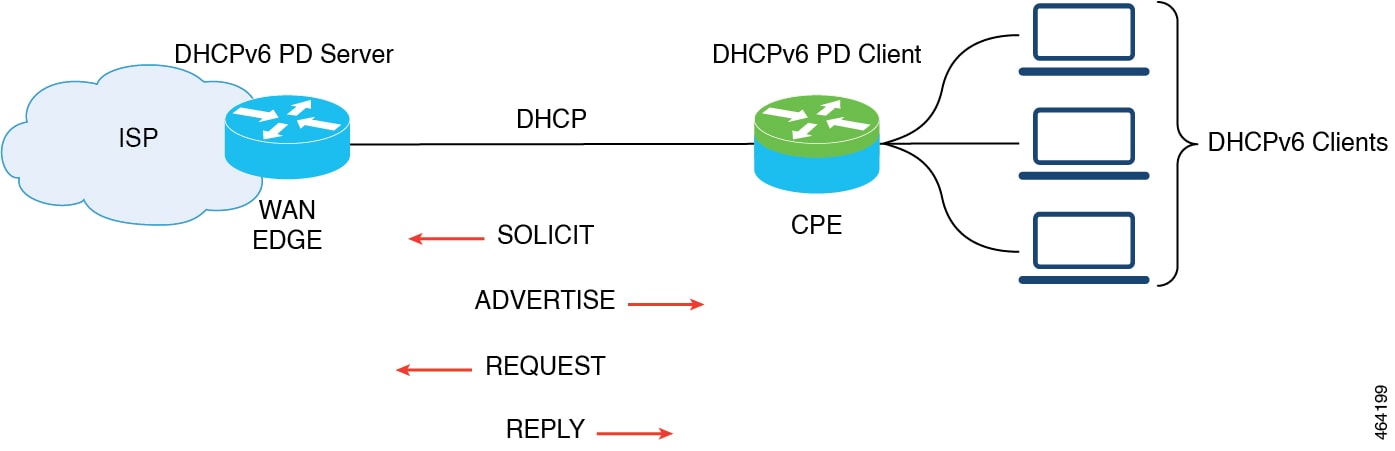
The model of operation for prefix delegation is as follows. In this sample topology, an edge device is configured as a DHCP server which is provisioned with prefixes to be delegated to a DHCP client. A Cisco IOS XE Catalyst SD-WAN device is configured as a DHCP client and requests prefix(es) from the server. The server chooses prefix(es) for delegation and responds with prefix(es) to the DHCP client. The DHCP client is then responsible for the delegated prefix(es).
For example, the client might assign a subnet from a delegated prefix to one of its interfaces and begin sending Router Advertisements for the prefix on that link. Each prefix has an associated preferred lifetime and valid lifetime, which constitute an agreement about the length of time over which the client is allowed to use the prefix. A client can request an extension of the lifetimes on a delegated prefix and is required to terminate the use of a delegated prefix if the valid lifetime of the prefix expires.
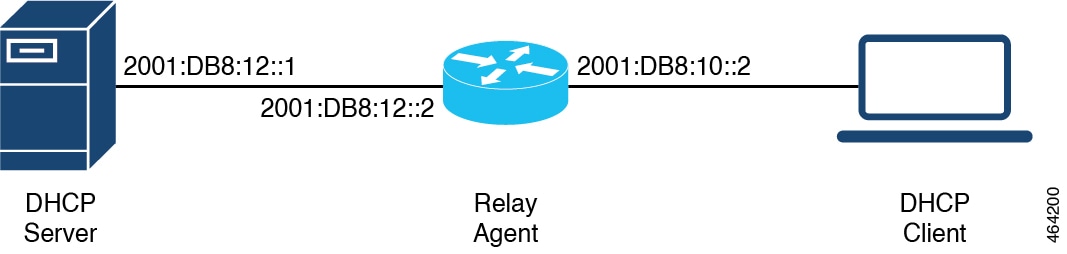
In this sample topology, the DHCP server is not in the same network as DHCP client. A Cisco IOS XE Catalyst SD-WAN device residing on the client's network acts as a relay agent to relay messages between the client and the server.
These are methods for configuring DHCP for IPv6 (DHCPv6) using CLI commands.
Use a CLI add-on profile or template to configure devices from Cisco SD-WAN Manager using CLI commands. The sections here provide examples of various DHCP configurations.
This example shows how to configure SLAAC on the client side.
device(config)# interface GigabitEthernet0/0/2
device(config-if)# ipv6 address autoconfig
device(config-if)# ipv6 enable
device(config-if)# end
This example shows how to configure SLAAC on the server side.
device(config)# interface GigabitEthernet1
device(config-if)# ipv6 address 2010:AB8:0:1::1/64
device(config-if)# ipv6 enable
device(config-if)# end
This example shows how to configure SLAAC and DHCPv6 pool on the client side.
device(config)# interface GigabitEthernet0/0/2
device(config-if)# ipv6 address autoconfig
device(config-if)# ipv6 enable
device(config-if)# ipv6 nd autoconfig default-route
device(config-if)# ipv6 dhcp client request vendor
device(config-if)# end
This example shows how to configure SLAAC and DHCPv6 pool on the server side.
device(config)# interface GigabitEthernet1
device(config-if)# ipv6 address 2010:AB8:0:1::1/64
device(config-if)# ipv6 enable
device(config-if)# ipv6 nd autoconfig default-route
device(config-if)# ipv6 nd other-config-flag
device(config-if)# ipv6 dhcp server dhcpv6
device(config-if)# end

device(config)# ipv6 dhcp pool dhcpv6
device(config-dhcpv6)# dns-server 2001:DB8:3000:3000::42
device(config-dhcpv6)# domain-name example.com
device(config-dhcpv6)# vendor-specific 100
device(config-dhcpv6)# suboption 1 address 2001:CC:1234:44::10
device(config-dhcpv6)# suboption 2 ascii "ip phone"
This example shows how to configure DHCPv6 address assignment on the client side.
device(config)# interface GigabitEthernet0/0/2
device(config-if)# ipv6 address dhcp
device(config-if)# ipv6 enable
device(config-if)# ipv6 nd autoconfig default-route
device(config-if)# ipv6 dhcp client request vendor
device(config-if)# end
This example shows how to configure DHCPv6 address assignment on the server side.
device(config)# interface GigabitEthernet1
device(config-if)# ipv6 address 2010:AB8:0:1::1/64
device(config-if)# ipv6 enable
device(config-if)# ipv6 nd autoconfig default-route
device(config-if)# ipv6 nd managed-config-flag
device(config-if)# ipv6 dhcp server dhcpv6
device(config-if)# end

device(config)# ipv6 dhcp pool dhcpv6
device(config-dhcpv6)# address prefix 2010:AB8:0:1::1/64 lifetime 200 200
device(config-dhcpv6)# dns-server 2001:DB8:3000:3000::42
device(config-dhcpv6)# domain-name example.com
device(config-dhcpv6)# vendor-specific 100
device(config-dhcpv6)# suboption 1 address 2001:CC:1234:44::10
device(config-dhcpv6)# suboption 2 ascii "ip phone"
This example shows how to configure DHCPv6 with prefix delegation on the client side.
device(config)# interface GigabitEthernet0/0/2
device(config-if)# ipv6 enable
device(config-if)# ipv6 nd autoconfig default-route
device(config-if)# ipv6 dhcp client pd prefix_from_provider
device(config-if)# ipv6 dhcp client request vendor
device(config-if)# end
This example shows how to configure DHCPv6 with prefix delegation on the server side.
device(config)# interface GigabitEthernet1
device(config-if)# ipv6 address 2010:AB8:0:1::1/64
device(config-if)# ipv6 enable
device(config-if)# ipv6 nd autoconfig default-route
device(config-if)# ipv6 nd managed-config-flag
device(config-if)# ipv6 nd ra interval 20
device(config-if)# ipv6 dhcp server dhcpv6
device(config-if)# end

device(config)# ipv6 dhcp pool dhcpv6
device(config-dhcpv6)# prefix-delegation pool dhcpv6-pool1 lifetime 200 200
device(config-dhcpv6)# dns-server 2001:DB8:3000:3000::42
device(config-dhcpv6)# domain-name example.com
device(config-dhcpv6)# vendor-specific 100
device(config-dhcpv6)# suboption 1 address 2001:CC:1234:44::10
device(config-dhcpv6)# suboption 2 ascii "ip phone"
device(config)# ipv6 local pool dhcpv6-pool1 2001:DB8:1200::/40 48
This example shows how to configure DHCPv6 with relay on the client side.
device(config)# interface GigabitEthernet3
device(config-if)# ipv6 address dhcp
device(config-if)# ipv6 enable
device(config-if)# ipv6 dhcp client pd pr-from-pd
device(config-if)# ipv6 dhcp client request vendor
device(config-if)# no mop enabled
device(config-if)# no mop sysid
device(config-if)# end
This example shows the configurations on the client facing a WAN edge device that acts as the relay agent.
device(config)# interface TenGigabitEthernet0/0/5
device(config-if)# vrf forwarding 10
device(config-if)# load-interval 30
device(config-if)# ipv6 address 2001:BB:1000::10/64
device(config-if)# ipv6 enable
device(config-if)# ipv6 dhcp relay destination 2001:BB8:1200::2
device(config-if)# ipv6 dhcp relay option vpn
device(config-if)# end
This example shows the configurations on the server facing WAN edge device.
device(config)# interface GigabitEthernet0/0/3
device(config-if)# vrf forwarding 10
device(config-if)# no ip address
device(config-if)# negotiation auto
device(config-if)# ipv6 address 2001:BB8:1200::1/64
device(config-if)# ipv6 enable
device(config-if)# end
This example shows how to configure DHCPv6 with relay on the server side.
device(config)# interface GigabitEthernet2
device(config-if)# ipv6 address 2001:BB8:1200::2/64
device(config-if)# ipv6 enable
device(config-if)# ipv6 dhcp server dhcpv6
device(config-if)# end

device(config)# ipv6 dhcp pool dhcpv6
device(config-dhcpv6)# prefix-delegation pool dhcpv6-pool10 lifetime infinite infinite
device(config-dhcpv6)# address prefix 2001:BB:1000::/64 lifetime 200 200
device(config-dhcpv6)# dns-server 2001:BB:1200::42
device(config-dhcpv6)# domain-name relay.com
device(config)# ipv6 local pool dhcpv6-pool10 8001:ABCD::/40 48
These are methods of verifying DHCP for IPv6 (DHCPv6) configurations.
This is a sample output from the show ipv6 dhcp interface command that provides details about DHCPv6 address allocation.
Device# show ipv6 dhcp interface GigabitEthernet0/0/2
GigabitEthernet0/0/2 is in client mode
  Prefix State is IDLE
  Address State is OPEN
  Renew for address will be sent in 00:01:09
  List of known servers:
    Reachable via address: FE80::250:56FF:FEBD:DBD1
    DUID: 00030001001EBD43F800
    Preference: 0
    Configuration parameters:
      IA NA: IA ID 0x00080001, T1 100, T2 160
        Address: 2010:AB8:0:1:95D1:CFC:F227:23FB/128
                preferred lifetime 200, valid lifetime 200
                expires at Oct 26 2021 07:28 AM (170 seconds)
      DNS server: 2001:DB8:3000:3000::42
      Domain name: example.com
      Information refresh time: 0
      Vendor-specific Information options:
          Enterprise-ID: 100
  Prefix Rapid-Commit: disabled
  Address Rapid-Commit: disabled
This is a sample output from the show ipv6 dhcp interface command that provides details about DHCPv6 prefix delegation.
Device# show ipv6 dhcp interface GigabitEthernet0/0/2
GigabitEthernet0/0/2 is in client mode
  Prefix State is OPEN
  Renew will be sent in 00:01:34
  Address State is IDLE
  List of known servers:
    Reachable via address: FE80::250:56FF:FEBD:DBD1
    DUID: 00030001001EBD43F800
    Preference: 0
    Configuration parameters:
      IA PD: IA ID 0x00080001, T1 100, T2 160
        Prefix: 2001:DB8:1202::/48
                preferred lifetime 200, valid lifetime 200
                expires at Oct 26 2021 07:30 AM (194 seconds)
      DNS server: 2001:DB8:3000:3000::42
      Domain name: example.com
      Information refresh time: 0
  Prefix name: prefix_from_server
  Prefix Rapid-Commit: disabled
  Address Rapid-Commit: disabled
This is a sample output from the show ipv6 dhcp interface command that provides details about SLAAC with DHCP.
Device# show ipv6 dhcp interface GigabitEthernet0/0/2
GigabitEthernet0/0/2 is in client mode
  Prefix State is IDLE (0)
  Information refresh timer expires in 23:59:49
  Address State is IDLE
  List of known servers:
    Reachable via address: FE80::250:56FF:FEBD:DBD1
    DUID: 00030001001EBD43F800
    Preference: 0
    Configuration parameters:
      DNS server: 2001:DB8:3000:3000::42
      Domain name: example.com
      Information refresh time: 0
      Vendor-specific Information options:
          Enterprise-ID: 100
  Prefix Rapid-Commit: disabled
  Address Rapid-Commit: disabled
This is a sample output from the show ipv6 dhcp pool command that provides details about DHCPv6 address allocation.
Device# show ipv6 dhcp pool
DHCPv6 pool: relay_server
  VRF 10
  Prefix pool: dhcpv6-pool2
  Address allocation prefix: 5001:DB8:1234:42::/64 valid 20000 preferred 20000 (1 in use, 0 conflicts)
               preferred lifetime 200, valid lifetime 200
  DNS server: 2001:BB8:3000:3000::42
  Domain name: relay.com
  Information refresh: 60
  Vendor-specific Information options:
  Enterprise-ID: 10
    suboption 1 address 2001:DB8:1234:42::10
    suboption 2 ascii 'ip phone'
  Active clients: 1
  Pool is configured to include all configuration options in REPLY
This is a sample output from the show ipv6 dhcp pool command that provides details about DHCPv6 prefix delegation.
Device# show ipv6 dhcp pool
DHCPv6 pool: relay_server
  VRF 10
  Prefix pool: dhcpv6-pool2
  Address allocation prefix: 5001:DB8:1234:42::/64 valid 20000 preferred 20000 (0 in use, 0 conflicts)
               preferred lifetime 200, valid lifetime 200
  DNS server: 2001:BB8:3000:3000::42
  Domain name: relay.com
  Information refresh: 60
  Vendor-specific Information options:
  Enterprise-ID: 10
    suboption 1 address 2001:DB8:1234:42::10
    suboption 2 ascii 'ip phone'
  Active clients: 1
  Pool is configured to include all configuration options in REPLY
This is a sample output from the show ipv6 dhcp binding command that provides details about DHCPv6 address allocation.
Device# show ipv6 dhcp binding
Client: FE80::250:56FF:FEBD:8261
  DUID: 00030001001EE6DBF500
  Username : unassigned
  VRF : 10
  IA NA: IA ID 0x00080001, T1 10000, T2 16000
    Address: 5001:DB8:1234:42:500C:B3FA:54A7:F63D
            preferred lifetime 20000, valid lifetime 20000
            expires at Oct 26 2021 01:17 PM (19925 seconds)
This is a sample output from the show ipv6 dhcp binding command that provides details about DHCPv6 prefix delegation.
Device# show ipv6 dhcp binding
Client: FE80::250:56FF:FEBD:8261
  DUID: 00030001001EE6DBF500
  Username : unassigned
  VRF : 10
  Interface : GigabitEthernet0/0/3
  IA PD: IA ID 0x00080001, T1 100, T2 160
    Prefix: 2001:BB8:1602::/48
            preferred lifetime 200, valid lifetime 200
            expires at Oct 26 2021 08:01 AM (173 seconds)
This is a sample output from the show ipv6 dhcp database command.
Device# show ipv6 dhcp database
Database agent bootflash:
  write delay: 300 seconds, transfer timeout: 300 seconds
  last written at Oct 26 2021 08:01 AM, write timer expires in 250 seconds
  last read at never
  successful read times 0
  failed read times 0
  successful write times 2
  failed write times 0
This is a sample output from the show ipv6 dhcp relay bindings command that provides details about DHCPv6 relay.
Device# show ipv6 dhcp relay binding

Relay Bindings associated with default vrf:

Relay Bindings associated with vrf 10:
Prefix: 2001:AA8:1100::/48 (GigabitEthernet3)
  DUID: 00030001001E49674C00
  IAID: 851969
  lifetime: INFINITE
  expiration: INFINITE
Summary:
  Total number of Relay bindings = 1
  Total number of IAPD bindings = 1
  Total number of IANA bindings = 0
  Total number of Relay bindings added by Bulk lease = 0
 Feedback