Reverse Proxy

Feature history for reverse proxy

Describes developments of reverse proxy, release by release.

Table 1. Feature history

Feature Name

Release Information

Description

Support for Reverse Proxy with Cisco Catalyst SD-WAN and Cisco Catalyst SD-WAN Multitenancy

Cisco IOS XE Release 17.6.1a

Cisco SD-WAN Release 20.6.1

Cisco vManage Release 20.6.1

With this feature, you can deploy a reverse proxy in your overlay network between Cisco IOS XE Catalyst SD-WAN devices and Cisco SD-WAN Manager and Cisco SD-WAN Controllers. Also, this feature enables you to deploy a reverse proxy in both single-tenant and multitenant deployments that include Cisco vEdge device s or Cisco IOS XE Catalyst SD-WAN device s. In a multitenant deployment, the service provider manages the reverse proxy and the associated configuration.

Reverse proxy

A reverse proxy in Cisco Catalyst SD-WAN is an intermediary network component that

  • relays control traffic between WAN edge devices and SD-WAN Control Components,

  • enhances security by preventing direct internet connections to SD-WAN Control Components, and

  • enables flexible deployment in single-tenant and multitenant setup.

Reverse proxy deployment and communication

In a standard overlay network, Cisco Catalyst SD-WAN edge devices initiate direct connections to the SD-WAN Control Components (SD-WAN Manager and SD-WAN Controllers) and exchange control plane information over these connections. The WAN edge devices are typically located in branch sites and connect to the SD-WAN Controllers over the internet. As a result, SD-WAN Manager and SD-WAN Controllers are also connected directly to the internet.

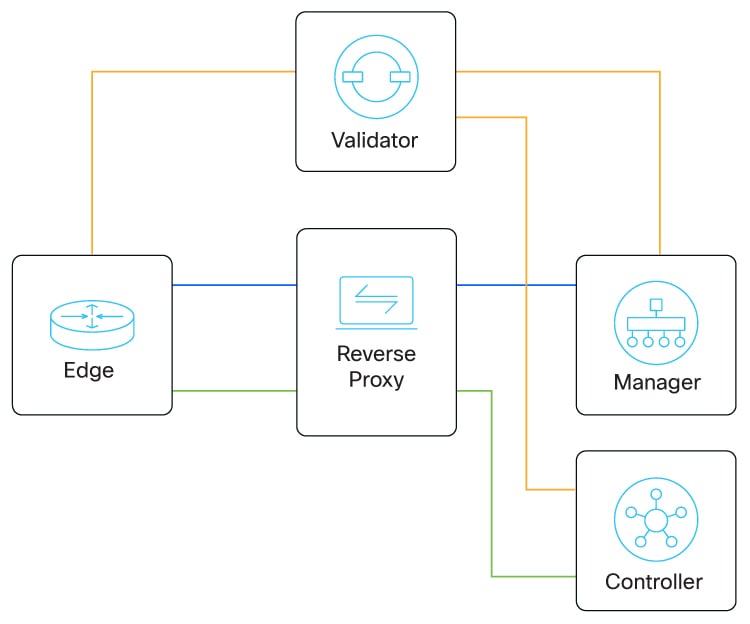
For security or other reasons, you may not want the SD-WAN Controllers to have direct internet connections. In such scenarios, the reverse proxy acts as an intermediary to pass control traffic between the SD-WAN Controllers and the WAN edge devices. WAN edge devices communicate with the reverse proxy, which relays traffic to and from SD-WAN Manager and SD-WAN Controllers.

You can deploy a reverse proxy in both single tenant and multitenant Cisco Catalyst SD-WAN deployments. The TLOC communicates with the reverse proxy on its public IP address and port, regardless of public or private TLOC.

The following figure illustrates a reverse proxy deployed between a WAN edge device, SD-WAN Manager and the SD-WAN Controllers.
Figure 1. Reverse Proxy

Devices with private and public network connectivity

Describes the considerations for devices in a Cisco Catalyst SD-WAN network that connect to both private networks and the public internet.

You can use a reverse proxy in a Cisco Catalyst SD-WAN network that includes a device with these multiple TLOCs:

  • A TLOC that connects to an internal private network without internet access, and

  • A TLOC that connects to the public internet

This scenario has a specific requirement for configuring the TLOC color of each SD-WAN Controller. This table describes this special case. For comparison, the table includes examples of devices with only one TLOC, and devices that have separate TLOCs for a private network and the public internet.

Table 2. TLOC Color Requirements

Device

TLOC

TLOC Connectivity

Configure this TLOC Color as a...

The Device Connects to this SD-WAN Validator

Connectivity to:

SD-WAN Controller , and

SD-WAN Manager

Specific TLOC Color Requirements

A

1

Internal private network

Private color

Example: private1

SD-WAN Validator reachable through the private network

Direct connectivity through the private network

None

B

1

Public internet

Public color

Example: custom1

SD-WAN Validator reachable through the public internet

Connectivity through a reverse proxy

None

C

1

Internal private network

Private color

Example: private1

SD-WAN Validator reachable through the private network

Direct connectivity through the private network

A network that includes a device with multiple TLOCs as shown here has this specific requirement:

Configure the TLOCs for each SD-WAN Controller with the private color that you are using for the private network. Do not leave the TLOC color as default.

Leaving the TLOC color for the SD-WAN Controllers as the default color causes this problem: Devices with a TLOC connecting to the internal private nework, such as Device C, cannot connect to the SD-WAN Controllers.

2

Public internet

Public color

Example: custom1

SD-WAN Validator reachable through the public internet

Connectivity through a reverse proxy

Restrictions for reverse proxy

Multitenant scenario

In a multitenant Cisco Catalyst SD-WAN overlay network, you can deploy a reverse proxy device with only a three-node SD-WAN Manager cluster.

TLS-based control plane

Deployment of the reverse proxy is only supported with a TLS-based control plane for SD-WAN Manager and SD-WAN Controllers.

Cisco vEdge 5000 router restriction

You cannot deploy a reverse proxy with a Cisco vEdge 5000 router.

IPv6

You cannot deploy a reverse proxy with IPv6 control connections.

Devices with a TLOC for a private WAN

The following restriction applies to edge devices in a scenario where:

  • one or more devices have a TLOC connecting them to a private WAN

  • one or more SD-WAN Validators do not have reachability to a reverse proxy:

    • In this scenario, Zero-Touch Provisioning (ZTP) onboarding does not support onboarding a Cisco IOS XE Catalyst SD-WAN device with a TLOC using the default TLOC color. Bootstrap the device with a minimal configuration that configures a non-default TLOC color.

Provision certificates on the reverse proxy

On the reverse proxy you must provision a certificate that is signed by the Certificate Authority (CA) that has signed the certificate of the Cisco SD-WAN Controllers. This certificate provisioned for reverse proxy is used to authenticate the WAN edge devices.

Procedure


Step 1

Generate a Certificate Signing Request (CSR) for the reverse proxy and have it signed by Cisco.

Run the following command on the reverse proxy:

Example:


            proxy$ 
            openssl req -new -days 365 -newkey rsa:2048 -nodes -keyout Proxy.key -out Proxy.csr
          

When prompted, enter values as suggested in the following table:

Table 3. CSR Prompt Fields and Example Values
Property Description
Country Name (2 letter code)

Any country code.

Example: US

State or Province Name

Any state or province.

Example: CA

Locality Name

Any locality.

Example: San Jose

Organization Name

Organization name used in the overlay.

Starting from Cisco Catalyst SD-WAN Manager Release 20.12.1 you cannot include a comma in the Organization Name field of the bootstrap configuration file.

Example: Cisco

Organizational Unit Name

Organization name unit used in the overlay.

Example: cisco-sdwan-12345

Common Name

Host name ending with cisco.com

Example: proxy.cisco.com

Email Address

Use any valid email address.

Example: someone@example.com

Step 2

If you use Cisco Public Key Infrastructure (PKI) as the CA for the Cisco SD-WAN Controllers, submit the CSR on the Cisco Network Plug and Play (PnP) application and retrieve the signed certificate.


Configure the reverse proxy settings

Procedure


Step 1

From the Cisco SD-WAN Manager menu, choose Administration > Settings > Proxy .

Step 2

Toggle Reverse Proxy to enable it.

Step 3

In Certificate Authority, choose an option.

  • Manager (Automated)
  • Enterprise (Manual)

Step 4

Click Save.


Configure reverse proxy settings on Cisco SD-WAN Controllers

Procedure


Step 1

From the Cisco SD-WAN Manager menu, choose Configure > Devices.

Step 2

Click Controllers .


Note


Starting from Cisco IOS XE Catalyst SD-WAN Release 17.13.1a , the Controllers tab is renamed as the Control Components tab to stay consistent with Cisco Catalyst SD-WAN rebranding.


Step 3

For the desired Cisco SD-WAN Manager instance or Cisco SD-WAN Controller, click … and click Add Reverse Proxy .

The Add Reverse Proxy dialog box appears.

Step 4

To map a private IP address and port number to a proxy IP address and port number, do as follows:

  1. Click Add Reverse Proxy.

  2. Enter the following details:

    Private IP

    The private IP address is the IP address of the transport interface in VPN 0.

    Private Port

    This is the port used to establish the connections that handle control and traffic in the overlay network. The default port number is 12346.

    Proxy IP

    Proxy IP address to which private IP address must be mapped.

    Proxy Port

    Proxy port to which the private port must be mapped.

  3. If the Cisco SD-WAN Manager instance or Cisco SD-WAN Controller has multiple cores, repeat Step 4 a and Step 4 b for each core.

Step 5

To delete a private IP address-port number to proxy IP address-port number mapping, find the mapping and click the trash icon.

Step 6

To save the reverse proxy settings, click Add.

To discard the settings, click Cancel.

Step 7

In the Security feature template attached to the Cisco SD-WAN Manager instance or Cisco SD-WAN Controller, choose TLS as the transport protocol.


After you configure reverse proxy settings on a Cisco SD-WAN Manager instance or a Cisco SD-WAN Controller, WAN edge devices in the overlay network are provisioned with a certificate for authentication with the reverse proxy.

  1. When a reverse proxy is deployed, Cisco SD-WAN Validator shares the details of the reverse proxy with the WAN edge devices.

  2. On learning about the reverse proxy, a WAN edge device initiates the installation of a signed certificate from Cisco SD-WAN Manager.

  3. After the certificate is installed, the WAN edge device uses the certificate for authentication with the reverse proxy and connects to the reverse proxy.

Disable the reverse proxy

Before you begin

Before you disable reverse proxy, delete any private IP address-port number to proxy IP address-port number mappings that you have configured for SD-WAN Manager instances and Cisco SD-WAN Controller. See Configure Reverse Proxy Settings on ​Cisco Catalyst SD-WAN Controllers for information about deleting the mappings.

Procedure


Step 1

From the Cisco SD-WAN Manager menu, choose Administration > Settings.

Step 2

For the Reverse Proxy setting, select Edit.

Step 3

For Enable Reverse Proxy, select Disabled.

Step 4

Select Save .


Monitor reverse proxy using the CLI

This topic provides sample CLI outputs and explanations for monitoring reverse proxy mappings and certificates on SD-WAN controllers and WAN edge devices.

Monitor Private and Proxy IP Address and Port Numbers of WAN Edge Devices on Cisco SD-WAN Controllers

The following is a sample output from the execution of the show control connections command on a Cisco SD-WAN Controller . In the command output, for a WAN edge device, the entries in the PEER PRIVATE IP and PEER PRIV PORT columns are the configured TLOC IP address and port number of the WAN edge interface. The entries in the PEER PUBLIC IP and PEER PUB PORT columns are the corresponding IP address and port number of the reverse proxy interface. The same command can also be executed on a SD-WAN Manager instance to obtain a similar output.


        vsmart1# 
        show control connections
        PEER                PEER                                          
        PEER    PEER PEER            SITE       DOMAIN PEER         PRIV    PEER        PUB                                           
        INDEX TYPE    PROT SYSTEM IP       ID         ID     PRIVATE IP   PORT    PUBLIC IP   PORT    ORGANIZATION   REMOTE COLOR     STATE UPTIME     
        -------------------------------------------------------------------------------------------------------------------------------------------------
        0     vbond   dtls 172.16.1.2         0          0      10.1.1.2     12346   10.1.1.2    12346   EXAMPLE-ORG    default         up     53:08:18:50
        0     vmanage tls  172.16.1.6         1          0      10.2.100.6   45689   10.2.100.6  45689   EXAMPLE-ORG    default         up     53:08:18:32
        1     vedge   tls  1.1.100.1       100        1      10.3.1.2     57853   10.2.100.1  53624   EXAMPLE-ORG    biz-internet    up     53:08:18:44
        1     vedge   tls  1.1.101.1       101        1      10.4.1.2     55411   10.2.100.1  53622   EXAMPLE-ORG    biz-internet    up     53:08:18:48
        1     vbond   dtls 172.16.1.2         0          0      10.1.1.2     12346   10.1.1.2    12346   EXAMPLE-ORG    default         up     53:08:18:51
        vsmart1#
      

View Mapping of SD-WAN Controller Private IP Address and Port Number to Proxy IP Address and Port Number on Cisco SD-WAN Validator

The following is a sample output from the execution of the show orchestrator reverse-proxy-mapping command on a Cisco SD-WAN Validator . In the command output, the entries in the PROXY IP and PROXY PORT columns are the proxy IP address and port number. The entries in the PRIVATE IP and PRIVATE PORT columns are the private IP address and port number of the transport interface in VPN 0.


        vbond# 
        show orchestrator reverse-proxy-mapping
        PRIVATE             PROXY                                                              
        UUID                                  PRIVATE IP  PORT     PROXY IP   PORT                                                               
        -----------------------------------------------------------------------------                                                            
        14c35ae4-69e3-41c5-a62f-725c839d25df  10.2.100.4  23456    10.2.1.10  23458                                                              
        14c35ae4-69e3-41c5-a62f-725c839d25df  10.2.100.4  23556    10.2.1.10  23558                                                              
        6c63e80a-8175-47de-a455-53a127ee70bd  10.2.100.6  23456    10.2.1.10  23457                                                              
        6c63e80a-8175-47de-a455-53a127ee70bd  10.2.100.6  23556    10.2.1.10  23557                                                              
        6c63e80a-8175-47de-a455-53a127ee70bd  10.2.100.6  23656    10.2.1.10  23657                                                              
        6c63e80a-8175-47de-a455-53a127ee70bd  10.2.100.6  23756    10.2.1.10  23757                                                              
        6c63e80a-8175-47de-a455-53a127ee70bd  10.2.100.6  23856    10.2.1.10  23857                                                              
        6c63e80a-8175-47de-a455-53a127ee70bd  10.2.100.6  23956    10.2.1.10  23957                                                              
        6c63e80a-8175-47de-a455-53a127ee70bd  10.2.100.6  24056    10.2.1.10  24057                                                              
        6c63e80a-8175-47de-a455-53a127ee70bd  10.2.100.6  24156    10.2.1.10  24157                                                              
        vbond#
      

Example: View Mapping of SD-WAN Controller Private IP Address and Port Number to Proxy IP Address and Port Number on a WAN Edge Device

The following is a sample output from the execution of the show sdwan control connections command on a Cisco IOS XE Catalyst SD-WAN device . In the command output, check the entry in the PROXY column for a Cisco SD-WAN Manager instance or a Cisco SD-WAN Controller . If the entry is Yes, the entries in the PEER PUBLIC IP and PEER PUBLIC PORT are the proxy IP address and port number.


        Device# 
        show sdwan control connections
        PEER              PEER                                  CONTROLLER                                                                                     
        PEER    PEER PEER            SITE       DOMAIN PEER          PRIV  PEER        PUB                                   GROUP                                                                                          
        TYPE    PROT SYSTEM IP       ID         ID     PRIVATE IP    PORT  PUBLIC IP   PORT  ORGANIZATION    LOCAL COLOR     PROXY STATE UPTIME      ID                                                                     
        --------------------------------------------------------------------------------------------------------------------------------------------------------------------------------------------------------------                                                                                          
        vsmart  tls  172.16.1.4         1          1      10.2.100.4    23558 10.2.1.10   23558 EXAMPLE-ORG     biz-internet    Yes   up     52:08:44:25 0                                                                     
        vbond   dtls 0.0.0.0         0          0      10.1.1.2      12346 10.1.1.2    12346 EXAMPLE-ORG     biz-internet    -     up     52:08:50:47 0                                                                     
        vmanage tls  172.16.1.6         1          0      10.2.100.6    23957 10.2.1.10   23957 EXAMPLE-ORG     biz-internet    Yes   up     66:03:04:50 0                                                                     
        Device# 
      

On a Cisco vEdge device , you can obtain a similar output by executing the command show control connections .

View Signed Certificate Installed on a WAN Edge Device for Authentication with Reverse Proxy

The following is a sample output from the execution of the show sdwan certificate reverse-proxy command on a Cisco IOS XE Catalyst SD-WAN device .


        Device# 
        show sdwan certificate reverse-proxy
        Reverse proxy certificate                                                                                                                
        ------------------                                                                                                                       
        Certificate:                                                                                                                             
        Data:                                                                                                                                
        Version: 1 (0x0)                                                                                                                 
        Serial Number: 1 (0x1)                                                                                                           
        Signature Algorithm: sha256WithRSAEncryption                                                                                     
        Issuer: C = US, CN = 6c63e80a-8175-47de-a455-53a127ee70bd, O = Viptela                                                           
        Validity                                                                                                                         
        Not Before: Jun  2 19:31:08 2021 GMT                                                                                         
        Not After : May 27 19:31:08 2051 GMT                                                                                         
        Subject: C = US, ST = California, CN = C8K-9AE4A5A8-4EB0-E6C1-1761-6E54E4985F78, O = ViptelaClient                               
        Subject Public Key Info:                                                                                                         
        Public Key Algorithm: rsaEncryption                                                                                          
        RSA Public-Key: (2048 bit)                                                                                               
        Modulus:                                                                                                                 
        00:e2:45:49:53:3a:56:d4:b8:70:59:90:01:fb:b1:                                                                        
        44:e3:73:17:97:a3:e9:b7:55:44:d4:2d:dd:13:4a:                                                                        
        a8:ef:78:14:9d:bd:b5:69:de:c9:31:29:bd:8e:57:                                                                        
        09:f2:02:f8:3d:1d:1e:cb:a3:2e:94:c7:2e:61:ea:                                                                        
        e9:94:3b:28:8d:f7:06:12:56:f3:24:56:8c:4a:e7:                                                                        
        01:b1:2b:1b:cd:85:4f:8d:34:78:78:a1:26:17:2b:                                                                        
        a5:1b:2a:b6:dd:50:51:f8:2b:13:93:cd:a6:fd:f8:                                                                        
        71:95:c4:db:fc:a7:83:05:23:68:61:15:05:cc:aa:                                                                        
        60:af:09:ef:3e:ce:70:4d:dd:50:84:3c:9a:57:ce:                                                                        
        cb:15:84:3e:cd:b2:b6:30:ab:86:68:17:94:fa:9c:                                                                        
        1a:ab:28:96:68:8c:ef:c8:f7:00:8a:7a:01:ca:58:                                                                        
        84:b0:87:af:9a:f6:13:0f:aa:42:db:8b:cc:6e:ba:                                                                        
        c8:c1:48:d2:f4:d8:08:b1:b5:15:ca:36:80:98:47:                                                                        
        32:3a:df:54:35:fe:75:32:23:9f:b5:ed:65:41:99:                                                                        
        50:b9:0f:7a:a2:10:59:12:d8:3e:45:78:cb:dc:2a:                                                                        
        95:f2:72:02:1a:a6:75:06:87:52:4d:01:17:f2:62:                                                                        
        8c:40:ad:29:e4:75:17:04:65:a9:b9:6a:dd:30:95:                                                                        
        34:9b                                                                                                                
        Exponent: 65537 (0x10001)                                                                                                
        Signature Algorithm: sha256WithRSAEncryption                                                                                         
        99:40:af:23:bb:cf:7d:59:e9:a5:83:78:37:02:76:83:79:02:                                                                          
        b3:5c:56:e8:c3:aa:fc:78:ef:07:23:f8:14:19:9c:a4:5d:88:                                                                          
        07:4d:6e:b8:0d:b5:af:fa:5c:f9:55:d0:60:94:d9:24:99:5e:
        33:06:83:03:c3:73:c1:38:48:45:ba:6a:35:e6:e1:51:0e:92:                                                                          
        c3:a2:4a:a2:e1:2b:da:cd:0c:c3:17:ef:35:52:e1:6a:23:20:                                                                          
        af:99:95:a2:cb:99:a7:94:03:f3:78:99:bc:76:a3:0f:de:04:                                                                          
        7d:35:e1:dc:4d:47:79:f4:c8:4c:19:df:80:4c:4f:15:ab:f1:                                                                          
        61:a2:78:7a:2b:6e:98:f6:7b:8f:d6:55:44:16:79:e3:cd:51:                                                                          
        0e:27:fc:e6:4c:ff:bb:8f:2d:b0:ee:ed:98:63:e9:c9:cf:5f:                                                                          
        d7:b1:dd:7b:19:32:22:94:77:d5:bc:51:85:65:f3:e0:93:c7:                                                                          
        3c:79:fc:34:c7:9f:40:dc:b1:fc:6c:e5:3d:af:2d:77:b7:c3:                                                                          
        88:b3:89:7c:a6:1f:56:35:3b:35:66:0c:c8:05:b5:28:0b:98:                                                                          
        19:c7:b0:8e:dc:b7:3f:9d:c1:bb:69:f0:7d:20:95:b5:d1:f0:                                                                          
        06:35:b7:c4:64:ba:c4:95:31:4a:97:03:0f:04:54:6d:cb:50:                                                                          
        2f:31:02:59                                                                                                                     
        Device#
      

On a Cisco vEdge device , you can obtain a similar output by executing the command show certificate reverse-proxy .