DNS Security

Feature history for DNS security

Table 1. Feature history

Feature Name

Release Information

Description

DNS Security with Cisco Secure Access

Cisco IOS XE Catalyst SD-WAN Release 26.1.1

Cisco Catalyst SD-WAN Manager Release 26.1.1.1

This feature monitors and controls the DNS requests by blocking access to unauthorized domains and applies consistent DNS-based security policies across devices.

DNS security fallback ensures that DNS security policy routing is determined by device routing configurations. In the event of a failover where the NAT Direct Internet Access (DIA) route is unavailable, connectivity is maintained by service vpn routing, ensuring continued reachability.

Increase in Local Domain Bypass Scale

Cisco IOS XE Catalyst SD-WAN Release 26.1.1

Cisco Catalyst SD-WAN Manager Release 26.1.1.1

With this feature the local domain bypass entries are increased to 256.

DNS security

The Cisco Catalyst SD-WAN Umbrella Integration feature enables the cloud-based security service by inspecting the Domain Name System (DNS) query that is sent to the DNS server through the device.

The security administrator configures policies on the Umbrella portal to either allow or deny traffic toward the fully qualified domain name (FQDN). The router acts as a DNS forwarder on the network edge, transparently intercepts DNS traffic, and forwards the DNS queries to the Umbrella cloud.

DNS security routing and fallback

A DNS security routing fallback mechanism is an implementation that

  • ensures device configurations dictate the egress path of packets,

  • maintains symmetric routing based on the device's routing table, and

  • data policy configurations takes precedence over the local DNS security policy.

DNS security uses the service VPN route configuration to establish connectivity to DNS servers, ensuring that device routing tables determine the egress path.

If you want to continue with the DNS security where traffic egresses via the global VRF, then configure a NAT DIA route for the Umbrella IP addresses 208.67.222.222 and 208.67.220.220.

Integration with NAT trackers

You can configure a NAT tracker and monitor the availability of the path.

  • If the path is healthy: The DNS traffic uses the NAT route.

  • If the path fails: The NAT tracker detects the failure, withdraws the route, and the device automatically performs a new route lookup to find an alternative path (like the overlay).

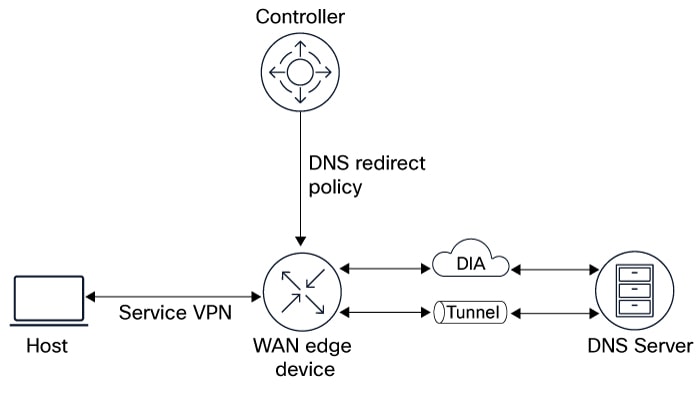
Figure 1. DNS security fallback
The DNS security fallback process illustrates how a NAT tracker monitors path availability, switching DNS traffic to an alternative route when the primary path fails.

Configure DNS security

Procedure


Step 1

From the Cisco SD-WAN Manager menu, choose Configuration > Policy Groups > DNS Security.

Step 2

Click Add DNS Security Policy.

Field

Description

Add DNS Security Policy

From the Add DNS Security Policy drop-down list, select Create New to create a new DNS Security Policy policy.

Create New

Displays the DNS Security Policy wizard.

Policy Name

Enter a name for the policy.

Select Provider

Minimum supported release: Cisco Catalyst SD-WAN Manager Release 26.1.1.1

Choose from:

  • Cisco Secure Access

  • Umbrella

Registration Status

Displays the status of the API Token configuration.

Manage Cisco Secure Access Registration

Enter the following details:

  • Organization ID:

    Cisco Secure Access organization ID for your organization.

    For more information, see Find Your Organization ID in the Cisco Secure Access User Guide.

  • API Key: Cisco Secure Access API Key.

  • Secret: Cisco Secure Access API Secret.

Manage Umbrella Registration

  • Enter the Cisco Umbrella organization ID (Organization ID) for your organization. For more information, see Find Your Organization ID in the Cisco Umbrella SIG User Guide.

Do one of the following:

  • In the Legacy Credentials pane, enter the Registration Key. It is the Umbrella Management API Key, which is part of DNS security policy under unified security policy. Then, enter the Umbrella Management API Secret.

  • For Legacy Credentials, navigate to Legacy Keys and select Umbrella Network Devices to obtain the key and secret

Or

  • From Cisco Catalyst SD-WAN Manager Release 20.15.1, in the Scope Credentials pane, enter the Registration Key. It is the Umbrella Management API Key, which is part of DNS security policy under unified security policy. Then, enter the Umbrella Management API Secret.

    For Scope Credentials, go to API Keys and choose the appropriate key scope based on your requirements. Ensure that Tunnels and Network Devices are selected in the deployments tab (these API Keys are read/write keys).

to add Cisco Umbrella Registration Key and Secret. Specific network-devices keys are used in DNS.

Also see Information About Cisco Umbrella Scope Credentials.

You can edit the umbrella credentials from Administration > Settings > Cloud Provider > Cloud Credentials.

Match All VPN

Click Match All VPN to keep the same configuration for all the available VPNs.

Custom VPN Configuration

choose Custom VPN Configuration to input the specific VPNs.

Local Domain Bypass List

Perform one of these actions:

  • Choose a local domain from the drop-down list

  • Choose Create New.

If you click Create New, configure these options:

  • Name

  • Description (optional)

  • Local domain

    From Cisco Catalyst SD-WAN Manager Release 26.1.1.1, 256 local domain bypass entries are supported.

DNS Server IP

Configure DNS Server IP from these options:

  • Umbrella Default

  • Custom DNS

    The DNS security fallback feature is not supported for custom DNS. You must configure an explicit NAT route to the DNS server for the custom DNS redirect to work.

DNSCrypt

Enable or disable the encryption of DNS packets.

The DNS security fallback feature is not supported for DNSCrypt.

Step 3

Click Save.


Verify DNS security configurations using CLI

DNS security configuration example

The following is a sample configuration of the DNS security with Cisco Secure Access..


parameter-map type dns-defense global​
local-domain test   ​
dnscrypt​
api-key apikey​
orgid 1111111​
secret 6 ehB_GFUYBFN]SAJM]eQPdOiJGWfRTDDdJLLPQB]JHCa]HHNgIYLbbPOJKMTdUVWHRhVgF​
vrf 1​
dns-resolver umbrella​
match-local-domain-to-bypass​
vrf 2​
dns-resolver umbrella​
match-local-domain-to-bypass​

View VRFs registration

The show sdwan dns-defense info command displays how many VRFs requested registration, how many were successfully registered, and whether DNSCrypt is enabled.


Device# show sdwan dns-defense info

REGISTRATIONS REQUESTED         REGISTRATIONS COMPLETED         DNSCRYPT         LAST SUCCESS ATTEMPT
-----------------------------------------------------------------------------------------------------------------------------------------------------------------------
11                                     10                                   True                       10/25/25 21:12:01

View registration status

The show sdwan dns-defense device-registration command displays the device ID and the registration status, indicating whether registration was successful or failed for any reason. The response also provides information about the cause of any failure.


Device# show sdwan dns-defense device-registration

VRF ID                         RESP CODE             TAG                        DEVICE_ID                        DESCRIPTION
----------------------------------------------------------------------------------------------------------------------------------------------------------
1                             201 created           vpn1                       f3384af554cefba2           Device Id received successfully
2                             201 created           vpn2                       f3382ad2f8a37dc6           Device Id received successfully