High Availability and CP Reconciliation

Feature Summary and Revision History

Summary Data

Table 1. Summary Data

Applicable Product(s) or Functional Area

cnBNG

Applicable Platform(s)

SMI

Feature Default Setting

Disabled - Configuration Required

Related Documentation

Not Applicable

Revision History

Table 2. Revision History
Revision Details Release

Introduced support for automatic CP-UP reconciliation for CP events.

2026.03.0

CP HA and Audit support for LAC and LNS sessions.

2022.03.0

First introduced.

2021.04.0

Feature Description

The high availability (HA) and Reconciliation feature for the control plane supports all cnBNG-specific service pods. This feature supports the IPoE, PTA, LAC, and LNS session types.

CP Audit

When subscriber sessions desynchronize across all pods in the control plane during HA events and session inconsistency, cnBNG runs CP reconciliation (that is, CP audit) to synchronize the sessions.


Note


CP reconciliation is also referred to as CP audit in this document.


  • Reconciliation between SM and DHCP for IPoE sessions

  • Reconciliation between SM, DHCP, and PPP for PTA and LNS sessions

  • Reconciliation between SM and PPP for LAC sessions

  • Reconciliation between PPP and L2TP for LAC and LNS sessions

  • Reconciliation between Node Manager (NM) and FSOLs for all session types

To recover L2TP service after HA events and to avoid service impact, critical information such as L2TP sequence numbers (Ns/Nr), Session Count, and SessionID bitmap must be recovered. The tunnel state for L2TP HA is recovered through recovery from another L2TP service.

Pod Restart

The cnBNG-specific service pods support the pod restart functionality.

This feature supports one BNG-specific service pod restart with a minimum gap of 10 minutes between pod restarts. It also supports one VM restart with a minimum gap of 30 minutes between VM restarts.

The HA support for L2TP is provided using a local peer service to synchronize the necessary L2TP tunnel information and recover it after restart. It also supports hitless operation during pod restart, and the restart of pods without impacting the existing sessions and tunnels. This feature helps to recover the L2TP control connection information such as Ns/Nr sequence numbers, Tunnel Context, and Session Bitmap, and also resume the control channel.


Note


VM reboot is not supported for LAC and LNS sessions.


The restart of service pods has the following impact:

  • CPU or memory spike can occur if there is a churn of sessions during pod restart. For example, if SM has two replicas such as instance 1 and instance 2, and if instance 1 restarts, there will be spike in the CPU or memory in instance 2.

  • Service pod IPCs can timeout if the destination service pod restarts before responding to the ongoing IPCs.

  • CDL updates of ongoing sessions can fail and result in desynchronization of sessions between pods.

  • If subscriber sessions desynchronize between CP and UP, cnBNG runs CP to UP reconciliation.

  • If IP address leaks occur in IPAM, run the IPAM reconciliation CLI command reconcile ipam .

  • ID leaks (CP SubcriberID and PPPoE Session ID) can occur in the NM.

  • Reset of Grafana metrics for the restarted pods.

How it Works

This section describes how the high availability and Reconciliation feature for the control plane works.

CP Reconciliation Process

This section describes the CP reconciliation scenarios and processes.

On issuing the manual CP Audit CLI command, FSOL services (DHCP and PPPoE) start reconciling their respective sessions with the SM service to check if the session exists and if the Audit-ID matches. When this check is passed, it proceeds to the next step, else, FSOL disconnects the session.

In the next step, FSOLs tries to audit the session with the Node Manager (NM) to check if the IP address and ID resources are matching. This is to ensure the consistency of the IP and ID resource across session database and NM.

After reconciliation from FSOLs, SM triggers the final reconcile to remove any extra sessions. At the end of this step, all services are expected to have a consistent session database.

CP reconciliation supports the following functionality:

  • Supports a maximum of five CP reconciliations in parallel for different UPs.

  • Configure the mandatory cdl datastore session slot notification max-concurrent-bulk-notifications CLI command to run CDL bulk notifications in parallel for multiple bulk notification requests. Without this configuration, the CP reconciliation process can be slow.

    For information, see the Configuring CDL Bulk Notifications.

    New bulk notification requests are put in queue and these requests are dequeued one at a time when the ongoing request is complete.

    Each CP reconciliation request invokes three bulk notification requests to the CDL. Hence, five CP reconciliation requests invoke a maximum of 15 bulk notifications. With this configuration, the clear subscriber CLI command is executed in parallel.

    Each clear subscriber CLI command invokes one CDL bulk notification request to the CDL. Executing more than 5 clear subscriber and show subscriber CLI commands slows down the CP reconciliation process. Therefore, it is recommended to avoid these commands while CP reconciliation is in progress.

  • CP reconciliation deletes the session in the following scenarios:

    • Extra sessions in DHCP or PPP compared to SM

    • Extra sessions in SM compared to DHCP or PPP

    • Mismatch in session data between DHCP, PPP, and SM

    • Mismatch between IP and ID resources between FSOLs and NM

  • When a session is deleted in the CP or UP because of a mismatch, the same deleted session could be present in the CPE. This causes traffic loss for the deleted subscriber until the subscriber is recreated after lease expiry for an IPoE session.


Note


  • If any pod (SM, DHCP, or PPPoE) restarts while CP reconciliation is in progress, there may still be a session mismatch across pods even after completing the CP reconciliation.

  • CP reconciliation without churn and HA events in CP or UP—if it is executed within the supported TPS limits and sessions across pods in the CP synchronize after completing CP reconciliation.

  • CP reconciliation with churn (session bring-up or bring-down, CoA) and no HA events in CP and UP:

    • If CP audit is executed within TPS limits and sessions across pods in CP synchronize after completing CP audit.

    • CP audit reconciles sessions that are created before starting the audit. CP audit does not reconcile sessions that are created after starting audit.

    • CP audit does not reconcile sessions that are updated 60 seconds before audit start time. For example, session update time is T1 and audit start time is T2, if T2 minus T1 is less than or equal to 60 seconds, then that session is not audited.


L2TP Audit Process

Depending on the time of HA event and session or tunnel churn, session inconsistency can occur across CP pods mainly between PPPoE, SM, and L2TP. The L2TP tunnel and session ID syncing is required between NM and L2TP, PPPoE and L2TP respectively.

The L2TP Audit has the following two stages:

  1. The PPPoE service is modified to check if the session has L2TP sessions or not. It will sync the session with L2TP.

  2. The L2TP service checks the audited bitmap. It sweeps the remaining bitmap to clear any stale or non-matching sessions and synchronizes the PPPoE services. DHCP, SM, and PPPoE services will synchronise for LNS sessions.

Automatic Session Mismatch Detection

An existing Audit ID is incremented and sent to the SM for every new transaction initiated from DHCP or PPP to SM. If the transaction is successful, this Audit ID is stored in DHCP or PPP, and in the SM CDL records.

The SM validates the Audit ID received in every request from DHCP or PPP. When a received Audit ID is not incremental to the Audit ID present in the SM, the SM discards the transaction and responds to the DHCP or PPP with an Audit ID mismatch error. The SM then initiates a new transaction to disconnect the session in CP and UP.

Synchronizing Sessions Across CP Pods and UP

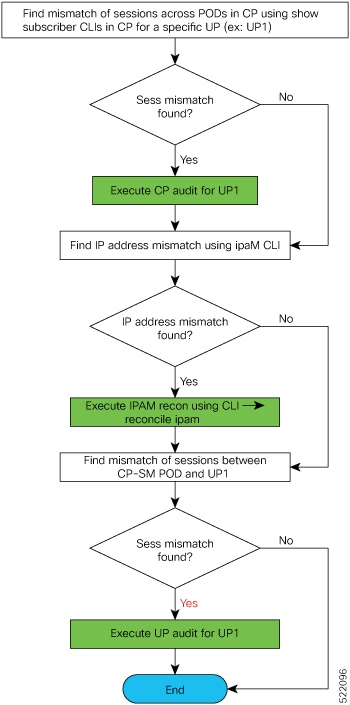
CP reconciliation or UP reconciliation (that is, reconciliation between CP-SM pod and UP) is executed for a specific UP.

The following figure depicts the procedure to synchronize sessions across CP pods and UP, for a specific UP.

Figure 1. Synchronizing Sessions Across CP Pods and UP


Limitations and Restrictions

The High Availability and CP Reconciliation feature has the following limitations and restrictions in this release:

  • Supports one BNG-specific service pod restart with a minimum gap of 10 minutes between pod restarts.

  • Supports one VM restart with a minimum gap of 30 minutes between VM restarts.

  • Does not support double fault for infrastructure pods (cache, CDL, and Node Manager). The system goes to "bad" state with double faults.

Configuring High Availability and CP Reconciliation

This section describes how to configure the High Availability and CP Reconciliation feature.

Configuring the High Availability and CP Reconciliation feature involves the following steps:

Reconciling Sessions Across CP Pods and UP

Use the following commands to reconcile subscriber sessions across PPP, DHCP, and SM pods in the CP with the specified UP.

subscriber session-synchronize-cp upf upf_name  { abort |  
      timeout timeout_value | tps tps_value } 

NOTES:

  • upf upf_name : Configures CP reconciliaton for this UPF.


    Note


    The maximum number of CP reconciliations supported is 5.
  • { abort | timeout timeout_value| tps tps_value } : Specifies the following parameters for subscriber session reconciliation:

    abort : Aborts the ongoing CP reconciliation for only the specified UPF.

    timeout timeout_in_seconds : Specifies the number of seconds the reconciliation can run. If it runs longer than the specified timeout, the reconciliation process is aborted. The valid values range from 2 to 100 minutes. The default value is 60 minutes.

    tps tps_value : Specifies the number of notifications sent from the CDL to Node Manager per second. The valid values range from 40 to 1000. The default is 40.


    Note


    Set this value based on the scale and churn of sessions during the CP reconciliation.

Verifying High Availability and CP Reconciliation

Use the following show command to verify ongoing or completed CP audit details for the specified UPF.


Note


Only one CP audit detail is stored per UPF.

show subscriber synchronize-cp upf upf_name

Example

The following is a configuration example.

[cnbng-smi-40g-tb03/bng] bng# show subscriber synchronize-cp upf lps_asr9k-1
subscriber-details
{
"Audit ID": 1634722199,
"Session Audit Statistics": {
"DHCP": {
"Audit State": "Completed",
"Session Count": 430,
"Notifications Received": 430
},
"LNS": {
"Audit State": "N/A",
"Session Count": 0,
"Notifications Received": 0
},
"PTA & LAC": {
"Audit State": "N/A",
"Session Count": 0,
"Notifications Received": 0
},
"Session Manager": {
"Audit State": "Completed",
"Session Count": 404,
"Notifications Received": 404
}
},
"Audit State": "Completed",
"Notifications/Sec": 40,
"Timeout": 6000,
"Audit Started": "2021-10-20 09:29:59 +0000 UTC",
"Fsol Audit Started": "2021-10-20 09:29:59 +0000 UTC",
"SM Audit Started": "2021-10-20 09:30:10 +0000 UTC",
"Audit Ended": "2021-10-20 09:30:22 +0000 UTC",
"Total Time Taken": "23 Seconds"
} 

Configuring CDL Bulk Notifications

Use the following commands to run CDL bulk notifications in parallel for multiple bulk notification requests.


Note


This is a mandatory configuration for CP reconciliation.
config 
   cdl datastore session slot notification max-concurrent-bulk-notifications value 
   exit 

NOTES:

  • max-concurrent-bulk-notifications value : Specifies the maximum number of bulk task notifications that CDL can process concurrently. The valid values range from 1 to 20.

    Configure this value to 20 for CP reconciliation.

Sample Configuration

The following is a sample configuration of the CDL bulk notification where a maximum of 20 bulk notifications are executed in parallel for multiple bulk notification requests.

config
   cdl datastore session slot notification max-concurrent-bulk-notifications 20
   exit

Automatic CP-UP reconciliation for CP events

Automatic CP-UP reconciliation for CP events is a cnBNG feature that

  • automatically reconciles Control Plane (CP) and User Plane (UP) subscriber state after certain UPF status changes

  • runs as an in-cluster process so no external orchestration tool is required, and

  • corrects out-of-sync state through existing internal management interfaces without manual operator steps.

Table 3. Feature History Table

Feature Name

Release Information

Feature Description

Automatic CP-UP reconciliation for CP events

Release 2026.04.0

Added support for UP RPFO, CP-UP connected LC reload, and UPF NAL process restart or upgrade scenarios.

Automatic CP-UP reconciliation for CP events

Release 2026.03.0

You can now reduce downtime and manual intervention after CP or UP events, as this feature automatically detects and reconciles out-of-sync subscriber state between the CP and UP following eligible events, with built-in protection against repeated unstable transitions when enabled.

Benefits

  • Eliminates manual resync effort: Automatically reconciles CP and UP subscriber state after CP-UP Heartbeat flaps or UPF reload events, replacing the manual resync operators must perform today.

  • Runs without external tooling: Operates as an in-cluster process, so no external orchestration product is required to trigger or manage resync.

  • Deterministic, repeatable corrections: Executes a fixed, ordered correction sequence (SRG sync → route sync → CP-UP session sync) every time, rather than relying on ad hoc manual steps.

  • Resilience across restarts: Persists job and flap state to support automatic resumption of in-progress jobs following a same-environment container restart. For major events like full-pod, node, or GR failovers, job state is preserved to allow for manual operator-led recovery, ensuring system consistency.

  • Prevents disruptive over-triggering : Flap protection acts as a safety governor, automatically throttling resync attempts for unstable UPFs (For example 3 flaps within 30 minutes). This persistent, stateful mechanism prevents redundant signaling and resource exhaustion, while ensuring full operational visibility through dedicated status commands and proactive alert notifications.

  • Safe-by-default operation: Feature is disabled until explicitly enabled by an authorized operator, and corrections are applied only through existing internal management interfaces rather than writing directly to UPF configuration.

  • Reduces stale DHCP sessions during switchover: Handles DHCP in-flight session deletion cases (Client Release, Clear Subscriber, DHCP Lease Expiry, DHCP Hold Timer Subscriber) occurring in parallel with a CP GR switchover.

Operational restrictions for automatic CP-UP reconciliation

These restrictions apply to the automatic CP-UP reconciliation for CP events feature.

  • Supported only on SMI CNDP-based cnBNG CP deployments.

  • Not supported on OpenShift unless specifically qualified.

  • Parallel execution of automatic reconciliation jobs is not permitted - the worker pool size is fixed at one per cluster.

  • Only CP-UP Heartbeat flaps, UPF reload, UPF reload-timestamp changes (UP RPFO, CP-UP connected LC reload, and UPF NAL process restart or upgrade), and inactive-to-active UPF events trigger automatic resynchronization jobs.

  • Active-to-inactive UPF transitions abort any running automatic reconciliation jobs without triggering new jobs.

  • Automatic reconciliation is not triggered if a UPF that is marked as offline transitions to the ACTIVE state.

  • Automatic reconciliation is not supported for reassociations initiated via the clear-cp-assoc CLI command.

  • Double switchover is not supported. If a CP GR role change occurs while a job is running, the job is aborted or continued based on the response received from the node manager and session manager for the scheduled reconciliation.


Note


Automatic reconciliation is a best-effort mechanism for cleaning up stale or orphaned sessions. A 100% CP-UP session count match cannot be guaranteed if session churn is high, due to in-flight sessions and timing discrepancies.


Scenarios supported

Scenario / Condition Support Status Notes

CP-UP Heartbeat flap

Supported

Primary trigger condition for the current release.

UPF reload (Reassociation when CP-UP already associated)

Supported

Supported when it results in an eligible UPF recovery or reassociation trigger.

CPGR SWO handling for DHCP session deletion

Supported

Use cases include: Client Release, Clear Subscriber, DHCP Lease Expiry, and DHCP Hold Timer Subscriber.

UP RPFO (Remote Processor Failureover)

Supported

Introduced in 2026.04.

Triggered by reload timestamp identity change.

The Active to Initialized to Active sequence seen during an RPFO is not counted as a flap by flap protection.

CP-UP connected LC reload or OIR

Supported

Introduced in 2026.04. Triggered by reload timestamp identity change.

UPF NAL process restart or upgrade

Supported

Introduced in 2026.04. Triggered by reload timestamp identity change.

Reassociation via explicit clear-cp-assoc CLI

Not Supported

Explicit CLI-driven reassociation is not an automatic trigger source in Release 2026.04.

Manual synchronization is recommended.

Cascade case: reconciliation requested by another CP while a reconciliation is already scheduled for the same UPF

Supported

In 2026.03, the first reconciliation for the UPF is accepted and a second request from another CP for the same UPF is rejected while the first is ongoing.

From 2026.04, the UP returns recon_retry so that the request can be retried.

Flap protection

Flap protection is an automated safety mechanism designed to maintain system stability within the cnBNG CP-UP Autoresync feature. It functions as a governor that suppresses reconciliation triggers for unstable User Plane Functions (UPFs).

The mechanism continuously monitors for Active-to-Inactive state transitions. When a UPF exhibits frequent flapping behavior, the system dynamically throttles automatic reconciliation to achieve the following:

  • Resource conservation: Minimizes unnecessary CP and UP compute utilization during periods of instability.

  • Signaling efficiency: Prevents disruptive management REST traffic and redundant synchronization attempts.

  • Operational integrity: Avoids race conditions and state inconsistencies that can occur when attempting to perform reconciliation on a node that is not stable.

Protection states

Protection is tracked for each (UPF, GR instance) tuple, utilizing these operational states:

  • Normal: Automatic reconciliation is allowed.

  • Backoff: The flap threshold was reached within the sliding window. Automatic triggers for the UPF are temporarily throttled. When the backoff period elapses and the flap count has decayed, the UPF returns to Normal.

  • AdminActionRequired: The UPF flapped again during Backoff. Automatic reconciliation remains suppressed until you manually clear the flap state with the subscriber auto-resync clear-flap-state command, or until the state auto-clears after the configured idle period.

By enforcing these thresholds, flap protection ensures that the Autoresync feature operates only under conditions where the network is sufficiently stable to achieve a successful and meaningful synchronization.

By default, 3 flaps within a 30-minute window cause the UPF to enter Backoff, the minimum backoff period is 300 seconds, and AdminActionRequired auto-clears after 1 hour without flapping. You can change these values using the auto-resync flap-protection configuration.

Note that an active-to-inactive transition also aborts any job currently running for that UPF and counts as one flap iteration.

Restart and recovery

The Autoresync feature provides stateful recovery mechanisms to ensure operational continuity following system events. Job metadata, history, and flap-protection states are maintained in a replicated cache.

  • Persistence and Lifecycle: Job data and flap-protection states survive container and pod restarts. Note that this history is cleared following a fresh deployment or a system shut and start sequence.

  • Container-level recovery: If only the Autoresync container restarts within an existing pod, interrupted jobs are automatically requeued and resumed.

  • System-level recovery: Following a whole-pod restart, node restart, or CP GR failover, interrupted jobs are transitioned to a "held" state to prevent automated interference with system recovery, requiring operator intervention to resume.

  • State-dependent behavior: If the automatic reconciliation state is disabled at the time of system startup, interrupted jobs are held and will not resume until the feature is explicitly re-enabled.

  • Crash-loop protection: A safety guard limits the number of automatic resume attempts. This prevents a job that consistently causes container instability from entering an indefinite restart loop.

Job execution

Reconciliation jobs follow a deterministic, sequential execution pipeline. Each job consists of multiple phases, with execution governed by the following policies:

  • Each phase operates within a strictly bounded timeout period to ensure the system remains responsive. You can configure individual timeout values for both the SRG reconciliation and session synchronization phases to align with your network scale.

  • The system enforces an Aborted policy by default. If a phase fails, the reconciliation pipeline immediately halts, subsequent phases are skipped, and the job is marked as Aborted .

Configure automatic CP-UP reconciliation for CP events

Enable automatic CP-UP reconciliation for CP events.

By default, automatic CP-UP reconciliation is disabled after deployment. You must explicitly enable it before eligible events trigger reconciliation jobs.

  • Use this procedure to activate automatic reconciliation and manage job and flap state.

Procedure


Step 1

Use the subscriber auto-resync state enable command in config mode to enable automatic reconciliation.

Example:

configure
   subscriber auto-resync state enable

Step 2

(Optional) Use the subscriber auto-resync state disable command in config mode to disable automatic reconciliation.

Example:

configure
   subscriber auto-resync state disable

Step 3

Use the show subscriber auto-resync summary command to view the current automatic reconciliation summary, including job history.

Example:

bng# show subscriber auto-resync summary
{
  "job-id": "b81d04a2-2c19-4e7e-9f3a-77e1c0d9aa10",
  "upf": "upf2",
  "result": "in-progress",
  "phase-name": "cp-up-recon",
  "phase-label": "CP-UP Session Reconciliation",
  "phase-order": 3,
  "start-time": "2026-06-30T08:20:10Z"
}

This command displays the 10 most recently updated jobs across the fleet, including status and whether automatic reconciliation is enabled.

The result field is one of in-progress, pass, fail, partial, aborted, cancelled, interrupted, or resuming. The trigger-reason field shows why the job was started, for example cp-up reassociation. For a job that aborted or failed, the failure-reason field shows the reason.

Step 4

Use the show subscriber auto-resync detail [ job-id uuid ] [ upf upf-name ] command to view detailed phase-level information for reconciliation jobs.

Example:

bng# show subscriber auto-resync detail
{
  "job-id": "3f2a9c1e-7b44-4f0a-9d2e-1c5b6a8e0f31",
  "upf": "upf1",
  "result": "pass",
  "start-time": "2026-06-30T08:14:22Z",
  "end-time": "2026-06-30T08:14:51Z",
  "phases": [
    { "phase-name": "srg-recon",   "phase-label": "SRG Group Reconciliation",    "phase-order": 1, "result": "pass", "phase-details": "SRG reconciliation triggered" },
    { "phase-name": "route-recon", "phase-label": "Route Reconciliation",         "phase-order": 2, "result": "pass", "phase-details": "route sync triggered and completed" },
    { "phase-name": "cp-up-recon", "phase-label": "CP-UP Session Reconciliation", "phase-order": 3, "result": "pass", "phase-details": "CP-UP session sync triggered" }
  ]

This command displays the 10 most recently updated jobs across the fleet, including phase details, outcomes, and failure reasons. Review outcomes and any failure reasons for troubleshooting.

Each phase can also show an attempts count and a failure-reason if it was retried or failed. If you specify a job-id, only that job is displayed, with its full phase history.

  • Use job-id or upf parameters to investigate specific jobs or UPF instances, referencing details from the summary output.

Step 5

Clear flap-protection state for a specific UPF if it is throttled or locked.

Example:

bng# subscriber auto-resync clear-flap-state upf upf1

Warning


Flap protection prevents excessive reconciliation attempts during instability. Clearing flap state prematurely may cause repeated jobs or ongoing instability. Only clear flap state after resolving the underlying issue.


Step 6

(Optional) Use the auto-resync flap-protection commands in config mode to change the flap-protection thresholds.

Example:

configure
   auto-resync flap-protection slide-window-min 30
   auto-resync flap-protection max-events 3
   auto-resync flap-protection backoff-sec 300
   auto-resync flap-protection disable-auto-clear-hr 1

The default values are 30 minutes for the sliding window (slide-window-min), 3 flaps for the threshold (max-events), 300 seconds for the minimum backoff (backoff-sec), and 1 hour for the idle period after which AdminActionRequired auto-clears (disable-auto-clear-hr).

Step 7

(Optional) Use the auto-recon-timeout commands in config mode to set the SRG reconciliation and session synchronization timeouts, in seconds.

Example:

configure
   auto-recon-timeout srg <seconds>
   auto-recon-timeout session <seconds>

Step 8

Use the show subscriber auto-resync flap-protection upf command to view the flap-protection state of a UPF.

Example:

bng# show subscriber auto-resync flap-protection upf upf1
{
  "upf": "upf1",
  "gr-instance": 1,
  "recent-flap-count": 0,
  "flap-window-minutes": 30,
  "protection-status": "Normal",
  "issue-job-id": "autoresync-upf1-1-1788434082806008812",
  "issue-reason": "aborted: UPF went inactive during autoresync",
  "clear-flap-state-needed": false
}
  • upf: The UPF being tracked.

  • gr-instance: The GR instance associated with the UPF.

  • recent-flap-count: The number of active to inactive to active cycles seen within the sliding window. The Active to Initialized to Active sequence of an RPFO is not counted.

  • flap-window-minutes: The configured duration for which flap iterations are retained.

  • protection-status: Normal, Backoff, or AdminActionRequired.

  • issue-job-id: The most recent job associated with an observed flap-related issue, if any.

  • issue-reason: The reason retained for that job, for example the UPF became inactive while reconciliation was running.

  • clear-flap-state-needed: true when you should clear the flap state with the subscriber auto-resync clear-flap-state upf command; otherwise false.


Monitor reconciliation with alerts

In addition to the show commands, you can configure alerts on the CEE Ops Center to be notified about automatic reconciliation events. The alerts are based on the autoresync metrics. The alert rules are organized in three groups, and you can install each group independently:

  • AutoResync (Core): Contains 9 primary fault alerts designed to capture critical operational issues, such as flap protection escalations, component unhealthiness, and job failures.

  • AutoResyncExt (Extended): Provides 12 supplemental alerts covering advanced fault scenarios, including trigger queue saturation, configuration reload errors, and systemic phase failure trends.

  • AutoResyncNotify (Notifications): Includes 3 informative alerts that provide positive confirmation of job lifecycle stages—such as job initiation, progress, and successful completion—rather than reporting error states.

These rules can be installed independently within the CEE Ops Center, allowing for a tailored alerting strategy based on the specific operational environment.

Table 4. Alerts on the CEE Ops Center

Alert

Group

Severity

For

Description

AutoResyncAdminActionRequired AutoResync critical 0m Repeated UPF flapping requires you to clear the flap state.
AutoResyncBackoffActive AutoResync warning 5m Automatic reconciliation for a UPF is temporarily throttled because the UPF is flapping.
AutoResyncComponentUnhealthy AutoResync major 1m An internal autoresync component, such as the job store, watcher, configuration reload, flap persistence, or hydration, is unhealthy.
AutoResyncEligibleTriggerSuppressed AutoResync major 0m A valid trigger arrived while automatic reconciliation was disabled.
AutoResyncJobFailed AutoResync major 0m A job ended as failed, aborted, or partial, excluding timeouts and a UPF going inactive.
AutoResyncJobFailedByStepTimeout AutoResync major 0m A configured step timeout terminated a job.
AutoResyncMetricsTargetDown AutoResync critical 5m The autoresync metrics scrape target is unavailable, including a failure of only the autoresync container.
AutoResyncInterruptedJobNeedsAction AutoResync major 1m A restart or recovery left a job interrupted, and it is held for outcome verification or retrigger.
AutoResyncRepeatedJobFailures AutoResync critical 0m Three or more non-timeout terminal failures occurred for one UPF and GR instance.
AutoResyncUpfNotReady AutoResyncExt minor 0m The UPF has no active SRG pair, so every phase fails with upf-not-ready. The UPF must be provisioned.
AutoResyncTriggerEventsDropped AutoResyncExt critical 0m Trigger events were dropped because the trigger queue was full. The affected UPF is not reconciled.
AutoResyncJobDispatchFailed AutoResyncExt major 0m A job was accepted but was never dispatched to a worker.
AutoResyncWatcherUnavailable AutoResyncExt critical 0m The automatic trigger path is unavailable while the pod is ready, so automatic reconciliation does not run.
AutoResyncDisabledForExtendedPeriod AutoResyncExt warning 24h Automatic reconciliation has been disabled for an extended period. The default state is disabled.
AutoResyncJobStuck AutoResyncExt major 5m A job has not progressed from its current state, which indicates a stuck worker.
AutoResyncPersistenceUnavailable AutoResyncExt critical 1m The job store fell back to memory, so jobs do not survive a restart and interrupted-job recovery is not possible.
AutoResyncConfigReloadFailed AutoResyncExt major 1m A configuration reload failed, and the pod keeps the previous configuration.
AutoResyncReconRetryLoop AutoResyncExt warning 0m A UPF repeatedly requests a reconciliation retry and does not converge.
AutoResyncFlapStateWidespread AutoResyncExt critical 5m Three or more UPFs are flapping at the same time, which indicates a CP-side or network-side fault.
AutoResyncTriggerQueueNearCapacity AutoResyncExt warning 2m The trigger queue is close to its capacity, so events might be dropped.
AutoResyncStepFailureConcentration AutoResyncExt warning 0m Failures are concentrated in one reconciliation phase.
AutoResyncJobStartedNotification AutoResyncNotify minor 0m A job was started. The alert shows the trigger reason.
AutoResyncJobInProgress AutoResyncNotify minor 0m A job is running. The alert is raised when the job starts and cleared when it ends.
AutoResyncJobSucceededNotification AutoResyncNotify minor 0m A job completed successfully.

Install alert rules

You can provision alerting groups by applying their respective rule blocks within the CEE Ops Center CLI. These configurations are applied in config mode.

To install the AutoResync core alert group, use the procedure:

config
 alerts rules group AutoResync
  interval-seconds 30
  rule AutoResyncAdminActionRequired
   expression "autoresync_flap_state{state=\"AdminActionRequired\"} == 1"
   duration 0m
   severity critical
   type "Processing"
   annotation summary
    value "AutoResync requires operator action"
    exit
   annotation description
    value "Repeated flap protection requires explicit operator action."
    exit
  exit
 exit
 commit
end

Remove alert rules

To decommission a specific group of rules, use the no alerts rules group command in configuration mode.

config
 no alerts rules group AutoResyncNotify
commit
end

When applying these configurations, ensure that you are using a plain-text editor to prevent the conversion of straight quotes into smart quotes, as curly quotes will result in syntax errors during command execution.

Autoresync metrics

The autoresync container exports these Prometheus metrics, which the alerts use.

Table 5. Prometheus metrics

Metric

Type

Primary labels

Purpose

autoresync_runtime_enabled Gauge none Runtime admission gate, value 0 or 1.
autoresync_component_healthy Gauge component Last observed component health.
autoresync_trigger_events_total Counter UPF, GR, trigger reason, event, decision, reason code Trigger suppression, rejection, and queue loss.
autoresync_job_events_total Counter UPF, GR, trigger reason, event, result, decision, reason code Job lifecycle, dispatch, interruption, and recovery.
autoresync_job_state Gauge UPF, GR, trigger reason, state One-hot current job state.
autoresync_job_state_since_timestamp_seconds Gauge UPF, GR, trigger reason Time of the current job-state transition.
autoresync_job_duration_seconds_total Counter UPF, GR, trigger reason, result Accumulated terminal duration.
autoresync_job_duration_seconds_histogram Duration-bin counter job labels, bin App-infra job-duration bins.
autoresync_flap_transitions_total Counter UPF, GR, previous/current state, reason Flap escalation and clear transitions.
autoresync_flap_state Gauge UPF, GR, state One-hot Normal, Backoff, or AdminActionRequired state.
autoresync_flap_iterations Gauge UPF, GR Current flap-window count.
autoresync_step_events_total Counter UPF, GR, trigger reason, step, event, result, reason Step boundaries.
autoresync_step_duration_seconds_total Counter step lifecycle labels Accumulated step duration.
autoresync_step_duration_seconds_histogram Duration-bin counter step lifecycle labels, bin App-infra step-duration bins.
autoresync_correction_events_total Counter UPF, GR, trigger reason, step, correction, event, result, reason Correction boundaries.
autoresync_correction_duration_seconds_total Counter correction lifecycle labels Accumulated correction duration.
autoresync_correction_duration_seconds_histogram Duration-bin counter correction lifecycle labels, bin App-infra correction-duration bins.
autoresync_trigger_queue_depth Gauge none Current trigger-channel depth.
autoresync_trigger_queue_capacity Gauge none Trigger-channel capacity.