Overview

The Cisco Catalyst 8500L-8S4X Edge Platform significantly increases services performance, router throughput, and router scale at lower costs. This document covers only hardware installation specific details for Cisco Catalyst 8500-8S4X Edge Platform.

For more information on the features and specifications, refer to the Cisco 8500 Series Catalyst Edge Platform datasheet.

Hardware Features

This section describes the hardware features of the Cisco Catalyst 8500L-8S4X Edge Platform.

Table 1. Hardware Features

Feature

C8500L-8S4X

Ethernet Ports

8x 1GE SFP

4x 10GE SFP+

Rack Unit

One

External Storage

M.2 Storage (USB or NVMe)

System Memory (DRAM)

16 GB DDR4 DIMM default

Can be upgraded to 32 GB or 64 GB via DIMMs

Boot Flash Storage

32GB internal

Management Interface

1x RJ45

10/100/1000 Mbps

ConsolePort

1x RJ45

1x USB Micro-USB (Type B)

USB Ports

2x USB 3.0 Type-A

Rack Installation

Two post and four post

Supported Trasceivers

8X 1GE SFP,4X 10G SFP+

1G SFP or 10G SFP+ can be configured with dual-rate 10GE ports as follows:

10G SFP+ on dual-rate 10GE Interface: Auto-negotiation protocol is not supported, and automatic negotiation cannot be configured using negotiation auto command.

1G SFP on dual-rate 10GE Interface:Auto-negotiation protocol is supported, and automatic negotiation can be configured using negotiation auto command. To disable auto negotiation, use no negotiation auto command.

Power Supply

The Cisco Catalyst 8500L-8S4X Edge Platforms have dual PSU slots and support redundant PSUs (N+1 redundancy).

The table lists the supported power supply PIDs for the input types:

Table 2. Supported Power Supplies

PID

Input-type

Input

PWR-CH1-400WAC

AC

100 to 240 Vac

PWR-CH1-400WDC

DC

+48 to +60 Vdc

-48 to -60 Vdc

PWR-CC1-400WHV

HVAC/HVDC

100 to277 Vac

240 to 380 Vdc


Note


The Cisco Catalyst 8500L-8S4X Edge Platforms can support two AC, DC,orHigh Voltage AC or DC (HVAC/HVDC) power supplies. Do not install mixed AC and DC power supply units in the same chassis.


The following table contains specifications for DC-powered systems for the Cisco Catalyst 8500L-8S4X Edge Platforms.

Table 3. Cisco Catalyst 8500L/8530L Edge Platforms DC Power Supply System Input Requirements

System Input Rating (Amps)

Circuit BreakerAmps

AWG # Wire

Minimum

Maximum

15A

20

30

14

Bay Configuration

Bay Configuration for Cisco Catalyst C8500L-8S4X Edge Platform

The Cisco Catalyst 8500L-8S4X Edge Platform has one RJ-45 Ethernet Management port and multiple Small Form-Factor Pluggable (SFP) ports.

GE and SFP Ports

Management Ethernet Port

The Catalyst 8500L-8S4X Edge Platform has one Gigabit Ethernet Management Ethernet interface. The purpose of this interface is to allow users to perform management tasks on the router, often through Telnet and SSH. It is not designed to forward network traffic. The Gigabit Ethernet Management Ethernet interface supports 10/100/1000 Mbps speed.

SFP Ports

The Cisco Catalyst 8500L-8S4X Edge Platform has SFP and SFP+ ports.

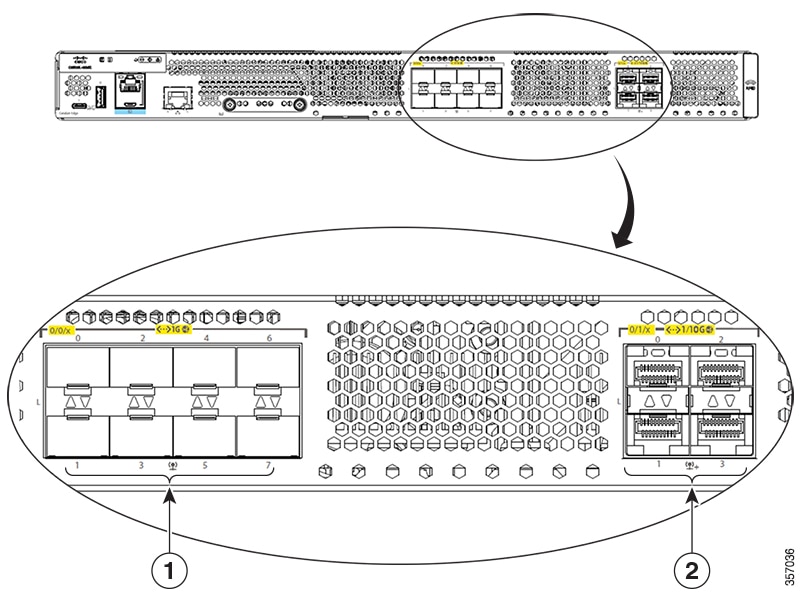
  • Bay 0 (0/0/0 - 0/0/7) ports support SFP transceivers with maximum 1Gbps speed.

  • Bay 1 (0/1/8 - 0/1/3) ports support SFP or SFP+ transceivers with 1Gbps and 10Gbps speeds, respectively.

Figure 1. C8500L-8S4X Chassis - GE and SFP Ports

1

8X1GE SFP Ports (0/0/0 - 0/0/7)

2

4X 1/10G SFP+ Ports (0/1/0 - 0/1/3)

Memory

Cisco Cisco Catalyst 8500L-8S4X Edge Platform contain DIMMs that store running configuration and routing tables, and are used for packet buffering by the network interfaces.

  • Boot/NVRAM—Stores the bootstrap program (ROM monitor) and the configuration register. The boot/NVRAM is not serviceable.

  • Internal memory—Internal bootflash memory

  • Removable slot for M.2 card—Available in 16GB, 32GB M.2 USB and 600GB M.2 NVMe SSD

  • DRAM options

    • MEM-C8500L-16GB (default)

    • MEM-C8500L-32GB (upgrade with one 32 GB DIMM or two 16 GB DIMM)

    • MEM-C8500L-64GB (upgrade with two 32 GB DIMM)

Chassis Views

This section contains views of the power supply and I/O panels of the Cisco Catalyst 8500L/8530L Edge Platforms,showing the locations of power and signal interfaces, status indicators, and chassis identification labels.

Chassis Views for Cisco Catalyst C8500L-8S4X Edge Platform

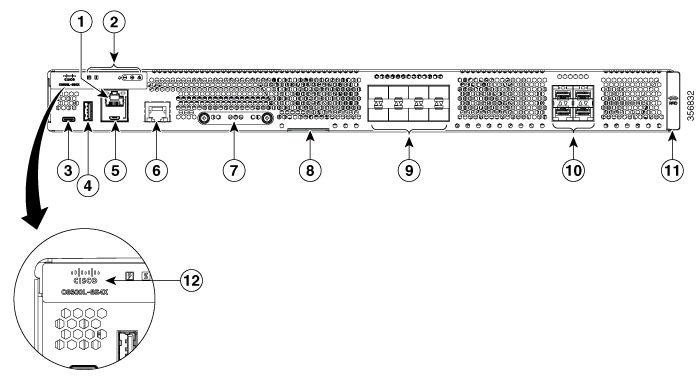
Figure 2. Cisco C8500L-8S4X Chassis - I/O Side
Table 4. I/O Side

1

RJ45 Console Port

2

Status Indicator LEDs

3

USB Type C Slot

4

USB Type A Slot

5

Micro-USB Console

6

Management Ethernet Port GigabitEthernet0

7

M.2 USB/NVMe Card Slot

8

Device Label Tray

9

SFP Ports GigabitEthernet 0/0/0-0/0/7

10

SFP+ Ports TenGigabitEthernet 0/1/0-0/1/3

11

RFID (Provisionable)

12

Backlit Logo

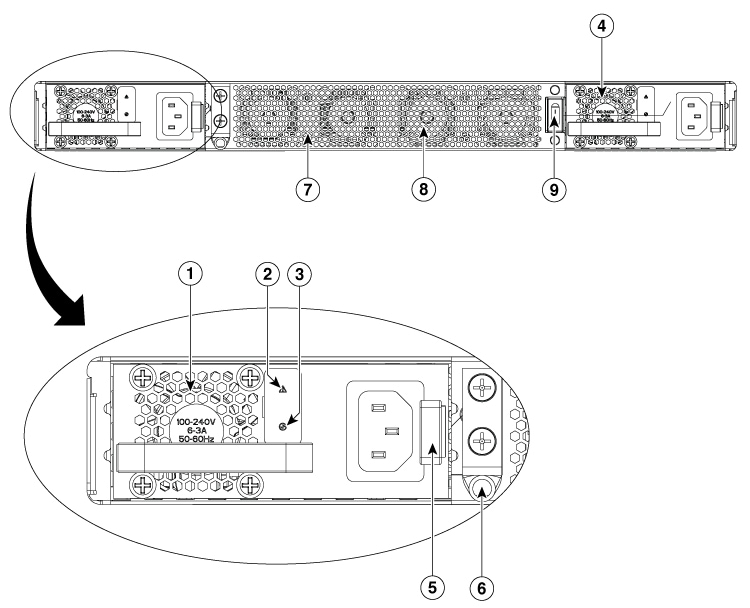
Figure 3. C8500L-8S4X Chassis - PSU/Fan Tray Side (displaying the correct PSU orientation)
Table 5. PSU/Fan Tray Side

1

Power Supply 1 (PSU1)

2

ALARM Fail LED

3

Status LED

4

Power Supply 0 (PSU0)

5

PSU Latch

6

Ground Lug

7

Fan Tray Vent

8

Internal Fans

9

Power Switch

LEDs for Cisco Catalyst C8500L-8S4X Edge Platform

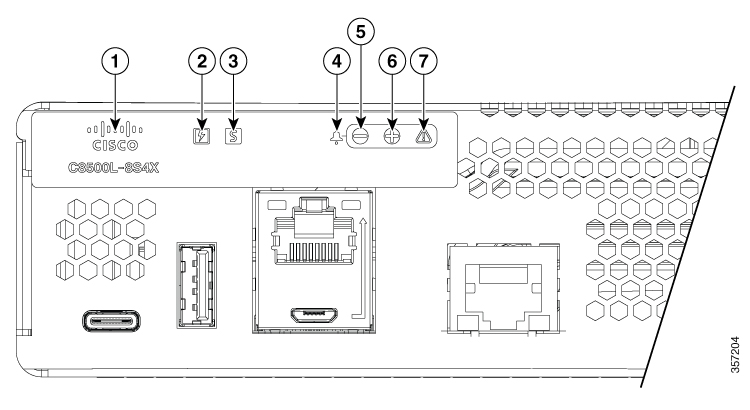
Figure 4. LEDs for Cisco Catalyst C8500L-8S4X Edge Platform

1

Backlit Logo Label

2

Power

3

Status

4

Alarm icon (not lit)

5

Minor Alarm

6

Major Alarm

7

Critical Alarm

Table 6. LEDs Indicators

LED

Color

Description

CISCO LOGO

Blue

Cisco Logo LED

Off: The system is powered off

Blue: The system is powered on

POWER

Green/Amber

Power Supply Status

Off: The system is powered off

Yellow: A Power Supply in the system is not functioning correctly

Green: Both PSUs are installed and operating correctly

STATUS

Green/Amber/Red Blinking

System Status

Red: The system is booting

Red Blinking Red: The system has failed a hardware integrity error

Yellow: Rommon has completed booting and system is at Rommon prompt or booting platform software.

Green: Normal System Operation

USB CON

Green

USB Console Active

Green indicates that the active console port is USB.

RJ-45 CON

Green/Yellow

Serial Console Active

Green indicates that RJ-45 is the active console port.

SFP LINK

Green

SFP port 0/1 Link LED

Off: No Link (or not present)

Green: Link established

Yellow: Loss of Signal

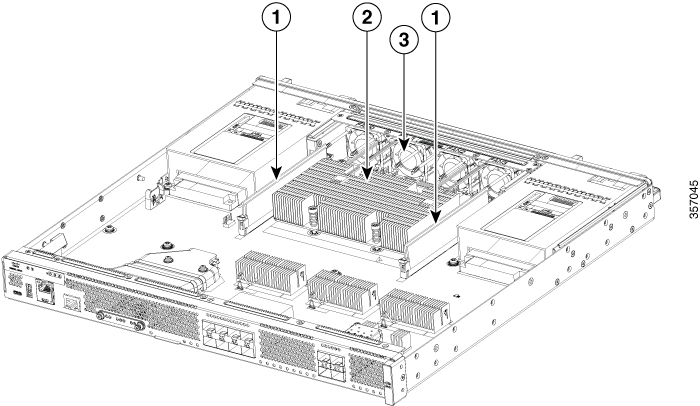
Platform Summary

The figure below shows the internal view of with parts and module locations.

Figure 5. Platform Summary of C8500L-8S4X

1

DIMMs

2

Fan Tray

Fans, Ventilation, and Airflow

Chassis Ventilation

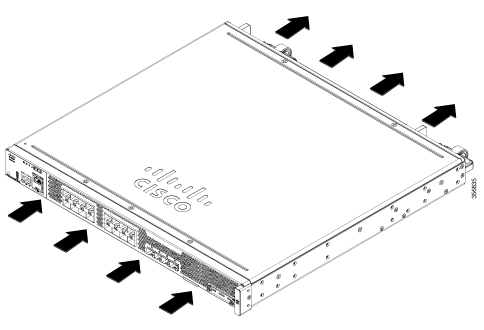
The chassis temperatureis regulated with internal fans. An onboard temperature sensor and pressure sensor controls the fan speed. The fans are always on when the device is powered on. Under all conditions, the fans operate at the slowest speed possible to conserve power and reduce noise. Thefans operate at higher speeds under conditions of higher ambient temperature and altitude or under fault conditions like a fan failure. The air intake is on the I/O side.

Figure 6. Airflow of Cisco C8500L-8S4X

Locating Labels on Cisco Catalyst C8500L-8S4X Edge Platforms

Use the Cisco Product Identification (CPI) tool to find labels on the platform. The tool provides detailed illustrations and descriptions of where labels are located on Cisco products. It includes the following features:

  • A search option that allows browsing for models by using a tree-structured product hierarchy.

  • A search field on the final results page that makes it easier to look up multiple products.

  • End-of-sale products clearly identified in results lists.

The tool streamlines the process of locating serial number labels and identifying products. Serial number information expedites the entitlement process and is required for access to support services.

Location of Labels on Cisco Catalyst 8500L-8S4X Edge Platforms

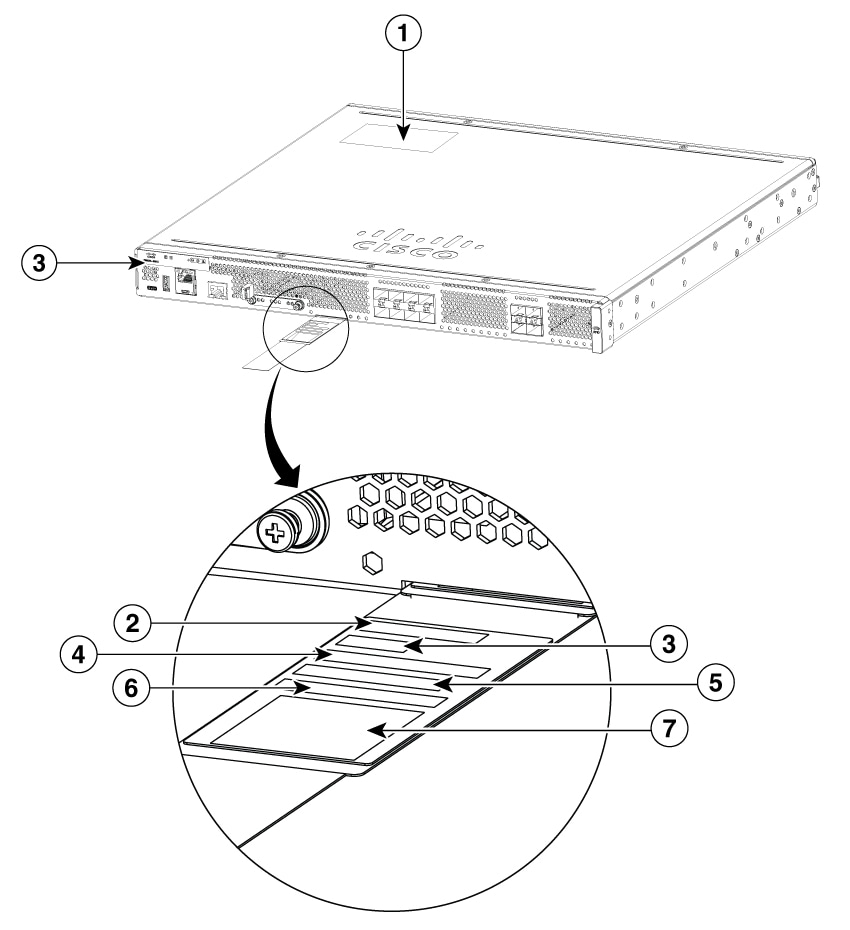
The figures shows the location of the labels on the Cisco Catalyst 8500L-8S4X Edge Platforms.

The Serial number (SN), Common language equipment identifier (CLEI), Tax deduction and collection account (TAN), Product ID (PID), PID version ID (VID), and Quick response (QR) code are printed at the same location on a label on the back of the platform or on a label tray located on the chassis on all the Cisco Catalyst 8500L-8S4X Edge Platforms.

Figure 7. Label Location on a C8500L-8S4X
Table 7. Label Location on Cisco Catalyst 8500L-8S4X Edge Platforms

1

Compliance Label

2

PID Label

3

SN

4

CLEI

5

TAN

6

MAC

7

QR Code

Locate Product Identification Details

Software License

The serial number (SN), product ID (PID), version ID (VID), and Common Language Equipment Identifier (CLEI) are printed on a label on the bottom of the device or on the label tray.

To obtain a software license, you need the unique device identifier (UDI) of the device where the license is to be installed.

The UDI has two main components:

  • Product ID (PID)

  • Serial number (SN)

The UDI can be viewed using the show license udi command in privileged Exec mode in Cisco Internet Operating System (IOS) software.