Getting Software Licenses for the Router
The Integrated Services Router Generation 2 (ISR G2) platforms offer a new Universal Cisco Internet Operating System (IOS) software image. The Universal image and its licensing provisions provide greater flexibility to deploy new features while also improving visibility and management of existing licenses on routers in the network.
When you order a new ISR G2, it is shipped with the software image and the corresponding permanent licenses for the packages and features that you specified, preinstalled. The software does not need to be activated or registered prior to use.
Use the Cisco management application such as Cisco License Manager (CLM), or use the Cisco IOS show license command to determine the licenses activated on your system. CLM is a free software application available at http://www.cisco.com/go/clm.
The router comes with an evaluation license, also known as a temporary license, for most packages and features supported on the router. To try a new software package or feature, activate the evaluation license for that package or feature.
Activating a New Software Package or Feature
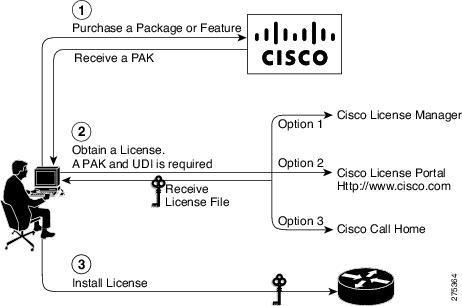
Complete the following steps to permanently activate a software package or feature on the router:
Step 1 Purchase the software package or feature you want to install. You receive a product activation key (PAK) with your purchase.
Step 2 If you do not have a Cisco.com username and password, register for an account at the following URL:
https://tools.cisco.com/RPF/register/register.do.
Step 3 Get the license file using one of the following options:

Note You must have the serial number (SN) and product ID (PID) of the router where the license should be installed. See Figure 1-13 for the location of the SN and PID.
- Cisco License Manager (CLM) — CLM is a free software application available at:
http://www.cisco.com/go/clm. - Cisco License Registration Portal — Cisco license registration portal is a web-based portal for getting and registering individual software licenses, available at:
http://www.cisco.com/go/license - Cisco License Call Home — Use the Cisco License Call Home interface on the router to directly interact with the Cisco Product License Registration portal.
Step 4 Install the license file using one of the following options:
- Cisco License Manager (CLM) — CLM is a free software application available at http://www.cisco.com/go/clm.
- Cisco License Call Home — Use the Cisco License Call Home interface on the router to directly interact with the Cisco Product License Registration portal.
- Cisco IOS CLI - Use the Cisco IOS command line interface to install and manage licenses.
- Simple Network Management Protocol (SNMP) — Use SNMP to install and manage software licenses.
Figure 1 Steps for Software Activation
RMA License Transfer
To transfer a software license from a failed device to a new device, go to the Cisco licensing portal at:
http://www.cisco.com/go/license.
Note You need the SN and PID of the defective device and the RMA router, to initiate an RMA replacement license.
Additional Information
See the Software Activation on Cisco Integrated Services Routers and Cisco Integrated Service Routers Generation 2 document at Cisco.com for detailed information about software activation on Cisco ISR G2 platforms.
 Feedback