Amplifier APC
From Release 25.2.1, Amplifier Automatic Power Control (APC) is supported on the EDFA2 card. APC is an optical; application that compensates for span loss variations over time in optical fiber links. This compensation ensures stable optical power levels despite changes in span loss.
Amplifier APC is implemented by two independent control loops:
-
Line TX direction: Managed by controller Ots0/<slot>/0/0, which acts on VOA1 attenuation.
-
Line RX direction: Managed by controller Ots0/<slot>/0/1, which acts on PRE-Amplifier Gain.
This diagram shows the NCS1K14-EDFA2 line card optical layout. Optical components controlled by amplifier APC are highlighted in green.
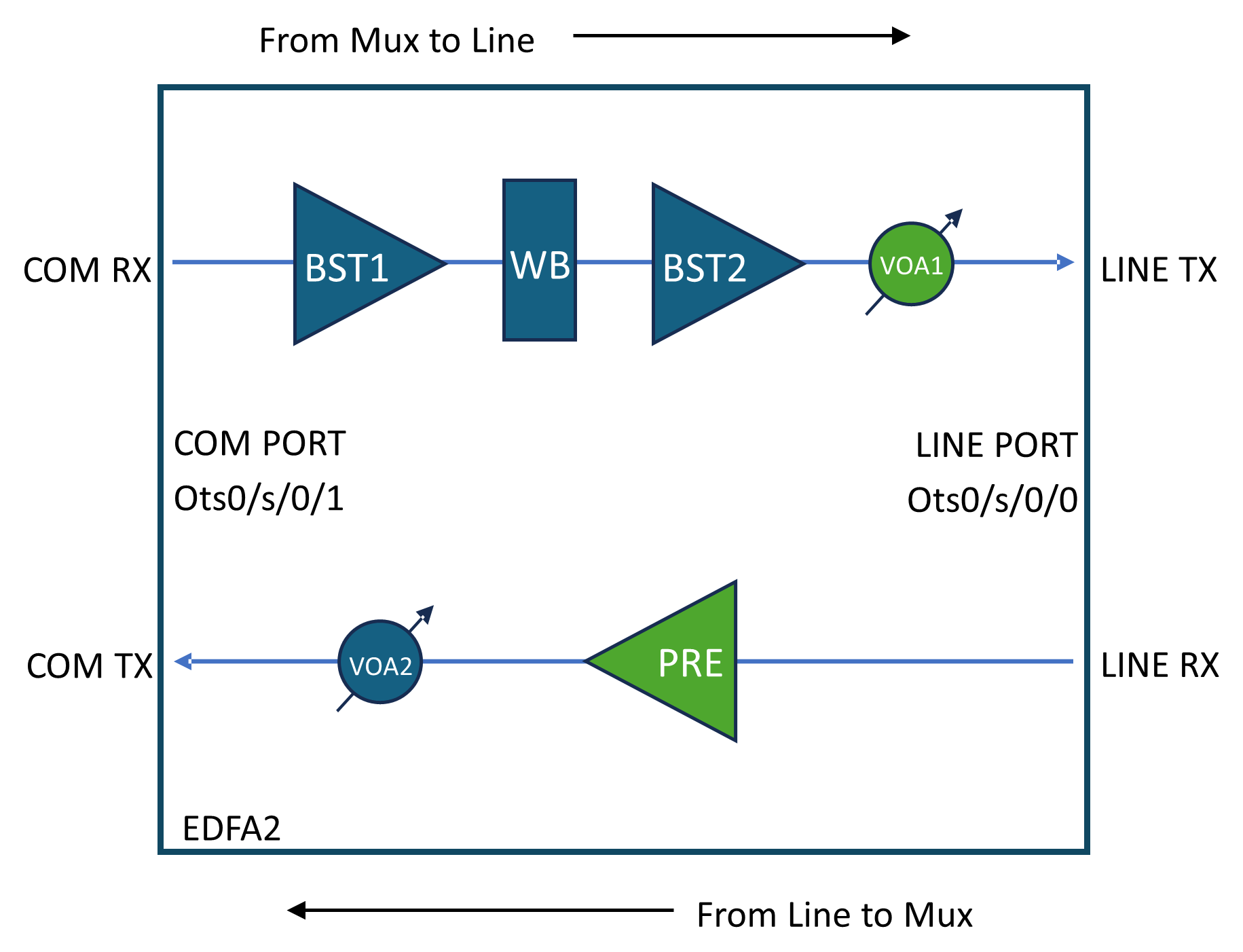
How amplifier APC works
Summary
Amplifiers APC control loop compensates the span loss variation over time.
Workflow
These are the stages of amplifier apc process.
- A span loss variation greater than 0.5 dB triggers the control loops to perform correction.
-
For a given direction (e.g., from near-end towards far-end), a span loss change is compensated by adjusting:
- Near-end TX VOA1 attenuation or
- Far-end RX PRE gain.
-
Span loss changes are detected by the OLC Span Loss application, which notifies the APC application to trigger a correction.
For a given direction, a span loss change is compensated by adjusting the near-end transmit VOA1 attenuation and/or the far-end
receive PRE gain.
- Lookup Table: The VOA attenuation and PRE gain adjustments are derived using an internal lookup table. This table is indexed by Fiber Type and the current Span Loss value, returning the appropriate VOA1 attenuation and PRE gain values. The lookup table defines how much of the span loss variation is compensated by the TX VOA attenuation and how much by the RX PRE gain.
- PRE Amplifier Saturation Control: An additional control loop is implemented to limit the PRE gain configuration to avoid amplifier saturation, ensuring that the output power does not exceed the maximum allowed value based on the input power and the calculated gain from the lookup table.
Enable Amplifier APC
This topic describes how to enable amplifier APC.
This task describes how to configure amplifier APC. These configurations are in this topic:
-
Enable amplifier APC on COM port
-
Enable amplifier APC on line port
Procedure
|
Step 1 |
Use these commands to enable amplifier APC on COM port |
|
Step 2 |
Use these commands to enable amplifier APC on line port |
Disable Amplifier APC
This topic describes how to disable amplifier APC.
This task describes how to configure amplifier APC. These configurations are in this topic:
-
Disable amplifier APC on COM port
-
Disable amplifier APC on line port
Procedure
|
Step 1 |
Use these commands to disable amplifier APC on COM port |
|
Step 2 |
Use these commands to disable amplifier APC on line port |
Pause Amplifier APC
This topic describes how to pause amplifier APC.
This task describes how to configure amplifier APC. This configuration is in this topic:
-
Pause amplifier APC
Procedure
|
Use these commands to pause amplifier APC |
Resume Amplifier APC
This topic describes how to configure amplifier APC.
This task describes how to configure amplifier APC. This configuration is in this topic:
-
Resume amplifier APC
Procedure
|
Use these commands to resume amplifier APC |
View amplifier APC information
This task describes how to view amplifier APC information.
The Line TX direction control loop acts on VOA1 attenuation and is managed by controller Ots0/<slot>/0/0.
| Field | Description |
| Gain Range | BST2 gain range |
| Last Correction | Last VOA1 attenuation correction time stamp |
| Last Span-Loss Input | Last Line TX span loss value measured |
| Last Span-Loss Input Timestamp | Last Line TX span loss measure time stamp |
| Span-Loss Correction Threshold | Threshold below which no correction is triggered |
| Egress Ampli Input Power (dBm) | BST2 input power |
| Egress Ampli Gain (dB) | BST2 gain |
| Egress Ampli Output Power (dBm) | BST2 output power |
| TX VOA Attenuation (dB) | VOA1 attenuation |
| TX Signal Power (dBm) | Signal power on Line TX |
The Line RX direction control loop acts on PRE amplifier gain and is managed by controller Ots0/<slot>/0/1.
| Field | Description |
| Gain Range | PRE gain range |
| Last Correction | Last PRE gain correction time stamp |
| Last Span-Loss Input | Last Line RX span loss value measured |
| Last Span-Loss Input Timestamp | Last Line RX span loss measure time stamp |
| Span-Loss Correction Threshold | Threshold below which no correction is triggered |
| Egress Ampli Input Power (dBm) | PRE input power |
| Egress Ampli Gain (dB) | PRE gain |
| Egress Ampli Output Power (dBm) | PRE output power |
| TX VOA Attenuation (dB) | VOA2 attenuation |
| TX Signal Power (dBm) | Signal power on Com TX |
| Amplifier APC Status | Description |
|---|---|
| BLOCKED |
The APC moves to BLOCKED state if:
|
| PAUSED | APC is paused using the ampli-apc-pause command. No regulation is executed on VOA2 or PRE amplifier when in this status. |
| IDLE | APC regulation has been completed successfully; no current adjustments are being made. |
| REGULATING | APC detected a span loss variation and is actively adjusting VOA2 attenuation and/or PRE gain. |
| Blocking Reason | Description |
|---|---|
| OUTPUT-EDFA-OSRI-ENABLED | OSRI triggered on the BST2 amplifier |
| OUTPUT-EDFA-ALS | BST2 amplifier in Auto Laser Shutdown |
| OUTPUT-OTS-SHUTDOWN | Ots controller shutdown (output side) |
| INPUT-OTS-SHUTDOWN | Ots controller shutdown (input side) |
| Blocking Reason | Description |
|---|---|
| OUTPUT-EDFA-OSRI-ENABLED | OSRI triggered on the PRE amplifier |
| INPUT-EDFA-RX-LOS | RX-LOS alarm present on the Ots0/<slot>/0/0 controller |
| OUTPUT-OTS-SHUTDOWN | Ots controller shutdown (output side) |
| INPUT-OTS-SHUTDOWN | Ots controller shutdown (input side) |
Procedure
|
Step 1 |
To view channel APC information for Line TX direction, use the show olc ampli-apc controller Ots R/S/0/0 regulation-info command. Example:Typical output when the Line TX direction control loop is the IDLE state. Typical output when the Line TX direction control loop is the BLOCKED state. |
||
|
Step 2 |
To view channel APC information for Line RX direction, use the show olc ampli-apc controller Ots R/S/0/1 regulation-info command. Example:Typical output when the Line RX direction control loop is the IDLE state. Typical output when the Line RX direction control loop is the BLOCKED state.
|
 Feedback