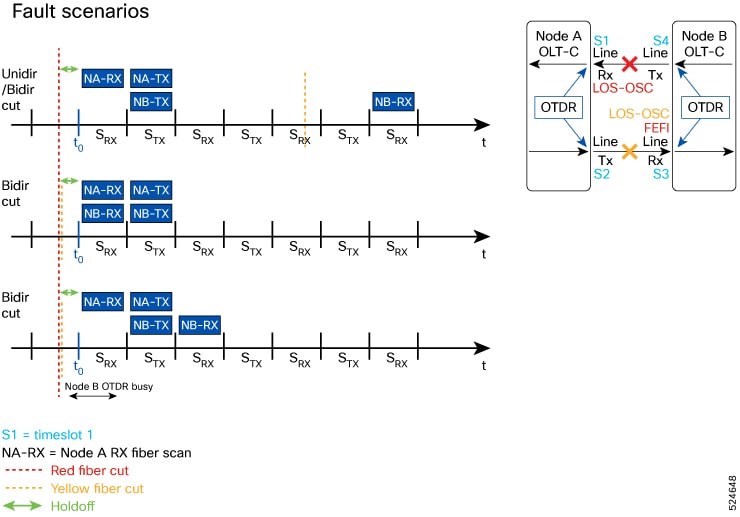
This topic explains how automatic OTDR scans function as a fiber diagnostics feature, automatically triggering OTDR tests in response to events such as span faults and restorations. It also describes bidirectional scanning capabilities for comprehensive fault detection and rapid fault localization through alarm monitoring.
An automatic OTDR scan is a fiber diagnostics feature that
-
automatically triggers OTDR tests in response to specific events such as span fault, span restoration, device power cycling, and line card cold reload that affect the optical span,
-
enables RX directionscanning for comprehensive fault detection and prevents scan collisions, and
-
provides rapid fault localization by monitoring and raising relevant alarms during scan execution.
| Feature Name | Release Information | Feature Description |
|---|---|---|
|
Bidirectional automatic OTDR scan |
Cisco Cisco IOS XR Release 26.1.1 |
The OTDR autoscan is now conducted in both the Rx and Tx directions for all triggering events, ensuring no collision occurs during the bidirectional autoscan. This improvement allows autoscan operations to be executed in both directions, greatly enhancing fault detection and network diagnostics while preventing interference between scans. |
| Feature Name | Release Information | Feature Description |
|---|---|---|
|
Automatic OTDR Scan |
Cisco IOS XR Release 7.11.1 |
An OTDR scan is automatically triggered on Rx direction, whenever events such as span fault, span restore, device power cycle, and line card cold reload occur. The automatic scan lets you quickly identify fiber failure type and fault location. Commands added to enable and view OTDR results:
|
Autoscan direction and duration
In Release 7.11.1, autoscan is performed only in the Rx direction, regardless of whether the span fault is unidirectional or bidirectional. From Release 26.1.1, OTDR autoscan performs scanning in the Tx direction in addition to the Rx direction for the events.
In both span up and span down events, the bidirectional OTDR scan process terminates after both Rx and Tx scans have been completed successfully. You can stop the scan sequence by disabling the autoscan feature.
The autoscan duration depends on the mode of the scan. For Auto and Expert modes, the scan takes upto three minutes to complete. For multiregion mode, it takes 8-9 minutes. The OTDR autoscan takes less than three minutes to complete. During the autoscan, the OTDR-SCAN-IN-PROGRESS-RX alarm is raised and gets cleared once the scan is finished. During the autoscan, the OTDR-SCAN-IN-PROGRESS-RX and OTDR-SCAN-IN-PROGRESS-TX alarms are raised and get cleared once the scan is finished.