Quantum-Safe Encryption Using Postquantum Preshared Keys

Postquantum preshared keys

A postquantum preshared key is a security enhancement that

  • strengthens IKEv2 encryption by adding additional preshared keys to the key derivation process,

  • makes VPN communications resilient against attacks by future quantum computers by incorporating quantum-safe techniques, and

  • extends the standard cryptographic protocol to comply with RFC 8784, supporting both manual and dynamic PPK generation.

Table 1. Feature history

Feature name

Release information

Description

SKIP Protocol Support for Quantum Safe IKEv2 Encryption

Release 24.1.1

Traditionally, the IKEv2 encryption was vulnerable to quantum attacks. Now, IKEv2 encryption complies with RFC 8784, which specifies using postquantum preshared keys (PPK) to make it resilient to quantum attacks. You can generate both manual and dynamic PPKs. The dynamic PPKs are generated using the Cisco Secure Key Integration Protocol (SKIP). The IKEv2 encryption is configured through CLI or by the Cisco-IOS-XR-um-ikev2-cfg Yang model.

CLI:

  • The ppk manual/dynamic keyword is introduced in the keyring command.

  • The keyring ppk keyword is introduced in the ikev2 profile command.

  • The sks profile command is introduced.

Quantum computers have raised significant concerns about the security of traditional cryptographic algorithms. For example, the IKEv2 protocol, which is used to establish VPNs, could become vulnerable to decryption by powerful quantum computers. Postquantum preshared keys address this risk. They extend IKEv2 by using additional keys in the derivation process. This approach ensures that encrypted communications remain secure, even as cryptographic threats increase.

If the preshared keys contain sufficient entropy, session keys derived from them are resistant to quantum attacks. As a result, the system is secure against both modern classical attackers and future quantum attackers.

RFC 8784 (Mixing Preshared Keys in IKEv2 for Postquantum Security) specifies how IKEv2 can use PPKs for quantum resistance, enabling PPK negotiation, PPK ID transmission, integration into session key derivation, and fallback to sessions not using PPKs.
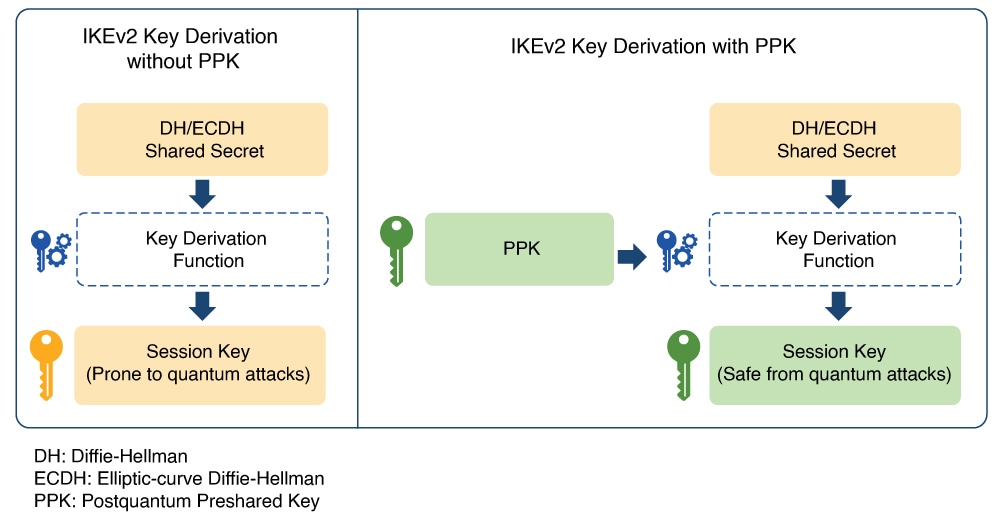
Figure 1. IKEv2 Key Derivation - With and Without PPK

Dynamic postquantum preshared keys

A dynamic postquantum preshared key is a cryptographic key that

  • is imported by encryption devices from external key sources using the Cisco Secure Key Integration Protocol (SKIP),

  • enables automated provisioning and periodic updates of preshared keys, and

  • provides improved entropy for greater quantum safety compared to static preshared keys.

Dynamic postquantum preshared keys are typically provisioned from sources such as Quantum Key Distribution (QKD) devices, specialized software, or cloud-based key services. These keys support quantum-safe session key generation when used with protocols like IKEv2 and OTNsec.

Cisco Secure Key Integration Protocol

A Cisco Secure Key Integration Protocol is a security protocol that

  • uses HTTPS as a transport to securely import preshared keys (PPKs) into Cisco encryption devices,

  • acts as a client on encryption devices and a server on external key sources to enable automated and coordinated key provisioning, and

  • provides reliable out-of-band synchronization, ensuring both initiator and responder devices receive identical key material.

Externally imported PPKs via SKIP are called dynamic PPKs. For successful integration, encryption devices must implement the SKIP client, and external sources (such as Quantum Key Distribution [QKD] devices or Cisco Session Key Service [SKS] servers) must implement the SKIP server.

SKIP compliance requirements

To be SKIP-compliant, an external key source must:

  • implement the SKIP protocol or API as specified in the Cisco SKIP specification,

  • provide the same preshared key (PPK) to both the initiator and responder devices using a reliable out-of-band synchronization mechanism,

  • contact Cisco for technical guidance during implementation, especially for vendors supplying Quantum Key Distribution (QKD) or third-party solutions.

Workflow for dynamic postquantum preshared keys

Dynamic postquantum preshared keys rely on secure orchestration among encryption devices and their key sources, leveraging SKIP for automated provisioning, synchronization, and quantum-safe session key generation.

Summary

The key components involved in the process are:

  • IKEv2 initiator: Requests and uses PPKs, communicating with the peer during session establishment.

  • IKEv2 responder: Uses synchronized PPKs to ensure secure and matching session derivation.

  • External key sources (SKIP server): Provide PPKs to devices and synchronize key material out-of-band.

  • SKIP client: Runs on encryption devices to interact securely with the key source.

Workflow
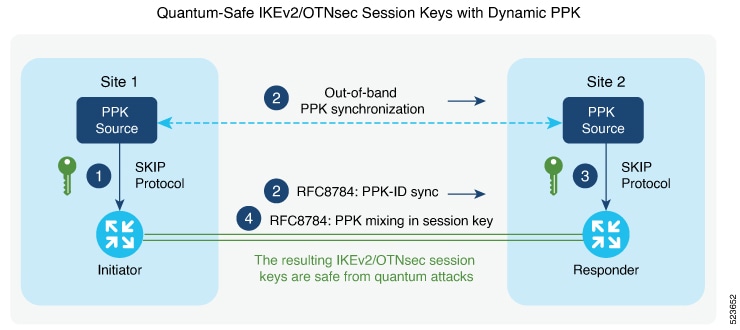
Figure 2. Quantum-safe IKEv2 and OTNsec session keys with dynamic PPK

Thiw figure shows quantum-safe IKEv2 and OTNsec session keys using dynamic PPK.

The process involves the following stages:

  1. The IKEv2 initiator requests a preshared key (PPK) from its configured external key source using SKIP. The key source replies with a PPK and associated PPK ID.
  2. The initiator’s key source synchronizes the PPK to the responder’s key source out-of-band, based on the type of key source. Simultaneously, the initiator communicates the PPK ID to the responder via IKEv2 using RFC 8784 extensions.
  3. The responder requests the correct PPK from its own key source using the received PPK ID and obtains the matching PPK.
  4. Both initiator and responder mix the PPK into the key derivation process as specified in RFC 8784, generating quantum-safe IKEv2 and OTNsec session keys.

Result

The process ensures that both participating devices use a synchronized cryptographic key with enhanced entropy, enabling secure, quantum-resistant session establishment.

Configuring Dynamic PPK using SKS SKIP

Use the following commands to configure the dynamic PPK for one or more peers or groups of peers, in the IKEv2 keyring.

configure terminal

keyring dynamic

peer name

ppk dynamic sks-profile-name [required]

pre-shared-key key-string

address {ipv4-address mask}

ikev2 profile name

match identity remote address {ipv4-address mask}

keyring ppk keyring-name

keyring keyring-name

sks profile profile-name type remote

kme server ipv4 ip-address port port-number

exit

exit

Example :

RP/0/RP0/CPU0:ios#configure terminal
RP/0/RP0/CPU0:ios(config)#keyring dynamic
RP/0/RP0/CPU0:ios(config-ikev2-keyring)#peer peer1
RP/0/RP0/CPU0:ios(config-ikev2-keyring-peer)#ppk dynamic qkd required
RP/0/RP0/CPU0:ios(config-ikev2-keyring-peer)#pre-shared-key cisco123!cisco123
RP/0/RP0/CPU0:ios(config-ikev2-keyring-peer)#address 10.0.0.1 255.0.0.0
RP/0/1/CPU0:ios(config)#ikev2 profile test
RP/0/1/CPU0:ios(config-ikev2-profile-test)#keyring dynamic
RP/0/1/CPU0:ios(config-ikev2-profile-test)#keyring ppk dynamic
RP/0/1/CPU0:ios(config-ikev2-profile-name)#match address 10.0.0.1 255.255.255.0

RP/0/1/CPU0:ios(config)#sks profile qkd type remote 
RP/0/1/CPU0:ios(config-sks-profile)#kme server ipv4 192.0.2.34 port 10001
RP/0/RP0/CPU0:ios(config-ikev2-keyring-peer)#exit
RP/0/RP0/CPU0:ios(config)#exit

Manual postquantum preshared keys

A manual postquantum preshared key is a type of PPK that

  • is manually configured with identical values on both the IKEv2 and OTNsec initiator and responder,

  • provides an easier alternative to dynamic PPKs, and

  • requires administrator intervention for setup, maintenance, and rotation.

Manual PPK requirements

When using manual PPKs, you can provision the same PPKs on both the IKEv2 and OTNsec initiator and responder by manually configuring the PPKs on both sides. Ensure that a manual PPK is of sufficient size and entropy, and that it is frequently rotated by the administrator to maintain security.

This figure illustrates that the session keys of quantum-safe IKEv2 and OTNsec are obtained through a manual PPK:
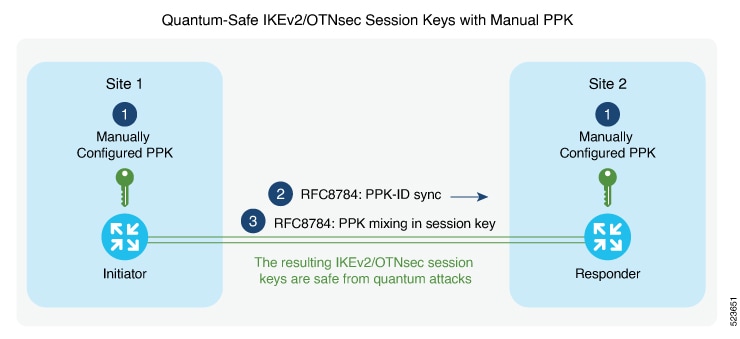
Figure 3. Quantum-safe IKEv2 and OTNsec session keys with manual PPK

Configure a manual PPK in an IKEv2 keyring

Define a manual PPK for one or more IKEv2 peers or peer groups to enhance VPN authentication security.

Manually configuring PPKs in IKEv2 keyrings allows for more flexible peer authentication in secure VPN deployments. From Release 24.3.1, Type 6 passwords are supported for preshared keys, providing enhanced protection. See Enable Type 6 password.

Follow these steps to configure a manual PPK in an IKEv2 keyring:

Procedure

Step 1

Access global configuration mode and create or enter an IKEv2 keyring using the keyring keyring-name command.

Example:
RP/0/RP0/CPU0:ios#configure terminal
RP/0/RP0/CPU0:ios(config)#keyring manual

Step 2

Define the peer and configure the manual PPK and preshared key using the keywords peer name password [required].

Example:

RP/0/RP0/CPU0:ios(config-ikev2-keyring)#peer peer1
RP/0/RP0/CPU0:ios(config-ikev2-keyring-peer)#ppk manual id cisco123 key password 060506324F41584B56 required

Step 3

Define the pre-shred-key and peer adress using the keywords pre-shared-key key-string address {ipv4-address mask }

Example:

RP/0/RP0/CPU0:ios(config-ikev2-keyring-peer)#pre-shared-key cisco123cisco123
RP/0/RP0/CPU0:ios(config-ikev2-keyring-peer)#address 10.0.0.1 255.0.0.0

Step 4

Exit to global configuration mode.

Example:
RP/0/RP0/CPU0:ios(config-ikev2-keyring-peer)#exit
RP/0/RP0/CPU0:ios(config)#exit

Step 5

Create or modify the IKEv2 profile, associating the keyring and matching remote peer identity using the keywords ikev2 profile namematch identity remote address {ipv4-address mask}keyring ppk keyring-name keyring keyring-name

Step 6

Exit to global configuration mode.

Example:
RP/0/RP0/CPU0:ios(config-ikev2-keyring-peer)#exit
RP/0/RP0/CPU0:ios(config)#exit

Verify the PPK configuration

Ensure that PPK (Post-Quantum Key) features are correctly configured and active on your device for quantum-safe encryption.

Follow these steps to verify the PPK configuration.

Procedure


Step 1

Use the show ikev2 sa detail command to display information about the current IKEv2 security associations.

Example:

RP/0/1/CPU0:ios#show ikev2 sa detail
IKE SA ID : 866
-------------------------------------------------------------------------------
Local : 192.0.2.34/500
Remote : 192.0.2.40/500
Status(Description) : READY (Negotiation done)
Role : Initiator
Fvrf : Default
Encryption/Keysize : AES-CBC/256
PRF/Hash/DH Group : SHA512/SHA512/19
Authentication(Sign/Verify) : PSK/PSK
Life/Active Time(sec) : 86400/21
Session ID : 5
Local SPI : C18D2946B0C4259C
Remote SPI : 5D1BD398AEB3A1E1
Local ID : 192.0.2.34
Remote ID : 192.0.2.40
Quantum resistance : Enabled with manual PPK

The Quantum resistance parameter in the output of the command indicates that manual PPK-based quantum-safe encryption is enabled.

Note


Both manual and dynamic PPK options can be used for viewing IKEv2 details.

Step 2

Use the show ikev2 statistics command to display the statistics and counters related to IKEv2 sessions

Example:

RP/0/1/CPU0:ios#show ikev2 statistics
Thu Jun 8 13:30:06.360 IST
................................
NO_NAT : 2 0 0 0
PPK COUNTERS
=============================================================================================
PPK ERRORS
---------------------------------------------------------------------------------------------
PPK_ID_MISMATCH : 0
PPK_RETRIEVE_FAIL : 0
PPK_AUTH_FAIL : 0

Step 3

Use the show ikev2 summary command to display the IKEv2 session summary of NCS 1004.

Example:

RP/0/1/CPU0:ios#show ikev2 summary
Thu Jun 8 12:54:30.969 IST
IKEv2 SA Summary
-------------------------------------------------
Total SA (Active/Negotiating) : 2 (2/0)
Total Outgoing SA (Active/Negotiating): 2 (2/0)
Total Incoming SA (Active/Negotiating): 0 (0/0)
Total QR SA (Dynamic/Manual) : 2 (1/1)

Step 4

Use the show ikev2 profile command to display the details for each IKEv2 profile.

Example:

RP/0/1/CPU0:ios#show ikev2 profile
Tue Jun 6 18:00:20.277 IST
Profile Name : p4
===============================================================================
Keyring : k4
Fvrf : Default
Lifetime(Sec) : 86400
DPD Interval(Sec) : 4
DPD Retry Interval(Sec) : 2
Match ANY : NO
Total Match remote peers : 1
Addr/Prefix : 198.51.100.19/255.255.255.0
Number of Trustpoints : 0
Local auth method : PSK
Number of remote auth methods : 1
Auth Method : PSK
PPK Keyring : Not Configured
Profile Name : ppk_d
===============================================================================
Keyring : Not Configured
Fvrf : Default
Lifetime(Sec) : 86400
DPD Interval(Sec) : 4
DPD Retry Interval(Sec) : 2
Match ANY : NO
Total Match remote peers : 0
Number of Trustpoints : 0
Local auth method : NULL
Number of remote auth methods : 0
PPK Keyring : ppk_d
Profile Name : ppk_m
==============================================================
Keyring : Not Configured
Fvrf : Default
Lifetime(Sec) : 86400
DPD Interval(Sec) : 4
DPD Retry Interval(Sec) : 2
Match ANY : NO
Total Match remote peers : 0
Number of Trustpoints : 0
Local auth method : NULL
Number of remote auth methods : 0
PPK Keyring : ppk_m

Step 5

Use the show keyring command to display the configured keyring details on NCS 1004.

Example:

RP/0/1/CPU0:ios#show keyring
Tue Jun 6 18:00:28.272 IST
Keyring Name : k4
===============================================================================
Total Peers : 1
-------------------------------------------------------------------------------
Peer Name : init
IP Address : 198.51.100.19
Subnet Mask : 255.255.255.0
Local PSK : Configured
Remote PSK : Configured
PPK Mode : Not Configured
PPK Mandatory : Not Configured
Keyring Name : ppk_m
===============================================================================
Total Peers : 1
-------------------------------------------------------------------------------
Peer Name : init
IP Address : Not Configured
Subnet Mask : Not Configured
Local PSK : Not Configured
Remote PSK : Not Configured
PPK Mode : Manual
PPK Mandatory : No
Keyring Name : ppk_m_req
===============================================================================
Total Peers : 1
------------------------------------------------------------------------
Peer Name : init
IP Address : Not Configured
Subnet Mask : Not Configured
Local PSK : Not Configured
Remote PSK : Not Configured
PPK Mode : Manual
PPK Mandatory : Yes
Keyring Name : ppk_d
===============================================================================
Total Peers : 1
-------------------------------------------------------------------------------
Peer Name : init
IP Address : Not Configured
Subnet Mask : Not Configured
Local PSK : Not Configured
Remote PSK : Not Configured
PPK Mode : Dynamic
PPK Mandatory : No
Keyring Name : ppk_d_req
===============================================================================
Total Peers : 1
-------------------------------------------------------------------------------
Peer Name : init
IP Address : Not Configured
Subnet Mask : Not Configured
Local PSK : Not Configured
Remote PSK : Not Configured
PPK Mode : Dynamic
PPK Mandatory : Yes

Step 6

Use the show ikev2 session detail command to display information about the current IKEv2 session.

Example:

RP/0/1/CPU0:ios#show ikev2 session detail
Fri Feb 2 11:21:09.131 IST
Session ID : 3
===============================================================================
Status : UP-ACTIVE
IKE Count : 1
Child Count : 1
IKE SA ID : 11625
-------------------------------------------------------------------------------
Local : 192.0.2.3/500
Remote : 192.0.2.1/500
Status(Description) : READY (Negotiation done)
Role : Initiator
Fvrf : Default
Encryption/Keysize : AES-CBC/256
PRF/Hash/DH Group : SHA512/SHA512/19
Authentication(Sign/Verify) : PSK/PSK
Life/Active Time(sec) : 200/115
Session ID : 3
Local SPI : E8F0716FF44EA1C3
Remote SPI : B1046E13B805178E
Local ID : 192.0.2.3
Remote ID : 192.0.2.1
Quantum resistance : Enabled with manual PPK
Child SA
-------------------------------------------------------------------------------
Local Selector : 0.0.0.0/0 - 255.255.255.255/65535
Remote Selector : 0.0.0.0/0 - 255.255.255.255/65535
ESP SPI IN/OUT : 0xf5e2a1c2 / 0x12bb94fd
Encryption : AES-CBC
Keysize : 256
ESP HMAC : SHA384

What to do next