Cisco NCS 1001 Overview

This chapter provides an overview of Cisco NCS 1001.

Cisco NCS 1001 Overview

Cisco NCS 1001 (NCS1001-K9) is 1 RU chassis that addresses the growing bandwidth needs of data center DWDM applications. It provides a DWDM line system that is optimized for data center environments and is optimized for point-to-point applications at maximum capacity. NCS 1001 supports up to three optical modules. The modules can be amplifiers or protection switching modules.

NCS 1001 has the following components:

  • Removable control card

  • Four removable fans

  • Two removable 600W AC/DC or DC/DC power supply modules (PSU)

  • Three slots for optical modules. Two Optical Amplifier Modules ( NCS1K-EDFA) and a Protection Switching Module (NCS1K-PSM) can be inserted in these slots.

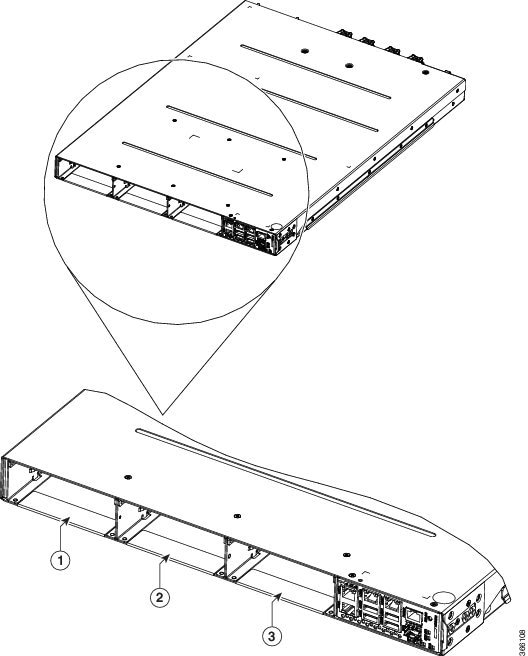
    The optical modules can be inserted in slots 1 to 3 as shown in the following figure. The optical modules can be inserted and removed from the slots while the system is operational. In amplified configuration, the Optical Amplifier module can be inserted in any slot. In (section) protected configuration, the protect Optical Amplifier module is inserted in slot 1, Protection Switching Module in slot 2, and working Optical Amplifier module in slot 3.


Caution


Each optical module must be inserted in a slot only when the module in the adjacent slot is completely inserted and seated or the adjacent slot is empty. If an optical module is inserted in a slot without seating the adjacent module, the ejector might interfere with the adjacent module.


Caution


The empty slots must be inserted with the filler optical modules or filler PSUs as appropriate to guarantee safety and system cooling compliance. See Cisco NCS 1001 Front View and Cisco NCS 1001 Rear View to identify the slots for optical modules and PSUs respectively.
Figure 1. Cisco NCS 1001 Front View

Cisco NCS 1001 Front View

1

Optical Module Slot 1

2

Optical Module Slot 2

3

Optical Module Slot 3

The slot numbers are also specified on the front panel label.
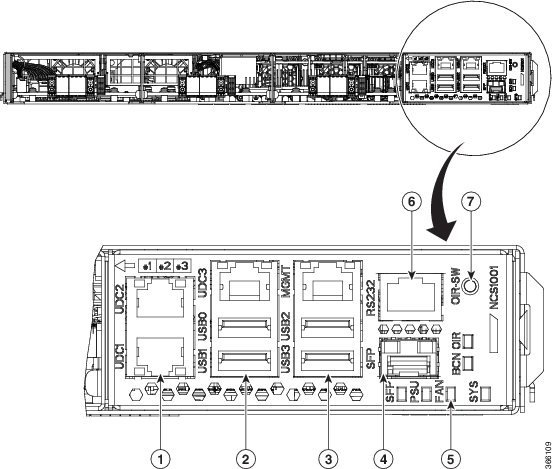
Figure 2. Cisco NCS 1001 Front View

Cisco NCS 1001 Front View

1

UDC (user data channel) for optical modules 1 and 2

2

Two USB 2.0 ports and one UDC for optical module 3

3

Two USB 2.0 ports and one 10/100/1000 LAN electrical management interface

4

10/100/1000 LAN management interface (optical)

5

Status LED (SFP link, Power supply, Fan, System, Beacon, OIR)

6

RS232 console port of the control card

7

OIR switch

Figure 3. Cisco NCS 1001 Rear View

Cisco NCS 1001 Rear View

1

Control card and SSD (Solid State Disk)

2

Fan 3

3

Fan 2

4

Fan 1

5

Fan 0

6

600W AC/DC or DC/DC redundant power supply module (PSU 1)

7

600W AC/DC or DC/DC redundant power supply module (PSU 0)

Both the power supply modules shall be AC/DC or DC/DC. Mixed configuration is not allowed.

Benefits

NCS 1001 provides the following benefits.

  • Up to 23dBm output power to allow for +3dBm per channel fiber launch power and maximum optical performance for high baud rate and higher order modulation format transponders.

  • Switchable gain pre-amplifier up to 34db.

  • Embedded Optical Channel Monitoring (OCM) module to monitor per channel power at all the input and output ports.

  • Integrated pluggable optics based OSC and OTDR support.

  • OSC supports user data channel transport as well as remote node management.

  • Supports 96 channels of C-Band in 1 RU.

  • Supports flex grid on OCM module.

Physical Characteristics

  • Width: 17.44” (442.9 mm)

  • Depth: 23.64” (600.5 mm)

  • Height: 1 RU

  • Weight without power supply unit: 8.2 kg

  • Weight with two power supply units: 10.5 kg

  • Weight of AC PSU: 1.162 kg

  • Weight of Fan: 78 gms

  • Weight of control card: 1.5 kg

For information about NCS 1001, see the data sheet.
Safety Labels

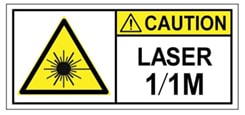
Cisco NCS 1000 Series chassis is classified as Hazard Level 1M as per IEC 60825-2 and Laser Class 1M as per IEC 60825-1, since it includes pluggable optical modules Class 1 or Class 1M.

The Class 1/1M Laser Product label is shown in the following figure:

Figure 4. Class 1/1M Laser Product Label
Class 1/1M Laser Product Label

This section explains the significance of the safety labels attached to the NCS 1001 chassis. The faceplates of the chassis are clearly labeled with warnings about the laser radiation levels.

You must understand all warning labels before working on the chassis.

Figure 5. Class 1M Laser Product Label


Safety Precaution for Module Installation and Removal

Ensure to observe the following safety precautions when you are working with the chassis modules.

Invisible laser radiations present. Statement 1016.

Invisible laser radiation may be emitted from disconnected fibers or connectors. Do not stare into beams or view directly with optical instruments. Statement 1051.

Figure 6. Class 1/1M Laser Product Label
Class 1/1M Laser Product Label

Safety Precaution for Laser Radiation

Cisco NCS 1000 Series chassis is classified as Hazard Level 1M as per IEC 60825-2 and Laser Class 1M as per IEC 60825-1, since it may include embedded or pluggable optical modules Class 1 or Class 1M.

Figure 7. Class 1M Laser Product Label


Optical Amplifier Module

Table 1. Feature History

Feature Name

Release Information

Feature Description

Amplifier Behaviour

Cisco IOS XR Release 7.3.1

Grid mode configuration for the optical amplifier has been extended to support 75GHz spaced channels.

You can optimize the optical spectrum and granularity using the gridless configuration. You can provision channels with arbitrary channel frequencies and channel widths. Up to 96 channels can be configured using the gridless configuration.

Commands modified:

  • hw-module

  • show controllers

The optical amplifier module (NCS1K-EDFA) has pre-amplifier and booster amplifier.

The optical amplifier module provides the following functionality.

  • Preamplifier (LINE-RX to COM-TX) - Single preamplifier variant, with switchable gain ranges, according to link loss:

    • Range # 1: 0 to 24 dB gain, Tilt control: 24 to 27 gain, with tilt uncontrolled

    • Range # 2: 20 to 34 dB gain, Tilt control: 34 to 37 dB gain, with tilt uncontrolled

    • 23dBm output power @ COM-TX port

  • Booster amplifier (COM-RX to LINE-TX) - True variable gain booster amplifier

    • Gain range: 1 to 20. 20 to 25 uncontrolled tilt.

    • 23dBm output power @ LINE-TX port

  • ADD/DROP OSC channel supports both 1510nm and 1610nm +/-10nm

  • OCM assesses channel presence and Gain regulation and per channel power monitoring.

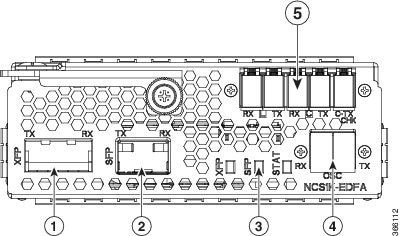
Figure 8. EDFA Front View

EDFA Front View

1

XFP for OSC and additional OTDR feature

2

SFP for OSC (Optical Service Channel)

3

Status LED

4

Service Channel input and output port [OSC - RX, TX]

5

PRE and BST amplifier inputs and output ports

[L (LINE) - RX, TX]

[C (COM) - RX, TX]

[COM - CHECK]

The following table describes the mapping of controllers and optical ports for the optical amplifier module.

Controller

Optical Ports

Ots 0/slot/0/0

  • COM-RX (booster input)

  • COM-TX (preamplifier output)

Ots 0/slot/0/1

  • LINE-RX (preamplifier input)

  • LINE-TX (booster output)

Ots 0/slot/0/2

  • OSC-RX

  • OSC-TX

Ots 0/slot/0/3

COM-CHECK

COM-CHECK CONFIGURATION

The COM-CHECK configuration is described below.

  • Safety must be ensured to protect the fiber intra-node from the pre-amplifier to the Mux or Demux section for the total output power on COM-TX port upto 23 dB. This is required to compensate for an extremely lengthy span.

  • If the output power on COM-TX is less than or equal to 20 dB, the com-check port may not be used and can be turned off. Also no physical connection between the pre COM-CHECK and Demux monitor port is required.

  • Safety on pre is necessary in some cases such as large spans over high power requirements.

  • The COM-CHECK PD9 is the safety port.

  • The COM-RX like controller Ots 0/s/0/0 is not part of safety.

  • The safety restart process is similar to the booster case, with some difference in the APR Check phase.

Protection Switching Module

The protection switching module (NCS1K-PSM) provides the following functionality.

  • In TX section:

    • Splits input optical channels to both working and protection lines.

    • Forces the switch in the remote site by opening one of the two line paths (by putting the related VOA in AVS).

  • In RX section:

    • Selects the signals from working or protection line. Each line is monitored through a PD.

    • Balances the two line losses by changing the VOA attenuation value at the same time of the switch change of state.

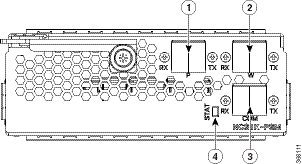
Figure 9. PSM Front View

PSM Front View

1

Protected path input and output port [P - RX, TX]

2

Working path input and output port [W - RX, TX]

3

COM input and output port [COM - RX, TX]

4

Status LED

The following table describes the mapping of controllers and optical ports for the protection switching module.

Controller

Optical Ports

Ots 0/slot/0/0

COM-TX

Ots 0/slot/0/1

Working path input and output port [W - RX, TX]

Ots 0/slot/0/2

Protected path input and output port [P - RX, TX]

Optical Time Domain Reflectometer Module

Optical Time Domain Reflectometer (OTDR) is a line card supported in NCS 1001. The line card contains 2x bidirectional OTDRs and 2x filter that combines C-band, OSC, and OTDR filters and splits OSC and OTDR. Each internal OTDR can perform measurements on both TX and RX fiber by using an internal optical switch. OTDR line card is connected to the OSC port on the optical amplifier. The OTDR line card can be inserted in any slot of NCS 1001.

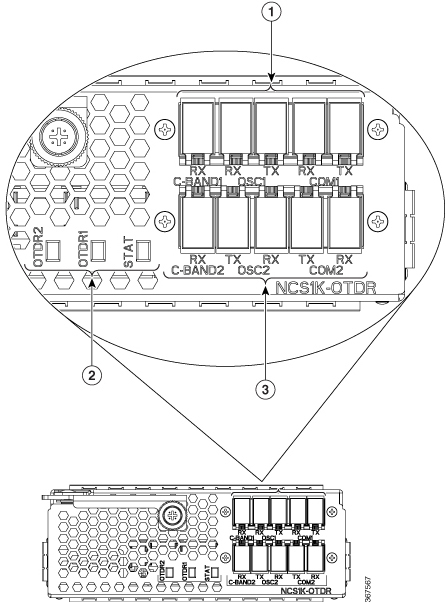
Figure 10. OTDR Front View
OTDR Front View

1

OTDR1 interface

2

LED status

3

OTDR2 interface

For more information about the OTDR module, see the data sheet.

Cisco NCS 1000 32-Channel Even Mux/Demux Patch Panel

The Cisco NCS 1000 32-Channel Even Mux/Demux patch panel (PID: N1K-MD-32E-C) is a pair of passive Athermal Arrayed Waveguide Grating (AAWG) based modules.


Note


"Patch panel" refers to N1K-MD-32E-C Even Mux/Demux patch panel.


The patch panel has 32 channels and works as an add/drop unit for its 32 channels at 140 GBd. Each even patch panel allows the multiplexing and demultiplexing of 32 channels with 150-GHz spacing. The patch panel provides a wide spectrum of optical wavelengths support.

The N1K-MD-32E-C patch panel operates in C-band. This even patch panel is fully passive.

Figure 11. N1K-MD-32E-C Patch Panel Front View

Port Label Descriptions

The even patch panel has 34-port LC-duplex connectors.

Table 2. Even Mux/Demux Patch Panel Port Interfaces

Port

Connector Type

Connector Label

Operating Frequency Range [THz (nm)]

Note

COM-RX

COM-TX

LC

COM

191.3–196.1 (1528.77–1567.13)

TX

RX

MON-RX

MON-TX

LC

MON

196.175–191.15 (1528.2–1568.4)

Both are output ports. Replica of COM-RX/TX signals ~20dB attenuated.

TX

RX

CH-i TX/RX

[i=0–31]

LC

<frequency>

For more information on EVEN channels, see Channel Wavelength Allocation

TX

RX

INV

USB Type A receptacle connector

INV

USB inventory port.

Channel Wavelength Allocation

The following table describes the C-band channel wavelength plan for the patch panel.

Table 3. C-Band Channel Wavelength Plan

Channel Label

N1K-MD-32E-C

Frequency (THz)

Wavelength (nm)

0

196.025

1529.36

1

195.875

1530.53

2

195.725

1531.70

3

195.575

1532.88

4

195.425

1534.05

5

195.275

1535.23

6

195.125

1536.41

7

194.975

1537.59

8

194.825

1538.78

9

194.675

1539.96

10

194.525

1541.15

11

194.375

1542.34

12

194.225

1543.53

13

194.075

1544.72

14

193.925

1545.92

15

193.775

1547.12

16

193.625

1548.31

17

193.475

1549.52

18

193.325

1550.72

19

193.175

1551.92

20

193.025

1553.13

21

192.875

1554.34

22

192.725

1555.55

23

192.575

1556.76

24

192.425

1557.97

25

192.275

1559.19

26

192.125

1560.40

27

191.975

1561.62

28

191.825

1562.84

29

191.675

1564.07

30

191.525

1565.29

31

191.375

1566.52

NCS1K-MD-32x-CE mux/demux passive patch panels

NCS1K-MD-32x-CE mux/demux passive patch panels are a pair of optical patch panels that
  • use passive Athermal Arrayed Waveguide Grating (AAWG) technology to multiplex and demultiplex signals across multiple channels,

  • support 32 channels per panel with 150-GHz spacing and offer wide optical pass-band support, and

  • enable add/drop functions for the NCS 1001 and NCS 1014 optical line systems and can be paired (ODD and EVEN panels) to achieve 64 channels with 75-GHz spacing.

Supported Panels:

  • NCS1K-MD-32E-CE (EVEN panel)

  • NCS1K-MD-32O-CE (ODD panel)

Key features and usage:

  • Each mux/demux panel allows multiplexing and demultiplexing for 32 channels with a channel spacing of 150 GHz.

  • When both ODD and EVEN panels are used together on the same NCS 1001 or NCS 1014 optical line system, the combined capacity becomes 64 channels with 75-GHz spacing.

  • Each panel acts as an add/drop unit for 32 channels at 140 GBd in standalone mode.

  • The panels operate fully in the C-band and are enhanced versions of the NCS1K-MD-32O/E-C patch panels.

Front panel of the MD-32x-CE

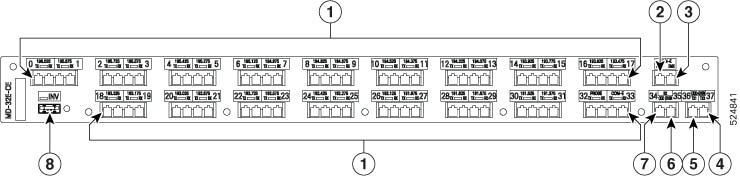
The interfaces of MD-32E-C patch panel is similar to the MD-32-O-CE patch panel.

Figure 12. MD-32x-CE interfaces
k
Table 4. Port Label Descriptions
Callout

Port label

Connector type

Description

1

CH-i TX/RX [i=0–31]

LC

Transmits and receives data through the 32 optical channels

COM-x-TX/RX

LC

Transmits and receives the combined signals to multiplex or demultiplex. Its operating frequency range is 196.175–191.15 (1528.2–1568.4) [THz (nm)].

PROBE-TX/RX

LC

Starts the coherent test probe signal in TX port and detects the signal in RX port to verify connection with the host card

2

MON-x-MUX

LC

Monitors the aggregrated signal flowing out of the patch panel. Its operating frequency range is 196.175–191.15 (1528.2–1568.4) [THz (nm)].

3

MON-x-DEMUX

LC

Monitors the aggregrated signal coming into the patch panel to demultiplex the signal. Its operating frequency is the same as MON-x-MUX port.

4

ODD+EVEN-TX2

LC

Transmits the ODD and EVEN optical channels

5

ODD+EVEN TX1

LC

Transmits the ODD and EVEN optical channels

6

RX-EVEN

LC

Receives the EVEN optical channels

7

RX-ODD

LC

Receives the ODD optical channels

8

INV

USB Type A receptacle connector

Establishes USB communication channel with the optical line system

Characteristics of MD-32x-CE

The MD32x-CE patch panel operates in C-band. It is the enhanced version of the NCS1K-MD-32O/E-C patch panel.

Functionalities

NCS1K-MD-32E-CE

NCS1K-MD-32O-CE

Band type

C-band

Loopback

Loopback is not supported.

Frequency range (THz)

191.375 - 196.025

191.450 - 196.100

Embedded optical modules

optical coupler

optical splitter

Coherent probe testing

MD32x-CE patch panel has a dedicated PROBE port to detect test probe signal to verify connection with the host card.

Communication with the NCS 1001 and NCS 1014 optical line system

The MD32x-CE patch panels communicate to the optical line system using a USB communication channel. The INV port is the dedicated USB 2.0 port in the patch panels that connect to the controllers to communicate.

The USB communication channel helps to retrieve the inventory data and the insertion loss of the optical paths.

Channel wavelength allocation

The table shows the frequency and wavelength allocated to each channel for both ODD and EVEN version of the MD-32x-C patch panels.

Table 5. C-Band channel wavelength allocation

Channel Label

NCS1K-MD-32E-CE

NCS1K-MD-32O-CE

Frequency (THz)

Wavelength (nm)

Frequency (THz)

Wavelength (nm)

0

196.025

1529.36

196.100

1528.77

1

195.875

1530.53

195.950

1529.94

2

195.725

1531.70

195.800

1531.12

3

195.575

1532.88

195.650

1532.29

4

195.425

1534.05

195.500

1533.47

5

195.275

1535.23

195.350

1534.64

6

195.125

1536.41

195.200

1535.82

7

194.975

1537.59

195.050

1537.00

8

194.825

1538.78

194.900

1538.19

9

194.675

1539.96

194.750

1539.37

10

194.525

1541.15

194.600

1540.56

11

194.375

1542.34

194.450

1541.75

12

194.225

1543.53

194.300

1542.94

13

194.075

1544.72

194.150

1544.13

14

193.925

1545.92

194.000

1545.32

15

193.775

1547.12

193.850

1546.52

16

193.625

1548.31

193.700

1547.72

17

193.475

1549.52

193.550

1548.91

18

193.325

1550.72

193.400

1550.12

19

193.175

1551.92

193.250

1551.32

20

193.025

1553.13

193.100

1552.52

21

192.875

1554.34

192.950

1553.73

22

192.725

1555.55

192.800

1554.94

23

192.575

1556.76

192.650

1556.15

24

192.425

1557.97

192.500

1557.36

25

192.275

1559.19

192.350

1558.58

26

192.125

1560.40

192.200

1559.79

27

191.975

1561.62

192.050

1561.01

28

191.825

1562.84

191.900

1562.23

29

191.675

1564.07

191.750

1563.45

30

191.525

1565.29

191.600

1564.68

31

191.375

1566.52

191.450

1565.90

Cisco ONS 15216 4 channel optical add/drop multiplexers

A Cisco ONS 15216 4 channel optical add/drop multiplexer is a passive optical networking device that

  • enables the Cisco ONS 15454 Multiservice Transport Platform (MSTP) to address the network edge cost-effectively without sacrificing operational ease,

  • is well suited for applications with minimal wavelength requirements and tight space and power constraints, such as cell site and customer premises terminations, and

  • offers ten models covering a 40-channel 100-GHz channel plan.

The Cisco ONS 15216 4 channel OADMs support flexible deployment, especially where space and power are limited. These models allow edge optical networking to be extended economically, meeting both operational and environmental constraints.

In Release 25.4.1, NCS 1001 supports USB inventory only for Cisco ONS 15216 4 channel optical add/drop multiplexer.

USB passive inventories

A USB passive inventory is a system feature that

  • automatically detects and collects key parameters (such as Product ID, Description, Serial Number, and Version ID) from passive optical modules when connected via USB,

  • enables real-time inventory visibility and management for network administrators,

  • ensures compatibility and traceability of passive modules within NCS 1001 hardware environments.

Table 6. Feature History

Feature Name

Release

Description

Inventory Support

Cisco IOS XR Release 7.3.1

A new passive device with PID NCS1K-MD-64-C (NCS 1000 64 channels Odd Multiplexer or Demultiplexer Patch Panel-C-band) is supported.

Table 7. Feature History

Feature Name

Release

Description

USB inventory support

Cisco IOS XR Release 25.4.1

NCS 1001 can now retrieve information from additional passive devices connected to its USB ports. The feature extends support beyond previously supported passive devices, allowing you to access data from a wider range of connected equipment. The passive devices include:

  • NCS 1000 32 chs Even Mux/Demux Patch Panel (NCS1K-MD-32E-CE )

  • NCS 1000 32 chs Odd Mux/Demux Patch Panel (NCS1K-MD-32O-CE)

  • Cisco ONS 15216 4 Channel OADMs

How USB passive inventories work

When a supported passive unit is physically connected to one of the four available USB ports on the controller card of the NCS 1001, the inventory system automatically queries and retrieves the module's parameters. This information includes PID, Description, Serial Number, and Version ID. Only one passive unit can be inventoried at a time per USB port.

The inventory data is immediately accessible through operational commands such as show inventory in XR or through admin sessions. These commands provide clear module identification directly from the system interface. Inventory records can also be accessed through SNMP “entPhysicalEntity” objects, telemetry, and NETCONF using the yang model Cisco-IOS-XR-invmgr-oper.yang. This enables automated network management and monitoring.

From Release 25.4.1, NCS 1001 supports USB inventory management for these devices:

  • NCS 1000 32 chs Even Mux/Demux Patch Panel (NCS1K-MD-32E-CE )

  • NCS 1000 32 chs Odd Mux/Demux Patch Panel (NCS1K-MD-32O-CE)

  • Cisco ONS 15216 4 Channel OADMs


Note


For the MD32 patch panel, NCS1001 can only retrieve data from the inventory. It cannot access LED or photodiode status, nor can it configure the device in any way.


Table 8. Passive modules supported in NCS 1001

PID

Description

15216-MD-48-ODDE

ONS Multiplexer/Demultiplexer Patch Panel Even Extended

15216-MD-48-EVENE

ONS Multiplexer/Demultiplexer Patch Panel Odd Extended

15216-MD-48-CME

ONS Coupler and Splitter

15216-FLD-OSC

OSC Combiner and Splitter

NCS1K-MD-64-C

NCS 1000 64 channels Odd Multiplexer/Demultiplexer Patch Panel-C-band

N1K-MD-32E-C

NCS 1000 32 channels Even Multiplexer/Demultiplexer Patch Panel, No-loopback - 150GHz - C-band

15216-FLD-4-30.3=

15216-FLD-4-33.4=

15216-FLD-4-36.6=

15216-FLD-4-39.7=

15216-FLD-4-42.9=

15216-FLD-4-46.1=

15216-FLD-4-49.3=

15216-FLD-4-52.5=

15216-FLD-4-55.7=

15216-FLD-4-58.9=

Cisco ONS 15216 4 Channel OADM

NCS1K-MD-32E-CE

NCS 1000 32 chs Even Mux/Demux Patch Panel

NCS1K-MD-32O-CE

NCS 1000 32 chs Odd Mux/Demux Patch Panel


Remember


N1K-MD-32E-C and NCS1K-MD-32E-C are 32-channel even multiplexer/demultiplexer patch panels. The N1K-MD-32E-C does not have a loopback function and is compatible only with the NCS 1001. The NCS1K-MD-32E-C supports a loopback function and is compatible only with the NCS 1010.


Example:

RP/0/RP0/CPU0:ios#show inventory                              
Wed May 23 08:24:07.350 CEST…………

NAME: "0/RP0-USB0", DESCR: "ONS Mux/Demux Patch Panel Even Extended"
PID: 15216-MD-48-EVENE , VID: V01 , SN: NSZ19510021

NAME: "0/RP0-USB1", DESCR: "OSC Combiner-Splitter Module"
PID: 15216-FLD-OSC=    , VID: V00 , SN: OPL17190305

NAME: "0/RP0-USB2", DESCR: "ONS Mux/Demux Patch Panel Odd Extended"
PID: 15216-MD-48-ODDE  , VID: V01 , SN: NSZ19510003

NAME: "0/RP0-USB3", DESCR: "ONS Coupler and Splitter Pluggable"
PID: 15216-MD-48-CME   , VID: V01 , SN: NSZ20159002

NAME: "0/RP0-USB0", DESCR: "NCS 1000 32 chs Even Mux/Demux Patch Panel - 150GHz - C-band"
PID: NCS1K-MD-32E-CE   , VID: V00 , SN: ACW2804YJ23

NAME: "0/RP0-USB1", DESCR: "NCS 1000 32 chs Odd Mux/Demux Patch Panel - 150GHz - C-band"
PID: NCS1K-MD-32O-CE   , VID: V00 , SN: ACW2804YH08
NAME: "0/RP0-USB0", DESCR: "NCS 1000 4 Channel add drop multiplexer Module"
PID: 15216-FLD-4-55.7=   , VID: V00 , SN: OPL19380046

Product IDs

Table 9. Feature History

Feature Name

Release Information

Feature Description

ONS-SE-155-1510 Support

Cisco IOS XR Release 7.3.2

A new SFP pluggable optics module with PID ONS-SE-155-1510 SFP is supported.

The following table describes the product IDs of the components.

Product ID

Description

NCS1001-K9=

Network Convergence System 1001 line system 3 slots

NCS1K-CNTLR2=

Network Convergence System 1001 Control card

NCS1K-EDFA=

Network Convergence System 1001 amplifier module

NCS1K-PSM=

Network Convergence System 1001 protection module

NCS1K-OTDR=

Network Convergence System 1001 OTDR module

NCS1K-2KW-AC2=

Network Convergence System 1001 AC power supply unit - 2KW normal operating temperature, 600W short term high temperature

NCS1K-2KW-DC=

Network Convergence System 1001 DC power supply unit - 2KW normal operating temperature, 600W short term high temperature

NCS1K1-FAN=

Network Convergence System 1001 line system Fan

NCS1K-SSD=

SSD

ONS-SC-Z3-1510=

SFP OC-48/STM-16/GE, CWDM, 1510 nm

ONS-SE-155-1510

SFP OC-3/STM-1, CWDM, 1510 nm EXT; SFP Pluggable Optics Module

CWDM-SFP-1510

CWDM 1510-nm SFP; Gigabit Ethernet 1 and 2 Gb Fibre Channel

CWDM-SFP-1610

CWDM 1610-nm SFP; Gigabit Ethernet 1 and 2 Gb Fibre Channel

ONS-SC-Z3-1610=

SFP OC-48/STM-16/GE, CWDM, 1610 nm

ONS-SI-GE-LX=

SFP 1000BASE-LX Gigabit Ethernet, 1310 nm, SM, I-TEMP

ONS-SI-GE-SX=

SFP 1000BASE-SX Gigabit Ethernet, 850 nm, MM, I-TEMP

ONS-SI-GE-ZX=

SFP 1000BASE-ZX Gigabit Ethernet, 1550 nm, SM, I-Temp

ONS-SC-Z3-1510=

SFP OC-48/STM-16/GE, CWDM, 1510 nm

ONS-SC-Z3-1610=

SFP OC-48/STM-16/GE, CWDM, 1610 nm

LEDs in Cisco NCS 1001

LED

State

Description

SYS

Green

The unit is operating correctly.

Yellow

The unit has one or more errors detected.

Off

Power is not applied to the unit.

BCN

Blue

The unit needs attention.

Off

The unit does not need attention.

SFP

Green

The SFP link is up.

Yellow

The link is down, active alarms are present on this port, or a hardware failure has occurred.

Off

The port is not provisioned by the software, the optics module is missing, or the port does not have power.

PSU and FAN

Green

The unit is operating correctly.

Red

The unit has one or more errors detected.

OIR

Off

The control card is not present or not properly inserted.

Amber Blinking

The software is not operating correctly as the control card may not be correctly inserted.

Amber Solid

The control card, BIOS, and software are functional.

32-Channel Even Mux/Demux Panel LEDs

The behaviour of the 32-channel even mux/demux pannel LEDs are similar to the 32-channel mux/demux patch panel LEDs. For information, see Mux/Demux Patch Panel LEDs.