Cisco Optical Network Controller architecture overview
The Cisco Optical Network Controller (CONC) high-level architecture places CONC between a hierarchical controller or orchestrator and the Cisco optical network. The hierarchical controller or orchestrator uses the northbound interface to request abstracted optical network information and service data from CONC.
The architecture shows example northbound operations such as GET getTopology, GET getAllManagedElements, GET getPhysicalTerminationPoints, and GET getAllServices. These operations allow the higher-level controller to consume topology, managed element, physical termination point, and service information without directly managing optical devices.
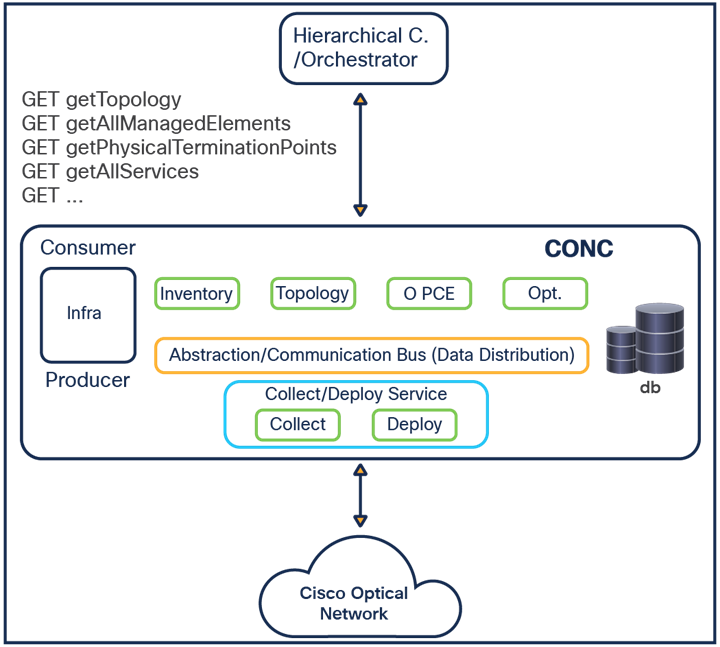
Inside CONC, consumer and producer functions exchange information through the Abstraction/Communication Bus, which provides data distribution across the controller. The bus separates higher-level consumers from device-specific collection and deployment logic.
The CONC architecture includes these components:
-
Infra, which provides the infrastructure function shown on the consumer and producer side of the CONC boundary.
-
Inventory, which maintains managed element and resource information for the optical domain.
-
Topology, which maintains the abstracted network topology made available to the hierarchical controller or orchestrator.
-
O-PCE, which supports optical path computation for the services and topology managed by CONC.
-
Optimization (Opt.), which represents optimization functions operating on network and service data.
-
Database (db), which stores controller data used by CONC functions.
-
Collect/Deploy Service, which contains Collect and Deploy functions for interaction with the Cisco optical network.
-
Collect, which gathers network data from the Cisco optical network and feeds it into CONC.
-
Deploy, which sends service or configuration changes from CONC to the Cisco optical network.
The southbound side of the architecture connects CONC to the Cisco optical network. CONC collects network state from the optical domain, distributes that data internally, and exposes the resulting abstracted view to the hierarchical controller or orchestrator.
Crosswork framework services
Cisco Optical Network Controller (CONC) runs on the Crosswork framework. The framework provides common platform services used by CONC applications and controller functions.
The Crosswork framework provides the following supporting services for CONC:
-
User management for controlling access to CONC applications and services.
-
Logging and monitoring services for controller operation and troubleshooting.
-
A common Kafka bus for message exchange and data distribution across CONC functions.
-
Underlying platform support for high availability (HA).
-
Underlying platform support for scale.
Authentication flow
All HTTP(s) requests are authenticated throughout the system, both inside and outside the cluster.
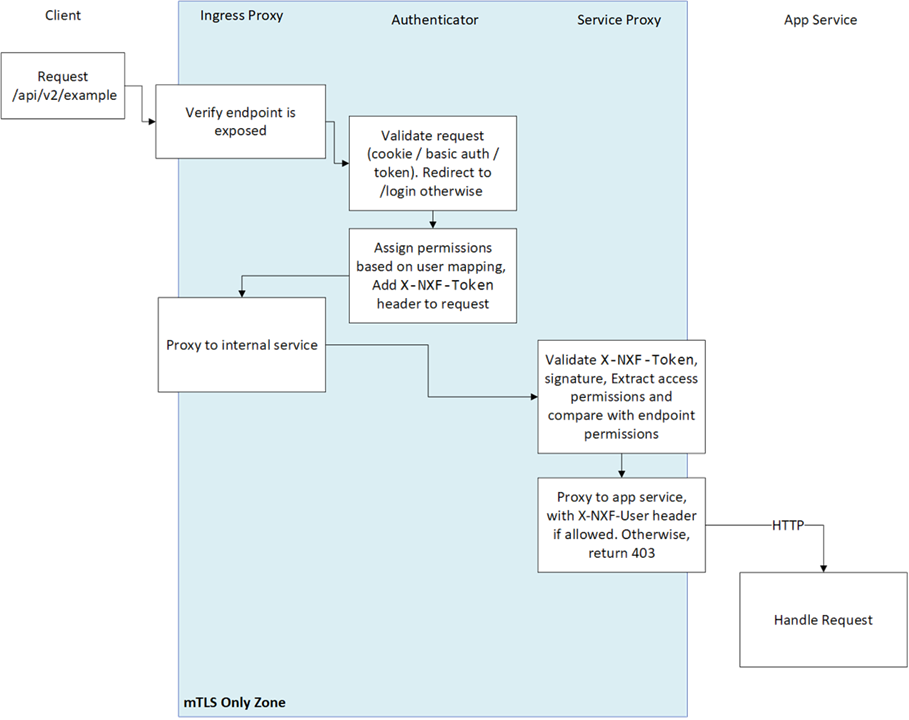
Every request MUST have an X-NXF-Token header, which is an ES256 signed JWT header issued by either Authenticator - for exposed endpoints, or NextFusion Controller - for internal endpoints.
Whenever a service starts, the NextFusion Controller issues a short-lived token which gets pushed to the service proxy. This token contains the permissions that were declared in the service access field in the CRD.
When trying to access some service endpoint, Service Proxy checks the X-NXF-Token of the request with the allowed permission field of this endpoint. If the user is authorized for this action, Service Proxy proxies the request to the app service, including an X-NXF-User header, which contains the decoded user profile.
The Ingress Proxy Server is configured as a reverse proxy server, intercepts all requests to the Cisco Optical Network Controller, and acts as the first line of defense against security attacks. The Ingress Proxy Server only accepts HTTPS packets on port 8443. The Ingress Proxy Server uses the NextFusion Authenticator to perform client authorization and authentication for Cisco Optical Network Controller. The Ingress Proxy Server is the only component that is accessible from outside the device on which Cisco Optical Network Controller is installed. The HTTP and SQL connections are internal connections that are bound to local interfaces and are not accessible from outside.
Password storage
Password storage uses secure, salted password hashing for local authentication. A salt is random data used as input to a hashing function, preventing dictionary attacks. This significantly increases security by protecting passwords even if the password file is compromised. The hashing function used is bcrypt, based on the Blowfish cipher. Bcrypt incorporates a salt to protect against rainbow table attacks and is an adaptive function that ensures Cisco Optical Network Controller remains resistant to brute-force search attacks even with increasing computation power.
Containers
Cisco Optical Network Controller (CONC) components are designed as microservices. These components are packaged as Docker images and launched in Kubernetes (K8s) pods.
This container-based architecture supports scale and alignment with Cisco automation products and platforms.
Database
Cisco Optical Network Controller uses Postgres as the database. Access to the database is restricted per service by mutual TLS. Tables of sensitive data, such as network element details and user credentials, are all encrypted (encryption is by AES256 GCM).
 Feedback