Introduction to Cisco Prime Network Registrar

Cisco Prime Network Registrar is a full featured, scalable Domain Name System (DNS), Dynamic Host Configuration Protocol (DHCP), and Trivial File Transfer Protocol (TFTP) implementation for medium to large IP networks. It provides the key benefits of stabilizing the IP infrastructure and automating networking services, such as configuring clients and provisioning cable modems. This provides a foundation for policy-based networking.

Service provider and enterprise users can better manage their networks to integrate with other network infrastructure software and business applications.

Target Users

Cisco Prime Network Registrar is designed for these users:

  • Internet service providers (ISPs) —Helps ISPs drive the cost of operating networks that provide leased line, dialup, and DSL (Point-to-Point over Ethernet and DHCP) access to customers.
  • Multiple service operators (MSOs) —Helps MSOs provide subscribers with internet access using cable or wireless technologies. MSOs can benefit from services and tools providing reliable and manageable DHCP and DNS services that meet the Data Over Cable Service Interface Specification (DOCSIS). Cisco Prime Network Registrar provides policy-based, robust, and scalable DNS and DHCP services that form the basis for a complete cable modem provisioning system.
  • Enterprises —Helps meet the needs of single- and multisite enterprises (small-to-large businesses) to administer and control network functions. Cisco Prime Network Registrar automates the tasks of assigning IP addresses and configuring the Transport Control Protocol/Internet Protocol (TCP/IP) software for individual network devices. Forward-looking enterprise users can benefit from class-of-service and other features that help integrate with new or existing network management applications, such as user registration.
Regional and Local Clusters

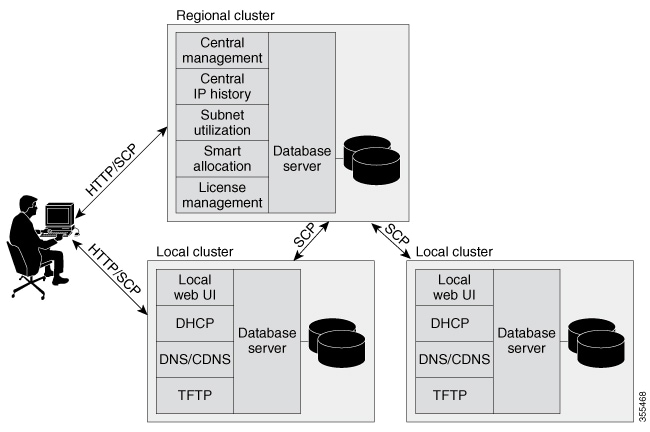
The regional cluster acts as an aggregate management system for up to a hundred local clusters. Address and server administrators interact at the regional and local clusters through the regional and local web-based user interface (web UI), and local cluster administrators can continue to use the command line interface (CLI) at the local cluster. The regional cluster consists of a Central Configuration Management (CCM) server, Tomcat web server, servlet engine, and server agent (see Management Components). The license management is now done at the regional cluster and hence the local server has to be registered to a regional server to avail the necessary services. See the "Overview" chapter in Cisco Prime Network Registrar 11.4 Installation Guide for more details.

Figure 1. Cisco Prime Network Registrar User Interfaces and Server Clusters


A typical deployment is one regional cluster at a customer network operation center (NOC), the central point of network operations for an organization. Each division of the organization includes a local address management server cluster responsible for managing a part of the network. The System Configuration Protocol (SCP) communicates the configuration changes between the servers.

Deployment Scenarios

The Cisco Prime Network Registrar regional cluster web UI provides a single point to manage any number of local clusters hosting DNS, CDNS, DHCP, or TFTP servers. The regional and local clusters also provide administrator management so that you can assign administrative roles to users logged in to the application.

This section describes two basic administrative scenarios and the hardware and software deployments for two different types of installations—a small-to-medium local area network (LAN), and a large-enterprise or service-provider network with three geographic locations.

Small-to-Medium-Size LANs

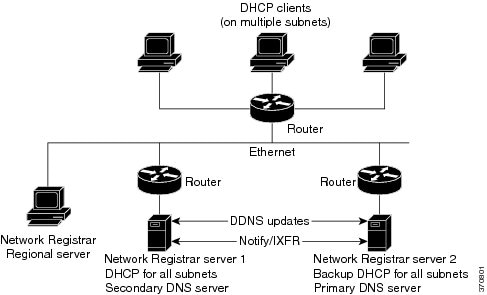
In this scenario, low-end Linux servers are acceptable. The image below shows a configuration that would be adequate for this network.


Note


Regional server is MUST in deployment for small and medium sized LANs.
Figure 2. Small-to-Medium LAN Configuration


Large Enterprise and Service Provider Networks

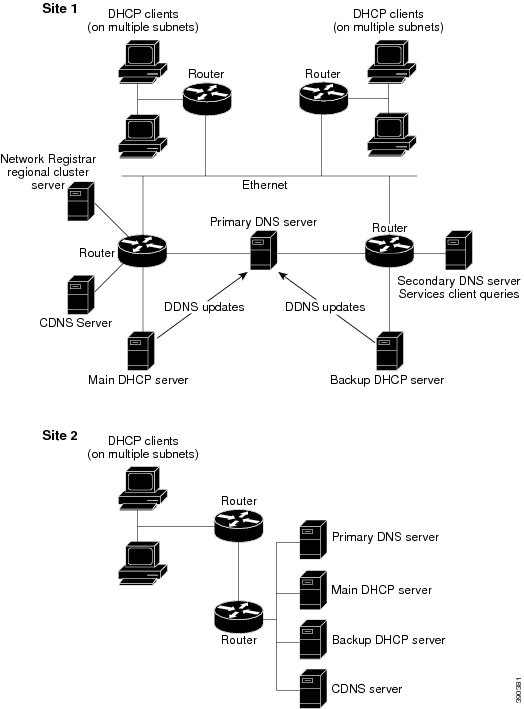
In a large enterprise or service provider network serving over 500,000 DHCP clients, use mid-range Linux servers. Put DNS and DHCP servers on different systems. The image below shows the hardware that would be adequate for this network.

When supporting geographically dispersed clients, locate DHCP servers at remote locations to avoid disrupting local services if wide-area connections fail. Install the Cisco Prime Network Registrar regional cluster to centrally manage the distributed clusters.

Figure 3. Large Enterprise or Service Provider Network Configuration


Configuration and Performance Guidelines

Cisco Prime Network Registrar is an integrated DHCP, DNS, and TFTP server cluster capable of running on a Linux workstation or server.

Because of the wide range of network topologies for which you can deploy Cisco Prime Network Registrar, you should first consider the following guidelines. These guidelines are very general and cover most cases. Specific or challenging implementations could require additional hardware or servers.

Best practices for Cisco Prime Network Registrar configuration

Follow these best practices when configuring Cisco Prime Network Registrar IP Express deployments:

  • Configure separate DHCP servers to serve remote WAN segments. Ensure that the DHCP client can always send a packet to the server in under a second, as protocol requirements specify a client must receive a response within four seconds. Many clients, including early Microsoft DHCP stacks, use a two-second timeout.

  • Separate the secondary DHCP server from the primary DNS server when dynamic DNS updates are used in large deployments. Always run DNS and DHCP servers on different clusters to avoid disk performance issues caused by simultaneous lease requests and DNS updates to a common disk.

  • Include a time server in your configuration to synchronize data across local and regional clusters. This ensures that aggregated data appears consistently at the regional server. See the Polling Utilization and Lease History Data.

  • Set DHCP lease times in policies to at least four to ten days. Choose a period longer than the anticipated duration the client is offline (such as over long weekends) to prevent lease expiration.See the "Managing Leases" section in Cisco Prime Network Registrar 11.4 DHCP User Guide.

  • Locate backup DNS servers on different network segments. This minimizes client impact during network failures by ensuring primary and secondary DNS servers are not on the same segment.

  • Deploy separate DNS servers for forward and reverse zones if your network experiences a high rate of dynamic DNS updates.

  • Use NOTIFY/IXFR incremental zone transfers for environments with frequent DNS changes. This reduces the number of transferred records and optimizes performance. Apply NOTIFY/IXFR instead of full zone transfers (AXFR), as described in RFCs 1995 and 1996. See the "Enabling Incremental Zone Transfers (IXFR)” section in Cisco Prime Network Registrar 11.4 Authoritative and Caching DNS User Guide .

Special Configuration Cases

The following suggestions apply to some special configurations:

  • When using dynamic DNS updates for large deployments or very dynamic networks, divide primary and secondary DNS and DHCP servers across multiple clusters.

    Dynamic DNS updates generate an additional load on all Cisco Prime Network Registrar servers as new DHCP lease requests trigger dynamic DNS updates to primary servers that update secondary servers through zone transfers.

  • During network reconfiguration, set DHCP lease renewal times to a small value.

    Do this several days before making changes in network infrastructure (such as to gateway router and DNS server addresses). A renewal time of eight hours ensures that all DHCP clients receive a changed DHCP option parameter within one working day. See the "Managing Leases" section in Cisco Prime Network Registrar 11.4 DHCP User Guide

General Performance Guidelines

For Cisco Prime Network Registrar, the general guideline is to invest in the highest performance disk I/O subsystem available, then memory, and finally the processors. DHCP and Authoritative DNS (especially if using DNS updates) will be most impacted by disk latency, then memory and network performance, and finally CPU (these applications are not CPU intensive).

  • The best way to reduce latency and improve performance is to provide high performance disks (SSD are recommended over traditional hard disks). High performance disk controllers are also recommended. This is especially important for DHCP and Authoritative DNS servers that handle Dynamic Updates.

  • Providing lots of memory is also important as it reduces disk read requirements if the file system cache can be used. The recommendation here is to assure that a system has sufficient free memory that is twice the size of the Cisco Prime Network Registrar databases. It is difficult to give exact requirements here as it depends on many variables.

  • Network performance is also an important consideration and 1 GB or better Ethernet controllers are recommended.

  • As most Cisco Prime Network Registrar uses are not CPU intensive, the CPU performance tends to be least important.

Interoperability with Earlier Releases

The following table shows the interoperability of Cisco Prime Network Registrar features on the regional CCM server with versions of the local cluster.

Table 1. CCM Regional Feature Interoperability with Server Versions

Feature

Local Cluster Version

11.0

11.1

11.2

11.3

11.4

Push and pull:

Address space

x

x

x

x

x

IPv6 address space

x

x

x

x

x

Scope templates, policies, client-classes

x

x

x

x

x

IPv6 prefix and link templates

x

x

x

x

x

Zone data and templates

x

x

x

x

x

Groups, owners, regions

x

x

x

x

x

Resource records (RRs)

x

x

x

x

x

Local cluster restoration

x

x

x

x

x

Host administration

x

x

x

x

x

Extended host administration

x

x

x

x

x

Administrators and roles

x

x

x

x

x

Zone Views

x

x

x

x

x

Administrator:

Single sign-on

x

x

x

x

x

Password change

x

x

x

x

x

IP history reporting:

Lease history

x

x

x

x

x

Detailed lease history

x

x

x

x

x

Utilization reporting:

DHCP utilization history (v4 History)

x

x

x

x

x

DHCP utilization history (v6 History)

x

x

x

x

x

Subnet and scope utilization

x

x

x

x

x

IPv6 prefix utilization

x

x

x

x

x