Netflow Configuration Guide for Cisco NCS 560 Series Routers, Cisco IOS XR Release 25.1.x, 25.2.x, 25.3.x, 25.4.x
Bias-Free Language
The documentation set for this product strives to use bias-free language. For the purposes of this documentation set, bias-free is defined as language that does not imply discrimination based on age, disability, gender, racial identity, ethnic identity, sexual orientation, socioeconomic status, and intersectionality. Exceptions may be present in the documentation due to language that is hardcoded in the user interfaces of the product software, language used based on RFP documentation, or language that is used by a referenced third-party product. Learn more about how Cisco is using Inclusive Language.
Internet Protocol
Flow Information Export (IPFIX) is an IETF standard export protocol for sending
Netflow packets. IPFIX is based on Netflow version 9.
The IPFIX feature
formats Netflow data and transfers the Netflow information from an exporter to
a collector using UDP as transport protocol.
Restrictions for IPFIX
These IPFIX features are not supported:
Variable-length information element in the IPFIX template
Stream Control Transmission Protocol (SCTP) as the transport protocol
Limitations for IPFIX
Configuring
IPFIX
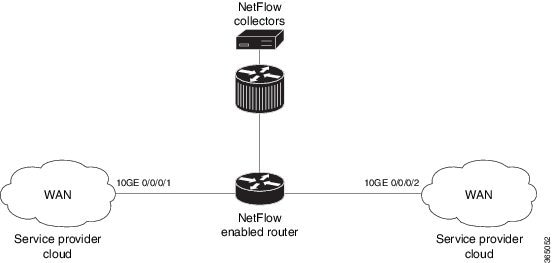
Consider SP-PE use
case where SP (Service Provider) cloud is connected to the PE (Provider Edge)
router through TenGigabit ethernet.
Figure 1. SP-PE
Topology
Configuring NetFlow on
PE router involves:
Configuring
Exporter map with IPFIX as an exporter
Configuring
Monitor map
Configuring
Sampler map
Applying the
Monitor map and Sampler map to an interface
Configuring
Exporter map with IPFIX as the exporter version
flow exporter-map fem_ipfix
 destination 10.1.1.1
 source Loopback 0
 transport udp 1025
 exit
version ipfix
 template data timeout 600
 options sampler-table
exit
sampler-map fsm1
 random 1 out-of 4000  /*Sampling rate supported is 1:4000*/
exit
Applying the
Monitor map to an interface
Now apply the
monitor-map
fmm1 that is
configured with an exporter version IPFIX and sampler-map
fsm1 to the
10GE 0/0/0/1 interface in the ingress direction:
Exported packets in an IPFIX packet structure are in the form of template set or data set. The first data template is sent
when the configuration is activated on the interface.
With constant stream, the flowset data does not change, so data is decoded. Data template is updated in the case of timeout
on the template. To change the timeout options in the flow exporter, use the template options timeout command:
RP/0/RP0/CPU0:router(config)#flow exporter-map ipfix_exp1
RP/0/RP0/CPU0:router(config-fem)#version ipfix
RP/0/RP0/CPU0:router(config-fem-ver)#template options
RP/0/RP0/CPU0:TU-PE3(config-fem-ver)#template options timeout
RP/0/RP0/CPU0:TU-PE3(config-fem-ver)#template options timeout 30

RP/0/RP0/CPU0:router# show flow exporter-map ipfix_exp1
version ipfix
  template data timeout 30
!
dscp 40
transport udp 9001
source Loopback0
destination 10.127.59.86
IPFIX Enablement for SRv6 and Services over SRv6 Core
Table 1. Feature History Table
Feature Name
Release Information
Description
IPFIX Enablement for SRv6 and Services over SRv6 Core
Release 7.10.1
During the transition from conventional IP/MPLS networks to SRv6-based networks, the necessity for monitoring SRv6 traffic
flow becomes crucial. This feature enables IPFIX to effectively monitor SRv6 IP traffic flow from network devices.
The feature introduces these changes:
CLI:
The srv6 keyword is introduced in therecord ipv6 command.
The srv6 keyword is supported on fourth generation and later ASR 9000 Series High Density Ethernet line cards.
Simultaneous L2 and L3 Flow Monitoring using IPFIX
Release 7.10.1
This feature introduces support for simultaneous L2 and L3 flow monitoring. Now, you can configure IP Flow Information Export
(IPFIX) to actively monitor and record end-to-end L2 and L3 flow information elements from network devices. Previously, only
L2 or L3 flow could be monitored at a time.
The feature introduces these changes:
CLI:
The l2-l3 keyword is introduced in the record ipv4 command.
The l2-l3 keyword is introduced in the record ipv6 command.
The l2-l3 keyword is supported on fourth generation and later ASR 9000 Series High Density Ethernet line cards.
During the transition from conventional IP/MPLS networks to SRv6-based networks, the requirement for information elements
specific to SRv6 traffic flow arises. To address this requirement, we have introduced the srv6 keyword within the ipv6 command. Consequently, information related to SRv6 payload such as L2VPN and L3VPN services will also will be exported as
part of IPFIX record.
Restriction and Limitation
IPFIX with multiple SRH is not supported in IOS XR software version 7.10.1
When the VLAN rewrite pop/translate option is enabled, the fourth and fifth generation of the Cisco ASR 9000 line cards do
not support capturing of the VLAN information on an L2 interface.
SRv6 encapsulated L2VPN IPFIX records captured at the Decap PE node may show IE89 ForwardingStatus as "forwarded," but IE14
egressInterface will be 0.
When ASR 9000 is the endpoint of SR, Base Format 1 Segment Identifier (SID) is not supported and only the Micro-SID format
for Layer 2 VPN services is supported.
Configuration
From Cisco IOS-XR Release 7.10.1, a new optional keyword, l2-l3 is introduced for the record ipv4 and record ipv6 option. See the following example:
Internet Protocol Flow Information Export (IPFIX) is an IETF standard export protocol (RFC 7011) for sending IP flow information.
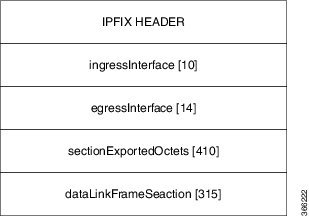
Router supports IPFIX 315 format to export flow information. IPFIX 315 format facilitates sending ‘n’ octets frame information
starting from ethernet header till transport header of the traffic flow over the network. IPFIX 315 supports sending variable
size packet record with variable payload information such as IPv4, IPv6, MPLS, and Nested packets like OuterIP-GRE-InnerIP
and so on. The process includes sampling and exporting the traffic flow information. Along with the ethernet frame information,
IPFIX 315 format exports information of incoming and outgoing interface of the sampled packet.
Use hw-module profile netflow ipfix315 location <linecard location > command to enable IPFIX 315.
The information of the packets flowing through a device is used for variety of purpose including network monitoring, capacity
planning, traffic management, and so on,
Sampling and Exporting Information
The below figure IPFIX 315 Export Packet Format shows exported packet information.
Figure 2. IPFIX 315 Export Packet Format
A special cache type called Immediate Aging is used while exporting the packets. Immediate Aging ensures that the flows are
exported as soon as they are added to the cache. Use the command cache immediate in flow monitor map configuration to enable Immediate Aging cache type.
IPFIX 315 Implementation Considerations
Here are few key points to consider before implementing IPFIX 315:
Supported only in ingress direction.
Supported on main interface only. The traffic on all sub-interfaces under the main interface is exported. This applies to
releases up to and including IOS-XR software release 7.10.x.
Sampling rate for bundles is per member-link and not per bundle interface.
The outgoing interface information may not be correct incase of packets that are multicasted or broadcasted on multiple ports.
The incoming and outgoing interface will have information of main interface and not the sub-interface even if the packet is
routed via sub-interface. Incase of bundles it will point to bundle main interface.
IPFIX 315 is not supported on BVI interface.
Sampling and exporting of the control packets is not supported.
When you configure ipfix315-enable, then you must configure all the ports on that LC with datalinkframesection flow.
When the HQoS profile is enabled, Netflow does not give correct Output Interface. DSP is unique for each sub-interface.
Netflow on the L2 interface assumes IPv4/IPv6/MPLS traffic, and if the traffic is purely L2 based, then the system ignores
that traffic.
You must remove all v9 configurations before reloading an LC. Else, with the existing v9 configurations on LC reload, you
might encounter a few configuration apply error. Or, flow might be seen on an interface even when apply on interface has failed.
Configuring IPFIX 315
Configuring IPFIX 315 involves:
Configuring Exporter map
Configuring Monitor map
Configuring Sampler map
Applying the Monitor map and Sampler map to an interface
Configuring Exporter map
flow exporter-map ipfix_exp
 version ipfix
 !
 dscp 40
 transport udp 9001
 source Loopback1
 destination 100.10.1.159
!
Note
For options command and its configurations in Exporter Map, see options.
The default cache size is 65535, hence you can configure sampling rate as 1 out of 65535 packets. However the recommended
sampling rate is 1 out of 32000 packets.

 Feedback