DHCP Relay in VXLAN BGP EVPN

This chapter contains these sections:

DHCP relay agents in VXLAN BGP EVPN fabrics

A DHCP relay agent in a VXLAN BGP EVPN fabric is a network component that:

  • forwards DHCP packets between hosts and DHCP servers across VXLAN overlays,

  • provides relay functionality in a multi-tenant environment to support multiple virtual networks, and

  • uses VXLAN VTEP capabilities along with specialized sub-options for accurate address assignment and scope selection.

In VXLAN BGP EVPN networks, DHCP relay agents facilitate communication between local DHCP clients and remote DHCP servers. The relay ensures DHCP messages traverse the VXLAN fabric, maintaining tenant isolation and supporting distributed gateway models. Use a unique loopback interface as the GiAddr for each switch to ensure correct DHCP address assignment and scope selection.

Relevant Option 82 sub-options

In a multi-tenant EVPN environment, DHCP relay uses these sub-options of Option 82:

  • Sub-option 151 (0x97) – Virtual Subnet Selection (RFC 6607): Conveys VRF-related information to the DHCP server in an MPLS-VPN or VXLAN EVPN multi-tenant network. Helps the DHCP server select the correct IP address pool based on the virtual subnet or tenant.

  • Sub-option 11 (0xb) – Server ID Override (RFC 5107): Allows the relay agent to specify a new server ID, making renewal requests return to the relay agent rather than directly to the DHCP server. The proprietary enhancement uses sub-option 152 (0x98). Use the ip dhcp relay sub-option type cisco command to manage the function.

  • Sub-option 5 (0x5) – Link Selection (RFC 3527): Separates the DHCP client’s subnet from the relay’s GiAddr, enabling the DHCP server to assign an address based on the correct subscriber subnet. The proprietary enhancement uses sub-option 152 (0x98). Use the ip dhcp relay sub-option type cisco command to manage the function.

DHCP relay agent operation in multi-tenant networks

In a multi-tenant data center network using VXLAN BGP EVPN, each switch (VTEP) employs a unique loopback interface as its GiAddr. DHCP relay agents add Option 82 sub-options to DHCP messages:

  • Sub-option 151 informs the DHCP server which tenant (VRF) the request originated from.

  • Sub-option 11 (Server ID Override) ensures clients send DHCP renew requests to the appropriate relay.

  • Sub-option 5 (Link Selection) helps in exact subnet assignment.

This model allows the network to correctly assign IP addresses and manage tenant isolation, even with distributed gateways.
Guidelines and limitations for DHCP relay in VXLAN BGP EVPN

This topic provides the configuration guidelines and limitations for DHCP relay in VXLAN BGP EVPN.

DHCP Relay in VXLAN BGP EVPN has the following configuration guideline and limitation:

  • DHCP Relay in VXLAN BGP EVPN feature is not supported on EoR switches.

DHCP relay in VXLAN BGP EVPN supported release and platform

This topic provides a comprehensive lookup of supported Cisco Nexus 9000 Series switch platforms and their corresponding minimum software release versions for DHCP relay in VXLAN BGP EVPN.

Table 1. Supported releases and platforms of CloudScale Platform switches

Release

Platform

9.2(x) and later

Cisco Nexus 9300-GX Series switches

9.3(x) and later

Cisco Nexus 9300-FX3 Series switches

DHCP Relay in VXLAN BGP EVPN Example

Provides a reference configuration and topology overview for implementing DHCP relay services across a VXLAN fabric using tenant VRFs.

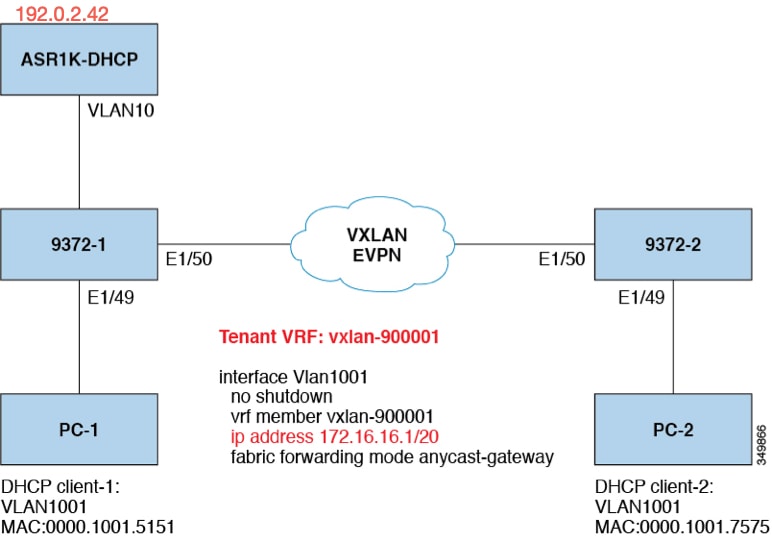
Figure 1. Example Topology


Topology characteristics:

  • Switches 9372-1 and 9372-2 are VTEPs connected to the VXLAN fabric.

  • Client1 and client2 are DHCP clients in vlan1001. They belong to tenant VRF vxlan-900001.

  • The DHCP server is ASR1K, a router that sits in vlan10.

DHCP server configuration:

ip vrf vxlan900001
ip dhcp excluded-address vrf vxlan900001 172.16.16.1 172.16.16.9
ip dhcp pool one
 vrf vxlan900001 
 network 172.16.16.0 255.240.0.0
 defaultrouter 172.16.16.1

DHCP relay on VTEPs

This document outlines various deployment scenarios for DHCP relay on VTEPs, including configurations where clients and servers are located in different or identical VRFs.

The following are common deployment scenarios:

  • Client on tenant VRF and server on Layer 3 default VRF.

  • Client on tenant VRF (SVI X) and server on the same tenant VRF (SVI Y).

  • Client on tenant VRF (VRF X) and server on different tenant VRF (VRF Y).

  • Client on tenant VRF and server on non-default non-VXLAN VRF.

The following sections below move vlan10 to different VRFs to depict different scenarios.

Client on Tenant VRF and Server on Layer 3 Default VRF

Configure the DHCP server (192.0.2.42) in the default VRF and verify connectivity from the 9372-1 and 9372-2 switches to ensure successful DHCP relay.

Connectivity Verification

9372-1# sh run int vl 10

!Command: show running-config interface Vlan10
!Time: Mon Aug 24 07:51:16 2018

version 7.0(3)I1(3)

interface Vlan10
  no shutdown
  ip address 192.0.2.25/24
  ip router ospf 1 area 0.0.0.0

9372-1# ping 192.0.2.42 cou 1

PING 192.0.2.42 (192.0.2.42): 56 data bytes
64 bytes from 192.0.2.42: icmp_seq=0 ttl=254 time=0.593 ms
- 192.0.2.42 ping statistics -
1 packets transmitted, 1 packets received, 0.00% packet loss
roundtrip min/avg/max = 0.593/0.592/0.593 ms

9372-2# ping 192.0.2.42 cou 1
PING 192.0.2.42 (192.0.2.42): 56 data bytes
64 bytes from 192.0.2.42: icmp_seq=0 ttl=252 time=0.609 ms
- 192.0.2.42 ping statistics -
1 packets transmitted, 1 packets received, 0.00% packet loss
round-trip min/avg/max = 0.609/0.608/0.609 ms

DHCP Relay Configuration

  • 9372-1

    9372—1# sh run dhcp
    
    !Command: show running—config dhcp
    !Time: Mon Aug 24 08:26:00 2018
    
    version 7.0(3) I1(3)
    feature dhcp
    
    service dhcp
    ip dhcp relay
    ip dhcp relay information option
    ip dhcp relay information option vpn
    ipv6 dhcp relay
    
    interface Vlanl001
      ip dhcp relay address 192.0.2.42 use—vrf default
  • 9372-2

    9372-2# sh run dhcp
    
    !Command: show running—config dhcp
    !Time: Mon Aug 24 08:26:16 2018
    
    version 7.0(3)11(3)
    feature dhcp
    
    service dhcp
    ip dhcp relay
    ip dhcp relay information option
    ip dhcp relay information option vpn
    ipv6 dhcp relay
    
    interfaoe Vlanl001
      ip dhcp relay address 192.0.2.42 use—vrf default

Debug Output

  • The following is a packet dump for DHCP interact sequences.

    9372-1# ethanalyzer local interface inband display-filter
    "udp.srcport==67 or udp.dstport==67" limit-captured frames 0
    
    Capturing on inband
    20180824 08:35:25.066530 0.0.0.0 -> 255.255.255.0 DHCP DHCP Discover - Transaction ID 0x636a38fd
    20180824 08:35:25.068141 192.0.2.25 -> 192.0.2.42 DHCP DHCP Discover - Transaction ID 0x636a38fd
    20180824 08:35:27.069494 192.0.2.42 -> 192.0.2.25 DHCP DHCP Offer Transaction - ID 0x636a38fd
    20180824 08:35:27.071029 172.16.16.1 -> 172.16.16.11 DHCP DHCP Offer Transaction - ID 0x636a38fd
    20180824 08:35:27.071488 0.0.0.0 -> 255.255.255.0 DHCP DHCP Request Transaction - ID 0x636a38fd
    20180824 08:35:27.072447 192.0.2.25 -> 192.0.2.42 DHCP DHCP Request Transaction - ID 0x636a38fd
    20180824 08:35:27.073008 192.0.2.42 -> 192.0.2.25 DHCP DHCP ACK Transaction - ID 0x636a38fd
    20180824 08:35:27.073692 172.16.16.1 -> 172.16.16.11 DHCP DHCP ACK Transaction - ID 0x636a38fd

    Note


    Ethanalyzer might not capture all DHCP packets because of inband interpretation issues when you use the filter. You can avoid this by using SPAN.


  • DHCP Discover packet 9372-1 sent to DHCP server. giaddr is set to 192.0.2.25 (ip address of vlan10) and suboptions 5/11/151 are set accordingly.

    Bootp flags: 0x0000 (unicast)
    client IP address: 0.0.0.0 (0.0.0.0)
    Your (client) IP address: 0.0.0.0 (0.0.0.0)
    Next server IP address: 0.0.0.0 (0.0.0.0)
    Relay agent IP address: 192.0.2.25 (192.0.2.25)
    client MAC address Hughes_01:51:51 (00:00:10:01:51:51)
    client hardware address padding: 00000000000000000000
    Server host name not given
    Boot file name not given
    Magic cookie: DHCP
    Option: (53) DHCP Message Type
      Length: 1
      DHCP: Discover (1)
    Option: (55) Parameter Request List
      Length: 4
      Parameter Request List Item: (1) Subnet Mask
      Parameter Request List Item: (3) Router 
      Parameter Request List Item: (58) Renewal Time Value
      Parameter Request List Item: (59) Rebinding Time Value
    Option: (61) client identifier
      Length: 7
      Hardware type: Ethernet (0x01)
      Client MAC address: Hughes_01:51:51 (00:00:10:01:51:51)
    Option: (82) Agent Information Option
      Length: 47
    Option 82 Suboption: (1) Agent Circuit ID
      Length: 10
      Agent Circuit ID: 01080006001e88690030
    Option 82 Suboption: (2) Agent Remote ID
      Length: 6
      Agent Remote ID: f8c2882333a5
    Option 82 Suboption: (151) VRF name/VPN ID
    Option 82 Suboption: (11) Server ID Override
      Length: 4 
      Server ID Override: 172.16.16.1 (172.16.16.1)
    Option 82 Suboption: (5) Link selection
      Length: 4
      Link selection: 172.16.16.0 (172.16.16.0)
    ASR1K-DHCP# sh ip dhcp bin
    Bindings from all pools not associated with VRF:
    IP address ClientID/ Lease expiration Type State Interface
             Hardware address/
             User name
    
    Bindings from VRF pool vxlan900001:
    IP address ClientID/ Lease expiration Type State Interface
             Hardware address/
             User name
    172.16.16.10 0100.0010.0175.75 Aug 25 2018 09:21 AM Automatic Active GigabitEthernet2/1/0
    172.16.16.11 0100.0010.0151.51 Aug 25 2018 08:54 AM Automatic Active GigabitEthernet2/1/0
    
    9372-1# sh ip route vrf vxlan900001
    IP Route Table for VRF "vxlan900001"
    '*' denotes best ucast nexthop
    '**' denotes best mcast nexthop
    '[x/y]' denotes [preference/metric]
    '%<string>' in via output denotes VRF <string>
    
    10.11.11.11/8, ubest/mbest: 2/0, attached
      *via 10.11.11.11, Lo1, [0/0], 18:31:57, local
      *via 10.11.11.11, Lo1, [0/0], 18:31:57, direct
    10.22.22.22/8, ubest/mbest: 1/0
      *via 1.2.2.2%default, [200/0], 18:31:57, bgp65535,internal, tag 65535 (evpn)segid: 900001 tunnelid: 0x2020202
    encap: VXLAN
    
    172.16.16.0/20, ubest/mbest: 1/0, attached
     *via 172.16.16.1, Vlan1001, [0/0], 18:31:57, direct
    172.16.16.1/32, ubest/mbest: 1/0, attached
     *via 172.16.16.1, Vlan1001, [0/0], 18:31:57, local
    172.16.16.10/32, ubest/mbest: 1/0
     *via 1.2.2.2%default, [200/0], 00:00:47, bgp65535,internal, tag 65535 (evpn)segid: 900001 tunnelid: 0x2020202
    encap: VXLAN
    
    172.16.16.11/32, ubest/mbest: 1/0, attached
     *via 172.16.16.11, Vlan1001, [190/0], 00:28:10, hmm
    
    9372-1# ping 172.16.16.11 vrf vxlan900001 count 1
    PING 172.16.16.11 (172.16.16.11): 56 data bytes
    64 bytes from 172.16.16.11: icmp_seq=0 ttl=63 time=0.846 ms
    - 172.16.16.11 ping statistics -
    1 packets transmitted, 1 packets received, 0.00% packet loss
    round-trip min/avg/max = 0.846/0.845/0.846 ms
    
    9372-1# ping 172.16.16.10 vrf vxlan900001 count 1
    PING 172.16.16.10 (172.16.16.10): 56 data bytes
    64 bytes from 172.16.16.10: icmp_seq=0 ttl=62 time=0.874 ms
    - 172.16.16.10 ping statistics -
    1 packets transmitted, 1 packets received, 0.00% packet loss
    round-trip min/avg/max = 0.874/0.873/0.874 ms

Client on Tenant VRF (SVI X) and Server on the Same Tenant VRF (SVI Y)

Configure the DHCP server (192.0.2.42) into the VRF of vxlan-900001 and ensure it is reachable from both 9372-1 and 9372-2 through the VRF of vxlan-900001.

Because 172.16.16.1 is an anycast address for vlan1001 configured on all the VTEPs, a unique address must be selected as the DHCP relay packet’s source address to ensure the DHCP server can deliver a response to the original DHCP Relay agent. In this scenario, loopback1 is used and must be reachable from everywhere in VRF vxlan-900001.

9372-1# sh run int vl 10

!Command: show running-config interface Vlan10
!Time: Mon Aug 24 09:10:26 2018

version 7.0(3)I1(3)

interface Vlan10
  no shutdown
  vrf member vxlan-900001
  ip address 192.0.2.25/24
9372-1# sh run int lo1

!Command: show running-config interface loopback1
!Time: Mon Aug 24 09:18:53 2018

version 7.0(3)I1(3)

interface loopback1
  vrf member vxlan-900001
  ip address 10.11.11.11/8

9372-1# ping 192.0.2.42 vrf vxlan900001 source 10.11.11.11 cou 1
PING 192.0.2.42 (192.0.2.42) from 10.11.11.11: 56 data bytes
64 bytes from 192.0.2.42: icmp_seq=0 ttl=254 time=0.575 ms
- 192.0.2.42 ping statistics - 
1 packets transmitted, 1 packets received, 0.00% packet loss
round-trip min/avg/max = 0.575/0.574/0.575 ms

9372-2# sh run int lo1

!Command: show running-config interface loopback1
!Time: Mon Aug 24 09:19:30 2018

version 7.0(3)I1(3)

interface loopback1
  vrf member vxlan900001
  ip address 10.22.22.22/8

9372-2# ping 192.0.2.42 vrf vxlan-900001 source 10.22.22.22 cou 1
PING 192.0.2.42 (192.0.2.42) from 10.22.22.22: 56 data bytes
64 bytes from 192.0.2.42: icmp_seq=0 ttl=253 time=0.662 ms
- 192.0.2.42 ping statistics -
1 packets transmitted, 1 packets received, 0.00% packet loss
round-trip min/avg/max = 0.662/0.662/0.662 ms

DHCP Relay Configuration

  • 9372-1

    9372—1# sh run dhcp
    
    !Command: show running-config dhcp
    !Time: Mon Aug 24 08:26:00 2018
    
    version 7.0(3)11(3)
    feature dhcp
     
    service dhcp
    ip dhcp relay
    ip dhcp relay information option
    I4ip dhcp relay information option vpn
    ipv6 dhcp relay
    
    interface Vlanl00l
      ip dhcp relay address 192.0.2.42
      ip dhcp relay source—interface loopback1
  • 9372-2

    9372—2# sh run dhcp
    
    !Command: show running-config dhcp
    !Time: Mon Aug 24 08:26:16 2018
    
    version 7.0(3) 11(3)
    feature dhcp
    
    service dhcp
    ip dhcp relay
    ip dhcp relay information option
    ip dhcp relay information option vpn
    ipv6 dhcp relay
    
    interface Vlanl00l
      ip dhcp relay address 192.0.2.42
      ip dhcp relay source—interface loopback1

Debug Output

The following is a packet dump for DHCP interact sequences.

9372-1# ethanalyzer local interface inband display-filter
"udp.srcport==67 or udp.dstport==67" limit-captured frames 0

Capturing on inband
20180824 09:31:38.129393 0.0.0.0 -> 255.255.255.0 DHCP DHCP Discover - Transaction ID 0x860cd13
20180824 09:31:38.129952 10.11.11.11 -> 192.0.2.42 DHCP DHCP Discover - Transaction ID 0x860cd13
20180824 09:31:40.130134 192.0.2.42 -> 10.11.11.11 DHCP DHCP Offer - Transaction ID 0x860cd13
20180824 09:31:40.130552 172.16.16.1 -> 172.16.16.11 DHCP DHCP Offer - Transaction ID 0x860cd13
20180824 09:31:40.130990 0.0.0.0 -> 255.255.255.0 DHCP DHCP Request - Transaction ID 0x860cd13
20180824 09:31:40.131457 10.11.11.11 -> 192.0.2.42 DHCP DHCP Request - Transaction ID 0x860cd13
20180824 09:31:40.132009 192.0.2.42 -> 10.11.11.11 DHCP DHCP ACK - Transaction ID 0x860cd13
20180824 09:31:40.132268 172.16.16.1 -> 172.16.16.11 DHCP DHCP ACK - TransactionID 0x860cd13

Note


Ethanalyzer might not capture all DHCP packets because of inband interpretation issues when you use the filter. You can avoid this by using SPAN.


DHCP Discover packet 9372-1 sent to DHCP server. giaddr is set to 10.11.11.11(loopback1) and suboptions 5/11/151 are set accordingly.

Bootstrap Protocol
  Message type: Boot Request (1)
  Hardware type: Ethernet (0x01)
  Hardware address length: 6
  Hops: 1
  Transaction ID: 0x0860cd13
  Seconds elapsed: O
  Bootp flags: 0x0000 (unicast)
  Client IP address: 0.0.0.0 (0.0.0.0)
  Your (client) IP address: 0.0.0.0 (0.0.0.0)
  Next server IP address: 0.0.0.0 (0.0.0.0)
  Relay agent iP address: 10.11.11.11 (10.11.11.11)
  Client MAC address: Hughes_01:51:51 (00:00:10:01:51:51)
  Client hardware address padding: 00000000000000000000
  Server host name not given
  Boot file name not given
  Magic cookie: DHCP
  Option: (53) DHCP Message Type
    Length: 1
    DHCP: Discover (1)
  Option: (55) Parameter Request List
  Option: (61) Client Identifier
  Option: (82) Agent Information Option
    Length: 47
  Option 82 suboption: (1) Aqent Circuit ID
  Option 82 suboption: (151) Agent Remote ID
  Option 82 suboption: (11) Server ID Override
    Length: 4
    Server ID override: 172.16.16.1 (172.16.16.1)
  Option 82 suboption: (5) Link selection
    Length: 4
    Link selection: 172.16.16.0 (172.16.16.0)

ASR1K-DHCP# sh ip dhcp bin
Bindings from all pools not associated with VRF:
IP address ClientID/Lease expiration Type State Interface
         Hardware address/
         User name

Bindings from VRF pool vxlan-900001:
IP address ClientID/Lease expiration Type State Interface 
         Hardware address/
         User name

172.16.16.10 0100.0010.0175.75 Aug 25 2018 10:02 AM Automatic Active GigabitEthernet2/1/0
172.16.16.11 0100.0010.0151.51 Aug 25 2018 09:50 AM Automatic Active GigabitEthernet2/1/0

9372-1# sh ip route vrf vxlan-900001
IP Route Table for VRF "vxlan-900001"
'*' denotes best ucast nexthop
'**' denotes best mcast nexthop
'[x/y]' denotes [preference/metric]
'%<string>' in via output denotes VRF <string>

10.11.11.11/8, ubest/mbest: 2/0, attached
  *via 10.11.11.11, Lo1, [0/0], 19:13:56, local
  *via 10.11.11.11, Lo1, [0/0], 19:13:56, direct
10.22.22.22/8, ubest/mbest: 1/0
  *via 2.2.2.2%default, [200/0], 19:13:56, bgp65535,internal, tag 65535 (evpn)segid: 900001 tunnelid: 0x2020202
encap: VXLAN
172.16.16.0/20, ubest/mbest: 1/0, attached
  *via 172.16.16.1, Vlan1001, [0/0], 19:13:56, direct
172.16.16.1/32, ubest/mbest: 1/0, attached
  *via 172.16.16.1, Vlan1001, [0/0], 19:13:56, local
172.16.16.10/32, ubest/mbest: 1/0
  *via 2.2.2.2%default, [200/0], 00:01:27, bgp65535,
internal, tag 65535 (evpn)segid: 900001 tunnelid: 0x2020202
encap: VXLAN
172.16.16.11/32, ubest/mbest: 1/0, attached
  *via 172.16.16.11, Vlan1001, [190/0], 00:13:56, hmm
192.0.2.20/24, ubest/mbest: 1/0, attached
  *via 192.0.2.25, Vlan10, [0/0], 00:36:08, direct
192.0.2.25/24, ubest/mbest: 1/0, attached
  *via 192.0.2.25, Vlan10, [0/0], 00:36:08, local
9372-1# ping 172.16.16.10 vrf vxlan-900001 cou 1
PING 172.16.16.10 (172.16.16.10): 56 data bytes
64 bytes from 172.16.16.10: icmp_seq=0 ttl=62 time=0.808 ms
- 172.16.16.10 ping statistics -
1 packets transmitted, 1 packets received, 0.00% packet loss
round-trip min/avg/max = 0.808/0.808/0.808 ms

9372-1# ping 172.16.16.11 vrf vxlan-900001 cou 1
PING 172.16.16.11 (172.16.16.11): 56 data bytes
64 bytes from 172.16.16.11: icmp_seq=0 ttl=63 time=0.872 ms
- 172.16.16.11 ping statistics -
1 packets transmitted, 1 packets received, 0.00% packet loss
round-trip min/avg/max = 0.872/0.871/0.872 ms

Client on Tenant VRF (VRF X) and Server on Different Tenant VRF (VRF Y)

The DHCP server is placed into another tenant VRF vxlan-900002 so that DHCP response packets can access the original relay agent. We use loopback2 to avoid any anycast ip address that is used as the source address for the DHCP relay packets.

9372-1# sh run int vl 10
!Command: show runningconfig interface Vlan10
!Time: Tue Aug 25 08:48:22 2018

version 7.0(3)I1(3)
interface Vlan10
  no shutdown
  vrf member vxlan900002
  ip address 192.0.2.40/24

9372-1# sh run int lo2
!Command: show runningconfig interface loopback2
!Time: Tue Aug 25 08:48:57 2018
version 7.0(3)I1(3)
interface loopback2
  vrf member vxlan900002
  ip address 10.33.33.33/8

9372-2# sh run int lo2
!Command: show runningconfig interface loopback2
!Time: Tue Aug 25 08:48:44 2018
version 7.0(3)I1(3)
interface loopback2
  vrf member vxlan900002
  ip address 10.44.44.44/8

9372-1# ping 192.0.2.42 vrf vxlan-900002 source 10.33.33.33 cou 1
PING 192.0.2.42 (192.0.2.42) from 10.33.33.33: 56 data bytes
64 bytes from 192.0.2.42: icmp_seq=0 ttl=254 time=0.544 ms
- 192.0.2.42 ping statistics -
1 packets transmitted, 1 packets received, 0.00% packet loss
round-trip min/avg/max = 0.544/0.544/0.544 ms

9372-2# ping 192.0.2.42 vrf vxlan-900002 source 10.44.44.44 count 1
PING 192.0.2.42 (192.0.2.42) from 10.44.44.44: 56 data bytes
64 bytes from 192.0.2.42: icmp_seq=0 ttl=253 time=0.678 ms
- 192.0.2.42 ping statistics -
1 packets transmitted, 1 packets received, 0.00% packet loss
round-trip min/avg/max = 0.678/0.678/0.678 ms

DHCP Relay Configuration

The following configurations are applied to the relay agents.

  • 9372-1

    9372—1# sh run dhcp
    
    !Command: show running—config dhcp
    !Time: Mon Aug 24 08:26:00 2018
    
    version 7.0(3) Ii (3)
    feature dhcp
    
    service dhcp
    ip dhcp relay
    ip dhcp relay information option
    ip dhcp relay information option vpn
    ipv6 dhcp relay
    
    interface VlanlOOl
      ip dhcp relay address 192.0.2.42 use—vrf vxlan—900002
      ip dhcp relay source—interface loopback2
  • 9372-2

    !Command: show running-config dhcp
    !Time: Mon Aug 24 08:26:16 2018
    
    version 7.0(3)11(3)
    feature dhcp
    
    service dhcp
    ip dhcp relay
    ip dhcp relay information option
    ip dhcp relay information option vpn
    ipv6 dhcp relay
    
    interface VlaniOOl
      ip dhcp relay address 192.0.2.42 use-vrf vxlan—900002
      ip dhcp relay source—interface loopback2

Debug Output

The following debug information captures DHCP interaction sequences and packet details.

  • Packet dump for DHCP interact sequences.

    9372-1# ethanalyzer local interface inband display-filter "udp.srcport==67 or udp.dstport==67" limit-captured-frames 0
    Capturing on inband
    20180825 08:59:35.758314 0.0.0.0 -> 255.255.255.0 DHCP DHCP Discover - Transaction ID 0x3eebccae
    20180825 08:59:35.758878 10.33.33.33 -> 192.0.2.42 DHCP DHCP Discover - Transaction ID 0x3eebccae
    20180825 08:59:37.759560 192.0.2.42 -> 10.33.33.33 DHCP DHCP Offer - Transaction ID 0x3eebccae
    20180825 08:59:37.759905 172.16.16.1 -> 172.16.16.11 DHCP DHCP Offer - Transaction ID 0x3eebccae
    20180825 08:59:37.760313 0.0.0.0 -> 255.255.255.0 DHCP DHCP Request - Transaction ID 0x3eebccae
    20180825 08:59:37.760733 10.33.33.33 -> 192.0.2.42 DHCP DHCP Request - Transaction ID 0x3eebccae
    20180825 08:59:37.761297 192.0.2.42 -> 10.33.33.33 DHCP DHCP ACK - Transaction ID 0x3eebccae
    20180825 08:59:37.761554 172.16.16.1 -> 172.16.16.11 DHCP DHCP ACK - Transaction ID 0x3eebccae
  • DHCP Discover packet 9372-1 sent to DHCP server with giaddr set to 10.33.33.33 (loopback2) and suboptions 5/11/151 configured.

    Bootstrap Protocol
      Message type: Boot Request (1)
      Hardware type: Ethernet (0x01)
      Hardware address length: 6
      Hops: 1
      Transaction ID: Ox3eebccae
      Seconds elapsed: O
      Bootp flags: 0x0000 (unicast)
      Client IP address: 0.0.0.0 (0.0.0.0)
      Your (client) IP address: 0.0.0.0 (0.0.0.0)
      Next server IP address: 0.0.0.0 (0.0.0.0)
      Relay agent IP address: 10.33.33.33 (10.33.33.33)
      Client MAC address: i-iughes_01:51:51 (00:00:10:01:51:51)
      Client hardware address padding: 00000000000000000000
      Server host name not given
      Boot file name not given
      Magic cookie: DHCP
      Option: (53) DHCP Message Type
        Length: 1
        DHCP: Discover (1)
      Option: (55) Parameter Request List
      Option: (61) client identifier
      Option: (82) Agent Informatìon option
        Length: 47
      Option 82 Suboption: (1) Agent circuit W
      Option 82 suboption: (2) Agent Remote 10
      Option 82 suboption: (151) VRF name/VPN ID
      Option 82 Suboption: (11) Server ID Override
        Length: 4
        Server ID Override: 172.16.16.1 (172.16.16.1)
      Option 82 Suboption: (5) Link selection
        Length: 4
        Link selection: 172.16.16.0 (172.16.16.0)

Client on Tenant VRF and Server on Non-Default Non-VXLAN VRF

Provides the configuration steps and debug output for a DHCP relay scenario where the server resides in the management VRF and the IP address is 10.122.164.147.

Interface Configuration

9372-1# sh run int m0
!Command: show running-config interface mgmt0
!Time: Tue Aug 25 09:17:04 2018
version 7.0(3)I1(3)
interface mgmt0
  vrf member management
  ip address 10.122.165.134/8

9372-1# ping 10.122.164.147 vrf management cou 1
PING 10.122.164.147 (10.122.164.147): 56 data bytes
64 bytes from 10.122.164.147: icmp_seq=0 ttl=251 time=1.024 ms
- 10.122.164.147 ping statistics -
1 packets transmitted, 1 packets received, 0.00% packet loss
round-trip min/avg/max = 1.024/1.024/1.024 ms

9372-2# sh run int m0
!Command: show running-config interface mgmt0
!Time: Tue Aug 25 09:17:47 2018
version 7.0(3)I1(3)
interface mgmt0
  vrf member management
  ip address 10.122.165.148/8

9372-2# ping 10.122.164.147 vrf management cou 1
PING 10.122.164.147 (10.122.164.147): 56 data bytes
64 bytes from 10.122.164.147: icmp_seq=0 ttl=251 time=1.03 ms
- 10.122.164.147 ping statistics -
1 packets transmitted, 1 packets received, 0.00% packet loss
round-trip min/avg/max = 1.03/1.03/1.03 ms

DHCP Relay Configuration

The following configurations are applied to the switches for DHCP relay.

  • 9372-1 configuration:

    9372—1# sh run dhcp 9372—2# sh run dhcp
     
    !Command: show running-config dhcp 
    !Time: Mon Aug 24 08:26:00 2018
    
    version 7.0(3)11(3) 
    feature dhcp 
    
    service dhcp 
    ip dhcp relay 
    ip dhcp relay information option 
    ip dhcp relay information option vpn 
    ipv6 dhcp relay 
     
    interface VlanlOOl 
      ip dhcp relay address 10.122.164.147 use—vrf management 
  • 9372-2 configuration:

    9372-2# sh run dhcp
    !Command: show running-config dhcp
    !Time: Tue Aug 25 09:17:47 2018
    
    version 7.0(3)11(3)
    feature dhcp
    
    service dhcp
    ip dhcp relay
    ip dhcp relay information option
    ip dhcp relay information option vpn
    ipv6 dhcp relay
    
    interface VlanlOOl
    ip dhcp relay address 10.122.164.147 use—vrf management

Debug Output

Packet capture and analysis for DHCP interaction sequences.

  • Packet dump for DHCP interact sequences:

    9372-1# ethanalyzer local interface inband display-filter "udp.srcport==67 or udp.dstport==67" limit-captured-frames 0
    Capturing on inband
    20180825 09:30:54.214998 0.0.0.0 -> 255.255.255.0 DHCP DHCP Discover - Transaction ID 0x28a8606d
    20180825 09:30:56.216491 172.16.16.1 -> 172.16.16.11 DHCP DHCP Offer - Transaction ID 0x28a8606d
    20180825 09:30:56.216931 0.0.0.0 -> 255.255.255.0 DHCP DHCP Request - Transaction ID 0x28a8606d
    20180825 09:30:56.218426 172.16.16.1 -> 172.16.16.11 DHCP DHCP ACK - Transaction ID 0x28a8606d
    
    9372-1# ethanalyzer local interface mgmt display-filter "ip.src==10.122.164.147 or ip.dst==10.122.164.147" limit-captured-frames 0
    Capturing on mgmt0
    20180825 09:30:54.215499 10.122.165.134 -> 10.122.164.147 DHCP DHCP Discover - Transaction ID 0x28a8606d
    20180825 09:30:56.216137 10.122.164.147 -> 10.122.165.134 DHCP DHCP Offer - Transaction ID 0x28a8606d
    20180825 09:30:56.217444 10.122.165.134 -> 10.122.164.147 DHCP DHCP Request - Transaction ID 0x28a8606d
    20180825 09:30:56.218207 10.122.164.147 -> 10.122.165.134 DHCP DHCP ACK - Transaction ID 0x28a8606d
  • DHCP Discover packet details:

    giaddr is set to 10.122.165.134 (mgmt0) and suboptions 5/11/151 are set accordingly.

    Bootstrap Protocol
      Message type: Boot Request (1)
      Hardware type: Ethernet (0x01)
      Hardware address length: 6
      Hops: 1
      Transaction ID: 0x28a8606d
      Seconds elapsed: O
      Bootp flags: 0x0000 (Unicast)
      Client IP address: 0.0.0.0 (0.0.0.0)
      Your (client) IP address: 0.0.0.0 (0.0.0.0)
      Next server IP address: 0.0.0.0 (0.0.0.0)
      Relay agent IP address: 10.122.165.134 (10.122.165.134)
      Client MAC address: Hughes_01:51:51 (00:00:10:01:51:51)
      Client hardware address padding: 00000000000000000000
      Server host name not given
      Boot file name not given
      Magic cookie: DHCP
      Option: (53) DHCP Message Type
        Length: 1
        DHCP: Discover (1)
      Option: (55) Parameter Request List
      Option: (61) Client identifier
      Option: (82) Agent Information Option
        Length: 47
        Option 82 Suboption: (1) Agent Circuit ID
        Option 82 Suboption: (2) Agent Remote ID
        Option 82 Suboption: (151) VRF name/VPN ID 
        Option 82 Suboption: (11) Server ID Override
          Length: 4
          Server ID Override: 172.16.16.1 (172.16.16.1)
        Option 82 Suboption: (5) Link selection
          Length: 4
          Link selection: 172.16.16.0 (172.16.16.0)

Configuring vPC Peers Example

This reference provides a configuration example for implementing DHCP relay across vPC peers within an overlay network.


The following steps outline the configuration sequence for DHCP relay on vPC peers:

  • Enable DHCP service:
    service dhcp
  • Configure DHCP relay:
    ip dhcp relay
    ip dhcp relay information option        
    ip dhcp relay sub-option type cisco    
    ip dhcp relay information option vpn
  • Create loopback under VRF where you need DHCP relay service:
    interface loopback601
      vrf member evpn-tenant-kk1
      ip address 192.0.2.36/24
      ip router ospf 1 area 0     /* Only required for vPC VTEP. *//
  • Advertise LoX into the Layer 3 VRF BGP:
    Router bgp 2
    vrf X
       network 10.1.1.42/8
  • Configure DHCP relay on the SVI under the VRF:
    interface Vlan1601
      vrf member evpn-tenant-kk1
      ip address 10.160.1.254/8
      fabric forwarding mode anycast-gateway
      ip dhcp relay address 10.160.2.201 
      ip dhcp relay source-interface loopback601
  • Configure Layer 3 VNI SVI with ip forward :
    interface Vlan1600
      vrf member evpn-tenant-kk1
        ip forward
  • Create the routing VLAN/SVI for the vPC VRF:


    Note


    Only required for vPC VTEP


    Vlan 1605
    interface Vlan1605
      vrf member evpn-tenant-kk1
      ip address 10.160.5.43/8
      ip router ospf 1 area 10.10.10.41
  • Create the VRF routing:


    Note


    Only required for vPC VTEP.


    router ospf 1
    vrf evpn-tenant-kk1
        router-id 10.160.5.43

vPC VTEP DHCP relay configuration example

This reference provides configuration examples for associating an SVI to a vPC VLAN within a tenant VRF to facilitate DHCP relay across the MCT peer-link.

To configure a VLAN allowed across the MCT/peer-link, an SVI can be associated to the VLAN and created within the tenant VRF. This creates an underlay peering where the tenant VRF is instantiated under the routing process.

Alternatively, static routes can be used between vPC peers across the MCT to ensure the server reply returns to the correct destination, with each VTEP using a different loopback interface for the GiAddr.

Configuration examples for vPC VTEP DHCP relay:

  • Configuration of SVI within underlay routing:

    /* vPC Peer-1 */
    
    router ospf UNDERLAY
    vrf tenant-vrf
    
    interface Vlan2000
      no shutdown
      mtu 9216
      vrf member tenant-vrf
      ip address 192.168.1.1/16
      ip router ospf UNDERLAY area 0.0.0.0
    
    
    /* vPC Peer-2 */
    
    router ospf UNDERLAY
    vrf tenant-vrf
    
    interface Vlan2000
      no shutdown
      mtu 9216
      vrf member tenant-vrf
      ip address 192.168.1.2/16
      ip router ospf UNDERLAY area 0.0.0.0
  • Configuration of SVI using static routes between vPC peers across the MCT:

    /* vPC Peer-1 */
    
    interface Vlan2000
      no shutdown
      mtu 9216
      vrf member tenant-vrf
      ip address 192.168.1.1/16
    
    vrf context tenant-vrf
    ip route 192.168.1.2/16 192.168.1.1
    
    
    /* vPC Peer-2 */
    
    interface Vlan2000
      no shutdown
      mtu 9216
      vrf member tenant-vrf
      ip address 192.168.1.2/16
    
    vrf context tenant-vrf
    ip route 192.168.1.1/16 192.168.1.2