
Cisco Nexus Hyperfabric — Quality of Service (QoS) and traffic classification
Quality of Service (QoS) and traffic classification
Quality of Service (QoS) is a set of techniques used to manage network resources and prioritize critical traffic. To achieve this, the system uses traffic classification to identify and sort network traffic into specific categories. During classification, a label—such as a Differentiated Services Code Point (DSCP) value—is added to each frame to identify how the network should treat that traffic. This process provides the foundation for QoS settings, which determine the bandwidth and priority each traffic class receives.
Use cases for configuring QoS settings
Review these use cases to help you understand how configuring Quality of Service (QoS) settings is beneficial for your network.
Use the Traffic classification section of the UI to configure and manage QoS settings.
|
Category |
Scenario |
Action |
|---|---|---|
|
Ensure application performance |
A critical application experiences high latency or unexpected packet loss. |
Verify and adjust the application's traffic class to assign higher priority. |
|
Support new services |
An AI analytics service is about to be deployed and requires specific bandwidth guarantees. |
Review current classifications and assign appropriate queues and values. For example, you might decide to increase DWRR values for queues 3 and 4 because they support the lossless transport required for AI storage workloads. |
|
Troubleshoot network issues |
Users report congestion during peak times. |
Identify and reclassify non-essential traffic to lower priority queues to reduce congestion for critical services. |
|
Meet service level agreements (SLAs) |
Ensure guaranteed performance for specific workloads to meet SLAs. |
Adjust queue weights and priorities so critical traffic meets required service levels. |
|
Optimize resource utilization |
Bandwidth is unevenly used across queues. |
Balance traffic assignments and adjust DWRR values for more efficient network usage. |
|
Respond to security or policy changes |
New policy requires isolating sensitive or management traffic. |
Ensure such traffic is classified into secure, dedicated queues. |
Configure QoS settings
Map network traffic to specific queues using DSCP values to isolate different traffic types and prevent interference between critical and general data. Prior to configuring these settings, identify the DSCP values your servers use for critical traffic. Assign these values to queues 3 and 4, where PFC is enabled. These specific queues protect important data and ensure it passes through the network without loss.
Additionally, assign different DWRR weights for each queue to control how much network capacity each type of traffic receives.
Default behavior
By default, the system classifies all traffic into queue 0 until you configure QoS for the fabric. When you start the configuration for the first time, the system displays default settings that you can save or modify.
 Note
NotePFC, ECN, and strict priority settings are read-only and connect to specific queues. Queue 7 is reserved for internal fabric control traffic.
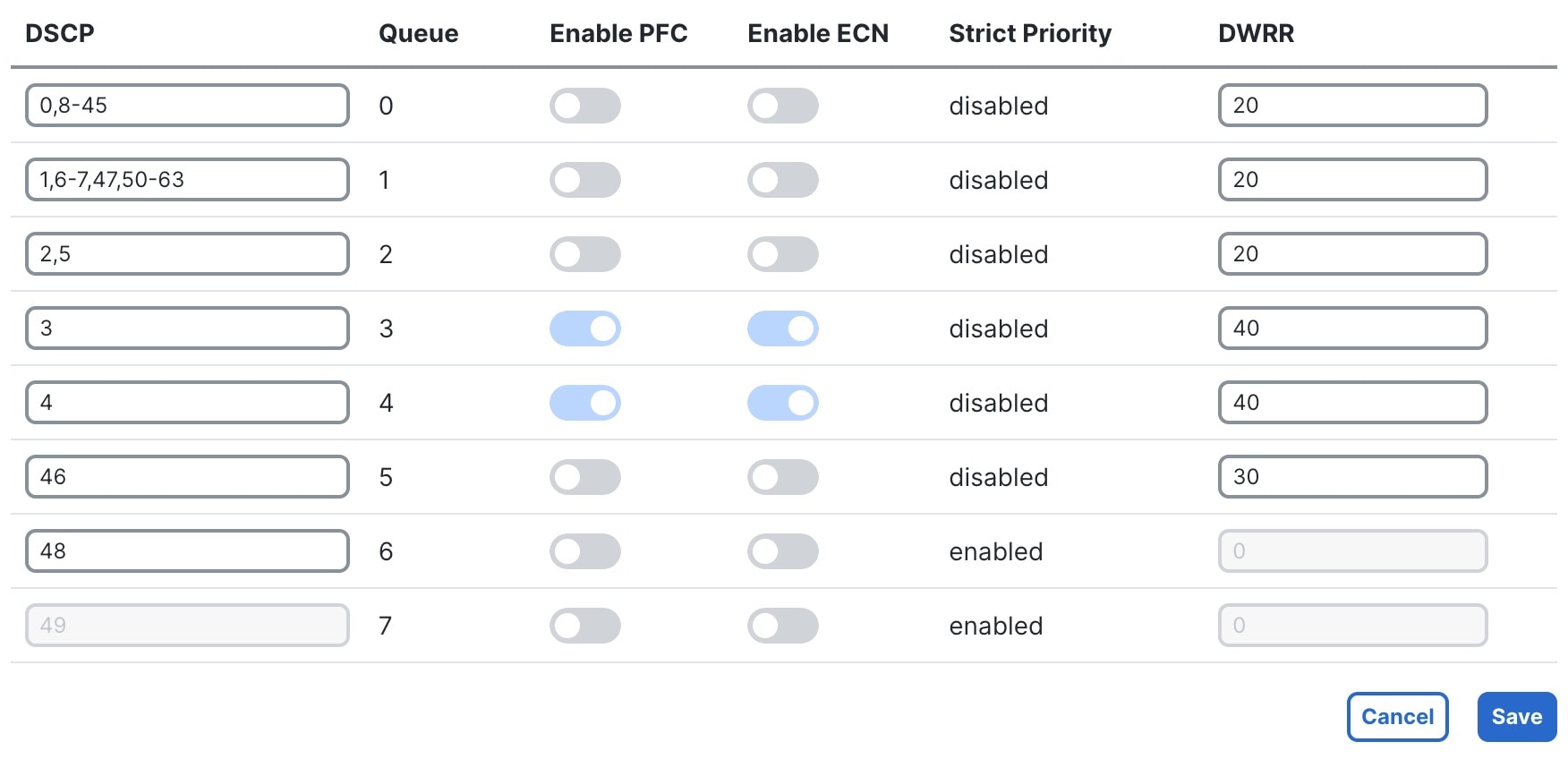
Step 1 | Choose Fabrics, then select the fabric you want to configure. |
Step 2 | In the Attachments area, select Traffic classification. When you start configuration for the first time, the Traffic classification pane displays default QoS settings that you can save or modify as needed. |
Step 3 | Select Configure. |
Step 4 | Modify DSCP and DWRR settings as needed. All other settings are read-only. For more information, refer to QoS settings. |
Step 5 | Select Save. |
QoS settings
Refer to these descriptions to understand the function and purpose of each setting shown in the Traffic classification pane.
| Setting |
Description |
|---|---|
|
DSCP |
Differentiated Services Code Point (DSCP) is a 6-bit value in the IP header used to label traffic. Each DSCP value can map to only one queue to ensure consistent handling. The numerical value can be 0 to 63. |
|
Queue |
A path in the network device where traffic is sent for processing. Each queue (0 to 7) has specific priority and bandwidth settings. |
|
PFC |
Priority Flow Control (PFC) is a per-hop, priority-based pause mechanism. It prevents packet loss by signaling the upstream device to pause transmission for a specific queue when a buffer threshold is reached. When QoS settings are configured, PFC is enabled on queues 3 and 4. |
|
ECN |
Explicit Congestion Notification (ECN) helps manage congestion by propagating congestion information to endpoints. Network nodes mark ECN bits in the IP header to notify the receiver of congestion. The receiver tells the sender to slow down the affected data flow, enabling efficient congestion control across the network. When QoS settings are configured, ECN is enabled on queues 3 and 4. |
|
Strict Priority |
This setting ensures that the highest priority queues are serviced before all other queues. |
|
DWRR |
Deficit Weighted Round Robin (DWRR) determines how much network bandwidth a queue receives compared to other queues. The value represents the relative weight or share of bandwidth assigned to each queue. This allows important types of traffic to be prioritized and ensures customized distribution of network resources among different traffic classes. |