Cisco ACI Installation Guide for OpenStack Services on OpenShift 18
Available Languages
Bias-Free Language
The documentation set for this product strives to use bias-free language. For the purposes of this documentation set, bias-free is defined as language that does not imply discrimination based on age, disability, gender, racial identity, ethnic identity, sexual orientation, socioeconomic status, and intersectionality. Exceptions may be present in the documentation due to language that is hardcoded in the user interfaces of the product software, language used based on RFP documentation, or language that is used by a referenced third-party product. Learn more about how Cisco is using Inclusive Language.
- US/Canada 800-553-2447
- Worldwide Support Phone Numbers
- All Tools
 Feedback
 Feedback
Cisco ACI with OpenStack using OpenStack Services on OpenShift 18
The Cisco Application Centric Infrastructure (ACI) is a comprehensive policy-based architecture that provides an intelligent, controller-based network switching fabric. This fabric is designed to be programmatically managed through an API interface that can be directly integrated into multiple orchestration, automation, and management tools, including OpenStack. Integrating Cisco ACI with OpenStack allows dynamic creation of networking constructs to be driven directly from OpenStack requirements, while providing extra visibility within the Cisco Application Policy Infrastructure Controller (APIC) down to the level of the individual virtual machine (VM) instance.
OpenStack defines flexible software architecture for creating cloud-computing environments. The reference software-based implementation of OpenStack allows for multiple Layer 2 transports including VLAN, GRE, and VXLAN. The Neutron project within OpenStack can also provide software-based Layer 3 forwarding. When used with Cisco ACI and the ACI OpenStack Unified ML2 plug-in provides an integrated Layer 2 and Layer 3 VXLAN-based overlay networking capability. This architecture provides the flexibility of software overlay networking along with the performance and operational benefits of hardware-based networking.
The Cisco ACI OpenStack plug-in can be used in either ML2 or GBP mode. In Modular Layer 2 (ML2) mode, a standard Neutron API is used to create networks. This is the traditional way of deploying VMs and services in OpenStack. In Group Based Policy (GBP) mode, a new API is provided to describe, create, and deploy applications as policy groups without worrying about network-specific details. Mixing GBP and Neutron APIs in a single OpenStack project is not supported. For more information, see the OpenStack Group-Based Policy User Guide.
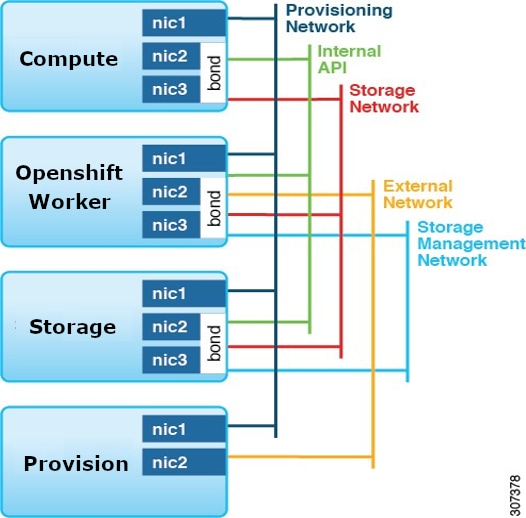
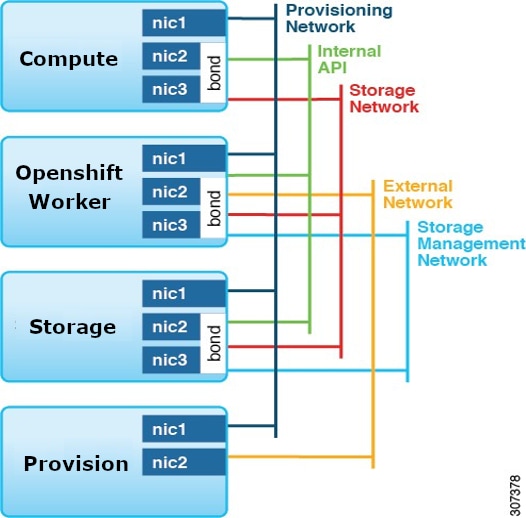
Refer to the Network Planning section of the OpenStack Services on OpenShift 18 documentation for network layout such as the one shown here. (For more information, see the Deploying Red Hat OpenStack Services on OpenShift documentation on the Red Hat website.)
Setting up the Cisco APIC and the network
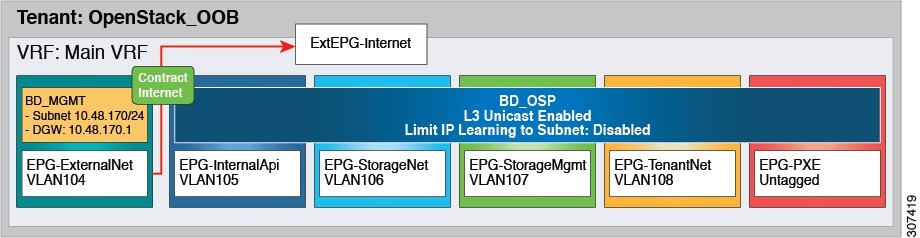 |
● If PXE is required and is configured through ACI, you may need to make the PXE network use a native VLAN. This is because native VLAN is typically defined as a dedicated NIC on the provisioned nodes, you can connect PXE network interfaces either to the Cisco Application Centric Infrastructure (ACI) fabric or to a different switching fabric.
● All OpenStack Platform (RHOSO) networks except for PXE are in-band (IB) through Cisco ACI. The following VLANs are examples: Cisco ACI Infra: VLAN 4093
● ExtEPG-Internet used in this example is the L3Out external EPG that allows connectivity to Internet for the OpenStack External Network. You also may need to provide external connectivity for the Internal API OpenStack network, according to your requirements.
To add an OpenStack external network, see theAdd an OpenStack external network chapter in Cisco ACI Installation Guide for Red Hat OpenStack Using the OpenStack Platform 17.1 Director Guide.
● Rogue Endpoint Control should be disabled. This can be found under System Settings, Endpoint Controls, and Rogue EP Control.
● The OpenStack internal VLANs (VLAN104-VLAN108 in the diagram) need to be connected to both control-plane (OpenShift) nodes and data-plane (compute) nodes. They are usually provisioned using static VLAN binding on the respective EPGs. This is similar to the previous OpenStack releases.
To prepare Cisco ACI for in-band configuration you can use the physical domain and the static binding to the EPGs created for these networks. This involves creating the required physical domain and attachable access entity profile (AEP). Note that the infra VLAN should be enabled for the AEP. For more details, see the knowledge base article Creating Domains, Attach Entity Profiles, and VLANs to Deploy an EPG on a Specific Port.
In RHOSO-18 there is no need to provision ACI infra VLAN on the control plane nodes. It is only required on the compute nodes.
Prepare for the OpenStack installation
Note: The example ACI container images in this document are using 18.0.17 tag with assumption that current upstream OpenStack version is 18.0.17. Please ensure that the tags always correspond to the intended RHOSO version.
Step 1: Install the OpenStack operator
Follow the steps in Red Hat RHOSO guide and install OpenShift and then follow the steps to install the OpenStack operator. You may also need to install some other prerequisites like:
● CSI Operator
● NMState Operator
● MetalLB Operator
● CertManager Operator
After installing the OpenStack operator, activate it as per instructions in the Red Hat guide.
Step 2: Prepare the OpenShift container platform
Complete these steps to prepare the Red Hat OpenShift container platform for Red Hat OpenStack services on OpenShift:
● Create and patch the OpenStack namespace
● Create the OpenStack services secrets
Step 3: Prepare the network
Apply network configuration to install OpenStack services as specified in the Red Hat guide. Samples of the configuration file are provided in Appendix A. Please note that the configuration file format is subject to change and these examples are provided as samples, you may need to adapt them if the format changes and/or new resources are added. Make sure to consult the latest upstream Red Hat RHOSO deployment guide.
● Apply Node Network Configuration Policy (nncp) files
● Apply Network Attachment Definition (nad) file.
● Apply IP Address Pool file
● Apply L2 Advertisement file.
● Apply OpenStack Net Config
You should be able to log into the OpenShift nodes using ssh or oc debug command to confirm the application of the network config. Check all the CRs as instructed in the Red Hat Guide to make sure there are no errors.
Step 4: Create the OpenStack control plane
This section uses a modified method to install the OpenStack control plane. For OpenStack control plane the OpenStackControlPlane CR is used. You will need to remove the upstream ovn component from the CRD, override the images for neutron_api, horizon, heat and OpenStack client. In addition, you will also need to install the ACI Integration Manager (AIM) operator as a separate service.
In simple words OpenStackControlPlane CRD for ACI is just the upstream CRD with ovn service removed and a modified section for neutron service. An example of OpenStackControlPlane CRD with ACI plugin is provided in appendix A.
Before creating the OpenStackControlPlane you need to first create the OpenStackVersion CR with the ACI container image overrides so it does not pull the upstream images for neutron_api, heat, horizon, and openstack client images for this you can pre-create OpenStackVersion CR with all ACI image overrides, the idea is to create it with same name as the OpenStackControlPlane CR.
● Create the OpenStackVersion CRD, with name, e.g. aci_custom_images.yaml to override the container images. Sample provided in Appendix A.
● Create the openstack_control_plane.yaml with ovn components removed similar to one provided in Appendix A.
● To enable keystone purge notification (for auto cleaning up of deleted projects), It is required to enable notifications topic in keystone. This can be done by adding customServiceConfig to keystone CR for example:
customServiceConfig: |
[oslo_messaging_notifications]
driver=messagingv2
topics = barbican_notifications,notifications
● Create the control plane using these steps:
oc create -f aci_custom_images.yaml
oc create -f openstack_control_plane.yaml -n openstack
Follow the rest of the section to check that the control plane is up. As per Red Hat document, after the control plane is up, you can RSH (Remote Shell) to the OpenStack client pod and use OpenStack and GBP CLI to work with your environment.
noiro@rhosovirt1 ~]$ oc rsh -n openstack openstackclient
sh-5.1$ openstack endpoint list
+----------------------------------+-----------+--------------+----------------+---------+-----------+---------------------------------------------------------------------------------+
| ID | Region | Service Name | Service Type | Enabled | Interface | URL |
+----------------------------------+-----------+--------------+----------------+---------+-----------+---------------------------------------------------------------------------------+
| 0173b2bd626241ffa21ec0dc2622782f | regionOne | nova | compute | True | public | https://nova-public-openstack.apps.fabvirt1.fabvirt1.local/v2.1 |
| 0c6d665821a047f0881fc1a0cead0495 | regionOne | cinderv3 | volumev3 | True | public | https://cinder-public-openstack.apps.fabvirt1.fabvirt1.local/v3 |
| 13debe3491f94f90ba6a97b9aac36cc6 | regionOne | swift | object-store | True | internal | https://swift-internal.openstack.svc:8080/v1/AUTH_%(tenant_id)s |
| 1de19327bd3c404b9c46762640e483f8 | regionOne | keystone | identity | True | public | https://keystone-public-openstack.apps.fabvirt1.fabvirt1.local |
| 1fba16131e0d4f8ba9192515091edca8 | regionOne | heat-cfn | cloudformation | True | internal | https://heat-cfnapi-internal.openstack.svc:8000/v1 |
| 2086091fc404465a89b90288cf38abce | regionOne | placement | placement | True | internal | https://placement-internal.openstack.svc:8778 |
| 281c2ef6ca724c9dab015e970e240e01 | regionOne | heat | orchestration | True | internal | https://heat-api-internal.openstack.svc:8004/v1/%(tenant_id)s |
| 54efdd3450814d2fb09686fc77869631 | regionOne | glance | image | True | public | https://glance-default-public-openstack.apps.fabvirt1.fabvirt1.local |
| 741e74700b164481b31810a359ac0f81 | regionOne | neutron | network | True | internal | https://neutron-internal.openstack.svc:9696 |
| 7c92191f193645bca98afa5004753d64 | regionOne | nova | compute | True | internal | https://nova-internal.openstack.svc:8774/v2.1 |
| 7d342084c5644fc69623bfd8cd8596c8 | regionOne | neutron | network | True | public | https://neutron-public-openstack.apps.fabvirt1.fabvirt1.local |
| 910bf7649d6d43b695d59549e109d9c4 | regionOne | placement | placement | True | public | https://placement-public-openstack.apps.fabvirt1.fabvirt1.local |
| 9ed754b572964e26aa579717d6933f4d | regionOne | barbican | key-manager | True | internal | https://barbican-internal.openstack.svc:9311 |
| a4fafa71a5694fdfa4bff593f07ca1be | regionOne | heat-cfn | cloudformation | True | public | https://heat-cfnapi-public-openstack.apps.fabvirt1.fabvirt1.local/v1 |
| a81617feda4343afa9ffb08981daf511 | regionOne | glance | image | True | internal | https://glance-default-internal.openstack.svc:9292 |
| afc8a5eff8554af393fa04244a039b0a | regionOne | barbican | key-manager | True | public | https://barbican-public-openstack.apps.fabvirt1.fabvirt1.local |
| b7a25d6000114bb1a638f167640778f2 | regionOne | cinderv3 | volumev3 | True | internal | https://cinder-internal.openstack.svc:8776/v3 |
| b9215ee751984e0ea68cadfe46685cda | regionOne | heat | orchestration | True | public | https://heat-api-public-openstack.apps.fabvirt1.fabvirt1.local/v1/%(tenant_id)s |
| bcc8eb1be22c4e81a78de38457a26052 | regionOne | swift | object-store | True | public | https://swift-public-openstack.apps.fabvirt1.fabvirt1.local/v1/AUTH_%(tenant_id)s |
| f86db5a831694a17bccd0aedf69a22e2 | regionOne | keystone | identity | True | internal | https://keystone-internal.openstack.svc:5000 |
+----------------------------------+-----------+--------------+----------------+---------+-----------+---------------------------------------------------------------------------------+
Step 4a: Install AIM operator
This is the extra step in control plane installation for ACI. You need to install the ACI Integration Manager (AIM) operator. Following are the steps for installation:
● Obtain the CRD, RBAC, and deployment yamls from the GitHub link.
● Edit ciscoaciaim-cr.yaml and make sure APIC info, systemID, and AAEP info and other values are correct.
● Ensure that the container Image is using the correct tag, e.g. 18.0.14. in ciscoaciaim-cr.yaml. Do not modify other files.
● Install the operator using these commands: Install the operator using these commands:
oc apply -f api.cisco.com_ciscoaciaims.yaml
oc apply -f ciscoaciaim-rbac.yaml
oc apply -n openstack -f ciscoaciaim-cr.yaml
oc apply -f aim_operator_deployment.yaml
The CR yaml files can also be obtained from:
https://github.com/noironetworks/aciaim-osp18-operator/tree/main/config/aim_configs
Note: To enable cert base Authentication between AIM and APIC, create a local previledged user with an X.509 certificate and create a secret using the private key and specify the secret in the ciscoaciaimcr.yaml instead of using the parameters ACIApicCertName and ACIApicPrivateKeySecretRef.
See the section "Creating a Local User and Adding a User Certificate" in Cisco APIC Security Configuration Guide, Release 5.1(x).
When you use certificate-based authentication, make sure that you do not specify the parameter ACIApicPassword.
Example secret creation:
oc create secret generic adminuser-key \
--from-file=adminuser.key=/home/stack/adminuser_private.key \
-n openstack
Use of secret in CiscoAciAim CR:
ACIApicCertName: "adminuser"
ACIApicPrivateKeySecretRef:
name: adminuser-key
key: adminuser.key
Step 5: Create the OpenStack data plane
Deploy the data plane or compute node using EDPM workflow. The compute nodes are external to OpenShift and are very similar to OSP17.1.
You can deploy data plane nodes using either of the following workflows:
1. Pre-provisioned Nodes: Nodes are manually provisioned with Red Hat Enterprise Linux (RHEL) before deployment.
2. Unprovisioned Nodes (BareMetalHost): Nodes are provisioned automatically using the BareMetalHost Custom Resource (CR).
Note: Whether using the pre-provisioned or unprovisioned workflow (or adopting from OSP17.2), the list of services deployed must be modified for Cisco ACI. You must remove all OVN-related services (ovn, neutron-metadata) and add the neutron-dhcp service. After that follow the steps for adding/patching nodeSet with ACI related services as in Step 5.3.
In this section only pre-provisioned compute node workflow is shown, which means the compute nodes are provisioned manually with the Red Hat OS. The relevant sections in OpenStackDataPlaneNodeSet CR are the same in both Pre-provisioned and Unprovisioned/Baremetal cases.
Here are the prerequisites for installing the data plane for pre-provisioned nodes.
● Nodes are pre-provisioned with RHEL 9.4.
● Each node has 2 unprovisioned/unused network interfaces connected to a vPC to create an LACP bond. (the bonded interface will be created by the EDPM classes)
● Passwordless sudo is provisioned.
● SSH keys are installed for passwordless access, and public keys are noted to be added to the SSH secret.
● /etc/environment is set with http_proxy, https_proxy and no_proxy.
Note: When creating the Red Hat container registry secret, you may need to add credentials for multiple registries. Here is an example of secrets for multiple registries, replace usernames and passwords with your Red Hat registry access credentials:
oc create secret generic redhat-registry \
--from-literal edpm_container_registry_logins='{"registry.redhat.io": {"reg_user": "my_pass"}, "registry.connect.redhat.com":
{"connect_user": "my_pass2"}}' \
-n openstack
As in control plane, when deploying EDPM, remove all of the ovn service/roles (ovn and neutron-metadata) and use the ACI ansible services/roles instead, and add the neutron-dhcp service.
Follow the steps in “Creating the data plane secrets” for Deploying Red Hat OpenStack Services on OpenShift and create the ssh, nova-migration, libvirt, subscription-manager, and container registry secrets.
After that, create the OpenStackDataPlaneNodeSet and deploy the Node Set using OpenStackDataPlaneDeployment CR.
You will create the OpenStackDataPlaneNodeSet with neutron-dhcp added and remove ovn services (ovn, neutron-metadata) and then deploy it. After it is up, you can patch the CR with the services (opflex-agent, neutron-opflex-agent, lldp-agent).
Ensure that you have these files:
● OpenStackDataPlaneNodeSet file openstack_preprovisioned_node_set.yaml
● OpenStackDataPlaneDeployment file openstack_data_plane_deploy.yaml
● Cisco ACI EDPM artifacts
● Example CRs are provided in Appendix B
Here is an example of services in the services section that will be deployed with EDPM:
apiVersion: dataplane.openstack.org/v1beta1
kind: OpenStackDataPlaneNodeSet
metadata:
name: openstack-data-plane
namespace: openstack
spec:
env:
- name: ANSIBLE_FORCE_COLOR
value: "True"
services:
- redhat
- bootstrap
- configure-network
- validate-network
- install-os
- configure-os
- ssh-known-hosts
- run-os
- reboot-os
- install-certs
- neutron-dhcp
- libvirt
- nova
Rest of the parameters in file are explained in the Red Hat guide. The sample uses bond0 for adding the OpenStack VLANs and the ACI infra vlan. Make the necessary changes to the network topology in edpm_network_config_template section.
You also need to add a firewall rule for vxlan using edpm_nftables_user_rules which is required by ACI plugin.
ansibleVars:
edpm_nftables_user_rules:
- rule_name: "110 allow vxlan udp 8472"
rule:
proto: udp
dport:
- 8472
state: ["NEW"]
Step 5.1: Create the data plane node set as in the Deploying Red Hat OpenStack Services on OpenShift guide:
oc create --save-config -f openstack_preprovisioned_node_set.yaml -n openstack
oc wait openstackdataplanenodeset openstack-data-plane --for condition=SetupReady --timeout=10m
Step 5.2: After you create the data plane, deploy as in the Deploying the data plane section of the Deploying Red Hat OpenStack Services on OpenShift guide.
oc create -f openstack_data_plane_deploy.yaml -n openstack
oc get pod -l app=openstackansibleee -w
oc logs -l app=openstackansibleee -f --max-log-requests 10
oc get openstackdataplanedeployment -n openstack
oc get openstackdataplanenodeset -n openstack
Step 5.3: After you deploy the upstream Node Set, you can add the ACI services using the following steps:
● Create ACI EDPM definition files for opflex-agent, neutron-opflex-agent and lldp agent as listed in Appendix B.
● Make sure all container tags are correct (e.g. 18.0.17 )
● Edit nodeset_patch.yaml and make sure the opflex interface, ACI infra vlan, and systemID are correct.
● Apply the ACI changes
Step 5.4: Define the ACI custom services
oc apply -f neutron-opflex-agent-service.yaml -n openstack
oc apply -f ciscoaci-lldp-agent-service.yaml -n openstack
oc apply -f cisco-opflex-agent-service.yaml -n openstack
The ACI Custom services should be visible as dataplane service.
oc get openstackdataplaneservice -n openstack
Step 5.5: Deploy services in the patch using nodeset_patch_deploy.yaml as in Appendix B:
oc patch openstackdataplanenodeset openstack-data-plane -n openstack --type merge \
--patch-file nodeset_patch.yaml
Note: The patch is the OpenStackDataPlaneNodeSet to add ACI services, nodeset_patch.yaml is listed in Appendix B.
oc apply -f nodeset_patch_deploy.yaml
Step 5.6: Make sure the OpenStackDataPlaneNodeSet patch is deployed
$ oc get OpenStackDataPlaneDeployment deploy-new-service
NAME NODESETS STATUS MESSAGE
deploy-new-service ["openstack-data-plane"] True Setup complete
If there are errors, you can check the failed pod.
oc get pod -l app=openstackansibleee
Step 5.7: After deploying the data plane, run discovery and add the new compute nodes to cells, as described in the Deploying Red Hat OpenStack Services on OpenShift guide.
oc rsh nova-cell0-conductor-0 nova-manage cell_v2 discover_hosts -–verbose
The compute nodes should be visible in the hypervisor list.
oc rsh -n openstack openstackclient
openstack hypervisor list
sh-5.1$ openstack hypervisor list
+----------------------+--------------------------+-----------------+-------------+-------+
| ID | Hypervisor Hostname | Hypervisor Type | Host IP | State |
+----------------------+--------------------------+-----------------+-------------+-------+
| db945cb9-2de8-43e7-a3df-57cd0ee0067c | compute01.fabvirt1.local | QEMU | 1.100.1.101 | up |
| 5d397838-e88d-4d5c-b0f3-51692a21eff5 | compute00.fabvirt1.local | QEMU | 1.100.1.100 | up |
+-----------------------+--------------------------+-----------------+-------------+-------+
sh-5.1$
The installation of RHOSO-18 with ACI is complete. You should be able to access the horizon dashboard and should be able to create networks and instances.
Minor release upgrade
Performing a minor release upgrade on RHOSO-18 Deployment
To perform a minor update please follow the Red Hat RHOSO minor update guide but skip/ignore all OVN update sections.
Control plane
Skipping the OVN section you can proceed with the control plane update. You can ingore the instructions to watch OVN update and proceed directoly to the next section. You should also include the ACI custom images in the openstackversionpatch.yaml and apply the openstackversionpatch.yaml patch as specified in the Red Hat guide.
example of openstackversionpatch.yaml assuming 18.0.18 is the new minor version.
spec:
targetVersion: "18.0.18-20260422.194755"
customContainerImages:
heatAPIImage: registry.redhat.io/rhoso/openstack-heat-engine-rhel9-ciscoaci:18.0.18
neutronAPIImage: registry.redhat.io/rhoso/openstack-neutron-server-rhel9-ciscoaci:18.0.18
horizonImage: registry.connect.redhat.com/noiro/openstack-horizon-rhel9-ciscoaci:18.0.18
openstackClientImage: registry.connect.redhat.com/noiro/ openstack-cli-rhel9-ciscoaci:18.0.18
Follow the instructions on monitoring the progress, the control plane should update as desired. You can watch using cli command
oc get openstackversion openstack-control-plane -n openstack -w
Data plane
For data plane update, follow the instructions for updating the non-aci (upstream) services and monitor progress. Once the upstream services are updated you can proceed with updating the ACI services and containers.
To update the ACI services create the ACI services file as in the Install section. These should be the same files used at installation (sample provided in Appendix B), but with updated EDPM runner image tags (18.0.8) in this example.
Now update the service objects by applying the new service files:
oc apply -f neutron-opflex-agent-service.yaml -n openstack
oc apply -f cisco-opflex-agent-service.yaml -n openstack
oc apply -f ciscoaci-lldp-agent-service.yaml -n openstack
Similarly create the nodeset patch file with new container tags similar to sample provided in Appendix B. And use “oc patch”
oc patch openstackdataplanenodeset openstack-data-plane -n openstack --type merge --patch-file \nodeset_patch_local.yaml
After this, create the aci edpm updater file openstack-edpm-aci-update.yaml
apiVersion: dataplane.openstack.org/v1beta1
kind: OpenStackDataPlaneDeployment
metadata:
name: deploy-aci-services-18018
namespace: openstack
spec:
nodeSets:
- openstack-data-plane
servicesOverride:
- neutron-opflex-agent-custom-service
- cisco-opflex-agent-custom-service
- ciscoaci-lldp-agent-service
Now apply the updater to trigger the EDPM update:
oc apply -f /home/stack/operators/minimal_openstack/upgrade/openstack-edpm-aci-update.yaml
You can monitor the update using command provided in the Red Hat guide.
oc get pod -l app=openstackansibleee -w
Once this is complete openstackversion should reflect the new version and all containers should be updated, concluding the minor update.
In place upgrade
Adopting a Red Hat OpenStack Platform 17.1 Deployment
Systems can be upgraded from Red Hat OpenStack Platform (RHOSP) 17.1 to RHOSO 18. For the complete upgrade process, refer to the Red Hat document titled Adopting a Red Hat OpenStack Platform 17.1 Deployment.
Important Considerations:
● Supported Configurations: This upgrade path is supported only for RHOSP 17.1 clouds that use the OpenStack ML2 Plugin for ACI.
● Unsupported Configurations: Upgrades from clouds using other integrations, such as OVN, are not supported.
Process Modifications:
When following the instructions in the "Deploying back-end services" chapter, you must modify the OpenStackControlPlane Custom Resource (CR) by removing the ovn section as described in Step 4: Create the OpenStack control plane, of this guide.
Additional Process Modifications:
● Skip OVN Migration: You must skip the "Migrating OVN data" chapter entirely, as OVN is not used with the OpenStack Plugin for ACI. Example CRs are provoided in Appendix A.
● Pre-Networking Configuration: Before beginning the "Adopting the Networking service" chapter, you must patch the OpenStackVersions CR to include the required container images.
● Installation of AIM: AIM operator installation is also required, as done in chapter 1.
Example: If your OpenStackVersions CR is named openstack, use the following command:
$ oc patch openstackversion openstack --type=merge --patch '
spec:
customContainerImages:
heatAPIImage: registry.redhat.io/rhoso/openstack-heat-engine-rhel9-ciscoaci:18.0.17
neutronAPIImage: registry.redhat.io/rhoso/openstack-neutron-server-rhel9-ciscoaci:18.0.17
horizonImage: registry.connect.redhat.com/noiro/openstack-horizon-rhel9-ciscoaci:18.0.17
openstackClientImage: registry.connect.redhat.com/noiro/ openstack-cli-rhel9-ciscoaci:18.0.17
In step 1, “Patch the OpenStackControlPlane CR to deploy the Networking service”, the patch for the control plane service should have this:
template:
corePlugin: ml2plus
customServiceConfig: |
[DFAULT]
dhcp_agent_notification = True
service_plugins=group_policy,apic_aim_l3,trunk,qos
apic_system_id=ostack-bm-3
[ml2]
type_drivers=opflex,local,flat,vlan,gre,vxlan
tenant_network_types=opflex
mechanism_drivers=apic_aim
extension_drivers=apic_aim,port_security,dns,qos
[ml2_apic_aim]
enable_optimized_dhcp=True
enable_optimized_metadata=True
enable_keystone_notification_purge=True
keystone_notification_exchange=keystone
keystone_notification_topic=notifications
[group_policy]
policy_drivers=aim_mapping
extension_drivers=aim_extension,proxy_group,apic_allowed_vm_name,
apic_segmentation_label
ml2MechanismDrivers:
- apic-aim
AIM installation Steps
To install AIM, follow “Step 4a: Install AIM operator” as discussed in Chapter 1 of this guide.
DataPlane Adoption
Before running the steps in the “Adopting Compute services to the RHOSO data plane” chapter, create OpenStackDataPlaneService CRs for the services that will run on the compute hosts. Examples CRs are provided in appendix B.
oc apply -f - <<EOF
---
apiVersion: dataplane.openstack.org/v1beta1
kind: OpenStackDataPlaneService
metadata:
name: ciscoaci-lldp-agent-service
spec:
label: dataplane-deployment-ciscoaci-lldp-agent-service
openStackAnsibleEERunnerImage: registry.redhat.io/rhoso/combined-ansibleee-runner:18.0.17
playbook: osp.edpm.lldp
caCerts: combined-ca-bundle
edpmServiceType: ciscoaci-lldp-agent-service
---
apiVersion: dataplane.openstack.org/v1beta1
kind: OpenStackDataPlaneService
metadata:
name: cisco-opflex-agent-custom-service
spec:
label: dataplane-deployment-cisco-opflex-agent-service
openStackAnsibleEERunnerImage: registry.redhat.io/rhoso/combined-ansibleee-runner:18.0.17
playbook: osp.edpm.opflex_agent
---
apiVersion: dataplane.openstack.org/v1beta1
kind: OpenStackDataPlaneService
metadata:
name: neutron-opflex-agent-custom-service
spec:
label: dataplane-deployment-neutron-opflex-agent-service
openStackAnsibleEERunnerImage: registry.redhat.io/rhoso/combined-ansibleee-runner:18.0.17
playbook: osp.edpm.neutron_opflex_agent
caCerts: combined-ca-bundle
edpmServiceType: neutron-opflex-agent-custom-service
dataSources:
- secretRef:
name: rabbitmq-transport-url-neutron-neutron-transport
EOF
As part of the OpenStackDataPlaneDeployment, the services on the compute hosts are disabled for a period of time. In order to prevent an outage after reconnection, a snapshot of the agents policy should be taken.
In the step " Create the data plane node set definitions for each cell”, add the following for the services in the CR:
services:
- redhat
- bootstrap
- download-cache
- configure-network
- validate-network
- install-os
- configure-os
- ssh-known-hosts
- run-os
- reboot-os
- install-certs
- libvirt
- nova-$CELL
- cisco-opflex-agent-custom-service
- neutron-opflex-agent-custom-service
ansibleVars:
edpm_cisco_neutron_opflex_agent_container_registry_logins: ""
edpm_cisco_neutron_opflex_image: registry.connect.redhat.com/noiro/openstack- neutron-opflex-rhel9-ciscoaci:18.0.17"
edpm_cisco_opflex_agent_aci_apic_infravlan: 3914
edpm_cisco_opflex_agent_aci_apic_systemid: qa-fab-1
edpm_cisco_opflex_agent_aci_opflex_uplink_interface: bond1
edpm_cisco_opflex_image: "registry.connect.redhat.com/noiro/openstack-opflex-rhel9-ciscoaci:18.0.17"
edpm_ciscoaci_lldp_image: "registry.connect.redhat.com/noiro/openstack-lldp-rhel9-ciscoaci:18.0.17"
edpm_container_registry_insecure_registries:
- 192.168.100.13:8787
edpm_ciscoaci_lldp_interfaces: '*,!tap*'
Appendix A – Control plane sample configuration
apiVersion: nmstate.io/v1
kind: NodeNetworkConfigurationPolicy
metadata:
name: osp-bond0-master-1
spec:
desiredState:
interfaces:
- description: internalapi vlan interface
ipv4:
address:
- ip: 1.121.101.10
prefix-length: 24
enabled: true
dhcp: false
ipv6:
enabled: false
name: bond0.101
state: up
type: vlan
vlan:
base-iface: bond0
id: 101
- description: storage vlan interface
ipv4:
address:
- ip: 1.121.102.10
prefix-length: 24
enabled: true
dhcp: false
ipv6:
enabled: false
name: bond0.102
state: up
type: vlan
vlan:
base-iface: bond0
id: 102
- description: tenant vlan interface
ipv4:
address:
- ip: 1.121.104.10
prefix-length: 24
enabled: true
dhcp: false
ipv6:
enabled: false
name: bond0.104
state: up
type: vlan
vlan:
base-iface: bond0
id: 104
nodeSelector:
kubernetes.io/hostname: master1.fabvirt1.local
node-role.kubernetes.io/worker: ""
Sample network attachment definitions file
apiVersion: k8s.cni.cncf.io/v1
kind: NetworkAttachmentDefinition
metadata:
name: internalapi
namespace: openstack
spec:
config: |
{
"cniVersion": "0.3.1",
"name": "internalapi",
"type": "macvlan",
"master": "bond0.101",
"ipam": {
"type": "whereabouts",
"range": "1.121.101.0/24",
"range_start": "1.121.101.25",
"range_end": "1.121.101.70"
}
}
---
apiVersion: k8s.cni.cncf.io/v1
kind: NetworkAttachmentDefinition
metadata:
labels:
osp/net: ctlplane
name: ctlplane
namespace: openstack
spec:
config: |
{
"cniVersion": "0.3.1",
"name": "ctlplane",
"type": "macvlan",
"master": "enp1s0",
"ipam": {
"type": "whereabouts",
"range": "1.100.1.0/24",
"range_start": "1.100.1.25",
"range_end": "1.100.1.70"
}
}
---
apiVersion: k8s.cni.cncf.io/v1
kind: NetworkAttachmentDefinition
metadata:
name: storage
namespace: openstack
spec:
config: |
{
"cniVersion": "0.3.1",
"name": "storage",
"type": "macvlan",
"master": "bond0.102",
"ipam": {
"type": "whereabouts",
"range": "1.121.102.0/24",
"range_start": "1.121.102.25",
"range_end": "1.121.102.70"
}
}
---
apiVersion: k8s.cni.cncf.io/v1
kind: NetworkAttachmentDefinition
metadata:
labels:
osp/net: tenant
name: tenant
namespace: openstack
spec:
config: |
{
"cniVersion": "0.3.1",
"name": "tenant",
"type": "macvlan",
"master": "bond0.104",
"ipam": {
"type": "whereabouts",
"range": "1.121.104.0/24",
"range_start": "1.121.104.25",
"range_end": "1.121.104.70"
}
}
apiVersion: metallb.io/v1beta1
kind: IPAddressPool
metadata:
name: internalapi
namespace: metallb-system
spec:
addresses:
- 1.121.101.80-1.121.101.90
autoAssign: true
avoidBuggyIPs: false
---
apiVersion: metallb.io/v1beta1
kind: IPAddressPool
metadata:
namespace: metallb-system
name: ctlplane
spec:
addresses:
- 1.100.1.80-1.100.1.90
autoAssign: true
avoidBuggyIPs: false
---
apiVersion: metallb.io/v1beta1
kind: IPAddressPool
metadata:
namespace: metallb-system
name: storage
spec:
addresses:
- 1.121.102.80-1.121.102.90
autoAssign: true
avoidBuggyIPs: false
---
apiVersion: metallb.io/v1beta1
kind: IPAddressPool
metadata:
namespace: metallb-system
name: tenant
spec:
addresses:
- 1.121.103.80-1.121.103.90
autoAssign: true
avoidBuggyIPs: false
apiVersion: metallb.io/v1beta1
kind: L2Advertisement
metadata:
name: l2advertisement
namespace: metallb-system
spec:
ipAddressPools:
- internalapi
interfaces:
- bond0.101
---
apiVersion: metallb.io/v1beta1
kind: L2Advertisement
metadata:
name: ctlplane
namespace: metallb-system
spec:
ipAddressPools:
- ctlplane
interfaces:
- enp1s0
---
apiVersion: metallb.io/v1beta1
kind: L2Advertisement
metadata:
name: storage
namespace: metallb-system
spec:
ipAddressPools:
- storage
interfaces:
- bond0.102
---
apiVersion: metallb.io/v1beta1
kind: L2Advertisement
metadata:
name: tenant
namespace: metallb-system
spec:
ipAddressPools:
- tenant
interfaces:
- bond0.104
Sample OpenStack netconfig file:
apiVersion: network.openstack.org/v1beta1
kind: NetConfig
metadata:
name: openstacknetconfig
namespace: openstack
spec:
networks:
- name: CtlPlane
dnsDomain: ctlplane.fabvirt1.fabvirt1.local
subnets:
- name: subnet1
allocationRanges:
- end: 1.100.1.120
start: 1.100.1.100
- end: 1.100.1.200
start: 1.100.1.150
cidr: 1.100.1.0/24
gateway: 1.100.1.1
- name: InternalApi
dnsDomain: internalapi.fabvirt1.fabvirt1.local
subnets:
- name: subnet1
allocationRanges:
- end: 1.121.101.250
start: 1.121.101.100
excludeAddresses:
- 1.121.101.10
- 1.121.101.12
cidr: 1.121.101.0/24
vlan: 101
- name: External
dnsDomain: external.fabvirt1.fabvirt1.local
subnets:
- name: subnet1
allocationRanges:
- end: 172.20.71.235
start: 172.20.71.230
cidr: 172.20.71.0/24
gateway: 172.20.71.1
- name: Storage
dnsDomain: storage.fabvirt1.fabvirt1.local
subnets:
- name: subnet1
allocationRanges:
- end: 1.121.102.250
start: 1.121.102.100
cidr: 1.121.102.0/24
vlan: 102
- name: StorageMgmt
dnsDomain: storagemgmt.fabvirt1.fabvirt1.local
subnets:
- name: subnet1
allocationRanges:
- end: 1.121.103.250
start: 1.121.103.100
cidr: 1.121.103.0/24
vlan: 103
- name: Tenant
dnsDomain: tenant.fabvirt1.fabvirt1.local
subnets:
- name: subnet1
allocationRanges:
- end: 1.121.104.250
start: 1.121.104.100
cidr: 1.121.104.0/24
vlan: 104
Sample OpenStackVersion (custom images) file
apiVersion: core.openstack.org/v1beta1
kind: OpenStackVersion
metadata:
name: openstack-control-plane
namespace: openstack
spec:
customContainerImages:
neutronAPIImage: registry.connect.redhat.com/noiro/openstack-neutron-server-rhel9-ciscoaci:18.0.17
heatAPIImage: registry.connect.redhat.com/noiro/openstack-heat-engine-rhel9-ciscoaci:18.0.17
horizonImage: registry.connect.redhat.com/noiro/openstack-horizon-rhel9-ciscoaci:18.0.17
openstackClientImage: registry.connect.redhat.com/noiro/ openstack-cli-rhel9-ciscoaci:18.0.17
Sample ACI neutron secrets file
apiVersion: v1
kind: Secret
metadata:
name: neutron-server-aci-config
type: Opaque
stringData:
ml2_conf_cisco_apic.ini: |
[ml2]
type_drivers=opflex,local,flat,vlan,gre,vxlan
tenant_network_types=opflex
mechanism_drivers=apic_aim
extension_drivers=apic_aim,port_security,dns,qos
[group_policy]
policy_drivers=aim_mapping
extension_drivers=aim_extension,proxy_group,apic_allowed_vm_name,
apic_segmentation_label
Sample OpenStack control plane file
apiVersion: core.openstack.org/v1beta1
kind: OpenStackControlPlane
metadata:
name: openstack-control-plane
namespace: openstack
spec:
secret: osp-secret
storageClass: hostpath-provisioner
cinder:
apiOverride:
route: {}
template:
databaseInstance: openstack
secret: osp-secret
cinderAPI:
replicas: 3
override:
service:
internal:
metadata:
annotations:
metallb.universe.tf/address-pool: internalapi
metallb.universe.tf/allow-shared-ip: internalapi
metallb.universe.tf/loadBalancerIPs: 1.121.101.80
spec:
type: LoadBalancer
cinderScheduler:
replicas: 1
cinderBackup:
networkAttachments:
- storage
replicas: 0 # backend needs to be configured to activate the service
cinderVolumes:
volume1:
networkAttachments:
- storage
replicas: 0 # backend needs to be configured to activate the service
nova:
enabled: true
apiOverride:
route: {}
template:
apiServiceTemplate:
replicas: 3
override:
service:
internal:
metadata:
annotations:
metallb.universe.tf/address-pool: internalapi
metallb.universe.tf/allow-shared-ip: internalapi
metallb.universe.tf/loadBalancerIPs: 1.121.101.80
spec:
type: LoadBalancer
metadataServiceTemplate:
replicas: 3
override:
service:
metadata:
annotations:
metallb.universe.tf/address-pool: internalapi
metallb.universe.tf/allow-shared-ip: internalapi
metallb.universe.tf/loadBalancerIPs: 1.121.101.80
spec:
type: LoadBalancer
schedulerServiceTemplate:
replicas: 3
override:
service:
metadata:
annotations:
metallb.universe.tf/address-pool: internalapi
metallb.universe.tf/allow-shared-ip: internalapi
metallb.universe.tf/loadBalancerIPs: 1.121.101.80
spec:
type: LoadBalancer
cellTemplates:
cell0:
cellDatabaseAccount: nova-cell0
cellDatabaseInstance: openstack
cellMessageBusInstance: rabbitmq
hasAPIAccess: true
cell1:
cellDatabaseAccount: nova-cell1
cellDatabaseInstance: openstack-cell1
cellMessageBusInstance: rabbitmq-cell1
noVNCProxyServiceTemplate:
enabled: true
networkAttachments:
- internalapi
- ctlplane
hasAPIAccess: true
secret: osp-secret
dns:
template:
options:
- key: server
values:
- 10.100.1.1
override:
service:
metadata:
annotations:
metallb.universe.tf/address-pool: internalapi
metallb.universe.tf/allow-shared-ip: internalapi
metallb.universe.tf/loadBalancerIPs: 1.121.101.87
spec:
type: LoadBalancer
replicas: 2
galera:
templates:
openstack:
storageRequest: 5000M
secret: osp-secret
replicas: 3
openstack-cell1:
storageRequest: 5000M
secret: osp-secret
replicas: 3
keystone:
apiOverride:
route: {}
template:
override:
service:
internal:
metadata:
annotations:
metallb.universe.tf/address-pool: internalapi
metallb.universe.tf/allow-shared-ip: internalapi
metallb.universe.tf/loadBalancerIPs: 1.121.101.80
spec:
type: LoadBalancer
databaseInstance: openstack
secret: osp-secret
replicas: 3
glance:
apiOverrides:
default:
route: {}
template:
databaseInstance: openstack
storageClass: ""
storageRequest: 10G
secret: osp-secret
keystoneEndpoint: default
glanceAPIs:
default:
type: single
replicas: 1
override:
service:
internal:
metadata:
annotations:
metallb.universe.tf/address-pool: internalapi
metallb.universe.tf/allow-shared-ip: internalapi
metallb.universe.tf/loadBalancerIPs: 1.121.101.80
spec:
type: LoadBalancer
networkAttachments:
- storage
barbican:
apiOverride:
route: {}
template:
databaseInstance: openstack
secret: osp-secret
barbicanAPI:
replicas: 3
override:
service:
internal:
metadata:
annotations:
metallb.universe.tf/address-pool: internalapi
metallb.universe.tf/allow-shared-ip: internalapi
metallb.universe.tf/loadBalancerIPs: 1.121.101.80
spec:
type: LoadBalancer
barbicanWorker:
replicas: 3
barbicanKeystoneListener:
replicas: 1
memcached:
templates:
memcached:
replicas: 3
neutron:
enabled: true
apiOverride:
route: {}
template:
ml2MechanismDrivers:
- apic-aim
corePlugin: ml2plus
customServiceConfig: |
[DEFAULT]
service_plugins=group_policy,apic_aim_l3,trunk,qos
apic_system_id=ostack-bm-3
dhcp_agent_notification=True
allow_overlapping_ips=True
global_physnet_mtu=1400
[ml2]
type_drivers=opflex,local,flat,vlan,gre,vxlan
tenant_network_types=opflex
mechanism_drivers=apic_aim
extension_drivers=apic_aim,port_security,dns,qos
[ml2_apic_aim]
enable_optimized_dhcp=True
enable_optimized_metadata=True
enable_keystone_notification_purge=True
keystone_notification_exchange=keystone
keystone_notification_topic=notifications
keystone_notification_pool=neutron_keystone
[group_policy]
policy_drivers=aim_mapping
extension_drivers=aim_extension,proxy_group,apic_allowed_vm_name,apic_segmentation_label
[oslo_messaging_notifications]
driver=messagingv2
[resource_mapping]
default_ipv6_ra_mode = slaac
default_ipv6_address_mode = slaac
[group_policy_implicit_policy]
default_ip_version = 46
default_ip_pool = '2001:db8::/56,10.10.0.0/16'
default_subnet_prefix_length = 24
default_external_segment_name = l3out_1
replicas: 3
override:
service:
internal:
metadata:
annotations:
metallb.universe.tf/address-pool: internalapi
metallb.universe.tf/allow-shared-ip: internalapi
metallb.universe.tf/loadBalancerIPs: 1.121.101.80
spec:
type: LoadBalancer
databaseInstance: openstack
secret: osp-secret
networkAttachments:
- internalapi
swift:
enabled: true
proxyOverride:
route: {}
template:
swiftProxy:
networkAttachments:
- storage
override:
service:
internal:
metadata:
annotations:
metallb.universe.tf/address-pool: internalapi
metallb.universe.tf/allow-shared-ip: internalapi
metallb.universe.tf/loadBalancerIPs: 1.121.101.80
spec:
type: LoadBalancer
replicas: 1
swiftRing:
ringReplicas: 1
swiftStorage:
networkAttachments:
- storage
replicas: 1
storageRequest: 10Gi
placement:
apiOverride:
route: {}
template:
override:
service:
internal:
metadata:
annotations:
metallb.universe.tf/address-pool: internalapi
metallb.universe.tf/allow-shared-ip: internalapi
metallb.universe.tf/loadBalancerIPs: 1.121.101.80
spec:
type: LoadBalancer
databaseInstance: openstack
replicas: 3
secret: osp-secret
rabbitmq:
templates:
rabbitmq:
replicas: 3
override:
service:
metadata:
annotations:
metallb.universe.tf/address-pool: internalapi
metallb.universe.tf/loadBalancerIPs: 1.121.101.85
spec:
type: LoadBalancer
rabbitmq-cell1:
replicas: 3
override:
service:
metadata:
annotations:
metallb.universe.tf/address-pool: internalapi
metallb.universe.tf/loadBalancerIPs: 1.121.101.86
spec:
type: LoadBalancer
horizon:
apiOverride: {}
enabled: true
template:
customServiceConfig: ""
memcachedInstance: memcached
override: {}
preserveJobs: false
replicas: 2
resources: {}
secret: osp-secret
tls: {}
heat:
apiOverride:
route: {}
cnfAPIOverride:
route: {}
enabled: true
template:
databaseAccount: heat
databaseInstance: openstack
heatAPI:
override:
service:
internal:
metadata:
annotations:
metallb.universe.tf/address-pool: internalapi
metallb.universe.tf/allow-shared-ip: internalapi
metallb.universe.tf/loadBalancerIPs: 1.121.101.80
spec:
type: LoadBalancer
replicas: 1
resources: {}
tls:
api:
internal: {}
public: {}
heatCfnAPI:
override: {}
replicas: 1
resources: {}
tls:
api:
internal: {}
public: {}
heatEngine:
replicas: 1
resources: {}
memcachedInstance: memcached
passwordSelectors:
authEncryptionKey: HeatAuthEncryptionKey
service: HeatPassword
preserveJobs: false
rabbitMqClusterName: rabbitmq
secret: osp-secret
serviceUser: heat
telemetry:
enabled: true
template:
metricStorage:
enabled: true
dashboardsEnabled: true
monitoringStack:
alertingEnabled: true
scrapeInterval: 30s
storage:
strategy: persistent
retention: 24h
persistent:
pvcStorageRequest: 20G
autoscaling:
enabled: false
aodh:
databaseAccount: aodh
databaseInstance: openstack
passwordSelector:
aodhService: AodhPassword
rabbitMqClusterName: rabbitmq
serviceUser: aodh
secret: osp-secret
heatInstance: heat
ceilometer:
enabled: true
secret: osp-secret
logging:
enabled: false
Appendix B – Data plane sample configuration
Sample openstack_preprovisioned_node_set.yaml file
apiVersion: dataplane.openstack.org/v1beta1
kind: OpenStackDataPlaneNodeSet
metadata:
name: openstack-data-plane
namespace: openstack
spec:
env:
- name: ANSIBLE_FORCE_COLOR
value: "True"
services:
- redhat
- bootstrap
- configure-network
- validate-network
- install-os
- configure-os
- ssh-known-hosts
- run-os
- reboot-os
- install-certs
- neutron-dhcp
- libvirt
- nova
networkAttachments:
- ctlplane
preProvisioned: true
nodeTemplate:
ansibleSSHPrivateKeySecret: dataplane-ansible-ssh-private-key-secret
extraMounts:
- extraVolType: Logs
volumes:
- name: ansible-logs
persistentVolumeClaim:
claimName: "compute-storage"
mounts:
- name: ansible-logs
mountPath: "/runner/artifacts"
managementNetwork: ctlplane
ansible:
ansibleUser: noiro
ansiblePort: 22
ansibleVarsFrom:
- secretRef:
name: subscription-manager
- secretRef:
name: redhat-registry
ansibleVars:
edpm_nftables_user_rules:
- rule_name: "110 allow vxlan udp 8472"
rule:
proto: udp
dport:
- 8472
state: ["NEW"]
rhc_release: 9.4
rhc_repositories:
- {name: "*", state: disabled}
- {name: "rhel-9-for-x86_64-baseos-eus-rpms", state: enabled}
- {name: "rhel-9-for-x86_64-appstream-eus-rpms", state: enabled}
- {name: "rhel-9-for-x86_64-highavailability-eus-rpms", state: enabled}
- {name: "fast-datapath-for-rhel-9-x86_64-rpms", state: enabled}
- {name: "rhoso-18.0-for-rhel-9-x86_64-rpms", state: enabled}
- {name: "rhceph-7-tools-for-rhel-9-x86_64-rpms", state: enabled}
edpm_container_registry_insecure_registries:
- 192.168.100.34:8787
edpm_bootstrap_release_version_package: []
edpm_network_config_tool: os-net-config
edpm_network_config_os_net_config_mappings:
edpm-compute-0:
nic1: 52:54:00:3c:65:c6
nic3: 34:ed:1b:c2:3f:2c
nic4: 34:ed:1b:c2:3f:2d
edpm-compute-1:
nic1: 52:54:00:9a:76:c0
nic3: 34:ed:1b:c2:3f:2e
nic4: 34:ed:1b:c2:3f:2f
neutron_physical_bridge_name: br-ex
neutron_public_interface_name: eno2
edpm_network_config_update: True
edpm_network_config_template: |
---
{% set mtu_list = [ctlplane_mtu] %}
{% for network in nodeset_networks %}
{{ mtu_list.append(lookup('vars', networks_lower[network] ~ '_mtu')) }}
{%- endfor %}
{% set min_viable_mtu = mtu_list | max %}
network_config:
- type: interface
name: nic1
mtu: {{ ctlplane_mtu }}
use_dhcp: false
dns_servers: {{ ctlplane_dns_nameservers }}
domain: {{ dns_search_domains }}
addresses:
- ip_netmask: {{ ctlplane_ip }}/{{ ctlplane_cidr }}
routes: {{ ctlplane_host_routes }}
- type: ovs_bridge
name: {{ neutron_physical_bridge_name }}
mtu: {{ min_viable_mtu }}
use_dhcp: false
dns_servers: {{ ctlplane_dns_nameservers }}
domain: {{ dns_search_domains }}
members:
- type: linux_bond
name: bond0
use_dhcp: false
mtu: {{ min_viable_mtu }}
bonding_options: mode=802.3ad miimon=100 lacp_rate=slow xmit_hash_policy=layer2
members:
- type: interface
name: nic3
primary: true
mtu: {{ min_viable_mtu }}
- type: interface
name: nic4
mtu: {{ min_viable_mtu }}
{% for network in nodeset_networks %}
- type: vlan
mtu: {{ lookup('vars', networks_lower[network] ~ '_mtu') }}
vlan_id: {{ lookup('vars', networks_lower[network] ~ '_vlan_id') }}
addresses:
- ip_netmask:
{{ lookup('vars', networks_lower[network] ~ '_ip') }}/{{ lookup('vars', networks_lower[network] ~ '_cidr') }}
routes: {{ lookup('vars', networks_lower[network] ~ '_host_routes') }}
{% endfor %}
nodes:
edpm-compute-0:
hostName: edpm-compute-0
ansible:
ansibleHost: 1.100.1.100
ansibleUser: noiro
ansibleVars:
fqdn_internal_api: compute-0.fabvirt1.fabvirt1.local
networks:
- name: ctlplane
subnetName: subnet1
defaultRoute: true
fixedIP: 1.100.1.100
- name: internalapi
subnetName: subnet1
fixedIP: 1.121.106.100
- name: storage
subnetName: subnet1
fixedIP: 1.121.107.100
- name: tenant
subnetName: subnet1
fixedIP: 1.121.109.100
edpm-compute-1:
hostName: edpm-compute-1
ansible:
ansibleHost: 1.100.1.101
ansibleUser: noiro
ansibleVars:
fqdn_internal_api: compute-1.fabvirt1.fabvirt1.local
networks:
- name: ctlplane
subnetName: subnet1
defaultRoute: true
fixedIP: 1.100.1.101
- name: internalapi
subnetName: subnet1
fixedIP: 1.121.106.101
- name: storage
subnetName: subnet1
fixedIP: 1.121.107.101
- name: tenant
subnetName: subnet1
fixedIP: 1.121.109.101
Sample openstack_data_plane_deploy.yaml file
apiVersion: dataplane.openstack.org/v1beta1
kind: OpenStackDataPlaneDeployment
metadata:
name: data-plane-deploy
namespace: openstack
spec:
nodeSets:
- openstack-data-plane
spec:
nodeTemplate:
ansible:
ansibleVars:
edpm_cisco_neutron_opflex_agent_container_registry_logins: ""
edpm_cisco_neutron_opflex_image: "registry.connect.redhat.com/noiro/openstack-neutron-opflex-rhel9-ciscoaci:18.0.17"
edpm_ciscoaci_lldp_image: "registry.connect.redhat.com/noiro/openstack-lldp-rhel9-ciscoaci:18.0.17"
edpm_cisco_opflex_image: "registry.connect.redhat.com/noiro/openstack-opflex-rhel9-ciscoaci:18.0.17"
edpm_cisco_opflex_agent_aci_opflex_uplink_interface: bond0
edpm_cisco_opflex_agent_aci_apic_infravlan: 4093
edpm_cisco_opflex_agent_aci_apic_systemid: 'virt1-kube'
#edpm_cisco_opflex_agent_aci_opflex_encap_mode: "vlan"
#(Set above for VLAN encap, VXLAN is default)
services:
- neutron-opflex-agent-custom-service
- cisco-opflex-agent-custom-service
- ciscoaci-lldp-agent-service
Sample opflex agent custom service file
apiVersion: dataplane.openstack.org/v1beta1
kind: OpenStackDataPlaneService
metadata:
name: cisco-opflex-agent-custom-service
spec:
label: dataplane-deployment-cisco-opflex-agent-service
openStackAnsibleEERunnerImage: registry.connect.redhat.com/noiro/aci-edpm-runner:18.0.17
playbook: osp.edpm.opflex_agent
Sample neutron opflex agent custom service file
apiVersion: dataplane.openstack.org/v1beta1
kind: OpenStackDataPlaneService
metadata:
name: neutron-opflex-agent-custom-service
spec:
label: dataplane-deployment-neutron-opflex-agent-service
openStackAnsibleEERunnerImage: registry.connect.redhat.com/noiro/aci-edpm-runner:18.0.17
playbook: osp.edpm.neutron_opflex_agent
caCerts: combined-ca-bundle
edpmServiceType: neutron-opflex-agent-custom-service
dataSources:
- secretRef:
name: rabbitmq-transport-url-neutron-neutron-transport
Sample LLDP agent config custom service file
apiVersion: dataplane.openstack.org/v1beta1
kind: OpenStackDataPlaneService
metadata:
name: ciscoaci-lldp-agent-service
spec:
label: dataplane-deployment-ciscoaci-lldp-agent-service
openStackAnsibleEERunnerImage: registry.connect.redhat.com/noiro/aci-edpm-runner:18.0.17
playbook: osp.edpm.lldp
caCerts: combined-ca-bundle
edpmServiceType: ciscoaci-lldp-agent-service
Sample nodeset_patch_deploy.yaml
apiVersion: dataplane.openstack.org/v1beta1
kind: OpenStackDataPlaneDeployment
metadata:
name: deploy-new-service
namespace: openstack
spec:
nodeSets:
- openstack-data-plane