Release Notes for NSO SMI Automation Function Pack, Release 2026.03.0
Available Languages
Bias-Free Language
The documentation set for this product strives to use bias-free language. For the purposes of this documentation set, bias-free is defined as language that does not imply discrimination based on age, disability, gender, racial identity, ethnic identity, sexual orientation, socioeconomic status, and intersectionality. Exceptions may be present in the documentation due to language that is hardcoded in the user interfaces of the product software, language used based on RFP documentation, or language that is used by a referenced third-party product. Learn more about how Cisco is using Inclusive Language.
- US/Canada 800-553-2447
- Worldwide Support Phone Numbers
- All Tools
 Feedback
 Feedback
NSO SMI Automation Function Pack, 2026.03.0
NSO SMI Automation Function Pack, 2026.03.0
The NSO SMI Automation Function Pack is a collection of multiple packages including the cisco-smi-deployer (previously referred to as the SMI Core Function Pack).
The key highlights of this release include:
· Centralized Supermicro firmware management: Automates critical hardware updates across the infrastructure, significantly reducing manual maintenance time and ensuring consistent security compliance for all server components.
· Optimized resource management for VPC-SI: Enables granular control over hardware resource allocation to match specific operational needs, improving infrastructure efficiency and preventing service instability caused by incomplete configurations.
· Flexible Ingress and gateway management: Enhances network stability and deployment flexibility by allowing operators to choose between different traffic management methods, preventing service-disrupting resource conflicts.
· Scalable high-availability for SMF: Increases network capacity and service reliability by distributing the SMF across multiple servers, ensuring seamless connectivity even during high-demand periods or hardware failures.
· Resilient multi-instance redundancy for EPC GW/MSUP: Maximizes network uptime and reduces infrastructure costs by automating failover for multiple service instances through a single management point, ensuring continuous service with minimal hardware overhead.
· Secure onboarding for IPv6 networks: Streamlines the integration of new network components by extending secure, centralized authentication to IPv6 environments, ensuring a consistent and efficient setup process.
For more information on SMI AFP, see the Related resources section.
Release lifecycle milestones
The following table provides EoL milestones for NSO SMI AFP software:
Table 1. EoL milestone information for NSO SMI AFP, 2026.03.0
| Milestone |
Date |
| First Customer Ship (FCS) |
23-July-2026 |
| End of Life (EoL) |
23-July-2026 |
| End of Software Maintenance (EoSM) |
22-Jan-2028 |
| End of Vulnerability and Security Support (EoVSS) |
31-Jan-2028 |
| Last Date of Support (LDoS) |
31-Jan-2029 |
These milestones and the intervals between them are defined in the Cisco Ultra Cloud Core (UCC) Software Release Lifecycle Product Bulletin available on cisco.com.
This section provides a brief description of the new software features introduced in this release.
Table 2. New software features for SMI AFP, 2026.03.0
| Product impact |
Feature |
Description |
| Software Reliability |
Supermicro firmware upgrade |
Simplifies hardware maintenance by enabling centralized firmware updates for server components, ensuring infrastructure remains secure, up-to-date, and performant with minimal manual intervention. |
| Software Reliability |
UPF deployment (VPC-SI) with resource assignment options |
Enables customizable CPU, memory, and disk allocation for VPC-SI VM deployments at the cluster, node, or function levels. To ensure configuration validity, all CPU and memory parameters must be defined together following an "all or none" requirement. |
| Software Reliability |
K8s Nginx Ingress retirement |
Increases network configuration options by allowing a choice between different ingress management methods (Nginx and Gateway-API), preventing resource conflicts during deployment. |
| Software Reliability |
SMF multi-server support |
Enables the SMF to operate across multiple servers, allowing the network to handle higher traffic volumes while ensuring continuous service availability through improved system redundancy. |
| Software Reliability |
NSO AFP support for N:1 model on EPC GW/MSUP |
Enables a single multi-instance Ops Center to manage multiple MSUP/EPCGW instances with N:1 redundancy, automating lifecycle and role-based configuration via the DVPC-HA module. |
| Software Reliability |
TACACS+ Support for IPv6 |
Enables TACACS+ for IPv6 NFs and Cluster Managers via new nodeport parameters, using a prioritized port selection process to ensure seamless device onboarding. |
| Software Reliability |
All-In-One 5GSA GW support |
Enables NSO AFP to manage the full lifecycle and Day 1-N configurations for All-In-One (AIO) 5GSA GW deployments. |
This section provides a brief description of the behavior changes introduced in this release.
Table 3. Behavior changes for SMI AFP, Release 2026.03.0
| Description |
Behavior changes |
| Ingress and gateway API compatibility |
Previous Behavior: The ingress addon was enabled by default within the system configuration. There was no mechanism to disable it, which prevented the use of the gateway-api due to potential resource conflicts. New Behavior: A new configuration, ingress-enabled, has been introduced. This allows users to explicitly enable or disable the ingress addon. The system now enforces a rule where ingress and gateway-api cannot be active simultaneously. This "ingress-enabled" parameter defaults to true for backward compatibility. Customer Impact: To use the gateway-api parameters, customers must now manually set ingress-enabled to false. Failure to do so will prevent the gateway-api from being successfully configured. |
| Unified SSH IP configuration for K8s and KVM nodes
|
Previous Behavior: For k8s cluster nodes, AFP's ssh-ip parameter under smi deployment <name> clusters cluster <name> node <name> was propagated to the cluster manager as clusters <name> nodes <name> k8s ssh-ip. This parameter is now deprecated. New Behavior: AFP's ssh-ip parameter is now propagated to two places for k8s nodes: clusters <name> nodes <name> k8s ssh-ip (which is deprecated), and clusters <name> nodes <name> ssh-ip (which is the recommended configuration). Customer Impact: Existing deployments using the AFP ssh-ip parameter may see a configuration change propagated to the cluster manager - AFP's ssh-ip parameter will be propagated to k8s nodes to two places as mentioned above. This is not expected to impact functionality. |
This table lists the resolved issues in this specific software release.
Note: This software release may contain bug fixes first introduced in other releases. To see additional information, click the bug ID to access the Cisco Bug Search Tool. To search for a documented Cisco product issue, type in the browser: <bug_number> site:cisco.com.
Table 4. Resolved issues for SMI AFP, Release 2026.03.0
| Bug ID |
Description |
| SMI AFP does not support the "ssh-ip" parameter under "nodes" on SMI CM |
|
| SMI AFP needs to provide replay timestamp when subscribing for system-status notifications. |
This table lists the open issues in this specific software release.
Note: This software release may contain bug fixes first introduced in other releases. To see additional information, click the bug ID to access the Cisco Bug Search Tool. To search for a documented Cisco product issue, type in the browser: <bug_number> site:cisco.com.
Table 5. Open issues for SMI AFP, Release 2026.03.0
| Bug ID |
Description |
| SMI AFP does not allow configuring functions without static NETCONF and SSH ports. |
|
| SMI AFP needs simultaneous support for regular and nodeport based SSH/NETCONF ports. |
This section lists compatibility information of the Cisco UCC software products that are verified to work with this version of the NSO SMI AFP software.
Table 6. Compatibility information for SMI AFP, 2026.03.0
| Product |
Supported release |
| CEE |
2026.03.1.i01 |
| PCF |
2026.03.0 |
| RCM |
2026.03.0 |
| SMF+cnSGWc |
2026.03.0 |
| UPF |
21.28.mh40.100907 |
| MSCP |
2026.03.0 |
| MSUP |
2026.03.0 |
The NSO SMI AFP software is compatible with the following operating systems:
Table 7. Compatible operating systems for NSO SMI AFP software
| OS |
Minimum server configuration |
Version |
| Ubuntu |
CPU: 8 Cores RAM: 64 GB Disk: 250 GB |
18.04 LTS |
| Red Hat |
CPU: 8 Cores RAM: 64 GB Disk: 250 GB |
7.3 (Maipo) |
| CentOS |
CPU: 8 Cores RAM: 64 GB Disk: 250 GB |
7.4 (Core) |
| MacOS |
CPU: 8 Cores RAM: 64 GB Disk: 250 GB |
10.12.6 |
Note the following product, platform, and runtime requirements for this release:
● NSO: 6.4.8.3
● SMI: 2026.03.1.08
● Python: 3.12.x
This section provides information about the release packages associated with NSO SMI AFP.
Table 8. Software packages for SMI AFP, 2026.03.0
| Software package |
Release |
| ncs-6.4.8.3-nso-smi-afp-2026.03.0.tar.SPA.tgz |
SMI AFP version: 2026.03.0 |
| cisco-amf-nc-1.1 |
1.1.2026.03 |
| cisco-ccg-nc-1.1 |
1.1.2026.03 |
| cisco-cee-nc-1.1 |
1.1.2026.03.1.i03 |
| cisco-etsi-nfvo |
4.7.8 |
| cisco-nrf-nc-1.1 |
1.1.2026.03 |
| cisco-pcf-nc-1.1 |
1.1.2026.03 |
| cisco-rcm-nc-1.1 |
1.1.2026.03 |
| cisco-smi-deployer |
2026.03.0 |
| cisco-smi-dvpc |
2026.03.0 |
| cisco-smi-nc-1.1 |
1.1.2026.03.1.08 |
| cisco-staros-cli-5.55 |
5.55 |
| cisco-staros-cli-5.57 |
5.57.5 |
| esc |
5.3.0.94 |
| etsi-sol003-gen-1.13 |
1.13.19 |
| mobility-common |
2026.03.0 |
| mobility-ha-subscriber |
2026.03.0 |
| mop-automation |
2026.03.0 |
| mop-common |
2026.03.0 |
| openstack-cos-gen-4.2 |
4.2.34 |
| resource-manager |
4.2.10 |
Cloud native product version numbering system
The show helm list command displays detailed information about the version of the cloud native product currently deployed.
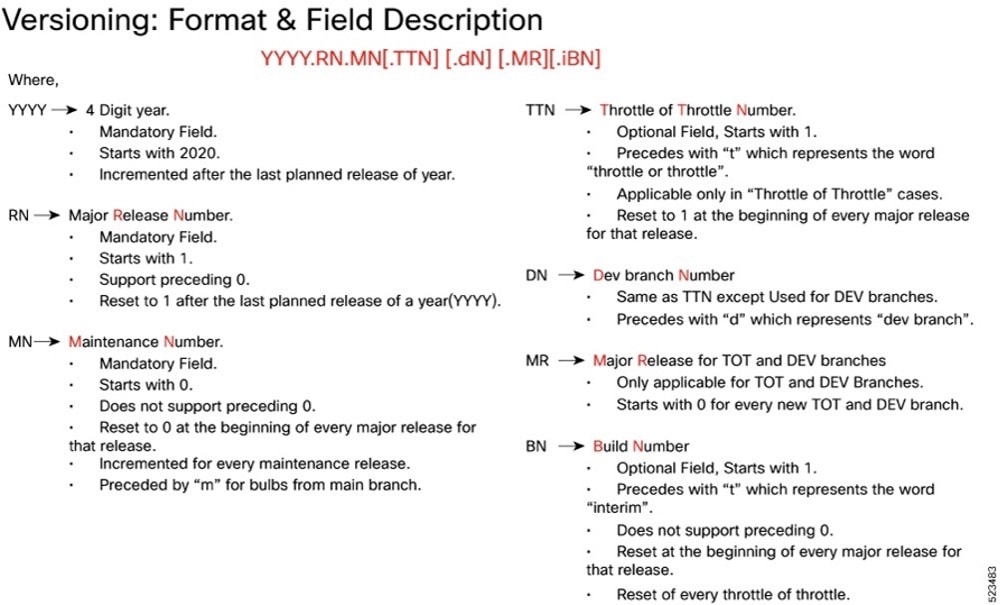
Image checksum information is available through Cisco.com Software Download Details. To find the checksum, hover the mouse pointer over the software image you have downloaded.
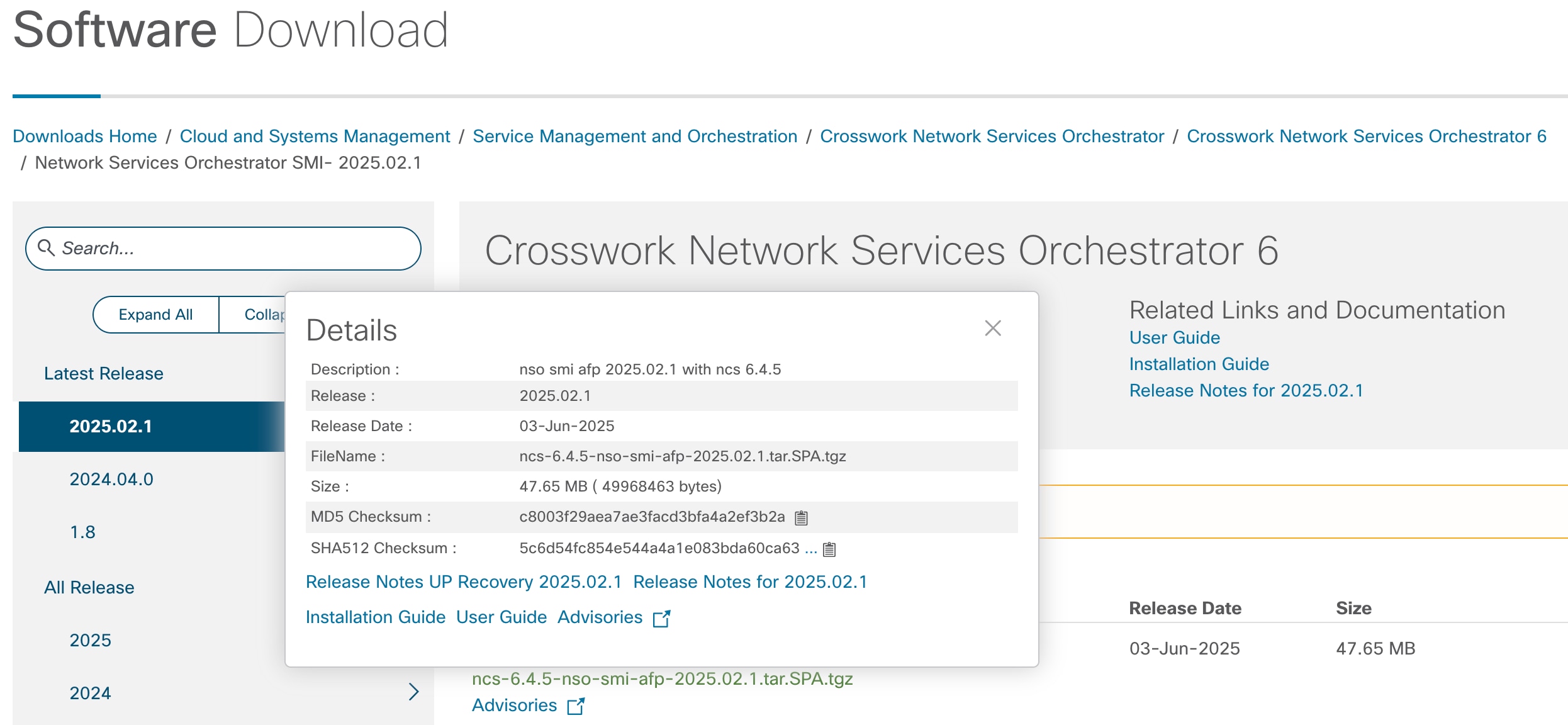
To validate the information, calculate a SHA512 checksum using the information in the following table and verify that it matches the one provided on the software download page.
To calculate a SHA512 checksum on your local desktop, see this table.
Table 9. Checksum calculations per operating system
| Operating System |
SHA512 checksum calculation command examples |
| Microsoft Windows |
Open a command line window and type the following command: > certutil.exe -hashfile <filename.extension> SHA512 |
| Apple MAC |
Open a terminal window and type the following command: $ shasum -a 512 <filename.extension> |
| Linux |
Open a terminal window and type the following command: $ sha512sum <filename.extension> OR $ shasum -a 512 <filename.extension> |
| Note: <filename> is the name of the file. <extension> is the file type extension (for example, .zip or .tgz). |
|
If the SHA512 checksum does not match, we advise you not to attempt upgrading any systems with the corrupted software image. Download the software again and verify the SHA512 checksum again. If there is a constant mismatch, please open a case with the Cisco Technical Assistance Center.
NSO SMI AFP software images are signed via x509 certificates. Please view the .README file packaged with the software for information and instructions on how to validate the certificates.
This table provides key resources and links to the support information and essential documentation for SMI AFP.
Table 10. Related resources and additional information
| Resource |
Link |
| NSO SMI AFP documentation |
|
| Service request and additional information |
Cisco and the Cisco logo are trademarks or registered trademarks of Cisco and/or its affiliates in the U.S. and other countries. To view a list of Cisco trademarks, go to this URL: www.cisco.com/go/trademarks. Third-party trademarks mentioned are the property of their respective owners. The use of the word partner does not imply a partnership relationship between Cisco and any other company. (1110R)
Any Internet Protocol (IP) addresses and phone numbers used in this document are not intended to be actual addresses and phone numbers. Any examples, command display output, network topology diagrams, and other figures included in the document are shown for illustrative purposes only. Any use of actual IP addresses or phone numbers in illustrative content is unintentional and coincidental.
© 2026 Cisco Systems, Inc. All rights reserved.