Release Notes for NSO SMI Automation Function Pack, Release 2026.02.0
Available Languages
Bias-Free Language
The documentation set for this product strives to use bias-free language. For the purposes of this documentation set, bias-free is defined as language that does not imply discrimination based on age, disability, gender, racial identity, ethnic identity, sexual orientation, socioeconomic status, and intersectionality. Exceptions may be present in the documentation due to language that is hardcoded in the user interfaces of the product software, language used based on RFP documentation, or language that is used by a referenced third-party product. Learn more about how Cisco is using Inclusive Language.
- US/Canada 800-553-2447
- Worldwide Support Phone Numbers
- All Tools
 Feedback
 Feedback
NSO SMI Automation Function Pack, 2026.02.0
NSO SMI Automation Function Pack, 2026.02.0
The NSO SMI Automation Function Pack is a collection of multiple packages including the cisco-smi-deployer (previously referred to as the SMI Core Function Pack).
The key highlights of this release include:
· System local time-zone support: This enhancement enables cluster-level time-zone configuration to ensure unified event timestamping. It improves operational consistency, simplifying log analysis and troubleshooting across the entire environment.
· Unified IPA configuration management: This update integrates Identity Management (IPA) directly into the deployment section for both cluster and node levels. It eliminates fragmented configuration requirements, enabling a streamlined and efficient service-driven management workflow.
· Advanced network configuration for MSUP and EPCGW: Provides granular control over SR-IOV, CNI, and MTU settings to optimize network performance and streamline MSUP/EPCGW deployment workflows.
· Automated data masking and encryption: Automates the protection of sensitive information within device templates, ensuring passwords and other critical data are never stored or displayed in plaintext.
· Integrated Longhorn storage management: Streamlines the deployment of Longhorn storage by integrating it into the standard SMI AFP repository and configuration framework.
· Native path-based Ingress support: Provides a more flexible way to manage external access to Cloud-native functions, improving routing efficiency and simplifying network configuration.
For more information on SMI AFP, see the Related resources section.
Release lifecycle milestones
The following table provides EoL milestones for NSO SMI AFP software:
Table 1. EoL milestone information for NSO SMI AFP, 2026.02.0
| Milestone |
Date |
| First Customer Ship (FCS) |
23-Apr-2026 |
| End of Life (EoL) |
23-Apr-2026 |
| End of Software Maintenance (EoSM) |
22-Oct-2027 |
| End of Vulnerability and Security Support (EoVSS) |
22-Oct-2027 |
| Last Date of Support (LDoS) |
31-Oct-2028 |
These milestones and the intervals between them are defined in the Cisco Ultra Cloud Core (UCC) Software Release Lifecycle Product Bulletin available on cisco.com.
This section provides a brief description of the new software features introduced in this release.
Table 2. New software features for SMI AFP, 2026.02.0
| Product impact |
Feature |
Description |
| Software Reliability |
System local time-zone support |
This enhancement allows the configuration of the system's local time-zone at the cluster level through the AFP. This ensures that system logs and events are time-stamped according to the specified local time, improving operational consistency across the CNDP environment. Command introduced: smi deployment <deployment-name> clusters cluster <cluster-name> timezone name <timezone-name> |
| Software Reliability |
Unified IPA configuration management |
The Identity Management (IPA) configuration container is now integrated into the cisco-smi-deployment configuration section, allowing for management at both the cluster and node levels. Commands introduced: · Cluster level: · Node level: |
| Software Reliability |
Enhanced cluster parameter support for MSUP and EPCGW |
AFP supports advanced cluster-level parameters tailored for MSUP and EPCGW deployments. These enhancements allow for direct configuration of SR-IOV, Cilium CNI, and MTU settings within the AFP deployment model, eliminating the need for manual workarounds while optimizing data plane throughput and network efficiency. |
| Software Reliability |
Encryption of sensitive data in device templates |
Support includes an encrypted-value field within device templates to secure sensitive information. When users provide plaintext data in this field, the AFP automatically encrypts it, ensuring that only the encrypted version is stored or displayed. This feature is available for templates at the cluster, node, function, and card levels, providing a secure and streamlined workflow for managing sensitive parameters. |
| Software Reliability |
Longhorn addon integration |
AFP supports Longhorn as an integrated "addon," enabling automated deployment and lifecycle management of persistent storage. This update introduces a new "addon" repository type and allows for granular cluster-level configuration of Longhorn settings, such as data paths and UI access, ensuring a consistent management experience across all system components. |
| Upgrade |
Validation for ConfD 8.x and CDL 2.0 |
SMI AFP has been fully validated to support the upgrade to ConfD 8.x and the migration from CDL 1.12 to 2.0. |
| Software Reliability |
Native path-based Ingress configuration in AFP |
AFP supports the native configuration of a path-based-ingress parameter on function objects. This feature, applicable to Cloud-native functions running on Kubernetes clusters, allows for more granular control over ingress traffic routing. The parameter is a Boolean value, set to false by default, and is configured directly within the AFP function object. Command introduced: smi functions function <function_type> <function_name> path-based-ingress {true | false} Default Setting: Disabled – Configuration required. |
This section provides a brief description of the behavior changes introduced in this release.
Table 3. Behavior changes for SMI AFP, 2026.02.0
| Description |
Behavior changes |
| Decoupling of bind IP address from management IP configurations |
Previous Behavior: When the bind-ip-address was configured at the cluster level, the system automatically used this address to configure the netconf-ip and ssh-ip for the associated network function. New Behavior: The assignment of management IP addresses now follows a specific hierarchy based on the configurations within the function object: · If mgmt-ip is configured in the function object, netconf-ip is set to that mgmt-ip. · If mgmt-ip is not configured AND mgmt-ipv6 is not configured, netconf-ip is set to the bind-ip-address of the cluster. · In all other conditions, netconf-ip is not set. 2. netconf-ipv6 Assignment: · If mgmt-ipv6 is configured on the function object, netconf-ipv6 is set to that mgmt-ipv6. · If mgmt-ipv6 is not configured AND mgmt-ip is not configured, netconf-ipv6 is set to the bind-ipv6-address of the cluster. · In all other conditions, netconf-ipv6 is not set. 3. ssh-ip Assignment: · If ssh-ip is configured in the function object, the configured value is used. · If ssh-ip is not configured, ssh-ip inherits the value of netconf-ip. If netconf-ip is not set, ssh-ip remains unset. 4. ssh-ipv6 Assignment: · If ssh-ipv6 is configured in the function object, the configured value is used. · If ssh-ipv6 is not configured, ssh-ipv6 inherits the value of netconf-ipv6. If netconf-ipv6 is not set, ssh-ipv6 remains unset. Customer Impact: For both existing and new deployments, the reliance on automatic population from the bind-ip-address has been reduced. |
This table lists the resolved issues in this specific software release.
Note: This software release may contain bug fixes first introduced in other releases. To see additional information, click the bug ID to access the Cisco Bug Search Tool. To search for a documented Cisco product issue, type in the browser: <bug_number> site:cisco.com.
Table 4. Resolved issues for SMI AFP, Release 2026.02.0
| Bug ID |
Description |
| NED prompts for unnecessary string value for node-defaults OS IPA enabled. |
|
| NED shows IPA password in clear text under devices template (node-defaults OS IPA password). |
|
| AFP onboarding timeout and callback failure. |
|
| SMI function auto-adds default IPv4 netconf-ip/ssh-ip under ops-centers even when only IPv6 management is configured, with no user control to disable this. |
This table lists the open issues in this specific software release.
Note: This software release may contain open bugs first identified in other releases. To see additional information, click the bug ID to access the Cisco Bug Search Tool. To search for a documented Cisco product issue, type in the browser: <bug_number> site:cisco.com.
Table 5. Open issues for SMI AFP, Release 2026.02.0
| Bug ID |
Description |
| SMI AFP does not support the "ssh-ip" parameter under "nodes" on SMI Cluster Manager. |
|
| SMI AFP needs to provide replay timestamp when subscribing for system-status notifications. |
|
| SMI AFP should probably not receive smi-alert-notification for non-RCM NFs. |
|
| SMI AFP does not allow configuring functions without static NETCONF and SSH ports. |
This section lists compatibility information of the Cisco UCC software products that are verified to work with this version of the NSO SMI AFP software.
Table 6. Compatibility information for SMI AFP, 2026.02.0
| Product |
Supported release |
| CEE |
2026.02.0 |
| PCF |
2026.02.0 |
| RCM |
2026.02.0 |
| SMF+cnSGWc |
2026.02.0 |
| UPF |
21.28.mhx.100306 |
The NSO SMI AFP software is compatible with the following operating systems:
Table 7. Compatible operating systems for NSO SMI AFP software
| OS |
Minimum server configuration |
Version |
| Ubuntu |
CPU: 8 Cores RAM: 64 GB Disk: 250 GB |
18.04 LTS |
| Red Hat |
CPU: 8 Cores RAM: 64 GB Disk: 250 GB |
7.3 (Maipo) |
| CentOS |
CPU: 8 Cores RAM: 64 GB Disk: 250 GB |
7.4 (Core) |
| MacOS |
CPU: 8 Cores RAM: 64 GB Disk: 250 GB |
10.12.6 |
Note the following product, platform, and runtime requirements for this release:
● NSO: 6.4.8.2
● SMI: 2026.02.1.i07
● Python: 3.12.x
This section provides information about the release packages associated with NSO SMI AFP.
Table 8. Software packages for SMI AFP, 2026.02.0
| Software package |
Release |
| ncs-6.4.8.2-nso-smi-afp-2026.02.0.tar.SPA.tgz |
SMI AFP version: 2026.02.0 |
| cisco-etsi-nfvo |
4.7.8 |
| cisco-smi-deployer |
2026.02.0 |
| cisco-smi-dvpc |
2026.02.0 |
| cisco-smi-nc-1.1 |
1.1.2026.02.1.i07 |
| cisco-staros-cli-5.57 |
5.57.5 |
| esc |
5.3.0.94 |
| etsi-sol003-gen-1.13 |
1.13.19 |
| mobility-common |
2026.02.0 |
| mobility-rcm-subscriber |
2026.02.0 |
| mop-automation |
2026.02.0 |
| mop-common |
2026.02.0 |
| openstack-cos-gen-4.2 |
4.2.34 |
| resource-manager |
4.2.10 |
Cloud native product version numbering system
The show helm list command displays detailed information about the version of the cloud native product currently deployed.
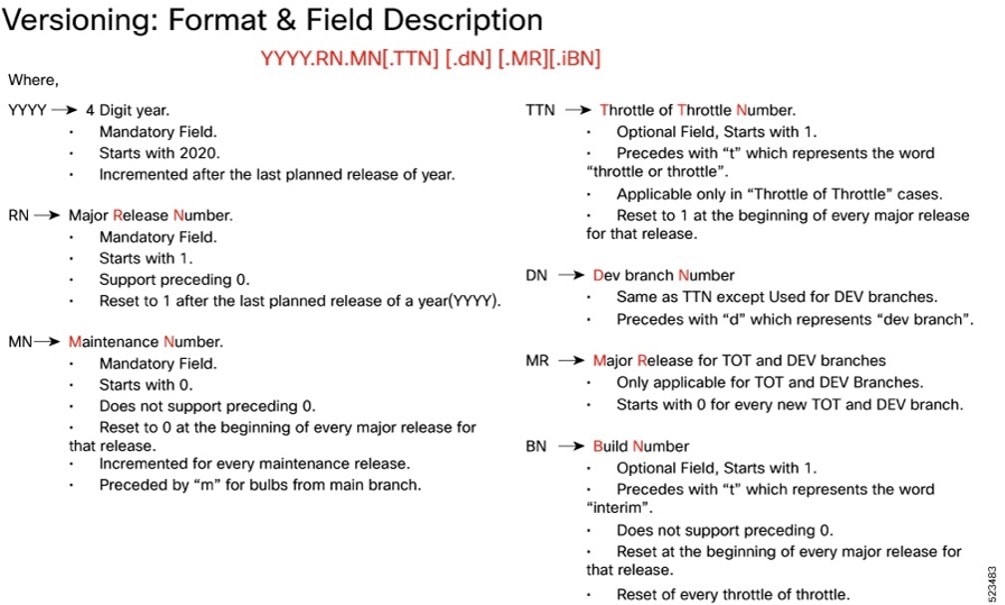
Image checksum information is available through Cisco.com Software Download Details. To find the checksum, hover the mouse pointer over the software image you have downloaded.
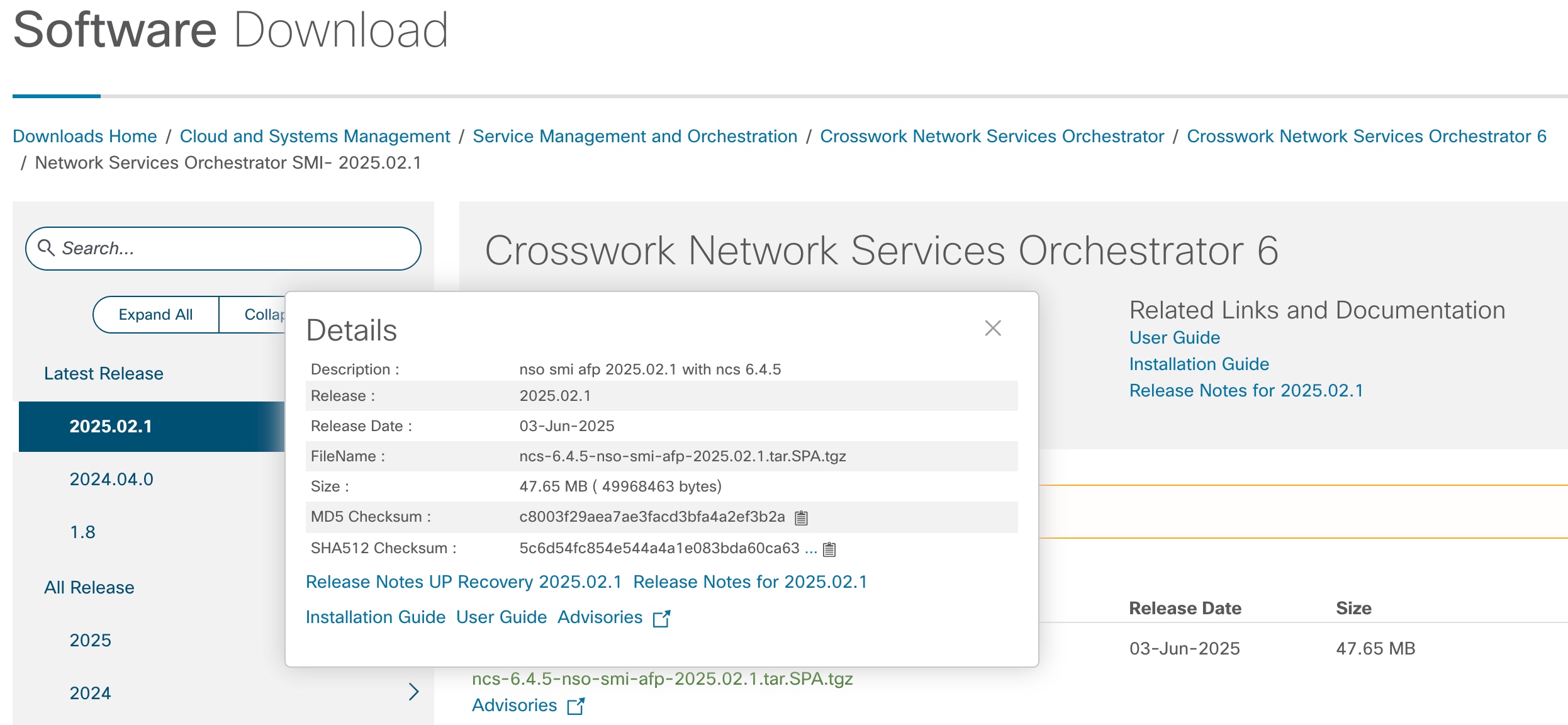
To validate the information, calculate a SHA512 checksum using the information in the following table and verify that it matches the one provided on the software download page.
To calculate a SHA512 checksum on your local desktop, see this table.
Table 9. Checksum calculations per operating system
| Operating System |
SHA512 checksum calculation command examples |
| Microsoft Windows |
Open a command line window and type the following command: > certutil.exe -hashfile <filename.extension> SHA512 |
| Apple MAC |
Open a terminal window and type the following command: $ shasum -a 512 <filename.extension> |
| Linux |
Open a terminal window and type the following command: $ sha512sum <filename.extension> OR $ shasum -a 512 <filename.extension> |
| Note: <filename> is the name of the file. <extension> is the file type extension (for example, .zip or .tgz). |
|
If the SHA512 checksum does not match, we advise you not to attempt upgrading any systems with the corrupted software image. Download the software again and verify the SHA512 checksum again. If there is a constant mismatch, please open a case with the Cisco Technical Assistance Center.
NSO SMI AFP software images are signed via x509 certificates. Please view the .README file packaged with the software for information and instructions on how to validate the certificates.
This table provides key resources and links to the support information and essential documentation for SMI AFP.
Table 10. Related resources and additional information
| Resource |
Link |
| NSO SMI AFP documentation |
|
| Service request and additional information |
Cisco and the Cisco logo are trademarks or registered trademarks of Cisco and/or its affiliates in the U.S. and other countries. To view a list of Cisco trademarks, go to this URL: www.cisco.com/go/trademarks. Third-party trademarks mentioned are the property of their respective owners. The use of the word partner does not imply a partnership relationship between Cisco and any other company. (1110R)
Any Internet Protocol (IP) addresses and phone numbers used in this document are not intended to be actual addresses and phone numbers. Any examples, command display output, network topology diagrams, and other figures included in the document are shown for illustrative purposes only. Any use of actual IP addresses or phone numbers in illustrative content is unintentional and coincidental.
© 2026 Cisco Systems, Inc. All rights reserved.