Install Cisco Crosswork Planning

This chapter explains the processes to install Cisco Crosswork Planning on a single VM or node. In a single VM-based solution, the Cisco Crosswork Platform Infrastructure, Cisco Crosswork Planning infrastructure, and Cisco Crosswork Planning Design and Cisco Crosswork Planning Collector applications are bundled together in a single OVA image. Once you complete the installation procedure, all these components are installed on your machine by default.

  • The Cisco Crosswork Platform Infrastructure is a microservices-based platform and is the foundation required for running Crosswork applications.

  • Cisco Crosswork Planning Collector provides a set of microservices to create, maintain, and archive a model of the current network.

  • Cisco Crosswork Planning Design provides a set of microservices for network planning, designing, and visualization.

  • Cisco Crosswork Planning Infrastructure provides a set of microservices to manage Smart Licensing and Archive services.

This section contains the following topics:

Installation parameters

This section explains the important parameters that you must specify while installing Cisco Crosswork Planning. Ensure that you have relevant information to provide for each of the parameters mentioned in the table.


Attention


Use the latest template file that comes with the Cisco Crosswork Planning build file.


Table 1. General parameters

Parameter

Description

Cw_VM_Image

The name of Crosswork VM image in vCenter.

This value is set as an option when running the installer tool and does not need to be set in the template file.

ClusterIPStack

The IP stack protocol: IPv4

vm_sizes

Create a custom profile as per your requirement. These two profiles are supported in Cisco Crosswork Planning:
vm_sizes = {
  "large" = {
    vcpus = 16,
    cpu_reservation = 24000,
    memory = 128000
  },
  "xlarge" = {
    vcpus = 24,
    cpu_reservation = 32000,
    memory = 256000
  }
}

vcpus

The number of virtual CPU instances allocated for virtual machine.

cpu_reservation

The guaranteed minimum CPU resource allocation for virtual machine.

memory

The amount of memory allocation for virtual machine.

ManagementIPAddress

The Management IP address of the VM (IPv4).

ManagementIPNetmask

The Management IP subnet in dotted decimal format (IPv4).

ManagementIPGateway

The Gateway IP on the Management Network (IPv4). The address must be reachable, otherwise the installation will fail.

ManagementVIP

The Management Virtual IP for the Crosswork VM.

DataIPAddress

The Data IP address of the VM (IPv4).

DataIPNetmask

The Data IP subnet in dotted decimal format (IPv4).

DataIPGateway

The Gateway IP on the Data Network (IPv4). The address must be reachable, otherwise the installation will fail.

DataVIP

The Data Virtual IP for the Crosswork VM.

DNS

The IP address of the DNS server (IPv4). The address must be reachable, otherwise the installation will fail.

NTP

NTP server address or name. The address must be reachable, otherwise the installation will fail.

DomainName

The domain name used for the VM.

CWPassword

Password to log into Cisco Crosswork. When setting up a VM, ensure the password is strong and meets the following criteria:

  • It must be at least eight characters long, and include uppercase and lowercase letters, numbers, and at least one special character.

  • These special characters are not allowed: backslash (\), single quote ('), or double quote (").

  • Avoid using passwords that resemble dictionary words (for example, "Pa55w0rd!") or relatable words. While such passwords may meet the specified criteria, they are considered weak and will be rejected, resulting in a failure to set up the VM.

VMSize

VM size. Cisco Crosswork Planning supports the Large and XLarge profiles.

For more information, see Profile specifications.

VMName

Name of the VM.

NodeType

Type of VM. Choose "Hybrid".

IsSeed

Set to "True".

InitNodeCount

Set the value to 1.

InitMasterCount

Set the value to 1.

bckup_min_percent

Minimum percentage of the data disk space to be used for the size of the backup partition. The default value is 35 (valid range is from 1 to 80).

Use the default value unless recommended otherwise.

Note


The final backup partition size will be calculated dynamically. This parameter defines the minimum.

ThinProvisioned

Set to "false" for production deployments.

SchemaVersion

The configuration Manifest schema version. This indicates the version of the installer to use with this template.

Schema version should map to the version packaged with the sample template in the installer tool on cisco.com. You should always build a new template from the default template provided with the release you are deploying, as template requirements may change from one release to the next.

EnableSkipAutoInstallFeature

Pods marked as "skip auto install" will not be brought up unless explicitly requested by a dependent application or pod. By default, the value is set as "False".

Set the value as "True".

Note

 
  • If left blank, the default value ("False") is automatically selected.

  • This parameter accepts a string value, so be sure to enclose the value in double quotes.

EnforcePodReservations

Enforces minimum resource reservations for the pod. If left blank, the default value ("True") is selected.

This parameter accepts a string value, so be sure to enclose the value in double quotes.

K8sServiceNetwork

The network address for the kubernetes service network. By default, the CIDR range is fixed to '/16'.

K8sPodNetwork

The network address for the kubernetes pod network. By default, the CIDR range is fixed to '/16'.

IgnoreDiagnosticsCheckFailure

Used to set the system response in case of a diagnostic check failure.

If set to "false" (default value), the installation will terminate if the diagnostic check reports an error. If set to "true", the diagnostic check will be ignored, and the installation will continue.

We recommend to select the default value. This parameter accepts a string value, so be sure to enclose the value in double quotes.

Note

 
  • The log files (diagnostic_stdout.log and diagnostic_stderr.log) can be found at /var/log. The result from each diagnostic execution is kept in a file at /home/cw-admin/diagnosis_report.txt.

  • Use diagnostic all command to invoke the diagnostic manually on day N.

  • Use diagnostic history command to view previous test report.

ManagementVIPName

Name of the Management Virtual IP for the Crosswork VM. This is an optional parameter used to reach Crosswork Management VIP via DNS name. If this parameter is used, the corresponding DNS record must exist in the DNS server.

DataVIPName

Name of the Data Virtual IP for the Crosswork VM. This is an optional parameter used to reach Crosswork Data VIP via DNS name. If this parameter is used, the corresponding DNS record must exist in the DNS server.

EnableHardReservations

Determines the enforcement of VM CPU and Memory profile reservations. This is an optional parameter and the default value is true, if not explicitly specified.

If set as true, the VM's resources are provided exclusively. In this state, the installation will fail if there are insufficient CPU cores, memory or CPU cycles.

If set as false (only set for lab installations), the VM's resources are provided on best efforts. In this state, insufficient CPU cores can impact performance or cause installation failure.

corefs

Core partition size (in Giga Bytes). Default value is 18 GB and Maximum value is 1000 GB. You are recommended to use the default value.

ddatafs

Data disk size for the nodes (in Giga Bytes). This is an optional parameter and the default value is 485 (valid range is from 450 to 8000), if not explicitly specified.

Please use the default value unless recommended otherwise.

logfs

Log partition size (in Giga Bytes). Default value is 20 GB and Maximum value is 1000 GB. You are recommended to use the default value.

RamDiskSize

Size of the RAM disk.

This parameter is only used for lab installations (value must be at least 2). When a non-zero value is provided for RamDiskSize, the HSDatastore value is not used.

Timezone

Enter the timezone. Input is a standard IANA time zone (for example, "America/Chicago").

If left blank, the default value (UTC) is selected.

This is an optional parameter.

UseNonDefaultCalicoBgpPort

Determines whether Calico should use the default port 179 for BGP or an alternative port. Set to "True".

Table 2. VMware template parameters

Parameter

Description

VCenterAddress

The vCenter IP or host name.

VCenterUser

The username needed to log into vCenter.

VCenterPassword

The password needed to log into vCenter.

DCname

The name of the Data Center resource to use.

Example: DCname = "cp"

MgmtNetworkName

The name of the vCenter network to attach to the VM's Management interface.

This network must already exist in VMware or the installation will fail.

DataNetworkName

The name of the vCenter network to attach to the VM's Data interface.

This network must already exist in VMware or the installation will fail. However, if this is a single NIC installation using only the Management interface, then you need to specify DataNetworkName = "".

HostedCwVMs

The ID of the VM to be hosted by the ESXi host or resource.

Host

The ESXi host, or ONLY the vCenter VM/resource group name where the VM is to be deployed.

The primary option is to use the host IP or name (all the hosts should be under the data center). If the hosts are under a VM in the data center, only provide the VM name (all hosts within the VM will be picked up).

The subsequent option is to use a resource group. In this case, a full path should be provided.

Example: Host = "Main infrastructure/Resources/00_trial"

Datastore

The datastore name available to be used by this host or resource group.

The primary option is to use host IP or name. The subsequent option is to use a resource group.

Example: Datastore = "SDRS-DCNSOL-prodexsi/bru-netapp-01_FC_Prodesx_ds_15"

HSDatastore

The high speed datastore available for this host or resource group.

If the vCenter server has a separate high-speed datastore, then this should be set to the name of that high-speed data store. If the vCenter server uses only a high-speed datastore, then both Datatore and HSDatastore can be set to the same name.

Note: The use of high-speed datastore is mandatory for Cisco Crosswork Planning.

Table 3. Parameters used in KVM deployment

Parameter

Description

AdminIPv4Address

The Admin IP address of the VM (IPv4).

AdminIPv4Netmask

The Admin IP subnet in dotted decimal format (IPv4).

AwsIamRole

The Amazon Web Services IAM role name for the VIP update.

CWPassword

Password to log into Cisco Crosswork.

Use a strong VM Password (8 characters long, including upper and lower case letters, numbers, and at least one special character). Avoid using passwords similar to dictionary words (for example, "Pa55w0rd!") or relatable words (for example, C!sco123 or Cwork321!). While they satisfy the criteria, such passwords are weak and will be rejected resulting in failure to setup the VM.

CWUsername

Username to log into Cisco Crosswork.

ClusterCaKey

The CA private key. Use the default value (Empty).

ClusterCaPubKey

The CA public key. Use the default value (Empty).

CwInstaller

Set as "False".

DNSv4

The IP address of the DNS server (IPv4). The address must be reachable, otherwise the installation will fail.

DataIPv4Address

The Data IP address of the VM (IPv4).

DataIPv4Gateway

The Gateway IP on the Data Network (IPv4). The address must be reachable, otherwise the installation will fail.

DataIPv4Netmask

The Data IP subnet in dotted decimal format (IPv4).

DataPeerIPs

The Data peer IP addresses (IPv4) for the VM.

DataVIP

The Data Virtual IP for the Crosswork VM.

DataVIPName

Name of the Data Virtual IP for the Crosswork VM. This is an optional parameter used to reach Crosswork Data VIP via DNS name. If this parameter is used, the corresponding DNS record must exist in the DNS server.

Deployment

Enter the deployment type.

Disclaimer

Enter the disclaimer message.

Domain

The domain name used for the VM.

EnableSkipAutoInstallFeature

Any pods marked as skip auto install will not be brought up until a dependent application/pod explicitly asks for it.

Set to "True".

EnforcePodReservations

Enforces minimum resource reservations for the pod. If left blank, the default value ("True") is selected.

InitNodeCount

Set the value to 1.

InitMasterCount

Set the value to 1.

IsSeed

Set to "True".

K8Orch

Enforces minimum resource reservations for the pod. If left blank, the default value ("True") is selected.

K8sPodNetwork

The network address for the kubernetes pod network. By default, the CIDR range is fixed to '/16'.

K8sServiceNetwork

The network address for the kubernetes service network. By default, the CIDR range is fixed to '/16'.

ManagementIPv4Address

The Management IP address of the VM (IPv4).

ManagementIPv4Gateway

The Gateway IP on the Management Network (IPv4). The address must be reachable, otherwise the installation will fail.

ManagementIPv4Netmask

The Management IP subnet in dotted decimal format (IPv4).

ManagementVIP

The Management Virtual IP for the Crosswork VM.

ManagementVIPName

Name of the Management Virtual IP for the Crosswork VM. This is an optional parameter used to reach Crosswork Management VIP via DNS name. If this parameter is used, the corresponding DNS record must exist in the DNS server.

ManagementPeerIPs

The Management peer IP addresses (IPv4) for the VM.

NBIIPv4Address

The NBI IP address of the VM (IPv4).

NBIIPv4Gateway

The Gateway IP on the NBI Network (IPv4). The address must be reachable, otherwise the installation will fail.

NBIIPv4Netmask

The NBI IP subnet in dotted decimal format (IPv4).

NBIVIP

The NBI Virtual IP address (IPv4) for the VM.

NTP

NTP server address or name. The address must be reachable, otherwise the installation will fail.

Timezone

Enter the timezone. Input is a standard IANA time zone (for example, "America/Chicago").

If left blank, the default value (UTC) is selected.

This is an optional parameter.

VMLocation

Location of the VM.

VMType

Type of VM. Choose "Hybrid".

bckup_min_percent

Minimum percentage of the data disk space to be used for the size of the backup partition. The default value is 35 (valid range is from 1 to 80).

Please use the default value unless recommended otherwise.

Note


The final backup partition size will be calculated dynamically. This parameter defines the minimum.

corefs

Core partition size (in Giga Bytes). Default value is 18 GB and Maximum value is 1000 GB. You are recommended to use the default value.

ddatafs

Data disk size for the nodes (in Giga Bytes). This is an optional parameter and the default value is 485 (valid range is from 450 to 8000), if not explicitly specified.

Please use the default value unless recommended otherwise.

logfs

Log partition size (in Giga Bytes). Default value is 20 GB and Maximum value is 1000 GB. You are recommended to use the default value.

ramdisk

Size of the RAM disk.

This parameter is only used for lab installations (value must be at least 2). When a non-zero value is provided for RamDiskSize, the HSDatastore value is not used.

ssd

SSD disk size. This is an optional parameter and the default value is 15.

Please use the default value unless recommended otherwise.

ThinProvisioned

Set to "false" for production deployments.

UseNonDefaultCalicoBgpPort

Determines whether Calico should use the default port 179 for BGP or an alternative port. Set to "True".

bootOptions.efiSecureBootEnabled

Default value is "False".

Guidelines for custom profiles

Ensure that the vm_sizes parameter is set in accordance with your deployment profile. These two profiles are supported in Cisco Crosswork Planning:
vm_sizes = {
  "large" = {
    vcpus = 16,
    cpu_reservation = 24000,
    memory = 128000
  },
  "xlarge" = {
    vcpus = 24,
    cpu_reservation = 32000,
    memory = 256000
  }
}

Install Cisco Crosswork Planning using the vCenter vSphere UI

This topic explains how to deploy Cisco Crosswork Planning on a single VM using the vCenter user interface. This is the recommended method for installing Cisco Crosswork Planning on a single VM.


Note


When you install Cisco Crosswork Planning using the vCenter vSphere UI, you must import the inventory file manually. For details on importing an inventory file, see Import an inventory file.


Procedure


Step 1

Download the latest available Cisco Crosswork Planning image file (*.ova) to your system.

Step 2

With VMware ESXi running, log in to the VMware vSphere Web Client. On the left navigation pane, choose the ESXi host where you want to deploy the VM.

Step 3

In the vSphere UI, go to Host > Configure > Networking > Virtual Switches and select the virtual switch for the Management Network that will be used to access the UI of the VM. In the virtual switch, select Edit > Security, and configure the following DVS port group properties:

  • Set Promiscuous mode as Reject

  • Set MAC address changes as Reject

Confirm the settings and repeat the process for the virtual switch that will be used for the Data Network.

Step 4

Review and confirm that your network settings meet the requirements.

Ensure that the networks that you plan to use for Management network and Data network are connected to the host. Contact your Cisco Customer Experience team for assistance.

Step 5

Choose Actions > Deploy OVF Template.

Caution


The default VMware vCenter deployment timeout is 15 minutes. If vCenter times out during deployment, the resulting VM will not be bootable. To prevent this, we recommend that you document the choices (such as IP address, gateway, DNS server, etc.) so that you can enter the information quickly and avoid any issues with the VMware configuration.

Step 6

The VMware Deploy OVF Template window appears, with the first step, 1 - Select an OVF template, highlighted. Click Choose Files to navigate to the location where you downloaded the OVA image file and select it. Once selected, the file name is displayed in the window.

Step 7

Click Next. The Deploy OVF Template window is refreshed, with 2 - Select a name and folder now highlighted. Enter a name and select the respective data center for the Cisco Crosswork Planning VM you are creating.

We recommend that you include the Cisco Crosswork Planning version and build number in the name, for example: Cisco Crosswork Planning 7.1 Build 152.

Step 8

Click Next. The Deploy OVF Template window is refreshed, with 3 - Select a compute resource highlighted. Select the host for your Cisco Crosswork Planning VM.

Step 9

Click Next. The VMware vCenter Server validates the OVA. Network speed will determine how long validation takes. After the validation is complete, the Deploy OVF Template window is refreshed, with 4 - Review details highlighted.

Step 10

Review the OVF template that you are deploying. Note that this information is gathered from the OVF, and cannot be modified.

Note


Even though the Product field displays as "Cisco Crosswork Network Automation", once the installation procedure completes, the product name is displayed as "Cisco Crosswork Planning" in the application UI. The term "Cisco Crosswork Network Automation" is used universally for all the products under Crosswork portfolio.

Note


You may see alerts regarding the OVF package containing advanced configuration options and/or about trusted certificates. These are common and you can safely select the "Ignore" option.

Step 11

Click Next. The Deploy OVF Template window is refreshed, with 5 - License agreements highlighted. Review the End User License Agreement and if you agree, click the I accept all license agreements checkbox. Otherwise, contact your Cisco Customer Experience team for assistance.

Step 12

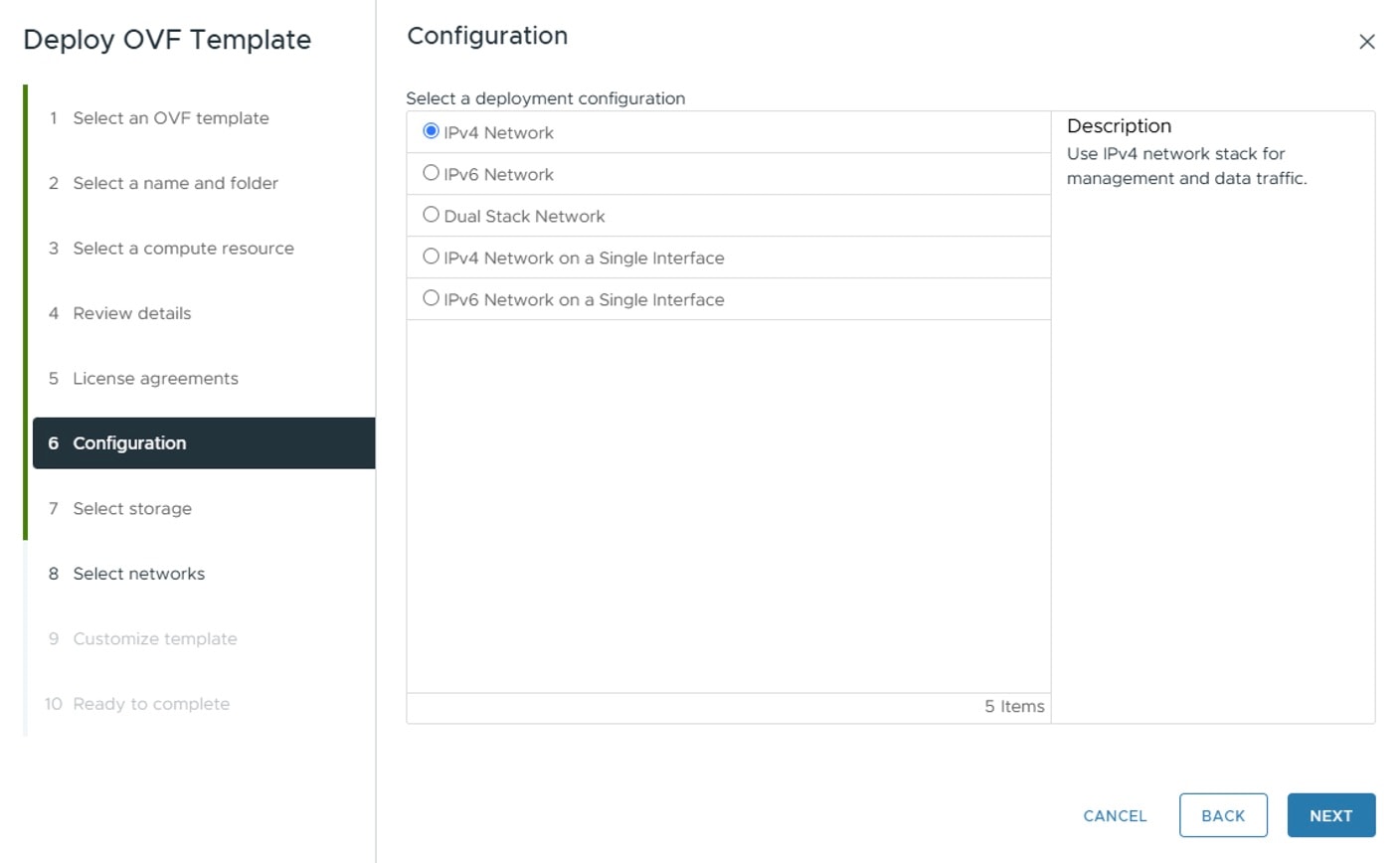
Click Next The Deploy OVF Template window is refreshed, with 6 - Configuration highlighted. Choose the desired deployment configuration.

Important


For Cisco Crosswork Planning deployment, the supported configuration is IPv4 Network using two NICs.

Figure 1. Select a deployment configuration

Step 13

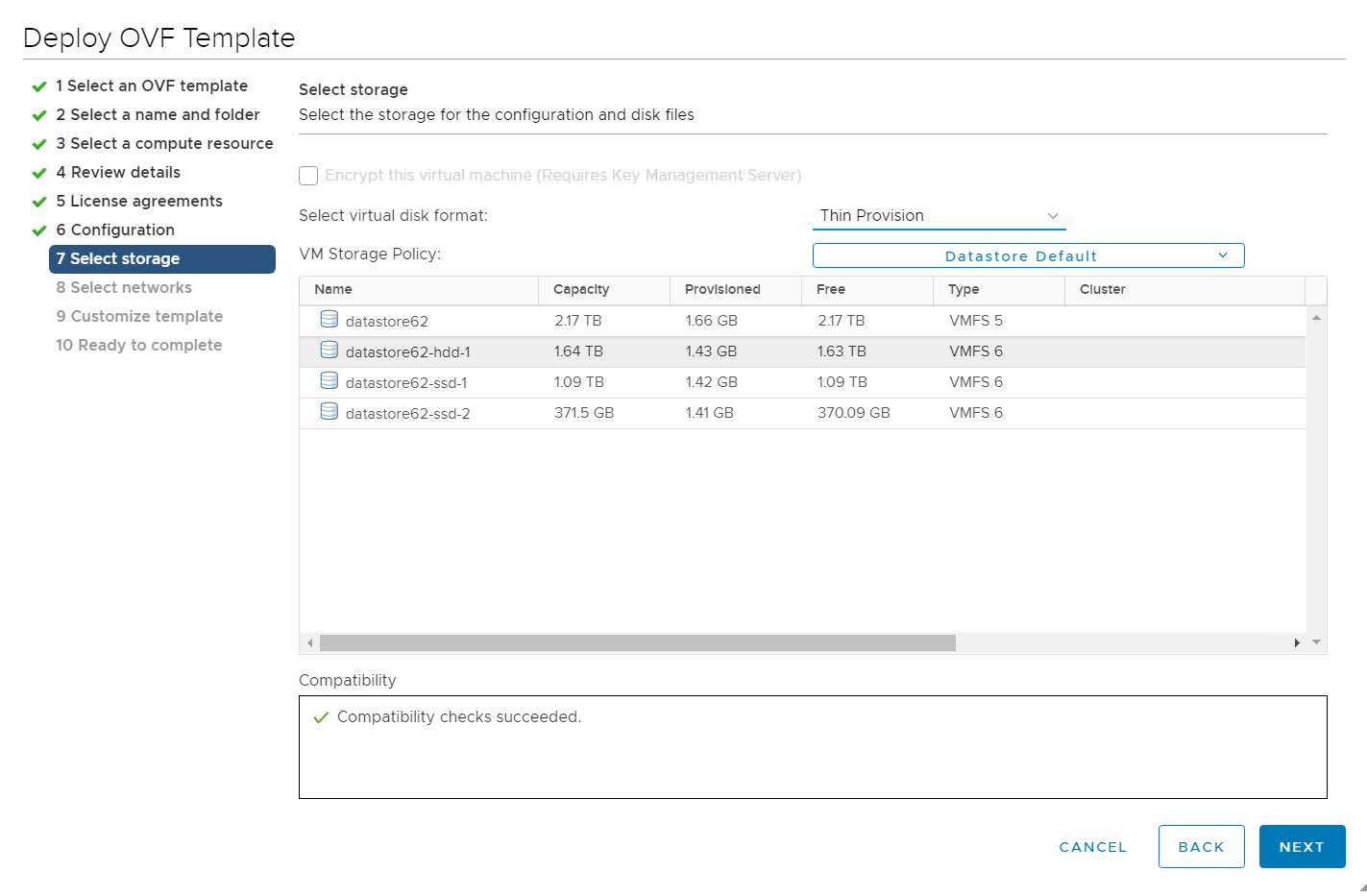
Click Next. The Deploy OVF Template window is refreshed, with 7 - Select Storage highlighted. Choose the relevant option from the Select virtual disk format drop-down list. From the table, choose the datastore you want to use, and review its properties to ensure there is enough available storage.

Figure 2. Select storage

Note


For production deployment, choose the Thick Provision Eager Zeroed option because this will preallocate disk space and provide the best performance. For lab purposes, we recommend the Thin Provision option because it saves disk space.

Step 14

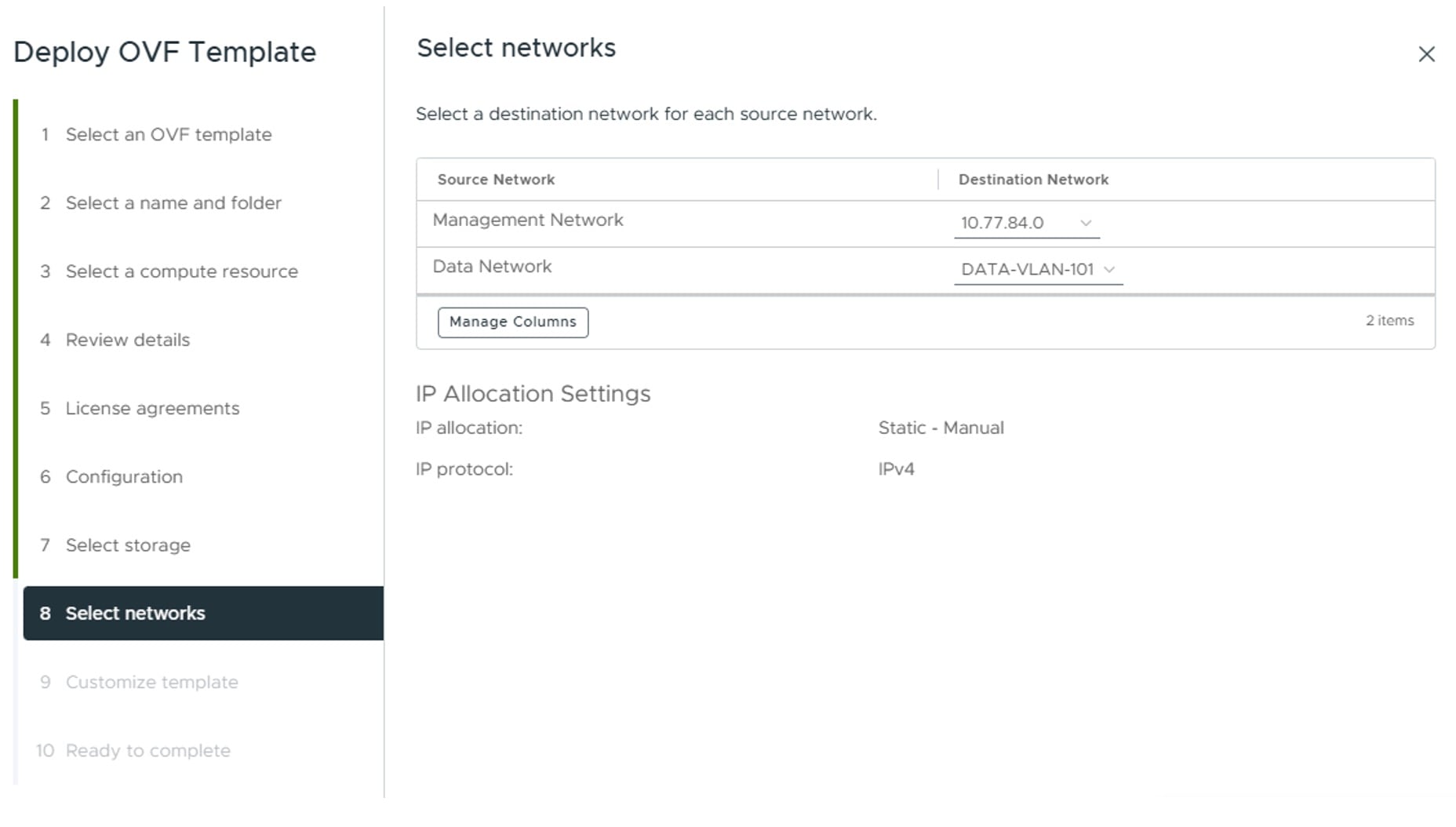
Click Next. The Deploy OVF Template window is refreshed, with 8 - Select networks highlighted. From the Destination Network drop-down list, select the proper networks for the Management Network and the Data Network.

Figure 3. Select networks

Step 15

Click Next. The Deploy OVF Template window is refreshed, with 9 - Customize template highlighted.

  1. Expand the Management Network settings. Provide information for the deployment, such as IP address, IP netmask, IP gateway, virtual IP address, and virtual IP DNS name.

  2. Expand the Data Network settings. Provide information for the deployment, such as IP address, IP netmask, IP gateway, virtual IP address, and virtual IP DNS name.

  3. Expand the Deployment Credentials settings. Enter relevant values for the VM Username and Password.

    Note


    Avoid using passwords that resemble dictionary words (for example, 'Pa55w0rd!') or easily guessable patterns. While such passwords might meet the initial criteria, they are considered weak and could cause the VM setup to fail without a clear explanation. To ensure a successful installation, use a complex password with a minimum of 8 characters that combines uppercase and lowercase letters, numbers, and special characters in a non-predictable sequence.

  4. Expand the DNS and NTP Servers settings. Provide information in these three fields:

    • DNS IP Address: The IP addresses of the DNS servers you want the Cisco Crosswork server to use. Separate multiple IP addresses with spaces.

    • NTP Servers: The IP addresses or host names of the NTP servers you want to use. Separate multiple IPs or host names with spaces.

    • DNS Search Domain: The name of the DNS search domain.

    • Timezone: Enter the timezone details. Default value is UTC.

    Note


    The DNS and NTP servers must be reachable using the network interfaces you have mapped on the host. Otherwise, the configuration of the VM will fail.

  5. Expand Disk Configuration settings. Provide relevant values for these fields:

    • Logfs Disk Size

    • Datafs Disk Size

    • Corefs Partition Size

    • High Speed Disk Size

    • Minimum backup partition size

    The default disk configuration settings should work for most environments. Change the settings only if you are instructed to by the Cisco Customer Experience team.

  6. Expand Crosswork Configuration and enter your legal disclaimer text (you will see this text if you log into the CLI).

  7. Expand Crosswork Cluster Configuration. Provide relevant values for these fields:

    • VM Type: Choose Hybrid.

    • Cluster Seed node: Choose True.

    • Crosswork Management Cluster Virtual IP: Enter virtual IP of the management network.

    • Crosswork Management Cluster Virtual IP Name: Enter DNS hostname of virtual IP interface of the management network.

    • Crosswork Data Cluster Virtual IP: Enter virtual IP of the data network.

    • Crosswork Data Cluster Virtual IP Name: Enter DNS hostname of virtual IP interface of the data network.

    • Initial hybrid node count: Set to 1.

    • Initial total node count: Set to 1.

    • Location of VM: Enter the location of VM.

    • Disclaimer: Enter your legal disclaimer text (you will see this text if you log into the CLI).

    • Installation type: Not applicable to single VM deployment. Do not select any checkbox.

    • Enable Skip Auto Install Feature: Set to True.

    • Auto Action Manifest Definition: Use the default value (Empty).

    • Product specific definition: Enter the product specific definition.

    • Ignore Diagnostics Failure?: Use the default value (False).

Step 16

Click Next. The Deploy OVF Template window is refreshed, with 10 - Ready to Complete highlighted.

Step 17

Review your settings and then click Finish if you are ready to begin deployment. Wait for the deployment to finish before continuing. To check the deployment status:

  1. Open a VMware vCenter client.

  2. In the Recent Tasks tab of the host VM, view the status of the Deploy OVF template and Import OVF package jobs.

Step 18

Once the deployment is completed, right-click on the VM and select Edit Settings. The Edit Settings dialog box is displayed. Under the Virtual Hardware tab, update these attributes based on your profile requirement.

  • CPU: change to 16 (for Large profile) or 24 (for XLarge profile)

  • Memory: change to 125 GB (for Large profile) or 256 GB (for XLarge profile)

For more information, see Profile specifications.

Click OK to save the changes.

Step 19

Power on the Cisco Crosswork Planning VM. To power on, expand the host’s entry, click the Cisco Crosswork Planning VM, and then choose Actions > Power > Power On.

The time taken to create the VM can vary based on the size of your deployment profile and the performance characteristics of your hardware.


Import an inventory file

If you have installed your VM manually using the vCenter UI, you must import an inventory file (.tfvars file) to Cisco Crosswork Planning to reflect the details of your VM. The inventory file contains information about the VM along with the data center parameters. A sample inventory file can be downloaded from the Cisco Crosswork Planning UI.


Note


  • If the manual installation was performed to replace a failed VM, you must delete the original VM after importing the inventory file.

  • Uncomment or set the "OP_Status = 2" parameter while importing the inventory file manually. If you fail to do this, the status of the VM will incorrectly appear as "Initializing" even after the VM becomes functional.


Procedure


Step 1

From the main menu, choose Administration > Crosswork Manager.

Step 2

On the Crosswork Summary tab, click the System summary tile to display the System Summary page.

Step 3

Click > Import inventory to display the Import Inventory page.

Step 4

(Optional) Click Download sample template file to download and edit the template. For more details on the installation parameters, see Installation parameters.

Step 5

Click Browse and select the inventory file.

Step 6

Click Import to complete the operation.


Install Cisco Crosswork Planning via the OVF tool

This topic explains how to deploy Cisco Crosswork Planning on a single VM using the OVF tool. You must modify the list of mandatory and optional parameters in the script as per your requirements and run the OVF tool.

Follow these steps to log in to the Cisco Crosswork Planning VM from SSH.

Before you begin

  • In your vCenter data center, go to Host > Configure > Networking > Virtual Switches and select the virtual switch. In the virtual switch, select Edit > Security, and ensure that these DVS port group properties are as shown.

    • Set Promiscuous mode as Reject

    • Set MAC address changes as Reject

    Confirm the settings and repeat the process for each virtual switch used by Cisco Crosswork Planning.

  • Ensure you are using the OVF tool version 4.4 or higher.

Procedure


Step 1

On the machine where you have the OVF tool installed, use this command to confirm that you have OVF tool version 4.4.

ovftool --version

Step 2

Create the script file (see the example in this step) and provide relevant information as per your target environment, such as IP addresses, gateway, netmask, password, and VCENTER_PATH, and so on.

Note


The file names mentioned in this topic are sample names and may differ from the actual file names on cisco.com.

Important


This is a sample script for deploying an XLarge VM profile. If you need to deploy a Large VM profile, replace the XLarge values with corresponding values for the Large profile.

  • XLarge profile:

    --numberOfCpus:"*"=24 --viCpuResource=:32000: \
    --memorySize:"*"=256000 --viMemoryResource=:256000: \
  • Large profile:
    --numberOfCpus:"*"=16 --viCpuResource=:24000: \
    --memorySize:"*"=128000 --viMemoryResource=:128000: \
cat cp_install.sh
#!/usr/bin/env bash
Host="X.X.X.X"
DM="thick"
DS="DS36"
Deployment="cw_ipv4"
DNSv4="10.10.0.99"
NTP="<NTP-Server>"
Timezone="US/Pacific"
EnforcePodReservations="True"
EnableSkipAutoInstallFeature="True"
Domain="cisco.com"
Disclaimer="ACCESS IS MONITORED"
VM_NAME="cp"
DataNetwork="DataNet"
ManagementNetwork="MgmtNet"
DataIPv4Address="x.x.x.x"
DataIPv4Gateway="x.x.x.x"
DataIPv4Netmask="x.x.x.x"
ManagementIPv4Address="x.x.x.x"
ManagementIPv4Gateway="x.x.x.x"
ManagementIPv4Netmask="x.x.x.x"
K8sServiceNetworkV4="10.75.0.0"
K8sPodNetworkV4="10.225.0.0"
Password="CLI Password"
Username="cw-admin"
ManagementVIP="x.x.x.x"
DataVIP="x.x.x.x"
VMType="Hybrid"
IsSeed="True"
InitNodeCount="1"
InitMasterCount="1"
 
CP_OVA_PATH=$1
 
VCENTER_LOGIN="Administrator%40vsphere%2Elocal:Password%40123%21@x.x.x.x"
VCENTER_PATH="DC1/host"
 
ovftool --version
ovftool --acceptAllEulas --skipManifestCheck --X:injectOvfEnv -ds=$DS \
--numberOfCpus:"*"=24 --viCpuResource=:32000: \
--memorySize:"*"=256000 --viMemoryResource=:256000: \
--diskMode=$DM --overwrite --powerOffTarget --powerOn --noSSLVerify \
--allowExtraConfig \
--deploymentOption=$Deployment \
--prop:"DNSv4=${DNSv4}" \
--prop:"NTP=${NTP}" \
--prop:"Timezone=${Timezone}" \
--prop:"EnforcePodReservations=${EnforcePodReservations}" \
--prop:"EnableSkipAutoInstallFeature=${EnableSkipAutoInstallFeature}" \
--prop:"Domain=${Domain}" \
--prop:"Disclaimer=${Disclaimer}" \
--name=$VM_NAME \
--net:"Data Network=${DataNetwork}" \
--net:"Management Network=${ManagementNetwork}" \
--prop:"DataIPv4Address=${DataIPv4Address}" \
--prop:"DataIPv4Gateway=${DataIPv4Gateway}" \
--prop:"DataIPv4Netmask=${DataIPv4Netmask}" \
--prop:"ManagementIPv4Address=${ManagementIPv4Address}" \
--prop:"ManagementIPv4Gateway=${ManagementIPv4Gateway}" \
--prop:"ManagementIPv4Netmask=${ManagementIPv4Netmask}" \
--prop:"K8sServiceNetworkV4=${K8sServiceNetworkV4}" \
--prop:"K8sPodNetworkV4=${K8sPodNetworkV4}" \
--prop:"CWPassword=${Password}" \
--prop:"CWUsername=${Username}" \
--prop:"ManagementVIP=${ManagementVIP}" \
--prop:"DataVIP=${DataVIP}" \
--prop:"VMType=${VMType}" \
--prop:"IsSeed=${IsSeed}" \
--prop:"InitNodeCount=${InitNodeCount}" \
--prop:"InitMasterCount=${InitMasterCount}" \
$CP_OVA_PATH \
vi://$VCENTER_LOGIN/$VCENTER_PATH/$Host

Step 3

Download the OVA and install scripts from cisco.com. For the purpose of these instructions, we use the file name as crosswork-planning-single-node-deployment-7.1.0-48.

Use this command to extract the files from the tar bundle.

tar -xvzf crosswork-planning-single-node-deployment-7.1.0-48.ova

The OVA is extracted.

cp]# ls -al
-rw-r--r--   1 root root 15416145920 Mar 28 11:12 crosswork-planning-single-node-deployment-7.1.0-48.ova
-rwxr-xr-x   1 root root        2324 Apr  2 14:06 cp_install.sh

Step 4

Use this command to make the scripts executable.

chmod +x {filename}

For example:

chmod +x cp_install.sh

Step 5

Execute the script with the OVA file name as parameter.

cp]# ./cp_install.sh crosswork-planning-single-node-deployment-7.1.0-48.ova
VMware ovftool 4.4.0 (build-16360108)
Opening OVA source: crosswork-planning-single-node-deployment-7.1.0-48.ova
<Removed some output >
Completed successfully

The time taken to create the VM can vary based on the size of your deployment profile and the performance characteristics of your hardware.


Install Cisco Crosswork Planning using the Docker installer tool

This section explains the procedure to install Cisco Crosswork Planning on a single VM using the docker installer tool. This method is less recommended compared to using the vCenter UI or the OVF tool for installation.

Before you begin

  • Make sure that your environment meets all the vCenter requirements specified in VMware settings.

  • The edited template in the /data directory contains sensitive information (VM passwords and the vCenter password). The operator needs to manage access to this content. Store the templates used for your install in a secure environment or edit them to remove the passwords.

  • The install.log, install_tf.log, and .tfstate files will be created during the install and stored in the /data directory. If you encounter any trouble with the installation, provide these files to the Cisco Customer Experience team when opening a case.

  • The install script is safe to run multiple times. Upon error, input parameters can be corrected and re-run. You must remove the install.log, install_tf.log, and tfstate files before each re-run. Running the installer tool multiple times may result in the deletion and re-creation of VMs.

  • In case you are using the same installer tool for multiple Cisco Crosswork Planning installations, it is important to run the tool from different local directories, allowing for the deployment state files to be independent. The simplest way for doing so is to create a local directory for each deployment on the host machine and map each one to the container accordingly.

  • Docker version 19 or higher is required while using the installer tool. For more information on Docker, see https://docs.docker.com/get-docker/.

  • To change the install parameters or to correct the parameters following the installation errors, it is important to distinguish whether the installation has managed to deploy the VM or not. Deployed VM is evidenced by the output of the installer similar to:

    vsphere_virtual_machine.crosswork-IPv4-vm["1"]: Creation complete after 2m50s [id=4214a520-c53f-f29c-80b3-25916e6c297f]
  • If you do not have Python installed, go to python.org and download the version of Python that is appropriate for your workstation.

Known limitations:

  • The vCenter host VMs defined must use the same network names (vSwitch) across all hosts in the data center.

  • The vCenter storage folders or datastores organized under a virtual folder structure, are not supported currently. Ensure that the datastores referenced are not grouped under a folder.

Procedure


Step 1

In your Docker capable machine, create a directory where you will store everything you will use during this installation.

Note


If you are using a Mac, ensure that the directory name is in lower case.

Step 2

Download the installer bundle (.tar.gz file) and the OVA file from cisco.com to the directory you created previously. For the purpose of these instructions, we will use the file name as crosswork-planning-single-node-docker-deployment-7.1.0-48.tar.gz and crosswork-planning-single-node-deployment-7.1.0-48.ova.

Attention


The file names mentioned in this topic are sample names and may differ from the actual file names on cisco.com.

Step 3

Use the following command to unzip the installer bundle:

tar -xvf crosswork-planning-single-node-docker-deployment-7.1.0-48.tar.gz

The contents of the installer bundle is unzipped to a new directory. This new directory will contain the installer image (cw-na-planning-installer-7.1.0-48-releasecnc710-250606.tar.gz) and files necessary to validate the image.

Step 4

Review the contents of the README file to understand everything that is in the package and how it will be validated in the following steps.

Step 5

Use the following command to verify the signature of the installer image:

Note


Use python --version to find out the version of python on your machine.

If you are using Python 2.x, use the following command to validate the file:

python cisco_x509_verify_release.py -e <.cer file> -i <.tar.gz file> -s 
<.tar.gz.signature file> -v dgst -sha512

If you are using Python 3.x, use the following command to validate the file:

python3 cisco_x509_verify_release.py3 -e <.cer file> -i <.tar.gz file> -s 
<.tar.gz.signature file> -v dgst -sha512

Step 6

Use the following command to load the installer image file into your Docker environment.

docker load -i <.tar.gz file>

For example:

docker load -i cw-na-planning-installer-7.1.0-48-releasecnc710-250606.tar.gz

Step 7

Run the docker image list or docker images command to get the "image ID" (which is needed in the next step).

For example:

docker images

The result will be similar to the following: (section we will need is underlined for clarity)

My Machine% docker images
REPOSITORY                        TAG                      IMAGE ID      CREATED    SIZE
dockerhub.cisco.com/cw-installer  cw-na-planning-7.1.0-48-
                                  releasecnc710-250606      4b99cf7d0684 7 days ago 280MB

Note


Pay attention to the "CREATED" time stamp in the table presented when you run docker images, as you might have other images present from the installation of prior releases. If you wish to remove these, the docker image rm {image id} command can be used.

Step 8

Launch the Docker container using the following command:

docker run --rm -it -v `pwd`:/data {image id of the installer container}

To run the image loaded in our example, use the following command:

docker run --rm -it -v `pwd`:/data 4b99cf7d0684

Note

 
  • You do not have to enter that full value. In this case, docker run --rm -it -v `pwd`:/data 4b9 was adequate. Docker requires enough of the image ID to uniquely identify the image you want to use for the installation.

  • In the above command, we are using the backtick (`). Do not use the single quote or apostrophe (') as the meaning to the shell is very different. By using the backtick (recommended), the template file and OVA will be stored in the directory where you are on your local disk when you run the commands, instead of inside the container.

  • CentOS/RHEL hosts, by default, enforce a strict SELinux policy which does not allow the installer container to read from or write to the mounted data volume. On such hosts, run the Docker volume command with the Z option as shown below:

    docker run --rm -it -v `pwd`:/data:Z <remainder of docker options>

Note


The Docker command provided will use the current directory to read the template and the ova files, and to write the log files used during the install. If you encounter either of the following errors you should move the files to a directory where the path is in lowercase (all lowercase, no spaces or other special characters). Then navigate to that directory and rerun the installer.

Error 1:

% docker run --rm -it -v `pwd`:/data 4b9
docker: invalid reference format: repository name must be lowercase.
See 'docker run --help'

Error 2:

docker: Error response from daemon: Mounts denied: approving /Users/Desktop: 
file does not exist
ERRO[0000] error waiting for container: context canceled

Step 9

Navigate to the directory with the VMware template.

cd /opt/installer/deployments/7.1.0/vcentre

Step 10

Copy the template file found under /opt/installer/deployments/7.1.0/vcentre/deployment_template_tfvars to the /data folder using a different name.

For example, cp deployment_template_tfvars /data/deployment.tfvars

For the rest of this procedure, we will use deployment.tfvars in all the examples.

Step 11

Edit the template file located in the /data directory in a text editor, to match your planned deployment (for reference, see Sample manifest template). The <sample manifest template> includes an example that you can reference for proper formatting. The example is more compact due to the removal of descriptive comments.

Step 12

From the /opt/installer directory, run the installer.

./cw-installer.sh install -m /data/<template file name> -o /data/<.ova file>

For example:

./cw-installer.sh install -m /data/deployment.tfvars -o /data/crosswork-planning-single-
node-deployment-7.1.0-48.ova

Step 13

Read, and then enter "yes" if you accept the End User License Agreement (EULA). Otherwise, exit the installer and contact your Cisco representative.

Step 14

Enter "yes" when prompted to confirm the operation.

Note


It is not uncommon to see some warnings like the following during the install:

Warning: Line 119: No space left for device '8' on parent controller '3'.
Warning: Line 114: Unable to parse 'enableMPTSupport' for attribute 'key' on element
'Config'.

If the install process proceeds to a successful conclusion (see sample output below), these warnings can be ignored.

Sample output:

cw_vms = <sensitive>
INFO: Copying day 0 state inventory to CW
INFO: Waiting for deployment status server to startup on 10.90.147.66. 
Elapsed time 0s, retrying in 30s
Crosswork deployment status available at http://{VIP}:30602/d/NK1bwVxGk/crosswork-
deployment-readiness?orgId=1&refresh=10s&theme=dark 
Once deployment is complete login to Crosswork via: https://{VIP}:30603/#/
logincontroller 
INFO: Cw Installer operation complete.

Note


If the installation fails, open a case with Cisco and provide the .log files that were created in the /data directory (and the local directory where you launched the installer Docker container), to Cisco for review. The two most common reasons for the install to fail are: (a) password that is not adequately complex, and (b) errors in the template file. If the installer fails for any errors in the template (for example, mistyped IP address), correct the error and rerun the install script.


Sample manifest template

This section presents the manifest template example for deploying Cisco Crosswork Planning on a single VM.


Cw_VM_Image = "crosswork-planning-single-node-deployment-7.1.0-48"  # Line added automatically by installer.
ClusterIPStack = "IPv4"
ManagementVIP = "172.20.118.86"
ManagementIPNetmask = "255.255.255.0"
ManagementIPGateway = "172.20.118.1"
DataVIP = "172.20.118.87"
DataIPNetmask = "255.255.255.0"
DataIPGateway = "172.20.118.1"
DNS = "172.24.97.250"
DomainName = "cisco.com"
CWPassword = "*****!"
VMSize = "Large"
NTP = "ntp.esl.cisco.com"
Timezone = "Asia/Calcutta"
ThinProvisioned = true
EnableHardReservations = false
EnableSkipAutoInstallFeature = "True"
ManagementVIPName = "CP-svm"
EnforcePodReservations = "True"
ThinProvisioned = "true"
ManagerDataFsSize = "2000"
bckup_min_percent = "35"

CwVMs = {
    "0" = {
        VMName = "vm1",
        ManagementIPAddress = "172.20.118.88",
        DataIPAddress = "172.20.118.89",
        NodeType = "Hybrid"
    }
}
 
VCentreDC = {
    VCentreAddress = "172.20.118.84",
    VCentreUser = "<your-username>",
    VCentrePassword = "******",
    DCname = "cp",
    MgmtNetworkName = "VM Network",
    DataNetworkName = "vlan101",
    VMs = [
        {
            HostedCwVMs = ["0"],
            Host = "172.20.118.81",
            Datastore = "datastore1 (2)",
            HSDatastore = "datastore1 (2)"    
        }
    ]
}
# VM size definitions
UseNonDefaultCalicoBgpPort = "true"
vm_sizes = {
    "large" = {
        vcpus = 16,
        cpu_reservation = 32000,
        memory = 128000
    }
}
SchemaVersion = "7.1.0"

Installing Cisco Crosswork Planning on KVM manually

This section provides the high-level workflow for installing Cisco Crosswork Planning on KVM manually using CLI.

Installation workflow

Follow these steps to complete the installation process.

Table 4. Installation workflow

Step

Action

1. Ensure that your KVM host meets all the requirements.

See KVM host bare metal requirements.

2. Ensure that your environment meets all the installation prerequisites.

See Preliminary checks.

3. Set up and validate the KVM environment.

See Set up and validate KVM on RHEL.

4. Configure network bridges or SRIOV.

See Configure network bridges or SRIOV.

5. Install Cisco Crosswork Planning on KVM.

See Install Cisco Crosswork Planning on KVM using CLI.

Known limitations

If you use a non-root user ID for deployment on bare metal systems, ensure to add this user ID to the sudoers list (/etc/sudoers).

Preliminary checks

This section describes the preliminary checks required for installing Cisco Crosswork Planning on KVM.

  • Virtualization: Ensure that your system supports virtualization. This is typically enabled in the BIOS. To check, use these commands:

    • For Intel CPUs: grep -wo 'vmx' /proc/cpuinfo

    • For AMD CPUs: grep -wo 'svm' /proc/cpuinfo

  • KVM modules: Ensure that the KVM modules are loaded: lsmod | grep kvm

Set up and validate KVM on RHEL

Follow these steps to set up KVM on RHEL.

Procedure


Step 1

Refresh repositories and install updates. This command updates all the packages on your system to their latest versions.

sudo dnf update -y

Step 2

Reboot the system after all the updates are installed successfully.

sudo reboot

Step 3

Install virtualization tools.

  1. Install virt-install and virt-viewer.

    sudo dnf install virt-install virt-viewer -y

    virt-install is a command-line tool for creating virtual machines.

    virt-viewer is a Lightweight UI for interacting with VMs.

  2. Install libvirt virtualization daemon, which is necessary for managing VMs.

    sudo dnf install -y libvirt
  3. Install virt-manager, a graphical interface for managing VMs.

    sudo dnf install virt-manager -y
  4. Install additional virtualization tools for managing VMs.

    sudo dnf install -y virt-top libguestfs-tools

Step 4

Start and enable libvirtd virtualization daemon.

  1. Start the libvirtd daemon.

    sudo systemctl start libvirtd
  2. Enable the libvirtd daemon.

    sudo systemctl enable libvirtd
  3. Verify that the Daemon is running.

    sudo systemctl status libvirtd

Step 5

Add users to the required groups, for example, libvirt and qemu. In the following commands, replace your_username with the actual username.

sudo usermod --append --groups libvirt your_username
sudo usermod --append --groups qemu your_username

Step 6

Ensure that IOMMU is enabled. If it is not enabled, run this command to enable it.

grubby --update-kernel=ALL --args=intel_iommu=on
dmesg | grep -I IOMMU

Step 7

Check IOMMU and validate the setup. Ensure that all checks show as PASS.

virt-host-validate

If the IOMMU check is not PASS, then use the following commands to enable it.

sudo grubby --update-kernel=ALL --args=intel_iommu=on
sudo reboot

Configure network bridges or SRIOV

Crosswork needs the 10G interface for all the data layer communications to support functionality at a scale. You may choose any networking configuration which can provide 10G throughput.

The following sections explain how to enable bridging and SRIOV network configuration.


Note


For KVM deployment, configure either network bridges or SRIOV, but not both.


Configure network bridges

A network bridge acts like a virtual network switch, allowing multiple network interfaces to communicate as if they are on the same physical network.

Follow these steps to configure network bridges.

Procedure

Step 1

Create a new network connection of type "bridge" with the interface name intMgmt and assign it the connection name intMgmt.

nmcli connection add type bridge ifname intMgmt con-name intMgmt

Step 2

Add a new bridge-port connection, associating the physical network interface <interface1> with the previously created bridge intMgmt.

nmcli connection add type bridge-port ifname <interface1> controller intMgmt

Step 3

Assign IP address to the bridge.

nmcli connection modify intMgmt ipv4.addresses <IPv4-address>/<subnet-mask>

Step 4

Bring up the intMgmt network connection.

nmcli connection up intMgmt

Step 5

Create another network bridge connection with the interface name intData and assign it the connection name intData.

nmcli connection add type bridge ifname intData con-name intData

Step 6

Add a bridge-port connection, associating the physical network interface <interface2> with the previously created bridge intData.

nmcli connection add type bridge-port ifname <interface2> controller intData

Step 7

Assign IP address to intData.

nmcli connection modify intData ipv4.addresses <IPv4-address>/<subnet-mask>

Step 8

Bring up the intData network connection.

nmcli connection up intData

Configure SRIOV

SRIOV allows a single physical network interface to be shared among multiple VMs by creating multiple Virtual Functions (VFs).

Follow these steps to configure SRIOV.

Procedure

Step 1

Open the rc.local file in the vi editor.

vi /etc/rc.d/rc.local

Step 2

Set the number of VFs for the network interfaces based on your requirement. For instance, in a Cisco Crosswork Planning single VM installation, you need a minimum of two network interfaces—one for management and the other for data. Two VFs are configured for each interface by default. You may also configure additional VFs for future scalability needs.

For example, to set the number of VFs to 2 for each <interface1> and <interface2>, use these commands. In this example, <interface1> refers to the management interface and <interface2> refers to the data interface.

echo 2 > /sys/class/net/<interface1>/device/sriov_numvfs
echo 2 > /sys/class/net/<interface2>/device/sriov_numvfs

Step 3

Change the permissions of the rc.local file to make it executable.

chmod +x /etc/rc.d/rc.local

Step 4

If any of the interfaces are configured over the VLAN, set the VLAN IDs to the interfaces.

ip link set <interface1> vf 0 vlan <vlanid>
ip link set <interface2> vf 1 vlan <vlanid>

Step 5

Save the changes and reboot the system.

Step 6

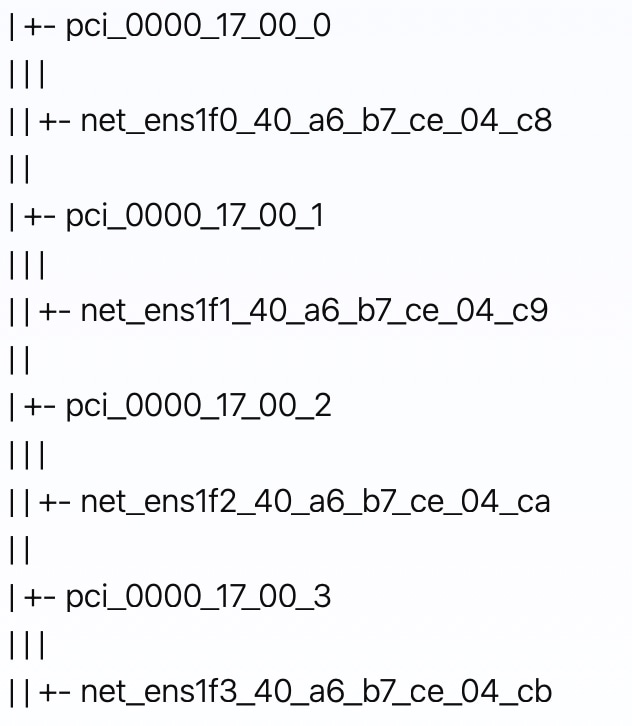
List all the PCI devices for all the virtual functions in a tree format. This is useful for verifying the setup and ensuring that the VFs are correctly recognized by the KVM hypervisor.

virsh nodedev-list --tree

In this procedure, since we set the number of VFs as 2 in Step 2, two VFs for each management interface and data interface are created. As a result, a total of four PCI devices are generated: two for management and two for data.

This PCI device information is used during the installation process with SRIOV (Step 4 of Install Cisco Crosswork Planning on KVM using CLI).


Install Cisco Crosswork Planning on KVM using CLI

Follow these steps to install Cisco Crosswork Planning on KVM manually using CLI.

Before you begin

Ensure that

Procedure


Step 1

As a first step, prepare the config ISO file for Cisco Crosswork Planning.

  1. Update the ovf-env.xml file as per your needs. For reference, see Sample configuration file. For description of installation parameters, see Installation parameters.

    $ cat ovf-env.xml
  2. Generate the ISO file.

    $ mkisofs -R -relaxed-filenames -joliet-long -iso-level 3 -l -o cp1.iso ovf-env.xml

    Note


    In the above command, "cp1" is the host name of the Cisco Crosswork Planning VM.

Step 2

Download the installer bundle (.tar.gz file) from cisco.com and extract it.

tar -xvf crosswork-planning-single-node-deployment-7.1.0-48-qcow2.tar.gz

Step 3

Extract the Cisco Crosswork Planning qcow2 tar file.

tar -xvf cw-na-planning-7.1.0-48-releasecnc710-250606-qcow2.tar.gz

This command creates three qcow2 files:

  • cw-na-planning-7.1.0-48-releasecnc710-250606_rootfs.qcow2

  • cw-na-planning-7.1.0-48-releasecnc710-250606_dockerfs.qcow2

  • cw-na-planning-7.1.0-48-releasecnc710-250606_extrafs.qcow2

Step 4

Navigate to the required installation folder and create three disks.

cd cp1/
qemu-img create -f qcow2 disk3 20G
qemu-img create -f qcow2 disk4 485G
qemu-img create -f qcow2 disk6 15G

Step 5

Install Cisco Crosswork Planning using network bridge or SRIOV.

  • Using network bridges:

    virt-install --boot uefi --boot hd,cdrom --connect qemu:///system --virt-type kvm --name cp1 --ram 128000 --vcpus 16 --os-type linux --disk path=cw-na-planning-7.1.0-48-releasecnc710-250606_rootfs.qcow2,format=qcow2,bus=scsi --disk path=cw-na-planning-7.1.0-48-releasecnc710-250606_dockerfs.qcow2,format=qcow2,bus=scsi --disk path=disk3,format=qcow2,bus=scsi --disk path=disk4,format=qcow2,bus=scsi --disk path=cw-na-planning-7.1.0-48-releasecnc710-250606_extrafs.qcow2,format=qcow2,bus=scsi --disk path=disk6,format=qcow2,bus=scsi --disk=cp1.iso,device=cdrom,bus=scsi --import --network bridge=intMgmt,model=virtio --network bridge=intData,model=virtio --noautoconsole --os-variant ubuntu22.04 --graphics vnc,listen=0.0.0.0
  • Using SRIOV:

    virt-install --boot uefi --boot hd,cdrom --connect qemu:///system --virt-type kvm --name cp1 --ram 128000 --vcpus 16 --cpu host-passthrough --disk path=cw_rootfs.vmdk.qcow2,format=qcow2,bus=scsi --disk path=cw_dockerfs.vmdk.qcow2,format=qcow2,bus=scsi --disk path=disk3,format=qcow2,bus=scsi --disk path=disk4,format=qcow2,bus=scsi --disk path=cw_extrafs.vmdk.qcow2,format=qcow2,bus=scsi --disk path=disk6,format=qcow2,bus=scsi --disk=cp1.iso,device=cdrom,bus=scsi --import --network none --host-device=pci_0000_17_00_0 --host-device=pci_0000_17_00_2 --os-variant ubuntu-lts-latest &


Sample configuration file

This section provides the sample ovf-env.xml file for installing Cisco Crosswork Planning on KVM.

<Environment
     xmlns="http://schemas.dmtf.org/ovf/environment/1"
     xmlns:xsi="http://www.w3.org/2001/XMLSchema-instance"
     xmlns:oe="http://schemas.dmtf.org/ovf/environment/1"
     xmlns:ve="http://www.vmware.com/schema/ovfenv"
     oe:id=""
   <PlatformSection>
      <Kind>KVM</Kind>
      <Locale>en</Locale>
   </PlatformSection>
    <PropertySection>
         <Property oe:key="AdminIPv4Address" oe:value="0.0.0.0"/>
         <Property oe:key="AdminIPv4Netmask" oe:value="0.0.0.0"/>
         <Property oe:key="AwsIamRole" oe:value=""/>
         <Property oe:key="CWPassword" oe:value="Cwork123!"/>
         <Property oe:key="CWUsername" oe:value="cw-admin"/>
         <Property oe:key="ClusterCaKey" oe:value=""/>
         <Property oe:key="ClusterCaPubKey" oe:value=""/>
         <Property oe:key="CwInstaller" oe:value="False"/>
         <Property oe:key="DNSv4" oe:value="72.163.128.140"/>
         <Property oe:key="DataIPv4Address" oe:value="10.225.120.180"/>
         <Property oe:key="DataIPv4Gateway" oe:value="10.225.120.129"/>
         <Property oe:key="DataIPv4Netmask" oe:value="255.255.255.128"/>
         <Property oe:key="DataPeerIPs" oe:value=""/>
         <Property oe:key="DataVIP" oe:value="10.225.120.179"/>
         <Property oe:key="DataVIPName" oe:value=""/>
         <Property oe:key="Deployment" oe:value="cw_ipv4"/>
         <Property oe:key="Disclaimer" oe:value="Cisco Crosswork"/>
         <Property oe:key="Domain" oe:value="cisco.com"/>
         <Property oe:key="EnableSkipAutoInstallFeature" oe:value="True"/>
         <Property oe:key="EnforcePodReservations" oe:value="True"/>
         <Property oe:key="InitMasterCount" oe:value="1"/>
         <Property oe:key="InitNodeCount" oe:value="1"/>
         <Property oe:key="IsSeed" oe:value="True"/>
         <Property oe:key="K8Orch" oe:value=""/>
         <Property oe:key="K8sPodNetworkV4" oe:value="10.244.0.0"/>
         <Property oe:key="K8sServiceNetworkV4" oe:value="10.96.0.0"/>
         <Property oe:key="ManagementIPv4Address" oe:value="10.225.120.111"/>
         <Property oe:key="ManagementIPv4Gateway" oe:value="10.225.120.1"/>
         <Property oe:key="ManagementIPv4Netmask" oe:value="255.255.255.128"/>
         <Property oe:key="ManagementVIP" oe:value="10.225.120.56"/>
         <Property oe:key="ManagementVIPName" oe:value=""/>
         <Property oe:key="ManagerPeerIPs" oe:value=""/>
         <Property oe:key="NBIIPv4Address" oe:value="0.0.0.0"/>
         <Property oe:key="NBIIPv4Gateway" oe:value="0.0.0.0"/>
         <Property oe:key="NBIIPv4Netmask" oe:value="0.0.0.0"/>
         <Property oe:key="NBIVIP" oe:value="NBI VIP address"/>
         <Property oe:key="NTP" oe:value="ntp.esl.cisco.com"/>
         <Property oe:key="Timezone" oe:value="US/Pacific"/>
         <Property oe:key="VMLocation" oe:value="default"/>
         <Property oe:key="VMType" oe:value="Hybrid"/>
         <Property oe:key="bckup_min_percent" oe:value="35"/>
         <Property oe:key="corefs" oe:value="18"/>
         <Property oe:key="ddatafs" oe:value="485"/>
         <Property oe:key="logfs" oe:value="20"/>
         <Property oe:key="ramdisk" oe:value="0"/>
         <Property oe:key="ssd" oe:value="15"/>
         <Property oe:key="ThinProvisioned" oe:value="true"/>
         <Property oe:key="UseNonDefaultCalicoBgpPort" oe:value="True"/>
         <Property oe:key="bootOptions.efiSecureBootEnabled" oe:value="False"/>
   </PropertySection>
</Environment>

Manage Cisco Crosswork Planning VM on KVM

This section provides the commands to manage the Cisco Crosswork Planning VM on KVM. In these examples, "cp1" is the host name of Cisco Crosswork Planning VM.

  • To access the Cisco Crosswork Planning VM console from KVM:

    [root@KVM-41 cp1]# virsh console cp1
  • To see the current status of Cisco Crosswork Planning in KVM:

    [root@KVM-41 cp1]# virsh list --all
    Id   Name   State
    ----------------------
    2    cp1    running
  • To shutdown the Cisco Crosswork Planning VM:

    [root@KVM-41 cp1]# virsh shutdown cp1
    Domain 'cp1' is being shutdown
     
    [root@KVM-41 cp1]# virsh list --all
    Id   Name      State
    --------------------------
    -    cp1   shut off
  • To restart the Cisco Crosswork Planning VM:

    [root@KVM-41 ~]# virsh start cp1
    Domain 'cp1' started
     
    [root@KVM-41 cp1]# virsh list --all
    Id   Name   State
    ----------------------
    1    cp1    running
  • To set the Cisco Crosswork Planning VM to auto-start, that is, to boot up automatically in case of power-reset of KVM:

    [root@KVM-41 ~]# virsh autostart cp1
    
    Domain 'cp1' marked as autostarted

Uninstall the Cisco Crosswork Planning VM in KVM deployment

This section describes how to uninstall the Cisco Crosswork Planning VM in KVM deployment.

Procedure

Step 1

Use the virsh destroy command to stop the Cisco Crosswork Planning VM forcefully.

Example:
[root@KVM-41 cp1]# virsh destroy cp1
Domain 'cp1' destroyed

Step 2

Use the virsh undefine command to remove the configuration of the Cisco Crosswork Planning VM.

Example:
[root@KVM-41 cp1]# virsh undefine --nvram cp1
Domain 'cp1' has been undefined

Diagnostic assessment

This topic explains the diagnostic checks performed during the Cisco Crosswork Planning deployment.

During deployment, the system checks the VM datastore(s) for disk latency and IOPS. If a fetched value is lower than the recommended value for any parameter, the diagnostic assessment reports a failure. You can then choose to either ignore the report and proceed with the installation, accepting the risk of failure, or update your VM resources to meet the required criteria and retry installation.

The outcome of the diagnostic assessment depends on the value set for the IgnoreDiagnosticsCheckFailure parameter:

  • If set to "false" (default value), the installation will be blocked if the diagnostic check reports an error.

  • If set to "true", the diagnostic check result is ignored, and the installation will proceed.

Diagnostic failure scenario

This is a breakdown of the failure scenario for the diagnostic assessment when set to its default value, (IgnoreDiagnosticsCheckFailure = false).

In this scenario, the fetched value is lower than the recommended value (such as IOPS < 4000), resulting in a diagnostic assessment failure.

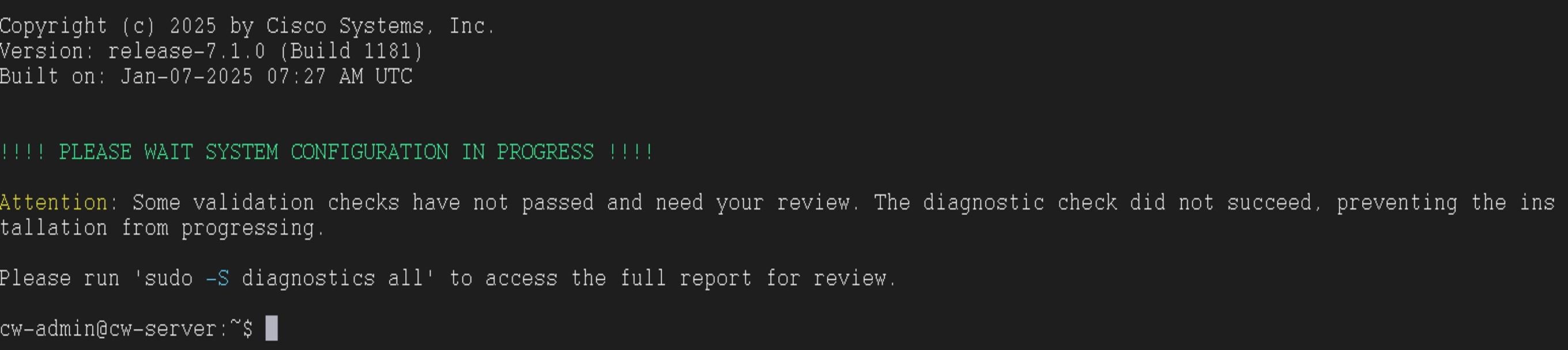
  1. A banner message is displayed to notify you about the failure.

    Figure 4. Sample diagnostic failure report
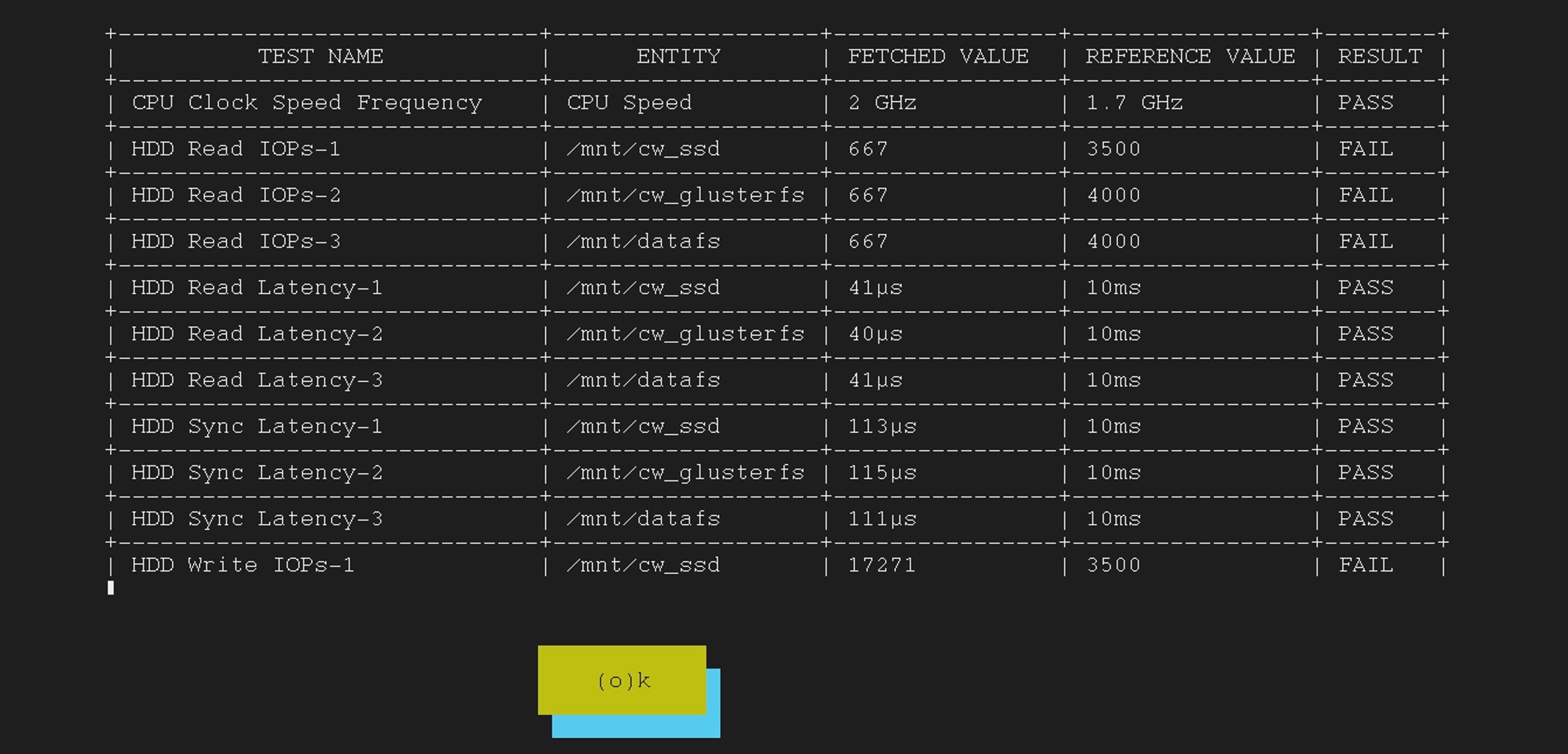
  2. You can use diagnostics all and diagnostics history commands to view the detailed diagnostic report.

    Figure 5. Diagnostic all output
  3. To ignore the failure report and proceed with the installation, you must change the value of the IgnoreDiagnosticsCheckFailure parameter.

    1. Log in to the vCenter UI.

    2. Power off the VM reporting the failure. Right-click on the VM, and click Power > Power Off. Click Yes in the confirmation pop-up window.

    3. Click on the Configure tab and click vApp Options in the Settings drop-down menu.

    4. Under Properties, select the IgnoreDiagnosticsCheckFailure parameter and click Set Value.

      Figure 6. Select parameter
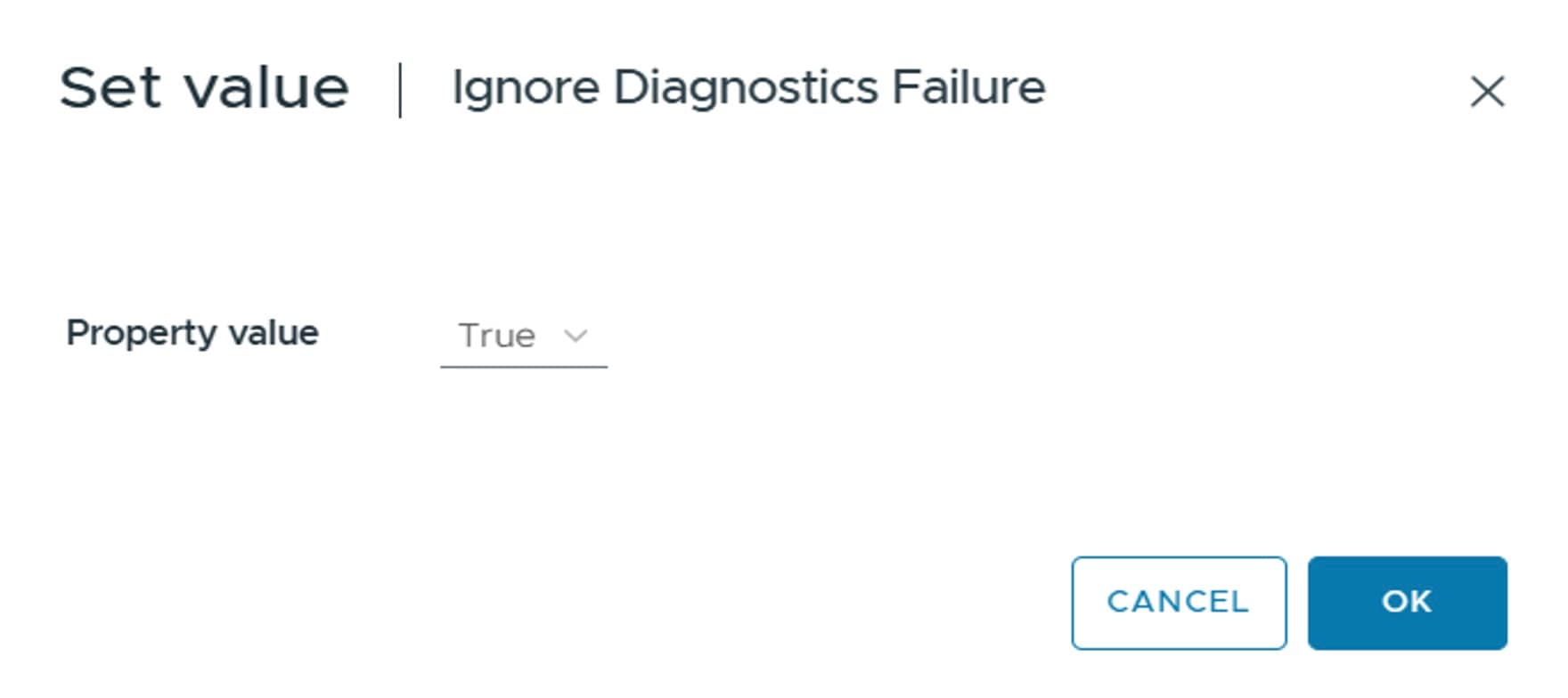
    5. Set the Property value as True. Click OK to confirm.

      Figure 7. Set value
    6. Power on the VM. Right-click on the VM, and click Power > Power On. Click Yes in the confirmation pop-up window.

  4. (Optional) If the diagnostic check reports failures and the installation is blocked, you can also proceed with a full installation using the skip option (-s) command in the Docker installer.

    Example:

    ./cw-installer.sh install -p -m /data/<template file name> -o /data/<.ova file> -y -s
  5. After IgnoreDiagnosticsCheckFailure is set to True, a banner message appears to inform you that the diagnostic check failure will be skipped.

    Figure 8. Skip install check banner message

    Important


    If the parameter value is lower than suboptimal (IOPS < 1000), the installation will fail irrespective of your choice to ignore the diagnostic check.


Diagnostic success scenario

The diagnostic check is successful and the installation will proceed without requiring any user action.

Backend checks

This backend check is used to verify the resource values of the VM:

  • Directory IOPS:

    fio --randrepeat=1  --fdatasync=1 --ioengine=sync --name=test --rw=rw 
    --filename=<DIR>/mytest --bs=8k --size=600M --runtime=10 --time_based=1
    

    Replace <DIR> with /mnt/cw_ssd/, /mnt/datafs, or /mnt/cw_glusterfs, as appropriate.

Log in to Cisco Crosswork Planning UI

After installing Cisco Crosswork Planning, you can access the Cisco Crosswork Planning UI by using the following steps.

Cisco Crosswork Planning is a browser-based application. For the supported browser versions, see Supported web browsers.

Procedure


Step 1

Open a web browser and enter:

https://<Crosswork Management Network Virtual IP (IPv4)>:30603/

When you access Cisco Crosswork Planning from your browser for the first time, some browsers display a warning that the site is untrusted. When this happens, follow the prompts to add a security exception and download the self-signed certificate from the server. After you do this, the browser accepts the Cisco Crosswork Planning server as a trusted site in all subsequent logins.

Step 2

Log in to Cisco Crosswork Planning.

  1. Enter the administrator username admin and the default password admin.

  2. Click Login.

  3. When prompted to change the administrator's default password, enter the new password in the fields provided and then click OK.

    Note


    Use a strong VM password (minimum eight characters long, including upper and lower case letters, numbers, and one special character). Avoid using passwords similar to dictionary words (for example, "Pa55w0rd!") or relatable words.

The Crosswork Manager page appears.

Step 3

Click the Crosswork Health tab, and click the Crosswork Platform Infrastructure tab to view the health status of the microservices running on Cisco Crosswork Planning.

Step 4

(Optional) Change the name assigned to the admin account to something more relevant.

Step 5

In case of manual installation: After logging into the UI, ensure the VM is healthy. Download the inventory sample (.tfvars file) from the Cisco Crosswork Planning UI and update it with information about the VM, along with the data center parameters. Then, import the file back into the Cisco Crosswork Planning UI. For more information, see Import an inventory file.