Data I/O for MOP actions
Prepare MOP actions to accept input from the system and return structured outputs. This enables you to track execution success.
Organize the input data into three primary sections. Each section provides information for a network operation.
-
CWM Solutions Job Data (app-data): The product framework provides data, including device details, software image selections, and required system metadata,
such as jobId, runId, and actionTimeout.
-
MOP Action-Specific Data (input-key): Enter commands or parameters using the Job Intent form when prompted during MOP job creation.
-
Stash and Dependencies: When you execute a MOP action in multiple stages (such as pre and post stages), use data from previous stages. The workflow stores output from the pre stage as a stash and automatically includes it in the input for the post stage so you can use results from the pre stage.
-
Stash: Results from a previous stage of the same action. For example, the system can use data captured in a pre stage during a post stage.
-
Passthrough: Data modified by a previous action in the MOP sequence and passed forward by the app-data object.
Before processing data, identify the execution scope of the MOP action using the executionMode field. This determines how the device data is structured in the input.
-
Per-Device (mode 1): The workflow runs for each device. The input includes a single device object.
-
Fleet-Wide (mode 2): The workflow runs once for a group of devices. The input includes a devices object with a list of all targeted resources.
Include these fields in the app-data object for every MOP action:
-
jobId or runId: Unique identifiers for execution tracking within CWM.
-
actionTimeout: The workflow's system-calculated timeout value.
-
executionMode: Integer (1 for Per-Device, 2 for Fleet-Wide).
-
stage: The current MOP stage (pre, distribute, activate, commit, or post).
Return a JSON object with these required fields to ensure correct processing and display of execution results in the Job Details
UI:
-
status: The UI uses this value for status reporting. Supported values are success, failed, warning, or terminated.
-
message: Enter a user-readable description of the action outcome.
-
processedResource: List the device UUIDs or resources handled by the action.
-
app-data: Return the modified or original app-data object to continue the workflow for further MOP actions.
Example 1: output structure
{
  "status": <status>,
  "message": <description_of_outcome>,
  "app-data": { ... },
  "processedResource": [<device_uuid>],
  "stash": { ... }
}
In the example 2, the MOP action is a disk-space pre stage check. There is no workflow-specific input data required beyond data injected directly by the product framework itself:
the image and device information, the name of the resource, and the MOP stage. All of this is either specified by the user
when setting up the MOP job, or specified in the MOP action itself.
Example 2: MOP Action with framework-only data
{
  "app-data": {
    "data": {
      "imageSize": 1095680,
      "imageVersion": "7.8.2",
      "softwareImages": [
        "ncs540l-7.8.2.CSCwe80628.tar"
      ]
    },
    "device": {
      "host": "NCS540-RON-TSDN.cisco.com",
      "ip": "172.22.141.249",
      "name": "NCS540-RON-TSDN",
      "productSeries": "Cisco Network Convergence System 540L Series Routers",
      "productType": "Cisco NCS 540-24Q8L2DD-SYS-A Router",
      "softwareType": "IOS XR",
      "softwareVersion": "7.8.2",
      "uuid": "fde8fd5d-98cf-4326-bf83-ef319c82223b",
      "vendor": "Cisco Systems"
    },
    "resource": "nso-217"
  },
  "phase": "",
  "stage": "pre"
}
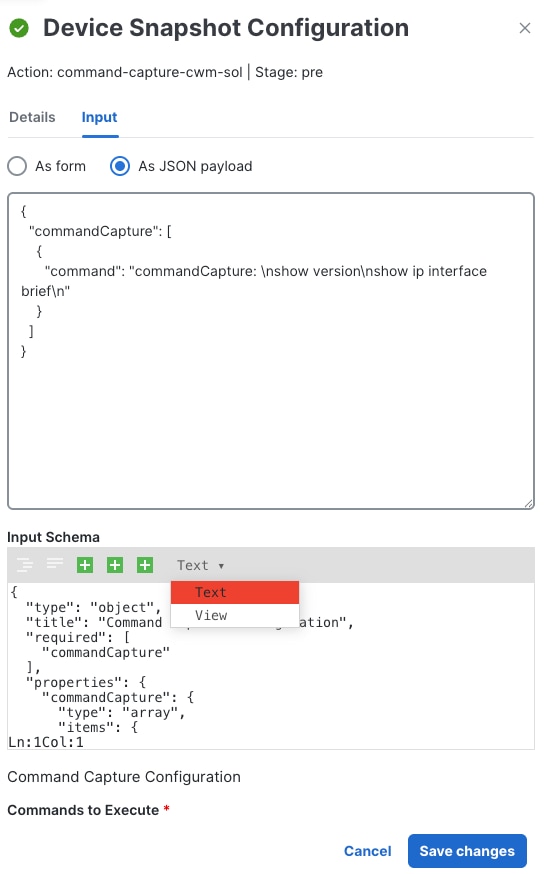
In example 3, the MOP action is a pre stage check on the operational status of the router, which requires as input a couple of commands specified by the user:
show version and show ip interface brief. All other the details about the device on which these two commands are to be executed came from the product framework, as
in Figure 2.
Example 3: MOP Action with user commands
{
  "app-data": {
    "data": {
      "imageSize": 1095680,
      "imageVersion": "7.8.2",
      "softwareImages": [
        "ncs540l-7.8.2.CSCwe80628.tar"
      ]
    },
    "device": {
      "host": "NCS540-RON-TSDN.cisco.com",
      "ip": "172.22.141.249",
      "name": "NCS540-RON-TSDN",
      "productSeries": "Cisco Network Convergence System 540L Series Routers",
      "productType": "Cisco NCS 540-24Q8L2DD-SYS-A Router",
      "softwareType": "IOS XR",
      "softwareVersion": "7.8.2",
      "uuid": "fde8fd5d-98cf-4326-bf83-ef319c82223b",
      "vendor": "Cisco Systems"
    },
    "resource": "nso-217"
},
"commandCapture": [
    "show version",
    "show ip interface brief"
 ],
  "phase": "",
  "stage": "pre"
}
Example 4 shows a MOP action executed in the pre stage, with the idea that the stash data saved during the pre stage will be provided to the workflow job of the post stage. In this example, command-capture is run in both the pre and post stages, and the details stored during the pre stage for the device are injected as stash data by the product framework.
Example 4: MOP Action with stashed pre phase output
{
  "app-data": {
    "data": {
      "imageSize": 1504059392,
      "imageVersion": "7.9.2",
      "softwareImages": [
        "8000-x64-7.9.2.iso"
      ]
    },
    "device": {
      "host": "PE1-UI",
      "ip": "172.20.221.183",
      "name": "PE1-UI",
      "productSeries": "Cisco 8000 Series Routers",
      "productType": "Cisco 8201 Router",
      "softwareType": "IOS XR",
      "softwareVersion": "7.9.2",
      "uuid": "a068190e-31cb-4b21-95fe-306768921a62",
      "vendor": "Cisco Systems"
    },
    "resource": "nso_resource"
  },
  "commandCapture": [
    {
      "command": "show version"
    },
    {
      "command": "show ip interface brief"
    }
  ],
  "phase": "",
  "stage": "post",
  "stash" : [
      "\r\n\rMon Aug  4 10:39:38.489 UTC\r\nCisco IOS XR Software, Version 7.9.2 LNT
\r\nCopyright (c) 2013-2023 by Cisco Systems, Inc.
\r\n\r\nBuild Information:\r\n Built By     : xxxxxxxxx
\r\n Built On     : Thu Jun 29 03:07:05 UTC 2023
\r\n Build Host   : bdb7eb8f4e82\r\n Workspace    : /auto/srcarchive16/prod/7.9.2/8000/ws
\r\n Version      : 7.9.2
\r\n Label        : 7.9.2
\r\n\r\ncisco 8000 (VXR)\r\ncisco 8201-SYS (VXR) processor with 32GB of memory
\r\nPE1-UI uptime is 16 weeks, 4 days, 35 minutes
\r\nCisco 8201 1RU Chassis\r\n\r\nRP/0/RP0/CPU0:PE1-UI#;
command: show version",
      "\r\n\rMon Aug  4 10:39:38.473 UTC\r\n
\r\nInterface                      IP-Address      Status          Protocol Vrf-Name
\r\nLoopback0                      150.1.1.1       Up              Up       default
\r\nFourHundredGigE0/0/0/0         10.1.13.1       Up              Up       paris
\r\nFourHundredGigE0/0/0/1         150.1.12.1      Up              Up       default
\r\nFourHundredGigE0/0/0/2         unassigned      Shutdown        Down     default
\r\nFourHundredGigE0/0/0/3         unassigned      Shutdown        Down     default
...
\r\nFourHundredGigE0/0/0/23        unassigned      Shutdown        Down     default
\r\nHundredGigE0/0/0/24            unassigned      Shutdown        Down     default
\r\nHundredGigE0/0/0/25            unassigned      Shutdown        Down     default
\r\nHundredGigE0/0/0/26            unassigned      Shutdown        Down     default
...
\r\nHundredGigE0/0/0/35            unassigned      Shutdown        Down     default
\r\nMgmtEth0/RP0/CPU0/0            192.168.122.58  Up              Up       MGMT
\r\nRP/0/RP0/CPU0:PE1-UI#; command: show ip interface brief"
    ],
}
In example 5, when the MOP action is executed in the pre and post stages, the stash data saved during the pre stage will be provided to the workflow job of the post stage. In this example, a package summary check is run in both the pre and post stages, and the details stored during the pre stage for the device are injected as stash data by the product framework.
Example 5: MOP Action with package summary
{
  "app-data": {
    "data": {
      "imageSize": 1504059392,
      "imageVersion": "7.9.2",
      "softwareImages": [
        "8000-x64-7.9.2.iso"
      ]
    },
    "device": {
      "host": "PE1-UI",
      "ip": "172.20.221.183",
      "name": "PE1-UI",
      "productSeries": "Cisco 8000 Series Routers",
      "productType": "Cisco 8201 Router",
      "softwareType": "IOS XR",
      "softwareVersion": "7.9.2",
      "uuid": "a068190e-31cb-4b21-95fe-306768921a62",
      "vendor": "Cisco Systems"
    },
    "resource": "nso_resource"
  },
  "phase": "",
  "stage": "post",
  "stash": {
    "activated": [
      {
        "Package": "xr-8000-l2mcast",
        "Version": "7.9.2v1.0.0-1"
      },
      {
        "Package": "xr-8000-mcast",
        "Version": "7.9.2v1.0.0-1"
      },
...
      {
        "Package": "xr-track",
        "Version": "7.9.2v1.0.0-1"
      },
      {
        "Package": "xr-8000-fpd",
        "Version": "7.9.2v1.0.1-1"
      }
    ],
    "committed": [
      {
        "Package": "xr-8000-l2mcast",
        "Version": "7.9.2v1.0.0-1"
      },
      {
        "Package": "xr-8000-mcast",
        "Version": "7.9.2v1.0.0-1"
      },
...
      {
        "Package": "xr-track",
        "Version": "7.9.2v1.0.0-1"
      },
      {
        "Package": "xr-8000-fpd",
        "Version": "7.9.2v1.0.1-1"
      }
    ]
  },
}
For examples 6 and 7, consider a simple MOP action that performs only a validation check on a device and appears to have no
"stash" data output, only a status message:
Example 6: output without stash data
{
  "Data": {
    "message": "Device disk check passed.",
    "status": "success"
  }
}
The stash data is useful in two ways. First, it lets users see detailed information about each MOP action that ran during
the CWM Solutions job. In the job execution view, when someone clicks on a specific MOP action, the stash shows the actual
device configuration or any relevant data used at that step. This gives more context than just a message or status, so users
can see exactly what data was involved in the decision.
Second, if that same MOP action is run again in a later stage (such as the post stage), the workflow automatically passes the pre stash data as input for the post stage. This means the workflow can re-use earlier results for post-processing, keeping things connected and efficient.
Example 7: output with stash data
{
  "Data": {
    "message": "Interface pre-upgrade check is successful.",
    "stash": [
      {
        "AdminDown": "0",
        "Down": "0",
        "InterfaceType": "IFT_ETHERNET",
        "Total": "1",
        "Up": "1"
      },
      {
        "AdminDown": "0",
        "Down": "0",
        "InterfaceType": "IFT_LOOPBACK",
        "Total": "1",
        "Up": "1"
      },
      {
        "AdminDown": "0",
        "Down": "0",
        "InterfaceType": "IFT_NULL",
        "Total": "1",
        "Up": "1"
      },
      {
        "AdminDown": "12",
        "Down": "0",
        "InterfaceType": "IFT_HUNDREDGE",
        "Total": "12",
        "Up": "0"
      },
      {
        "AdminDown": "22",
        "Down": "0",
        "InterfaceType": "IFT_FOURHUNDREDGE",
        "Total": "24",
        "Up": "2"
      },
      {
        "AdminDown": "34",
        "Down": "0",
        "InterfaceType": "ALL TYPES",
        "Total": "39",
        "Up": "5"
      }
    ],
    "status": "success"
  }
}
A MOP action should return output using the following JSON schema (the stash element is optional):
{
"status": "string",
"message": "string",
"stash": {output stash}
}
 Feedback