Feature overview

This section contains the following topics:

Overview

Workflows help you automate business processes in a standardized manner, bridging the gap between expressing and modelling business logic.

Workflow definitions are written based on the Serverless Workflow pecification. For CNC Workflow Automation, only a subset of the full specification is supported. This chapter describes all the supported features and gives practical examples for many of them.

Workflow definition features

A new workflow can be defined in JSON format. The structure of the workflow definition is described in the Serverless Workflow specification.

The supported high-level components are as follows:

Toplevel fields

Table 1. Toplevel fields

Parameter

Description

id

Unique identifier for the workflow.

name

Workflow name.

version

Workflow version based on Semantic Versioning.

specVersion

Version of the Serverless Workflow specification release this definition adheres to. The current CNC Workflow Automation implementation corresponds to the 0.9 specification.

description

Workflow description text.

start

State to be executed first.

Example:


    {
    "id": "MyWorkflow",
    "version": "1.0.0",
    "specVersion": "0.9",
    "name": "My Workflow",
    "description": "My Workflow Description",
    "start": "SomeState",
    "states": [],
    "functions": [],
    "retries":[]
    }

Retry definitions

Retry definitions are policies that can be assigned to workflow activities to control how the workflow engine deals with retries in the event of failure.

The following properties of retry definitions are supported.

Table 2. Retry definitions
Parameter

Definition

name

Definition name.

delay

Time delay between retry attempts in ISO 8601 format, for example "PT30S" for a 30 second delay.

maxAttempts

Maximum number of attempts. Set to 0 for infinite retries. For no retries, set to 1.

maxDelay

Maximum amount of delay between retry attempts. Uses ISO 8601 format.

multiplier

Used to multiply delay value, if provided before each retry attempt. This is a float value. For example, if the initial delay is 30 seconds, and the multiplier is 1.5, the retries will increase by 50% each time.

Example:

   "retries": [
        {
            "name": "Default",
            "delay": "PT1M",
            "maxAttempts": 5,
            "multiplier": 1.2
            "maxDelay": "PT3M"
        }
    ]

Error definitions

Error definitions describe errors that can occur during workflow execution. Whilst the serverless specification supports referencing an external file (JSON) that lists the errors, CNC Workflow Automation will only handle errors defined in the Workflow definition.

The following properties of error definitions are supported.

Table 3. Error definitions

Parameter

Definition

name

Definition name.

code

Error code that could be returned. Currently, this field is not used for error matching.

description

Should describe the error message. This description is used to match against the error returned by activities.


Note


The Serverless Workflow specification doesn't have an option to specify an error message. This means that currently the description is being used for matching against errors.


Example:


"errors": [
    {
        "name": "My Custom Error",
        "code": 0,
        "description": "Specific Error Message"
    }
    ]

Function definitions

Function definitions describe the functions available for the workflow to execute and the name of the adapter and activity that should be invoked by the engine when that function is invoked. While the Serverless Workflow specification supports various types of functions, CNC Workflow Automation supports only those custom type functions that map to activities exposed via Adapters.

The following properties of function definitions are supported.

Table 4. Function definitions

Parameter

Definition

name

Name of function definition.

operation

Defines the adapter name and activity name that should be invoked by the engine. Format is <adapter name>.<activity name>. For example: The NSO Adapter has an activity called RestconfGet. An operation for this would be the name of the activity as registered in the worker, such as RestconfGet. Note that this name is case-sensitive.

metadata

Allows modelling of information beyond the core definition of the Serverless Workflow specification. The "worker" key is used to define which Taskqueue the activities will be executed on. CNC Workflow Automation supports the concept of Workers that execute an Activity and are assigned Taskqueues that they listen to. To schedule an activity to run, the workflow engine places the activity on a Taskqueue. A worker process picks up the tasks to execute from the Taskqueue and executes the activity.

Example:


"functions": [
        {
            "name": "NSO.RestconfGet",
            "operation": "restconf_Get"
            "metadata":  {
                "worker": "defaultWorker"
            }
        },
        {
            "name": "NSO.RestconfPut",
            "operation": "restconf_Put"
            "metadata":  {
                "worker": "defaultWorker"
            }
        },
        {
            "name": "NSO.RestconfPost",
            "operation": "restconf_Post"
            "metadata":  {
                "worker": "defaultWorker"
            }
        },
        {
            "name": "NSO.RestconfPatch",
            "operation": "restconf_Patch"
            "metadata":  {
                "worker": "defaultWorker"
            }
        },
        {
            "name": "NSO.RestconfDelete",
            "operation": "restconf_Delete"
            "metadata":  {
                "worker": "defaultWorker"
            }
        },
        {
            "name": "NSO.SyncFrom",
            "operation": "device_SyncFrom"
            "metadata":  {
                "worker": "defaultWorker"
            }
        },
        {
            "name": "REST.Post",
            "operation": "rest_Post"
            "metadata":  {
                "worker": "defaultWorker"
            }
        } ]

SubFlowRef definitions

SubFlowRef definitions are used for invoking child workflows within a parent workflow. With child workflows, you can:

  • Separate the parent workflow code and workers from the child workflow code and workers.

  • Split the workload done by the workflow into smaller chunks for better separation of event history. This is especially helpful when your workflow is intended to spawn large numbers of activity executions.

The following properties of subFlowRef definition are supported:

Table 5. SubFlowRef Properties
Parameter Description
workflowId Child workflow unique id.
version Child workflow version.
invoke Specifies if the child workflow should be invoked sync or async. Default is sync, which means workflow execution should wait until the child workflow completes.
onParentComplete If invoke is async, specifies if child workflow execution should terminate or continue when parent workflow completes. Default is terminate.

Example:


        "states": [
            {
            "end": true,
            "name": "SpawnChildWorkflow",
            "type": "operation",
            "actions": [
                {
                "subFlowRef": {
                    "version": "1.0",
                    "workflowId": "subtest",
                    "invoke": "sync",
                    "onParentComplete": "terminate"
                }
              }
            ]
          }
        ] 

States

States define the building blocks of workflow execution logic. Different types of states provide control flow logic to the Execution Engine and also allow you to define which activities to execute.

Common state properties

The following properties are common to all states.

For any given state, you can only have one transition or end object. At least one must be present.

Table 6. Common state properties

Parameter

Definition

name

State name.

type

Supported types are: "operation", "switch", "sleep", "inject", "foreach".

transition

Next transition of workflow - see below for further details. Not applicable to SwitchState. For switch state, the transition option is defined on a per condition basis.

end

If the workflow should end after this state - see below for further details. Not applicable to SwitchState. For switch state, the end option is defined on a per condition basis.

stateDataFilter

Filter data input and output for the state - not applicable to "sleep" state.

onErrors

Defines error handling for a given state, see below for further details.  Can match based on Error Definition and control transition/end based on matched error including Compensation.

usedForCompensation

If true, this state is used to compensate another state. Default: false.

compensatedBy

Unique name of state which is responsible for compensation of this state.  State identified here, is executed if "compensate" is set to true for transition/end property.

Compensation

Compensation lets you define ways to undo the work done as part of a workflow. For each state, you can define a compensation state. If, during execution, a condition is reached where compensation logic should be executed, a compensate flag can be set when defining a transition or end. The flag will result in executing states that are to be usedForCompensation. Refer to the Workflow Serverless specification for more information: Workflow compensation.

In CNC Workflow Automation, each state marked for compensation is added to a LIFO (Last In First Out) queue.

Transition

The Serverless Workflow specification supports defining transition either as a string or as an object with further properties. The current CNC Workflow Automation implementation supports the object format and the nextState and compensate properties only.

Table 7. Transition

Parameter

Definition

nextState

The name of state that workflow will transition to next.

compensate

If set to true, triggers workflow compensation before next transition is taken. Default: false.

End

The Serverless Workflow specification supports defining end either as a string or as an object with further properties. The current CNC Workflow Automation implementation supports the object format and the nextState property only.

Table 8. End states

Parameter

Definition

terminate

Boolean value to define if this state should terminate the workflow.

compensate

If set to true, triggers workflow compensation before execution completes. Default: false.

stateDataFilter

State Data Filters allow you to define input and output data filters. Input Data filters allow you to select data that is required. Output Data filters are applied before transitioning to the next state, allowing you to filter data to be passed into the next state. More information on State Data Filters can be found in the Serverless Workflow specification. Both the input and output filters are workflow expressions defined in jq. If no filters are specified, then all data is passed.

Table 9. stateDataFilter

Parameter

Definition

input

Input filter jq expression.

output

Output filter jq expression.

Example:


"states": [
        {
            "name": "step1",
            "type": "operation",
            "stateDataFilter" : {
                "input": "${ . }"
                "output": "${ . }"
            }
            "transition": {
                "nextState": "downloadImage"
            }
        },
        {
            "name": "step2",
            "type": "operation",
            "end": {
                "terminate": "true"
            }
        }
    ]

onErrors

The onErrors property for a state defines errors that may occur during state execution and how they should be handled. You can find more information about onErrors in the Serverless Workflow documentation.

Table 10. onErrors

Parameter

Definition

errorRef or errorRefs

Define either a single errorDef or array of ErrorDefs to match for this state.

transition

Next transition of workflow if the error returned in state matches any of the error description in errorRef/errorRefs. Only transition or end can be defined.

end

The workflow should end if the error returned in state matches any of the error description in errorRef/errorRefs. Only transition or end can be defined.

Example:


"onErrors": [
        {
            "errorRef": "My Custom Error",
            "end" : {
                "terminate": true
                "compensate": true
            }
        }
    ]

Operation state overview

The serverless workflow specification permits operation states to define sets of actions to be executed in sequence or parallel. CNC Workflow Automation supports execution of actions in sequence only.

An specification defines invocation of three different types of services:

  • Execution of function definition. This is the only type of service that CNC Workflow Automation currently supports.

  • Execution of another workflow definition as a child workflow. This is not supported in the current implementation.

  • Referencing events that may be "produced" or "consumed". This is not supported in the current implementation.

Action

Action definition specifies the function that should be executed for this state. The following properties are supported:

Parameter Description
name Action name.
functionRef Object which defines the name of the function to be executed, and optionally arguments to pass into the activity the function points to. See below for further details.
retryRef Name of retry definition defined globally. For example, default.
sleep Object that optionally defines time to sleep either before or after action execution. See below for further details.
actionDataFilter Filter to control what data should be passed to action, how to filter the results returned by action, and where to store the filtered results in the global state data. See below for further details.

functionRef

Parameter Description
refName Name of function referencing the function definition.
arguments Arguments to be passed to the function. This can be a JSON object with complex structure. For Adapter activities, the structure has to be JSON, as follows:
{ 
"input": {
...
},
"resource": {
...
}
}

actionDataFilter

For detailed information on actionDataFilter with examples, see see this Serverless Workflow specification section.

Parameter Description
fromStateData Workflow expression in jq that filters data from state data to pass into function.
useResults Boolean flag to control whether data returned from function execution should added/merged into state data output.
results Workflow expression in jq that filters the data returned from function execution. Ignored if useResults is false. Default: true.
toStateData Workflow expression defines state data where the results should be added/merged. If not specified, results merged at top level.

sleep

Sleep specifies the amount of time to to pause before or after executing a workflow function.  

Parameter Description
before Amount of time to sleep before function is executed in ISO 8601 format e.g. "PT30S" - sleep for 30 seconds.
after Amount of time to sleep after function is executed in ISO 8601 format e.g. "PT30S" - sleep for 30 seconds.

    {
        "id": "example",
        "version": "1.0",
        "specVersion": "0.9",
        "start": "step1",
        "functions": [
            {
                "name": "NSO.RestconfPost",
                "operation": "RestconfPost"
            }
        ],
        "retries": [
            {
                "name": "Default",
                "maxAttempts": 5,
                "delay": "PT30S",
                "multiplier": 1.1
            }
        ],
        "states": [
            {
                "name": "step1",
                "type": "operation",
                "sleep": {
                    "before": "PT1M"
                },
                "actions": [
                    {
                        "retryRef": "Default",
                        "name": "showVersion",
                        "functionRef": {
                            "refName": "NSO.RestconfPost",
                            "arguments": {
                                "input": {
                                    "path": "restconf/operations/devices/device=${ .deviceName }/live-status/tailf-ned-cisco-ios-stats:exec/any",
                                    "data": "{\"input\": {\"args\": \"show version\"}}"
                                }
                            }
                        },
                        "actionDataFilter": {
                            "results": "${ if (.data) then .data | fromjson.\"tailf-ned-cisco-ios-stats:output\".result else null end }",
                            "toStateData": "${ .showVersionPreCheck }"
                        }
                    }
                ],
                "end": {
                    "terminate": "true"
                }
            }
        ]
    }

Switch state overview

Switch states enable you to define decision points to route the workflow to a given path based on certain conditions. The Serverless Workflow specification supports both data-based conditions and event-based conditions. CNC Workflow Automation supports data-based conditions only.

dataConditions

The data condition property of Switch state is an array of conditions that are evaluated by the Execution engine. The Execution engine will select the first condition it matches and proceed along that path. If there are subsequent conditions that also match, they will be ignored.  

Parameter Description
name Condition name.
condition Workflow expression in jq that represents the condition. Must evaluate to true/false.
transition Next transition of workflow if the condition matches.
end The workflow should end if the condition matches.

You can provide only the transition object or the end object. At least one must be present.

defaultCondition

The default condition that is applied if none of the conditions match.  

Parameter Description
transition Next transition of workflow if no conditions are matched.
end The workflow should end if condition matches.

You can provide only the transition object or the end object. At least one must be present.


    {
        "name": "ConditionName",
        "type": "switch",
        "dataConditions": [
            {
                "name": "IsTrue",
                "condition": "${ true  }",
                "transition": {
                    "nextState": "TrueState"
                }
            },
            {
                "name": "IsFalse",
                "condition": "${ false }",
                "transition": {
                    "nextState": "FalseState"
                }
            }
        ],
        "defaultCondition": {
            "end": {
                "terminate": true
            }
        }
    }

Sleep state

Sleep state pauses workflow execution for a given duration.  

Parameter Description
duration Duration the workflow should sleep for in ISO8601 format. For example, PT1M results in workflow sleeping for 1 minute.

    {
        "name": "Sleep3Minutes",
        "type": "sleep",
        "duration": "PT3M",
        "transition": {
            "nextState": "NextState"
        }
    }

Inject state

Use Inject state to inject static data into the State Data.

Parameter Description
data JSON object added to State Data.

    {
        "id": "example",
        "version": "1.0",
        "specVersion": "0.9",
        "start": "HelloWorld",
        "states": [
            {
                "name": "HelloWorld",
                "type": "inject",
                "data": {
                    "name": "Cisco",
                    "message": "Hello World"
                },
                "stateDataFilter":{
                    "output": "${ .message + \" from \" + .name + \"!\"  }"
                },
                "end": {
                    "terminate": "true"
                }
            }
        ]
    }

ForEach state

ForEach state allows you to define a set of actions to execute for each element in an array or list defined in State Data. For example, for each device in device array, check that the devices are in sync. While the serverless workflow specification defines support for Parallel and Sequential execution of actions, current implementation only supports sequential execution of actions for each element in array.

Parameter Description
inputCollection Workflow expression in jq that points to an array in State Data.
iterationParam Name of the parameter that can be referenced in action for each data element.
outputCollection Workflow expression in jq that points to an array in State Data that the result will be appended to. If array doesn't exist, it will be created.

    {
        "id": "example",
        "version": "1.0",
        "specVersion": "0.9",
        "start": "InjectData",
        "functions": [
            {
                "name": "HelloWorld",
                "operation": "HelloWorld"
            }
        ],
        "states": [
            {
                "name": "InjectData",
                "type": "inject",
                "data": {
                    "people": [
                        {
                            "Firstname": "Peter",
                            "Surname": "Parker"
                        },
                        {
                            "Firstname": "Thor",
                            "Surname": "Odinson"
                        },
                        {
                            "Firstname": "Bruce",
                            "Surname": "Banner"
                        }
                    ]
                },
                "transition":{
                    "nextStat": "SayHelloToEveryone"
                }
            },
            {
                "name": "SayHelloToEveryone",
                "type": "foreach",
                "inputCollection": "${ .people }",
                "iterationParam": "person",
                "outputCollection": "${  .messages }",
                "actions": [
                    {
                        "name": "SayHello",
                        "functionRef":{
                            "refName": "HelloWorld",
                            "arguments": {
                                "name": "${ .person.Firstname + \" \" + .person.Surname }"
                            }
                        }
                    }
                ],
                "end": {
                    "terminate": "true"
                }
            }
        ]
    }
 

Parallel state

Parallel state allows you to define a collection of branches that are executed in parallel. Each branch in a state can define its own set of actions. Once the execution has completed, the parallel branches are joined into current path based on the completionType attribute.

The completionType attribute can define two values:

  • allOf: All branches must complete execution before state can transition/end. This is the default value.

  • atLeast: State can transition/end if the number of branches specified in atLeast has completed execution. If completionType attribute is "atLeast", numCompleted must also be set.

Parameter Description
completionType Define how to evaluate completion of state based on branch execution. "allOf" or "atLeast".  Default: "allOf".
numCompleted If completionType is "atLeast", this value must be specified. Defines the minimum number of branches that must be completed for the execution to proceed.

Branches

Following is a list of branches that are to be executed in parallel state. For more information on branches, see the Serverless Workflow Specification documention on the Parallel State Branch, https://github.com/serverlessworkflow/specification/blob/0.9.x/specification.md#Parallel-State-Branch.

Parameter Description
name Name of branch.
actions Actions to execute for this branch. A branch can support an array of actions. The definition for each action is the same as for Operation state type.

Callback state

Callback state allows workflow designers to introduce manual tasks (human intervention points) into their workflows. Within Callback, the action property defines a function call that triggers an external activity/service (note that stating the function call is required for this state). Once the action executes, the callback state waits for a CloudEvent (defined via the eventRefproperty), which indicates the completion of the manual decision by the called service.

Parameter Description Type Required
name Unique State name. Must follow the Serverless Workflow Naming Convention string yes
type State type string yes
action Defines the action to be executed object yes
eventRef References a unique callback event (Form ID) in the defined workflow events string yes
transition Next transition of the workflow after callback event has been received string or object yes (if end is not defined)
end Is this state an end state boolean or object yes (if transition is not defined)

Note


According to the Serverless workflow spec, you need to include the action parameter for the callback state, although it is not required for triggering the task itself (the callback event).


State data

State data plays an important role during the lifecycle of the workflow. A state can filter data, inject data, and add data. Jq plays an important role in data filtering, creation and manipulation. For more information on how data can be handled, see the Serverless Workflow specification.

When creating workflows in CNC, the following data management rules apply:

  • Initial data passed into workflow execution is passed into State data as input.

  • Data output from the last executed state is workflow output.

  • If no State Input Filter is specified, all the data is passed into the state.

  • If no State Output Filter is specified, all the data is passed into the next state. 

  • Workflow expressions in jq allow you to filter and manipulate data.

  • Actions also allow for filtering data and also, if return data from action should be merged back into state data.

  • Filters must return JSON objects. If a jq workflow expression results in a string literal, this will result in an error. 

  • When working with jq, it is highly recommended to use https://jqplay.org/ to test the jq expressions. Alternatively, you can download jq locally and use it for testing.

Visualize workflow logic

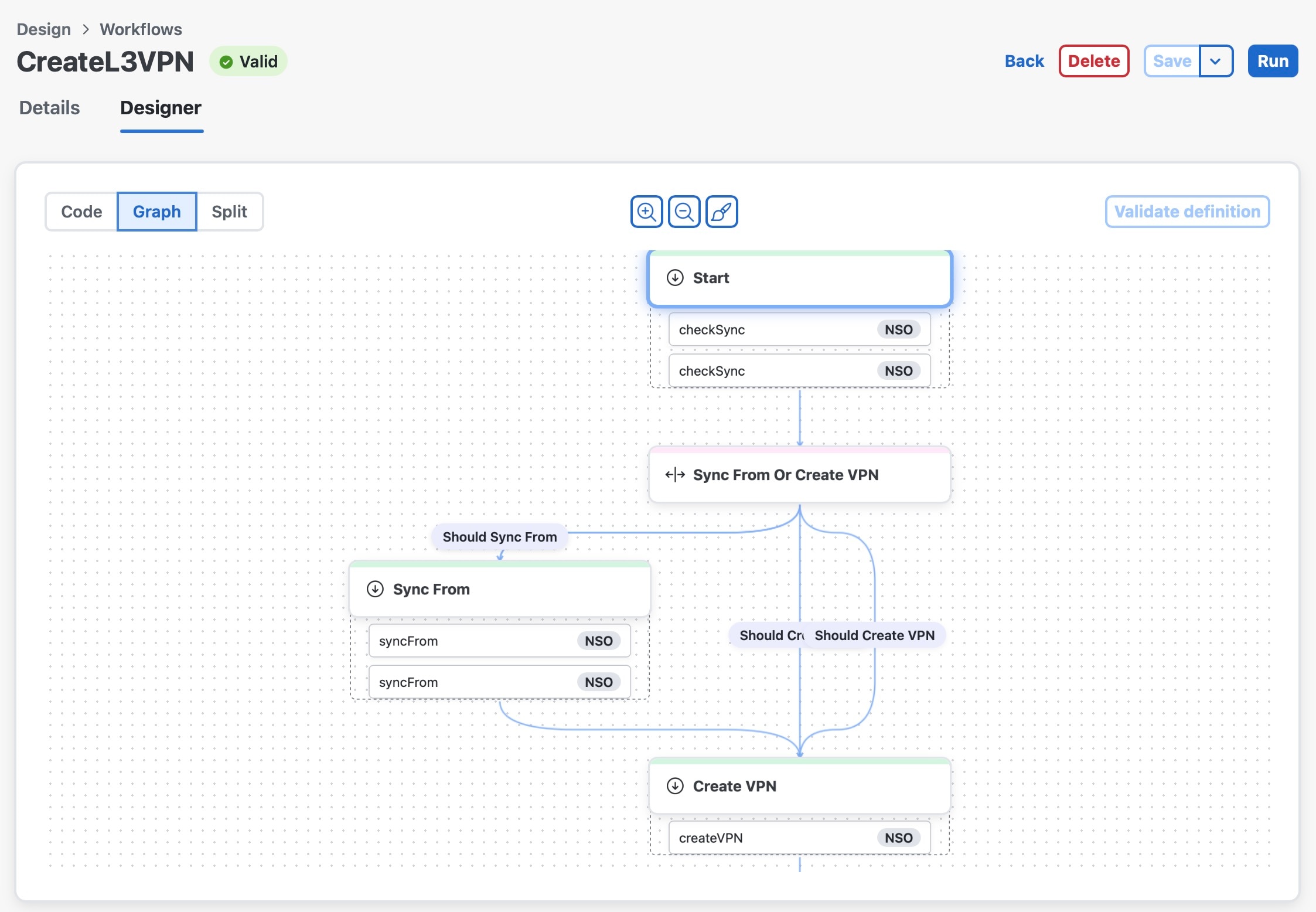
In CNC, choose Workflow Automation > Design > Workflows, click on a workflow name, then click the Designer tab to see a graphical representation of a created workflow.

The Designer view lets you trace the workflow's task sequences, decision points, and dependencies, helping you to ensure that the workflow is correctly structured.