Quantum-Safe Encryption using Postquantum Preshared Keys

Quantum-Safe Encryption with Postquantum Preshared Keys

A postquantum preshared key (PPK) is a preshared secret that IKEv2 mixes into session-key derivation to provide resistance to attacks by a future quantum computer.

  • The feature implements RFC 8784 extensions for IKEv2 and uses Cisco Secure Key Integration Protocol (SKIP) to obtain dynamic PPKs.

  • Session keys based on PPKs are not vulnerable to quantum attacks if the PPKs have sufficient entropy and the pseudorandom function (PRF), encryption, and authentication transformations are quantum secure.

Postquantum Preshared Keys

Quantum computers pose a serious challenge to the cryptographic algorithms and protocols deployed widely today. A quantum computer can solve Diffie-Hellman (DH) and Elliptic Curve Diffie-Hellman (ECDH) problems in polynomial time, and this can compromise the security of existing IKEv2 systems. A man-in-the-middle storing the VPN communications today can decrypt them later when a quantum computer is available.

RFC 8784 defines PPK capability negotiation, communication of the PPK ID, use of the PPK as an additional input to session-key derivation, and optional fallback to a session that does not use a PPK.
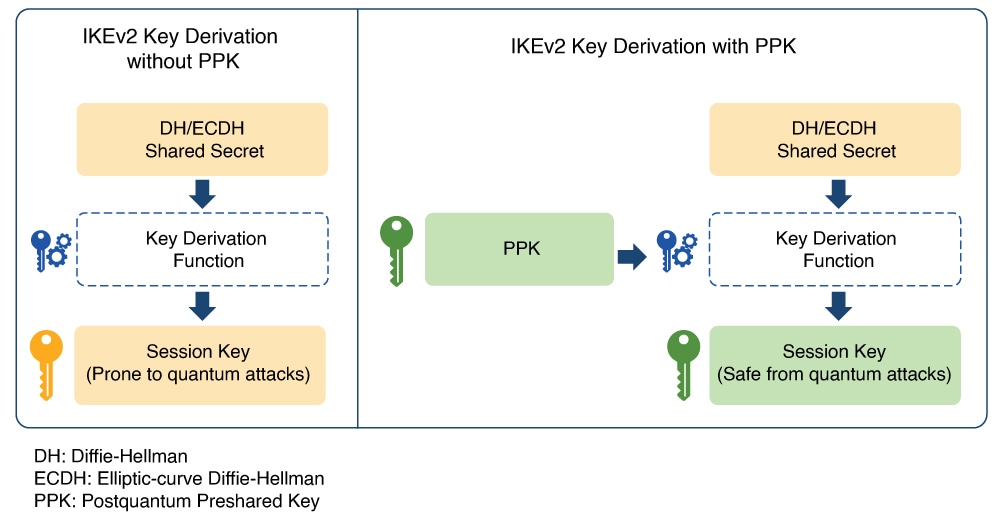
Figure 1. IKEv2 Key Derivation - With and Without PPK

A manual PPK is configured on both the IKEv2 initiator and responder. The PPK ID and PPK must match on both peers.

The administrator must ensure that a manual PPK has sufficient size and entropy and is rotated frequently.
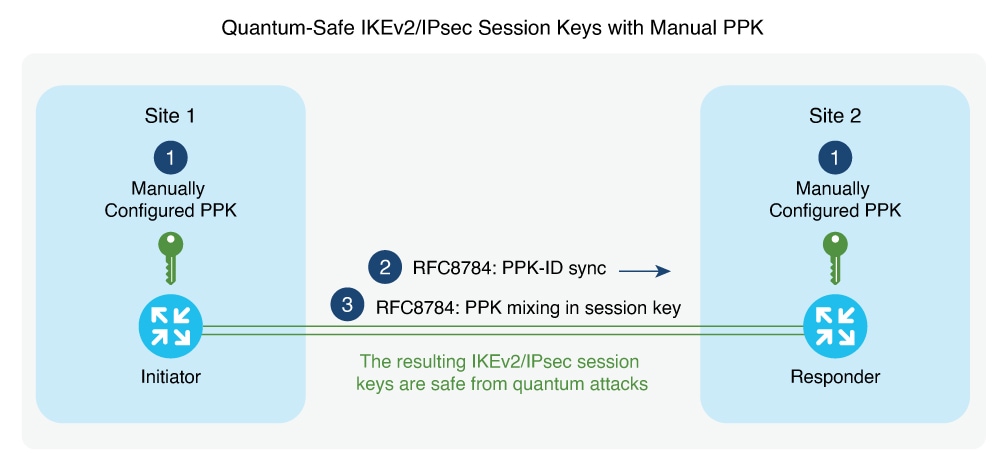
Figure 2. Quantum-Safe IKEv2 and IPsec Session Keys with Manual PPK

A dynamic PPK is imported from an external key source through SKIP. Dynamic PPKs provide automated provisioning and refresh and can provide better entropy than manually provisioned keys.

Cisco SKIP is an HTTPS-based protocol that uses TLS1.2 with a PSK-DHE cipher suite. It allows encryption devices such as routers, to import PPKs from an external key source.

The IR1101 router must implement the SKIP client, and the external key source must implement the SKIP server.

The external key source must meet the following expectations to be SKIP-compliant:

  • Must implement SKIP protocol or API, as defined in the Cisco SKIP specification.

  • Must provide the same PPK to the encryption device pair—initiator and responder—using an out-of-band synchronization mechanism.


Note


  • Key source vendors, such as QKD vendors, should contact their Cisco representative to implement the Cisco SKIP protocol.


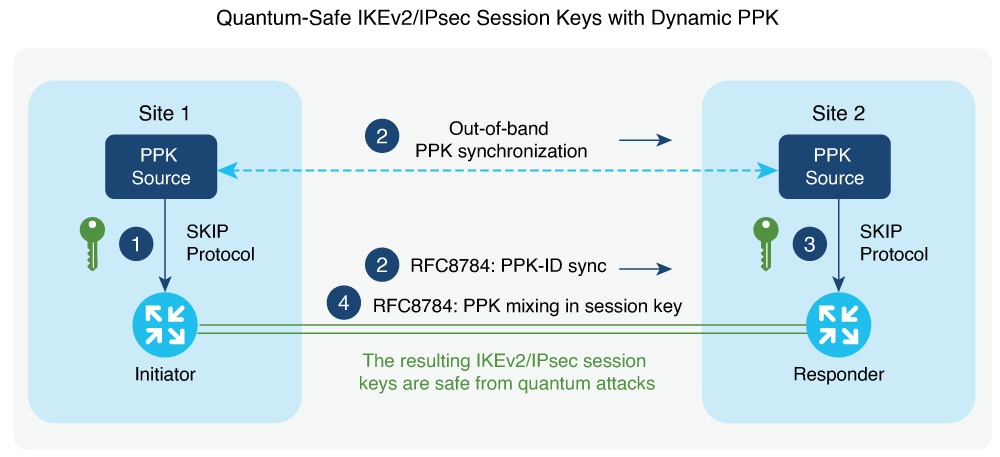
Figure 3. Quantum-Safe IKEv2 and IPsec Session Keys with Dynamic PPK

The IKEv2 initiator and responder are connected to their local key source and configured with the SKIP client that specifies the IP address and port of the key source and the preshared key for the TLS1.2 session. The PPK sources are configured with the SKIP parameters, including the local key source identity and the list of identities of the peer key sources.

Cisco SKIP protocol operates as given:

  • The IKEv2 initiator places a request for a PPK from its key source. The key source replies with a PPK and the corresponding PPK ID.

  • The initiator-side key source synchronizes the PPK to the responder-side key source using an out-of-band mechanism that is specific to the type of key source. The IKEv2 initiator communicates the PPK ID to the IKEv2 responder over IKEv2 using the RFC 8784 extensions.

  • The IKEv2 responder requests from its key source, the PPK corresponding to the PPK ID received from the IKEv2 initiator. The key source replies with the PPK corresponding to the PPK ID.

  • The IKEv2 initiator and responder mix the PPK in the key derivation, as specified in RFC 8784. The resulting IKEv2 and IPsec session keys are quantum-safe.

Postquantum Preshared Key restrictions

Consider these restrictions when you plan manual or dynamic PPK configuration.

Table 1. PPK restrictions

Condition

Restriction

VPN type

PPK-based quantum-safe encryption applies to IKEv2 and IPsec VPNs, including FlexVPN with SVTI or DVTI and DMVPN. It does not apply to GETVPN.

Dynamic PPK key format

When you configure a PPK through SKIP, the external key source must send the key in hexadecimal format.

Supported platforms

The Quantum-Safe Encryption Using Postquantum Preshared Keys feature is available on Cisco Catalyst IR1101 Rugged Series Router from Cisco IOS XE Release 17.18.1 onwards.

Configure manual Postquantum Preshared Keys

Before you begin


Note


The PPK ID and PPK must match on the initiator and responder.


Configure a manual PPK for one peer or a group of peers in an IKEv2 keyring. Use these steps to configure manual postquantum preshared keys:

Procedure


Step 1

Use the configure terminal command to enter global configuration mode.

Example:

Router# configure terminal

The router enters global configuration mode.

Step 2

Use the crypto ikev2 keyring keyring-name command to create an IKEv2 keyring and enter IKEv2 keyring configuration mode.

Example:

Router(config)# crypto ikev2 keyring keyring1

Step 3

Use the peer name command to define a peer or peer group and enter IKEv2 keyring peer configuration mode.

Example:

Router(config-ikev2-keyring)# peer peer1

Note


The WAN IP address is the IKE endpoint address and is independent of the identity address. The identity command is available for key lookup only on the IKEv2 responder.

Step 4

Use either the address {ipv4-address mask | ipv6-address prefix} command or the identity {address {ipv4-address | ipv6-address} | fqdn domain domain-name | email domain domain-name | key-id key-id} command to identify the remote IKEv2 peer.

The address command identifies an IPv4 or IPv6 address or range. The identity command identifies a peer by e-mail address, fully qualified domain name, IPv4 or IPv6 address, or key ID.

Router(config-ikev2-keyring-peer)# address 10.0.0.1 255.0.0.0
Router(config-ikev2-keyring-peer)# identity address 10.0.0.1

Step 5

Use the ppk manual id ppk-id key [0 | 6 | hex] password [required] command to configure the PPK ID and PPK.

The ppk-id identifies the PPK, and password specifies the PPK. Include required when PPK-based quantum-safe encryption is mandatory and the peers must not fall back to a normal IKEv2 or IPsec session.

Router(config-ikev2-keyring-peer)# ppk manual id ppk_id key cisco123

Step 6

Use the crypto ikev2 profile profile-name command to create an IKEv2 profile and enter IKEv2 profile configuration mode.

Example:

Router(config)# crypto ikev2 profile profile1

Step 7

Use the keyring ppk keyring-name command to associate the PPK keyring with the IKEv2 profile.

Example:

Router(config-ikev2-profile)# keyring ppk keyring1

Note


To remove the keyring from the IKEv2 profile, use the no keyring {aaa | local | ppk} keyring-name command.

Step 8

Use the end command to return to privileged EXEC mode

Example:

Router(config-ikev2-profile)# end

Configure dynamic Postquantum Preshared Keys

Before you begin


Note


On the responder, when multiple SKIP client instances are configured, only the first SKIP client entry in the configuration list is used. Map the skip-client configuration under the keyring to the first SKIP client block.


Configure the parameters that the IR1101 router uses to request dynamic PPKs from an external SKIP-compliant key source. A SKIP client configuration identifies the external key source and the preshared key used for the TLS 1.2 session. Use these steps to configure dynamic postquantum preshared keys:

Procedure


Step 1

Use the configure terminal command to enter global configuration mode.

Example:

Router# configure terminal

The router enters global configuration mode.

Step 2

Use the crypto skip-client skip-client-name command to create a SKIP client configuration block and enter SKIP client configuration mode.

Example:

Router(config)# crypto skip-client skip-client-cfg

Step 3

Use the server {ipv4 ipv4-address | ipv6 ipv6-address | fqdn domain-name} port port-number command to specify the external key source.

The command identifies the IPv4 address, IPv6 address, or FQDN and port used to connect to the external key source.

Router(config-crypto-skip-client)# server ipv4 10.10.0.3 port 9993

Step 4

Use the psk id id-name key [0 | 6 | hex] password command to configure the preshared key identity and key for the SKIP TLS session.

Example:

Router(config-crypto-skip-client)# psk id psk-id key 0 cisco123

Step 5

Use the end command to return to privileged EXEC mode.

Example:

Router(config-crypto-skip-client)# end

Configuration examples for Quantum-Safe Encryption Using Postquantum Preshared Keys

The following sections provide detailed configuration examples relating to the configuration of quantum-safe encryption using PPKs..

Postquantum Preshared Key configuration examples

The following sections provide initiator and responder configuration examples for manual and dynamic PPKs.

The manual PPK ID and PPK must match on both peers. Replace <ppk-value> with the same PPK on the initiator and responder.

Manual PPK initiator configuration

This example configures a manual PPK on the initiator.

conf t
hostname Router1
!
crypto ikev2 keyring ppk-keyring
 peer 1
  address 10.10.0.1 255.255.255.0
  ppk manual id ppk_id key <ppk-value>
!
crypto ikev2 profile prof
 match identity remote address 10.10.0.1
 authentication local pre-share key cisco
 authentication remote pre-share key cisco
 keyring ppk ppk-keyring
!
crypto ipsec profile prof
 set ikev2-profile prof
!
interface Tunnel0
 ip address 10.10.0.1 255.255.255.0
 tunnel source GigabitEthernet1
 tunnel destination 10.10.10.1
 tunnel protection ipsec profile prof
!
interface GigabitEthernet1
 ip address 10.10.10.2 255.255.255.0
 no shut
!

Manual PPK responder configuration

This example configures the matching manual PPK on the responder.

conf t
hostname Router2
!
crypto ikev2 keyring ppk-keyring
 peer 1
  address 10.10.0.1 255.255.255.0
  ppk manual id ppk_id key <ppk-value>
!
crypto ikev2 profile prof
 match identity remote address 10.10.0.1
 authentication local pre-share key cisco
 authentication remote pre-share key cisco
 keyring ppk ppk-keyring
!
crypto ipsec profile prof
 set ikev2-profile prof
!
interface Tunnel0
 ip address 10.10.0.2 255.255.255.0
 tunnel source GigabitEthernet1
 tunnel destination 10.10.10.2
 tunnel protection ipsec profile prof
!
interface GigabitEthernet1
 ip address 10.10.0.1 255.255.255.0
 no shut
!

Dynamic PPK initiator configuration

This example configures a SKIP client and dynamic PPK on the initiator.

conf t
hostname Router1
!
crypto skip-client skip-client-cfg
 server ipv4 10.10.0.4 port 9991
 psk id psk-id1 key 0 cisco123
!
crypto ikev2 keyring ppk-keyring
 peer 1
  address 10.10.0.1 255.255.255.0
  ppk dynamic skip-client-cfg
!
crypto ikev2 profile prof
 match identity remote address 10.10.0.1
 authentication local pre-share key cisco
 authentication remote pre-share key cisco
 keyring ppk ppk-keyring
!
crypto ipsec profile prof
 set ikev2-profile prof
!
interface Tunnel0
 ip address 10.10.0.2 255.255.255.0
 tunnel source GigabitEthernet1
 tunnel destination 10.10.10.1
 tunnel protection ipsec profile prof
!
interface GigabitEthernet1
 ip address 10.10.10.2 255.255.255.0
 no shut
!
interface GigabitEthernet1
 ip address 10.10.10.3 255.255.255.0
 no shut
!

Dynamic PPK responder configuration

This example configures a SKIP client and dynamic PPK on the responder.

conf t
hostname Router2
!
crypto skip-client skip-client-cfg
 server ipv4 10.10.0.4 port 9992
 psk id vedge-sim-1 key 0 cisco123
!
crypto ikev2 keyring ppk-keyring
 peer 1
  address 10.10.0.1 255.255.255.0
  ppk dynamic skip-client-cfg
!
crypto ikev2 profile prof
 match identity remote address 10.10.0.1
 authentication local pre-share key cisco
 authentication remote pre-share key cisco
 keyring ppk ppk-keyring
!
crypto ipsec profile prof
 set ikev2-profile prof
!
interface Tunnel0
 ip address 10.10.0.2 255.255.255.0
 tunnel source GigabitEthernet1
 tunnel destination 10.10.10.2
 tunnel protection ipsec profile prof
!
interface GigabitEthernet1
 ip address 10.10.10.1 255.255.255.0
 no shut
!
interface GigabitEthernet1
 ip address 10.10.10.4 255.255.255.0
!

Verify the Postquantum Preshared Key configuration

Use these steps to verify the postquantum preshared key configuration:

Procedure


Step 1

Use the show crypto ikev2 sa detailed command to display detailed information about the current IKEv2 security associations.

The command displays details for the current IKEv2 security associations.

Device# show crypto ikev2 sa detailed
IPv4 Crypto IKEv2 SA
Tunnel-id  Local             Remote            fvrf/ivrf  Status
3          <src IP>/SrcPort  <Dst IP>/DstPort  none/none  READY
Encr: AES-CBC, keysize: 256, PRF: SHA512, Hash: SHA512, DH Grp:19, Auth sign: . . .
Initiator of SA : No
Quantum Resistance Enabled

Step 2

Confirm that the output includes Quantum Resistance Enabled .

This message indicates that PPK-based quantum-safe encryption is enabled.